Macro Photography Course Landing Page Template
Macrovision is a cinematic horizontal-scroll landing page built for a macro photography online course. It guides visitors through a sequence of specimen-tray panels, manifesto hero, instructor spotlight, field shoot, edit reveal, and waitlist capture, using a warm darkroom palette, word-by-word type animation, and a friction-free email sign-up to convert curious photographers into enrolled students.
by Rocket studio
Quick summary
Macrovision is a single-page horizontal-scroll template designed for a macro photography course pre-launch. It opens on a full-viewport manifesto, moves through cinematic Creator Spotlight panels, and ends on an amber waitlist screen with a live seat counter and a one-field email form. Every design decision pulls visitors toward sign-up without interrupting the visual story.
Who this template is for
This template was built for photography educators who want their course to feel as considered as the art they teach. It suits instructors who are preparing a waitlist before a formal launch and need a page that earns trust through imagery alone.
- Macro photography instructors launching a pre-enrollment waitlist
- Nature bloggers or content creators offering a paid course on close-up photography
- Retired professionals or creative educators turning a specialist skill into an online offering
What problem this template solves
Most course landing pages lead with bullet-point curricula and pricing tables. For a visual subject like macro photography, that approach undersells the work. Prospective students need to feel the subject before they commit to learning it.
- Generic course pages fail to communicate the emotional pull of close-up photography
- Standard vertical-scroll layouts do not give specimen imagery the slow, deliberate pacing it deserves
- Waitlist pages with long forms create friction that stops sign-ups before they happen
What you get with this template
You get a fully structured horizontal-scroll landing page with five distinct panels, each serving a specific narrative role. The layout moves from curiosity to conviction before it ever asks for an email address.
- Five horizontal panels: hero manifesto, instructor spotlight, field shoot reveal, edit before-and-after, and waitlist call to action
- A cinematic Warm Artisan visual system with darkroom-black backgrounds, amber headlines, cream body text, and rosewood hover states
- GSAP ScrollTrigger-powered animations including a word-by-word headline reveal, an amber hairline rule draw, cross-dissolve panel transitions, and horizontal drag-scroll
Feature list
This template delivers a focused set of purpose-built features. Each one serves the single goal of moving a hesitant hobbyist photographer toward the waitlist.
Word-by-Word Manifesto Reveal
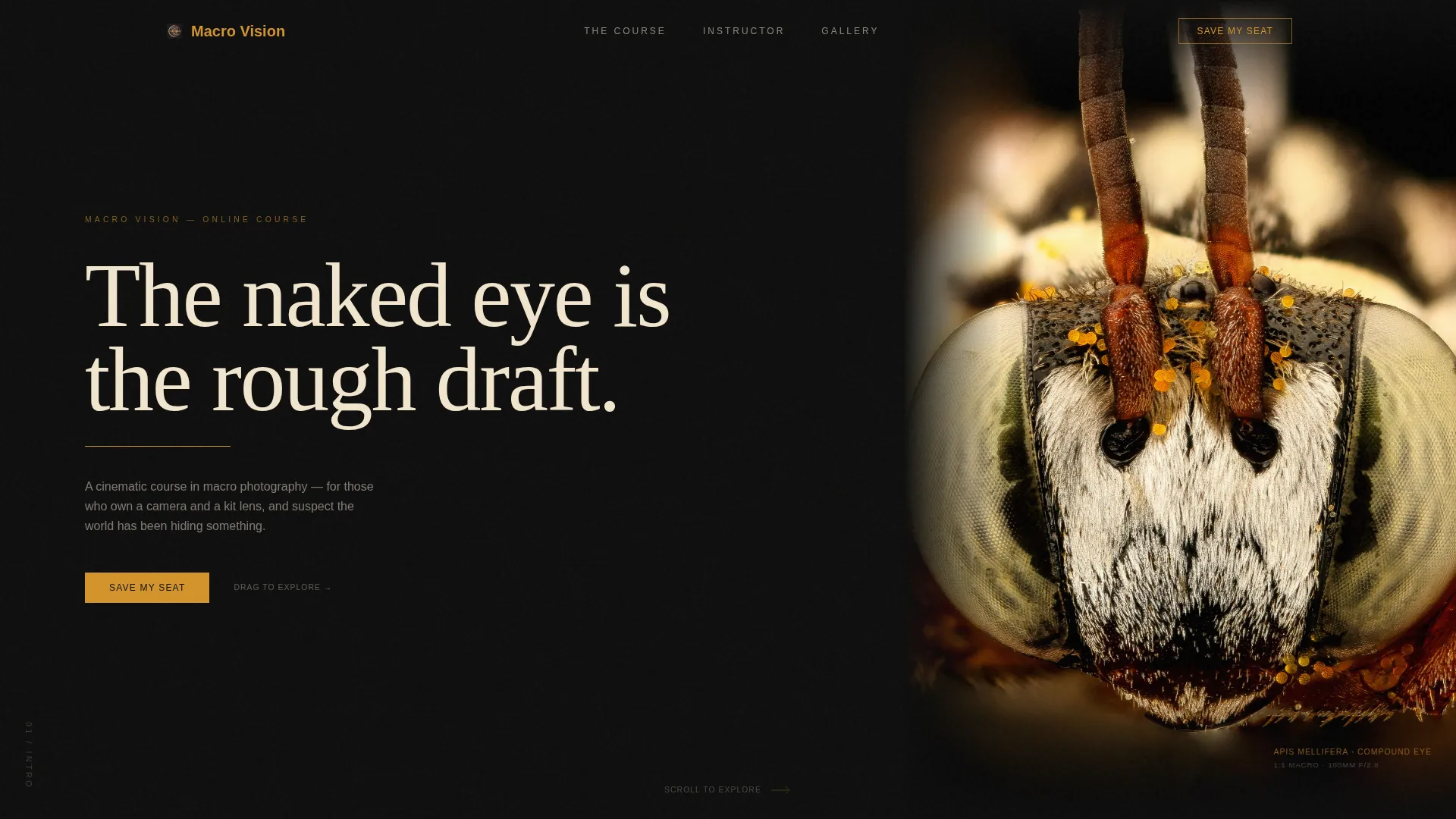
The hero panel opens on a full-viewport black field. The opening quote fades in one word at a time, mimicking the patience that macro photography demands. After three seconds, a hairline amber rule animates beneath the type, and a looping video bleeds in from the right edge to preview the horizontal journey ahead.
Horizontal Specimen-Tray Scroll
The page scrolls left to right using GSAP ScrollTrigger, replicating the feeling of sliding a specimen tray under a microscope stage. Each panel cross-dissolves into the next with a slow transition that echoes a camera focus pull. Visitors can scroll or drag through the sequence at their own pace.
Creator Spotlight Panel Sequence
Three consecutive panels follow the instructor's creative process: hands adjusting a focus rail, a behind-the-scenes field shoot clip, and a screen recording of a post-processing edit with a before-and-after side by side. The sequence builds implicit trust by showing the work, not just describing it.
Live Seat Counter with Scarcity Signal
The final waitlist panel displays a live counter showing seats remaining from a capped cohort total. A single line confirms that waitlist members receive early access and a free lens-comparison field guide. This pairing of scarcity and reward gives visitors a concrete reason to act now.
Friction-Free Email Waitlist Form
The conversion panel asks for one thing: an email address. No surname field, no dropdown, no secondary opt-in. The form sits against a full amber background, isolated from everything else on the page, so the eye has nowhere else to go.
Extreme Minimal Footer
The footer follows a Superhuman-style extreme minimal pattern. It carries only what is necessary, keeping the visual weight of the page on the specimen imagery and the amber waitlist panel rather than on navigation or legal clutter.
Page sections overview
| Section | Purpose |
|---|---|
| Hero Manifesto Panel | Opens with a full-viewport quote reveal and a right-edge looping video |
| Instructor Spotlight Panel | Shows hands on a focus rail beside the resulting specimen image |
| Field Shoot Panel | Pairs a behind-the-scenes phone clip with the final print-worthy frame |
| Edit Reveal Panel | Displays a post-processing screen recording with a before-and-after comparison |
| Waitlist Call to Action | Captures email with a live seat counter, early-access copy, and one-field form |
| Extreme Minimal Footer | Closes the page with essential information only |
Design & branding system
The visual identity is built around a Cinematic Dark color system interpreted through a Warm Artisan lens. The result feels like watching a print develop under a darkroom safelight: deep black absorbs almost everything, and amber light glows from the edges.
- Color palette: deep darkroom black (#0D0D0D) covers roughly eighty percent of the canvas; amber tungsten (#D4932A) drives headlines and progress indicators; soft cream (#F2E6CE) carries body text; rosewood (#6B3A3A) appears only on hover states and secondary accents
- Typography: Fraunces tall serif for headlines at generous tracking, DM Sans for body copy at restrained sizes
- Motion language: slow cross-dissolve transitions, a self-drawing amber rule, and a word-by-word fade that sets an unhurried, contemplative pace throughout
Mobile & speed optimization
The horizontal-scroll experience is designed as a desktop-first layout. On smaller screens, the template falls back to a vertical single-column flow so the content remains fully readable without the horizontal mechanic.
- Desktop: GSAP ScrollTrigger drives the horizontal panel sequence with native CSS smooth scroll for fluid movement
- Mobile fallback: panels restack vertically, preserving the narrative order and all imagery without requiring horizontal gesture controls
- Static panels are handled with server components to keep the page lightweight under the animation layer
How this template helps you convert
The page is structured as a forty-second emotional argument. By the time visitors reach the waitlist form, the imagery has already done the persuasion work.
- The manifesto hero and looping video establish the subject's visual power before any course details appear, building desire before expectation.
- The Creator Spotlight sequence shows real process, focus rail, field shoot, post-processing, which builds credibility through demonstrated skill rather than claimed expertise.
- The amber waitlist panel isolates the email field against a single color, removes every competing element, and pairs scarcity (live seat counter) with reward (free field guide) to create a clear, low-friction decision point.
Other information about this template
This template is part of a curated intersection of Blog and Editorial design with a Macro Photography Content subcategory focus. It is a strong fit for instructors who want a pre-launch page that doubles as a portfolio statement.
- Template style: Horizontal Scroll with a Cinematic Dark color system and Warm Artisan theme
- Creative direction: Creator Spotlight, meaning the instructor's hands-on process is the central proof of quality
- Header concept: Quote and Manifesto, setting a contemplative tone from the first second of the visit
- Landing-page direction: Waitlist and Coming Soon, optimized for email capture ahead of a Spring 2025 enrollment open
- The free lens-comparison field guide mentioned in the waitlist panel is a built-in copy element, not a connected digital delivery system
- The live seat counter is a designed interface element; connecting it to a live data source requires implementation by the user
- Animation is powered by GSAP ScrollTrigger; customizing timing and easing values is straightforward in the animation configuration layer


Theme
Warm Artisan
Creative direction
Creator Spotlight
Color system
Cinematic Dark
Style
Horizontal Scroll
Direction
Waitlist/Coming Soon
Page Sections
Word-by-word Manifesto Hero
GSAP Horizontal Scroll Engine
Creator Spotlight Panel Sequence
Amber Waitlist Conversion Panel
Cinematic Dark Color System
Extreme Minimal Footer
Related questions
Do I need a macro lens to use this template?
Can I change the waitlist copy and enrollment date?
How does the horizontal scroll behave on a phone?
Can I add more panels to the horizontal sequence?
Is the live seat counter connected to a real database?



