SpaceTech Startup Specialist Professional Website Template
Orbit is a single-page spacetech landing page template built for NewSpace hardware companies launching orbital infrastructure products. It combines a dark full-bleed header with animated glow effects, scrollable comparison tables organized by subsystem, an interactive configurator sidebar, and a freemium conversion flow, all styled in a precise Monochrome Steel palette designed to earn the trust of technical buyers.
by Rocket studio
Quick summary
Orbit is a high-fidelity spacetech landing page template engineered for companies selling orbital hardware. It opens with a cinematic dark header, then unfolds as a structured spec sheet. Visitors toggle live comparison tables by subsystem, configure a full stack in a persistent sidebar, and convert through a freemium flow, no login required to start.
Who this template is for
This template is built for technical audiences in the space industry. It speaks directly to people who read spec sheets before they read anything else.
- Mission architects and systems engineers at NewSpace startups evaluating orbital hardware options
- Procurement leads at defense prime contractors who need real performance numbers before engaging a vendor
- Founders launching a spacetech product who need a page that earns credibility with a deeply technical audience
What problem this template solves
Most product landing pages sell with adjectives. Orbital hardware buyers need data. This template closes that gap by presenting your product the way engineers already think about it, subsystem by subsystem, with real units.
- Generic templates force technical teams to request a datasheet before they can even compare options
- Marketing-first layouts lose credibility instantly with systems engineers who catch vague claims
- Coming soon pages for hardware products rarely give buyers a reason to engage before launch
What you get with this template
You get a fully structured, single-page comparison experience built around real engineering trade language. Every section functions as a discrete module with a clear purpose.
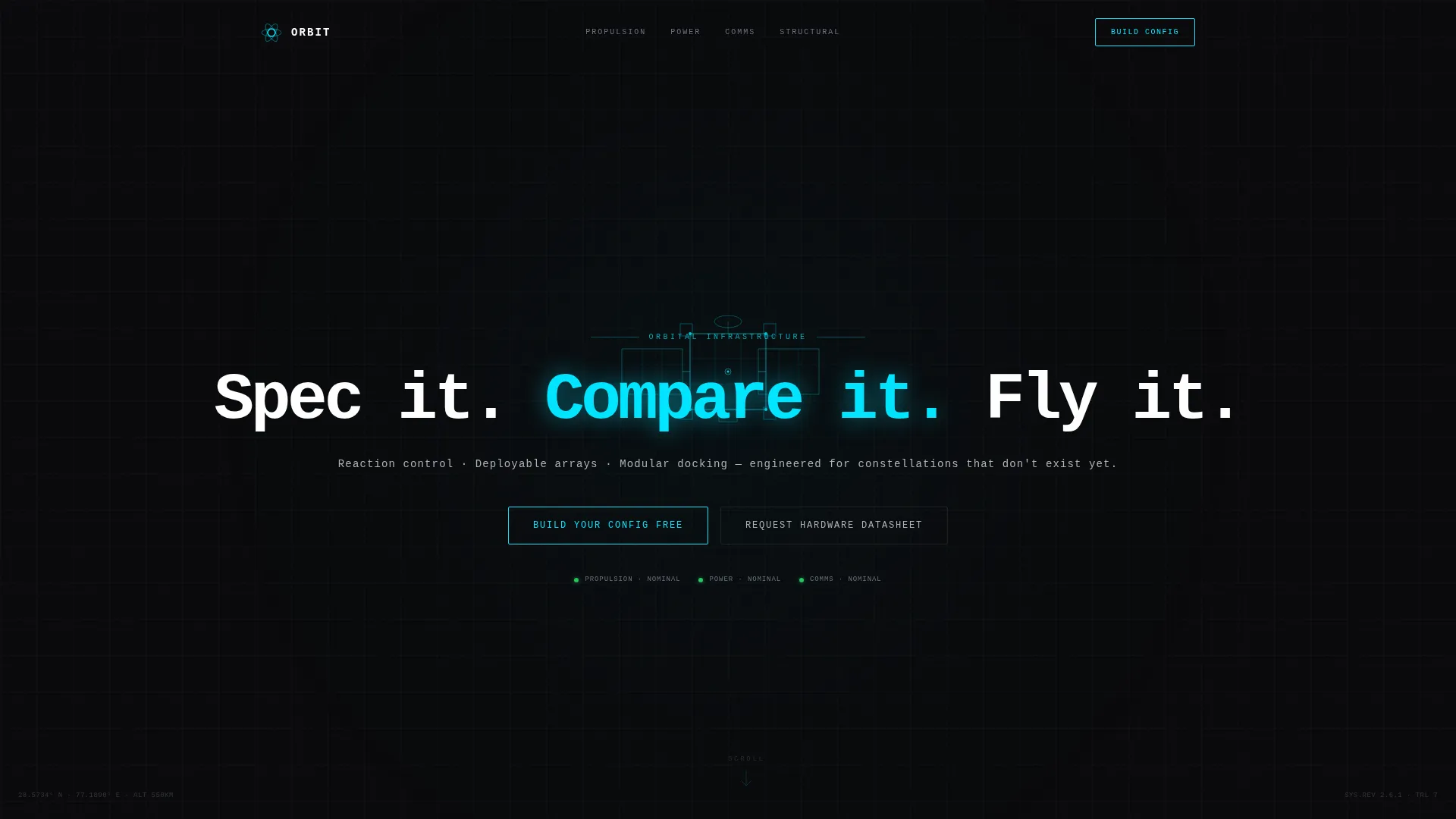
- A cinematic dark header with a slow-bloom cyan glow animation and a self-typing tagline in monospaced type
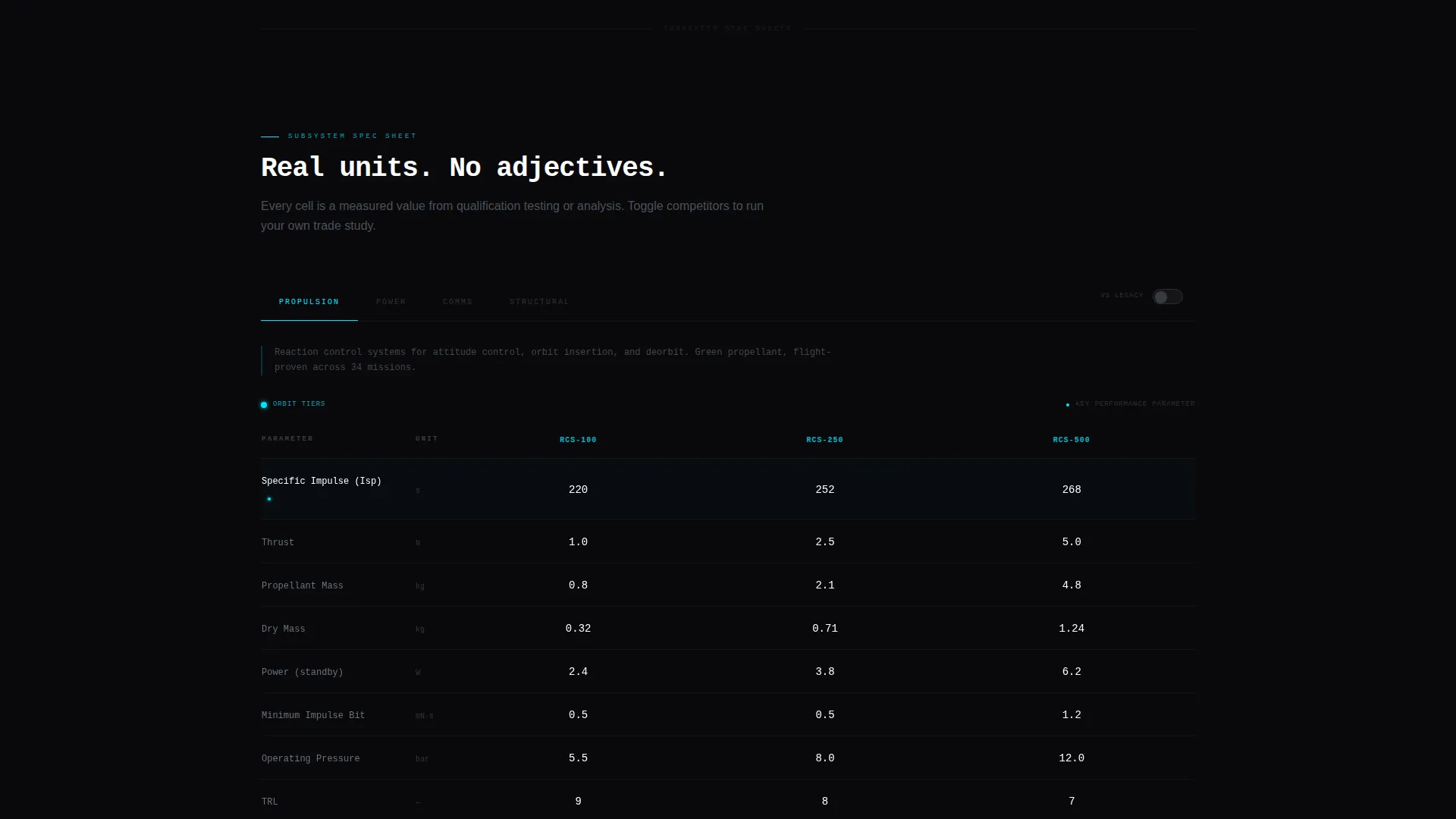
- Scrollable subsystem comparison tables covering propulsion, power, communications, and structural specs with real units such as specific impulse (Isp) in seconds, data rate in megabits per second, and mass in kilograms
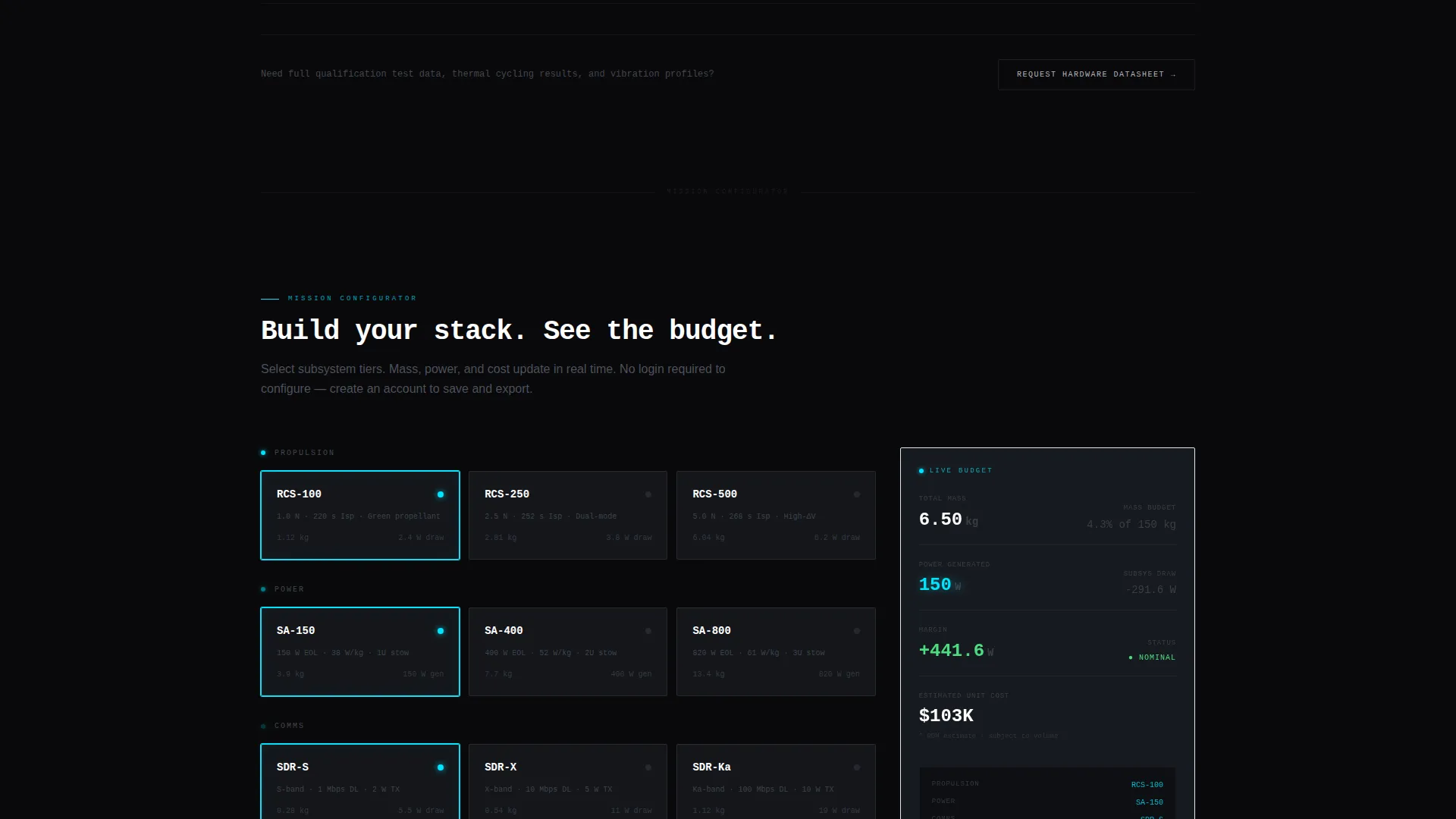
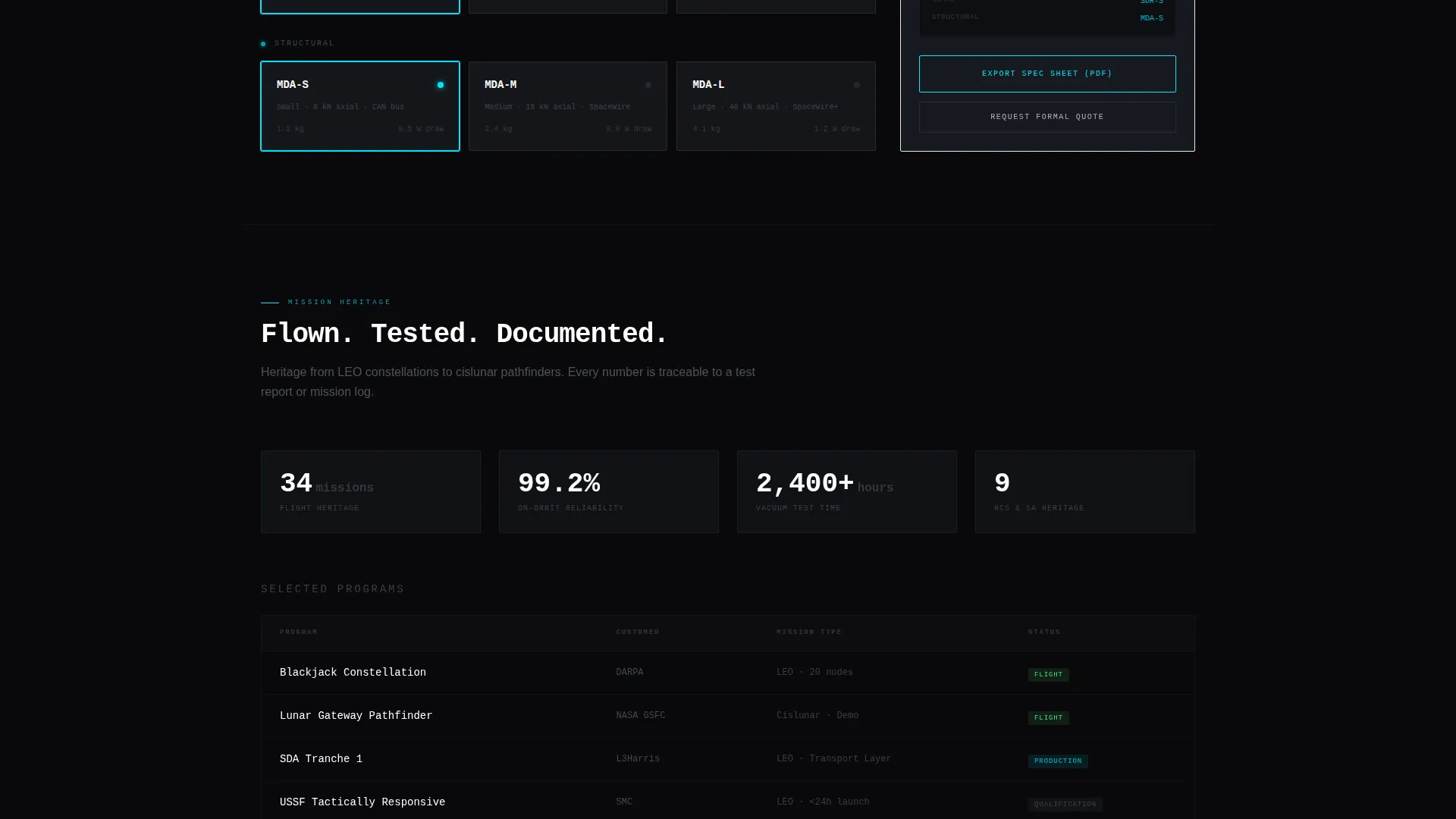
- A persistent sidebar with a primary call to action (call to action) that pins after the header clears, a mission-checklist progress tracker, and a live-updating mass and power budget as visitors select configuration options
Feature list
This section covers the core capabilities built into the Orbit template, grounded in what the source brief describes.
Dark Full-Bleed Animated Header
The header fills the entire viewport in vacuum black. A slow-bloom cyan glow pulses outward from center screen, revealing a rotating wireframe satellite bus silhouette. The tagline types itself in monospaced text before the scroll arrow pulses. No photographs or renders, only vector geometry and luminance.
Scrollable Subsystem Comparison Tables
Each scroll section represents a distinct hardware subsystem: propulsion, power, communications, and structural. Columns glow on hover. Cells display real engineering units. Rows animate in like rack-mounted components being installed as the visitor scrolls down the page.
Persistent Sidebar with Live Configurator
A sidebar stays fixed after the header clears. It hosts the primary call to action button, a mission-checklist tracker showing which subsystem the visitor is currently reviewing, and a running mass and power budget that updates as visitors select tier options. The configurator requires no login for a first build.
Freemium Conversion Flow
Visitors can build a full configuration, view a running mass, power, and cost summary, and export a preliminary spec sheet as a PDF without creating an account. To save builds, compare multiple configurations, or request a formal quote, visitors register with their email, organization name, and mission type.
Secondary Datasheet call to action
A second conversion path sits at the table footer. The "Request Hardware Datasheet" button serves engineers who want raw test data before using the configurator. This gives the page two distinct entry points matched to different buyer readiness levels.
Dynamic Motion Design System
Every interaction reinforces the Dynamic Motion theme. Tables assemble themselves on scroll. Hover states trigger cyan column glows. The sidebar checklist advances as subsystems come into view. Motion is purposeful and tied to content reveal, not decorative.
Page sections overview
| Section | Purpose |
|---|---|
| Dark Header Hero | Sets tone with animated glow, rotating wireframe satellite, and self-typing tagline |
| Propulsion Spec Table | Compares propulsion tier specs using real Isp and thrust-to-weight values |
| Power Spec Table | Presents deployable solar array output and power budget data by tier |
| Communications Spec Table | Shows data rate in megabits per second and link budget comparisons |
| Structural Spec Table | Displays modular docking adapter and bus mass in kilograms by configuration |
| System Config Builder | Aggregates selected tiers into a live mass, power, and cost summary |
| Conversion Footer | Hosts the "Request Hardware Datasheet" call to action and account signup prompt |
Design & branding system
The visual identity follows a Monochrome Steel color system that evokes precision-machined aerospace hardware. Every color plays a defined role and never drifts from it.
- Vacuum black (#09090B) dominates all backgrounds; machined titanium (#B0B3B8) handles body text and spec labels; panel-line gray (#1C1F26) draws table row dividers and section separators
- Thruster-glow cyan (#00E5FF) fires only on interactive states, hover glows, and the primary call to action, it is deliberately rare, so every occurrence carries the weight of a nominal status indicator
- Typography uses a monospaced typeface throughout, reinforcing the spec-sheet aesthetic and keeping all data cells visually consistent
Mobile & speed optimization
The layout is structured to keep technical content readable across screen sizes. The comparison table format adapts to narrower viewports without losing the data density that makes the page credible.
- Comparison tables are horizontally scrollable on smaller screens so no spec columns are hidden or collapsed
- The persistent sidebar converts to a bottom-anchored sticky bar on mobile, keeping the primary call to action accessible without obstructing the spec tables
- Motion effects are tied to scroll events rather than timers, so the page responds to the visitor's pace rather than forcing a fixed animation sequence
How this template helps you convert
This template earns the click before it asks for it. By the time a visitor reaches the call to action, the page has already done engineering work for them.
- The comparison tables demonstrate product fluency in the visitor's own units and trade space, building trust before any account prompt appears
- The no-login configurator removes the biggest friction point for technical buyers who distrust gated tools, letting them build and export a real spec sheet immediately
- Two distinct calls to action match two distinct buyer stages, the configurator captures engineers ready to explore, and the datasheet request captures those who need raw test data first
Other information about this template
This template is categorized under Startup and Launch, specifically within the SpaceTech Startup subcategory and the SpaceTech Coming Soon Page niche. A few additional details are worth noting for teams evaluating fit.
- The template is designed as a single-page experience with a section-led scroll flow, not a multi-page site
- The creative direction is Spec Sheet, meaning the page structure mirrors how aerospace engineers organize technical documentation
- The intersection match score for this template's niche, subcategory, and category alignment is 13 out of a possible range, reflecting a highly specialized audience fit
- The landing-page direction is Freemium and Trial, which means the conversion architecture is built around a zero-barrier first interaction followed by a lightweight account creation step
- The template style is Comparison Table, which makes it particularly well-suited for products sold across multiple tiers or stacked against legacy competitors
Theme
Dynamic Motion
Creative direction
Spec Sheet
Color system
Monochrome Steel
Style
Comparison Table
Direction
Freemium/Trial
Page Sections
Animated Dark Header with Glow Effect
Subsystem Comparison Tables
Persistent Sidebar Configurator
Freemium Export Flow
Secondary Datasheet Request Call to Action
Dynamic Motion Design System
Related questions
Do visitors need to create an account to use the configurator?
Can this template compare product tiers against legacy competitors?
What mission types does the account signup support?
Is this template suitable for a product that is not yet in production?
How does the sidebar mission checklist work?