E-Commerce Store Pre-Launch Revenue Calculator Website Template
Prelaunch is a bento grid landing page built for e-commerce stores gearing up for opening day. An interactive revenue calculator sits at the top as the hero. Founder pricing, blurred product previews, a live waitlist counter, and a sticky call-to-action form work together to turn early curiosity into committed signups before the store opens.
by Rocket studio
Quick summary
Prelaunch is a single-page bento grid template designed for e-commerce coming soon pages. It leads with an interactive revenue estimator, contrasts founder pricing against launch-day pricing, teases a locked product grid, and closes with a real-time waitlist and email capture form. Every section escalates visitor commitment from idle interest to a named founder position.
Who this template is for
This template is built for sellers who need to capture signups and price commitments before their store opens. It fits founders who want more than a placeholder page.
- Direct-to-consumer brand founders soft-launching their own storefront
- Solo makers transitioning from a marketplace to a standalone domain
- Dropshippers timing a product drop around a short trend window
What problem this template solves
Most coming soon pages do nothing while they wait. They show a date, collect an email, and lose visitors who have no reason to stay. This template replaces passive waiting with active engagement so every visitor leaves with a reason to come back.
- Visitors land with no context and leave before they sign up
- Founders lose early-adopter buyers to doubt because pricing and value are unclear
- A basic email form gives no social incentive to share or return
What you get with this template
You get a fully structured, single-page bento grid layout covering every stage of a pre-launch funnel. The sections are ready to customize and sequence together logically.
- An interactive calculator bento cell at the top that acts as the hero module
- A pricing comparison module, a blurred product preview grid, a live waitlist counter, and a sticky email capture bar
- A footer built on a horizontal flow pattern that closes the page cleanly
Feature list
This template ships with high-interactivity modules purpose-built for a pre-launch moment. Each feature below maps directly to a built-in section or component.
Interactive Revenue Calculator Hero
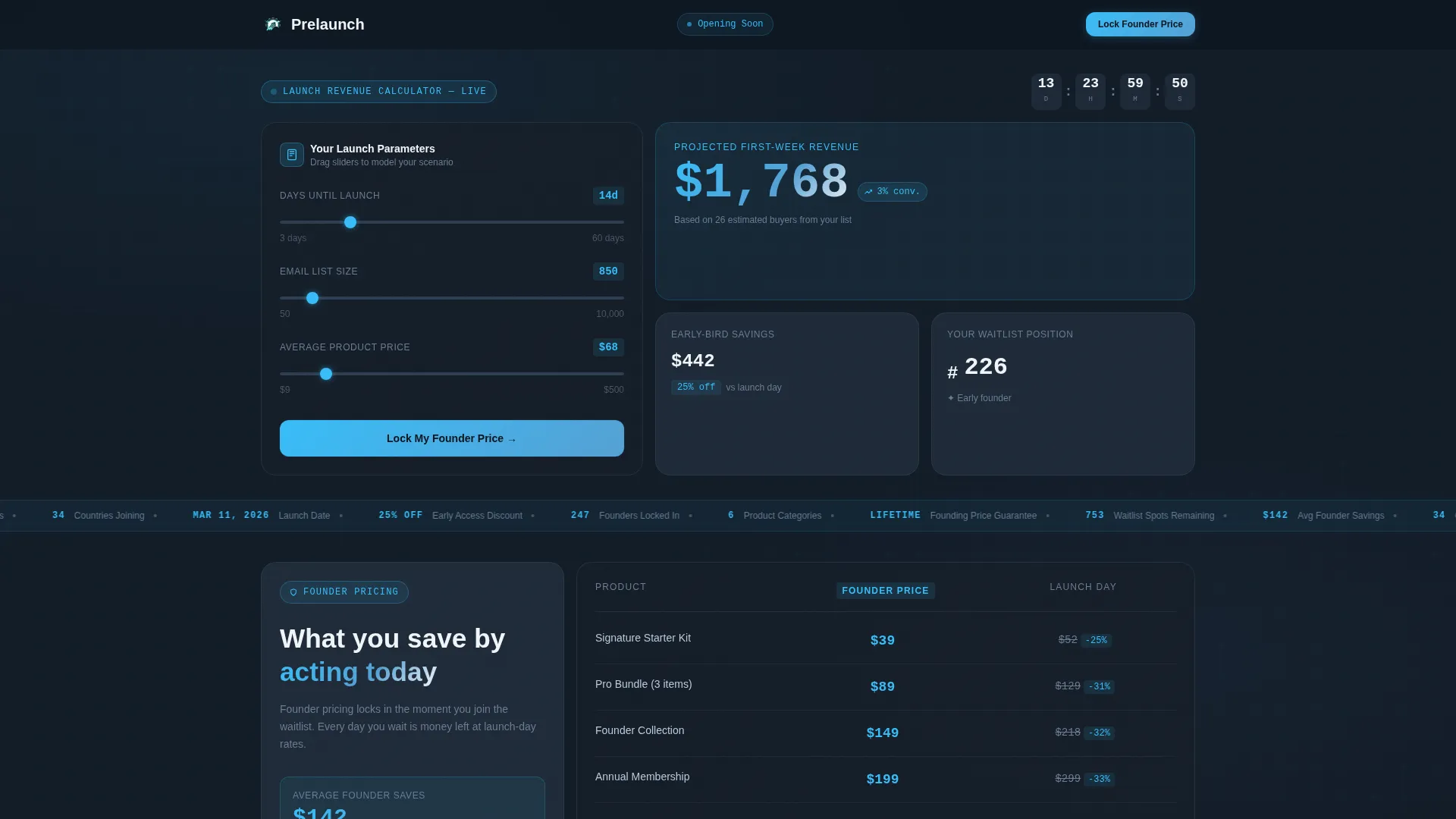
Visitors input their expected launch date, email list size, and average product price. The calculator instantly returns projected first-week revenue, estimated early-bird discount savings, and a waitlist position number. Results animate upward like a live trading dashboard, making the tool feel immediate and credible.
Founder versus. Launch Day Pricing Module
A split comparison module places founder pricing side by side with standard launch-day pricing. Animated price tags slide apart as the visitor scrolls, making the gap between the two options feel tangible and time-sensitive.
Blurred Product Preview Grid
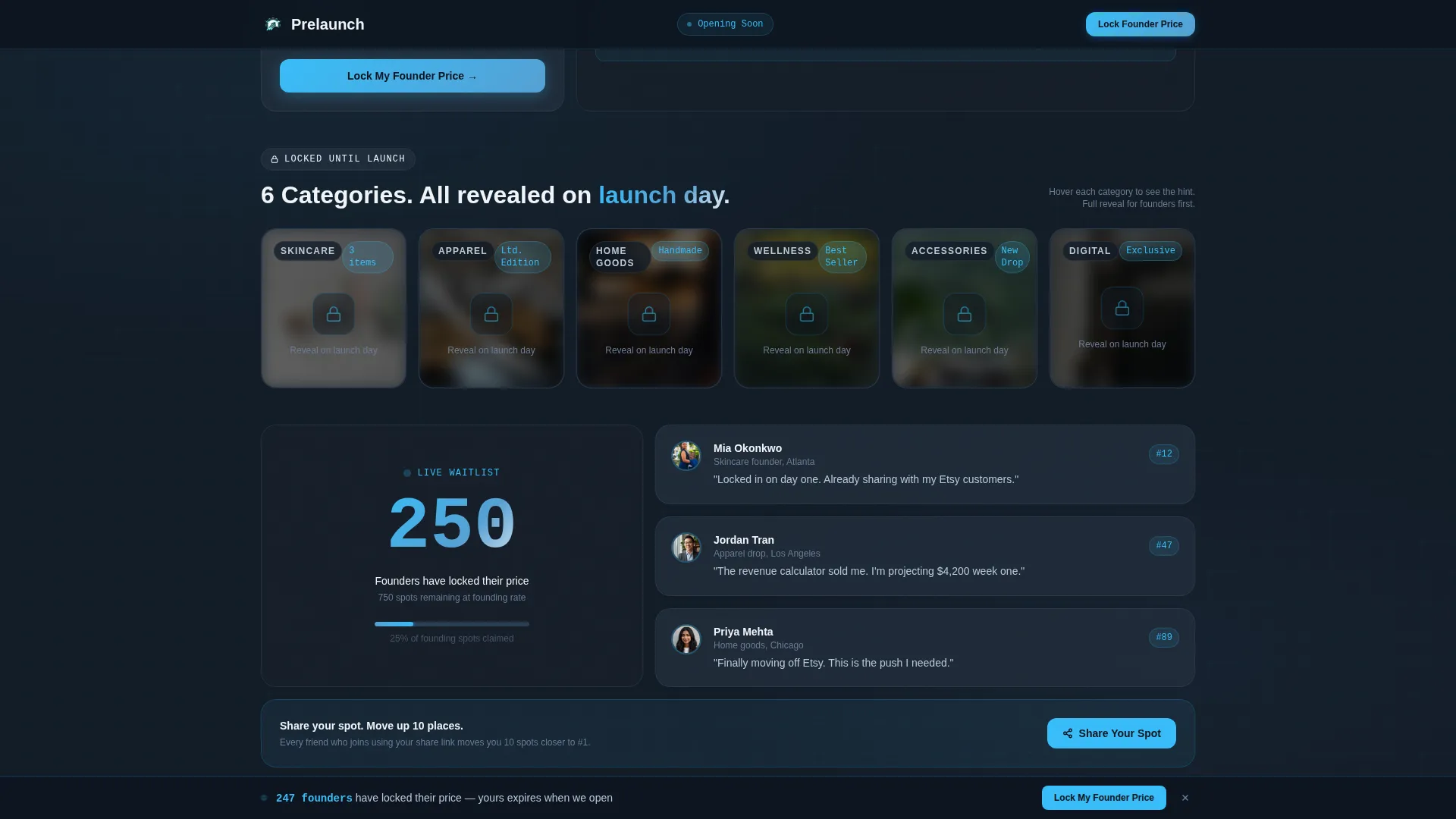
A product category grid shows thumbnail images locked behind a blur effect and a "Reveal on Launch Day" lock icon. The grid builds anticipation without giving away the full catalog before the store is ready.
Live Waitlist Counter and Founder Identity
A real-time counter updates the visible waitlist number as visitors join. Each signup receives a named founder position such as "You are Founder 247." A social share card lets visitors share their spot in exchange for moving up ten places in the queue.
Sticky Bottom Bar Call to Action
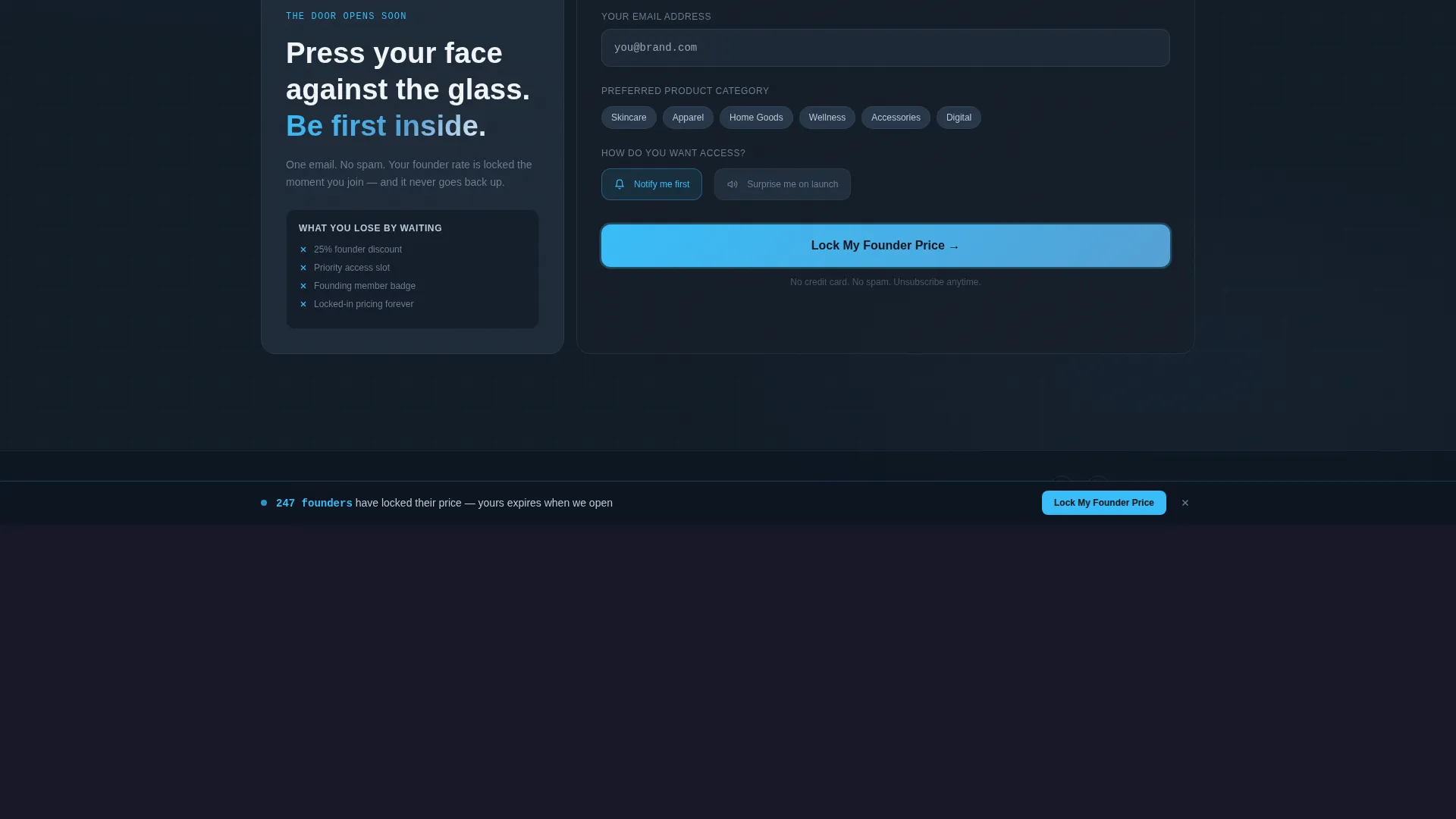
A persistent bottom bar keeps the primary call to action visible throughout the entire page scroll. The email capture form inside the bar includes a product category preference field and a single toggle between "Notify me first" and "Surprise me on launch."
Scroll-Linked Bento Grid Layout
Every bento cell is a clickable, interactive module. Scroll-linked reveals and stagger animations advance as the visitor moves down the page. Each row of the grid escalates commitment, from curiosity at the top to identity and sign-up at the bottom.
Page sections overview
| Section | Purpose |
|---|---|
| Revenue Calculator Hero | Engages visitors with projected launch figures instantly |
| Pricing Comparison Module | Contrasts founder and launch-day pricing side by side |
| Product Preview Grid | Teases locked catalog thumbnails to build anticipation |
| Live Waitlist Counter | Shows real-time queue growth and assigns founder numbers |
| Email Capture Form | Collects email, category preference, and notification toggle |
| Horizontal Flow Footer | Closes the page with a clean, structured footer pattern |
Design & branding system
The visual style reads like a software control panel at dawn. Dark slate backgrounds create a serious, focused atmosphere while signal cyan accents pull attention exactly where it matters. Cloud-white card surfaces keep individual bento cells readable and airy against the dark grid.
- Color palette: deep graphite slate (#1E2A38) for backgrounds, open-sky blue (#56A0D3) for live data highlights, signal cyan (#38BDF8) for interactive pulse accents, and cloud-white (#F0F4F8) for card surfaces
- Typography: DM Sans for headlines and body copy, JetBrains Mono for all numeric and data displays inside the calculator and counters
- Interaction style: hover glows, counter animations, price slide animations, glow effects, and scroll-linked stagger reveals throughout
Mobile & speed optimization
The layout is designed desktop-first because the calculator tool and bento grid benefit from a wider viewport. The template scales responsively to mobile without losing the core flow.
- Desktop-first layout with a responsive mobile breakpoint that preserves section order and readability
- Animations use GPU-accelerated transforms and Intersection Observer triggers to keep motion smooth as sections enter the viewport
- High-interactivity elements including the live counter, calculator output, and sticky bar are structured to remain functional at smaller screen sizes
How this template helps you convert
The template is built around a single principle: show visitors exactly what they lose by waiting. Every section adds friction to leaving and reduces friction to signing up.
- The calculator hero gives visitors a personalized reason to engage before they understand the brand. Seeing their own projected revenue number creates immediate investment in the launch.
- The animated pricing comparison makes the founder discount feel concrete and expiring. Visitors who scroll past it understand the offer without needing to read a paragraph of copy.
- The social share mechanic turns each signup into a recruitment event. Sharing a waitlist spot to move up ten places multiplies reach organically while reinforcing the scarcity of a founder position.
Other information about this template
This template sits in the Startup and Launch category under the Coming Soon and Waitlist subcategory, targeting the e-commerce store coming soon niche. It is a strong fit for Shopify pre-launch pages where the goal is email capture and early price commitment before the store goes live.
- Template style: Bento Grid
- Theme: Dashboard Pro
- Color system: Slate and Sky
- Creative direction: Interactive Explorer
- Header concept: Calculator and Estimator
- Landing page direction: Comparison and Versus
- Localization: English, United States dollar (USD), US date format
- Device priority: Desktop-first with responsive mobile support
- Intersection match score: 13, indicating a strong alignment between the startup launch category and the e-commerce coming soon niche

Theme
Dashboard Pro
Creative direction
Interactive Explorer
Color system
Slate & Sky
Style
Bento Grid
Direction
Comparison/Versus
Page Sections
Interactive Revenue Calculator Hero
Founder Versus. Launch Day Pricing Comparison
Locked Product Preview Grid
Live Waitlist Counter with Founder Identity
Sticky Email Capture Bar
Scroll-linked Bento Grid Interactions
Related questions
Can I customize the calculator inputs and output labels?
Does the template work for a Shopify pre-launch page?
Can I change the countdown date and waitlist counter starting number?
Does the sticky bottom bar stay visible on mobile screens?
Can I adjust the color palette to match my brand?