Resin Art & Craft Content Pre-Launch Website Template
Resin is a waitlist landing page for a resin art and craft online course. It uses a masonry gallery layout to showcase finished student pieces, builds desire through scroll-triggered reveals, and captures early signups with a sticky "Save My Seat" call to action. The warm Heritage and Story design feels like opening a handcrafted jewelry box.
by Rocket studio
Quick summary
Resin is a single-page waitlist template built for resin art and craft course creators. Its Gallery Walk masonry layout displays student work in staggered tiles that grow more advanced as visitors scroll. A sticky bottom bar, accordion curriculum preview, and inline signup form turn curiosity into waitlist conversions before the next cohort opens.
Who this template is for
This template is built for independent craft educators who teach resin art online. It suits creators who are preparing a new course cohort and need a page that earns trust before asking for a signup.
- Resin artists launching a waitlist for an upcoming online course cohort
- Hobbyist educators building an Etsy-adjacent creative business and growing an email list
- Course creators who want a visually rich, gallery-style page without writing a lengthy sales letter
What problem this template solves
Most course waitlist pages ask for a signup before showing any proof of value. A prospective student arrives with one quiet question in mind: "Can someone like me actually do this?" This template answers that question visually, before the form ever appears.
- Generic waitlist pages feel cold and transactional, which lowers signup trust
- Showing finished student work in a curated gallery builds belief faster than bullet-point promises
- A single sticky call to action keeps the path to signup clear without interrupting the browsing experience
What you get with this template
You get a fully structured single-page layout designed for a resin art and craft online course waitlist. Every section is purpose-built to move a first-time visitor from curious browser to eager early signup.
- A hero section with a half-page photo and headline layout, plus a masonry gallery walk with hover-reveal cards and full-width spotlight pieces
- An accordion curriculum preview, a testimonial slider, and an inline waitlist form with a sticky bottom bar
- A cohesive Heritage and Story visual identity using aged parchment, fountain-pen black, sepia, and resin amber across all sections
Feature list
This template comes with a focused set of components built to serve one purpose: filling your waitlist with genuinely interested students.
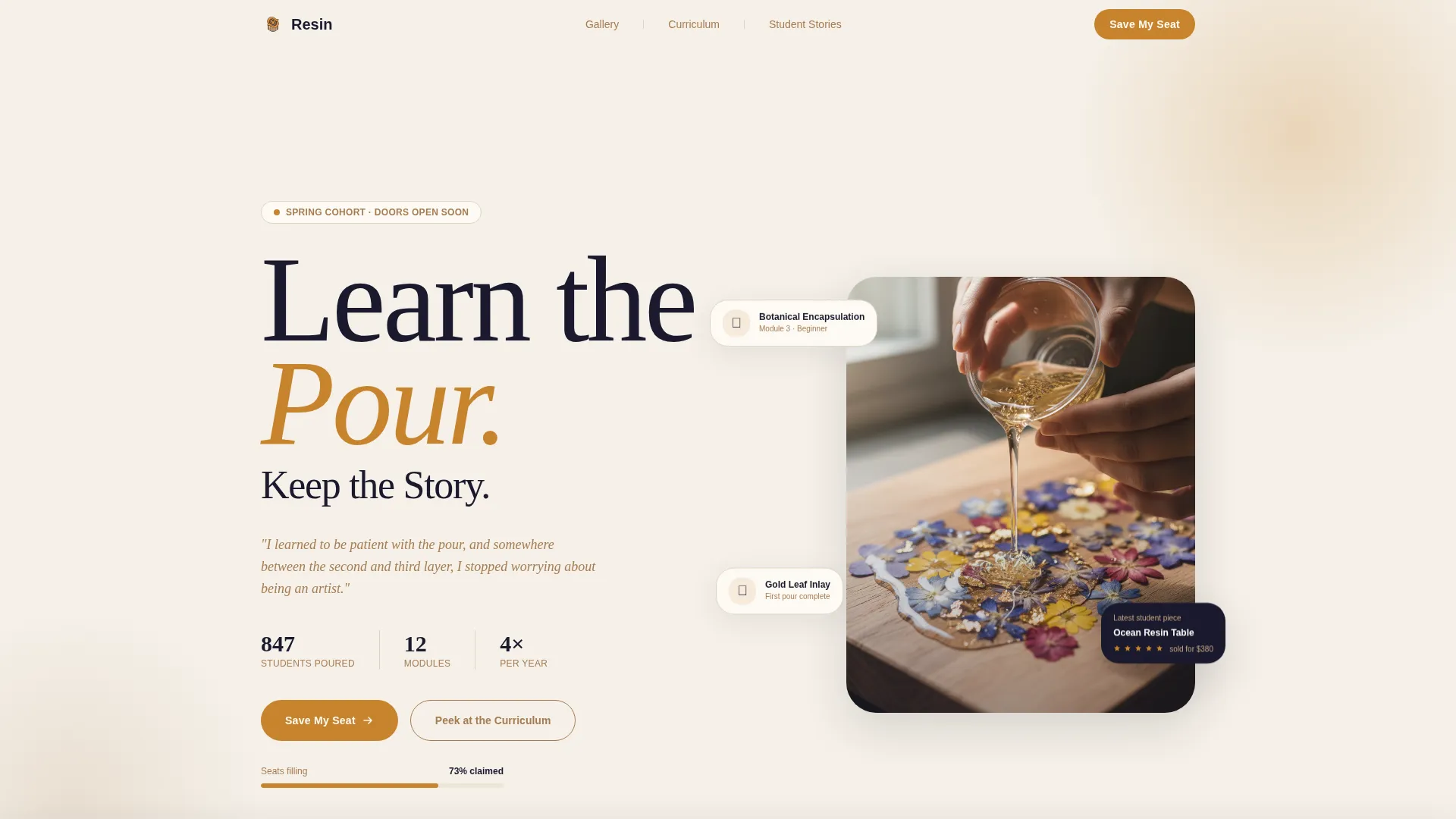
Half-Page Hero with Serif Headline
The hero splits the screen between a close-up process photograph on the left and a generous Fraunces serif headline on the right. A sepia italic subheading reads like a journal entry, setting the tone before the visitor scrolls.
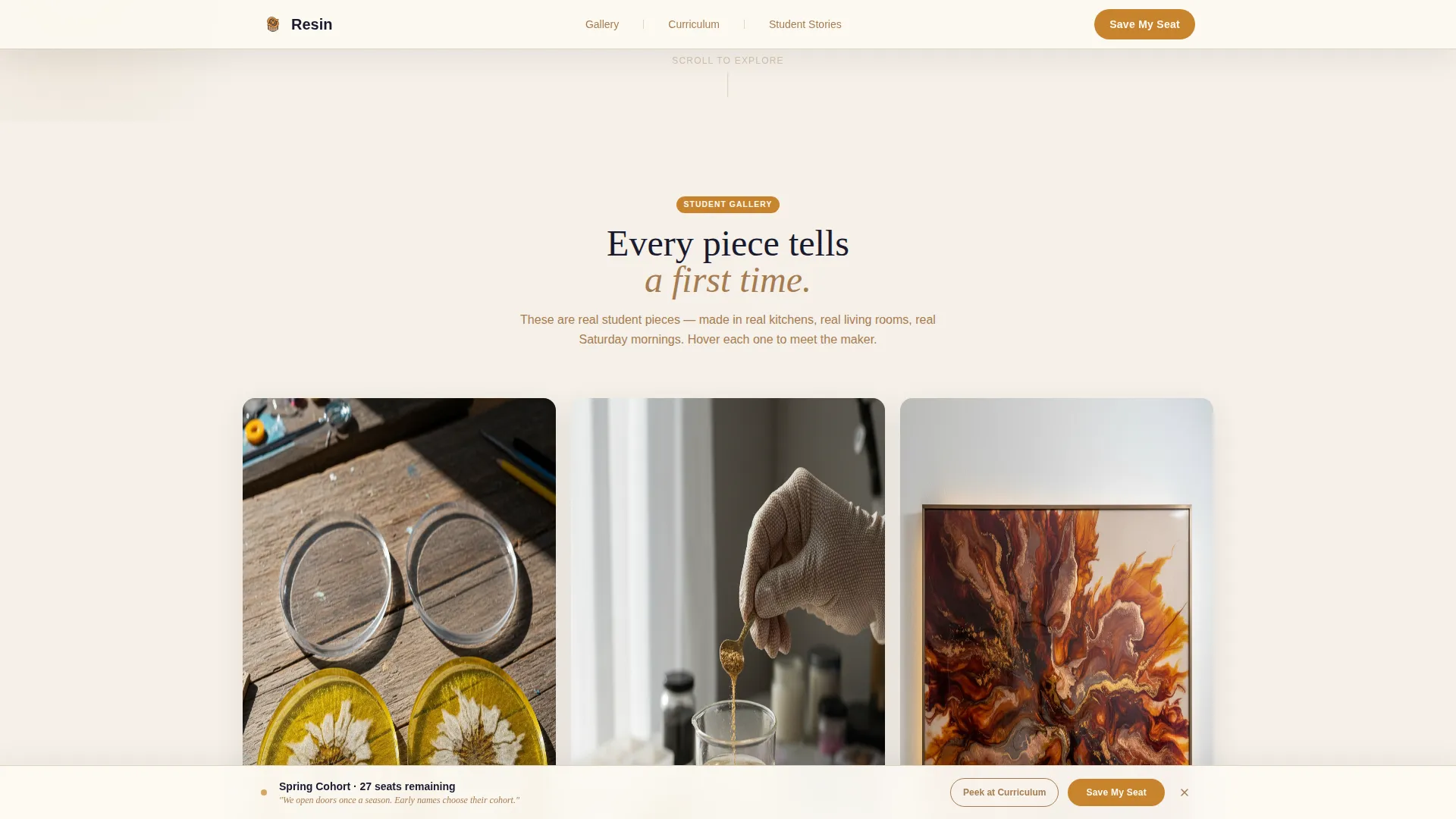
Masonry Gallery Walk
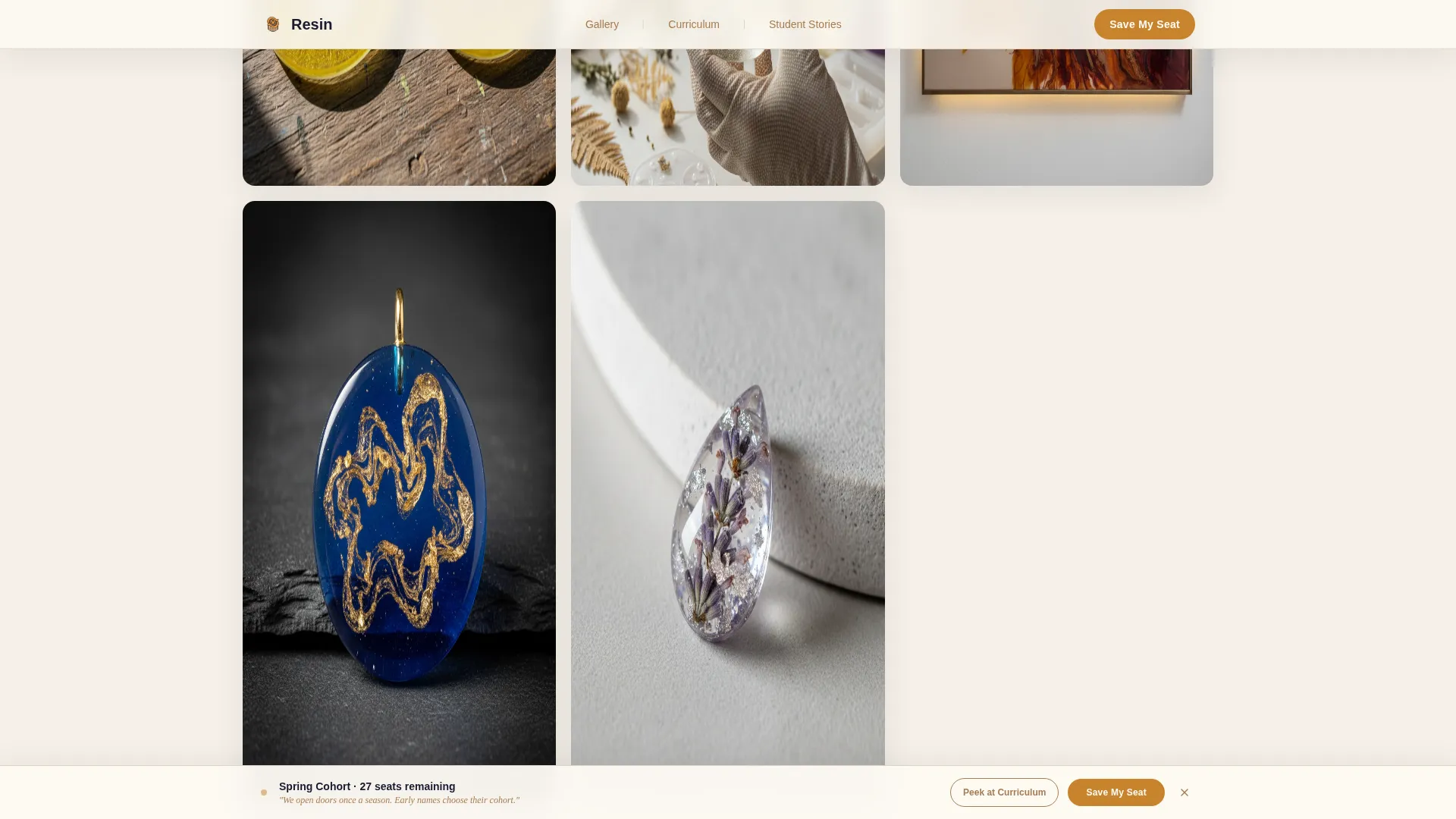
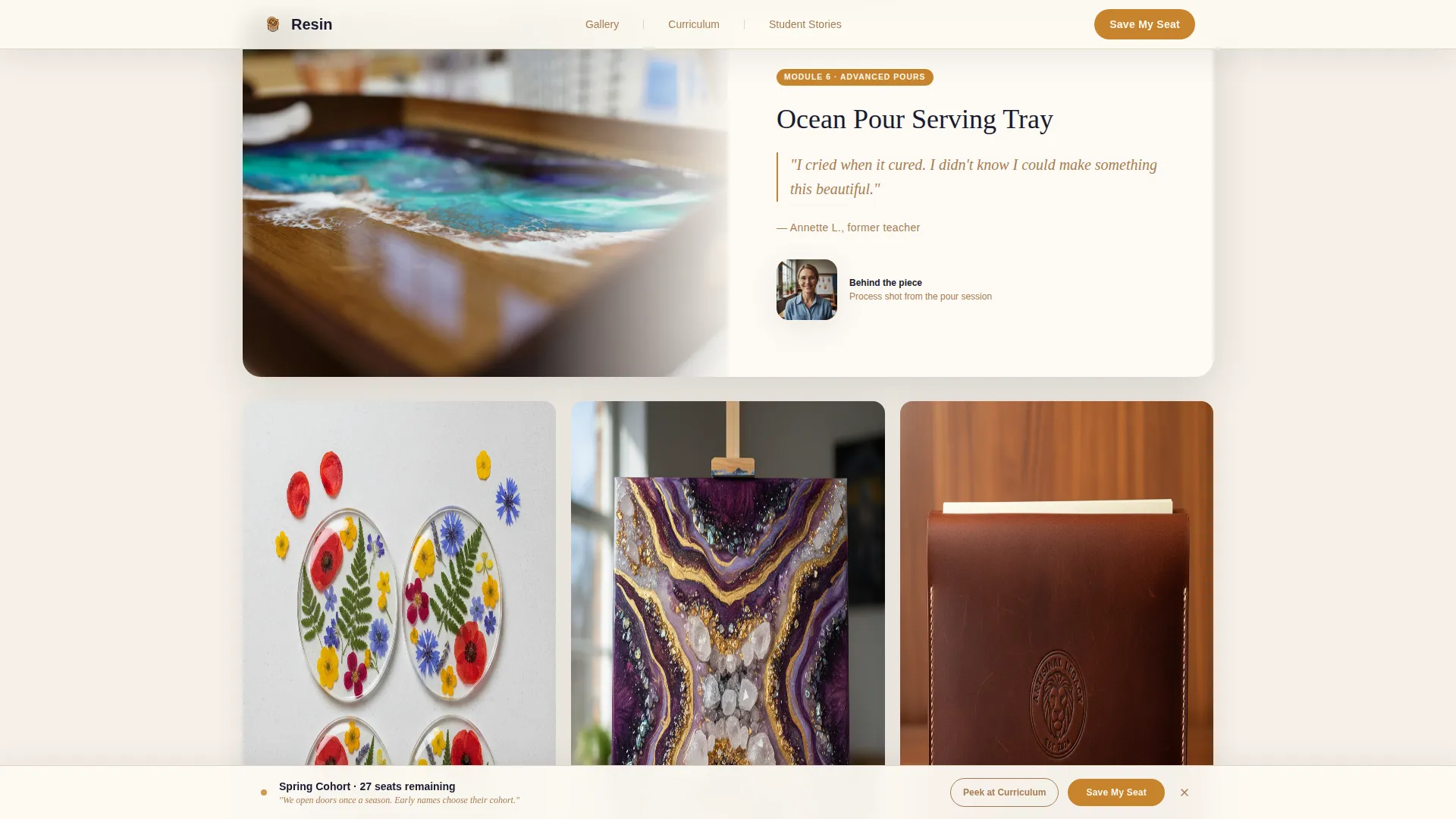
The core of the page is a Pinterest-style staggered grid of student work. Cards alternate between small thumbnail clusters and full-width spotlight pieces. Hovering over any card reveals the technique name, the module it belongs to, and a one-line student quote.
Scroll-Triggered Reveal Animations
As the visitor scrolls, gallery tiles appear with smooth entrance animations. The progression is intentional: simple coasters appear first, and heirloom ocean tables and botanical pendants appear later, building a silent visual argument for the course journey.
Sticky Waitlist Bottom Bar
After the first scroll, a sticky bar appears at the bottom of the screen anchoring the "Save My Seat" call to action. The bar stays visible throughout the entire page without interrupting the gallery experience.
Accordion Curriculum Preview
A secondary call to action labeled "Peek at the Curriculum" expands an accordion of module titles and sample project photos. It warms visitor curiosity without requiring a commitment to see what the course covers.
Testimonial Slider
A dedicated section displays student photos and quotes inside a slider component, providing social proof alongside the gallery pieces and cohort count metrics.
Page sections overview
| Section | Purpose |
|---|---|
| Hero Photo and Text | Introduce the course with a close-up process photograph and a serif headline |
| Masonry Gallery Walk | Display student pieces in a staggered grid with hover-reveal technique cards |
| Student Testimonial Slider | Build trust with student photos, quotes, and cohort metrics |
| Curriculum Peek Accordion | Let visitors explore module titles and sample project photos before committing |
| Inline Waitlist Form | Capture first name and email with a handwritten-style reassurance note |
| Sticky Bottom Bar | Keep "Save My Seat" visible and reachable throughout the entire scroll |
| Footer | Close the page with a horizontal flow pattern and supporting links |
Design & branding system
The visual identity follows a Heritage and Story theme using the Ink and Paper color system. Every color and type choice reinforces the feeling of a handcrafted, analog world rather than a digital product page.
- Color palette: aged parchment (#F5F0E8) for backgrounds, fountain-pen black (#1A1A2E) for body text, sepia mid-tone (#A67C52) for secondary text and dividers, and deep resin amber (#C8842D) for buttons, hover states, and progress indicators
- Typography: Fraunces serif for display headlines and DM Sans for body text, creating a warm contrast between editorial weight and clean readability
- Visual style: lacquered jewelry box aesthetic with warm analog textures, scroll-triggered masonry reveals, hover card lifts, and a sticky bar entrance animation
Mobile & speed optimization
The masonry gallery layout is designed with a mobile-first approach. Pinterest-style staggered grids are the primary browsing experience on small screens, and the layout adapts cleanly from desktop to phone.
- Gallery images use lazy loading so the page loads progressively as the visitor scrolls, rather than all at once
- CSS scroll behavior is set to smooth, creating a fluid, natural feel as visitors move between sections
- The sticky bottom bar and accordion curriculum preview are fully functional on mobile, keeping both conversion paths accessible on any screen size
How this template helps you convert
Every layout decision in this template moves a hesitant visitor closer to joining the waitlist. The page earns the signup by showing evidence first and asking for commitment second.
- The masonry gallery builds desire through visual progression: simple beginner pieces appear early, and advanced heirloom work appears deeper in the scroll, making the course outcome feel both achievable and aspirational.
- The "Peek at the Curriculum" accordion reduces friction by letting visitors explore course content before they decide to sign up, warming curiosity without requiring an email address upfront.
- The sticky bottom bar keeps the "Save My Seat" call to action visible at all times, so when a visitor is finally ready to commit, the signup path is always one tap away.
Other information about this template
This template is part of a curated set of creative education landing pages. It is built for a single-page, waitlist-first publishing flow and is ready to customize with your own course branding, student gallery images, and cohort schedule details.
- The waitlist form collects only a first name and email address, keeping the entry barrier as low as possible for early signups
- The handwritten-style note beneath the form ("We open doors once a season. Early names choose their cohort.") is included as editable copy inside the template
- The footer uses a horizontal flow pattern suited to creative and editorial brand pages
Theme
Heritage & Story
Creative direction
Gallery Walk
Color system
Ink & Paper
Style
Masonry/Pinterest
Direction
Waitlist/Coming Soon
Page Sections
Half-page Hero with Serif Headline
Masonry Gallery Walk
Scroll-triggered Reveal Animations
Sticky Waitlist Bottom Bar
Accordion Curriculum Preview
Testimonial Slider with Social Proof
Related questions
Who is this landing page template designed for?
Can I customize the gallery images and course modules?
Does the template include the sticky 'Save My Seat' bar?
What information does the waitlist form collect?
Is this template suitable for a course that is not yet live?



