Precision Workflow Optimization Landing Page Template
Cadence is an editorial landing page template built for productivity and time management podcasts. It uses a 60/40 asymmetric grid, a warm Parchment and Rust color palette, and curated episode collections to guide visitors from first impression to first listen. Every section earns attention before asking for a click.
by Rocket studio
Quick summary
Cadence is a single-page template designed for a productivity and time management podcast. It combines an editorial magazine aesthetic with high-interactivity components: inline audio previews, an expandable platform picker, and a sticky newsletter bar. The asymmetric 60/40 grid keeps the layout dynamic while every design choice reinforces authority and warmth.
Who this template is for
This template is built for podcast creators who want their page to feel like a publication, not a directory listing. It suits operators who have a defined point of view and an audience that values depth over noise.
- Podcast hosts in the productivity and time management space who want a premium, editorial presence
- Independent creators and small studios launching or refreshing a content-driven show
- Creative directors or team leads who produce audio content alongside other work
What problem this template solves
Most podcast landing pages look like a feed. They list episodes chronologically and offer nothing to hold a first-time visitor. Cadence solves the trust gap between discovery and first listen.
- Visitors leave before committing because there is no editorial curation or context to anchor their interest
- Single call-to-action pages miss newsletter subscribers who are not yet ready to open a podcast app
- Generic layouts fail to communicate the tone and philosophy behind a show before asking for a click
What you get with this template
You get a fully structured, single-page layout with distinct sections, each with a clear job to do. The template covers the full visitor journey from hero impression to platform selection or newsletter signup.
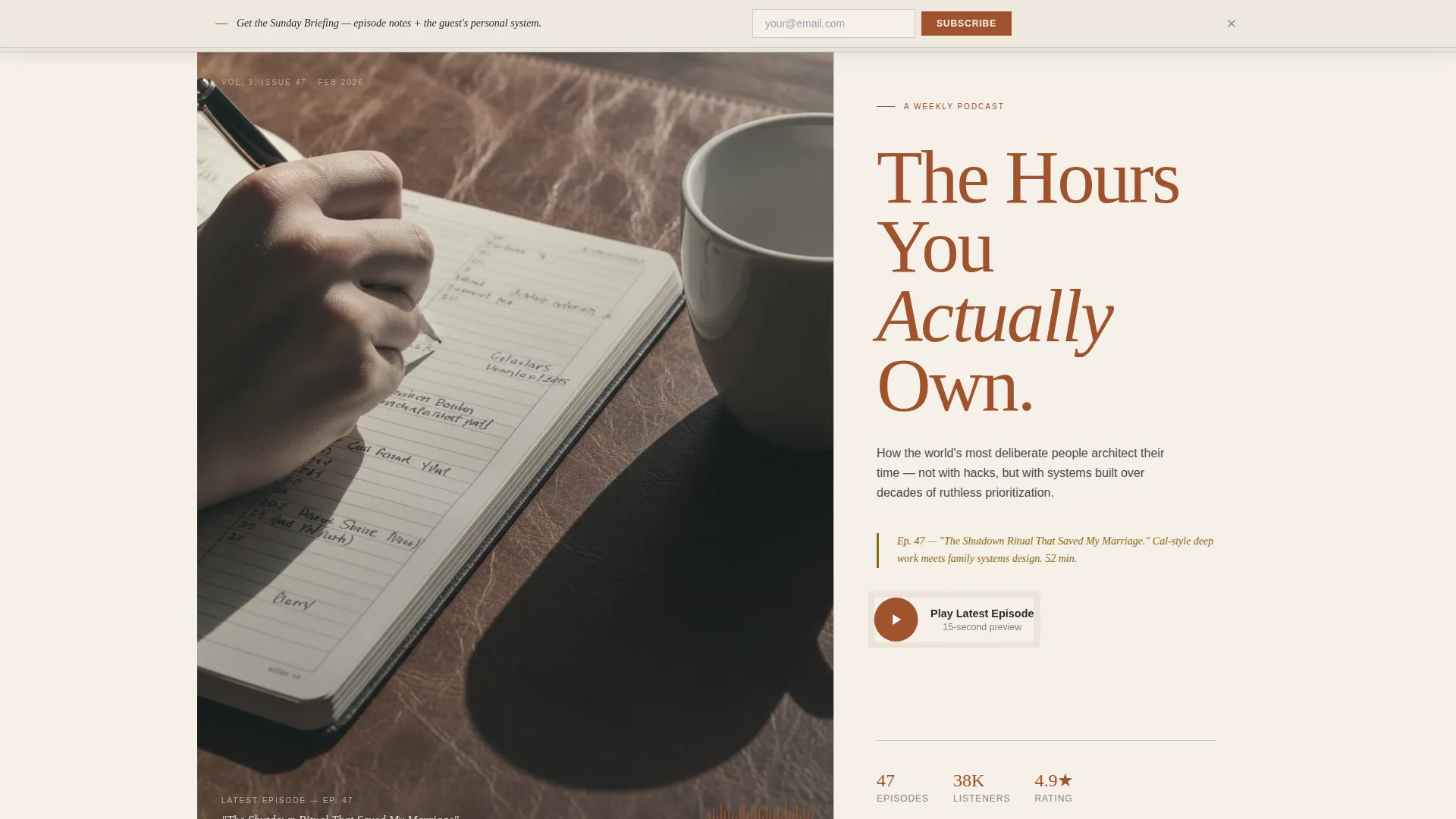
- A 60/40 asymmetric hero with a workspace photograph area, a large serif headline, and a pulsing play button
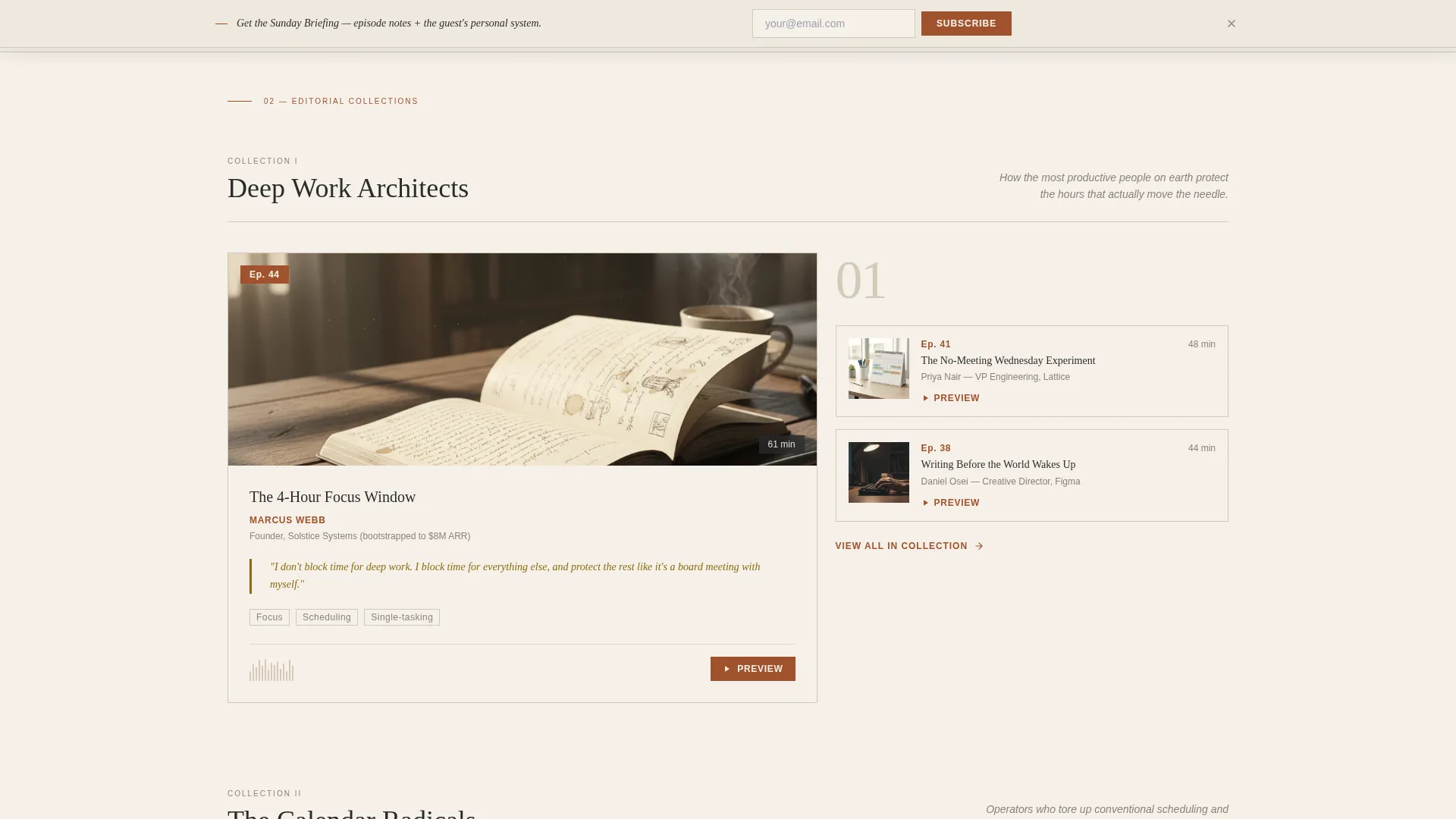
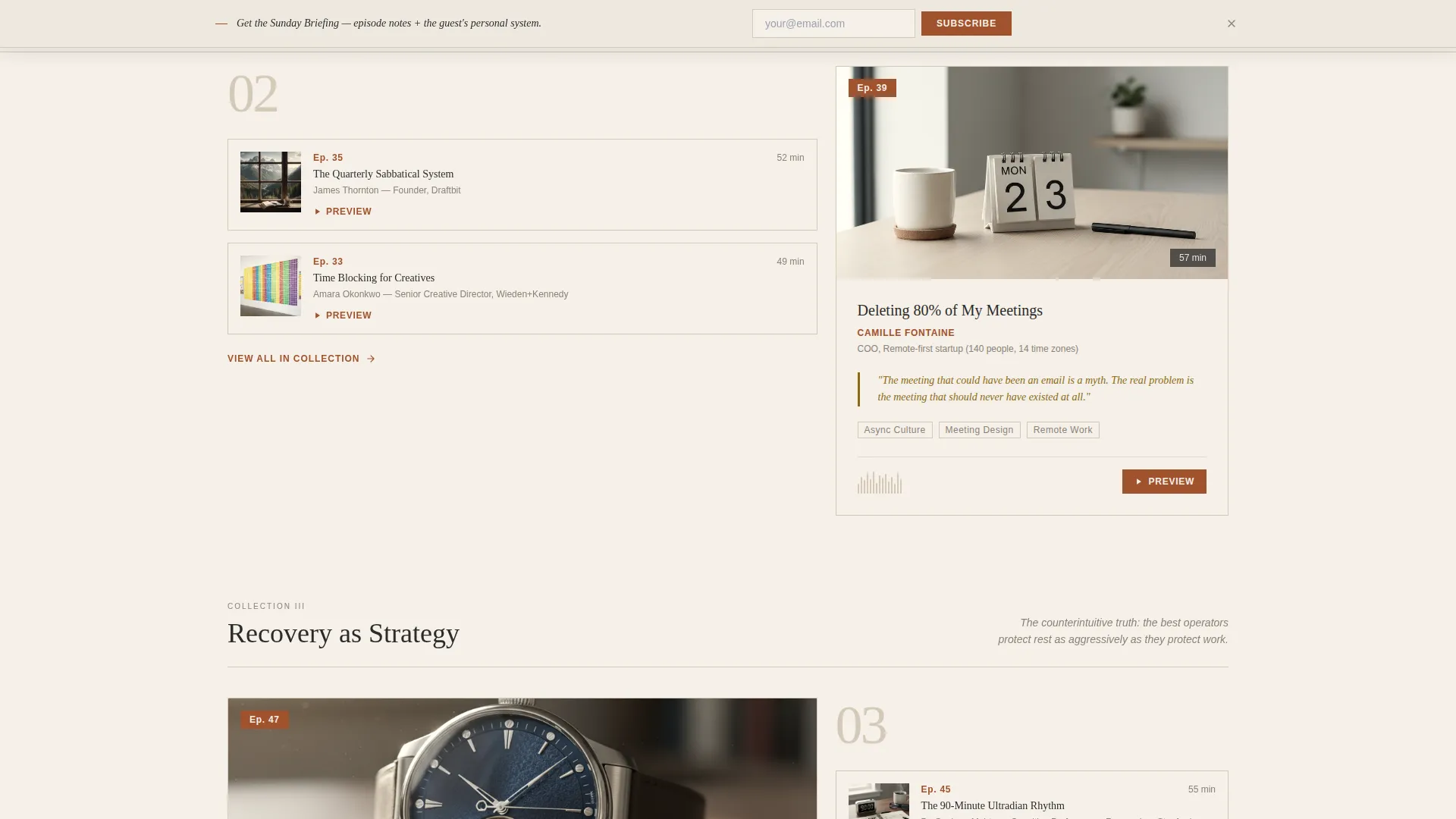
- Themed editorial episode collections displayed in a bento-style asymmetric grid with pull-quotes and waveform preview areas
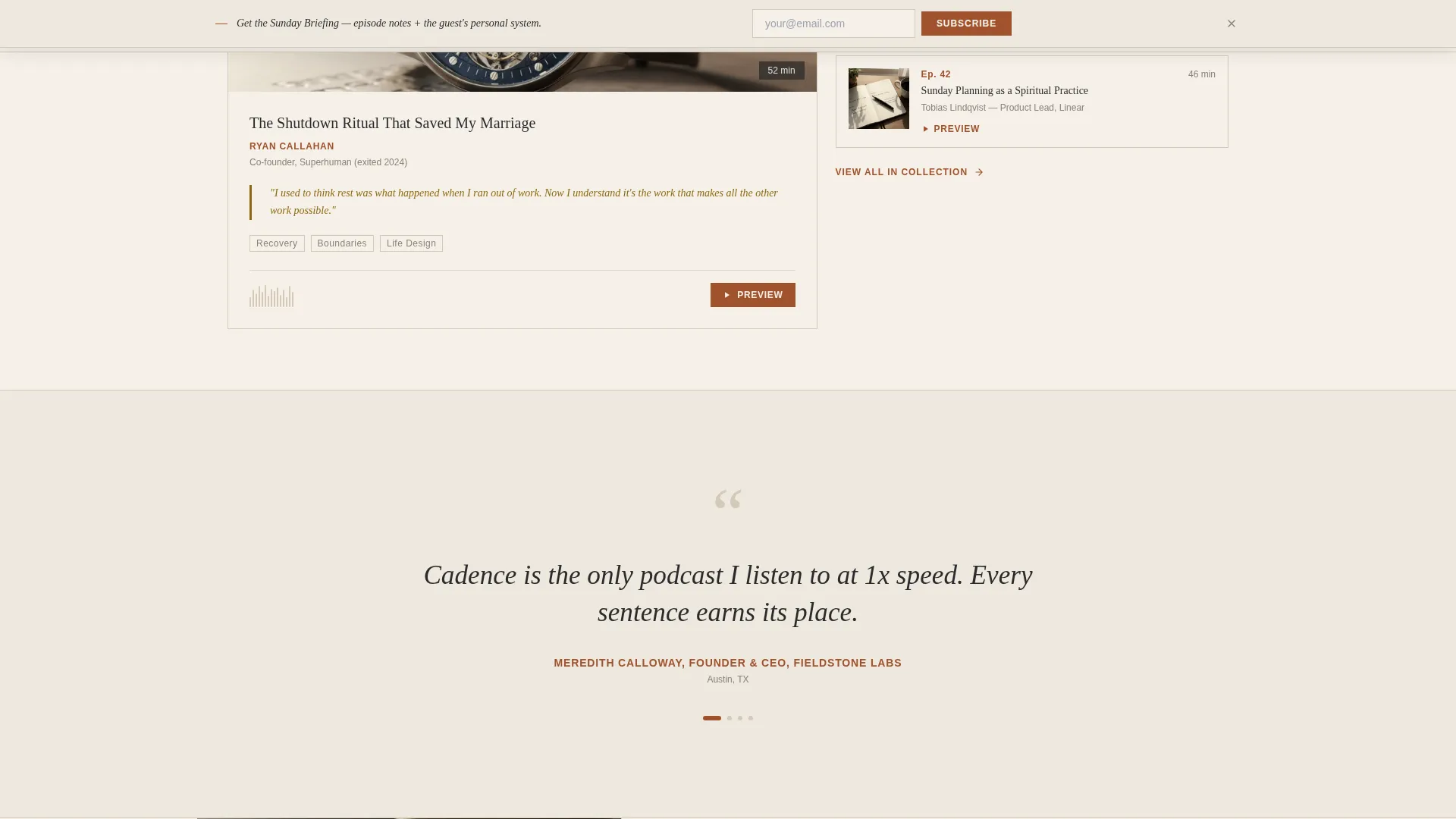
- A full-width rotating listener quote band, a philosophy and host bio section, an expandable subscribe block, and a sticky newsletter bar
Feature list
This template is built around a set of purposeful, prompt-backed components that work together.
Asymmetric 60/40 Hero Layout
The hero splits the viewport into a 60% editorial photograph column and a 40% headline column. The photograph area frames a workspace scene with intentional negative space. The headline sits large and tight in a serif typeface, paired with a one-sentence episode teaser and a rust-colored play button that pulses once on load.
Curated Editorial Episode Collections
Episodes are grouped into named thematic collections rather than a flat chronological list. Each collection uses the asymmetric grid: the 60% side carries a featured episode with a pull-quote and waveform preview area, while the 40% side stacks two related episodes with thumbnail art and duration stamps.
Inline Audio Preview Component
Each episode card supports a fifteen-second audio preview that plays inline on the page. Visitors can sample the show's quality and tone without leaving the template or opening a separate app.
Expandable Multi-Platform Subscribe Button
The primary call-to-action button reads "Listen on Your Player." On click, it expands to reveal platform icons for Apple Podcasts, Spotify, YouTube, and RSS. This removes friction by letting each visitor choose their preferred destination.
Sticky Newsletter Signup Bar
After the visitor scrolls past 40% of the page, a slim bar appears at the top of the viewport. It presents a single email field and a submit button under the label "Get the Sunday Briefing," capturing subscribers who want weekly episode notes and guest system breakdowns.
Rotating Listener Quote Band
A full-width section interrupts the grid midway through the page. It displays a single rotating listener testimonial in large italic serif type, styled as a magazine callout. The band uses the parchment background to separate it from the episode grid without a harsh visual break.
Page sections overview
| Section | Purpose |
|---|---|
| Hero, photo and headline | Establish editorial tone and prompt first play |
| Editorial episode collections | Curate episodes by theme to build the show's argument |
| Listener quote band | Deliver social proof styled as a magazine feature |
| Philosophy and host bio | Articulate the show's point of view and build host credibility |
| Subscribe call to action | Route visitors to their preferred podcast platform |
| Sticky newsletter bar | Capture email subscribers at scroll depth |
| Footer, single row | Provide minimal navigation and legal links |
Design & branding system
The visual identity draws from a vintage broadsheet left on a leather desk. Every color and type choice reinforces warmth, authority, and deliberate analog character in a digital context.
- Color palette: aged parchment cream (#F5F0E8) for backgrounds, deep rust (#A0522D) for headlines and interactive elements, charcoal ink (#2B2B2B) for body text, bone white (#EDE8DF) for alternating section backgrounds, and muted tobacco (#8B6914) for hover states and pull-quote borders
- Typography: Fraunces serif for all display headlines and pull-quotes, DM Sans for body text and interface labels, creating a clear hierarchy between editorial voice and functional copy
- Interactive accents: rust carries every actionable element including buttons, episode numbers, and progress bars so the visitor's eye always finds the next action
Mobile & speed optimization
The template is designed desktop-first to match the primary audience's working context. A strong mobile fallback ensures the experience holds across all screen sizes.
- The asymmetric 60/40 grid collapses gracefully into a stacked single-column layout on smaller screens, preserving section hierarchy and readability
- All animations use CSS only, with no heavy JavaScript libraries, keeping the motion lightweight and the page responsive
- Images are built for optimization-ready placement, and scroll-triggered reveals are tied to CSS transitions rather than render-blocking scripts
How this template helps you convert
Every layout decision is built to move a visitor from passive reader to active listener or subscriber.
- The inline audio preview lets visitors hear fifteen seconds of real content before committing to a platform click, proving quality before asking for trust
- The expandable multi-platform button meets each visitor at their preferred app rather than forcing a single destination, reducing drop-off at the conversion point
- The sticky newsletter bar introduces a lower-commitment conversion path for visitors who are not yet ready to open a podcast app, capturing subscribers through the "Get the Sunday Briefing" offer
Other information about this template
This template is a strong fit for creators building a content brand around productivity and time management themes. A few additional details worth noting before you start customizing.
- The page is single-page in structure, with all sections flowing in one continuous scroll, matching the landing page format
- Section backgrounds alternate between parchment cream and bone white to create rhythm without introducing harsh visual breaks
- The footer follows a linear single-row pattern, keeping the bottom of the page clean and uncluttered
- The sticky bar appears conditionally after 40% scroll depth, so it does not interrupt the first impression or the hero experience
- The editorial collections are designed to escalate thematically: from individual habits, to team systems, to life design, building a philosophical argument across the scroll
Theme
Editorial Magazine
Creative direction
Curated Collection
Color system
Parchment & Rust
Style
Asymmetric Grid (60/40)
Direction
Click-Through
Page Sections
Asymmetric 60/40 Hero Layout
Curated Editorial Episode Collections
Inline Audio Preview Component
Expandable Multi-platform Subscribe Button
Sticky Newsletter Signup Bar
Rotating Listener Quote Band
Related questions
Can I change the episode collection themes to match my own show?
Does the template support more than two podcast platforms in the subscribe block?
Is this template suitable for a new podcast with only a few episodes?
Can the sticky newsletter bar be removed if I do not need email signups?
What makes this template different from a standard podcast directory page?



