Edtech Pre-Seed Investor Landing Page Template
Syllabus is a comparison table landing page built for an AI tutoring pre-seed startup pitching seed-stage investors. It opens with a muted incumbent logo scroll, delivers a single sharp market stat, then presents a capability comparison table that makes the whitespace in competitors' columns feel intentional. The page closes with a sticky pitch deck call to action and a direct Calendly booking embed.
by Rocket studio
Quick summary
Syllabus is a single-page investor pitch template for an edtech pre-seed startup. It flows like a proprietary research brief: one devastating stat, one comparison table, one animated product moment, and two precisely placed calls to action. The design runs dark and data-dense, using void black, spectral violet, holographic teal, and pearl white to build calm conviction at every scroll depth.
Who this template is for
This template is built for early-stage founders who need to convert investor attention into a deck click or a calendar booking. It is purpose-built for the pitch-first, data-first moment before a seed round closes.
- Founders at AI or edtech pre-seed startups preparing investor-facing pages
- Teams who want their landing page to read like a diligence brief, not a product brochure
- Accelerator applicants who need traction, moat, and market problem on one scrollable page
What problem this template solves
Most startup landing pages try to explain everything at once. Investors scan fast and lose the thread quickly. This template solves the pacing problem by building a case section by section, the way a strong investment memo does.
- Investors leave generic startup pages without a clear reason to click further
- Founders struggle to show technical differentiation without screenshots or demos
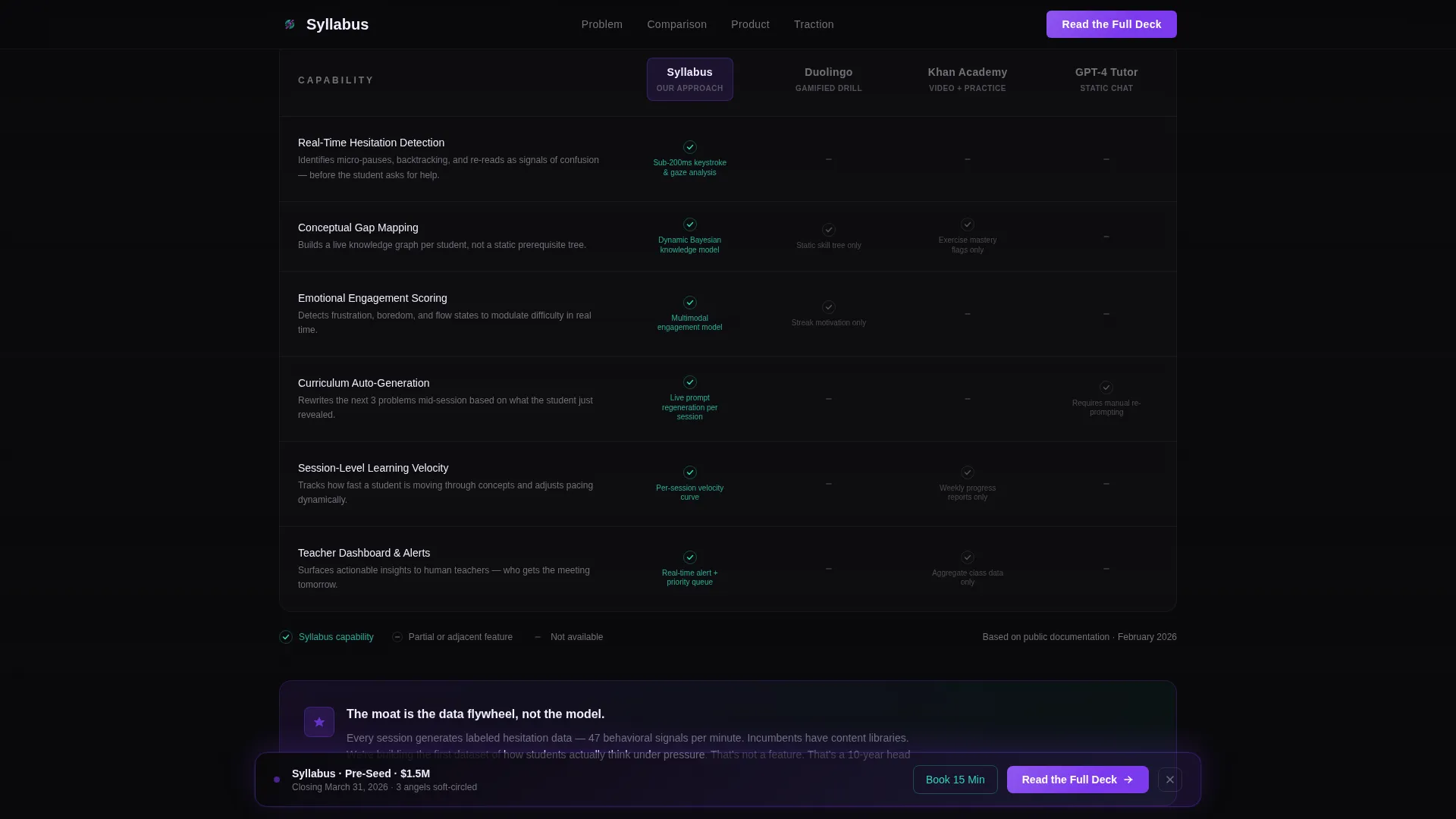
- A comparison table with teal checkmarks and gray dashes communicates moat faster than paragraphs can
What you get with this template
You get a fully structured, single-page investor pitch layout with five distinct content sections and two conversion touchpoints. Every component follows the Industry Report creative direction described in the brief.
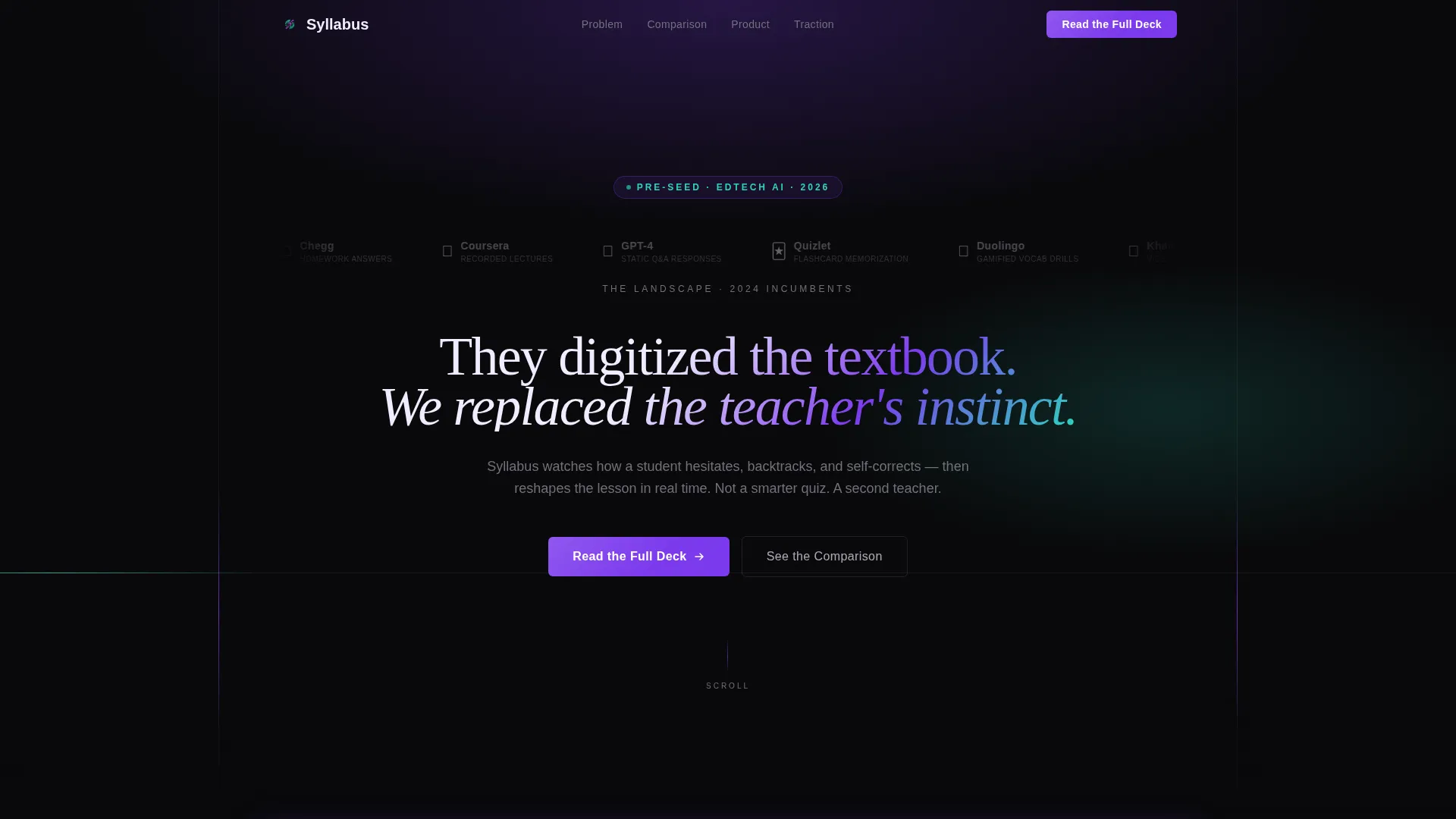
- A hero section with an infinite logo scroll ribbon and a bold 56-pixel violet headline
- A four-row comparison table pitting your capabilities against three incumbent approaches
- An animated product sequence, a traction metrics block, a sticky call to action bar, and a Calendly embed
Feature list
This template includes six purpose-built components that work together to build investor conviction from first scroll to final click.
Infinite Logo Scroll Ribbon
The header opens with a horizontal ribbon of recognizable incumbent logos drifting in a slow, continuous scroll at 40 percent opacity. The muted treatment signals awareness of the competitive landscape before a single word is read.
Devastating Market Stat Block
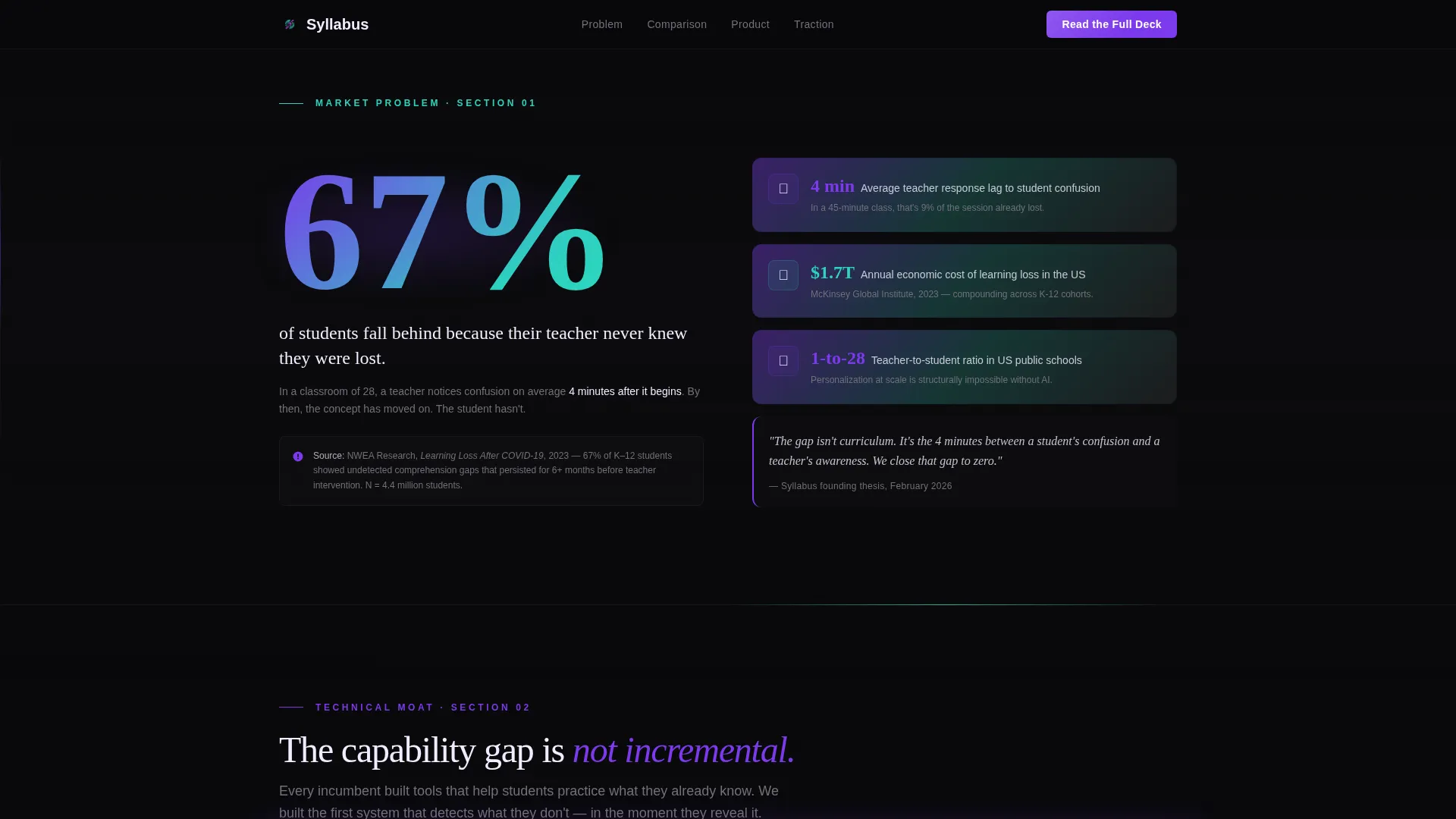
A single full-width section isolates one cited learning-loss statistic. The isolation gives the number room to land. It sets the stakes before the comparison table arrives.
Capability Comparison Table
Four rows of adaptive learning capabilities are compared across Syllabus and three incumbent approaches. Teal checkmarks mark Syllabus capabilities; muted gray dashes fill competitor columns. The whitespace in those columns does the persuasion work.
Animated Product Sequence
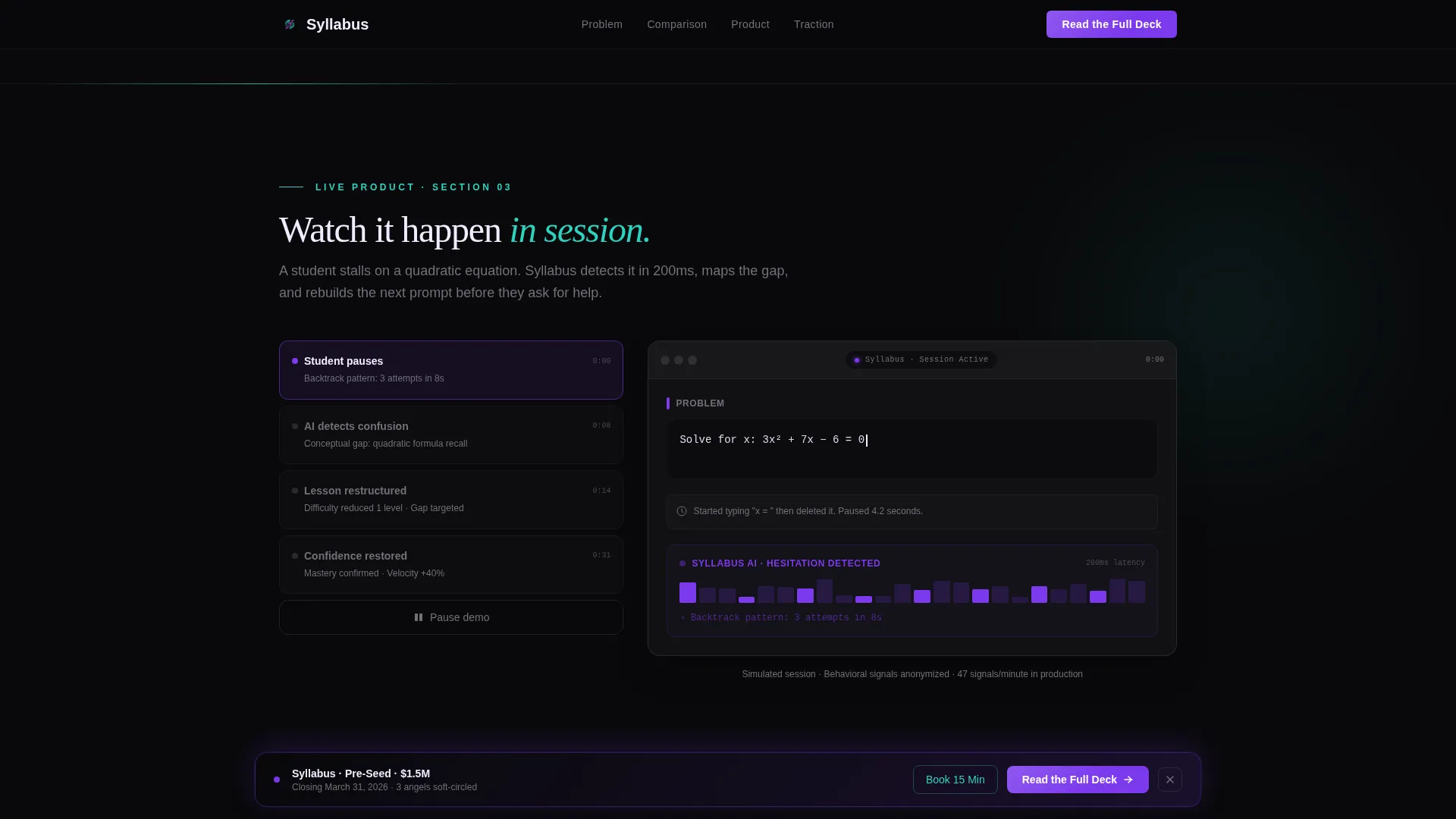
A live product GIF shows a student pausing on an algebra problem while the AI restructures the next prompt mid-session. It turns an abstract technical claim into a visible, believable moment.
Sticky "Read the Full Deck" call to action Bar
After the comparison table, a sticky bottom bar in spectral violet trails the visitor through the traction section. It appears again as a full-width closing block, leading to a pitch deck viewer.
Direct Calendly Booking Embed
A secondary call to action labeled "Book 15 Min with Founders" appears after the traction metrics block. It is an unobstructed Calendly embed with no form, no email gate, and no friction.
Page sections overview
| Section | Purpose |
|---|---|
| Hero Logo Bar | Frames competitive landscape, delivers headline challenge |
| Market Problem Stat | Establishes urgency with a single cited learning-loss figure |
| Capability Comparison Table | Visualizes technical moat against three incumbent approaches |
| Animated Product Demo | Makes the AI tutoring behavior concrete and credible |
| Traction Metrics Block | Delivers evidence before the investor is asked to act |
| Sticky call to action Bar | Keeps "Read the Full Deck" accessible after the comparison table |
| Calendly Booking Embed | Converts traction-convinced visitors to direct founder meetings |
| Footer | Single-row linear pattern closing the page cleanly |
Design & branding system
The visual identity follows a Startup Velocity theme with an AI Iridescent color system. The palette is designed to feel like light refracting through a prism onto a dark surface at 2 a.m., controlled and luminous at the same time.
- Void black (#09090B) dominates full-bleed sections; spectral violet (#7C3AED) drives calls to action, key metrics, and the hero headline
- Holographic teal (#2DD4BF) marks comparative advantages in the table; pearl white (#F0EDFF) floats data cards above the dark background
- Typography pairs Fraunces serif display for headlines with DM Sans for body copy and data labels
Mobile & speed optimization
The template is designed desktop-first, reflecting the reality that seed-stage investors review decks on laptops and monitors. Mobile fallback layouts are included so the page remains functional on smaller screens.
- CSS animations are preferred over JavaScript-heavy solutions to keep scroll-triggered reveals smooth
- IntersectionObserver handles scroll-triggered section reveals and comparison table stagger animations
- Beam borders, infinite scroll, and comparison table hover states are built to run without blocking the main thread
How this template helps you convert
The page earns both clicks through pacing, not pressure. Each section raises the conviction level before the next conversion moment appears.
- The comparison table stagger and teal checkmark pattern create implicit proof of technical moat before any call to action appears, so the sticky "Read the Full Deck" bar feels like a natural next step rather than a sales push.
- The Calendly embed appears only after the traction metrics block, so the visitor who reaches it has already processed the market stat, the comparison table, and the product demo. The booking feels like a formality, not a commitment.
Other information about this template
This template is categorized under Startup and Launch, with a specific niche alignment to edtech pre-seed investor pages. It is built for B2B conversion, where the audience is small, high-intent, and moves fast.
- The creative direction is Industry Report: the scroll reads like a research brief the visitor was not supposed to see yet, which creates forward momentum through every section
- The Click-Through landing-page direction means both calls to action lead outward: one to a pitch deck viewer in the style of a document-sharing platform, one to a direct scheduling tool
- The Logo Bar header concept is a specific design pattern where incumbent brand marks serve as context, not endorsement; their presence frames the competitive landscape before the headline challenges it
- The template style is a Comparison Table layout, making it well-suited for any pre-seed startup that needs to articulate a technical moat against established players in a single, scannable view
Theme
Startup Velocity
Creative direction
Industry Report
Color system
AI Iridescent
Style
Comparison Table
Direction
Click-Through
Page Sections
Infinite Logo Scroll Ribbon
Capability Comparison Table
Market Stat Section
Animated Product Demo Sequence
Sticky Pitch Deck Call to Action Bar
Direct Calendly Booking Embed
Related questions
Who is this landing page template designed for?
Can I use this template for a startup outside of edtech?
What makes the comparison table effective for investors?
Do both calls to action require a form or email capture?
Is this template suited for desktop or mobile viewing?