Insurtech Coming Soon Landing Page Template
Underwrite is a coming soon landing page template built for insurtech startups targeting managing general agents (MGAs), independent agents, and insurtech founders. It features a live micro-dashboard hero, an animated before-and-after comparison table, an interactive quoting sandbox, and an early-access signup with a role selector, all styled in a data-dense Electric Indigo palette.
by Rocket studio
Quick summary
Underwrite is a single-page insurtech coming soon template. It opens with a functioning micro-dashboard, walks visitors through an animated workflow comparison, and closes with an early-access call to action. The design feels like a Bloomberg terminal rebuilt for clarity, precise and interactive, never punishing.
Who this template is for
This template is built for teams launching insurance technology products into a specialist B2B market. It speaks directly to the people who live inside submission queues and carrier portals every day.
- Managing general agents (MGAs) dealing with submission backlogs and manual intake workflows
- Independent insurance agents toggling between multiple carrier portals to generate quotes
- Insurtech founders who need to visualize binding ratios and book-of-business data without exporting to a spreadsheet
What problem this template solves
Insurance workflows are fragmented. Submissions arrive by email, quotes travel as PDFs, and binding decisions live inside separate carrier portals. A coming soon page for a product solving this needs to demonstrate the problem and the solution before asking for a signup.
- Visitors cannot feel the value of a dashboard product from a static screenshot or a generic hero section
- MGAs and agents need to recognize their exact pain point before they trust an early-access offer
- Insurtech founders need social proof signals and role-specific messaging to feel the waitlist is worth joining
What you get with this template
You get a fully structured, single-page coming soon layout built specifically for an insurtech SaaS launch. Every section is designed to show the product working, not just describe it.
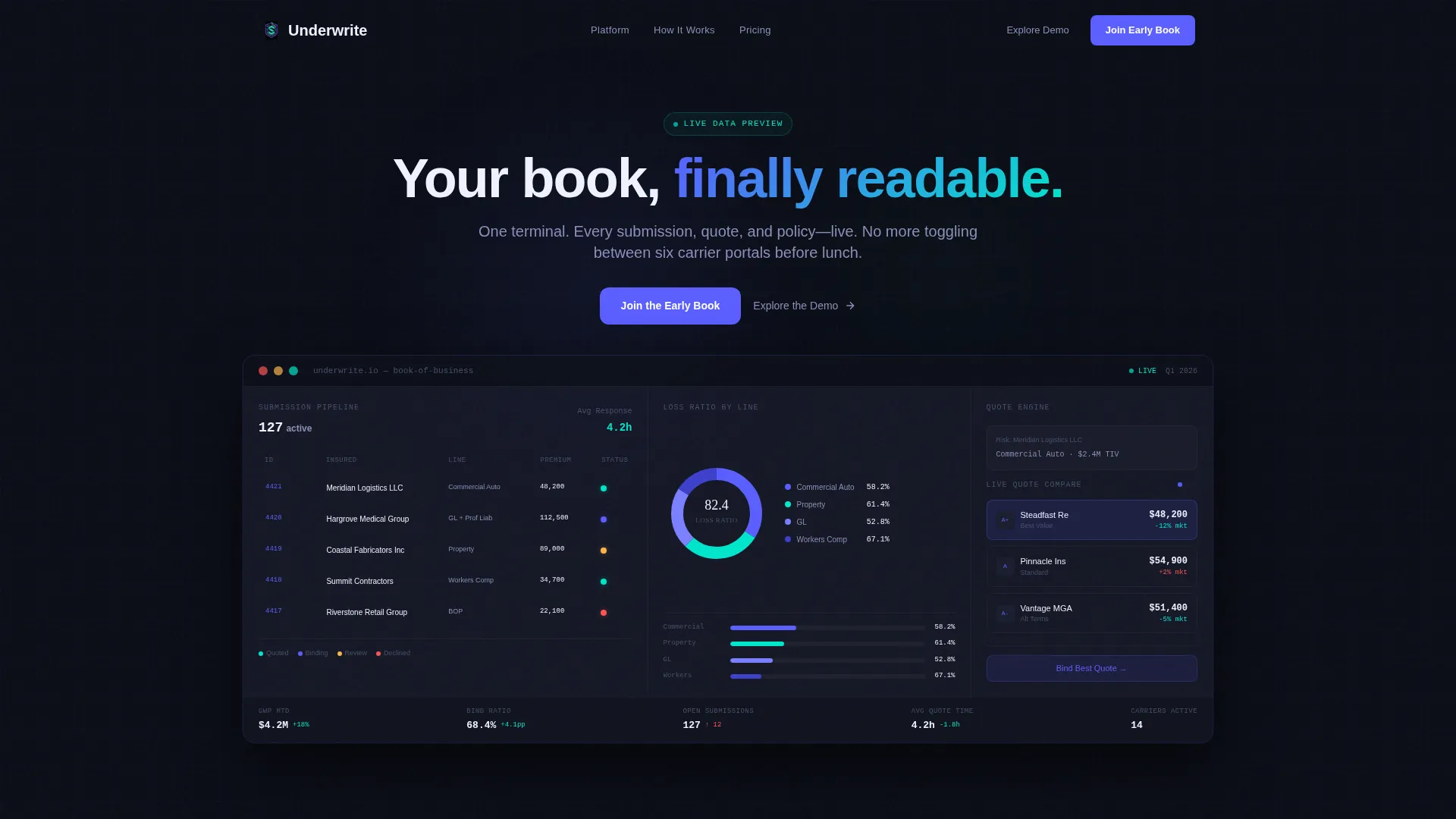
- An interactive hero micro-dashboard pre-loaded with sample book-of-business data, including a live submission pipeline, a loss-ratio donut chart, and an animated quote comparison card
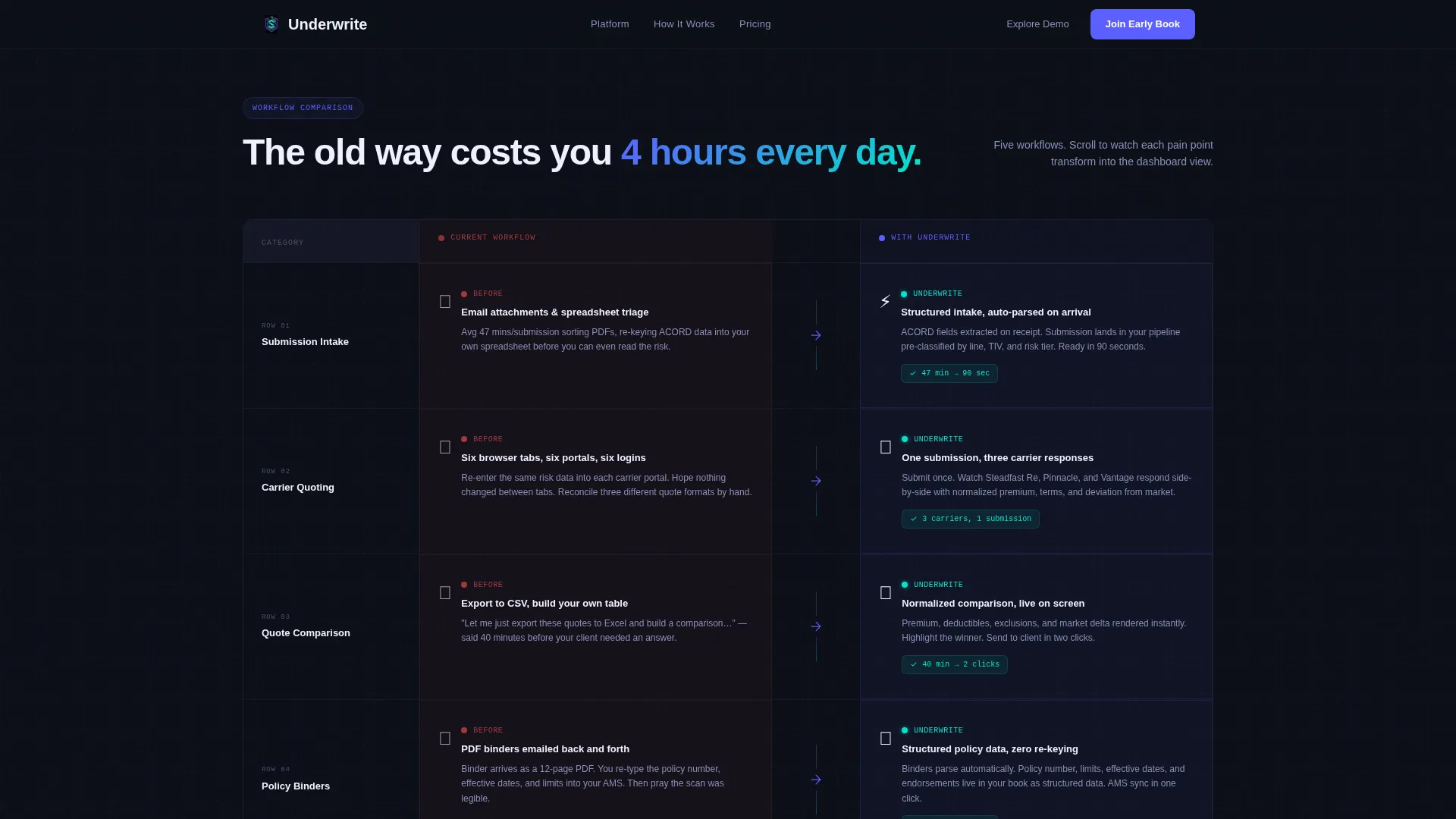
- An animated five-row comparison table that transitions each "before" pain point into an "after" dashboard view as the visitor scrolls
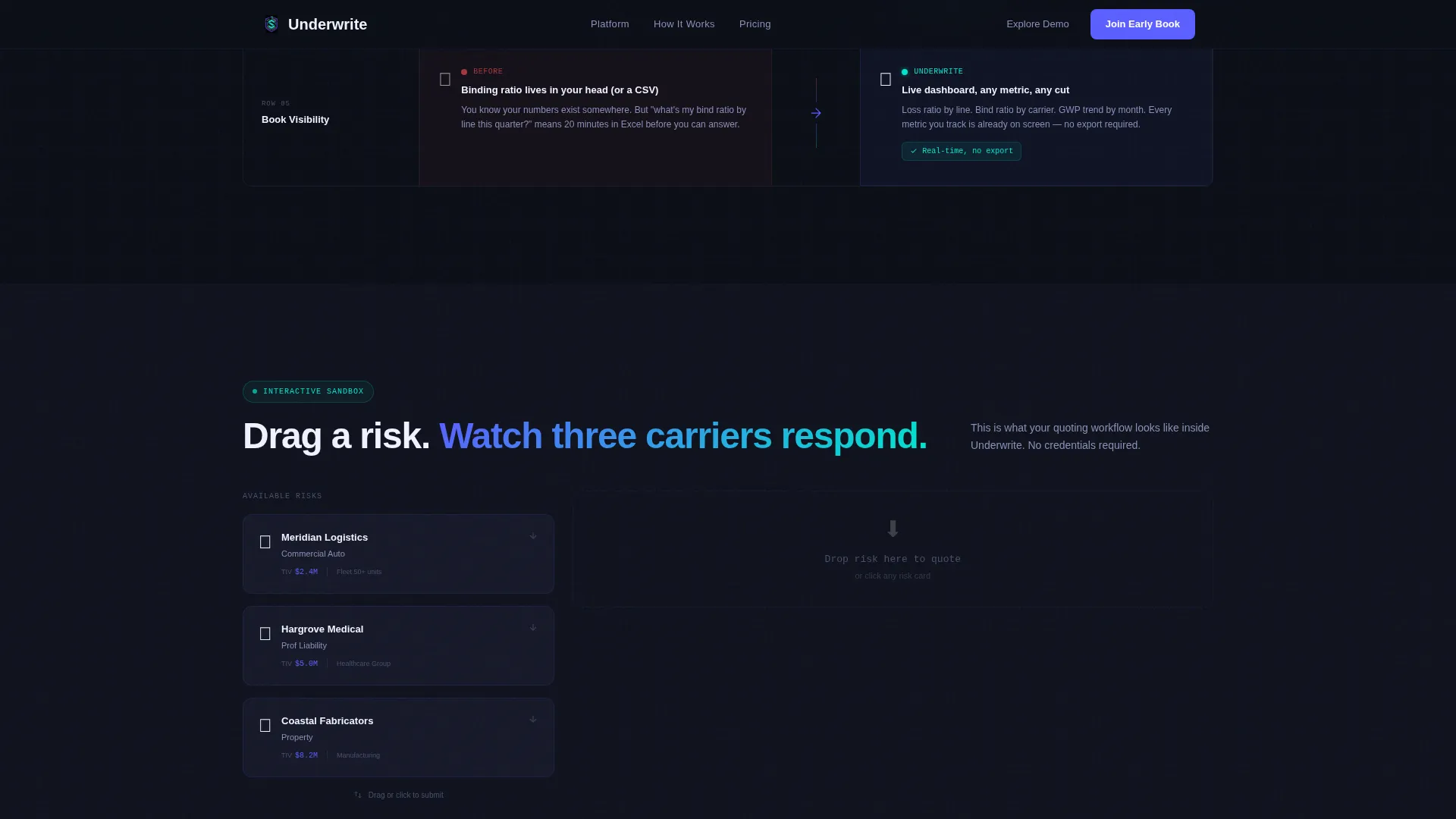
- An interactive quoting sandbox where visitors drag sample risks into a quoting engine and watch three carrier responses populate side by side
- A role-aware early-access signup with an email field, a role selector (MGA, Agent, Carrier, Broker), and dynamic confirmation messaging
Feature list
This template is built around high interactivity and scroll-driven storytelling. Each component below is defined in the source brief.
Live Micro-Dashboard Hero
The header section embeds a functioning micro-dashboard directly in the viewport. It displays a live submission pipeline on the left, a donut chart breaking down loss ratios by line of business, and a quote comparison card mid-animation. Visitors can hover cells and toggle between carrier panels before reading a single line of copy.
Animated Comparison Table
The comparison table section covers five workflow rows. Each row animates its "before" state, manual submission intake, emailed quotes, PDF binders, into the corresponding "after" dashboard view as the visitor scrolls into it. The scroll-triggered animation is driven by GSAP.
Interactive Quoting Sandbox
Below the comparison table, visitors can drag sample risks into a quoting engine and watch three carrier responses populate side by side. This sandbox lets prospects interact with the core product mechanic without creating an account.
Role-Aware Early Access Signup
The primary call to action uses a single email field paired with a role selector. Choosing MGA, Agent, Carrier, or Broker adjusts the confirmation message the visitor receives. This makes the signup feel personalized rather than generic.
Social Proof Section
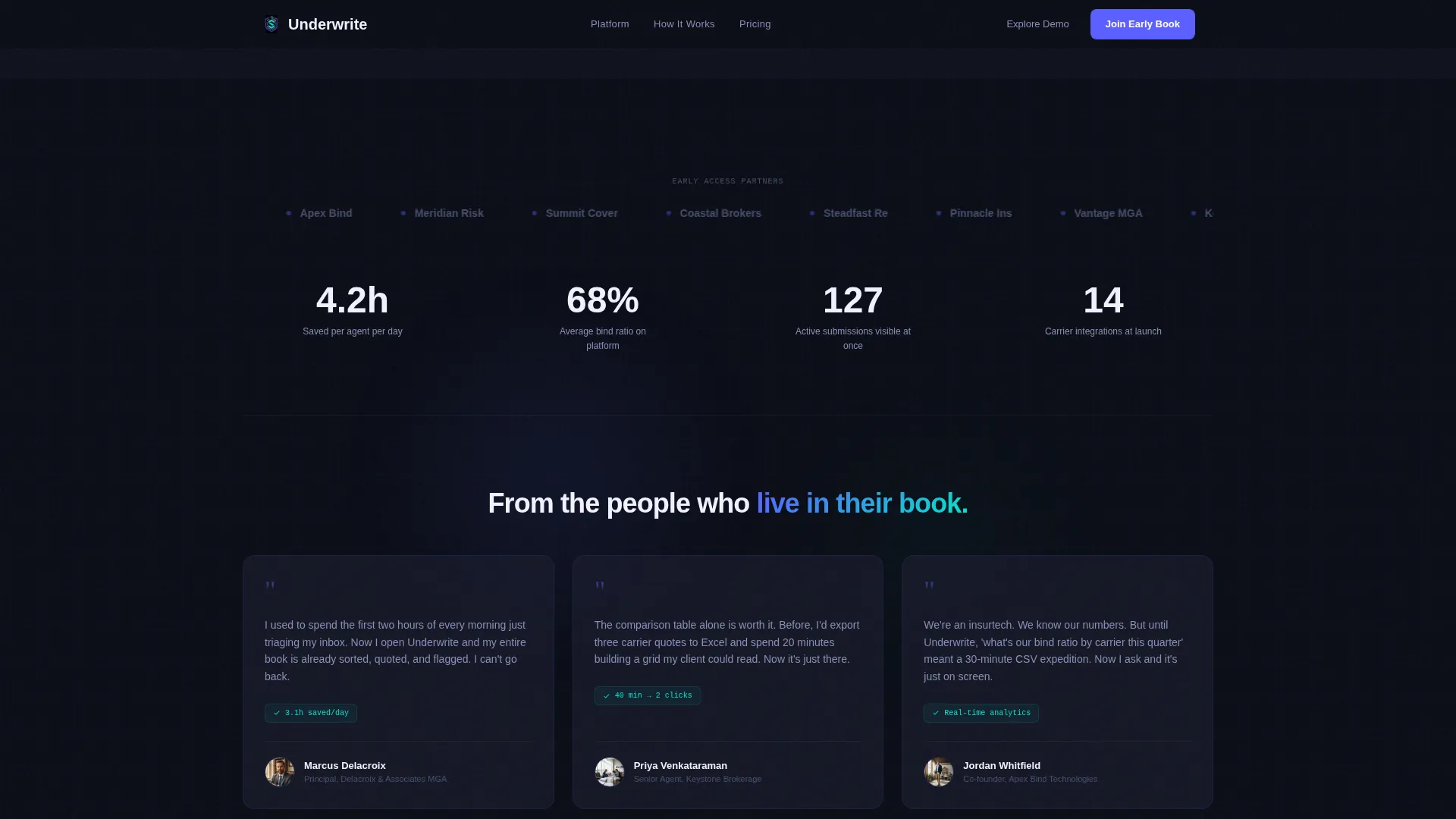
A dedicated section displays binding ratio metrics, submission volume statistics, and testimonials from MGAs and agents. These proof points are positioned between the sandbox and the call to action to reinforce urgency before the signup ask.
Scroll-Driven GSAP Animations
Counter animations, live chart simulations, and section entrance transitions are all handled through GSAP scroll triggers. Each animation is tied to a visible interactive element, so every effect feels earned rather than decorative.
Page sections overview
| Section | Purpose |
|---|---|
| Interactive Hero Dashboard | Opens the page with a live micro-dashboard showing submission pipeline, loss-ratio chart, and quote card |
| Animated Comparison Table | Scrolls through five before-and-after workflow rows with GSAP-triggered transitions |
| Interactive Quoting Sandbox | Lets visitors drag sample risks and view three live carrier quote responses side by side |
| Social Proof Metrics | Displays binding ratio stats, submission volume figures, and MGA testimonials |
| Early Access Signup | Captures email and role selection with dynamic role-based confirmation messaging |
| Linear Single-Row Footer | Closes the page with a compact, single-row footer layout |
Design & branding system
The visual identity follows a Dashboard Pro theme built on an Electric Indigo color system. The palette is designed to feel precise and data-dense without being visually punishing, every glow or accent is tied to something interactive underneath.
- Four-color system: void black (#0B0E17) for backgrounds, electric indigo (#5B5FFF) for primary actions and highlights, cool interface gray (#1A1D2E) for panel surfaces, and signal cyan (#00E5CC) reserved for live-data accents and hover states
- Typography uses Manrope for headings, DM Mono for data labels and numbers, and DM Sans for body copy
- Visual style references a Bloomberg terminal redesigned for clarity, data-dense layout logic with purposeful negative space
Mobile & speed optimization
The template is built desktop-first, reflecting the power-user audience that works across large monitors. It scales responsively to tablet viewports as well.
- Desktop-first layout prioritizes the full dashboard experience on wide screens, where the comparison table and sandbox have room to breathe
- Responsive breakpoints extend the layout to tablet, keeping interactive panels usable on medium-sized screens
- The architecture separates the static shell (rendered server-side) from the interactive dashboard components (loaded as client components), which keeps the initial page load lean while the interactive layers initialize
How this template helps you convert
The template earns the signup by letting visitors interact with the product multiple times before asking for credentials. This approach is designed for an audience that is skeptical of early-access pages and needs to feel the product before committing.
- Visitors touch the product three times before the signup is presented, first in the hero dashboard, then in the comparison table scroll, then in the quoting sandbox, building trust through direct interaction rather than persuasion copy
- The role selector in the signup form adjusts confirmation messaging for each audience segment, making the early-access offer feel specific to each visitor's actual workflow rather than a generic waitlist
Other information about this template
This template is categorized under Startup and Launch, specifically within the InsurTech Coming Soon Page niche. It is styled as a Comparison Table landing page using the Dashboard Pro theme and the Interactive Explorer creative direction.
- The header concept is an Interactive Preview, meaning the product demonstrates itself inside the viewport before any marketing copy appears
- The landing page direction follows a Freemium and Trial model, reframed here as early access with the primary call to action labeled "Join the Early Book" and a secondary path labeled "Explore the Demo"
- The template uses US insurance industry terminology throughout, with USD pricing context and English-language copy defaults
- Intersection match scoring places this template at a strong alignment between the InsurTech Startup subcategory and the Startup and Launch category
Theme
Dashboard Pro
Creative direction
Interactive Explorer
Color system
Electric Indigo
Style
Comparison Table
Direction
Freemium/Trial
Page Sections
Live Micro-dashboard Hero Section
Scroll-triggered Comparison Table
Interactive Quoting Sandbox
Role-aware Early Access Form
Social Proof Metrics Block
GSAP Animation System
Related questions
Who is this template designed for?
Can visitors actually interact with the dashboard before signing up?
What does the role selector in the signup form do?
How many sections does this landing page include?
Is this template customizable for a different insurance product?