
Searching for fast app building with built-in data storage? Choose an AI app builder that fits your needs, speeds development, supports databases, and helps individuals or teams create scalable mobile and web apps quickly.
How can you pick the right tool for building apps fast with data storage built in?
It’s about finding an AI app builder with database integration that fits your needs. Tools like these can turn ideas into real mobile and web apps in hours, not months.
Gartner’s research shows that by 2028, 75% of enterprise software engineers will use AI code assistants, up from less than 10% in early 2023. This comes from the rapid adoption of AI tools that help developers work faster and generate code more efficiently.
This blog will help you pick the best platform for your project, whether you’re a solo creator or a business team.
Why Database Integration Matters?
Even the smartest app won’t be very useful if it can’t store and manage its data. That’s where database integration comes in; it keeps your app organized, flexible, and ready for real-world use.
Key Points:
-
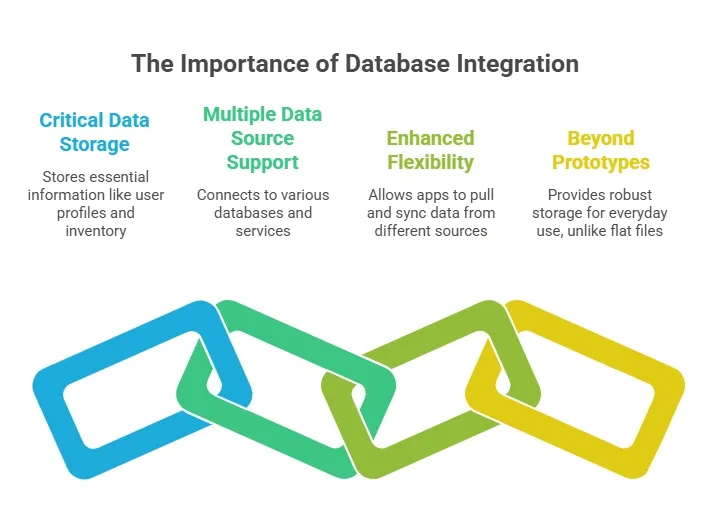
Holds critical data: Stores user profiles, task lists, inventory trackers, client portals, and more.
-
Supports multiple data sources: Connects to SQL databases, Google Sheets, Supabase, Airtable, or other hosted services.
-
Enhances flexibility: Lets your app pull data from different sources and keep everything in sync.
-
Beyond prototypes: Apps without proper database integration rely on flat files or temporary storage, which is fine for testing but not for everyday use.
Structured data storage is the backbone of any app meant for real users. When your AI app builder handles database integration, you get the freedom to focus on features and workflows without worrying about where your data lives or how it’s managed.
Why Database Integration Matters?
Even the smartest app won’t be very useful if it can’t store and manage its data. That’s where database integration comes in; it keeps your app organized, flexible, and ready for real-world use.
Structured data storage is the backbone of any app meant for real users. When your AI app builder handles database integration, you get the freedom to focus on features and workflows without worrying about where your data lives or how it’s managed.
Key Features to Look for in an AI App Builder
Choosing the right AI app builder isn’t just about flashy interfaces. The features under the hood make a huge difference in how fast and smoothly you can build apps. Here’s a practical checklist of what really matters.
Key Features:
-
Natural Language Prompts: Describe app features in simple sentences, like “user login” or “inventory tracker,” and watch the platform turn them into real screens and logic.
-
Built‑In Database Support: Connect to Supabase, Airtable, SQL databases, or other data sources for structured data and relationships.
-
API and Third‑Party Connections: Sync with external apps, payment gateways, messaging tools, or analytics services to extend your app’s capabilities.
-
User Authentication: Manage logins, role-based access, and audit logs to keep your app secure and organized.
-
Drag‑And‑Drop Visual Designer: Build and tweak screens visually, perfect for internal tools or client portals.
-
Deployment Options: Launch apps live, or export production ready React code if you want full control over development.
-
Free Plan and Paid Plans: Start small with a free plan, then scale with paid plans for more integrations, apps, and advanced features.
-
Workflow Automation: Trigger actions automatically, like sending emails on signup or syncing data between sources.
These features help you go from idea to functional app faster. A tool with strong AI, database integration, and automation options saves time, reduces headaches, and gives you a platform that grows with your app ambitions.
Comparing Popular Builders
Here’s a simple comparison of common AI app builders. This helps you see how tools stack up before digging deeper into choices.
| Feature | AI App Builder A | AI App Builder B | AI App Builder C |
|---|---|---|---|
| Natural Language Prompts | Yes | Yes | Yes |
| Database Integration | Supabase, Airtable | SQL only | Limited |
| Drag & Drop | Yes | Yes | No |
| Free Plan | Available | Limited | Available |
| User Auth | Yes | Yes | No |
| Export Code | Yes | No | No |
| Web Apps | Yes | Yes | Yes |
| Mobile Apps | Some Support | No | No |
This table gives a quick snapshot of what each builder offers, but remember numbers and checkmarks only tell part of the story. Consider your app’s needs, your comfort with data sources, and the level of automation you want before making a final choice.
Questions to Ask Yourself Before Choosing
Before diving into a platform, it helps to pause and ask yourself a few practical questions. Your answers will guide you to the AI app builder that fits your style, goals, and project needs.
Key Questions:
- What kind of app do you want to create?
Are you building a client portal, internal tools, or an inventory tracker? Each type favors different builders.
- Will your app scale over time?
If growth is on your roadmap, pick a platform that supports advanced workflows and complex data structures.
- Are you a non technical user or a developer?
Some tools focus on drag and drop visual design for non technical users. Others expect coding skills.
- Do you want production ready code export?
Certain builders let you export all code, so you can continue development outside the platform if needed.
Answering these questions honestly can save you time, frustration, and potential rebuilds later. Picking a builder that aligns with your app type, skill level, and future growth makes the entire process smoother and more enjoyable
What Users are Saying?
Some builders appreciate how Rocket.new can take a plain‑English prompt and turn it into a fully working app backend, UI, and all, much faster than traditional approaches.
One LinkedIn post even calls Rocket.new “not just another AI app builder” because it can generate complete apps ready for launch straight from a prompt. Linkedin
These voices highlight a real point from the community: people value speed and simplicity, but they also pay attention to how deep the data logic and structure go once an app gets complex. Some love the quick prototyping. Others want more room to grow.
A Closer Look at Rocket.new: Why It’s Worth Considering
Rocket.new is more than a no-code platform — it’s a vibe solutioning platform that transforms plain-English prompts into fully functional apps. This makes it ideal for people who want to focus on features and workflows instead of wrestling with code or databases.
With Rocket.new, you get a platform that combines frontend design, backend logic, and database integration in one place. That means you can build mobile and web apps that handle structured data, automate tasks, and connect to external services quickly.
Top Features
-
Prompt-Based App Creation: Describe your app in simple terms, and Rocket generates frontend, backend, authentication, and database structure automatically.
-
Database and API Connections: Connect Supabase, Stripe, OpenAI, or other data sources to manage users, tasks, or orders.
-
Figma Import: Converts design files into live, editable layouts
-
Code Export: Allows developers to extend or customize later
-
AI-Powered Backend: Automatically handles logic, data, and workflows
-
Reusable Components: Speeds up building with ready-to-use elements
-
Command-based actions: Use / and @ to run actions and quickly scope edits.
-
Live Preview: Shows instant updates while editing
-
Hosting: Publish your app live with one click, set up custom domains, or export production-ready code.
Why Rocket.new Works for AI App Builders?
Rocket.new isn’t just fast, it handles the core needs of database-connected apps:
-
Structured Data Management: Automatically sets up tables and relationships so your app can store, fetch, and manipulate data without extra coding.
-
Workflow Automation: Create automated actions triggered by database events, like updating records, sending notifications, or syncing with external services.
-
Multiple Data Sources: Pull in data from SQL databases, Google Sheets, or external APIs to keep your app flexible and connected.
-
Client and Team Tools: Perfect for internal dashboards, client portals, or small business apps where database reliability and integration are key.
With Rocket.new, you get a platform that matches the core expectations of an AI app builder with database integration, letting you focus on app ideas while it handles the data and logic behind the scenes.
Choosing the Best Fit: What Works for You?
With all the options out there, it’s easy to get overwhelmed. The right AI app builder depends on your goals, skills, and the type of app you want to create. Here’s a simple guide to help you narrow it down.
Key Considerations:
-
Skill Level: Are you a non-technical user or more of a developer? Pick a platform that matches your comfort with coding or visual design.
-
Project Type: Consider whether your app is a prototype, internal tool, client portal, or a full-scale product. Different builders handle these differently.
-
Workflow Complexity: Some tools are perfect for simple automated workflows, while others support complex business logic for growing apps.
-
Database Needs: Look for a builder that connects smoothly to your data sources and manages structured data effectively.
-
Long-Term Plans: Think about scaling. Will the builder support your app as it grows, or will you hit limits quickly?
Use these points to find a builder that fits your current needs and future growth. The best fit is one that feels intuitive, handles your data efficiently, and can grow with your app without forcing you to rebuild from scratch.
Your Ideal AI App Builder
Many app builders promise the world, but not all deliver when it comes to backend data, authentication, workflows, and real production needs. Choosing the wrong tool can leave you stuck rebuilding, losing time, or compromising on features your app really needs.
The solution is to pick a platform like Rocket.new that connects smoothly to data sources, supports both mobile and web apps, offers workflow automation, and responds to simple prompts. By using Rocket.new as your AI app builder with database integration, you can create functional, scalable apps quickly and focus on ideas instead of infrastructure.
Table of contents
- -Why Database Integration Matters?
- -Why Database Integration Matters?
- -Key Features to Look for in an AI App Builder
- -Comparing Popular Builders
- -Questions to Ask Yourself Before Choosing
- -What Users are Saying?
- -A Closer Look at Rocket.new: Why It’s Worth Considering
- -Top Features
- -Why Rocket.new Works for AI App Builders?
- -Choosing the Best Fit: What Works for You?
- -Your Ideal AI App Builder