
What’s stopping you from launching your app today? Build functional apps using AI tools, integrate Stripe payments, and start charging users quickly as digital payments continue to expand rapidly worldwide.
Can you really build an app and start accepting payments without coding?
Yes, you can. With an AI app builder and Stripe payment setup, you can create a working product, connect payments, and start charging users in a few hours. No deep coding skills required.
According to a Statista report, global digital payments are expected to exceed $11 trillion in volume by 2027, underscoring how quickly online payments are growing.
So if you have an idea, this is the perfect time to turn it into a real business.
What Does This Actually Mean?
Let’s keep it simple.
An AI app builder helps you create apps using natural language. You just describe your idea in plain English, and the AI generates code, sets up the database, and builds complete applications.
Stripe handles payments. It allows your app to accept money, manage subscriptions, and process checkout securely.
Put them together, and you get a powerful setup:
- AI builds your app
- Stripe handles payments
- You focus on your business
Sounds good, right?
That’s the real shift here. You’re no longer stuck in technical complexity. You’re free to move faster, test your idea, and actually start making money without waiting on developers.
Why Not Go With Traditional Development?
Well, traditional development is slow. You need developers. You need time. You need money. And sometimes, you need a lot of patience.
👉Worth a Quick Read: Vibe Solutioning vs Traditional Development: Making the Best Choice
Here’s what usually happens:
- You hire developers
- You explain your idea again and again
- You wait weeks for updates
- You deal with bugs and delays
Hiring developers can cost a lot, especially if you’re just testing app ideas.
With AI-powered tools, things change:
- You create apps faster
- You skip most of the technical implementation
- You don’t need advanced coding skills
That’s why many founders are moving away from traditional development.
How AI App Builders Actually Work?
Let’s break this down. An AI app builder uses artificial intelligence and AI agents to turn your idea into code. You type instructions in plain language, and the AI handles most of the process.
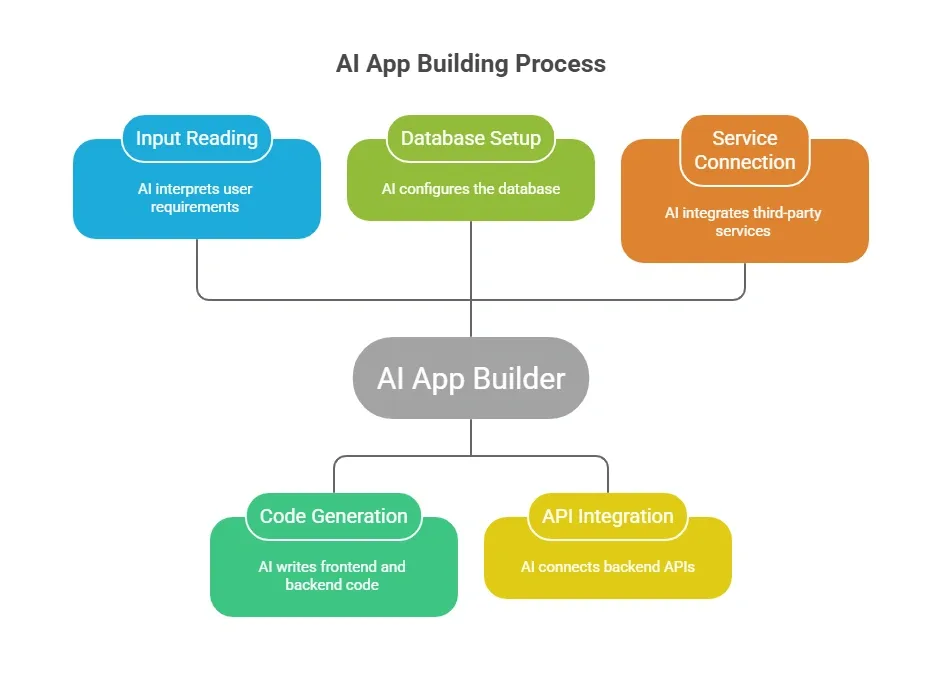
Some tools even use Claude code to improve accuracy and logic. You don’t need deep coding experience. Basic understanding helps, but it’s not required.
Step-by-Step: Build Your App with Stripe
Let’s walk through this step by step. Don’t worry, you don’t need heavy coding skills. Just follow along, and you’ll see how simple the process becomes with AI handling most of the work.
One quick tip before you start: don’t aim for perfection in your first version. Focus on getting a simple, working app live, then improve it based on real users' feedback.
Step 1: Start with Your Idea
Every project starts with an idea.
Think about:
- What problem are you solving?
- Who are your users?
- How will they pay?
Keep it simple. Good app ideas are often small and focused.
Example: A fitness app where users pay monthly for workout plans.
Step 2: Choose an AI App Builder
Pick tools that are user-friendly and support Stripe integration builder features.
Look for:
- Natural language input
- Workspace settings
- Hosting platform support
- Stripe payment integrations
These tools help you create complete applications without hiring developers.
Step 3: Build Core Features
Now tell the AI what to create.
Example prompt in plain English: “Create a web app with user accounts, login, dashboard, and subscription plans.”
The AI handles:
- User authentication
- Database management
- User management
- Backend setup
Your app starts taking shape quickly.
Step 4: Connect Stripe
Now comes the fun part. Payments. To connect Stripe,
You need:
- A Stripe account
- Stripe credentials
- Api key
Add these inside your workspace settings.
The AI can help with:
- Stripe checkout setup
- Payment processing
- Subscription management
- Web-hook handling
Now your users can pay and get access.
Step 5: Set Up Checkout Flow
Stripe checkout is simple.
You define:
- Product catalog
- Pricing
- Subscription plans
You can support:
- One time payments
- Monthly subscriptions
The AI app builder automatically configures Stripe payments in many cases.
Step 6: Handle Data and Access
After payments are made, you need to control access.
Example:
- Paid users get premium features
- Free users get limited access
This involves:
- Access control
- Database updates
- Webhook handling
The AI handles most of this logic.
Step 7: Test Everything
Testing is very important.
Check:
- Payments flow
- Checkout process
- User login
- Data updates
Use Stripe test mode to simulate payments. Run multiple test cases before going live.
Simple Workflow
If you’re someone who likes quick clarity, this table breaks down the entire process simply. You can see exactly what you need to do and what AI takes care of for you.
| Step | What You Do | What AI Handles |
|---|---|---|
| Idea | Describe the app idea | Suggest structure |
| Build | Define features | Generate code |
| Setup | Add Stripe credentials | Connect stripe |
| Payments | Create plans | Configure checkout |
| Testing | Run test cases | Fix errors |
| Launch | Go live | Monitor backend |
So, as you can see, you’re mainly guiding the process while AI does the heavy lifting. This is what makes building apps faster, simpler, and much more accessible today.
Community Insight
Here’s something a founder shared on LinkedIn:
“With Stripe, I had a sandbox and live test running in 5 minutes, with AI pretty much writing a bug free, fully functioning integration code in one shot.”
This shows how fast things are moving. Founders are using AI tools and Stripe together to build real apps, connect payments, and launch quickly without hiring developers.
Common Mistakes to Avoid
Let’s keep this real for a moment. When you’re building your app with AI and Stripe, a few small mistakes can slow you down or even cost you money. Here are the ones you should watch out for.
- Skipping testing: If you don’t test payments properly, you risk failed transactions or lost money. Always run multiple test cases before going live.
- Poor product catalog setup: Wrong pricing or unclear plans can confuse users. Keep your pricing simple and easy to understand.
- Ignoring fraud prevention: Stripe offers built-in fraud-prevention tools. Use them to keep your app and payments secure.
- Overcomplicating your app: Trying to build everything at once can slow your progress. Start small, launch fast, and improve over time.
If you avoid these mistakes, you’ll save time, reduce risk, and build a smoother experience for your users. Keep things simple, test properly, and grow step by step.
What About Security?
Good question. When money is involved, security is something you don’t want to ignore. The good news is that Stripe already covers much of this for you.
Stripe provides:
- Secure checkout
- Compliance requirements
- Fraud prevention tools
Your app should also:
- Store data safely
- Use secure api key handling
- Protect user accounts
Once you combine Stripe’s security features with basic best practices in your app, you create a setup that users can trust. And trust is what helps your business grow when real payments start coming in.
Rocket.new: Build and Launch Faster
Rocket.new is an AI-powered platform that helps you create complete applications quickly, without getting stuck in heavy coding or complex setups.
If you want to move fast and avoid traditional development headaches, this is a solid option. It’s built for founders who want to create, test, and launch apps with payments already in place.
Top Features
- Prompt to App Creation: Builds apps directly from single prompts
- Figma Import: Converts design files into live, editable layouts
- AI-Powered Backend: Automatically handles logic, data, and workflows
- Custom Domain Support: Publishes projects with a branded domain
- Code Export: Allows developers to extend or customize later
- Live Preview: Shows instant updates while editing
How to Connect Stripe with Rocket.new
Now let’s keep this simple. Connecting Stripe with Rocket. New is pretty straightforward, even if you don’t have much coding experience.
Here’s how it usually works:
-
Create your Stripe account: Go to Stripe and set it up. This is where your payments will be managed.
-
Get your Stripe credentials: Inside your Stripe dashboard, copy your api key and other Stripe credentials.
-
Add credentials in workspace settings: Go to Rocket.new and open your project workspace settings. Paste your api key there.
-
Enable Stripe checkout: Use Rocket.new’s Stripe integration builder to set up checkout pages for your app.
-
Set up products and pricing: Create your product catalog inside Stripe. Add subscriptions or one-time payments based on your idea.
-
Handle webhook events: Rocket.new helps you manage webhook handling, so your app knows when users pay, subscribe, or cancel.
-
Test before going live
Use Stripe test mode to simulate payments and check if everything works smoothly.
Rocket.new makes the whole process feel simple. You start with an idea, connect Stripe, and quickly turn it into a real business that can accept payments from day one.
How This Changes Business Building
Let’s be honest for a second. The way people build apps and businesses has changed a lot, and AI is a major reason for that.
Before this, you needed:
- Developers
- Time
- Big budgets
Now:
- AI handles most of the work
- You create faster
- You test app ideas quickly
Hiring developers is no longer the only way.
This is great for:
- Solo founders
- Content creators
- Students
This shift means you don’t have to wait months to get started. You can launch small, learn from real users, and grow your app's growth step by step. That’s how modern businesses are being built today.
A Smarter Way to Build Apps and Start Earning
Traditional development takes time, money, and skilled developers. Many founders struggle with coding skills and end up hiring developers just to test a simple idea, which slows everything down. With an AI app builder with Stripe payment integration, you can create apps, connect payments, and launch much faster. AI handles most of the technical implementation, while Stripe handles secure payments in the background.
You don’t need deep coding experience to build a real business today. Start with a simple idea, use ai powered tools, and test quickly with real users. Focus on what actually matters: value, users, and steady growth over time.
Table of contents
- -What Does This Actually Mean?
- -Why Not Go With Traditional Development?
- -How AI App Builders Actually Work?
- -Step-by-Step: Build Your App with Stripe
- -Step 1: Start with Your Idea
- -Step 2: Choose an AI App Builder
- -Step 3: Build Core Features
- -Step 4: Connect Stripe
- -Step 5: Set Up Checkout Flow
- -Step 6: Handle Data and Access
- -Step 7: Test Everything
- -Simple Workflow
- -Community Insight
- -Common Mistakes to Avoid
- -What About Security?
- -Rocket.new: Build and Launch Faster
- -Top Features
- -How to Connect Stripe with Rocket.new
- -How This Changes Business Building
- -A Smarter Way to Build Apps and Start Earning