
An AI backend generator auto-builds your APIs, database schemas, and authentication from a plain-language prompt. This guide covers how it works, which tools lead the space, a head-to-head comparison, and a security checklist before you deploy.
Modern backends are shifting from repetitive, manual setup toward AI-assisted generation covering APIs, authentication, database schemas, and deployment. This guide walks through what that shift looks like in practice, which tools are leading it, and how to choose the right approach for your project.
Can an AI backend generator really take an idea and produce a working backend in minutes?
Yes, and a growing number of developer teams are using exactly that to cut days of setup work down to hours.
According to Stack Overflow's 2025 Developer Survey, 84% of developers use or plan to use AI assistants in their development workflows. That means most teams are already relying on AI to write parts of their code, scaffold backend logic, and reduce repetitive setup cycles.
This guide covers what AI backend generation actually looks like in practice, where it genuinely helps, where it falls short, and how platforms like Rocket.new fit into real development workflows.
What's Changing in Backend Development?
Backend development has always centered on logic, data, infrastructure, security, and APIs. The work itself hasn't changed, but the tooling around it has.
Most backend developers spend significant time wiring up the same foundational pieces on every project: data models and database schemas, authentication and user management, REST or GraphQL APIs, deployment and environment configuration, and role-based access control. This setup work can consume days or weeks before a single line of actual business logic is written.
AI backend generators attack that problem by automating the scaffolding phase, generating the skeleton of a backend from a description, a schema, or a prompt. The result isn't always production-ready out of the box, but it gives teams a significant head start.
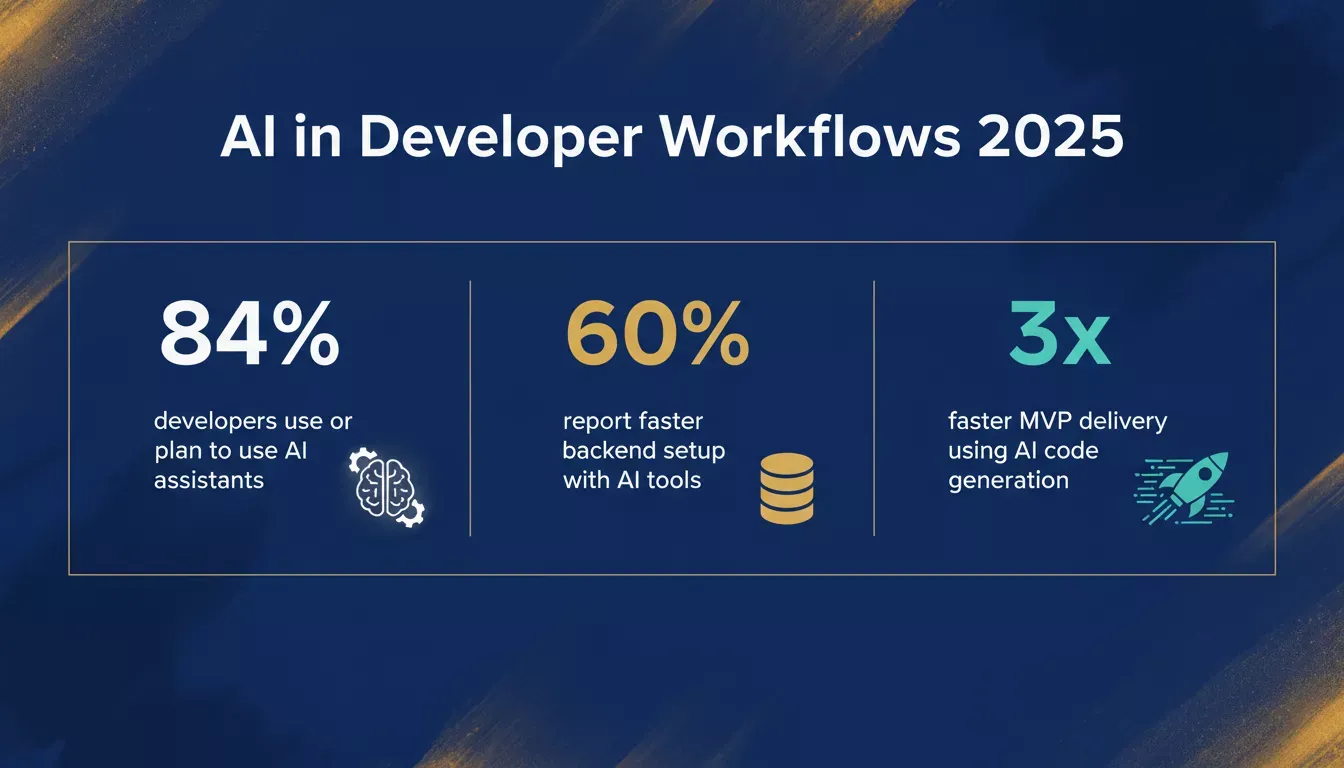 AI adoption in developer workflows is accelerating fast, with most teams now relying on AI for at least part of their backend setup.
Here's a practical breakdown of how this affects different roles:
| Benefit | What It Means in Practice | Who Benefits Most |
|---|---|---|
| Faster backend setup | Auth, database, and API wiring handled automatically | Backend developers on tight timelines |
| Auto-generated code scaffolds | Bootstrap common logic blocks without starting from scratch | Teams moving from idea to MVP |
| Schema templates | Database models ready to iterate on | New projects with defined data requirements |
| No-code onboarding | Non-developers can prototype functional apps | Founders, product managers, designers |
| Cloud-ready output | Deploy directly to hosting platforms | Product teams without dedicated DevOps |
How AI Tools Fit into Backend Development
AI backend tools aren't writing arbitrary code, they're trained on large volumes of programming patterns, framework conventions, and API structures. When used well, they can generate backend logic from natural language descriptions, produce database schema definitions and migration files, create authenticated API endpoints with role-based access, scaffold integration code for third-party services, and generate documentation alongside the code.
That said, AI output requires human review, especially around security and business logic. The scaffolding is often solid, but edge cases, access control logic, and data validation rules need developer attention before going to production.
One practical example: if you prompt an AI backend generator to create a user authentication system, it will typically produce a working OAuth or JWT flow. But whether that flow correctly enforces token expiration, handles refresh securely, or prevents privilege escalation depends on how carefully a developer reviews and tests the output.
The real value isn't that AI replaces backend judgment. It's that it removes the parts of backend work that don't require judgment.
For a deeper look at how AI in backend development improves API performance, the patterns are consistent: speed gains are real, but oversight remains essential.
The No-Code and AI Generation Trend
The no-code movement introduced drag-and-drop UI building. AI generation has taken that concept into the backend, allowing teams to describe what they want in natural language and receive a working structural output.
This lowers the barrier for non-technical teams to prototype functional applications, validate ideas, and build internal tools without immediately hiring a full backend team. For early-stage products, that speed matters.
However, it's worth being clear about the limits. For simple CRUD apps and MVPs, AI-generated backends are often sufficient with minimal modification. For complex domain logic, high-scale systems, or sensitive data, traditional backend development with AI assistance is still the right approach. For regulated industries like fintech and healthcare, human review of security architecture is non-negotiable regardless of how the code was generated.
What Developers Are Actually Saying
On LinkedIn, Ankita Kanara, a backend engineer with experience in Node.js and distributed systems, put it plainly:
"AI can handle the repetitive parts and speed up prototyping, but designing a backend that scales and stays secure still needs a real developer's judgment."
That framing, AI for repetition, developers for judgment, reflects how most experienced teams are integrating these tools in practice.
How an AI Backend Generator Works: The Core Flow
Understanding the workflow helps teams get the most from any AI backend builder or AI backend creator tool when building and managing AI workflows.
The process typically follows five stages: describe your app in plain language, the AI parses specific requirements from the prompt, it generates database schemas, API routes, and authentication configuration, a developer reviews and refines the output, and finally the app is deployed to
production.
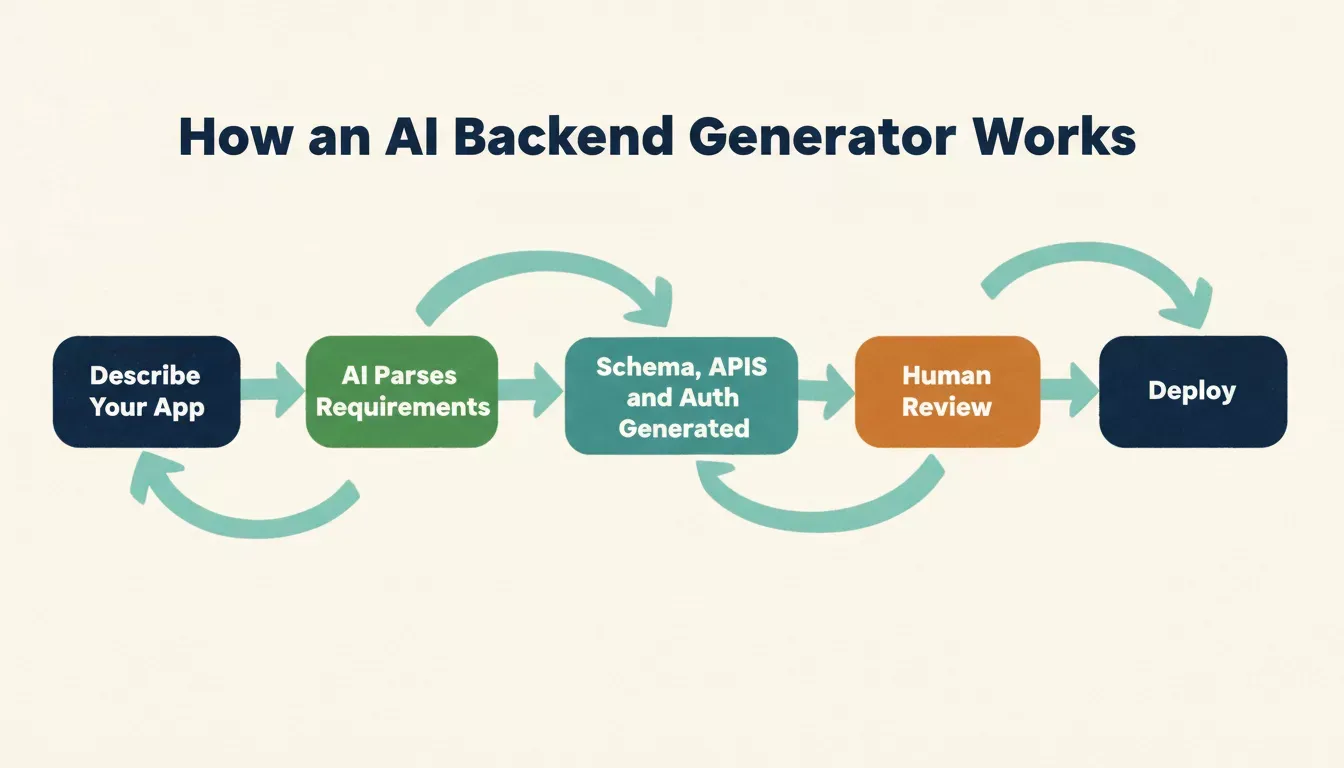 A typical AI backend generator transforms a plain-language description into a deployable backend in five steps.
5 Tool Comparison: Leading AI-Powered Backend Generators
The following tools represent different approaches to AI-assisted backend generation. They vary in how much control they give developers, what tech stacks they support, and how much of the backend they actually generate versus just scaffold.
| Tool | What It Generates | Code Export | Auth Built-in | Best For |
|---|---|---|---|---|
| Rocket.new | Full stack: UI, backend, APIs, DB | Yes, full codebase | Yes | Founders, product teams, rapid MVPs |
| Supabase | Database, auth, real-time APIs | Yes, open source | Yes | Developers wanting a Firebase alternative |
| Appwrite | Backend services: auth, DB, storage | Yes, self-hostable | Yes | Teams wanting full backend control |
| AWS Amplify | Cloud backend with AI assist | Yes | Yes | Teams already in AWS ecosystem |
| Xata | Serverless database + API layer | Partial | No | Data-heavy apps needing search |
Each tool has meaningful tradeoffs. Supabase and Appwrite give more direct database control. Rocket.new automates more of the end-to-end stack from a description. Bolt.new is browser-based software for full-stack generation, including Node.js backends and instant deployment. Base44 supports a wide range of app types, including productivity tools and business process automation. The most important question to ask any tool: Do you own the output?
Rocket.new: A Closer Look
Rocket.new is a vibe solutioning platform that generates full applications, frontend, backend, APIs, and database, from a plain-language description. The intent is to get from idea to a working, deployable app without the usual setup overhead.
Here's what the core workflow actually looks like.
Step 1: Describe your app in plain language, for example, "A project management tool with team workspaces, task assignment, and email notifications."
Step 2: Rocket.new generates the backend schema, API endpoints, authentication logic, and frontend UI automatically so teams can build fast from an idea.
Step 3: Review the output, adjust business logic as needed, and deploy with one click to ship a working app with minimal setup. Cloud-based platforms in this category also let teams build, edit, and deploy full-stack apps with real-time visual feedback.
Key Features
Natural language app creation: Describe your app once in plain text; Rocket.new builds frontend, backend, and APIs from that description.
Automatic backend setup: Database schemas, authentication flows, and core API logic are configured without manual wiring, which reduces repetitive automation work during setup. Rocket.new connects to Supabase for PostgreSQL, auth, real-time updates, and file storage, all scaffolded from chat, and teams can optimize the generated backend structure before deployment.
Figma design import: Import Figma files and get working UI code for web or mobile without additional conversion work. This is especially useful for design-to-code workflows.
Third-party integrations: Connect Stripe for payments, GitHub, analytics platforms, and email services without additional configuration, with support for enterprise needs as projects scale.
One-click deployment: Deploy to Netlify or a custom domain directly from the platform, so you can publish quickly once the app is ready. Learn more about launching your web app without server setup.
Exportable, editable codebase: The full generated codebase can be exported, modified, and maintained outside Rocket.new, with code snippets serving as useful starting points during refinement. You are not locked in.
Use Cases
| Use Case | What You Build | Who Benefits |
|---|---|---|
| Startup MVPs | Working backend from a prompt that can transform an idea into a live build fast | Entrepreneurs |
| Product teams | Rapid feature testing with real backend logic | PMs and engineers |
| Internal tools | Admin dashboards with ready APIs and user management for business process automation | Operations teams |
| Design-to-app workflow | Figma designs linked to backend logic | Designers |
| Team prototyping | Quick ideas without a full backend team, with early sharing across the team or community | Cross-functional teams |
Tips for Using AI Backend Tools Effectively
Five practical tips that apply whether you're using Rocket.new, Supabase, or any other AI backend generator.
Whether you're using Rocket.new, Supabase, or another AI backend generator, these practices apply across the board.
1. Be specific in your prompts. Vague descriptions produce generic scaffolding. The more detail you give, data models, user roles, specific API behaviors, and specific requirements- the closer the output will be to what you actually need.
2. Review authentication logic before deploying. AI-generated auth flows are usually structurally sound, but token expiration handling, refresh logic, and role enforcement need explicit human review before exposing any endpoint to real users.
3. Validate API responses against your business rules. Auto-generated APIs handle the happy path well. Edge cases, empty states, permission boundaries, rate limiting- need manual testing, and reviewing core backend concepts helps catch flawed logic early.
4. Run security scanning before going live. Use a static analysis tool such as Semgrep or Snyk on the generated code before production deployment. AI generators do not always catch injection vulnerabilities or insecure default configurations.
5. Use AI generation for structure; use your team for logic. The biggest wins come when AI handles the scaffolding and your developers focus on the business rules that differentiate your product, improving team efficiency.
For teams building full-stack apps with AI prompts, following these practices from the start saves significant rework later.
8 Code, Data Secure Practices, and What to Review
AI-generated backends need a security review before production deployment. Here is a concrete checklist, and some AI-driven tools can also detect vulnerabilities and auto-generate unit tests during UI changes:
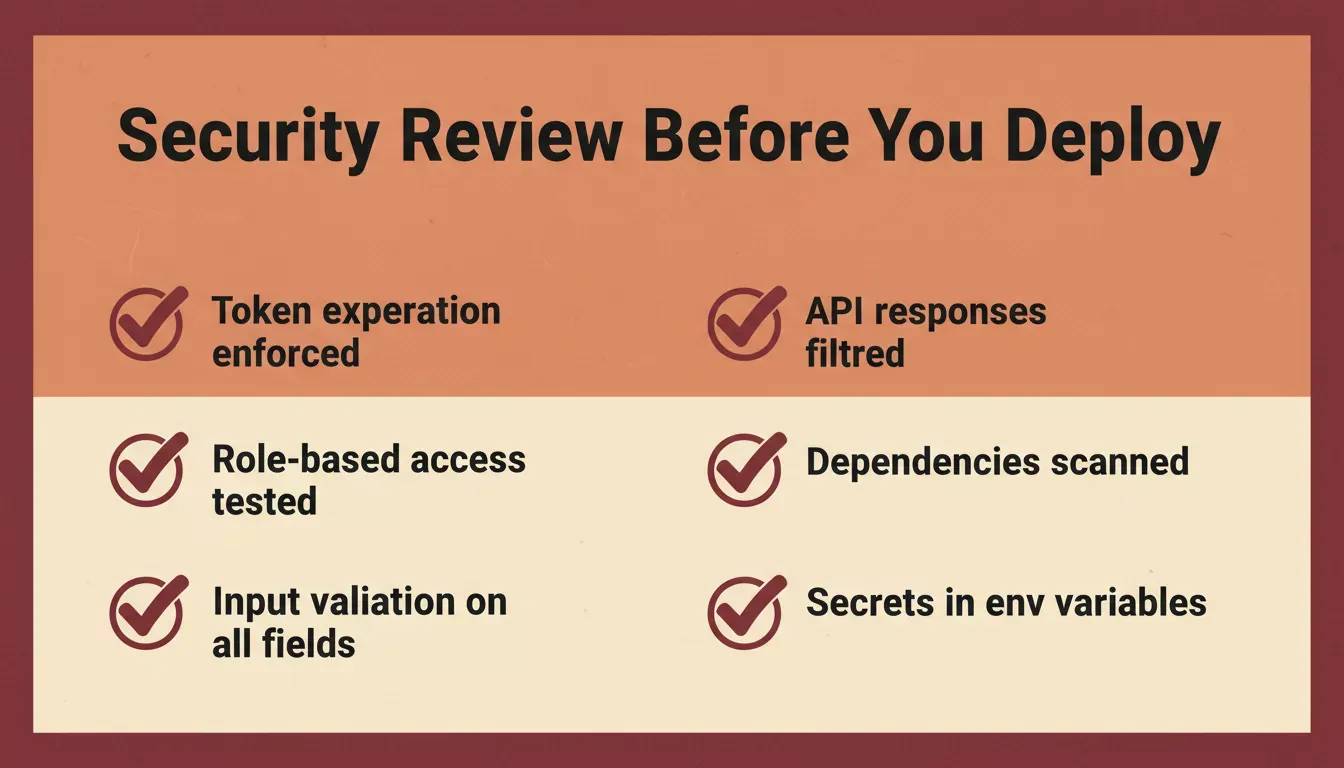 Run through this checklist before any AI-generated backend goes live, especially for apps handling user data.
- Authentication: Confirm token expiration is enforced. Verify that refresh tokens are rotated correctly and invalidated on logout.
- Authorization: Test that role-based access controls actually prevent unauthorized access. Do not assume the generated logic is correct without testing it.
- Input validation: Check that API endpoints validate and sanitize input. AI-generated handlers sometimes omit validation on optional fields.
- Data exposure: Review API responses to ensure they do not return fields that should not be client-accessible, such as password hashes, internal IDs, or admin flags.
- Dependency security: Run npm audit or equivalent to check for vulnerable packages in the generated dependency tree.
- Environment variables: Confirm that secrets such as API keys and database credentials are handled via environment variables, not hardcoded, and review secret handling carefully to keep data secure.
For teams in regulated industries, consult the OWASP API Security Top 10 as a baseline checklist before any AI-generated backend goes to production. Rocket.new also provides a built-in security and compliance guide for apps built on the platform.
Choosing the Right Backend Strategy
A practical decision framework for when to use an AI backend generator versus traditional development:
Use this framework to decide when AI generation is the right call and when traditional development is still the better path.
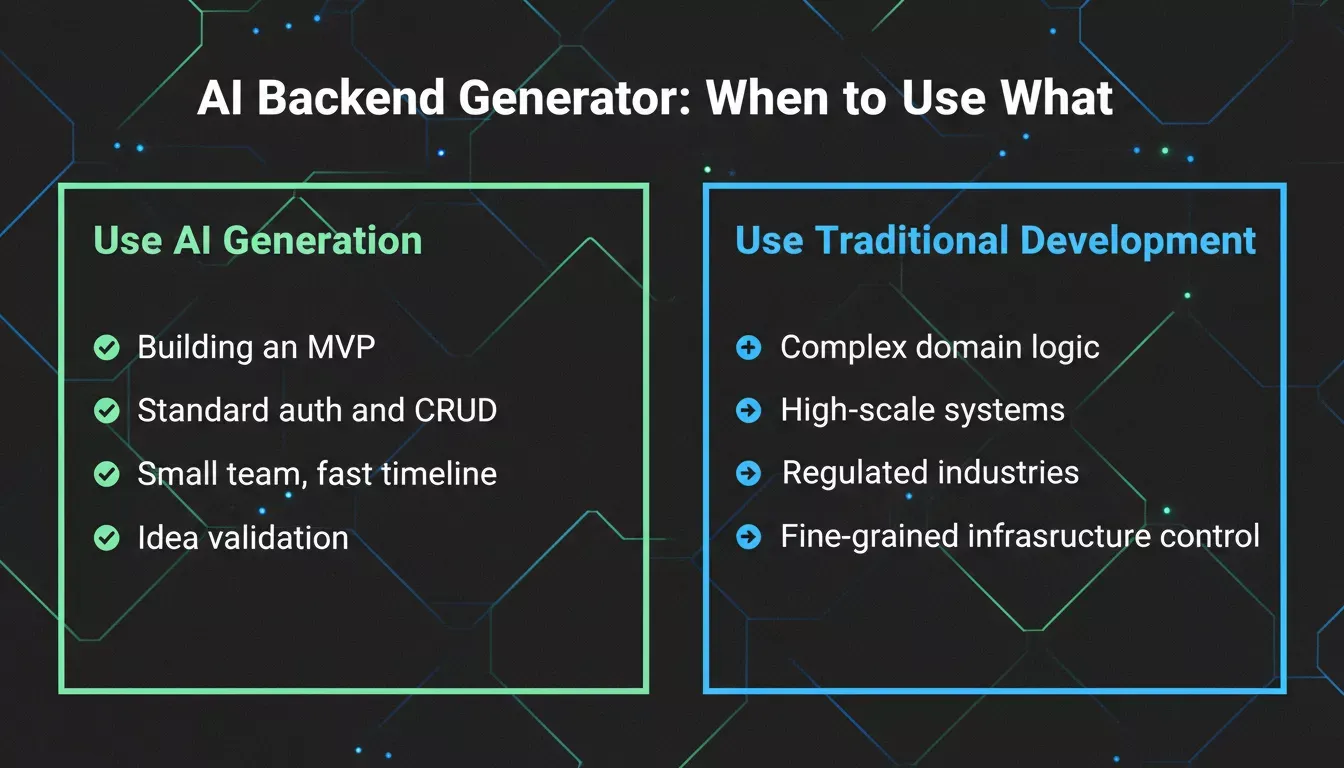 Use AI backend generation when you are building an MVP or prototype and speed matters more than optimization, your backend follows common patterns such as CRUD APIs and standard auth, you want to test a product idea before investing in custom backend architecture, or you have a small team without dedicated backend engineering resources.
Stick with traditional backend development when your business logic is highly domain-specific and does not map to common patterns, you are building for high scale or performance-critical workloads, you are operating in a regulated industry with specific compliance requirements, or you need fine-grained control over infrastructure and security architecture. Some advanced AI generators can communicate with CI/CD systems to configure Kubernetes clusters and manage auto-scaling, but these setups still need expert review.
Combine both when you want AI to handle initial scaffolding while your developers refine and extend, you are iterating on a product that started as an MVP and is moving toward production, or you want to maintain velocity while keeping engineering quality high. This hybrid approach helps teams use AI where infrastructure is standard and keep human control where systems are complex. Teams building no-code AI apps are already proving this combination works at scale.
The fastest path to a real product usually blends both: AI for structure and speed, developers for judgment and refinement.
Eliminate Repetitive Scaffolding
AI backend generators have become genuinely useful, not as a replacement for backend engineering or the backend developer, but as a way to eliminate the repetitive scaffolding work that slows teams down at the start of every project.
Used well, an AI backend generator means your team spends less time on setup and more time on the parts of your product that actually differentiate it, which is especially useful when building software under tight timelines. The tools that work best give you real, exportable code you can modify and maintain, not black-box platforms that lock you into a proprietary runtime.
If you are ready to stop wiring up backends by hand and build fast while shipping faster, Rocket.new is built for exactly that. From database schemas to authentication and one-click deployment, Rocket.new gives every team the speed of an AI backend builder without sacrificing code quality.
Start building on Rocket.new for free and go from idea to live app in minutes.
Table of contents
- -What's Changing in Backend Development?
- -How AI Tools Fit into Backend Development
- -The No-Code and AI Generation Trend
- -What Developers Are Actually Saying
- -How an AI Backend Generator Works: The Core Flow
- -5 Tool Comparison: Leading AI-Powered Backend Generators
- -Rocket.new: A Closer Look
- -Key Features
- -Use Cases
- -Tips for Using AI Backend Tools Effectively
- -8 Code, Data Secure Practices, and What to Review
- -Choosing the Right Backend Strategy
- -Eliminate Repetitive Scaffolding