Most marketing teams use AI daily but still spend hours fixing generic output. This blog gives you a five-part prompt framework, ready-to-use templates for email campaigns, lead scoring, and segmentation, and a direct path from prompt to deployed workflow.
Does your AI output still need a full rewrite before it goes live?
According to HubSpot's AI Trends for Marketers report, 66% of marketers globally use AI in their roles. Yet most still copy generic output into their tools and spend another hour fixing it.
The gap comes down to one skill: writing prompts that produce usable output on the first try. This guide gives you a practical framework, ready-to-use templates, and a clear path from prompt to production.
No theory. No vague advice. Just working prompts for real marketing workflows.
What is a Marketing Automation Prompt?
A marketing automation prompt is a structured natural language instruction. It tells an AI system exactly what workflow to build, what audience to target, what trigger to use, and what success looks like. It is not a search query. It is a precise brief that produces deployable output on the first attempt.
The difference between a chatbot prompt and a marketing automation prompt is scope. A chatbot prompt asks for a single response. A marketing automation prompt asks for a complete system: trigger conditions, audience segments, email sequences, compliance constraints, and measurable goals, all in one structured input.
In short, a well-formed marketing automation prompt answers five questions at once. It covers who the audience is, what triggers the workflow, what format is needed, what constraints apply, and what success looks like in measurable terms. When all five are present, the output goes directly into your platform without a rewrite cycle. To understand how this structured approach applies across use cases, explore natural language prompts.
Why Marketing Teams Need Structured Prompts Today
Marketing automation used to mean dragging boxes into flowcharts. Now it means talking to AI in plain language and getting a working system back. The shift is already here, and the data confirms it.
-
88% of organizations now use AI regularly in at least one business function, up from 78% the previous year, according to McKinsey's 2025 State of AI survey. The shift from experimentation to daily use is real.
-
Teams that write vague prompts get vague results. A prompt like "create email campaign" returns generic copy that needs rewriting. In contrast, a structured prompt specifying audience, tone, trigger conditions, and success metrics returns something deployable.
-
Revenue increases from AI are most commonly reported in marketing and sales functions. The ROI is real, but only for teams that know how to direct the AI precisely.
-
Manual campaign setup that once took a marketing ops team two days can now happen in a single prompt session. The bottleneck is no longer the tool. It is the quality of the instruction.
The teams seeing results are not using different AI models. They are writing better prompts. That is the single highest-leverage skill in marketing operations right now.
The Prompt Quality Gap Most Teams Miss
Most marketers treat AI prompts like search queries. They keep them short and vague, hoping the tool figures out the rest. That approach fails every time with automation workflows.
-
A well-structured prompt reduces revision cycles by 60-80%. Teams that invest five minutes in prompt design save hours in back-and-forth editing.
-
The gap shows up clearly. One team writes "make a drip campaign for new signups" and gets a generic three-email sequence. Another team specifies the product, the signup source, the tone, the CTA goal, and the timing rules. They get a deployable workflow.
As Emily Kramer wrote in her MKT1 Newsletter, the future of marketing ops is "building AI teammates" through structured prompt workflows. That shift from casual prompting to systematic prompt engineering best practices separates teams that ship from teams that tinker.
What Makes an Effective Prompt for Marketing Workflows?
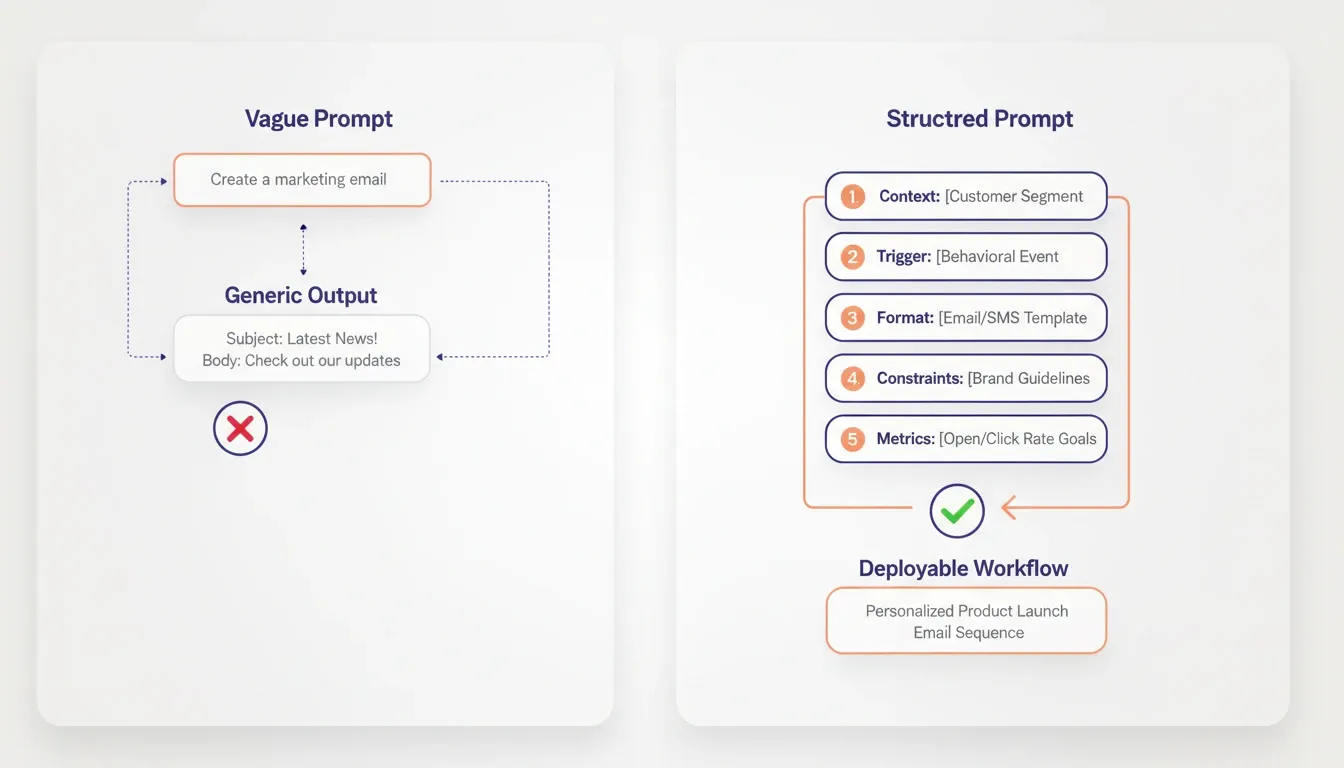
The difference between a prompt that works and one that does not comes down to five elements. Miss any one and the output falls flat.
-
Context first: Tell the AI who you are, what you sell, and who your audience is. A B2B SaaS company targeting CFOs needs completely different output than a DTC brand targeting Gen Z shoppers.
-
Specify the automation trigger: Every marketing workflow starts with a condition. Name it explicitly. For example: "When a lead downloads the pricing PDF" or "when a trial user has not logged in for three days."
-
Define the output format: State clearly whether you want email copy, a workflow diagram, segmentation rules, or an entire campaign sequence.
-
Set constraints: Word count limits, brand voice guidelines, compliance requirements, and channel specifications prevent the AI from generating unusable content.
-
Include success metrics: Tell the AI what good looks like. "Target 35% open rate" or "reduce unsubscribe rate below 0.5%" gives it a measurable goal to work toward.
HubSpot research found that 75% of marketing leaders whose organizations invested in AI saw positive ROI. The leaders consistently cite clear, structured instructions as the reason their AI investments pay off.
These five elements form a repeatable framework. Write them once as a template, and every prompt your team produces will hit a higher baseline quality.
A Five-Part Framework for Automation Prompts
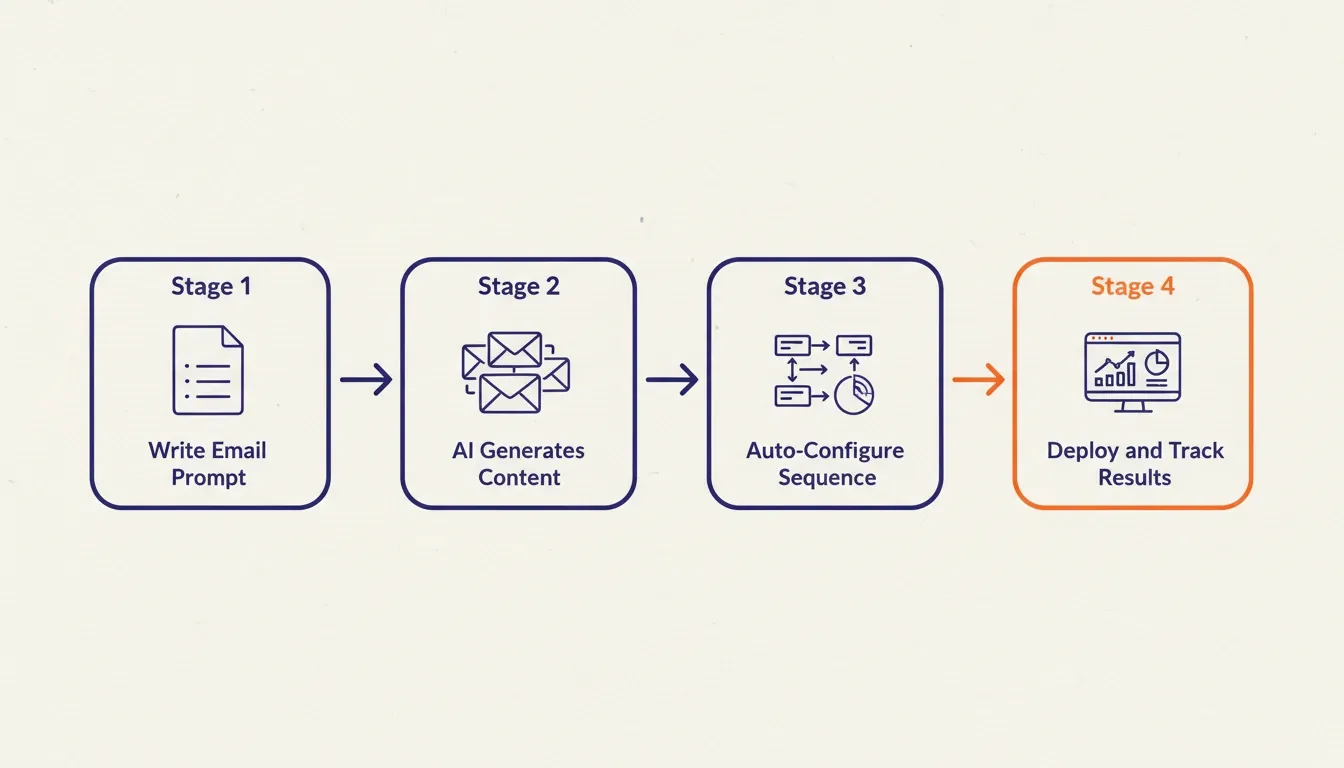
Here is the framework visualized. Each element feeds into the next, and skipping any step degrades the output.
-
Start with context on every single prompt. Teams that skip this step spend twice as long editing AI output compared to teams that include it.
-
The trigger and output format together account for most prompt accuracy. When the AI knows what event triggers the automation and what format you need back, the results are immediately usable.
-
Constraints and success metrics act as guardrails. They prevent the AI from generating a 500-word email when you needed 80 words. They also stop it from suggesting campaigns that violate GDPR consent rules.
Ready-to-Use Prompts for Core Marketing Tasks
Below are prompts you can copy, adapt, and use immediately. Each follows the five-part framework and targets a specific automation workflow. For a broader look at how AI handles business workflow automation, the same structural principles apply across departments.
Email Campaign and Drip Sequence Prompts
Prompt 1: Welcome Drip Sequence
We are a B2B project management SaaS with 14-day free trials. Create a 5-email welcome drip sequence triggered when a user signs up. Tone is friendly and professional, not salesy. Email 1 (day 0): welcome and quick-start guide link. Email 2 (day 2): highlight one power feature with a use case. Email 3 (day 5): share a customer success story. Email 4 (day 10): address common trial objections. Email 5 (day 13): urgency-based conversion CTA with a limited offer. Keep each email under 120 words. Target: 40% open rate across the sequence.
Prompt 2: Re-engagement Campaign
Our e-commerce brand sells sustainable home goods. Create a 3-email re-engagement campaign for customers who have not purchased in 90 days. Trigger: last purchase date exceeds 90 days. Include a personalized product recommendation based on past purchase category. Tone: warm and conversational. Email 1: We miss you, with new arrivals. Email 2: exclusive 15% discount. Email 3: last chance reminder. Each email under 100 words. Target: recover 5% of dormant customers.
Prompt 3: Event-Based Nurture
We run a fintech API platform. Build a 4-email nurture sequence triggered when a developer downloads our API documentation. Focus on technical credibility, not marketing speak. Email 1 (day 0): link to sandbox environment. Email 2 (day 3): common connection patterns. Email 3 (day 7): case study from a similar-sized company. Email 4 (day 14): offer a live technical walkthrough. Under 90 words each. Target: 25% click-through to sandbox.
Lead Scoring and Segmentation Prompts
Prompt 4: Lead Scoring Model
We sell enterprise HR software to companies with 500+ employees. Create a lead scoring model with point values for: website visits (page type and frequency), content downloads (whitepaper vs case study vs pricing page), email engagement (opens vs clicks vs replies), demo requests, company size, job title seniority, and industry fit. Assign weights from 1-10. Define three segments: cold (0-30 points), warm (31-70), hot (71+). Include recommended next actions for each segment.
Prompt 5: Audience Segmentation Rules
Our SaaS has three pricing tiers: Starter, Growth, and Enterprise. Create segmentation rules that categorize trial users into likely-to-convert tiers based on: team size during signup, features used in first 7 days, tools connected, and support tickets filed. Output as a decision tree with clear if/then conditions. Flag users showing enterprise behavior on free trials for immediate sales outreach.
The core principle: the more specific your context, the more actionable the AI output becomes. Generic prompts produce generic segments that nobody trusts enough to act on.
Prompt 6: Behavioral Trigger Automation
We operate a B2B analytics platform. Build a behavioral trigger automation for users who visit the pricing page three or more times in a seven-day window without converting. Trigger: three pricing page visits within seven days, no purchase event. Output: two-email sequence plus a sales alert. Email 1 (same day): value reinforcement with a case study matching the user's industry. Email 2 (day 3): offer a 20-minute ROI walkthrough. Sales alert: Slack notification to account owner with user's company, role, and visit history. Target: 15% demo booking rate from this segment.
These prompts work even better when the platform does the heavy lifting. Describe your full marketing automation system to Rocket and get a deployed, production-ready application back in minutes. Try Rocket.new and skip the manual configuration step entirely.
Prompt Comparison: Vague vs. Structured
| Prompt Type | Example | Output Quality | Time to Deploy |
|---|---|---|---|
| Vague | "Create email campaign" | Generic, needs full rewrite | 2-3 hours editing |
| Partially structured | "Create welcome email for SaaS trial users" | Usable with edits | 45-60 min editing |
| Fully structured (5-part) | Full context + trigger + format + constraints + metric | Deployable on first try | 5-10 min review |
| Modular (one prompt per module) | Separate prompts for email, segment, trigger | Production-ready system | Immediate deployment |
Advanced Prompt Patterns for Marketing Operations
Once your team has the five-part framework in place, these patterns unlock higher-order automation capabilities. For teams building custom automation workflows, the modular approach below applies directly.
The Modular Campaign Architecture Pattern
Instead of one prompt for an entire campaign, build a prompt library where each module handles one function. The outputs then connect into a complete system.
-
Module 1: Audience definition. Define your ICP, segment criteria, and exclusion rules.
-
Module 2: Trigger logic. Specify every entry condition, exit condition, and re-entry rule.
-
Module 3: Content sequence. Write each email, SMS, or in-app message separately.
-
Module 4: Scoring and routing. Define lead scoring weights and handoff conditions.
-
Module 5: Analytics and reporting. Specify the metrics, reporting cadence, and alert thresholds.
Each module produces a clean output that slots into the next. The full campaign assembles from five precise inputs rather than one overloaded prompt that produces shallow results across all five dimensions.
The Brand Voice Anchoring Pattern
AI-generated marketing copy defaults to a generic professional tone unless you anchor it explicitly. Add this block to every content-generating prompt:
Match the tone of the following sample content exactly. Preserve sentence length, vocabulary level, use of humor, and formality. [Paste 150-200 words of your best-performing existing copy here.]
This single addition removes the most common complaint about AI marketing output: that it sounds robotic or off-brand.
The Compliance-First Pattern
For regulated industries such as fintech, healthcare, legal, and insurance, lead with compliance constraints before any content request:
All output must comply with [CAN-SPAM / GDPR / HIPAA / FCA] requirements. Specifically: [list your three most critical compliance rules]. Do not include any claims that require regulatory approval. Flag any section that approaches a compliance boundary with a [REVIEW] tag.
Stating compliance requirements at the start prevents the AI from generating content your legal team will reject. This approach saves an entire review cycle.
How Do Prompts Connect to Automation Platforms?
Writing a great prompt is step one. Getting that output into a working system is step two, and this is where most teams stall.
The traditional workflow has three friction points:
-
The translation gap. You write a prompt and get email copy. Then you manually configure your automation platform to send it. The AI produced text. You still built the system.
-
The context reset. Every new prompt session requires re-explaining your audience, brand voice, and campaign goals from scratch.
-
The integration overhead. Connecting prompt output to your CRM, email platform, and analytics tool requires separate configuration in each system.
The prompt-native approach removes all three. Describe what you want in plain language and the platform builds the complete automation. This includes triggers, email copy, segmentation logic, and deployment. There is no manual configuration step, no context re-entry, and no integration overhead.
Teams using agentic AI platforms that handle full marketing automation workflows report shipping marketing systems three times faster than teams using separate prompt tools and automation tools. The connection layer matters more than the prompt itself. A well-crafted prompt loses its value if you spend 45 minutes manually translating the output into platform-specific rules.
From Prompt to Production: Building a Marketing System with AI
Most AI tools generate text. They do not generate systems. The difference between getting email copy and getting a deployed marketing automation platform from one conversation is the difference between a prompt tool and a platform that covers the full arc.
Rocket is the world's first Vibe Solutioning platform. It is where business thinking and building happen in the same place. For marketing teams, this means the research that validates your campaign strategy, the automation system that executes it, and the competitive intelligence that informs it all live in one workspace with shared context.
What Rocket produces from a single marketing automation prompt:
-
Rocket takes a single prompt and generates a complete, working marketing automation platform. The output is not a mockup or wireframe. It is a production-ready application with email sequences, segmentation logic, analytics dashboards, and deployment, all from one session.
-
The platform connects to Mailchimp, Brevo, and SendGrid for email delivery, Supabase for database and authentication, Stripe for billing, and Mixpanel for analytics. Authenticate once, and every tool is available in every build.
-
Every follow-up prompt builds on prior context. You never re-explain your audience segments, brand voice, or campaign goals. The tenth iteration knows everything the first nine established.
-
1.5 million people have tried Rocket across 180 countries, from solopreneurs launching their first campaign to enterprise teams replacing fragmented tool stacks.
The three Rocket pillars marketing teams use most:
| Pillar | What It Does for Marketing Teams |
|---|---|
| Solve | Validates campaign strategy, generates audience research, and produces structured briefs with data and recommendations |
| Build | Generates complete marketing automation platforms, landing pages, email systems, and analytics dashboards from natural language |
| Intelligence | Monitors competitor campaigns, pricing changes, and messaging shifts continuously, and surfaces signals before your next planning cycle |
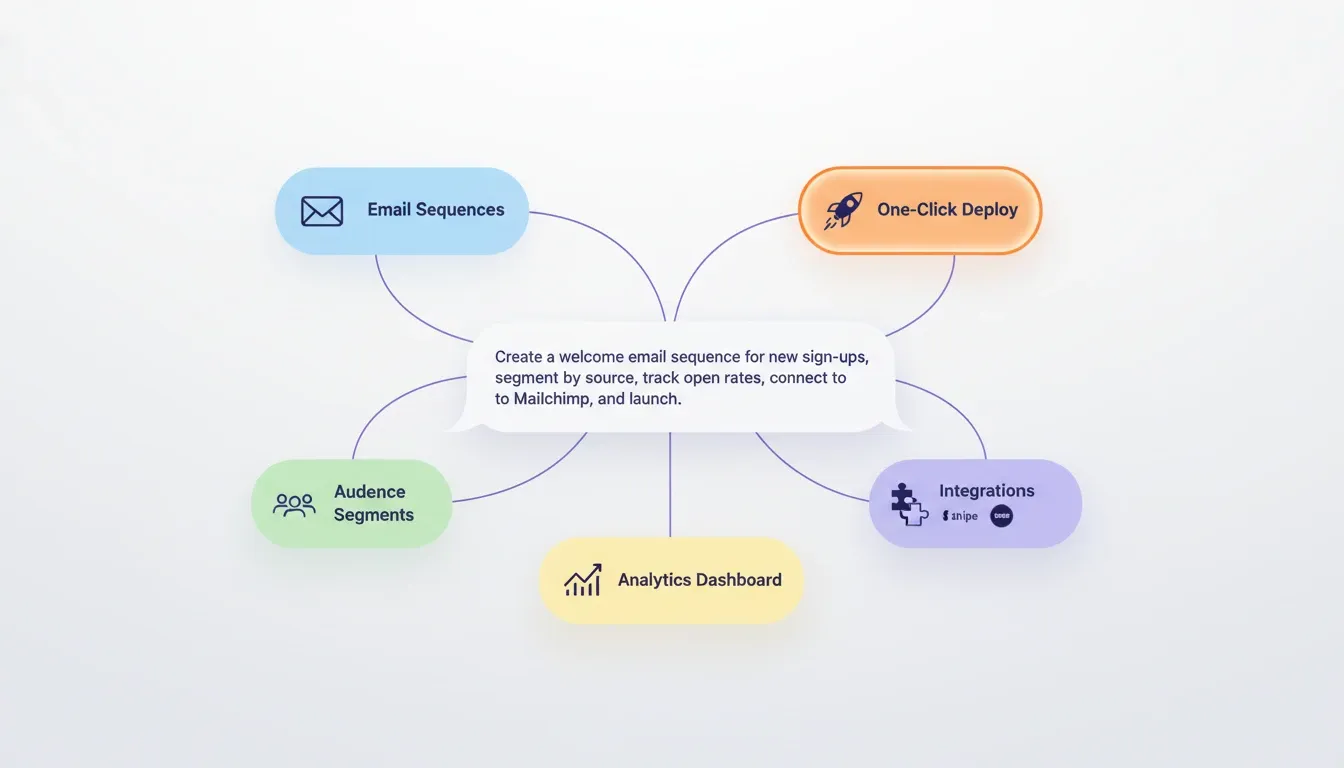
Rocket connects your campaign strategy, automation build, and competitive intelligence in one shared workspace.
Prompt Mistakes That Break Marketing Automation Workflows
Even teams with good intentions make these errors. Each one adds hours of rework or produces campaigns that underperform.
| Mistake | What Happens | Fix |
|---|---|---|
| No audience context | AI writes generic copy that resonates with nobody | Add company type, customer persona, and industry in every prompt |
| Missing trigger condition | Output cannot be automated because there is no start event | Always name the specific event that initiates the workflow |
| Vague success metric | No way to evaluate whether the output is good enough | Include a quantifiable target: open rate, conversion %, response time |
| Overloading one prompt | AI tries to handle too many tasks and produces shallow results | Break complex automations into one prompt per module |
| Skipping brand voice | Output sounds robotic or mismatched to your brand | Paste a sample of your existing content and say "match this tone" |
| No compliance mention | AI ignores GDPR, CAN-SPAM, or consent requirements | State regulatory constraints explicitly |
| No exit or re-entry rules | Contacts get stuck in loops or receive duplicate sequences | Define exit conditions and re-entry eligibility in every workflow prompt |
The most common pattern is overloading a single prompt with an entire campaign. Break it down. One prompt per email. One prompt per segment. One prompt per trigger rule. Then assemble the pieces into your workflow.
Where Should Teams Start with Prompt-Driven Automation?
You do not need to overhaul your entire marketing stack on day one. Instead, start with one workflow and expand from there. Teams that want to automate product development using AI follow the same incremental approach.
-
Week 1: Pick your highest-volume repetitive task. For most teams, this is welcome emails or lead follow-ups. Write one structured prompt using the five-part framework. Then compare the output to what you currently produce manually.
-
Week 2: Build a prompt library. Document your best-performing prompts as templates. Assign each template to a campaign type: nurture, re-engagement, onboarding, or upsell. This becomes your team's playbook.
-
Week 3: Connect prompts to execution. Move from generating text in a chatbot to generating entire workflows in a platform that deploys them. Choosing the right AI app builder for this step determines whether you ship in hours or weeks.
-
Week 4: Measure and iterate. Track open rates, conversion rates, and time-saved metrics against your pre-prompt baselines. Use performance data to refine your prompt templates for the next cycle.
The teams that win are not the ones with the fanciest tools. They are the ones that started with one good prompt, measured the result, and built from there.
Quick Reference: Prompt Template by Campaign Type
| Campaign Type | Key Trigger | Must-Have Constraints | Primary Metric |
|---|---|---|---|
| Welcome drip | User signup | Tone, email count, word limit per email | Open rate, trial-to-paid conversion |
| Re-engagement | Days since last purchase or login | Personalization rule, discount cap | Reactivation rate |
| Lead nurture | Content download or demo request | Industry-specific language, no hard sell | Click-through to next stage |
| Upsell or cross-sell | Feature usage threshold | Pricing accuracy, upgrade path clarity | Upgrade conversion rate |
| Win-back | Subscription cancellation | Empathetic tone, no aggressive urgency | Resubscription rate |
| Event follow-up | Webinar attendance or form submission | 24-hour send window, relevance to event topic | Reply rate, booked meetings |
Your Prompts Are Your Marketing Strategy Now
AI prompts for a marketing automation platform are now the operating layer for every campaign, segment, and workflow a high-performing team ships. The teams seeing results today are not using different models. They are writing better prompts, building modular systems, and connecting those systems to platforms that deploy them without manual translation.
As AI capabilities advance, the gap between teams with structured prompt practices and those without will widen. The frameworks in this guide give you the foundation to close that gap now.
Type your marketing automation requirements into Rocket.new and get a production-ready platform back, without the manual configuration step.
Table of contents
- -What is a Marketing Automation Prompt?
- -Why Marketing Teams Need Structured Prompts Today
- -The Prompt Quality Gap Most Teams Miss
- -What Makes an Effective Prompt for Marketing Workflows?
- -A Five-Part Framework for Automation Prompts
- -Ready-to-Use Prompts for Core Marketing Tasks
- -Email Campaign and Drip Sequence Prompts
- -Lead Scoring and Segmentation Prompts
- -Prompt Comparison: Vague vs. Structured
- -Advanced Prompt Patterns for Marketing Operations
- -The Modular Campaign Architecture Pattern
- -The Brand Voice Anchoring Pattern
- -The Compliance-First Pattern
- -How Do Prompts Connect to Automation Platforms?
- -From Prompt to Production: Building a Marketing System with AI
- -Prompt Mistakes That Break Marketing Automation Workflows
- -Where Should Teams Start with Prompt-Driven Automation?
- -Quick Reference: Prompt Template by Campaign Type
- -Your Prompts Are Your Marketing Strategy Now