
Want to launch your app idea faster? App builders enable quick web and mobile development with minimal coding. As low-code tools grow, founders use them to save time and bring products to market efficiently.
How can you launch your app idea without spending months?
You can do it using app builders. These tools let you create web and mobile apps quickly, with little to no coding.
According to Statista, the global low-code market is expected to grow significantly as more founders choose faster ways to build products.
So, if speed matters to you, this approach just makes sense. This is exactly the kind of shift founders are leaning into right now.
So in this blog, I'm going to get you through some aspects of the app builders that are likely to resonate with business people and entrepreneurs.
Why Entrepreneurs Are Turning to App Builders?
So, what’s driving this shift?
Entrepreneurs today want speed. They want to test an app idea, launch fast, and improve along the way. Traditional mobile app development just doesn’t match that pace. It takes time, money, and solid technical skills, which can slow things down early on.
Here’s why more founders are choosing an app builder instead:
-
Faster launch time: You can go from idea to working web apps or mobile apps in days, not months.
-
No need for heavy coding: A no code app builder removes the need for constant writing code, making it ideal for non technical users.
-
Simple design process: With a drag-and-drop interface, you can build your user interface visually using ready-made elements.
-
AI-powered building: An AI app builder lets you create apps using natural language prompts, which speeds up the whole app development process.
-
Lower costs: Many tools offer a free plan, so you can test your idea before moving to paid plans.
-
Flexible use cases: You can create everything from internal tools to client portals and even data driven apps connected to Google Sheets.
So, while it might sound a bit futuristic at first, the truth is simple. Using an app builder is one of the fastest and most practical ways to turn ideas into functional apps today..
Types of Apps You Can Build
Next, let’s talk about what you can actually create.
With the right app builder, you can build apps across different categories:
-
Web apps for dashboards, tools, and platforms
-
Mobile apps for iOS and Android
-
Internal tools for managing operations
-
Client portals for customer access
-
Data driven apps connected to Google Sheets or databases
Some tools even help you build native mobile apps or progressive web apps, depending on your needs. And yes, you can even create fully functional web apps that feel like real products.
No-Code vs Low-Code: What Should You Pick?
Let’s keep it simple.
| Feature | No Code App Builder | Low Code App Builders |
|---|---|---|
| Coding required | None | Minimal |
| Ease of use | Very beginner-friendly | Slight learning curve |
| Flexibility | Limited for complex apps | More flexible |
| Best for | Non technical users | Advanced users |
A no-code app builder is perfect for beginners and non-technical users. You use drag and drop tools and pre-built layouts.
A code app builder or low-code tool gives more control. You can add custom code if needed, which helps when building complex apps.
Key Features to Look For
Alright, now let’s break down what actually matters. When choosing an app builder, focus on these key features:
1. Drag and Drop Interface: A smooth drag-and-drop interface makes app creation fast and simple. You can design layouts, arrange elements, and build screens visually without confusion.
2. AI Capabilities: A strong AI app builder or AI app generator can turn ideas into working apps quickly using natural language prompts. It saves time and helps you move from concept to execution faster.
3. Prompt to Prototypes: Some advanced tools now convert prompts directly into prototypes. You describe your app idea, and the platform generates a basic version of your app layout and flow. This helps you test ideas before building full functional apps.
4. Data Integration: Look for tools that connect with Google Sheets, APIs, or databases. Many data-driven apps rely on Google Sheets data to manage content and updates.
5. App Store Publishing: If you want your app on the Apple App Store or Google Play Store, check for built-in app store publishing options. This makes it easier to submit apps without extra steps.
6. Push Notifications: For engagement, push notifications are a must, especially for mobile apps. They help you stay connected with users and bring them back to your app.
7. User Authentication: Secure login systems, such as user authentication, help manage users safely and protect sensitive data inside your app.
8. Workflow Automation: Many builders include workflow automation and a visual workflow builder to manage actions inside your app. This helps you create logic without complex setups.
Pick the right tool with these features, and your path from idea to launch becomes much smoother and faster.
How to Launch Fast Using an App Builder?
Now let’s get practical.
If your goal is speed, the process doesn’t need to be complicated. With the right app builder, you can move from idea to launch in a structured and simple way.
Here’s how to do it step by step:
-
Start with a clear app idea: Keep your app idea simple and focused. Try to solve one problem first instead of building everything at once. This helps you create functional apps faster.
-
Pick the right tool for your needs: Choose a powerful app builder that matches your goals. Some tools are better for mobile apps, while others work best for web apps or internal tools. Picking the right tool early saves time later.
-
Design using drag and drop: Use a drag-and-drop interface to build your user interface. Most platforms provide pre-built components, so you can quickly design layouts without writing code.
-
Add logic and workflows: Use workflow automation to connect features and actions inside your app. This step helps you build data-driven apps and manage how users interact with your product.
-
Test across devices: Check your app on different mobile devices and browsers. Testing helps you fix issues early and improve the overall experience.
-
Publish your app: When ready, submit apps to app stores like the Apple App Store or Google Play. Many platforms support direct app store publishing, which makes this step easier.
So, that’s your basic app development process. Keep it simple, move step by step, and focus on getting your app live quickly. Once it’s out there, you can improve and scale based on real feedback..
AI Is Changing Everything
Let’s talk about speed.
Today, an AI app can be created in minutes using an AI app builder. These tools are often seen as the best AI app builder options because they reduce manual work and simplify app development.
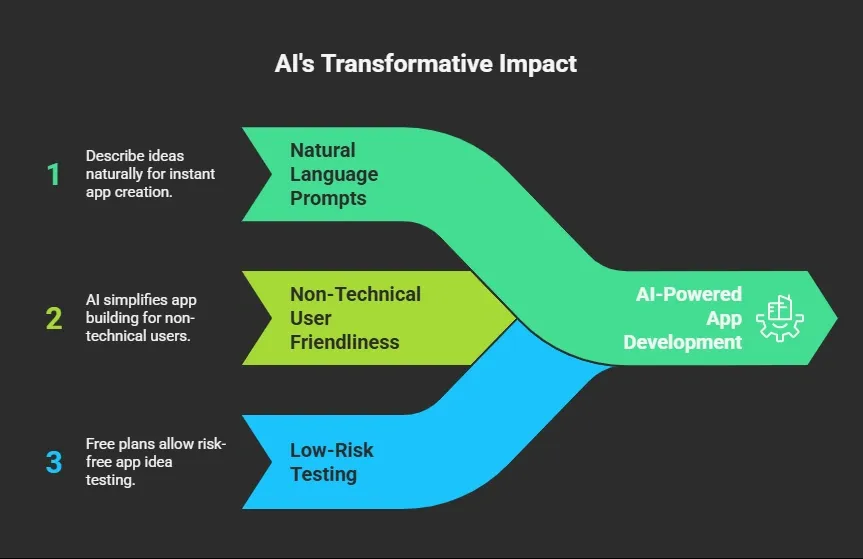
So, instead of spending weeks building from scratch, an AI app builder lets you move fast and focus on improving your app after launch.
Real Use Cases Entrepreneurs Love
So, what are people actually building?
-
Client portals for agencies
-
Internal tools for teams
-
Project management tool apps
-
E-commerce mobile apps
-
Booking systems as web apps
Many founders also build custom apps using Airtable and Google Sheets as the backend. You can even create cross platform apps that run on both Android and iOS.
Expert Talks
Here’s a real perspective from a founder on Twitter:
“Started #100DaysOfNoCode. Sharing tools and insights every day. No-code helps you ship faster and focus on what matters.” Twitter
This kind of feed shows that builders are talking about speed and simplicity when creating apps with visual tools rather than traditional development. It reflects a growing community of creators who are actively using app builders and no‑code platforms to move fast and build real products.
Rocket.new: Your Launchpad
Rocket.new is designed for entrepreneurs who want to move from idea to execution fast. Instead of getting lost in technical complexity, it helps you turn business concepts into functional apps with minimal friction.
Unlike traditional app builders that focus mainly on writing code, Rocket.new emphasizes ready-to-use solutions. This means you can focus on validating your idea, building your product, and getting it into users’ hands without being slowed down by development bottlenecks.
For entrepreneurs, it’s less about coding and more about creating, launching, and iterating quickly in a competitive market.
Top Features
-
Prompt to App Creation: Builds apps directly from single prompts
-
Figma Import: Converts design files into live, editable layouts
-
AI-Powered Backend: Automatically handles logic, data, and workflows
-
Reusable Components: Speeds up building with ready-to-use elements
-
Live Preview: Shows instant updates while editing
-
Code Export: Allows developers to extend or customize later
-
Command-based actions: Use / and @ to run actions and quickly scope edits.
-
Custom Domain Support: Publishes projects with a branded domain
Use Cases
Building with Rocket.new feels straightforward. You can go from idea to working app quickly without dealing with complex setups or long delays.
-
Web Apps: Build fully functional web apps for dashboards, client access, or internal tools.
-
Mobile Apps: Create mobile apps and submit them to Google Play or the Apple App Store.
-
Landing Pages: Quickly spin up landing pages for products, campaigns, or beta testing.
-
Internal Tools: Teams can manage workflows, tasks, and analytics through internal tools.
-
Client Portals: Build client portals with user authentication for secure access.
-
Data Apps: Connect to Google Sheets data to build data driven apps that update in real time.
With Rocket.new, it’s genuinely easy to build anything web apps, mobile apps, landing pages, internal tools, client portals, you name it without the usual coding headaches.
Pricing: Free vs Paid Plans
Let’s keep this simple.
Most platforms offer a free plan, which is perfect for testing your app idea and getting familiar with the app builder.
When you’re ready to grow, you can switch to paid plans for:
-
Advanced features: Access more tools inside the app builder for building powerful apps.
-
More storage: Handle larger data sets, especially for data driven apps connected to Google Sheets.
-
Better performance: Improve speed and reliability for your web apps and mobile apps.
-
Publishing options: Get access to app store publishing for the Apple App Store and Google Play.
Many of the best AI app builder tools follow this model, letting you start small and scale when needed.
Challenges You Should Know
Not everything is perfect.
-
Some tools have a learning curve
-
Advanced features may require custom code
-
Building more complex apps can get tricky
-
Some platforms have a steeper learning curve
Still, compared to traditional mobile app development, this is much faster.
Native vs Web Apps: What’s Better?
Good question. It really depends on what you’re trying to build.
-
Native apps offer better performance: They run directly on devices and work well for heavy features and push notifications.
-
Web apps are easier to update: You can make changes instantly without going through app stores.
-
Responsive web apps work across devices: A responsive web apps setup adjusts to different screen sizes.
-
Native mobile apps handle complex features better: Many native mobile apps are built for speed and deeper device access.
Some tools even let you build real native apps or directly build native mobile apps, giving you the best of both worlds.
Launch Faster Without the Usual Roadblocks
Building apps used to take time, money, and strong technical skills. Many founders struggled to move from idea to launch, especially when relying on traditional mobile app development. The process felt slow, and turning a simple concept into working web apps or mobile apps often required a full team.
Now, tools like app builders for entrepreneurs make it possible to create functional apps quickly using AI and simple design systems. If you want to move fast, start simple, pick the right tool, and improve as you go. You don’t need to master coding to build something useful and get it into users’ hands.
Table of contents
- -Why Entrepreneurs Are Turning to App Builders?
- -Types of Apps You Can Build
- -No-Code vs Low-Code: What Should You Pick?
- -Key Features to Look For
- -How to Launch Fast Using an App Builder?
- -AI Is Changing Everything
- -Real Use Cases Entrepreneurs Love
- -Expert Talks
- -Rocket.new: Your Launchpad
- -Top Features
- -Use Cases
- -Pricing: Free vs Paid Plans
- -Challenges You Should Know
- -Native vs Web Apps: What’s Better?
- -Launch Faster Without the Usual Roadblocks