
What tools help speed up building apps with AI and React? Discover popular platforms, useful features, and how they streamline development, making it easier to create web and mobile apps efficiently.
Which tools help developers build apps fast with AI and React?
Today’s top AI app builder with React frontend platforms can take your idea and turn it into real web apps or even mobile apps without starting from an empty code editor.
According to Statista, the global low‑code and no‑code market is expected to grow to $35 billion by 2030 as more creators and developers adopt AI tools to build software faster and easier than traditional development.
In this blog, we’ll talk about the best tools for building with AI and React, what features they offer, how they help developers, and how to pick one that fits your needs.
Why Developers Want AI App Builders That Work With React?
So you’re a developer or creator, and you want to build React apps faster.
What’s the challenge?
Traditional app development means writing tons of code, spending weeks wiring up components, hooking up data, managing state, and working out logic. Even with React’s reusable UI building blocks like React components and libraries, it can take time to reach a point where your production ready react code feels solid.
Now imagine tools that help you do all this without starting from scratch. That’s where modern app builder platforms enter the picture.
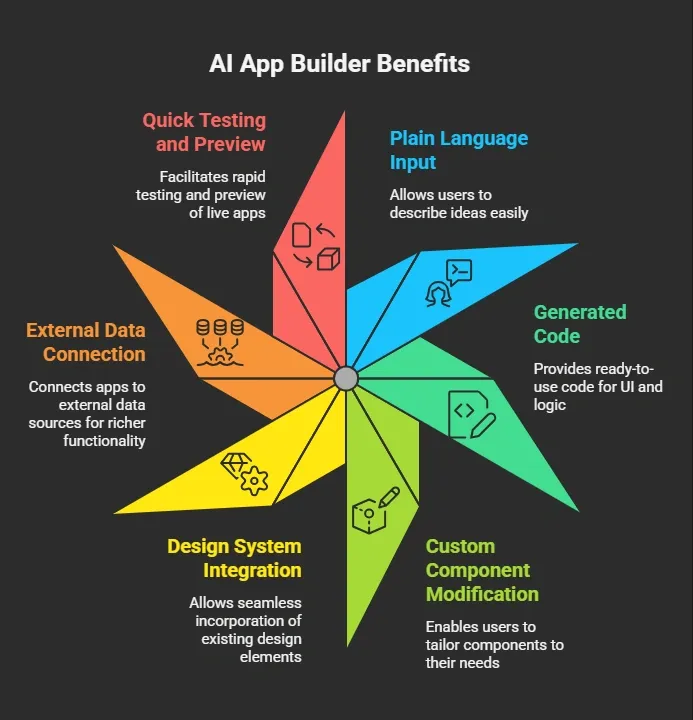
So instead of endless boilerplate and setup, you spend time shaping your vision.
How do we pick the best tools?
To find the right AI app builders with React frontend, we evaluated each platform based on several key criteria:
-
Support for React codebase and UI: Can the tool generate real React code and reusable React components?
-
Speed of building React apps: Does it help you build React apps faster without repetitive boilerplate?
-
Quality of generated code: Is the exported production-ready React code clean and maintainable?
-
Visual editor and customization: Does it allow UI tweaks, custom components, and page layout adjustments?
-
Real-world use and community feedback: Are developers using it successfully? Is there support from active communities and forums?
These factors helped us highlight tools that save time, produce solid code, and make building web apps or internal tools smooth
Top AI App Builders with React Frontend
Here’s a comparison table of leading builders that help developers make web apps and sometimes mobile frontends too:
| Tool | React Support | Visual Editor | Code Export |
|---|---|---|---|
| Rocket.new | Yes (Next.js by default) | Minimal visual, prompt driven | Yes (Full code export) |
| Create.xyz | Yes | Strong visual editor | Partial export |
| Bubble | No (Own UI engine) | Yes | Limited |
| Glide | Partial (Web) | Yes | Limited |
Let's see each of them in detail
1. Rocket.new
Now let’s talk about Rocket.new in detail since it’s one of the most discussed tools in this space.
Rocket.new is vibe solutioning platform that builds you the apps and React frontends within minutes
Rocket.new lets you describe your idea once in a single prompt and then builds the app structure, UI, backend logic, and deployment setup. It generates nearly production ready code and supports web apps using React (Next.js) and also mobile apps via Flutter.
Top Features
-
Prompt‑to‑app system that builds full apps from natural language
-
Automatic setup of React frontend, backend, and data logic
-
Code export so you can take the generated code and extend it
-
Templates for landing pages, dashboards, internal tools, and more
-
Hosting support and GitHub sync for smoother deploy
-
Built‑in integrations (Auth, database, analytics, payments, etc.)
Rocket gives you a single workspace where you can refine UI, add routes, and adjust components without juggling separate tools.
Use Cases
-
Startup MVPs: Build a working application with auth, roles, and data flows
-
Internal Tools: Dashboards that connect to team data
-
Business Web Apps: Customer portals, booking apps, and product sites
-
Prototypes: Get a live version quickly and test with users
Rocket.new also has a strong developer community and Discord group for support. There are Reddit users showing projects built on Rocket, from internal tools to full startup MVPs.
Best For: Developers and teams who need full-stack apps quickly without manual boilerplate.
Pricing: Free tier available; paid plans unlock more projects, tokens, and advanced features.
Rocket.new is ideal for developers looking for speed, control, and ready-to-edit React code in a single workspace.
2. Create.xyz
Now let’s talk about Create.xyz in detail since it’s one of the top tools when it comes to combining AI and design for building apps.
Create.xyz is an AI‑assisted web app builder that blends a guided visual editor with smart logic generation. It helps you quickly build apps that feel polished with UI elements and layout tools, while also giving you some level of code output you can refine later.
Top Features
-
Guided visual editor that lets you design screens without writing UI from scratch
-
Prompt help for generating UI structure and logic
-
Backend form logic for lists, data views, and basic flows
-
Connect to external data sources like Google Sheets or APIs
-
Reusable UI elements and design blocks you can tweak
-
Page navigation and routing controls built in
-
Partial export of generated code to continue development
Create.xyz helps you focus more on designing the app experience and less on boilerplate setup. You stay in one interface where you manage screens, data bindings, navigation, and interactions.
Create.xyz also has a friendly community of builders sharing tips, templates, and example apps. You’ll find users posting on forums and Discord about apps they’ve made with minimal code effort.
Best For:
Designers, small teams, or solo builders who want a visual approach to web apps and a smoother way to shape UI with some AI guidance.
Pricing:
Free plan available; paid subscriptions unlock higher limits, more pages, advanced data features, and team collaboration.
👉Worth a Quick Read: Create.xyz vs Rocket.new: Feature & Performance Comparison
Create.xyz is great when your priority is visual layout and experience first, with an AI assist to handle routine logic and structure, especially in early web app stages.
3. Bubble: No-Code App Builder for Web Apps
Now let’s dive into Bubble, a popular no-code platform known for letting non-developers build complex web apps visually.
Bubble is a web-based builder that uses a drag-and-drop interface to create frontends and handle backend workflows. While it doesn’t generate React code directly, it’s a powerful tool for creating functional web apps without coding. You can manage database workflows, user authentication, API calls, and more all in a visual environment.
Top Features
-
Drag-and-drop UI editor for pages and components
-
Visual workflow editor for backend logic
-
Built-in database management
-
API connector for external data sources
-
Responsive design support
-
Templates for dashboards, marketplaces, and SaaS apps
-
Built-in hosting and deployment
Bubble keeps everything in one workspace UI, workflows, database, and deployment so you don’t have to juggle multiple tools.
Bubble has a strong community with tutorials, templates, and forum support. You’ll find creators sharing apps built entirely without code.
Best For:
Non-developers or teams wanting full-featured web apps visually, without touching React or other frameworks.
Pricing:
Free tier available for basic apps; paid plans for custom domains, increased capacity, and collaboration features.
👉Worth a Quick Read: Bubble Alternatives That Offer More Control and Flexibility
Bubble is perfect if you want visually powerful web apps without touching code, ideal for MVPs, internal tools, and small business apps.
4. Glide
Next up is Glide, which turns spreadsheets into functional apps almost instantly.
Glide is a no-code platform that focuses on mobile-first apps. You connect a Google Sheet or Excel file, and Glide generates a working app interface, complete with lists, forms, and basic navigation. It’s highly visual, making it great for creating simple business apps fast.
Top Features
-
Spreadsheet-to-app conversion
-
Drag-and-drop layout editor for screens and components
-
Pre-built templates for business, education, and event apps
-
Built-in forms, lists, and user authentication
-
Real-time updates from linked data sources
-
Push notifications and sharing options
Glide keeps everything in one interface no code needed, just spreadsheets and visuals.
Glide has an active community and knowledge base, where users share templates and tips for building apps without programming.
Best For:
Non-developers, educators, small business owners, and teams who want quick mobile apps from spreadsheets.
Pricing:
Free tier for simple apps; paid plans for custom domains, advanced features, and more storage.
👉Worth a Quick Read: Powerful Glide Alternatives for Faster App Development
Glide is ideal if you need mobile apps quickly and your data is already structured in spreadsheets, making it perfect for small business tools and prototypes.
What You Can Build With These Tools
Platforms like Rocket.new and Create.xyz make building apps faster and simpler. With these AI-assisted builders, you can handle everything from UI to backend logic, saving time on boilerplate code. Here’s what you can create:
-
Full React apps without writing boilerplate code
-
Internal dashboards connected to real data for your team
-
Professional landing pages for products or events
-
Business portals with login systems and user roles
-
Prototypes to test ideas before hiring developers
-
Apps connected to external services and APIs
These tools also help manage core functionality like routing, authentication, and state management. That means you spend less time juggling separate tools and more time iterating on your product ideas.
Streamlining React App Development With AI-Powered Builders
The problem many developers face is that setting up React frontend projects with routing, state, components, and backend connections takes a lot of time before you ever see a working app.
The solution is picking an AI app builder with React frontend that guides you from idea to code in one place. Tools like Rocket.new let you get production ready code, tailor UI design with custom components, and connect real data without repetitive setup. Once you have the base, you can customize further or take it into your own development environment.
The main takeaway is this: AI‑powered platforms that support React can dramatically shorten time to prototype and launch, helping developers focus on logic and features rather than boilerplate.
Table of contents
- -Why Developers Want AI App Builders That Work With React?
- -How do we pick the best tools?
- -Top AI App Builders with React Frontend
- -1\. Rocket.new
- -Top Features
- -Use Cases
- -2\. Create.xyz
- -Top Features
- -Best For:
- -Pricing:
- -3\. Bubble: No-Code App Builder for Web Apps
- -Top Features
- -Best For:
- -Pricing:
- -4\. Glide
- -Top Features
- -Best For:
- -Pricing:
- -What You Can Build With These Tools
- -Streamlining React App Development With AI-Powered Builders