
Looking for simpler AI deployment in 2026? This blog explains one-click AI builders, covering features, integrations, scalability, costs, and real use cases, showing how they simplify development and deployment processes.
Is one-click AI builders really that simple in 2026?
Yes, they are. Today’s tools let you go from an idea to a working app in minutes using natural language prompts and a visual editor. You don’t need deep app development skills or long setup steps.
According to Statista, Artificial intelligence is rapidly becoming part of how software is built, with over 50% of companies worldwide already using AI in some capacity.
So let’s break down what the best AI builders with one-click deployment in 2026 actually include, and what you should expect before picking one.
What “One-Click Deployment” Really Means?
Let’s keep it simple.
A modern AI app builder handles everything from UI to backend logic with minimal input. You type what you want using natural language, and the platform builds a working app. Then, with one click, it deploys your app live.
No servers. No configs. No stress.
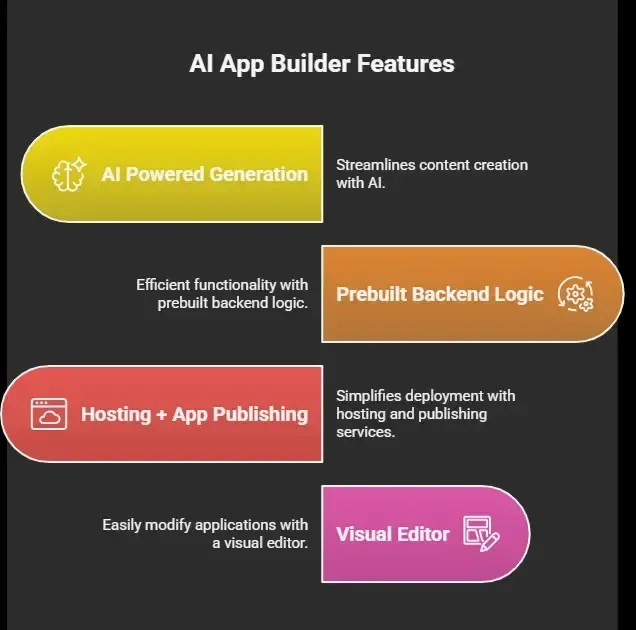 So instead of writing code, you guide the system. That’s why even non technical users and non technical founders are building apps now.
Core Features You Should Expect
So, what actually makes an AI app builder worth your time in 2026?
Not all tools deliver the same experience. Some feel limited after a few clicks, while others help you build a fully working app with ease. The best AI app builder options come with a set of core features that make app building smooth, fast, and practical even for beginners.
Let’s walk through what you should expect before choosing one.
1. Natural Language App Building
You describe your app idea in plain natural language.
Example: “Build a fitness tracking mobile app with login and progress charts.”
The AI app builder converts this into:
-
User interface
-
Backend logic
-
Database setup
This is powered by advanced AI models and smart AI generation.
2. Drag and Drop + Visual Editor
After AI builds your first version, you tweak it.
A good app builder gives:
-
Drag and drop layout editing
-
A clean visual editor
-
Easy workflow creation
So you can adjust without touching the underlying code.
3. One-Click Deployment
This is the main highlight.
You hit deploy, and the platform:
-
Hosts your app
-
Connects custom domains
-
Handles app publishing
You can launch:
-
Web apps
-
Mobile apps
-
Even native mobile apps
Some platforms also support publishing to app store and even Google Play.
4. Built-in Backend Logic
No more server headaches.
The AI app builder handles:
-
Backend code
-
Database
-
API integrations
You define business logic in natural language, and the AI agent builds it.
For example: “Send notification when user completes workout.” Done.
5. Free Tier and Paid Plans
Most tools offer:
-
A free tier or free version for testing
-
Flexible paid plans for scaling
The free tier usually includes:
-
Limited app building
-
Basic hosting
-
Limited API calls
While paid plans add:
-
Advanced features
-
More storage
-
Better performance
So, when you’re picking an app builder, don’t just look at the hype. Focus on how well it handles real app building tasks like backend logic, deployment, and flexibility. A good AI app builder should help you move from idea to a working app without friction, while still giving you room to tweak things as your needs grow.
If a platform checks most of these boxes, you’re already on the right track.
Types of Apps You Can Build
With a strong AI app builder, you’re not limited to basic ideas. You can build real, useful apps that people actually use across different categories.
-
Web Apps: From dashboards to SaaS tools, web apps are the easiest to launch and manage.
-
Mobile Apps: Build and deploy mobile apps quickly with minimal setup and no heavy configuration.
-
Internal Tools: Teams use these platforms to build internal tools like:
◦ Admin dashboards
◦ CRM systems
◦ Analytics panels
Even enterprise internal tools can be built without large dev teams.
A good app builder gives you the flexibility to create across all these use cases without slowing you down.
Comparison of Top AI App Builders
Before choosing an AI app builder, it helps to see how basic tools compare with more advanced options. Not every platform offers the same level of flexibility, speed, or features. Here’s a quick breakdown to help you spot the difference
| Feature | Basic Builder | Advanced AI App Builder |
|---|---|---|
| Natural Language Input | Limited | Full support |
| Backend Logic | Manual | AI powered |
| Deployment | Multi-step | One-click |
| Mobile Apps | Limited | Full support |
| Code Export | No | Yes |
| Custom Domains | Basic | Full |
| Free Tier | Yes | Yes |
| App Store Publishing | Rare | Available |
A quick look at this table makes it clear. If you want faster app building, better flexibility, and smoother deployment, going with a more advanced app builder is usually the better choice.
Benefits and Trade-Offs
These AI app builder platforms offer speed and simplicity, but they also come with certain limitations. A balanced view helps in making the right choice.
Benefits
-
Fast app building
-
Minimal learning curve
-
Suitable for business apps
-
Useful for operations teams
-
Supports workflow automation
Trade-Offs
-
Limited advanced customization
-
Risk of vendor lock in
-
Complex apps remain challenging
-
Limited code level control
A reliable app builder works well for most use cases, but higher app complexity may still require custom code.
The Role of AI Agents in App Building
Now this is interesting.
Modern platforms include an AI agent that:
-
Writes backend logic
-
Handles workflow creation
-
Connects external APIs
-
Fixes bugs
This makes the AI powered development environment feel like having a developer with you.
The Role of AI Agents in App Building
Modern platforms now include an AI agent that supports the entire app building process. It helps reduce manual effort and speeds up development tasks.
-
Writes backend logic
-
Handles workflow creation
-
Connects external APIs
-
Fixes bugs
This makes the AI powered development environment feel closer to working with a real developer..
What About Code and Flexibility?
Most platforms still provide flexibility for users who need more control over their apps.
-
Code export
-
Access to backend code
-
Option for custom code
Some platforms also support self hosting, allowing apps to run on your own infrastructure. This reduces dependency and offers better control.
Use Cases That Are Growing Fast
These AI app builder platforms are being used across different scenarios where speed and simplicity matter. They help turn ideas into real apps without long development cycles.
1. Client Portals
Create secure client portals with role based access controls.
2. Internal Tools
Build dashboards and automate workflows for teams.
3. SaaS Products
Launch small SaaS apps quickly.
4. Data Apps
Use Google Sheets as a backend for quick apps.
A good app builder supports these use cases efficiently, making it easier to build and scale apps based on your needs.
Rocket.new: An easy Track AI Builder
Rocket.new is an AI app builder designed for smooth app building with minimal setup. It fits directly into the idea of one-click deployment by helping users go from an app idea to a live working app using simple natural language prompts.
It focuses on speed, simplicity, and real output. Instead of dealing with complex app development steps or writing code, you describe what you want, and the platform handles the backend logic, layout, and deployment in one flow.
Key Features
-
AI powered app building
-
One-click deployment
-
Support for web apps and mobile apps
-
Custom domains
-
Code export options
-
Free tier for beginners
How Building and Deployment Works
With Rocket.new, the process is simple and direct. You start with an idea, describe it using natural language, and the platform generates a working app.
Example prompt: “Build a client portal with login, dashboard, and progress tracking for users.”
The AI app builder then:
-
Creates the user interface
-
Sets up backend logic
-
Connects data (like Google Sheets if needed)
-
Prepares the app for deployment
Once ready, you can deploy instantly with one click. This makes it easy to launch web apps or mobile apps without complex setup.
Use Cases
1. Internal Tools: Build dashboards and workflows for teams without writing code.
2. Client Portals: Set up secure portals with login and role based access controls.
3. SaaS MVPs: Launch a functional prototype quickly and test ideas.
4. Data Apps: Connect Google Sheets and turn them into working apps.
Rocket.new keeps the process simple while still allowing control over business logic and backend logic, making it a practical choice for fast and efficient app building.
Are These Tools Worth It?
If you’re wondering whether an AI app builder is actually worth using, the answer depends on what you want to build and how fast you want to move.
Short answer: yes, for most people.
If your goal is:
-
Quick app building
-
Testing ideas
-
Building internal tools
Then a best AI app builder is a solid choice. If you’re building highly complex web applications, you may still need developers.
A Simpler Way to Build Apps
Traditional app development takes time, effort, and technical skills. For many beginners and small teams, this creates a barrier. Even simple apps often require writing code, managing backend logic, and handling deployment manually, which slows down progress.
That’s where the best AI builders with one-click deployment in 2026 change things. They simplify app building using natural language and AI tools, helping you launch faster. These platforms are useful for testing ideas and building internal tools. Choosing an app builder that balances ease and flexibility is what really matters.
Table of contents
- -What “One-Click Deployment” Really Means?
- -Core Features You Should Expect
- -1\. Natural Language App Building
- -2\. Drag and Drop + Visual Editor
- -3\. One-Click Deployment
- -4\. Built-in Backend Logic
- -5\. Free Tier and Paid Plans
- -Types of Apps You Can Build
- -Comparison of Top AI App Builders
- -Benefits and Trade-Offs
- -Benefits
- -Trade-Offs
- -The Role of AI Agents in App Building
- -The Role of AI Agents in App Building
- -What About Code and Flexibility?
- -Use Cases That Are Growing Fast
- -1\. Client Portals
- -2\. Internal Tools
- -3\. SaaS Products
- -4\. Data Apps
- -Rocket.new: An easy Track AI Builder
- -Key Features
- -How Building and Deployment Works
- -Use Cases
- -Are These Tools Worth It?
- -A Simpler Way to Build Apps