
50 structured vibe coding prompts for AI app builders covering full-stack apps, UI design, debugging, deployment, and non-developer use cases. Each prompt is copy-ready with examples and usage notes.
The right prompt turns AI from a confused intern into a co-architect. This guide gives you 50 structured, copy-ready vibe coding prompts for AI app builders across full-stack apps, UI iteration, debugging, deployment, and more. Rocket is the fastest way to test them all.
No coding background? Skip directly to Prompts 9–16, written in plain language for non-developers.
Why Your Prompt Quality Determines App Quality
A vibe coding tool can only build what you describe. Vague inputs produce vague output. Structured inputs produce clean code that actually runs.
-
Specificity beats length. A 30-word prompt with clear constraints outperforms a 200-word rambling idea. When you write effective natural language prompts, you give the AI pair programmer a clear mental model to follow.
-
Context is your leverage point. Generated code improves dramatically when you name your tech stack, describe your data models, and define user roles upfront.
-
Constraints prevent hallucination. Telling the AI what NOT to do is just as important. "Do not use deprecated APIs" or "Keep all state management client-side" narrows the output to working code.
Most people assume the AI coding tool is the bottleneck. It rarely is. The bottleneck is clarity of intent.
How Should You Structure a Prompt for AI Coding Tools?
Every high-performing prompt follows a predictable anatomy. Whether you use Cursor, Claude Code, or a platform like Rocket.new, this structure works across all vibe coding tools.
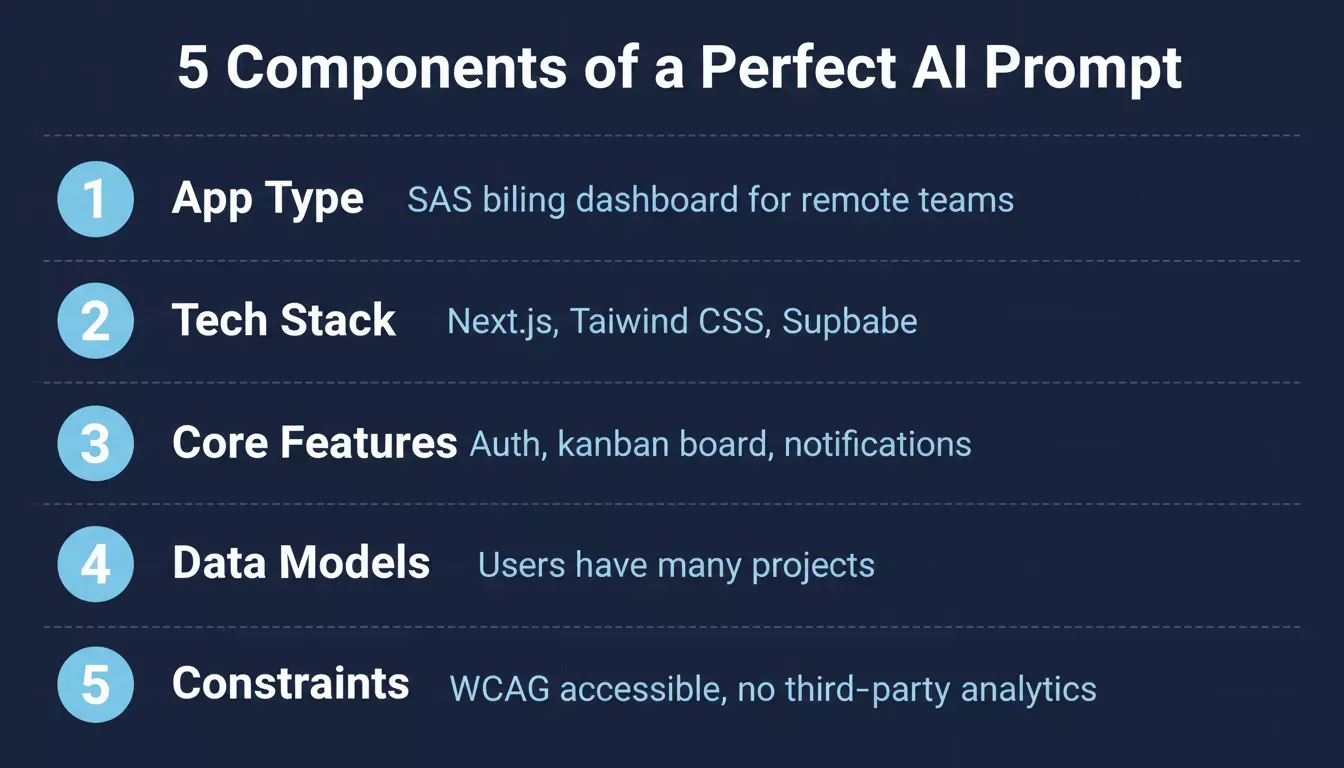
The five components every high-performing vibe coding prompt must include
| Component | What to Include | Example |
|---|---|---|
| App type and purpose | What you're building and who it's for | A project management dashboard for remote teams |
| Tech stack | Frameworks, languages, libraries | Use Next.js, Tailwind CSS, and Supabase |
| Core features | Pages, functionality, user flows | Auth, kanban board, calendar view, notifications |
| Data models | Entities, relationships, fields | Users have many projects; projects have many tasks |
| Constraints | What to avoid, performance goals | Mobile-responsive, WCAG accessible, no third-party analytics |
"Big insight: Prompt quality matters less than input structure. I fed a structured spec to Claude and the output was production-ready on the first pass." - u/volunteer_systems on r/vibecoding
When you connect external services to your app, the initial prompt needs to specify exactly which integrations you expect. A single prompt that covers all five components generates a far more complete first pass than five separate instructions fed one at a time.
How Rocket Turns a Single Prompt Into a Live App
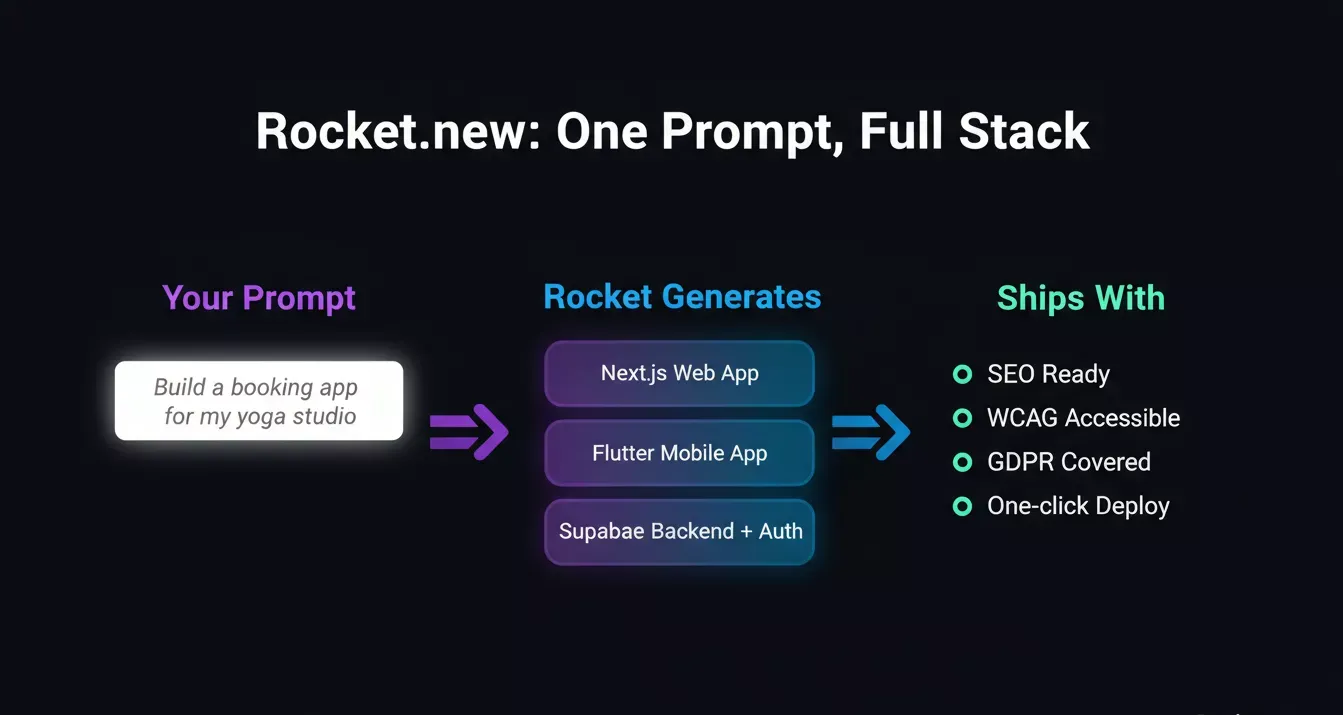
Rocket.new turns a single natural language prompt into a full-stack deployed product across web, mobile, and backend
So where do all these prompts actually perform best? That depends on the platform.
Cursor and Claude Code are powerful for developers who want an AI pair programmer inside their IDE. Bolt generates quick prototypes in a browser tab. Lovable focuses on non-developers who want pretty UIs fast.
Rocket takes a different approach entirely. It treats every prompt as a full-stack build instruction.
-
One prompt generates web, mobile, and backend simultaneously.
-
Key features ship automatically.
-
25,000+ templates as starting points.
-
Full code ownership with GitHub sync.
-
Free plan available to start building.
Other AI coding tools give you a file. Rocket gives you a running product.
Prompts That Generate Full-Stack Web Applications
Why this section matters: Full-stack prompts are the highest-leverage entry point for vibe coding. A single well-structured instruction can scaffold an entire application, including frontend, backend, database, and auth, in minutes. The prompts below are designed to produce working code on the first pass, not a prototype that needs rebuilding.
According to recent data, 63% of users on vibe coding platforms are non-developers, meaning most people generating full-stack apps have never manually configured a deployment pipeline. The prompt IS the architecture document.
Prompt 1: SaaS Billing Dashboard
Generates a complete subscription management platform with role-based access and real-time usage tracking in a single instruction.
Example prompt:
"Build a SaaS billing dashboard with Next.js. Include Stripe integration for subscription management, a usage metrics page, and role-based access for admin and member users. Use Supabase for the database with row-level security."
How it is used:
-
Produces a Next.js frontend with Stripe checkout and webhook handlers
-
Generates Supabase schema with row-level security policies
-
Creates role-based routing for admin and member dashboards
Prompt 2: Multi-Tenant Project Management App
Builds a real-time collaborative workspace with live task updates and magic link authentication from one prompt.
Example prompt:
"Create a multi-tenant project management app with workspaces, task boards, and real-time collaboration. Use WebSocket connections for live updates. Include user authentication with magic link login."
How it is used:
-
Scaffolds multi-tenant data isolation at the database level
-
Generates WebSocket event handlers for live board updates
-
Wires magic link auth flow end-to-end
Prompt 3: Freelancer Invoicing Platform
Creates a branded invoicing system with PDF generation, payment tracking, and automated overdue reminders.
Example prompt:
"Generate a freelancer invoicing platform where users create clients, generate branded PDF invoices, track payment status, and set automated reminders for overdue invoices. Store data in PostgreSQL."
How it is used:
-
Generates PDF invoice templates with dynamic branding
-
Creates client and invoice management CRUD flows
-
Wires automated reminder scheduling logic
Prompt 4: Restaurant Reservation System
Produces a full table management and booking system with SMS confirmations and an admin capacity dashboard.
Example prompt:
"Build a restaurant reservation system with table management, a customer-facing booking widget, and an admin dashboard showing daily capacity. Include SMS confirmation via Twilio."
How it is used:
-
Generates a customer-facing booking widget with date and time selection
-
Creates an admin dashboard with real-time table capacity view
-
Wires Twilio SMS confirmation on booking creation
Prompt 5: AI-Powered Job Board
Builds a two-sided job marketplace with resume parsing, keyword matching, and an AI recommendation engine.
Example prompt:
"Create an AI-powered job board where employers post listings and candidates submit applications. Include resume parsing, keyword matching, and a recommendation engine that suggests relevant roles."
How it is used:
-
Generates employer and candidate dashboards with separate flows
-
Produces resume parsing logic and keyword extraction
-
Creates a recommendation engine that matches candidates to listings
Prompt 6: Personal Finance Tracker
Connects to bank accounts via Plaid, auto-categorizes transactions, and visualizes spending trends with budget alerts.
Example prompt:
"Build a personal finance tracker that connects to bank accounts via Plaid, categorizes transactions automatically, and displays spending trends in interactive charts. Include budgeting goals and alerts."
How it is used:
-
Generates Plaid integration with transaction sync
-
Produces auto-categorization logic and spending chart components
-
Creates budget goal tracking with threshold alerts
Prompt 7: Event Management Platform
Creates a full event ticketing and management system with QR code check-in, speaker profiles, and custom registration forms.
Example prompt:
"Generate an event management platform with ticket sales, attendee check-in via QR codes, speaker profiles, and a schedule builder. Support multiple event types and custom registration forms."
How it is used:
-
Generates QR code generation and scanning for attendee check-in
-
Creates a schedule builder with speaker profile pages
-
Produces custom registration form builder with multiple event type support
Prompt 8: Learning Management System
Builds a complete course platform with video hosting, auto-graded quizzes, completion certificates, and Stripe enrollment.
Example prompt:
"Create a learning management system with video course hosting, progress tracking, quizzes with auto-grading, completion certificates, and Stripe payment for course enrollment."
How it is used:
-
Generates video course player with progress tracking
-
Produces quiz engine with auto-grading and certificate generation
-
Wires Stripe payment for course enrollment
What Makes These Full-Stack Prompts Work?
These prompts succeed because they name specific data models, define user roles, and specify the third-party services involved. Working code comes from working specifications.
-
They define relationships. "Users have many projects" tells the AI exactly how to structure the database schema, the API endpoints, and the frontend data fetching logic.
-
They name the backend logic explicitly. "Row-level security" or "role-based access" removes ambiguity about who can see what.
-
They scope complexity honestly. Each prompt asks for one coherent application, not a vague "build me something cool."
Start building your full-stack app on Rocket - free to try, no credit card required.
Prompt anatomy check: These prompts lean hardest on Tech stack + Data models + Constraints. If your output is missing features, check whether you named the framework, described entity relationships, and specified what the AI should not do.
Prompts for Non-Developers and Citizen Builders
If you have no coding background, technical prompt syntax gets in the way. These prompts describe outcomes in plain language, the way you'd explain your business to a contractor.
Prompt 9: Yoga Studio Booking Website
Builds a calm, minimal booking site where clients browse schedules, reserve class spots, pay online, and receive email confirmations.
Example prompt:
"I run a yoga studio. Build me a booking website where clients can see my weekly schedule, reserve spots in classes, pay online, and receive email confirmations. I want a calm, minimal design."
How it is used:
-
Generates a weekly class schedule view with spot reservation logic
-
Produces online payment flow and booking confirmation emails
-
Creates a calm, minimal design with soft typography and whitespace
Prompt 10: Real Estate Property Listing Site
Creates a property listing site where agents add homes with photos and pricing, and buyers filter by location, price, and bedrooms.
Example prompt:
"I'm a real estate agent. Create a property listing site where I can add homes with photos, descriptions, and pricing. Buyers should be able to filter by location, price, and bedrooms."
How it is used:
-
Generates an agent dashboard for adding and managing property listings
-
Produces a buyer-facing search with location, price, and bedroom filters
-
Creates individual property detail pages with photo galleries
Prompt 11: Consulting Business CRM
Builds a simple CRM with client tracking, deal stages, meeting notes, a pipeline view, and monthly revenue reports.
Example prompt:
"Build a simple CRM for my consulting business. I need to track client companies, contacts, deal stages, and meeting notes. Include a pipeline view and monthly revenue reports."
How it is used:
-
Generates client and contact management with deal stage tracking
-
Produces a visual pipeline view with drag-and-drop deal progression
-
Creates monthly revenue report with deal close rate analytics
Prompt 12: Handmade Candle Storefront
Creates a warm, artisanal e-commerce storefront with product pages, shopping cart, Stripe checkout, and order tracking.
Example prompt:
"I sell handmade candles online. Create a storefront with product pages, a shopping cart, Stripe checkout, and order tracking. The design should feel warm and artisanal."
How it is used:
-
Generates product pages with warm, artisanal visual design
-
Produces shopping cart and Stripe checkout integration
-
Creates order tracking flow with status updates for customers
Prompt 13: Music Teacher Student Portal
Builds a student portal where parents book lessons, teachers share practice assignments, and students upload recordings for feedback.
Example prompt:
"I'm a music teacher. Build a student portal where parents can book lessons, I can share practice assignments, and students can upload recordings for feedback."
How it is used:
-
Generates a lesson booking flow for parents with calendar integration
-
Produces a practice assignment sharing system for teachers
-
Creates a recording upload and feedback system for students
Prompt 14: Podcast Community Membership Site
Creates a membership site with free episode access for all users and bonus content, private forum, and Q&A events for paid members.
Example prompt:
"Create a membership site for my podcast community. Free users get episode access. Paid members get bonus content, a private forum, and monthly Q&A event invitations."
How it is used:
-
Generates tiered access control for free and paid membership levels
-
Produces a private forum and bonus content section for paid members
-
Creates monthly Q&A event invitation and RSVP system
Prompt 15: Co-Working Space Management App
Builds a member app for booking desks, reserving meeting rooms, paying monthly invoices, and browsing a community directory.
Example prompt:
"I manage a co-working space. Build an app where members can book desks, reserve meeting rooms, and pay monthly invoices. Include a community directory."
How it is used:
-
Generates desk and meeting room booking with availability calendar
-
Produces monthly invoice generation and payment flow
-
Creates a community directory with member profiles
Prompt 16: Pet Sitting Marketplace
Builds a two-sided marketplace where pet owners find local sitters, view profiles and reviews, book dates, pay securely, and message sitters.
Example prompt:
"Build a pet sitting marketplace where pet owners can find local sitters, view profiles and reviews, book dates, and pay securely. Include messaging between owner and sitter."
How it is used:
-
Generates sitter profile pages with reviews and availability calendar
-
Produces secure booking and payment flow for pet owners
-
Creates in-app messaging between owners and sitters
These prompts work because they describe software through the lens of the user's actual workflow, not through technical jargon.
Build your idea on Rocket without writing a single line of code.
Prompt anatomy check: These prompts lean on App type and purpose + Core features. The tech stack and data models are intentionally omitted, Rocket infers them. If output misses something, add one sentence describing the most important user action.
Prompts for UI Design and Frontend Iteration
Generated code often runs correctly but looks generic. These prompts target the visual layer specifically; they give the AI pair programmer enough design vocabulary to produce interfaces that look intentional rather than templated.
Use them after your first working build, not before.
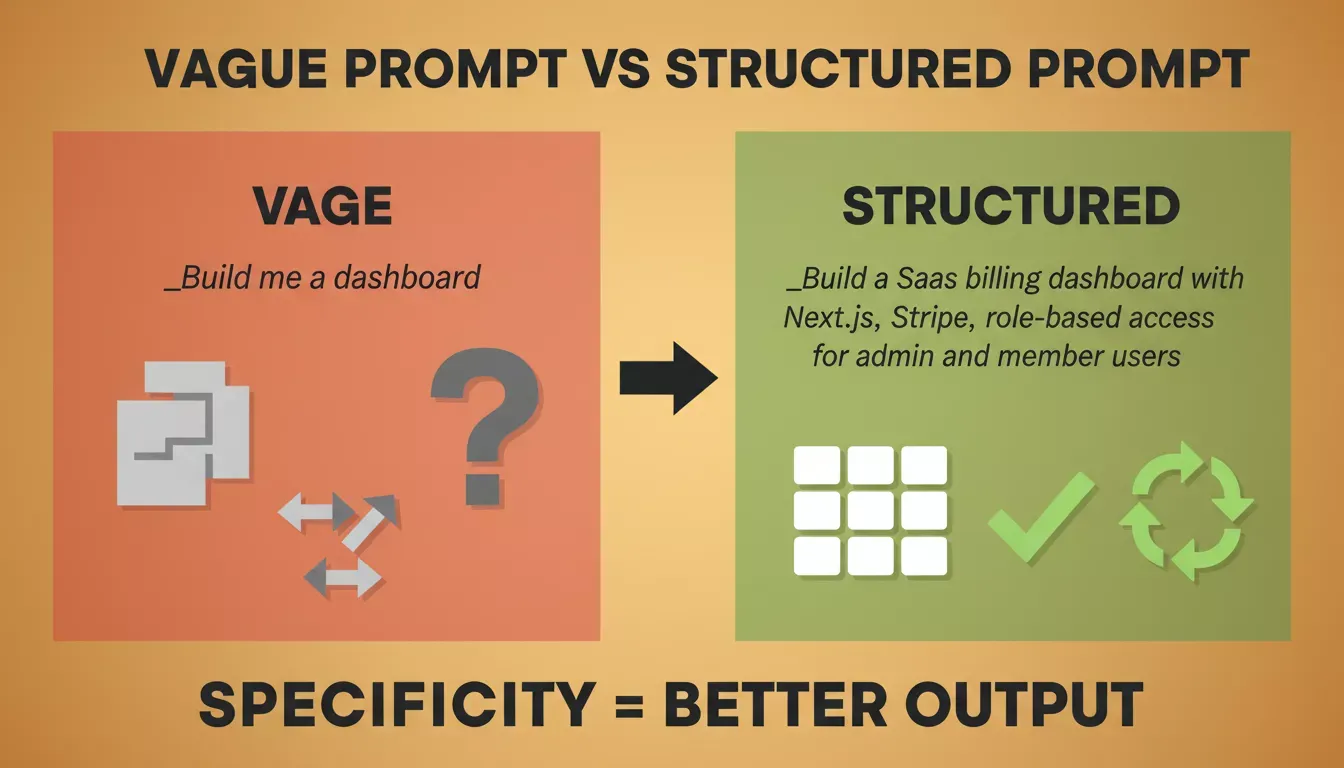
Specificity in UI prompts is the difference between a generic layout and a polished interface
Naming Tailwind directly prevents the AI from inventing custom CSS classes. Describing animations with specific terms like "glassmorphism" or "swipeable" references real design patterns the AI has seen. You can also explore Rocket's prompt library for ready-to-use UI patterns.
Prompt 17: Dark Theme Dashboard Redesign
Transforms a generic dashboard into a polished dark-mode interface with glassmorphism cards and hover micro-animations.
Example prompt:
"Redesign this dashboard with a modern dark theme, subtle glassmorphism cards, and a left sidebar navigation. Use inter font family. Add micro-animations on card hover."
Before: Generic light-mode dashboard with flat cards and no visual hierarchy.
After: Dark-mode interface with glassmorphism depth, Inter typography, and smooth hover transitions that signal interactivity.
Prompt 18: Wireframe to Responsive Landing Page
Converts any wireframe into a fully responsive Tailwind CSS landing page with hero, features, pricing, and newsletter sections.
Example prompt:
"Convert this wireframe to a responsive landing page with a hero section, three feature cards with icons, a pricing table, and a footer with newsletter signup. Tailwind CSS only."
How it is used:
-
Generates responsive hero, feature, pricing, and footer sections
-
Produces Tailwind CSS utility classes throughout with no custom CSS
-
Creates newsletter signup form with input validation
Prompt 19: Settings Page with Tabbed Navigation
Builds a grouped settings page with profile, notifications, billing, and security tabs plus inline form validation.
Example prompt:
"Add a settings page with grouped form sections: profile, notifications, billing, and security. Use tabs for navigation between sections. Include form validation with inline error messages."
How it is used:
-
Generates tabbed navigation component with four grouped sections
-
Produces form fields with inline validation and error state display
-
Creates billing section with plan display and upgrade flow
Prompt 20: Mobile-First Onboarding Flow
Creates a swipeable four-step onboarding experience with welcome, interest selection, profile setup, and confirmation screens.
Example prompt:
"Create a mobile-first onboarding flow with four steps: welcome screen, interest selection, profile setup, and confirmation. Use swipeable transitions between steps."
How it is used:
-
Generates four-screen onboarding flow with step progress indicator
-
Produces swipeable transition animations between steps
-
Creates interest selection grid and profile setup form
Prompt 21: Advanced Data Table Component
Produces a feature-rich data table with sortable columns, search, pagination, row selection, bulk actions, and dark/light mode.
Example prompt:
"Build a data table component with sortable columns, search filtering, pagination, row selection, and bulk actions dropdown. Support dark and light mode."
How it is used:
-
Generates sortable column headers with ascending/descending state
-
Produces search filter, pagination controls, and row checkbox selection
-
Creates bulk actions dropdown with dark and light mode toggle
Prompt 22: Single-Page Checkout Redesign
Rebuilds the checkout experience as a single-page flow with order summary, payment form, address autocomplete, and saved methods.
Example prompt:
"Redesign the checkout flow as a single-page experience. Show order summary on the right, payment form on the left. Include a progress indicator, address autocomplete, and saved payment methods."
Before: Multi-page checkout with separate address, payment, and confirmation steps causing drop-off at each transition.
After: Single-page layout with sticky order summary, address autocomplete, and saved payment methods reducing friction to one screen.
Prompt 23: Notification Center Dropdown
Builds a tabbed notification center with unread/mention filtering, mark-all-as-read, individual dismiss, and time-ago timestamps.
Example prompt:
"Generate a notification center dropdown with tabs for all, unread, and mentions. Include mark-all-as-read, individual dismiss, and time-ago timestamps."
How it is used:
-
Generates tabbed notification dropdown with filter state management
-
Produces mark-all-as-read and individual dismiss actions
-
Creates time-ago timestamp formatting for each notification
Prompt 24: Analytics Dashboard with Six Widgets
Creates a six-widget analytics dashboard with revenue, user growth, conversion funnel, top pages, active users, and churn rate.
Example prompt:
"Create an analytics dashboard with six widget cards: revenue chart (line), user growth (area), conversion funnel (horizontal bar), top pages (list), active users (counter), and churn rate (gauge)."
How it is used:
-
Generates six chart components using appropriate visualization types
-
Produces responsive widget card grid layout
-
Creates data binding structure for each metric type
Prompt 25: Drag-and-Drop Kanban Board
Builds a fully interactive kanban board with customizable columns, card labels, assignees, due dates, and quick-add inputs.
Example prompt:
"Build a drag-and-drop kanban board with customizable columns, card labels, assignees, due dates, and a quick-add card input at the bottom of each column."
How it is used:
-
Generates drag-and-drop column and card components
-
Produces card detail panel with label, assignee, and due date fields
-
Creates quick-add card input at the bottom of each column
Give your UI prompts a head start.
Prompt anatomy check: These prompts lean on Constraints + App type. The more specific your visual vocabulary (name the design pattern, name the CSS framework, name the animation type), the less the AI has to guess.
Prompts for Debugging, Testing, and Code Review
The AI pair programmer generates code that compiles, but compiling is not the same as correct. These prompts treat debugging as a structured process, not a "fix this" loop. Each one gives the AI a specific failure mode to investigate, which is the difference between a root-cause fix and a patch that breaks something else.
AI-produced code has 1.7x more major issues than manually written equivalents, so systematic debugging prompts save significant time.
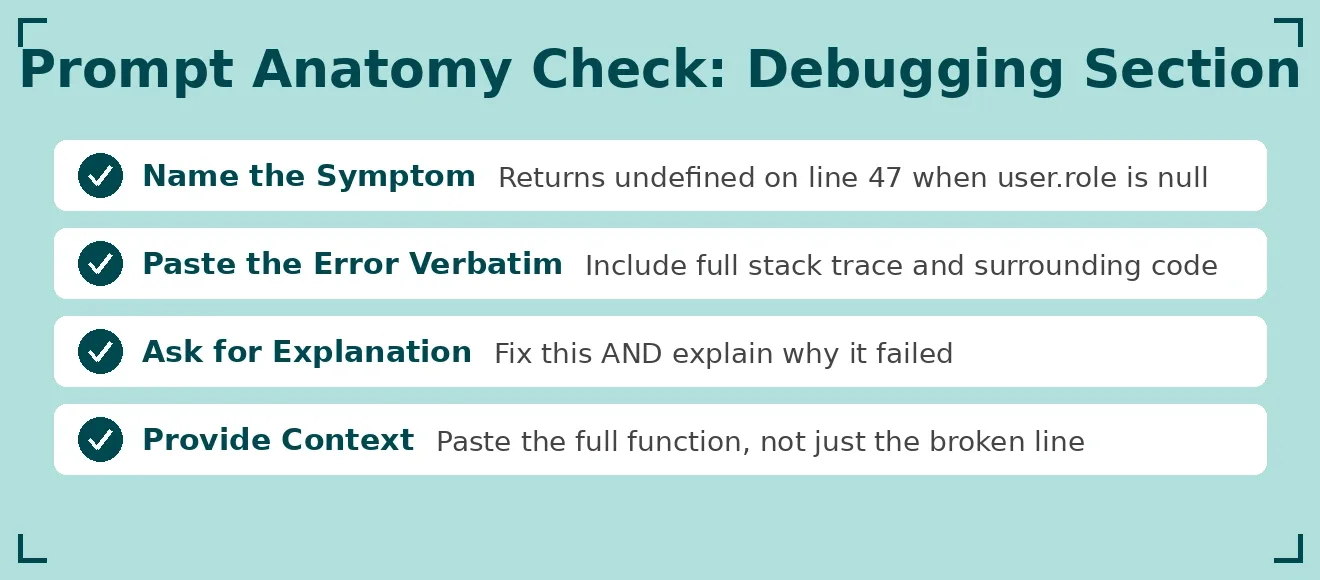
Four rules for debugging prompts that actually fix the root cause, not just the symptom
Prompt 26: Authentication Security Audit
Reviews your auth flow for exposed tokens, missing rate limiting, session mishandling, and SQL injection vulnerabilities with severity ratings.
Example prompt:
"Review this authentication flow for security vulnerabilities. Check for exposed tokens, missing rate limiting, improper session handling, and SQL injection vectors. List each issue with severity and fix."
How it is used:
-
Identifies exposed tokens, weak session handling, and injection vectors
-
Produces a severity-ranked list of vulnerabilities with fix instructions
-
Generates hardened replacement code for each flagged issue
Prompt 27: Intermittent 500 Error Debugger
Diagnose race conditions and null pointer exceptions in API endpoints that fail unpredictably in production.
Example prompt:
"This API endpoint returns 500 errors intermittently. Analyze the code, identify potential race conditions or null pointer exceptions, and suggest error handling patterns to prevent failures."
Why this works: Intermittent failures are the hardest to debug manually because they don't reproduce consistently. Giving the AI the full endpoint code plus the failure description lets it reason about async timing issues that a human reviewer would miss on a quick scan.
Prompt 28: Payment Module Unit Tests
Writes comprehensive Jest unit tests covering successful payments, declined cards, timeouts, duplicate charges, and refunds.
Example prompt:
"Write unit tests for this payment processing module. Cover successful payment, declined card, network timeout, duplicate charge prevention, and refund scenarios. Use Jest."
How it is used:
-
Generates Jest test suite with five core payment scenario cases
-
Produces mock implementations for Stripe API responses
-
Creates test coverage for edge cases like duplicate charge prevention
Prompt 29: React Performance Audit
Identifies unnecessary re-renders, missing memoization, and expensive computations that should move to useMemo or useCallback.
Example prompt:
"Audit this React component tree for performance issues. Identify unnecessary re-renders, missing memoization, and expensive computations that should be moved to useMemo or useCallback."
Before: Component re-renders on every parent state change, causing visible lag on data-heavy screens.
After: Memoized components with useMemo and useCallback applied precisely where expensive computations live.
Prompt 30: Local-to-Production Break Debugger
Compares local and production configs to surface CORS mismatches, missing environment variables, and API routing differences.
Example prompt:
"This form submission works locally but breaks in production. Compare the local and production environment configurations and identify potential differences in CORS, environment variables, or API routing."
Why this works: The most common cause of "works on my machine" failures is differences in environment variable names or CORS policy mismatches. This prompt forces the AI to treat the two environments as separate systems and diff them explicitly.
Prompt 31: REST API Integration Tests
Generates a full integration test suite covering CRUD operations, error responses, auth requirements, and rate limiting behavior.
Example prompt:
"Generate integration tests for this REST API. Test all CRUD operations, validate error responses for invalid inputs, check authentication requirements, and test rate limiting behavior."
How it is used:
-
Generates integration tests for all CRUD endpoints
-
Produces error response validation for invalid input scenarios
-
Creates rate-limiting behavior tests with retry-after header checks
Prompt 32: Slow Query Optimizer
Analyzes a 12-second database query, suggests indexes, and rewrites it for performance without changing the output structure.
Example prompt:
"This database query takes 12 seconds on 100K rows. Analyze the query plan, suggest indexes, and rewrite the query for better performance without changing the output structure."
How it is used:
-
Analyzes the query execution plan and identifies missing indexes
-
Produces index creation statements for the relevant columns
-
Rewrites the query with optimized joins and filtering logic
Prompt 33: Accessibility Compliance Review
Checks your codebase for missing ARIA labels, keyboard navigation gaps, color contrast failures, and screen reader issues with fixes.
Example prompt:
"Review this codebase for accessibility compliance. Check for missing ARIA labels, keyboard navigation gaps, color contrast issues, and screen reader compatibility. Provide fixes for each."
How it is used:
-
Identifies missing ARIA labels and roles across interactive elements
-
Produces keyboard navigation fixes for focus traps and tab order issues
-
Generates color contrast corrections and screen reader compatibility fixes
Prompt 34: Secrets and API Key Scanner
Scans your entire codebase for hardcoded secrets, client-side API keys, and exposed environment variables with .env remediation patterns.
Example prompt:
"Scan this entire codebase for hardcoded secrets, API keys in client-side code, and environment variables that should not be committed. List file locations and suggest .env patterns."
Why this works: This prompt treats the entire codebase as the input, not just the file you're looking at. You can also follow Rocket's security checklist for a complete production security guide.
Can AI Fix Its Own Generated Code?
Yes, but only with precise instructions about what went wrong. Vague "fix this" prompts create iteration loops that break more than they repair.
-
Name the symptom exactly. "Returns undefined on line 47 when user.role is null" beats "it's broken." The AI pair programmer needs a specific error path.
-
Provide the error message verbatim. Paste the entire codebase context around the failure point. AI coding tools perform better with more surrounding context than with isolated snippets.
-
Ask for an explanation alongside the fix. "Fix this AND explain why it failed" prevents the same pattern from recurring in later generated code.
Rocket's Advisor Agent diagnoses root causes and resolves error loops automatically. Start building smarter.
Prompt anatomy check: These prompts succeed when you provide the actual error or symptom as part of the input. The prompt template is the structure; your specific failure context is the fuel. A debugging prompt without the real error is just a generic code review.
Prompts for Scaling, Deployment, and Production Readiness
The prompts below close the gap between a working prototype and a production-grade system. They cover the infrastructure layer that AI builders often skip, caching, CI/CD, migrations, monitoring, rate limiting, and security, because builders don't think to ask for it until something breaks in production.
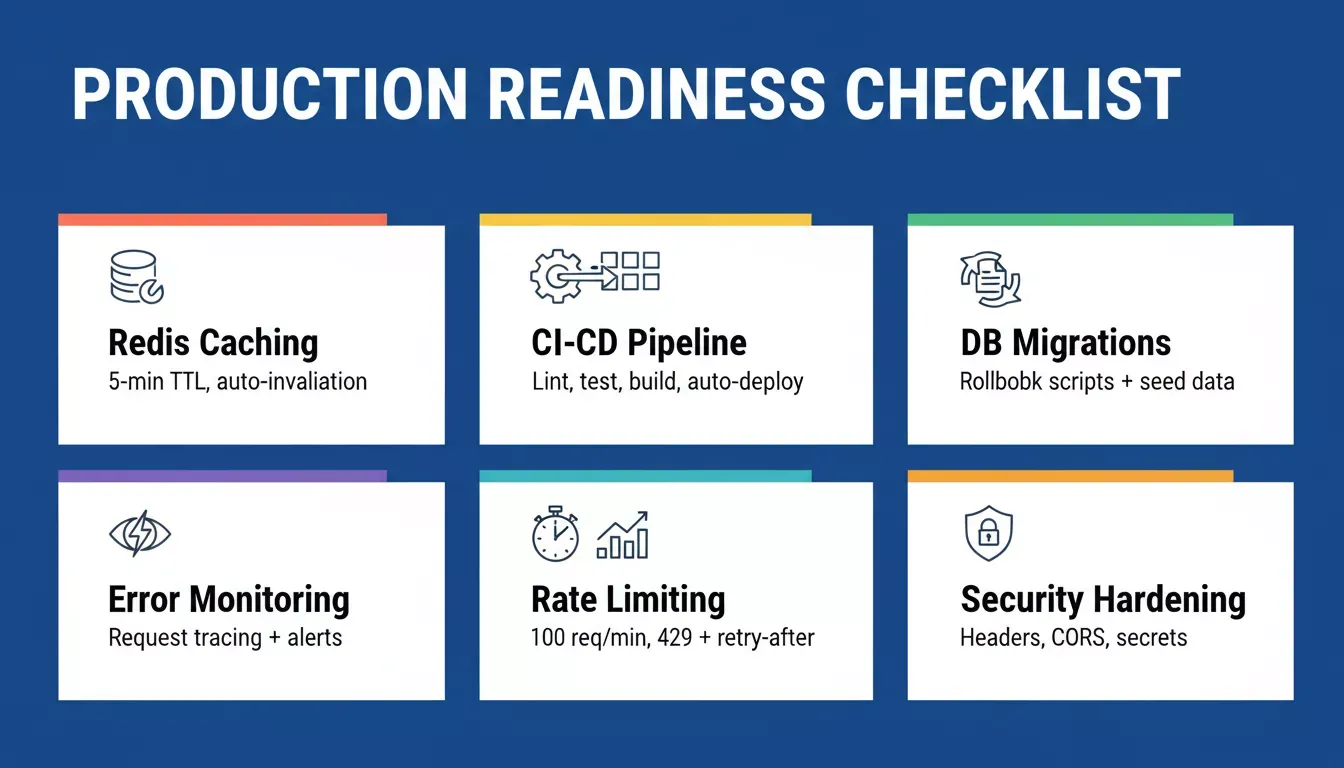
The six infrastructure layers every production app needs before real users arrive
Prompt 35: Redis Caching Layer
Adds a Redis caching layer to your API with GET request caching, automatic invalidation on mutations, and cache-control headers.
Example prompt:
"Add a caching layer to this API using Redis. Cache GET requests for 5 minutes, invalidate on POST/PUT/DELETE, and add cache-control headers for the frontend."
How it is used:
-
Generates Redis connection setup and cache middleware
-
Produces GET request caching with 5-minute TTL and key strategy
-
Creates automatic cache invalidation on POST, PUT, and DELETE operations
Prompt 36: GitHub Actions CI/CD Pipeline
Configures a complete deployment pipeline with lint, type check, unit tests, build verification, and auto-deploy to Vercel on merge.
Example prompt:
"Configure a deployment pipeline with GitHub Actions. Include lint check, type check, unit tests, build verification, and auto-deploy to Vercel on main branch merge."
Before: Manual deploys from a local machine with no test gate, a broken build reaches production before anyone notices.
After: Every push to main triggers lint, type check, tests, and build verification before a single line reaches Vercel.
Prompt 37: Database Migration Setup
Creates a migration system with rollback scripts, development seed data, and a CI step that runs migrations before deployment.
Example prompt:
"Set up database migrations for this schema. Include rollback scripts, seed data for development, and a CI step that runs migrations before deployment."
How it is used:
-
Generates migration files with up and down rollback scripts
-
Produces development seed data scripts for local testing
-
Creates a CI pre-deployment step that runs pending migrations automatically
Prompt 38: Error Monitoring and Structured Logging
Adds comprehensive error monitoring with request tracing, performance metrics, and alerting thresholds for response time and error rate.
Example prompt:
"Add comprehensive error monitoring with structured logging. Include request tracing, performance metrics, and alerting thresholds for response time and error rate."
How it is used:
-
Generates structured logging middleware with request tracing IDs
-
Produces performance metric collection for response time and throughput
-
Creates an alerting threshold configuration for error rate and latency
Prompt 39: API Rate Limiting System
Implements gateway-level rate limiting at 100 requests per minute per user with 429 responses, retry-after headers, and separate logging.
Example prompt:
"Implement a rate-limiting system at the API gateway level. Allow 100 requests per minute per user, return 429 with retry-after header, and log rate-limited requests separately."
Why this works: Rate limiting is invisible until you need it, and by then, an unprotected API has already been abused. Specifying the exact threshold, response code, and header gives the AI enough precision to generate production-ready middleware rather than a conceptual sketch.
Prompt 40: Horizontal Scaling Refactor
Makes your app stateless for load balancer compatibility by moving sessions to Redis and file uploads to cloud storage.
Example prompt:
"Add horizontal scaling support. Move session storage to Redis, ensure all file uploads go to cloud storage, and make the application stateless for load balancer compatibility."
How it is used:
-
Generates Redis session store integration, replacing in-memory sessions
-
Produces a cloud storage upload handler, replacing local file system writes
-
Creates a stateless application configuration compatible with load balancers
Prompt 41: Production Security Hardening Checklist
Generates a security hardening checklist covering HTTP headers, CORS, input sanitization, dependency audit, and secrets management.
Example prompt:
"Generate a security hardening checklist for this production app. Cover HTTP headers, CORS configuration, input sanitization, dependency audit, and secrets management."
How it is used:
-
Produces an itemized security checklist with implementation status
-
Generates HTTP security header configuration (CSP, HSTS, X-Frame-Options)
-
Creates CORS policy and input sanitization code for each endpoint
Prompt 42: Automated Database Backup System
Sets up daily full backups, continuous WAL archiving, and a tested point-in-time recovery procedure with documentation.
Example prompt:
"Set up automated database backups with point-in-time recovery. Include daily full backups, continuous WAL archiving, and a tested restore procedure with documentation."
Before: No backup strategy, a single bad migration or accidental delete is unrecoverable.
After: Daily full backups to cloud storage, continuous WAL archiving, and a documented restore procedure that's been tested before you need it.
Scalability prompts work best when they reference specific infrastructure. Naming Redis, Vercel, or GitHub Actions gives the AI enough context to generate production-ready configurations rather than generic advice.
Ships every build with SEO, WCAG, and deployment pipeline included by default.
Prompt anatomy check: These prompts require explicit Constraints. "Add caching" produces a generic implementation. "Cache GET requests for 5 minutes, invalidate on mutations, add cache-control headers" produces production-ready middleware. The more specific the operational requirement, the more precise the output.
Advanced Prompt Patterns for Complex Applications
Why this section matters: Multi-step workflows, real-time collaboration, AI integrations, and marketplace mechanics require prompts that go beyond single-feature requests. These patterns work best when you treat the prompt as a product specification, naming the architecture decisions alongside the features.
Prompt 43: Document Collaboration Tool
Builds a real-time co-editing platform with CRDT conflict resolution, version history, commenting threads, and permission levels.
Example prompt:
"Build a document collaboration tool with real-time co-editing, version history, commenting threads, and permission levels. Use CRDT for conflict resolution. Support Markdown and rich text."
How it is used:
-
Generates CRDT-based real-time co-editing with conflict resolution
-
Produces a version history timeline with diff view and restore
-
Creates commenting threads with permission-based visibility controls
Prompt 44: Multi-Step Insurance Quote Wizard
Creates a multi-step form wizard that collects vehicle details, driver history, and coverage preferences, then generates dynamic pricing.
Example prompt:
"Create a multi-step form wizard for insurance quotes. Collect vehicle details, driver history, coverage preferences, and generate pricing dynamically. Save progress between sessions."
Why this works: The key phrase is "save progress between sessions." Without it, the AI generates a stateless wizard that loses data on refresh. One constraint prevents a significant UX failure.
Prompt 45: AI Customer Support Chatbot
Builds a knowledge-base-powered support chatbot that escalates to humans after three failed attempts and logs conversation analytics.
Example prompt:
"Build an AI chatbot for customer support that reads from our knowledge base, escalates to humans after three failed attempts, logs conversation analytics, and integrates with Zendesk."
How it is used:
-
Generates a knowledge base retrieval system for chatbot responses
-
Produces human escalation logic triggered after three failed resolution attempts
-
Creates conversation analytics logging and Zendesk ticket integration
Prompt 46: Visual Workflow Automation Builder
Creates a no-code workflow builder where users connect triggers and actions visually with conditional branching and scheduled execution.
Example prompt:
"Generate a workflow automation builder where users connect triggers and actions visually. Support conditional branching, loops, webhook triggers, and scheduled execution."
Before: Automation logic buried in code that only developers can modify.
After: A visual canvas where non-technical users connect triggers and actions, with branching and scheduling handled through a drag-and-drop interface.
Prompt 47: White-Label Reporting Dashboard
Builds a multi-source reporting dashboard with custom branding per client, PDF export, scheduled email reports, and embeddable widgets.
Example prompt:
"Create a white-label reporting dashboard that reads from multiple data sources via API. Support custom branding per client, PDF export, scheduled email reports, and embeddable widgets."
How it is used:
-
Generates multi-source API data connectors with a unified dashboard view
-
Produces per-client branding configuration and PDF export
-
Creates scheduled email report delivery and embeddable widget code
Prompt 48: Two-Sided Marketplace
Builds a full marketplace with two-sided onboarding, listing creation, in-app messaging, Stripe Connect split payments, and dispute resolution.
Example prompt:
"Build a marketplace with two-sided onboarding for buyers and sellers. Include listing creation, search with filters, in-app messaging, Stripe Connect for split payments, and dispute resolution."
Why this works: "Stripe Connect for split payments" is the load-bearing phrase. Without it, the AI generates a standard Stripe checkout. Stripe Connect is architecturally different, it routes funds between parties. One word changes the entire payment architecture.
Prompt 49: CI/CD Monitoring Dashboard
Aggregates build status from GitHub Actions, deployment logs from Vercel, and error rates from Sentry into a unified service health view.
Example prompt:
"Generate a CI/CD monitoring dashboard that aggregates build status from GitHub Actions, deployment logs from Vercel, and error rates from Sentry. Show health per service with drill-down."
How it is used:
-
Generates API integrations for GitHub Actions, Vercel, and Sentry
-
Produces a unified service health dashboard with status indicators
-
Creates drill-down views for build logs, deployment history, and error traces
Prompt 50: Employee Onboarding System
Builds an HR onboarding system where teams create checklists, assign tasks across departments, track completion, and generate reports.
Example prompt:
"Build an employee onboarding system where HR creates checklists, assigns tasks to different departments, tracks completion percentage, sends reminders, and generates completion reports."
How it is used:
-
Generates HR checklist builder with department-level task assignment
-
Produces completion percentage tracking with automated reminder triggers
-
Creates onboarding completion reports with time-to-complete analytics
The evolving, fast nature of vibe coding means your prompts should iterate too. Start broad, review the output, then refine with follow-up prompts that target specific sections rather than regenerating from scratch. You can also learn how to build a full-stack app with an AI prompt for a deeper walkthrough.
Your Prompts Are the New Codebase
In a world where artificial intelligence generates 41% of all production code, the skill that matters most is no longer typing syntax. It is knowing exactly what to ask for.
The 50 prompts in this article work because they follow a pattern: describe the outcome, specify the constraints, name the tools.
Try any of these 50 prompts live on Rocket - the platform built to turn natural language into production-ready apps.
Whether you prefer Cursor, Claude Code, or a full-stack platform, the prompts you write today are the applications your users interact with tomorrow.
Table of contents
- -Why Your Prompt Quality Determines App Quality
- -How Should You Structure a Prompt for AI Coding Tools?
- -How Rocket Turns a Single Prompt Into a Live App
- -Prompts That Generate Full-Stack Web Applications
- -Prompt 1: SaaS Billing Dashboard
- -Prompt 2: Multi-Tenant Project Management App
- -Prompt 3: Freelancer Invoicing Platform
- -Prompt 4: Restaurant Reservation System
- -Prompt 5: AI-Powered Job Board
- -Prompt 6: Personal Finance Tracker
- -Prompt 7: Event Management Platform
- -Prompt 8: Learning Management System
- -What Makes These Full-Stack Prompts Work?
- -Prompts for Non-Developers and Citizen Builders
- -Prompt 9: Yoga Studio Booking Website
- -Prompt 10: Real Estate Property Listing Site
- -Prompt 11: Consulting Business CRM
- -Prompt 12: Handmade Candle Storefront
- -Prompt 13: Music Teacher Student Portal
- -Prompt 14: Podcast Community Membership Site
- -Prompt 15: Co-Working Space Management App
- -Prompt 16: Pet Sitting Marketplace
- -Prompts for UI Design and Frontend Iteration
- -Prompt 17: Dark Theme Dashboard Redesign
- -Prompt 18: Wireframe to Responsive Landing Page
- -Prompt 19: Settings Page with Tabbed Navigation
- -Prompt 20: Mobile-First Onboarding Flow
- -Prompt 21: Advanced Data Table Component
- -Prompt 22: Single-Page Checkout Redesign
- -Prompt 23: Notification Center Dropdown
- -Prompt 24: Analytics Dashboard with Six Widgets
- -Prompt 25: Drag-and-Drop Kanban Board
- -Prompts for Debugging, Testing, and Code Review
- -Prompt 26: Authentication Security Audit
- -Prompt 27: Intermittent 500 Error Debugger
- -Prompt 28: Payment Module Unit Tests
- -Prompt 29: React Performance Audit
- -Prompt 30: Local-to-Production Break Debugger
- -Prompt 31: REST API Integration Tests
- -Prompt 32: Slow Query Optimizer
- -Prompt 33: Accessibility Compliance Review
- -Prompt 34: Secrets and API Key Scanner
- -Can AI Fix Its Own Generated Code?
- -Prompts for Scaling, Deployment, and Production Readiness
- -Prompt 35: Redis Caching Layer
- -Prompt 36: GitHub Actions CI/CD Pipeline
- -Prompt 37: Database Migration Setup
- -Prompt 38: Error Monitoring and Structured Logging
- -Prompt 39: API Rate Limiting System
- -Prompt 40: Horizontal Scaling Refactor
- -Prompt 41: Production Security Hardening Checklist
- -Prompt 42: Automated Database Backup System
- -Advanced Prompt Patterns for Complex Applications
- -Prompt 43: Document Collaboration Tool
- -Prompt 44: Multi-Step Insurance Quote Wizard
- -Prompt 45: AI Customer Support Chatbot
- -Prompt 46: Visual Workflow Automation Builder
- -Prompt 47: White-Label Reporting Dashboard
- -Prompt 48: Two-Sided Marketplace
- -Prompt 49: CI/CD Monitoring Dashboard
- -Prompt 50: Employee Onboarding System
- -Your Prompts Are the New Codebase