

How can you create an ERP system tailored to your workflow? Map processes, define modules, choose the right platform, and build around real business needs to improve control, flexibility, and growth potential.
Want to build an ERP system that actually fits your workflow?
You develop ERP software around your real business needs, not generic templates. That means mapping processes, defining modules, and using the right platform to speed up development.
The global Enterprise Resource Planning (ERP) software market size was valued at USD 92.6 billion in 2025 and is projected to grow from USD 106.22 billion in 2026 to USD 281.58 billion by 2034.
That growth shows one thing. Businesses want better control over operations. And many prefer custom ERP over rigid off-the-shelf tools.
So let’s break down how to build an ERP that fits your workflow like it was designed just for you.
Why a Custom ERP Makes Sense?
An ERP system integrates various business processes into a single central platform. It handles financial management, human resources, supply chain management, inventory management, project management, and more.
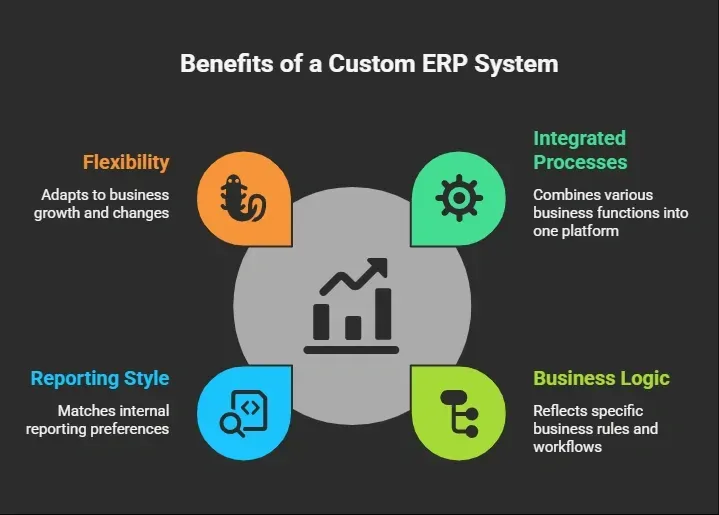
A modern ERP system built through custom ERP software development gives you flexibility. It adapts as your business growth continues.
Understanding the ERP Software Development Process
The ERP software development process is not magic. It is structured. And when done right, it avoids rework and confusion.
Here is how ERP development usually flows:
| Stage | What Happens | Why It Matters |
|---|---|---|
| Requirement Analysis | Define business requirements and workflows | Keeps development team focused |
| System Design | Plan architecture and tech stack | Supports scalability |
| Development | Build ERP modules and business logic | Converts ideas into working software |
| Testing | Validate ERP system functions | Prevents costly errors |
| Deployment | Launch ERP solution | Moves system into real use |
| Maintenance | Ongoing improvements | Supports business efficiency |
This development process keeps the erp project structured and clear.
How to Build an ERP System with Rocket. New?
Rocket.new is an AI-assisted app builder that allows teams to create structured software systems through prompts, templates, and visual tools. Instead of writing thousands of lines of code manually, the development team defines business logic, database models, and workflows inside a guided environment.
For ERP system development, that means faster setup, structured design, and flexibility. It supports database creation, workflow automation, dashboards, API connections, and deployment tools. That fits perfectly with custom ERP software development.
Now let’s get practical.
Step 1: Get Clear on What You Want to Build
Start with clarity before touching the platform. An ERP system should reflect real business needs, not assumptions.
Ask:
- What business processes need automation?
- Which ERP modules are required?
- Is inventory management a priority?
- Do you need financial management and accounts payable tracking?
- What about human resources workflows?
- Do you require supply chain management dashboards?
- Are there existing systems that need data integration?
Write your business requirements clearly. This makes the ERP software development process smoother.
Custom ERP starts with understanding business needs. Not with clicking buttons.
Step 2: Sign Up and Access Rocket.new
Now move from planning into action. This is where your ERP development journey officially begins.
Create an account on Rocket.new.
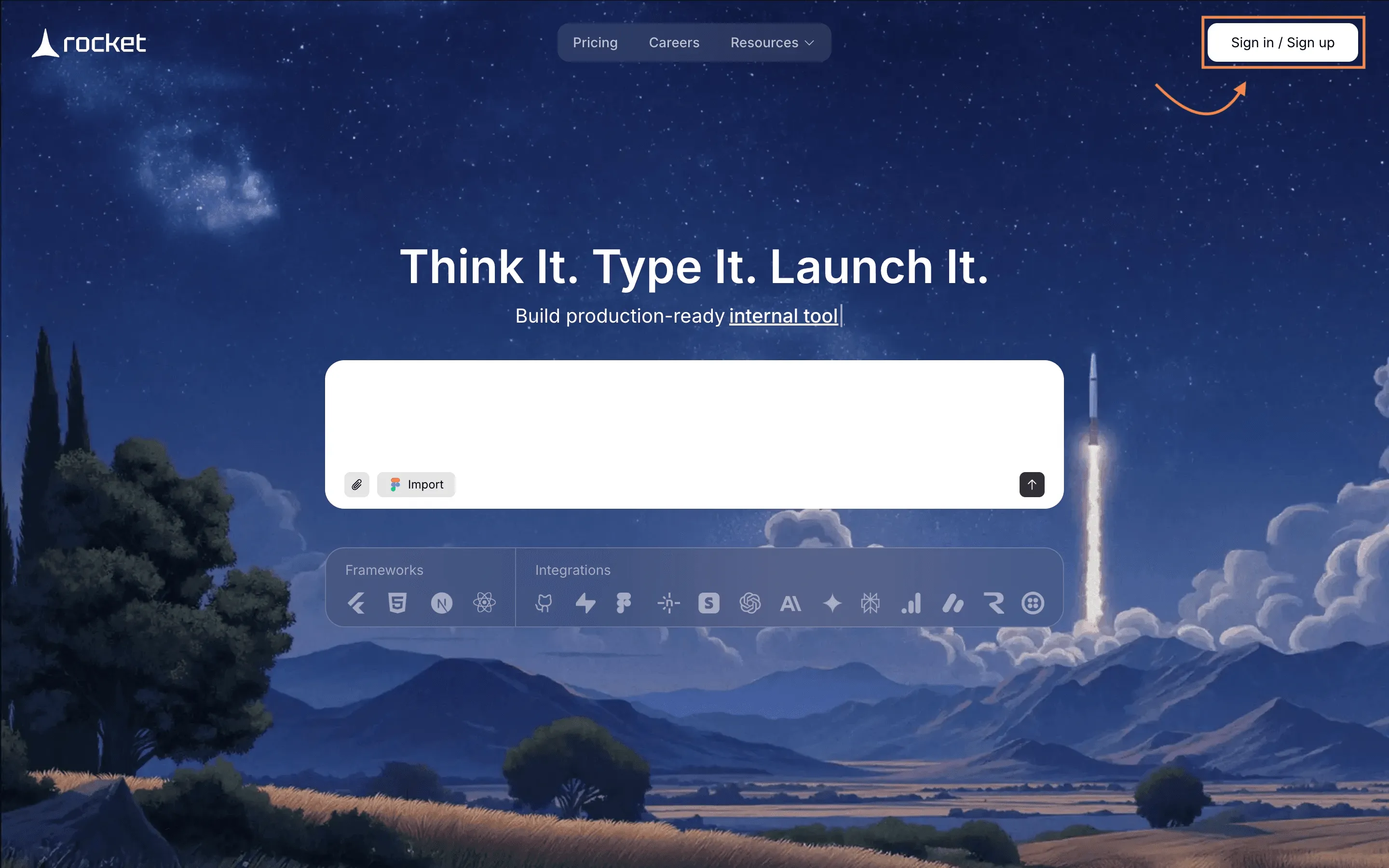
After login, access the Launchpad section. The platform guides users through the structured creation of apps. It is built for structured software development, not random screen building.
Step 3: Choose Prompt or Template from the Gallery
Rocket.new allows two approaches.
Option one. Use a template from the template gallery. Some templates already include dashboards, user roles, and database structures. You can modify them for enterprise resource planning ERP workflows.
Option two. Start with a prompt.
For example:
“Build a custom ERP system with modules for financial management, supply chain, human resources, and project management.”
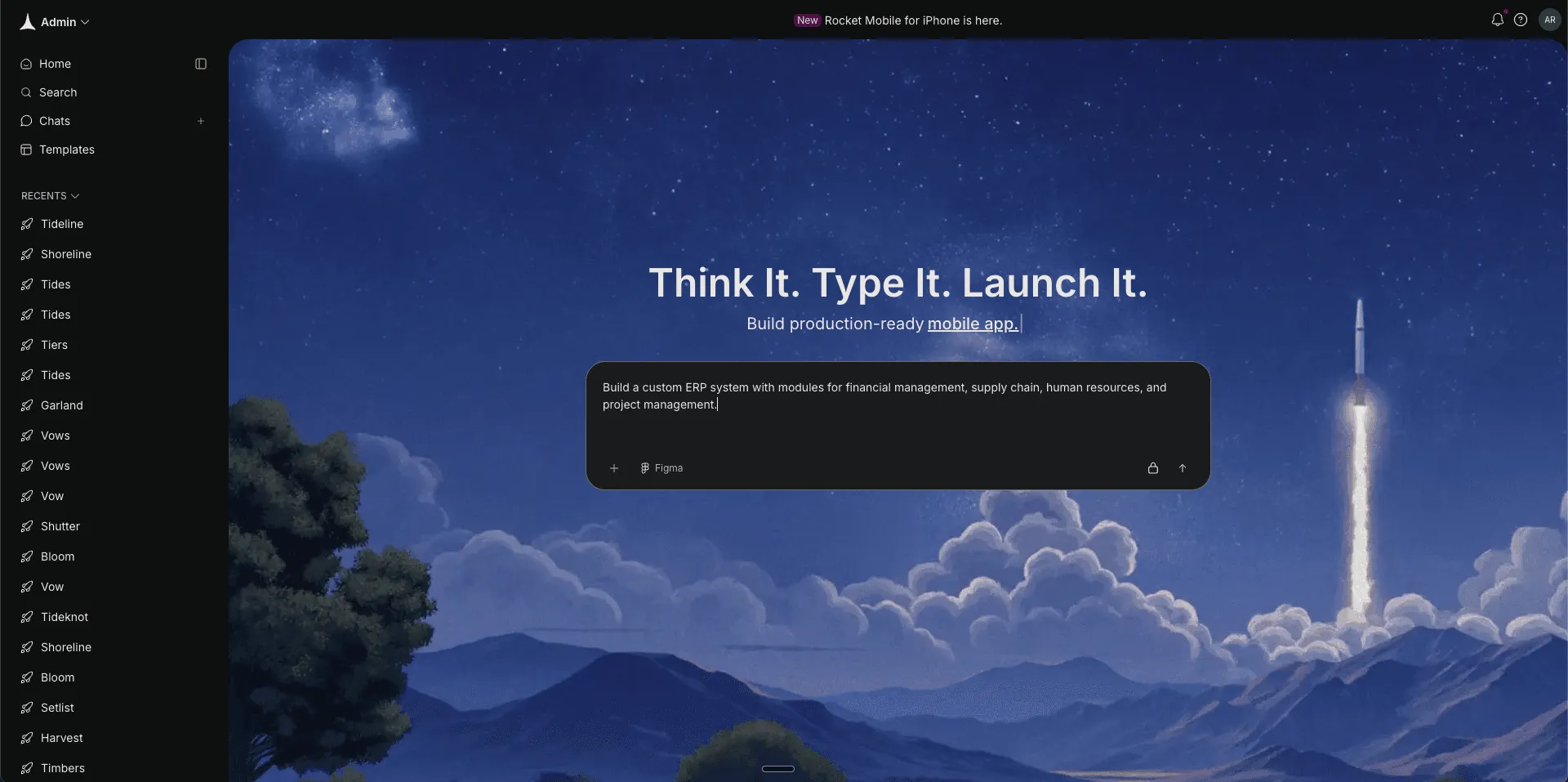
The system generates an initial structure. That includes database models and user interface layout. This speeds up the creation of ERP software without starting from scratch.
Step 4: Define Framework and Structure
This is where your ERP system gets its technical backbone. Now you decide how your software will actually be built.
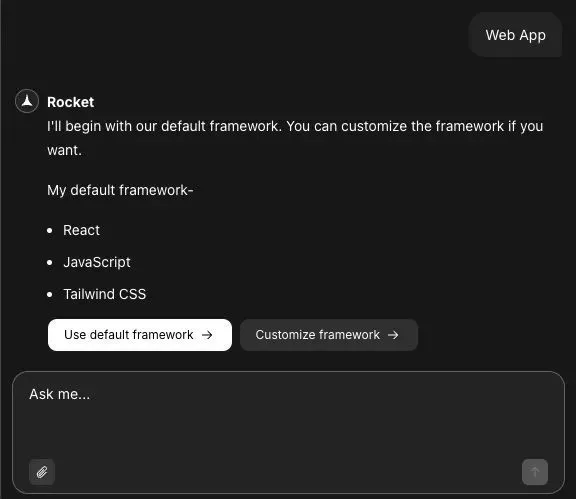
After Rocket generates the base structure, it offers a default framework. As shown in the screen, the default stack includes:
- React
- JavaScript
- Tailwind CSS
You can click “Use default framework” to move forward quickly. This works well for most custom ERP systems because it provides a modern web app structure with responsive design support.
If your development team prefers something different, select “Customize framework.” Rocket.new also supports options like Next.js, depending on project needs. This allows flexibility in ERP software development while keeping the structure intact.
At this stage, you refine:
- Tech stack preferences
- Database structure with centralized database layout
- Access controls and user roles
- Business logic rules
Choosing the right framework affects performance, scalability, and long-term maintenance. React works well for building interactive user interfaces. Tailwind CSS simplifies styling. JavaScript keeps development straightforward.
After framework selection, Rocket.new allows visual schema editing. This helps structure data management and resource allocation clearly.
ERP system functions such as approval flows, reporting rules, and workflow automation are configured here. Custom ERP software development becomes more controlled and predictable at this stage.
Step 5: Build ERP Modules
Now it is time to build what your business actually uses. Modules should mirror daily business operations.
Create ERP modules such as:
- Financial management with financial reporting dashboards
- Human resources workflows for leave approvals
- Inventory management for stock tracking
- Supply chain dashboards
- Customer relationship management tracking
- Project management boards
- Asset management module
Each module reflects your business operations.
You define relationships between modules. For example, supply chain data connects to inventory management. Financial management connects to procurement process records. This creates structured enterprise resource planning.
Step 6: Configure Business Logic
The system must behave the way your company works. This step defines the rules behind the screens.
Set:
- Approval hierarchies
- Automated notifications
- Resource planning ERP software rules
- Data processing workflows
This stage ensures the ERP system mirrors various business processes inside your company. The development team tests logic flows before moving forward.
Step 7: Connect Existing Systems and Handle Data Migration
Your ERP should not exist in isolation. It needs to work with tools you already use. If your company uses accounting tools or HR platforms, connect them.
Rocket.new supports API based ERP system integration. That helps with data integration across software systems.
Plan data migration carefully:
- Clean old records
- Transfer critical data
- Validate entries
Proper ERP system development includes structured data migration to avoid inconsistencies.
Step 8: Customize User Interface
Now after you get your first result, its time to make some tweaks according to your taste, Rocket.new provide tons of commands and features to modify the app.
Cause interactive user interfaces matter.
Learn more about the commands and features here.
Modify:
- Dashboard layout
- Charts for key performance indicators
- Reporting views
- Navigation menus
Custom ERP solutions should feel natural to users. The user interface should not confuse employees.
When digital solutions perfectly align with workflows, user training becomes easier.
Step 9: Test the ERP Project
Before launch, test everything.
Check:
- Financial reporting accuracy
- Accounts payable tracking
- Human resources approvals
- Supply chain updates
- Asset management logs
Testing ensures regulatory compliance and data management accuracy.
ERP implementation should not feel rushed.
Step 10: Launch and Monitor
Rocket.new provides deployment tools to help your ERP solution go live without complex infrastructure management.
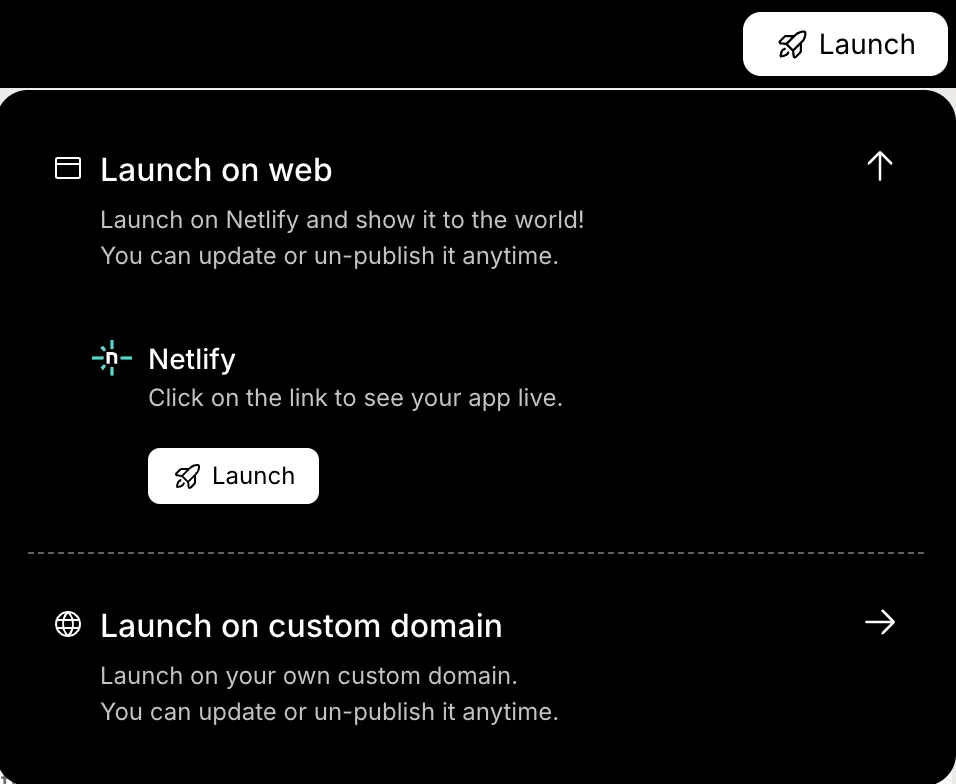
After launch:
- Provide user training
- Monitor business efficiency
- Track key performance indicators
- Adjust workflows
ERP development does not stop at deployment. Continuous improvements support business growth.
Community Insight
This Reddit thread, where users discuss how big ERP systems often don’t fit workflows and people prefer lighter or more customizable tools:
“If I had to pick an ERP today, I honestly wouldn’t start by choosing a big, all-in-one platform at all… forcing all of that into a giant monolithic ERP usually ends up with bloated licenses, half-used modules, and way too many expensive customizations.”
Managing Compliance and Security
ERP systems handle financial records, employee data, and operational details. That means security and compliance cannot be treated casually.
Include:
- Access controls with role-based permissions
- Regulatory compliance tracking aligned with industry regulations
- Audit logs to monitor changes and activity
- Data management safeguards for sensitive information
- Backup policies for critical data
Enterprise resource planning ERP systems often support multiple departments. Each department may have different security needs. Custom ERP allows for adjustments to sector-specific requirements.
Security should be built into the development process from day one, not added later as a patch.
Measuring ERP Success
Launching the ERP system is not the finish line. The real question is simple. Is it improving business operations?
Track key performance indicators such as:
- Reduced processing time across departments
- Improved financial reporting accuracy
- Stable supply chain performance
- Better resource allocation tracking
- Business efficiency improvements
Custom ERP solutions allow dashboards that track key performance indicators in real time. That makes performance visible instead of assumed.
When the numbers improve, cost savings often follow. And that creates a clear competitive advantage..
How to Develop ERP Software That Truly Fits?
Many companies adopt rigid ERP software that ignores unique business needs. Teams struggle to adapt, workflows feel forced, and productivity slows down. The real issue is not enterprise resource planning itself. The problem is choosing systems that do not reflect actual business operations.
The solution is simple and practical. Start with clear business requirements, design custom ERP modules around real workflows, choose the right tech stack, and plan data migration carefully. A focused development process, a capable development team, and flexible tools like Rocket.new help build ERP software into a comprehensive business management system designed to grow with the business.
Table of contents
- -Why a Custom ERP Makes Sense?
- -Understanding the ERP Software Development Process
- -How to Build an ERP System with Rocket. New?
- -Step 1: Get Clear on What You Want to Build
- -Step 2: Sign Up and Access Rocket.new
- -Step 3: Choose Prompt or Template from the Gallery
- -Step 4: Define Framework and Structure
- -Step 5: Build ERP Modules
- -Step 6: Configure Business Logic
- -Step 7: Connect Existing Systems and Handle Data Migration
- -Step 8: Customize User Interface
- -Step 9: Test the ERP Project
- -Step 10: Launch and Monitor
- -Community Insight
- -Managing Compliance and Security
- -Measuring ERP Success
- -How to Develop ERP Software That Truly Fits?

