

How can entrepreneurs launch apps without coding skills? Visual builders, automation, and AI let founders design forms, connect data, and publish web apps quickly, enabling small teams to create products.
Can a business owner build a digital product without learning programming?
Yes. Today, you can build a functional product using visual platforms, automation tools, and AI assistance.
You pick templates, add a form, connect data, and publish an app that runs on mobile, desktop, and the web. No deep code knowledge needed.
The demand for faster digital products is growing fast. According to a Gartner report, 70% of new applications will use low-code or no-code technologies by 2025.
That shift is helping small teams and solo founders quickly turn an idea into a real app. A modern app builder handles the heavy software development work in the background. Focus on your business, your data, and your users.
So let’s walk through the full process of building a web app without traditional programming.
Why Businesses are Choosing No-Code Platforms
Running a modern business often means building digital tools for customers and teams. In the past, that required developers, long timelines, and large budgets.
Now, no code platforms change that.
A no-code app builder allows you to create an app with visual editors instead of writing complex code. You simply move elements on the screen, connect data sources, and publish.
Here are a few reasons companies like this approach:
- Lower software costs
- Faster app building cycles
- Fewer repetitive manual tasks
- Easy updates after launch
- Better control for non-technical users
Many developers also use no-code platforms for quick prototypes or internal tools. It helps teams test an idea before investing in deeper code app builder workflows.
Even a simple project can turn into one of the powerful apps businesses rely on daily.
What a No-Code App Builder Actually Does
A no-code app builder is a platform that lets you create apps visually. Instead of writing code, you assemble parts of the app using visual components.
Typical components include:
- Form builders
- data tables
- automation tools
- notification systems
- dashboards for users
A good code app builder also integrates with external data sources, including Google Sheets, databases, and more. That means your app can display live data without a complex setup.
Many builders include AI features too. You can type instructions using natural-language prompts, and the platform automatically generates form fields, layouts, and workflows.
The app creators only guide the idea. The AI handles many repetitive parts of app building.
The Basic Process of Building an App Without Coding
The good news is that the process is very simple. Most teams can complete their first app in a few hours.
Here is a simple breakdown.
| Step | What Happens | Result |
|---|---|---|
| Idea planning | Define the business problem | Clear project direction |
| Data setup | Connect Google Sheets or other data sources | Live data storage |
| App design | Use a drag-and-drop builder | Layout appears on the screen |
| Workflow logic | Add form submissions, rules, and notifications | Smart automation |
| Testing | Open the app on mobile, desktop, or another device | Check usability |
| Launch | Publish to the web or install on home screen | Real users start using |
Each stage uses visual tools, so the coding required stays minimal. Even complex advanced logic can be added with AI suggestions and simple settings.
What Types of Apps Businesses Usually Build
Many people think no-code tools only make small projects. That is not true. Businesses use them to run daily operations, manage data, and support teams and customers. These apps solve real problems and help companies move faster.
Common Examples
- Internal Tools: Teams create internal tools to manage tasks, track inventory, or review data. Employees submit updates through a form, and the app sends notifications to managers. This reduces manual tasks and keeps work organized.
- Customer Portals: Companies build custom apps that let customers submit forms, track requests, or check for updates. The platform stores submissions in Google Sheets or other data sources.
- Mobile Dashboards: A web app can display live data on mobile devices. Managers open the app from their home screen to review reports anytime.
These simple ideas often grow into real apps that support daily business work and help teams make faster decisions.
The Role of AI in Modern App Builders
Modern app builder platforms include a strong AI layer. This speeds up app building and simplifies complicated tasks.
You might start with an idea like:
"Create a form for customer support tickets."
With natural language prompts, the AI generates:
- a ticket form
- notifications for new requests
- a data dashboard
- automatic updates across devices
The AI engine may also give smart suggestions during app building. For example, it might recommend new fields for a form, or propose advanced logic for routing messages.
Some code app builder platforms even use machine learning to predict common usage patterns. This helps produce real apps faster with fewer errors.
Community Insight
One discussion from Reddit highlighted how fast teams can ship a working app:
“Our startup built a working internal dashboard in two days using a no code platform connected to Google Sheets. No developer time required.”
Stories like this appear across many communities. Small teams use no-code tools to create apps, test an idea, and launch faster.
Even technical co-founders sometimes prefer no-code tools during early project stages.
Launching Your App on Mobile Devices
A modern web app can run almost anywhere. Many platforms generate responsive designs that work across mobile, desktop, and tablets.
Some builders also create native mobile experiences. Your app can appear on the home screen of an Android or iPhone device.
Certain platform tools even package your app as a native mobile app ready for Apple's App Store.
During the launch, you configure:
- notifications
- form submissions
- user permissions
- enterprise grade security
This step turns a prototype into a production-ready app used by real users.
Rocket Powered App Building with Rocket.new
One interesting app builder platform gaining attention is Rocket.new.
The goal of Rocket.new is simple. Help teams create working products using AI, visual tools, and no-code workflows.
The platform helps business teams move from idea to a real app quickly with just a prompt.
Instead of writing code, you describe your idea using natural language prompts. The AI engine generates the app structure, form, and data connections.
Top Features
- Prompt to App Creation: Builds apps directly from single prompts
- Figma Import: Converts design files into live, editable layouts
- AI-Powered Backend: Automatically handles logic, data, and workflows
- Custom Domain Support: Publishes projects with a branded domain
- Code Export: Allows developers to extend or customize later
- Live Preview: Shows instant updates while editing
These features help teams create apps without deep programming knowledge.
Building a Web App with Rocket.new
Rocket.new makes web app creation simple for teams that want results without heavy code work. You start with an idea, describe it using AI powered natural language prompts, and the platform helps create the structure of the app. The system connects your data sources, generates a form, and sets up workflows in minutes. This makes app building fast, even for people with no development background.
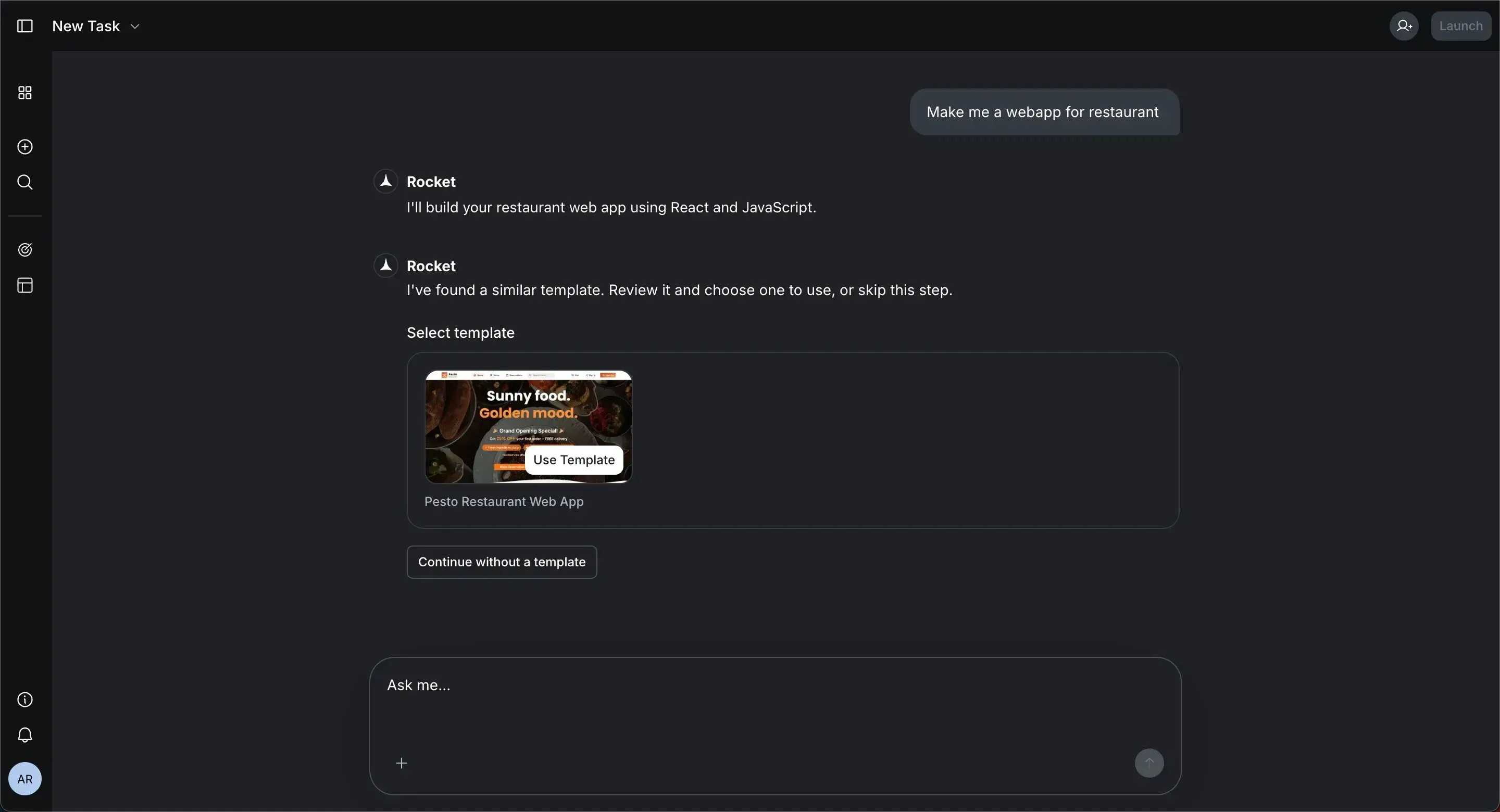
Once the app is ready, you can test it on different devices, adjust the screen layout, and launch it for your business.
The platform handles much of the technical setup, so teams focus on solving real problems instead of worrying about code.
Tips Before You Start Building
Starting your first app-building project might feel new. The good part is that a few simple steps can make the whole process smooth and organized.
A clear idea, the right tools, and basic planning help you create working apps much faster.
Helpful Tips
- Start with a small idea: Begin with a simple workflow, like a support form or an inventory tracker. Small projects help you learn the app-building process faster.
- Plan your data structure: Think about the data your users will submit. Decide what form fields the app needs before you start building.
- Use templates: Most app builder platforms offer free templates. These help you quickly create the first version of your app.
- Test across devices: Open the app on mobile, desktop, and another device before the final launch. This helps you check the screen layout and usage.
- Use learning resources: Many platforms offer tutorials and other resources to help new app creators understand the tools and features.
A clear idea combined with the right platform and tools can help you create useful apps for your business without a complicated setup.
A Simple Path to Building Apps
Many business owners want a digital app, but traditional software development often means hiring developers, learning code, and waiting months before anything goes live. That process can slow down a simple idea, even when the goal is just to collect data, manage a form, or support everyday work for users.
Modern no-code app builder platforms change that path. Teams can start small, test an idea, and launch a working web app using visual tools, AI, and connected data sources. The real value of building a web app without coding is simple. It helps businesses turn ideas into practical solutions without deep programming skills.
Table of contents
- -Why Businesses are Choosing No-Code Platforms
- -What a No-Code App Builder Actually Does
- -The Basic Process of Building an App Without Coding
- -What Types of Apps Businesses Usually Build
- -The Role of AI in Modern App Builders
- -Community Insight
- -Launching Your App on Mobile Devices
- -Rocket Powered App Building with Rocket.new
- -Top Features
- -Building a Web App with Rocket.new
- -Tips Before You Start Building
- -A Simple Path to Building Apps

