
Skip developers and code. No-code tools let you pick a template, customize in plain English, and go live the same day. 1.5 million people have tried Rocket across 180 countries to do exactly this.
You do not need a developer, a big budget, or any coding knowledge to build a landing page today. No-code tools let you pick a template, customize it in plain English, and go live the same day. 1.5 million people have tried Rocket across 180 countries to do exactly this. Here is how it works.
Can You Really Build a Landing Page Without Coding?
Yes. The question worth asking is not whether it is possible, it is which tool fits the job.
As of 2025, Gartner projected that over 70% of new applications would use no-code or low-code platforms, a forecast that has tracked closely with what the market actually produced. Whether you are launching a product, running a campaign, or capturing leads, you do not need to write a single line of code to get a professional page live.
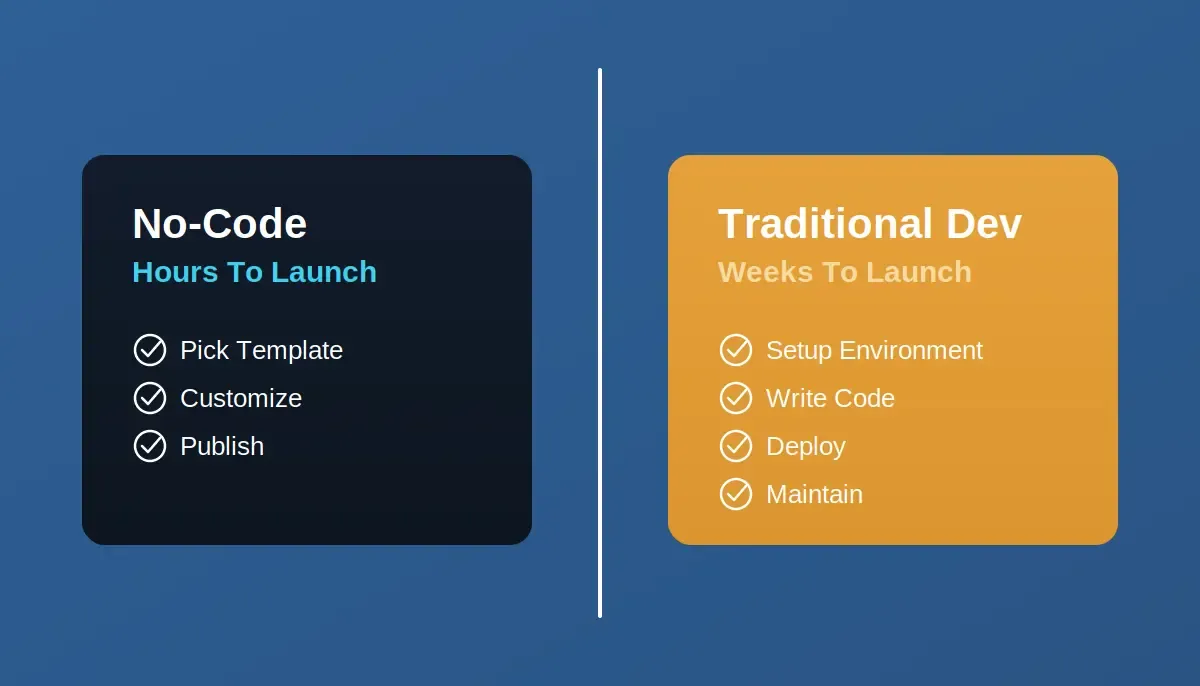
No-code platforms collapse the gap between idea and live page from weeks to hours.
What changed is not just the tools. The best no-code platforms today generate production-ready code from a plain-language description, ship it with SEO structure and accessibility compliance built in, and deploy it to a live URL in one action. The gap between "I have an idea" and "this is live" has collapsed from weeks to hours.
That said, not every no-code tool is built the same way, and the right choice depends on what you actually need to build.
What Is a No-Code Landing Page Builder?
A no-code landing page builder lets you design, build, and publish a landing page without writing code. These platforms use visual interfaces and configurations rather than programming, and are built for people with little to no technical background.
The older generation of these tools, Wix, Carrd, Squarespace, works by letting you arrange prebuilt components on a canvas. The platform converts your layout into code behind the scenes.
The newer generation goes further. Describe what you want in plain language, and the AI generates the entire page, structure, copy scaffolding, layout, integrations,from that description. You refine through conversation rather than menus, and the output is production-ready code specific to your use case.
What a modern no-code landing page builder typically includes:
- Drag and drop editors for arranging sections and elements
- Pre-built templates for landing pages, web apps, dashboards, and marketing sites
- Built-in forms to capture leads directly from your page
- Mobile-responsive layouts that adjust automatically across devices
- SEO settings, meta tags, and structured data by default
- Custom domain connection so your page lives on your own URL
- 25+ integrations with tools like Stripe, Mailchimp, Google Analytics, Supabase, and HubSpot
Common use cases:
- Product launch pages
- Event registration pages
- Free trial or demo sign-up pages
- Coming soon pages
- Campaign-specific pages for a defined target audience
The outcome is the same across all of them: a live, functional landing page without involving a development team. Understanding no-code development basics helps you pick the right tool from the start.
How Do No-Code Tools Help You Launch Landing Pages Faster?
No-code tools remove the code development cycle entirely. No back-and-forth with developers, no waiting on builds, no deployment pipeline to manage.
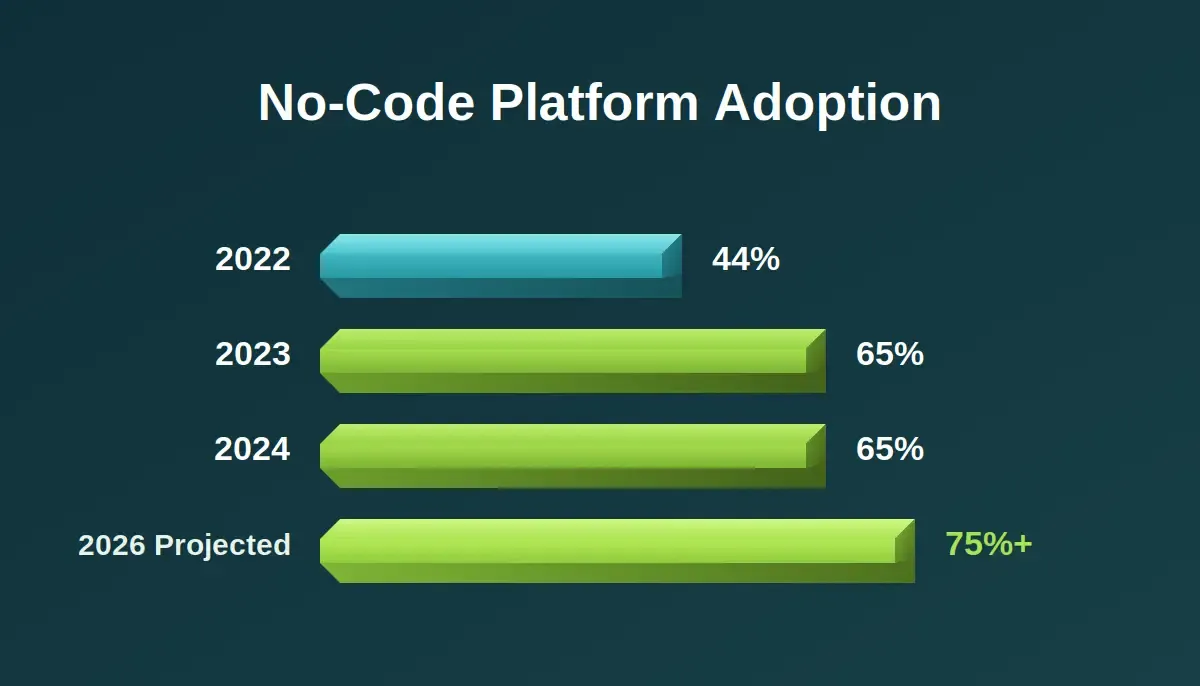
No-code platform adoption has grown consistently, with industry data projecting continued acceleration through 2026.
Here is what a modern no-code setup already handles for you:
- A template library built for specific industries and goals
- Visual components, buttons, headers, testimonial blocks, data tables, forms
- Responsive design that adjusts layout across devices automatically
- Connected data storage for form submissions
- Analytics integration (Google Analytics, or built-in tracking)
- One-click publishing with custom domain support
Who benefits most:
| User Type | Primary Need |
|---|---|
| Small business owner | Fast, affordable landing pages without hiring developers |
| Freelancer or creative | Portfolio or client project pages with no learning curve |
| Startup founder | Quick MVP or product launch page to test an idea before committing |
| Coach or consultant | Lead generation pages to capture leads and grow a list |
| Marketer | Campaign-specific pages that improve conversion rates without IT support |
Non-technical users, marketers, and founders are the biggest winners here. No coding required, and no delays tied to development cycles. Improving landing page optimization after launch is the natural next step once your page is live.
How Do You Choose the Right No-Code Platform?
Picking the right no-code platform comes down to what you actually need to build, and how much you are willing to trade off between simplicity and capability.
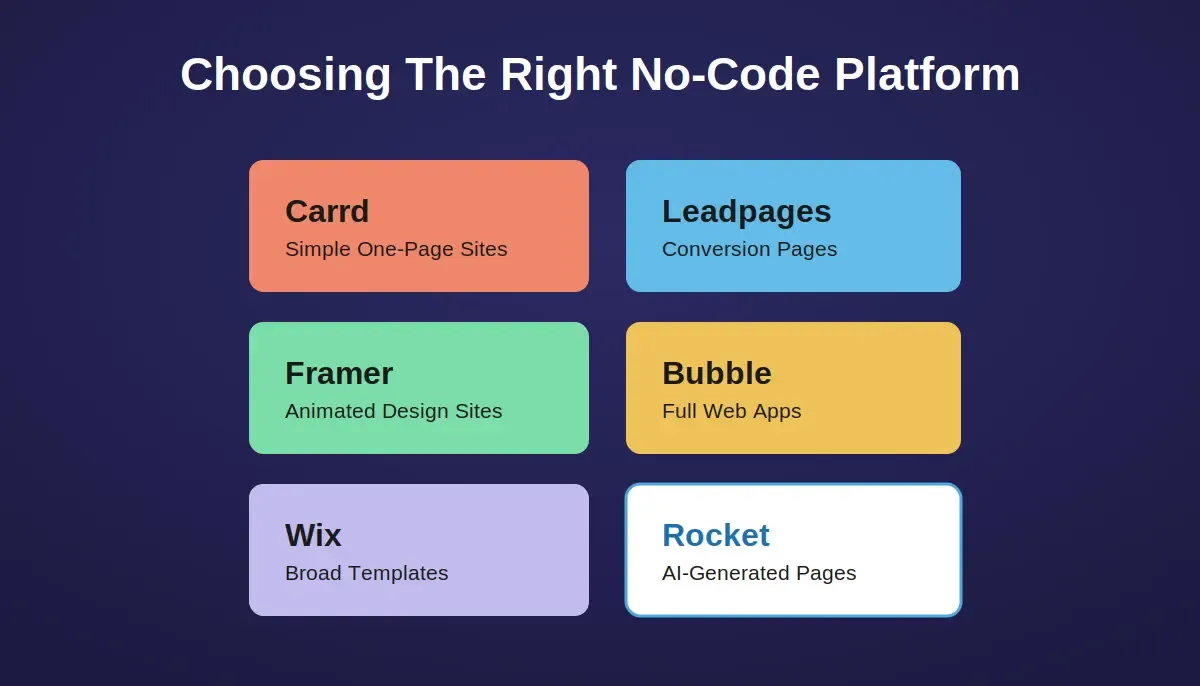
Each platform has a distinct strength, match the tool to the job, not the other way around.
Here is an honest breakdown:
- Carrd: Good for a single static page: a personal profile, a portfolio, a simple link page. Gets awkward the moment you need a form with conditional logic or more than one page. Pro features under $19/year.
- Leadpages: Built specifically for conversion-focused pages with 160+ templates and payment integrations. Strong for small businesses running campaigns. Less flexible for anything outside that use case.
- Framer: Excellent for animated, design-forward sites. Popular with startups that want a modern aesthetic. The learning curve is steeper than it looks, and the pricing scales quickly.
- Bubble: Capable of building full web apps with no code, not just landing pages. Worth considering if your "landing page" is actually the front door to a more complex product.
- Wix: 900+ templates, broad customization, good for beginners. The output tends to look like Wix. Fine for most small business use cases; less suited to anything that needs to look distinctive.
- WeWeb / Xano: For teams that want to mix no-code, low-code, and custom code in the same project. More setup required upfront.
Goal-to-platform mapping:
| Your Goal | Best Option | Key Limitation |
|---|---|---|
| AI-generated landing page from a prompt, production-ready code | Rocket | Overkill for a single static page with no integrations |
| Simple personal or portfolio page | Carrd | Limited to one page; forms need workarounds |
| High-converting pages with A/B testing | Unbounce | Expensive at scale; limited design flexibility |
| Full website with many templates | Wix | Output tends to look templated |
| Animated, modern startup page | Framer | Steeper learning curve than it appears |
| Free simple lead-capture page | Google Sites | Very limited design control |
| Small business page with payments | Leadpages | Narrow use case; weak outside conversion pages |
Platform comparison:
| Platform | Best For | Starting Price |
|---|---|---|
| Rocket | AI-generated landing pages, web apps, and full products with research and competitive intelligence built in | Free tier available |
| Wix | Beginners wanting broad template choice | Free tier; paid from ~$17/mo |
| Unbounce | Marketers focused on conversion rate optimization | From $99/mo |
| Webflow | Designers needing pixel-level control without writing CSS | Free tier; paid from $14/mo |
| Bubble | Full web app logic without code | Free tier; paid from $29/mo |
| Carrd | Single static pages at minimal cost | Free; pro from $9/year |
Steps to pick the right platform:
- Define your goal: lead generation, product launch, or event sign-up
- Check whether the platform's templates match your industry and output quality
- Test the free plan before committing to a paid tier
- Confirm mobile-responsive layouts and responsive design are included by default
- Verify the platform supports custom domains and the integrations you actually use
Step-by-Step: How to Build a Landing Page Without Coding Using Rocket
One thing worth understanding before the walkthrough: Rocket is not just a landing page tool. It is the world's first Vibe Solutioning platform, a system where research, building, and competitive monitoring happen in the same place. Landing pages are one output of its Build pillar.
The reason that matters for this walkthrough: when you build a landing page inside Rocket, it starts from the context of your actual product, not a generic template with placeholder copy. Web apps and landing pages are generated in production-ready Next.js. The code is real, downloadable, and connectable to GitHub.
Workflow: Start → Pick Template or Describe → Preview Structure → Customize in Chat → Connect Integrations → Publish Live
Step 1: Pick Your Starting Point, Template or Prompt
Rocket gives you two ways to begin: browse the template library and pick a structure that matches your use case, or describe what you want to build and let Rocket generate it from your description.
To browse the library, open the menu in the top right and select Templates. Templates are organized by category: Landing Page, Web App, Dashboard, Mobile App, Internal Tool, and more.
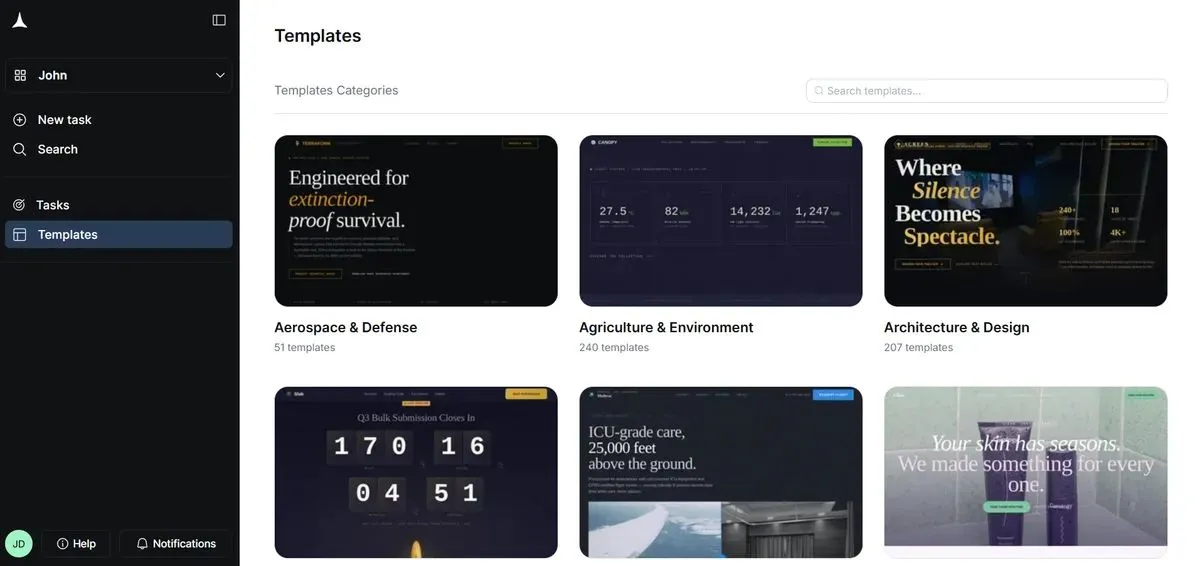
Browse Rocket's template library, organized by category so you find the right structure, not just a pretty layout.
If you would rather describe your idea, type something like: "A landing page for a productivity app targeting remote workers, with a sign-up form and three feature highlights." Rocket surfaces a relevant template or generates the page directly from your description.
Note: Using a template does not consume tokens. It is the fastest path to a production-ready starting point.
Step 2: Preview the Structure, Not Just the Colors
A common mistake is choosing a template because the color palette looks right. Colors are the easiest thing to change later. What actually determines whether the template is useful is the page structure.
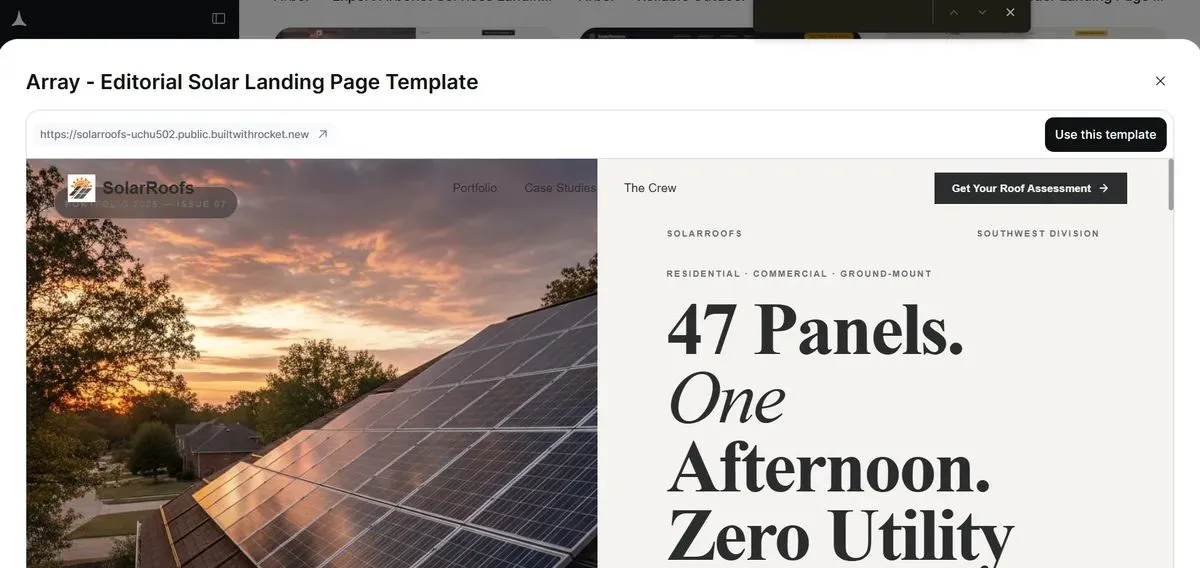
Evaluate templates by structure, hero section, feature blocks, social proof, and CTA placement matter more than the color scheme.
Look for templates that already include the sections you need: hero section with a clear headline and primary CTA, feature or benefit blocks, testimonials or social proof, pricing section (if relevant), and a secondary call-to-action.
Step 3: Customize in Plain English
Once the template loads, it becomes a full Rocket project. You do not need to navigate menus or learn a visual editor. Tell Rocket what to change in plain language.
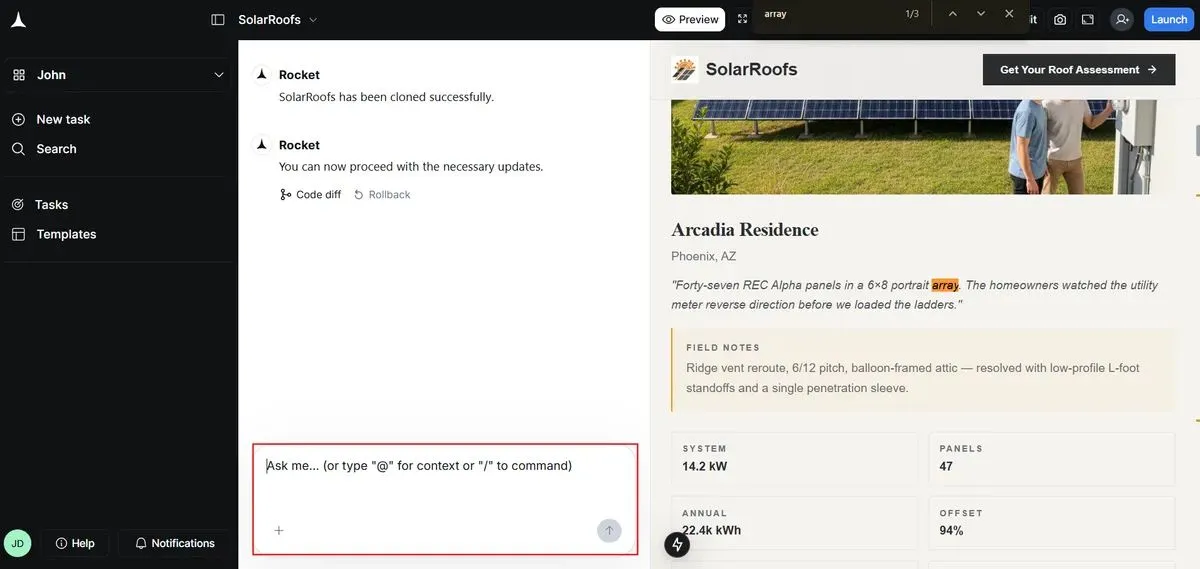
Customization happens through conversation, describe the change, Rocket applies it to the generated Next.js code.
Examples of what you can say:
- "Update the color scheme to use a dark blue primary and change the logo text to [your brand name]."
- "Add a pricing section with three tiers: Free, Pro at $19/month, and Enterprise."
- "Change the navigation from a top bar to a collapsible sidebar."
You can also click any element directly using Visual Edit mode to change text, colors, spacing, or layout without touching the chat. Both paths edit the same underlying Next.js code, you just choose how much control you want.
Step 4: Connect Your Integrations
A landing page without a working form is a brochure. Connect the tools you actually use before you publish.
Rocket supports 25+ integrations, Stripe for payments, Mailchimp and Brevo for email, Supabase for data storage, Google Analytics for tracking, and more. Authenticate once and they flow into the build.
You can prompt Rocket to handle the connection: "Connect Stripe for payments and add a login flow." Or: "Add a Mailchimp form and redirect to a thank-you page on submit."
Step 5: Check Mobile and Publish
Switch to mobile preview before you publish. Rocket's responsive design handles most of the layout work automatically, but it is worth verifying that buttons are large enough to tap, text is readable without zooming, and the layout flows cleanly on smaller screens.
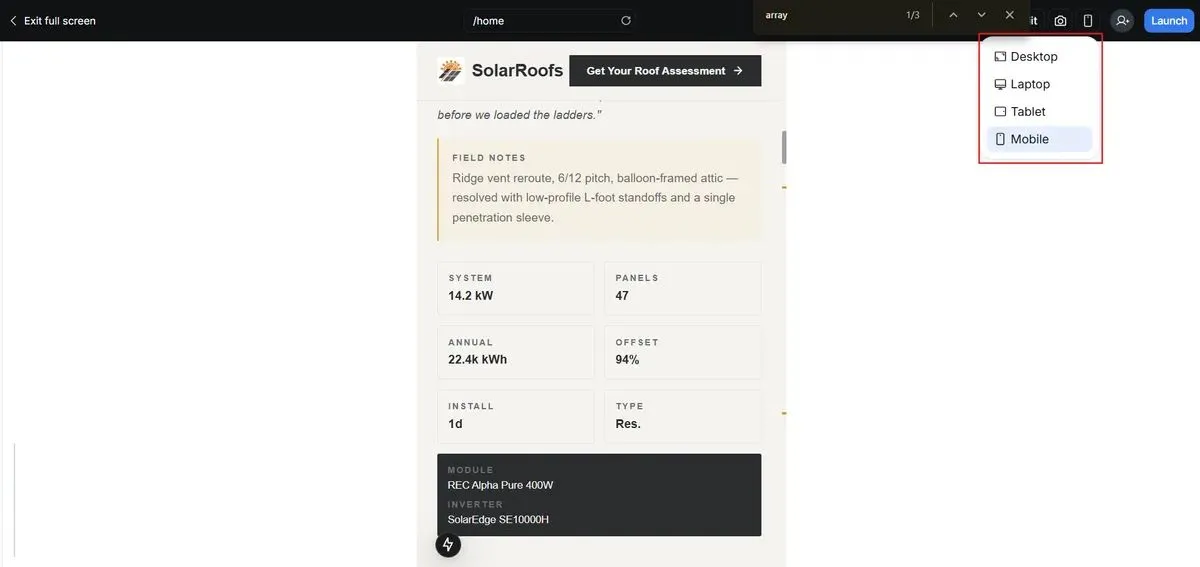
Mobile preview is a one-click toggle, check tap targets, text size, and layout flow before going live.
When the page looks right, hit Publish. You can connect a custom domain directly from within Rocket, either through automatic DNS setup or manual DNS records if you prefer.
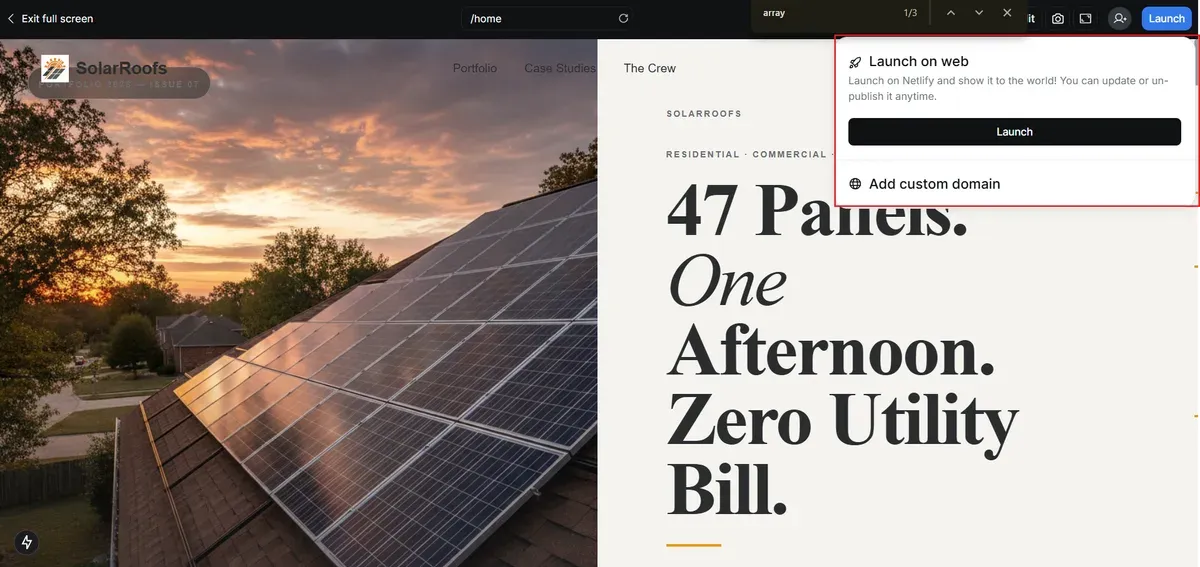
Publish to a live URL in one action, custom domain setup is handled inside Rocket, not in a separate DNS dashboard.
Your landing page is live. No developers, no waiting, no deployment pipeline.
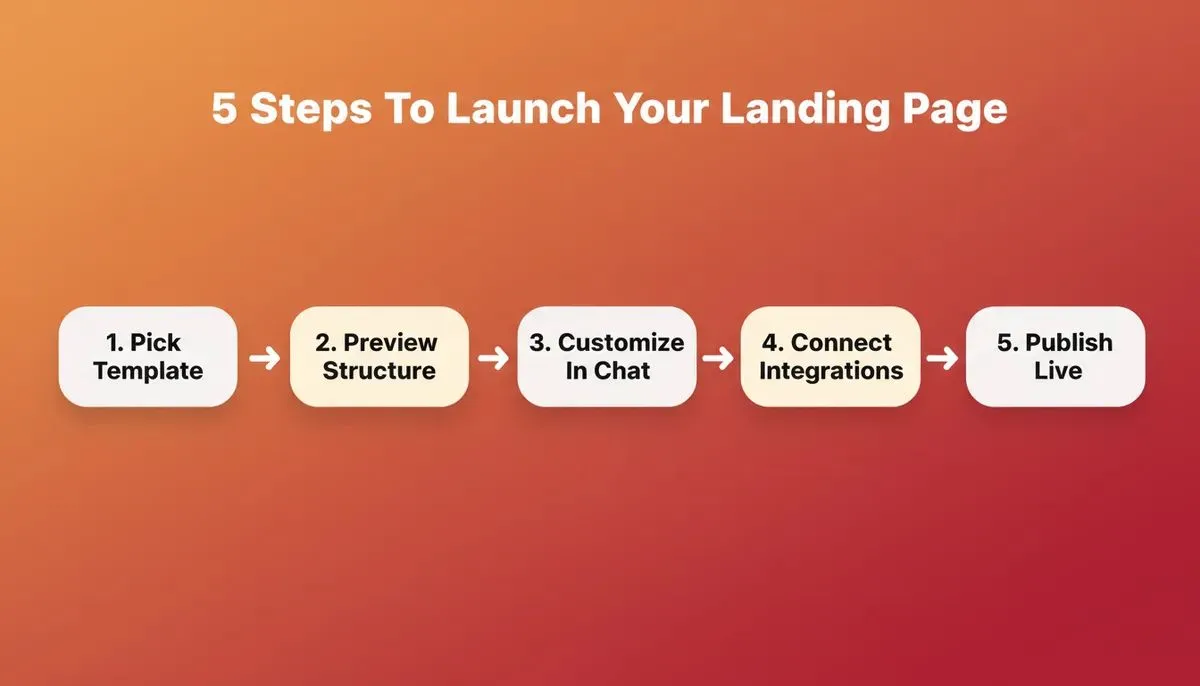
The complete Rocket workflow from template to published page, each step takes minutes, not days.
Who Actually Uses No-Code Landing Page Builders?
The user base is broader than most people expect. It is not just solo founders or marketers, it includes product teams at companies that have developers on staff but do not want to burn engineering time on a campaign page.
| User Type | What They Build | What Changes |
|---|---|---|
| Startup Founder | MVP launch page to validate an idea | Gets market feedback before writing a line of product code |
| Freelancer or Creative | Portfolio or client project showcase | Delivers pages the same day without a development dependency |
| Small Business Owner | Lead generation page for local services | Captures leads without hiring a developer or an agency |
| Coach or Consultant | Sign-up page for a course or free call | Builds and tests pages independently, iterates on conversion |
| Marketing Team | Campaign-specific pages for paid traffic | Ships pages in hours, not sprint cycles |
The common thread is not technical skill level, it is the desire to move from idea to live page without a handoff. No-code tools remove the handoff.
What Makes Rocket Different from Other No-Code Tools?
Most no-code landing page builders start at the build step. You arrive with an idea and the tool helps you execute it. That is useful. But it means the quality of what you build depends entirely on the quality of the thinking you brought with you.
Rocket is built differently. It is the world's first Vibe Solutioning platform, a system where research, building, and competitive monitoring happen in the same workspace, connected through shared context. The landing page you build in Rocket starts from the accumulated intelligence of your project: your market research, your competitive positioning, your customer problem.
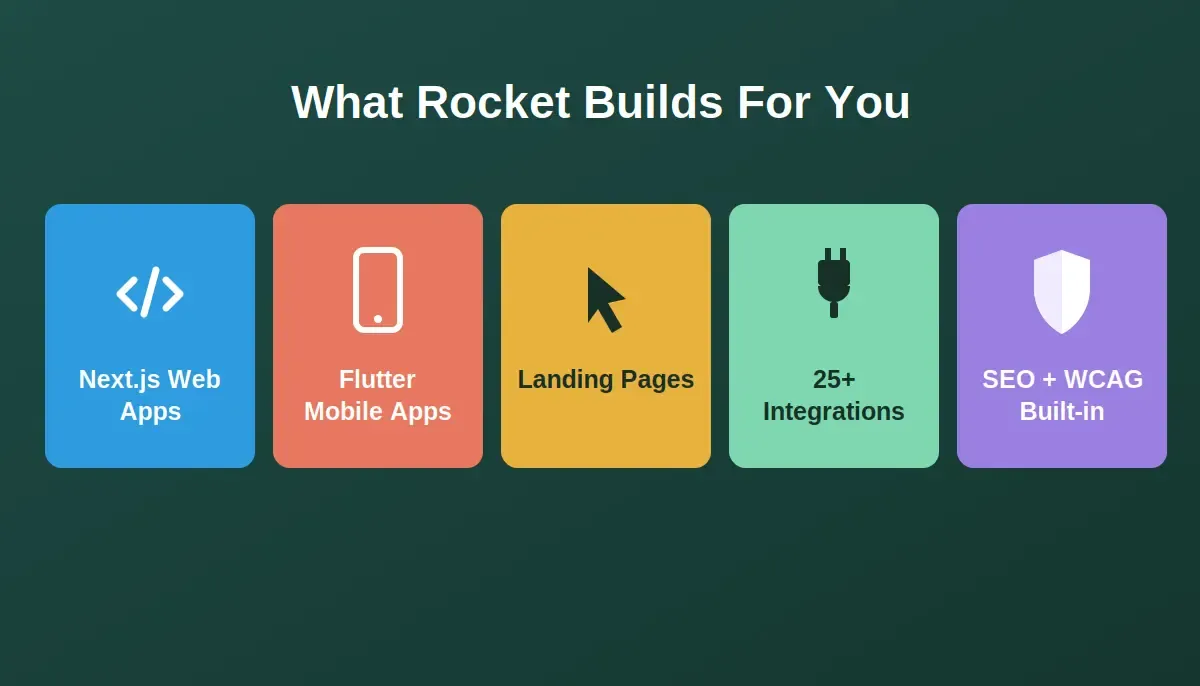
Rocket generates production-ready Next.js web apps and Flutter mobile apps, not locked templates.
What Rocket's Build pillar includes for landing pages:
- AI landing page builder that builds from natural language prompts
- 25,000+ pre-built templates across 40+ categories for product launches, lead capture, and more
- Production-ready Next.js output, real, downloadable code, not a locked platform
- Drag and drop editing plus chat-based customization after generation
- Mobile-responsive layouts with WCAG accessibility compliance by default
- Custom domains on paid plans
- Form builder with data storage for capturing leads
- 25+ integrations, Stripe, Google Analytics, Mailchimp, Supabase, HubSpot, and more
- Built-in analytics: visitors, conversions, and Core Web Vitals after launch
- Staging and production environments with full version history and one-click rollback
- SEO-ready structure, meta tags, and structured data shipped by default
Beyond landing pages, Rocket also generates full web apps in Next.js, Flutter mobile apps, internal dashboards, and customer portals, all from the same platform, all connected through the same project context. If your landing page is the front door to a larger product, you can build both in the same place.
For teams that want to go further: Rocket's Solve pillar answers strategic business questions before you build anything. Its Intelligence pillar monitors competitors continuously and surfaces what their moves mean for your product. The landing page is where most people start. The platform is built for everything that comes after.
Ready to build your first landing page? Rocket is where 1.5 million people across 180 countries have gone from idea to live page,without a developer, without a design team, and without writing code. Start building for free on Rocket.new and publish today.
Table of contents
- -Can You Really Build a Landing Page Without Coding?
- -What Is a No-Code Landing Page Builder?
- -How Do No-Code Tools Help You Launch Landing Pages Faster?
- -How Do You Choose the Right No-Code Platform?
- -Step-by-Step: How to Build a Landing Page Without Coding Using Rocket
- -Step 1: Pick Your Starting Point, Template or Prompt
- -Step 2: Preview the Structure, Not Just the Colors
- -Step 3: Customize in Plain English
- -Step 4: Connect Your Integrations
- -Step 5: Check Mobile and Publish
- -Who Actually Uses No-Code Landing Page Builders?
- -What Makes Rocket Different from Other No-Code Tools?