
Most SaaS pricing pages convert at just 3.8%. The fix is not redesigning the page. It is writing better prompts. This guide gives you 11 tested AI prompt templates covering tiers, objections, frameworks, A/B testing, mobile, and SEO metadata, each with a copy-paste example and before/after direction.
Over 90% of visitors who reach your SaaS pricing page leave without taking action. The median conversion rate sits at just 3.8%, and the problem is almost never the product.
The median landing page conversion rate sits at just 6.6% across industries, according to this 2026 analysis of 41,000 pages. The best AI prompts for pricing pages fix this by combining product context, audience specifics, and proven frameworks into copy that actually converts.
This guide delivers tested prompt templates for SaaS teams who want to stop losing visitors at checkout and start building pages that sell.
Why Do Most SaaS Pricing Pages Lose Visitors Before Checkout?
That means over 90% of visitors who reach your pricing page leave without taking action. The problem is rarely the product itself. It is almost always the copy, the structure, and the way value gets communicated to the user. AI prompts can fix this, but only when they include the right context.
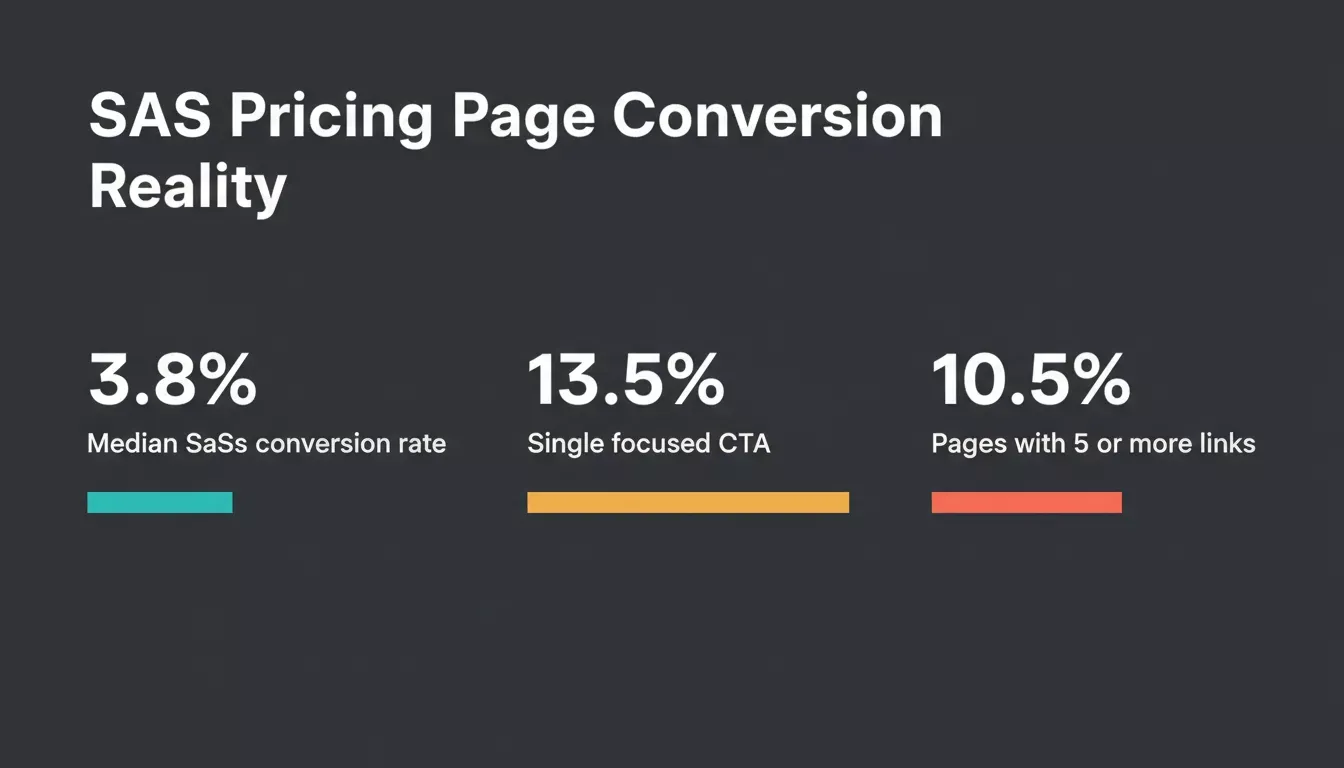
Conversion rates vary sharply based on how focused your pricing page is. Single-CTA pages outperform cluttered ones by 3 percentage points.
What Makes a Pricing Page Prompt Actually Work?
Most people write prompts that are too vague. They ask for "a pricing page" without giving the AI enough context about what the page needs to accomplish or who it needs to persuade.
-
Include your product category and target audience. A prompt for a B2B analytics SaaS targeting enterprise customers needs a different language than one for an ecommerce landing page aimed at solo creators. Name the customer segment, their pain points, and what they value most.
-
Specify your pricing models clearly. Tell the AI whether you use tiered pricing, usage-based pricing, freemium, or a flat rate. Mention how many tiers you have, what features sit in each plan, and which tier you want to sell the most.
-
Define the page structure you want. A strong prompt template asks for specific sections: headline, subheadline, tier cards, feature comparison table, FAQ section, social proof placement, and a clear call-to-action button.
-
Reference your unique selling points. What makes your product different from competitors? What customer value do you deliver that nobody else can match? Include this in the prompt so the AI can write copy that positions your offer in the market.
-
Set the tone and style. Some pricing pages need to feel technical and precise for developers. Others need to feel friendly and approachable for small business owners. Name the voice you want.
The prompt acts as a creative brief. The more relevant information you feed in, the less editing you do on the final output.
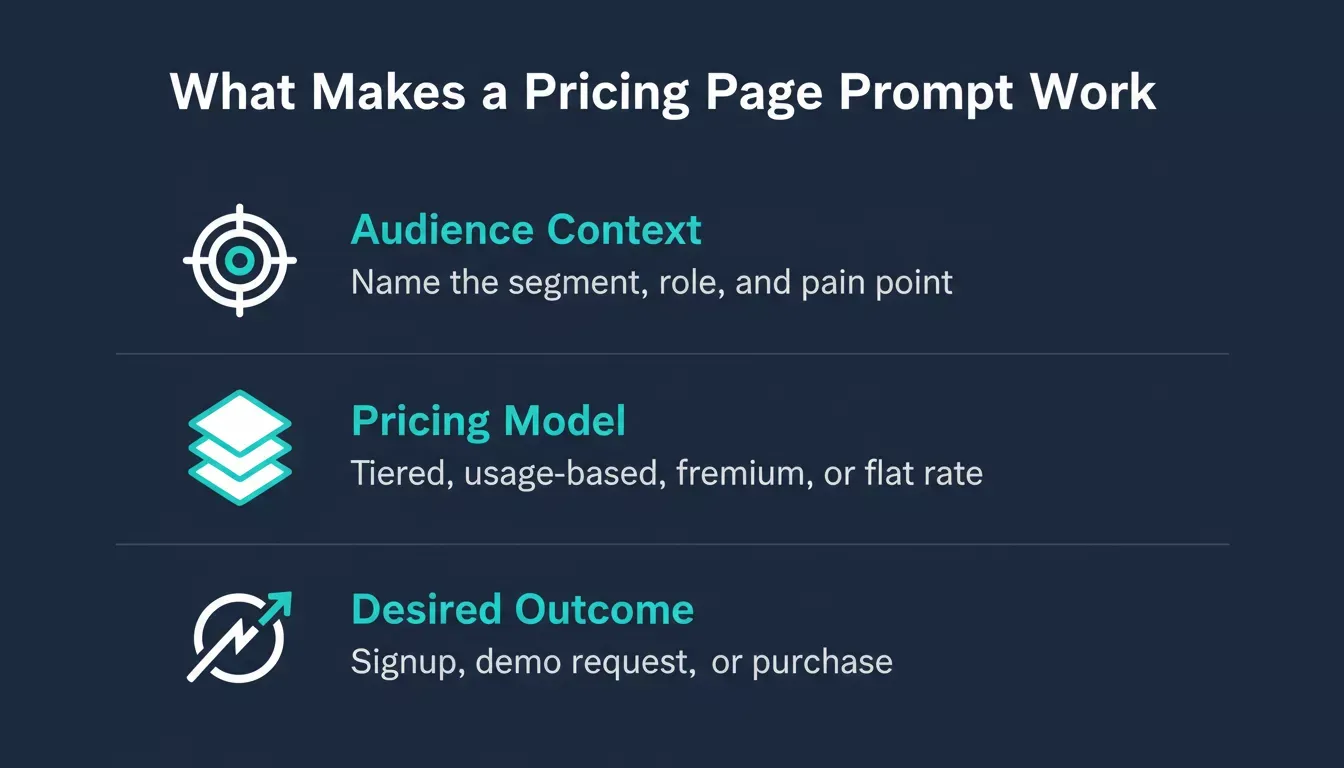
Every effective pricing page prompt has three layers: who you are writing for, how your pricing works, and what action you want the visitor to take.
How Should You Structure Prompts for Tier-Based Pricing?
Tier-based pricing pages are the most common format in SaaS. Most companies offer between three and four plans, and the highest-converting pricing pages focus on one primary call-to-action per tier.
-
Name each tier with intent. Your prompt should specify tier names that communicate value, not just "Basic, Pro, Enterprise." Instead, write tiers that match customer segments: "For Solo Builders," "For Growing Teams," "For Scaling Companies."
-
Map features to outcomes. Do not just list features per plan. Instruct the AI to explain what each feature lets the user accomplish. "Unlimited projects" becomes "Build as many landing pages as your campaigns demand."
-
Include pricing strategy context. Tell the AI which plan is your recommended option, whether you offer annual discounts, whether you have free trials, and what the upgrade path looks like.
-
Ask for objection handling within tiers. Smart prompts include a line like: "Under each tier, add a one-sentence response to the most common buyer hesitation for that segment." This creates copy that sells and reassures simultaneously.
For a deeper look at high-converting page structure beyond the tier layout, the principles of above-the-fold clarity apply to pricing pages just as much as to hero sections.
| Prompt Element | What to Include | Why It Matters |
|---|---|---|
| Product context | Category, market positioning, key differentiators | Prevents generic copy that could describe any product |
| Customer segments | Who buys each tier, their role, company size, pain point | Creates copy that speaks directly to each buyer persona |
| Pricing models | Flat, tiered, usage-based, freemium, hybrid | Structures the page layout and CTA strategy correctly |
| Competitor contrast | What rivals charge, what they lack, where you win | Gives the AI ammunition for positioning copy |
| Desired outcome | Signup, demo request, purchase, consultation booking | Shapes the CTA language and urgency of the page |
Pages with a single focused call-to-action convert at 13.5% on average, while those with five or more links drop to just 10.5%. Your prompt should tell the AI to keep the page focused on one action per tier.
Prompt 1: Tier-Based Pricing Page Builder
Generates a full tier-based pricing page with segment-matched plan names, feature-to-outcome mapping, and objection handling baked into each tier.
Example prompt:
"Create a pricing page for [product name], a [product category] for [target audience]. Include three tiers named to match these customer segments: [Segment A], [Segment B], [Segment C]. For each tier, list [X] features and immediately follow each with the business outcome it enables. Mark [Tier B] as recommended. Include a one-sentence objection response under each tier, addressing the most common hesitation for that segment. Offer an annual discount toggle. Tone: [brand voice]."
How to use it: Use this prompt when building a new SaaS pricing page from scratch or restructuring an existing one. Paste your product details, segment names, and feature list directly into the brackets. The prompt forces the AI to write outcome-driven copy rather than a bare feature list, which is the single biggest difference between pricing pages that convert and those that do not.
Writing Prompts That Address Buyer Objections
The gap between a visitor reading your pricing page and clicking "Start Free Trial" is almost always an unaddressed objection. Price anxiety, feature confusion, or lack of trust stops them cold.
-
Prompt for social proof placement. Ask the AI to create spots for testimonials, customer logos, or usage statistics near the pricing tiers. Addressing buyer fears on a landing page can lift conversions by up to 80%.
-
Include objection-specific FAQ prompts. Write your prompt to generate an FAQ section that tackles the top objections for your product category: "Is this worth the price?" "Can I cancel anytime?" "What happens when I outgrow my plan?"
-
Request comparison copy. Instruct the AI to write a brief section that explains how your pricing compares to competitors without naming them directly. This builds trust and saves the visitor from opening another tab.
-
Use value anchoring in your prompt. Tell the AI to frame your pricing against the cost of the problem it solves, not against competitor prices. "Save 40 hours per month" is more compelling than "$49 per month."
"The biggest mistake on pricing pages is assuming people understand the value. They don't. You have to spell it out next to the price, every single time." — r/SaaS community discussion on pricing page design
Your prompts should instruct the AI to research competitor pricing strategy and weave that context into the copy. Without market awareness, the output reads like it was written in a vacuum.
When a rival changes their pricing model, knowing how to respond to competitor pricing changes quickly is what separates reactive teams from proactive ones.
Prompt 2: Social Proof Placement Prompt
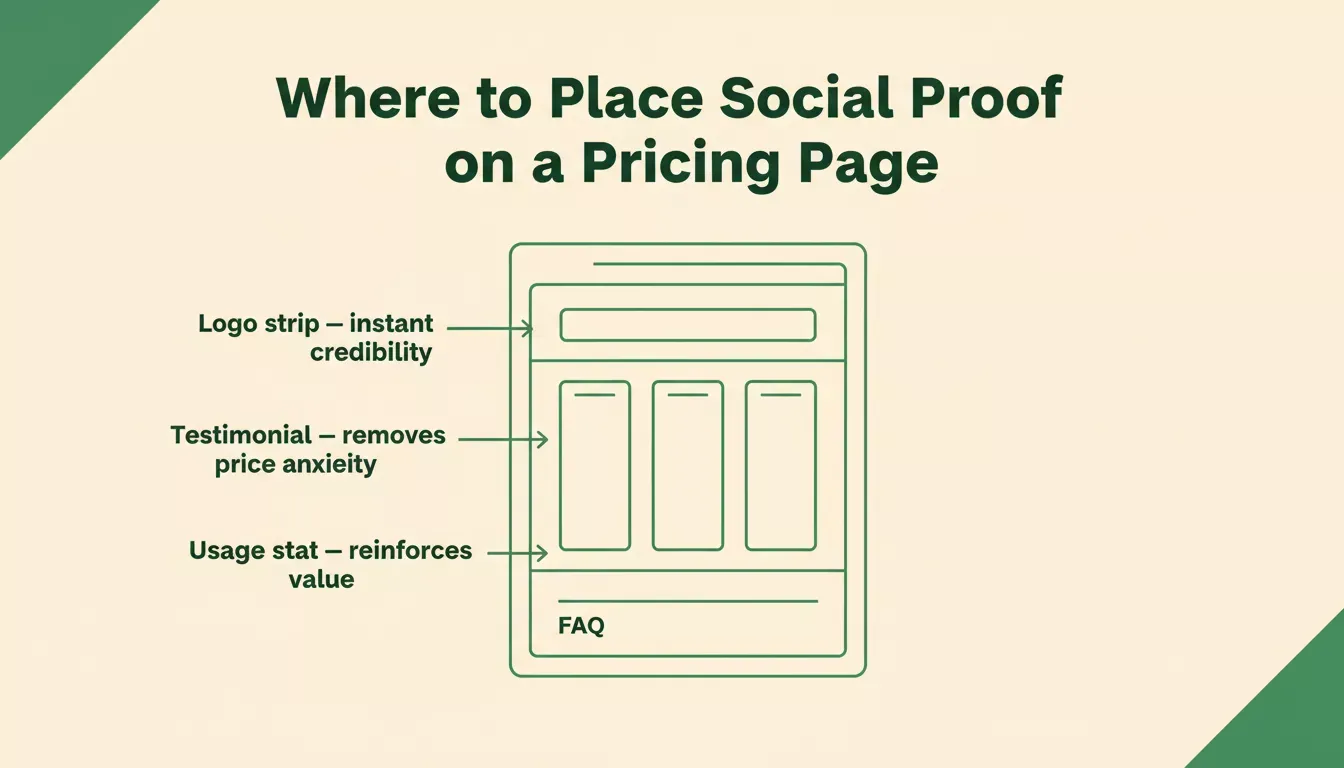
Social proof placed at the right scroll position removes objections before the visitor has to ask the question.
Instructs the AI to place testimonials, customer logos, and usage statistics at the exact points where buyer hesitation peaks on a pricing page.
Example prompt:
"Add social proof to this pricing page for [product]. Place a customer testimonial directly below the tier cards, addressing price anxiety. Add a logo strip of recognisable customers above the fold. Insert a usage statistic such as '[X] teams saved [Y] hours per month' between the feature comparison table and the FAQ section. Each proof element must directly respond to the objection a visitor would have at that scroll position."
How to use it: Use this prompt after your tier structure is in place. Feed it your existing pricing page copy and let the AI identify the three highest-anxiety scroll positions, then populate each with the right type of social proof. Works especially well for products where price is the primary objection.
Prompt 3: Objection-Specific FAQ Prompt
Generates a FAQ section that pre-empts the top buyer objections for your product category, placed strategically below the pricing tiers.
Example prompt:
"Write a 5-question FAQ section for the pricing page of [product], a [product category]. The questions must address these specific objections in this order: (1) Is this worth the price compared to [alternative]? (2) Can I cancel or downgrade anytime? (3) What happens when I exceed my plan limits? (4) Is my data secure? (5) How long does onboarding take? Each answer should be 2 to 3 sentences, factual, and written in a [tone] voice. No marketing language."
How to use it: Use this prompt when your pricing page has a high exit rate but decent time-on-page, a signal that visitors are reading but leaving with unanswered questions. Swap in your real objections by pulling them from support tickets, sales call notes, or churn surveys for maximum relevance.
Prompt 4: Competitor Comparison Copy Prompt
Write a positioning section that explains how your pricing compares to market alternatives without naming competitors directly, building trust through contrast.
Example prompt:
"Write a 3-sentence comparison section for [product]'s pricing page that explains how our pricing model differs from typical [product category] tools. Do not name any competitors. Highlight: (1) what we include that others charge extra for, (2) what we do not charge for that others do, and (3) the total cost of ownership difference over 12 months. Tone: confident, factual, no superlatives."
How to use it: Place this section immediately after your tier cards and before the FAQ. It intercepts the visitor who is about to open a new tab to compare alternatives and gives them the contrast they need without sending them away from your page.
Prompt 5: Value Anchoring Prompt
Reframes your pricing against the cost of the problem it solves rather than against competitor prices, making the number feel small relative to the outcome.
Example prompt:
"Rewrite the pricing section headline and subheadline for [product] using value anchoring. Frame the price against the cost of the problem it solves, not against competitor pricing. The headline should make [price] feel like a fraction of the value delivered. Include one specific metric such as hours saved, revenue gained, or errors reduced that a typical customer achieves in the first 30 days. Under 15 words for the headline, under 25 words for the subheadline."
How to use it: Use this prompt when your pricing page has a high bounce rate at the tier section, a signal that visitors are seeing the number before they understand the value. The value anchor reorders the cognitive sequence: outcome first, price second. Pairing this with pricing analytics data gives you real numbers to anchor against rather than estimates.
Build your first pricing page on Rocket.
Paste any prompt above and get a live page in minutes
Which Prompt Frameworks Drive the Highest Conversion Rates?
Not all prompt structures produce equal results. Three frameworks consistently generate pricing page copy that converts cold traffic into paying users. Before choosing a framework, use this decision rule:
-
Use PAS when your audience already knows they have a problem but has not yet considered your product as the answer. They need to feel understood before they will read a price.
-
Use AIDA when your pricing page receives cold traffic from ads, email, or social. These visitors have no product context and need the full persuasion sequence in a single scroll.
-
Use Feature-Benefit Mapping when your buyers are technical decision-makers who need to justify the purchase internally. They need the language to make the business case to their team.
AI-powered personalization on landing pages delivers up to 40% higher revenue and 42% better conversion than static pages, according to Zigment's 2026 AI marketing statistics. The framework you choose in your prompt determines whether the AI generates personalized copy or generic filler.
The best approach is to test multiple frameworks on the same product. Write two or three prompt variants using different structures, generate the pages, then run A/B tests to identify which version resonates with your specific audience.
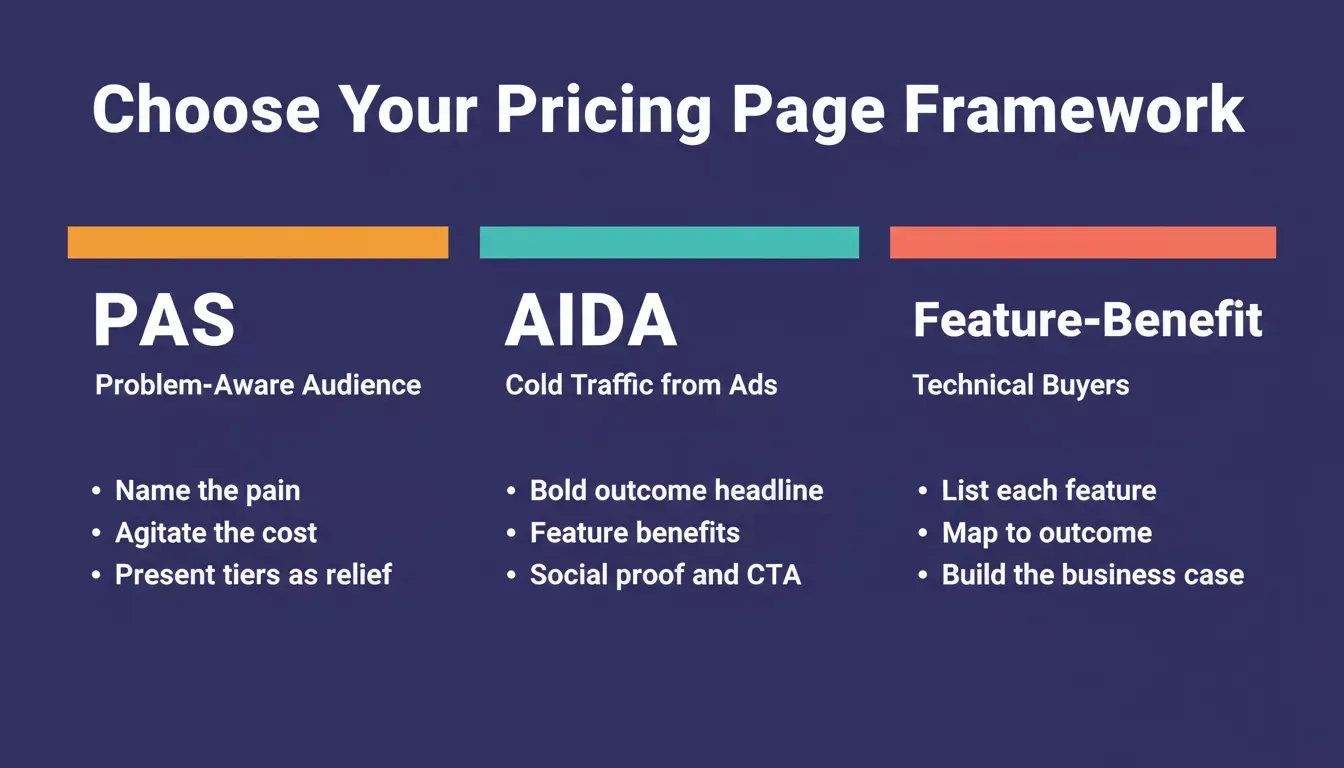
Choose your framework based on where your visitor is in their awareness journey, not based on what feels most natural to write.
Prompt 6: PAS Framework Pricing Prompt
Use this when your audience is problem-aware but solution-unaware. Structure your entire pricing page using Problem-Agitate-Solution, leading with the buyer's pain before presenting your tiers as the resolution.
Example prompt:
"Write a pricing page for [product] using the PAS framework. Section 1, Problem: Name the specific problem [target audience] faces when they try to [core job to be done] without a tool like ours. Two sentences, no product mention. Section 2, Agitate: Describe the cost of that problem in concrete terms, such as time lost, revenue missed, or errors made. Two sentences. Section 3, Solution: Present our three pricing tiers as the resolution. Each tier headline should echo the problem language from Section 1. Tone: [brand voice]."
How to use it: The PAS structure meets visitors at their current level of awareness and walks them toward the purchase decision. Feed in your audience's specific pain point and the concrete cost of inaction. The more precise these inputs are, the more the output feels like it was written for that reader specifically.
Prompt 7: AIDA Framework Pricing Prompt
Use this when your pricing page receives cold traffic from paid ads, email campaigns, or social. Builds a pricing page that moves cold visitors from attention to action in a single scroll.
Example prompt:
**"**Write a pricing page for [product] using the AIDA framework for cold traffic arriving from [ad platform]. Attention: A bold headline that names the outcome, not the product category. Under 8 words. Interest: A feature highlights section with three bullet points, each written as a benefit, not a feature name. Desire: A social proof block with one customer result and a usage statistic. Action: A primary CTA button label and one line of microcopy below it. Tone: [brand voice]. No jargon."
How to use it: Cold visitors arriving from an ad have no product context. The AIDA sequence gives them the full persuasion journey, from grabbing attention to earning the click, without requiring them to navigate to other pages for context. The same principles that make hero section copy convert well apply directly to the top of your pricing page.
Prompt 8: Feature-Benefit Mapping Prompt
Use this when your buyers are technical decision-makers who need to justify the purchase internally. Converts a raw feature list into a benefit-mapped pricing section.
Example prompt:
"Take this feature list for [product]'s [tier name] plan: [paste features]. For each feature, write one sentence that explains the business outcome it enables for [target buyer role] at a [company size] company. Format: Feature name, Outcome sentence. The outcome must be specific and measurable where possible. Avoid marketing language. Tone: direct, professional."
How to use it: Paste your actual feature list directly into the prompt. The AI maps each feature to the business outcome it enables, giving technical buyers the language they need to make the internal business case without you having to write it for each stakeholder individually.
Try these framework prompts on Rocket.
Describe your product and get a fully structured pricing page
How Rocket Turns Pricing Strategy Into a Live Page
Most AI tools treat the pricing page as an isolated copywriting task. You paste a prompt, get text back, then manually build the page somewhere else. Rocket works differently because research, building, and competitive intelligence all happen in one platform.
-
Research first, build second. Rocket's Solve feature lets you analyze competitor pricing models, identify market positioning gaps, and define your customer segments before you ever write a prompt. That research feeds directly into the Build step with no context lost between thinking and creating.
-
From prompt to deployed page. Once your pricing strategy is clear, describe what you want in plain language. Rocket generates a complete, production-ready page with 26+ connector integrations, including Stripe for payments, Supabase for databases, and HubSpot for CRM, all wired up from chat.
-
Intelligence keeps it current. Rocket's Intelligence feature monitors competitor pricing pages continuously across nine signal pillars. When a rival changes their tier structure or launches new plans, you get a structured brief explaining what changed and what it means for your business.
-
No template limitations. Other builders start from templates. Rocket generates from your specific context. The page reflects your brand, your pricing models, and your customer value proposition.
Where traditional page builders give you drag-and-drop editors with pre-made layouts, Rocket gives you a thinking-and-building platform. You can set up a complete landing page in under thirty minutes, informed by real market data rather than guesswork.
Rocket's pricing is credit-based: Free (20 credits, one-time), Pro ($25/mo, 100 credits), Rocket ($50/mo, 250 credits), and Booster ($250/mo, 1,500 credits). All plans include unlimited team members, and annual billing saves 20%.
Prompt 9: A/B Variant Generator Prompt
Produces three structurally distinct pricing page variants that each change one variable, giving you a clean A/B test without rewriting the entire page.
Example prompt:
"Here is my current pricing page copy: [paste current page]. Generate three alternative versions for A/B testing. Version A: Change only the tier headline copy, making each tier name outcome-focused rather than label-based. Version B: Change only the primary CTA button label on each tier, using action-outcome format, max 4 words, avoid 'Get Started'. Version C: Reorder the page sections, moving social proof above the tier cards instead of below. Keep all other copy identical across all three versions."
How to use it: Feed your existing page copy directly into the prompt and deploy the three variants as a proper split test. Changing one variable at a time is the only way to know which element drove the improvement. This prompt enforces that discipline automatically.
Prompt 10: Mobile-First Pricing Page Prompt
Generates a pricing page structure explicitly optimised for small screens, with readable tier cards, tap-friendly CTAs, and a layout that works before the visitor scrolls.
Example prompt:
"Create a mobile-first pricing page for [product]. Requirements: (1) Each tier card must be readable as a standalone unit on a 375px screen with no horizontal scrolling. (2) The primary CTA button on each tier must be at least 44px tall and full-width on mobile. (3) The feature comparison table must collapse into an expandable accordion on mobile. (4) Place the most important social proof element above the tier cards so it is visible without scrolling on a standard iPhone screen. Generate the full page structure with these mobile constraints built in from the start."
How to use it: Use this prompt as your starting point whenever you know your pricing page will receive significant mobile traffic. Building for mobile first prevents the common problem of desktop-designed pages that break on small screens and lose visitors before they reach the price.
Prompt 11: Metadata and SEO Prompt
Generates the meta title, meta description, OG title, and CTA-aligned email subject lines for your pricing page so the SEO layer matches the conversion copy.
Example prompt:
"Write the SEO metadata for a pricing page targeting the keyword [primary keyword]. Include: (1) Meta title, under 60 characters, contains keyword, communicates value. (2) Meta description, under 160 characters, contains a keyword, includes a benefit, and a soft CTA. (3) OG title, under 20 characters, punchy, keyword-adjacent. (4) Three email subject lines for a follow-up sequence to visitors who viewed the pricing page but did not convert, each under 50 characters, no clickbait. Tone: [brand voice]."
How to use it: Use this prompt after finalising your pricing page copy. Many teams write strong page copy and then use generic metadata that does not match the page's value proposition, which hurts both SEO rankings and click-through rates from search. This prompt closes that gap in one pass.
Prompt 12: Pricing Page Headline and Subheadline Prompt
Generates five headline and subheadline combinations for your pricing page, each using a different angle, outcome, urgency, contrast, question, and social proof, so you can test which hook converts your specific audience.
Example prompt:
"Write five headline and subheadline combinations for the pricing page of [product], a [product category] for [target audience]. Each pair should use a different angle: (1) Outcome, lead with the result the customer gets. (2) Urgency, emphasise what they are losing by waiting. (3) Contrast, highlight what makes this different from the default approach. (4) Question, open with the objection the visitor already has in their head. (5) Social proof, lead with a customer result or usage statistic. Headline under 10 words. Subheadline under 25 words. No jargon. Tone: [brand voice]."
How to use it: Run this prompt before writing any other section of your pricing page. The headline determines whether visitors read the rest, so testing five angles gives you a pool to A/B test before committing. Feed the winning headline back into Prompts 6, 7, or 8 as context so the rest of the page copy stays consistent with the opening hook.
What Are Common Mistakes in Pricing Page Prompts?
Knowing what not to do is just as important as knowing the right approach. These mistakes consistently produce weak pricing page copy that fails to convert visitors into leads or sales.
-
Writing prompts without audience context.
-
Ignoring competitor positioning.
-
Skipping the meta description and title tag.
-
Using vague CTA instructions.
-
Not requesting a mobile-responsive structure.
Generic prompts produce pages that look like every other SaaS pricing page on the web. Personalized prompts with tested prompt engineering patterns create pages that feel custom-built.
Infographic comparing five common pricing page prompt mistakes on the left versus the correct approach on the right
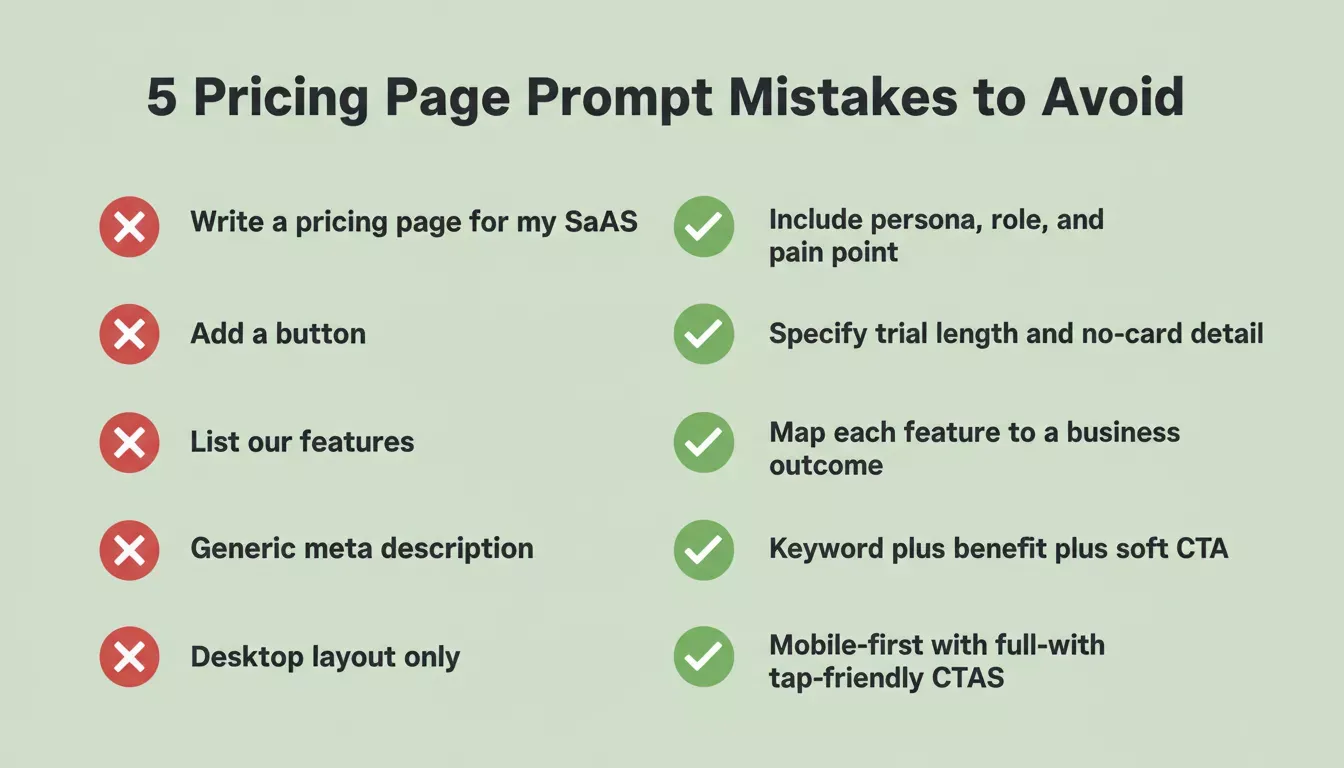
Each of these five mistakes has a direct fix. The pattern is always the same: replace vague instructions with specific, measurable constraints.
How to Iterate on These Prompts
The first version of any AI-generated pricing page is a draft, not a final product. The teams that get the best conversion rates treat the initial prompt output as a starting point for rapid iteration.
-
Generate three to five variants. Run the same base prompt with slight modifications: different headline angles, alternative tier names, varied CTA copy. Then test them against each other.
-
Review for clarity and flow. Read the generated copy out loud. If any section feels confusing or wordy, refine your prompt to ask for simpler language. Pages written at a 5th to 7th grade reading level convert at 11.1% compared to 5.3% for complex academic writing.
-
Check the page against your ad copy. If the pricing page receives traffic from paid campaigns, the messaging needs to match. The headline on the page should echo the promise in the ad. Include your ad copy in the prompt as context.
-
Iterate on the prompt, not just the output. When something does not work, go back and rewrite the prompt rather than manually editing the generated copy. A better prompt produces better results every time you run it, creating a reusable asset for your business.
Smart prompt engineering practices treat each generation as a learning cycle. The prompt improves with each iteration until you have a template that reliably produces high-converting pricing page copy for your specific product and market.
Your Pricing Copy Deserves a Smarter Starting Point
Writing pricing page copy from scratch wastes time when AI can generate a solid first draft in seconds. The difference between good and great comes down to what you put into the prompt: your product details, your customer research, your competitive positioning, and your conversion goals.
The prompts in this post give you a framework for getting there faster. Start with the structure, add your context, pick the right framework, and iterate until the page converts.
Ready to go from pricing strategy research to a live, deployed pricing page in one workflow? Rocket.new combines market intelligence, AI generation, and one-click deployment so your pricing page is informed by real data, not guesswork.
Start building with Rocket today and ship your first high-converting pricing page in under thirty minutes.
Table of contents
- -Why Do Most SaaS Pricing Pages Lose Visitors Before Checkout?
- -What Makes a Pricing Page Prompt Actually Work?
- -How Should You Structure Prompts for Tier-Based Pricing?
- -Prompt 1: Tier-Based Pricing Page Builder
- -Writing Prompts That Address Buyer Objections
- -Prompt 2: Social Proof Placement Prompt
- -Prompt 3: Objection-Specific FAQ Prompt
- -Prompt 4: Competitor Comparison Copy Prompt
- -Prompt 5: Value Anchoring Prompt
- -Which Prompt Frameworks Drive the Highest Conversion Rates?
- -Prompt 6: PAS Framework Pricing Prompt
- -Prompt 7: AIDA Framework Pricing Prompt
- -Prompt 8: Feature-Benefit Mapping Prompt
- -How Rocket Turns Pricing Strategy Into a Live Page
- -Prompt 9: A/B Variant Generator Prompt
- -Prompt 10: Mobile-First Pricing Page Prompt
- -Prompt 11: Metadata and SEO Prompt
- -Prompt 12: Pricing Page Headline and Subheadline Prompt
- -What Are Common Mistakes in Pricing Page Prompts?
- -How to Iterate on These Prompts
- -Your Pricing Copy Deserves a Smarter Starting Point