
Thinking about launching an app without coding skills? No-code and AI tools now enable faster product creation, helping founders turn ideas into real applications as low-code adoption continues to grow rapidly.
How can one launch a product without a Dev team?
With a no-code approach and modern AI tools, building an app is no longer limited to developers. Today, creators, founders, and even non-technical users can turn an app idea into a real product much faster than before.
In fact, Gartner predicts that around 70% of new enterprise applications will use low-code or no-code technologies in the coming years. That’s a massive shift in how products are built.
So, if you’ve been sitting on an idea, this is your sign to start.
What is a No-Code AI Builder?
So, what exactly is a no-code app builder, and why is everyone talking about it?
A no-code app builder is a platform that allows you to build apps without writing code. Instead of dealing with complex syntax, you use a visual approach to design and control your app. It’s simple, fast, and built for people who don’t have deep technical knowledge.
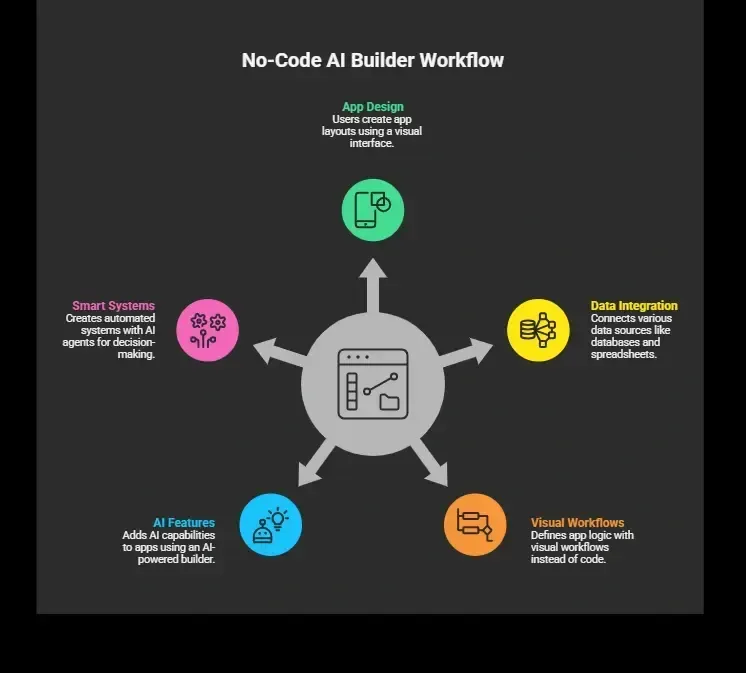
The best part? You can describe what you want in everyday language, and the platform helps turn it into a real, working app.
These tools are designed for people with little to no coding experience. So whether you want to build web apps, a mobile app, or even internal tools, you don’t need a technical background to get started.
In short, it’s about turning ideas into reality faster, without getting stuck in the complexity of traditional development.
Why No-Code is Changing App Building?
Well, traditional app building takes time, money, and a team. You need developers, designers, and testers. With no code, things are simpler.
You can:
-
Build apps in just a few clicks
-
Skip complex technical setup
-
Focus on your idea instead of writing code
This reduces the learning curve, especially for beginners. Many platforms offer free plans, so you can start without spending anything.
Also, the rise of AI agents has made automation easier. You can now create ai agents that handle customer queries, process data, or run workflows.
Types of Apps You Can Build
So, let’s get practical.
What kind of app can you actually create with a no code approach?
The answer is simple. You can build a wide range of apps, from basic tools to smart, AI-driven products, without needing a dev team.
1. Web Apps
You can build dashboards, marketplaces, and tools using no code tools. These web apps are perfect for startups that want to launch quickly and test ideas without heavy investment.
2. Mobile Apps
Create a native mobile app or a smooth native mobile experience for both Android and iOS. Some platforms even allow direct publishing to the apple app store and google play, making your app accessible to a wider audience.
3. Internal Tools
Companies use no code for building internal tools like CRMs, admin panels, and tracking systems. These apps help manage operations and improve team productivity without complex development.
4. AI Apps
You can build an AI app powered by AI models and AI agents. These apps handle automation, decision-making, and workflows, making them useful for businesses and creators alike.
In short, whether you want to launch a startup, manage a team, or automate tasks, no code gives you the flexibility to build the kind of app you need.
Key Features to Look For
Not all platforms are the same. Here’s what you should look for in the best no-code tools.
| Feature | Why It Matters |
|---|---|
| Drag and drop | Makes app building fast and simple |
| AI agent builder | Helps you add AI agents easily |
| Data integration | Connect tools like Google Sheets |
| Authentication systems | Secure user access |
| Enterprise grade security | Keeps your app safe |
| Custom domain | Gives your app a professional look |
These features help you go from idea to production ready app quickly.
How AI Agents Fit Into the Picture
This is where things get interesting. An AI agent builder lets you design smart systems inside your app.
These AI agents can:
-
Answer user queries
-
Process external api data
-
Automate multi step workflows
You don’t need deep coding skills to do this. Just define the flow using natural language prompts.
For example, you can build an AI app that:
-
Reads customer messages
-
Responds instantly
-
Updates your database
That’s real automation.
Step-by-Step: Build Your First App
So, how do you actually go from an idea to a real app? The process is much simpler than you might think. With the right no-code platform, you can move step by step and turn your concept into a working product without stress.
Here’s a clear path you can follow:
-
Step 1: Start With an Idea: Your app idea should solve a real problem. Keep it simple and focused.
-
Step 2: Choose a No Code Platform: Pick a no code platform that offers solid free plans and has an easy learning curve for beginners.
-
Step 3: Design the UI: Use a drag and drop interface to build your user interface and structure your app visually.
-
Step 4: Set Up Data: Connect your data source like Google Sheets. Define your data structure and plan your data storage.
-
Step 5: Add Logic: Set up your app's logic using workflows. Many platforms support advanced logic and even complex logic.
-
Step 6: Add AI Features: Use an AI agent builder to add AI agents. This is where your AI app becomes more powerful and interactive.
-
Step 7: Test and Launch: Review your working app, fix issues, and launch it as a mobile app or web apps.
At the end of the day, it’s all about starting small and taking action. Your first app doesn’t have to be perfect. It just needs to be live.
Popular No-Code Tools
Here are some widely used platforms:
-
Glide app
-
Bubble
-
Adalo
-
Webflow
These no-code tools offer both free plans and paid plans, depending on your needs. Some are completely no-code, while others act like a low-code tool for more flexibility.
Free Plans vs Paid Plans
So, what’s the difference between free and paid options when using a no-code platform?
Most platforms offer free plans, which are perfect when you’re just starting out. You can use them to test your app idea, build a basic version of your app, and understand how the platform works without spending money.
But as your app grows, you’ll likely need more advanced features. That’s where paid plans come in.
Here’s what you typically get with paid plans:
-
Enterprise grade features for scaling your app
-
Better data security to protect user and business data
-
Advanced user management for handling multiple users and roles
Some platforms also offer enterprise plans, which are designed for large businesses that need more control, higher limits, and additional support.
In short, start with free plans to learn and experiment, then move to paid plans when your app is ready to grow.
Learning Curve: What to Expect
So, what should you expect when getting started? Let’s be real. Every tool comes with a learning curve, no matter how simple it looks at first.
-
Some platforms have a steeper learning curve, especially when working with complex workflows
-
Many tools are designed for non technical users, so the overall learning curve stays manageable
-
Starting small helps you understand the basics without feeling stuck
The best approach is simple. Begin with simple apps, learn as you go, and then move on to bigger projects with confidence.
Rocket.new: Launch Faster
Rocket.new is an AI-driven app builder designed to help you create and launch an app without a dev team. It fits perfectly with the idea of no code app builder platforms by turning simple inputs into real products.
If your goal is app building with minimal effort, this tool directly supports that journey.
It combines no-code tools, an AI agent builder, and automation in one place. You don’t need deep coding experience. You can build web apps, a mobile app, or even internal tools using a smooth workflow powered by AI agents.
Top Features
-
Prompt to App Creation: Builds apps directly from single prompts
-
Figma Import: Converts design files into live, editable layouts
-
AI-Powered Backend: Automatically handles logic, data, and workflows
-
Reusable Components: Speeds up building with ready-to-use elements
-
Command-based actions: Use / and @ to run actions and quickly scope edits.
-
Custom Domain Support: Publishes projects with a branded domain
-
Live Preview: Shows instant updates while editing
-
Code Export: Allows developers to extend or customize later
Use Cases
Startup MVPs: Launch a working app in days. This helps you test your app idea quickly without heavy investment or long delays.
Internal Tools: Build dashboards and internal tools to manage your team, track data, and improve workflows using no code.
Client Portals: Create client portals or even customer portals with clean design and smooth user interface, making it easy to manage users and services.
Rocket.new brings everything together in one place. If you want to go from idea to launch without dealing with complex setup, it works as a strong solution for fast and simple app building.
Challenges You Might Face
Let’s be real for a moment. While no code makes app building easier, there are still a few challenges you might run into.
-
Limited custom code options in some platforms
-
Some tools come with a steeper learning curve, especially at the start
-
Handling sensitive data requires extra care and awareness
-
Not all platforms support advanced logic or complex logic equally
These challenges are manageable. Once you understand your tool and start small, things become much smoother over time.
Building Apps Without a Dev Team
Launching an app once meant hiring developers, spending months, and relying on strong coding experience. That process slowed many ideas before they even started. Today, things are different. With the rise of no-code tools, AI agents, and simple workflows, you can build, test, and launch faster without a full team. The process is smoother and more accessible for anyone with an idea.
A no-code AI builder makes it possible to turn your concept into a real product. You don’t need a dev team to begin. Start small, stay consistent, and focus on learning as you go. Your first app is just the starting point.
Table of contents
- -What is a No-Code AI Builder?
- -Why No-Code is Changing App Building?
- -Types of Apps You Can Build
- -1\. Web Apps
- -2\. Mobile Apps
- -3\. Internal Tools
- -4\. AI Apps
- -Key Features to Look For
- -How AI Agents Fit Into the Picture
- -Step-by-Step: Build Your First App
- -Popular No-Code Tools
- -Free Plans vs Paid Plans
- -Learning Curve: What to Expect
- -Rocket.new: Launch Faster
- -Top Features
- -Use Cases
- -Challenges You Might Face
- -Building Apps Without a Dev Team