
Rocket.new Solve uses AI to break down and map business questions before research begins, helping teams align faster, eliminate confusion, and ensure more focused, efficient, and insight-driven decision-making processes.
What if you could map your entire business question before doing any research?
That’s exactly what Rocket.new Solve does. It helps you break down a problem, structure your thinking, and prepare everything before you even start digging into data. Instead of guessing your next step, you begin with clarity and direction.
According to Statista’s in-depth artificial intelligence report, AI is rapidly expanding across industries, driven by big data growth of around 40% annually and increasing adoption in sectors like finance, healthcare, and technology.
This is not just growth. It reflects how teams are changing the way they plan, think, and build every app or product idea.
This blog will help you understand how to use Solve to think smarter, plan better, and build stronger apps from the start.
What is Solve on Rocket.new?
Before jumping into research or building an app, most teams struggle with one thing — clarity. Solve on Rocket.new focuses exactly on that.
Solve is Rocket's research engine one of three pillars inside the Rocket platform alongside Build and Intelligence. It helps you slow down, organize your thinking, and map your business question before taking action.
Here's how it works simply:
-
You start with natural language and describe your business question in plain English
-
Solve classifies your question into one of nine intelligence types automatically
-
For ambiguous questions, it asks clarifying questions to sharpen scope before starting
-
It breaks your question into its component dimensions each researched independently
-
It runs all research streams simultaneously through parallel agents
-
It delivers a structured report with an executive summary, detailed analysis, supporting evidence, and actionable recommendations
This is not just another name in the list of AI tools. It feels more like a research partner that questions your approach and helps you think through every dimension of your problem before you commit to a direction.
And the best part? You don't need deep coding knowledge to get started..
Why Mapping Before Research Matters?
Most teams jump straight into building an app or doing research. That leads to a frustrating experience later. You realize halfway that your assumptions were off.
Solve changes that.
It helps product managers, small teams, and even solo founders slow down for a moment. Then it gives them structure.
Think of it like this:
-
You have a business question
-
You type it in plain language
-
Solve breaks it into its component research dimensions
-
It maps every angle market trends, competitive positioning, pricing benchmarks, product direction
-
You receive a structured report that anchors your next decisions
Now your team starts building with clarity.
That alone can reduce wasted effort and cut a lot of repetitive work down the line.
How Solve Fit Into Modern App Building?
Today, decisions are being made faster than ever. Before committing to a build, you need structured evidence, not guesswork.
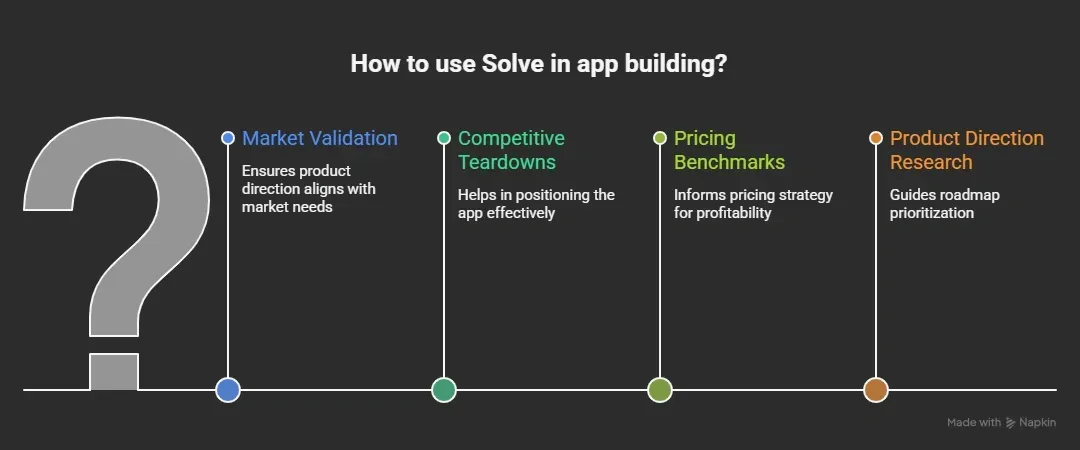 It acts like a thinking layer before you build apps.
Instead of jumping into development on assumptions, you use Solve to get structured answers first. Then your team can move into Build Rocket's app builder with a much clearer direction and evidence-backed decisions behind every choice.
This is where smarter, faster development actually begins.
How does it work?
Before building any app, Solve focuses on structuring your research first. Instead of rushing into development, it gives you a clear, evidence-backed path to follow so your decisions are well-defined from the start.
Here's how the process flows:
Step 1: Input Your Question
You start by writing your business question using natural language. It can be simple or detailed, depending on your use case. You can also pick from suggestion categories — Strategy, Product, GTM, Sales, Competition, What to build.
Step 2: Automatic Classification
Solve classifies your question into one of nine intelligence types automatically. For ambiguous prompts, it asks clarifying questions before starting to sharpen scope and avoid wasted effort.
Step 3: Research Objective Is Set
Solve defines the central research goal based on your question and any clarifying answers. This anchors every subsequent research stream.
Step 4: Query Decomposition
Solve breaks your question into its component dimensions. Each dimension becomes an independent research stream. You can watch these decomposed queries appear in chat as research begins.
Step 5: Parallel Agent Research
Each stream runs simultaneously through its own agent — not in sequence. For each stream, you can see what the agent researched, which tools it used, what it found, and how it assessed the findings.
Step 6: Synthesis and Report
All findings merge into a structured report with an executive summary, detailed analysis, supporting evidence, and actionable recommendations. A Final report link appears in chat for you to open and reference.
By the end of this process, you're not just guessing your next step. You have a clear, evidence-backed structure and a strong base to start building your app with confidence.
Key Features of Solve
Solve is designed to simplify early-stage thinking and reduce confusion. Here are the key features based on the documentation.
| Feature | What It Does |
|---|---|
| Natural Language Input | Ask any business question in plain language — no technical framing needed |
| Automatic Classification | Classifies your question into one of nine intelligence types automatically |
| Query Decomposition | Breaks your question into research dimensions, each handled by a separate agent |
| Parallel Agent Research | All research streams run simultaneously for faster, deeper coverage |
| Structured Reports | Delivers an executive summary, detailed analysis, supporting evidence, and recommendations |
| Follow-up Questions | Suggests smart follow-ups after the report so you can drill deeper without re-framing |
| Share and Export | Reports can be shared within your workspace or exported for use outside Rocket |
These features help teams move toward fully informed decisions faster and with more clarity.
From Idea to Working App
Once your research is complete, Solve gives you everything you need to move into action confidently. This is where your business question turns into a structured, evidence-backed direction.
It covers:
-
Market analysis: Sizing markets, identifying trends, and assessing opportunities
-
Competitive teardowns: Comparing features, analyzing positioning, and running SWOT frameworks
-
Pricing strategy: Benchmarking pricing and analyzing willingness to pay
-
Product direction: Prioritizing features and informing roadmaps
-
Investment analysis: Building business cases and evaluating opportunities
-
GTM strategy, brand positioning, and more
So when your team begins building, they already have a clear, evidence-backed plan.
No guesswork. No starting from zero. This makes moving into development much smoother and cuts down wasted effort.
How Rocket Helps Build Apps?
Once Solve has grounded your direction in evidence, Rocket's Build pillar takes over and helps you bring that idea to life.
You can:
-
Use a visual editor to shape your app
-
Connect logic directly to UI
-
Work from an idea, a Figma file, a screenshot, a template, or a GitHub repo
-
Build internal tools, landing pages, or customer-facing apps
-
Support both web apps and mobile apps (iOS and Android) from one codebase
It supports both no-code users and those with coding knowledge. That balance makes it flexible for different types of teams.
Visual Editor and Code Flexibility
Many platforms rely on rigid templates, which limit creativity. Rocket avoids that.
Here’s what you get:
-
A flexible visual editor for designing your app
-
Access to code snippets when needed
-
Option for code export
-
Even full code export for complete control
You can move from no code to full code whenever required. That means your entire codebase stays in your hands, not locked inside a system.
Deployment and Scaling
Once your app is ready, the next step is getting it live and managing it smoothly. Rocket keeps this part simple so teams can focus on improving their app instead of dealing with setup issues.
Here’s what you can do:
-
Deploy instantly without complex steps
-
Connect your app to custom domains
-
Track activity using audit logs
-
Manage updates with version control
This setup helps teams build production-ready applications without unnecessary friction. It also works well for long term projects, not just quick builds or experiments.
With these options, your app is not just built. It is ready to run, scale, and adapt as your needs grow.
Free Plan and Paid Options
Getting started with Rocket is simple. You don’t need a big commitment upfront.
Here’s how it works:
-
A free plan lets you test ideas and build early versions
-
You can try different AI features while exploring the platform
-
As your app grows, paid plans offer more flexibility and control
This makes it a good choice for personal projects, early-stage ideas, and teams that want to scale over time.
You can start small, experiment freely, and move to advanced options only when your app is ready to grow.
What users are saying
Here’s a real perspective from LinkedIn featuring Rocket and its vision around AI-driven app building:
“He built tools to help creators and founders build the future without writing a single line of code.”
This highlights a key shift in how products are being built today. Platforms like Rocket focus on making app creation more accessible while helping teams think clearly before starting development.
Solve and Full Stack Thinking
Solve is not just about solving one part of the problem. It encourages you to think in a complete, connected way right from the start.
Instead of focusing only on design or backend, it brings everything together:
-
Backend layer: defines backend logic clearly before writing any code
-
Data structure: suggests clean database schemas and organizes data models
-
Frontend flow: outlines how users will interact with the app
-
System connection: links all parts into one full stack view
This is where full stack generation starts to feel natural.
By connecting every layer early, Solve helps you move from idea to generated apps with clarity and fewer surprises during development.
How It Compares to Other Platforms
Most platforms focus on one part of the process. That can slow things down later when pieces don’t fit well together.
Here’s how Solve stands apart:
-
Build-first tools: many tools jump straight into building without planning
-
Design-first tools: some focus only on UI and user experience
-
Code-first tools: others rely heavily on writing code from scratch
-
Solve’s approach: it focuses on thinking and structure before anything else
This shift makes a big difference.
By focusing on clarity first, Solve stands out from other platforms and helps teams avoid confusion later in the process.
The Role of AI in Development
AI is now part of almost every stage of building an app. It supports teams from idea to launch.
Here’s where it plays a role:
-
Idea stage: helps with idea generation using natural language
-
Planning stage: structures workflows and reduces guesswork
-
App development: supports smoother app development with better planning
-
Testing stage: helps identify issues early
With Solve, the AI engine works at the earliest stage, where most mistakes usually happen.
Fixing problems early saves a lot of development time and makes the entire process smoother from start to finish.
Think First, Build Better with Solve
Teams often jump into app development without enough clarity. This leads to wasted effort, messy code, and longer development time. Solve fixes this by mapping everything before you begin. It follows an AI powered approach to structure your idea, define backend logic, and prepare a clear full stack plan so your direction is set from the start.
The AI Tool on Rocket.new helps you think before you build. That simple shift changes how teams approach every app. It does not replace people. It supports better decisions, cleaner planning, and smoother execution.
Table of contents
- -What is Solve on Rocket.new?
- -Why Mapping Before Research Matters?
- -How Solve Fit Into Modern App Building?
- -How does it work?
- -Key Features of Solve
- -From Idea to Working App
- -How Rocket Helps Build Apps?
- -Visual Editor and Code Flexibility
- -Deployment and Scaling
- -Free Plan and Paid Options
- -What users are saying
- -Solve and Full Stack Thinking
- -How It Compares to Other Platforms
- -The Role of AI in Development
- -Think First, Build Better with Solve