
Rocket.new is ideal for non-developers who want to build and launch apps using simple prompts without coding. Replit is better for users who want control over code and are willing to learn coding while building. Choose Rocket for efficiency, code ownership and simplicity, Replit for flexibility and development control.
Which platform actually helps someone with no coding background ship a working app faster, Rocket.new or Replit?
The answer depends on how much code you want to touch. According to Hashnode's State of Vibe Coding 2026 report, 63% of vibe coding users are people without development experience building full-stack apps and personal software using natural language prompts. The AI tools have caught up with the ambition.
So if you are a founder, designer, or creator deciding between these two platforms, this breakdown covers what each one does and where each falls short.
What Vibe Coding Means for Beginners
Vibe coding lets you create applications using natural language prompts instead of writing traditional code. You describe what you want in plain language, and the platform translates that into functional code.
-
Vibe coding tools cut development timelines by letting beginners skip months of learning programming languages
-
92% of US developers now use AI coding tools daily, and 46% of all new code is AI-generated code
-
The vibe coding market hit an estimated $4.7 billion in 2026, with a 38% compound annual growth rate
-
Vibe coding shifts app creation closer to the people who understand the business problem, removing bottlenecks in traditional development cycles
The trend toward end-to-end app creation driven entirely by natural language is well underway. Vibe coding tools act as a force multiplier for experienced developers and a gateway for non-technical users.
How Rocket.new Works?
Rocket.new is an AI-powered app builder that creates functional applications from natural language prompts with minimal coding required. It generates complete, working software, not mockups or wireframes.
-
Built around a simple four-step loop: describe, build, refine, ship
-
Users describe their desired outcomes in natural language, and the platform translates them into functional code
-
Supports Flutter for mobile apps and Next.js for web apps
-
Generates full-stack code, including UI, backend logic, and data handling
-
One-click deployment to app hosting with custom domains
Rocket is ideal for founders, designers, and non-technical creators who need a production-ready application MVP. It removes the barrier between idea and implementation for projects where speed outweighs customization needs.
How Replit Works?
In contrast to Rocket.new, Replit is a cloud IDE and complete development environment where developers write code with AI assistance and deploy production applications. Replit often requires understanding code basics to get the most out of it.
-
Provides a browser-based IDE with version control and full visibility into the codebase
-
Replit agent handles multi-step builds, debugging, and deployment
-
Supports 50+ programming languages and multi-language projects
-
Replit offers real-time collaboration for teams
-
Replit is accessible to beginners looking to build with AI
Replit provides a full IDE where AI enhances the coding process. The platform gives experienced developers control over their codebase while offering AI features to accelerate work on complex projects.
Key Takeaways: Replit vs Rocket.new at a Glance
Here are the key takeaways on how Replit vs Rocket.new compares:
-
Replit vs Rocket.new differs in control: Replit gives full code access, Rocket abstracts code behind prompts
-
Replit vs Rocket.new differs in speed: Rocket generates entire applications from a single prompt, Replit gives you a workspace to build step by step
-
Replit vs Rocket.new differs in audience: Rocket targets creators with zero code experience, Replit targets developers who want AI agents and AI tools to speed up work
-
Both offer a free tier, code export, and deployment tools
Replit vs Rocket.new: Feature Comparison
Here is a side-by-side breakdown of key features across both app builders. This table covers the key features that matter most when choosing an AI app builder.
| Feature | Rocket.new | Replit |
|---|---|---|
| Primary approach | AI generates entire applications from prompts | Cloud IDE with AI-assisted coding |
| Setup time | no setup, browser-based | Under 2 minutes, browser-based |
| Mobile apps | Native Flutter support for mobile apps | Mobile apps through responsive web |
| Code visibility | Code export with GitHub sync | Code editor in a browser-based IDE |
| AI generation | Entire app from one prompt | AI assists while you code |
| Deployment | One-click deploy with custom domains | Built-in hosting and deployment |
| Free plan | Free tier with 1M tokens | Free tier with limited agent access |
| Paid plans | Starting at $25/month | Core at $20/month |
| Learning curve | Minimal, no code knowledge needed | Steeper, requires some code knowledge |
| Collaboration | Built-in team features | Real-time collaboration on paid plans |
How AI Works in Replit vs Rocket.new
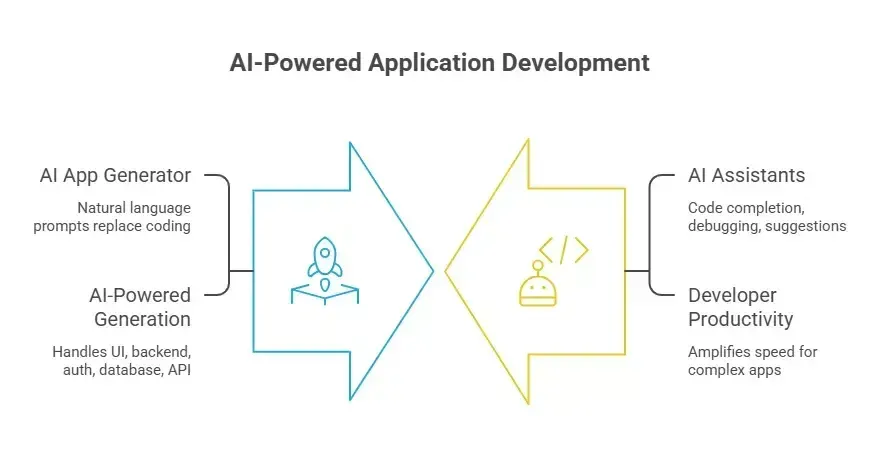
The AI features in Rocket and Replit work in opposite directions. Rocket.new's AI replaces much of the manual coding process. Replit's AI capabilities amplify developer productivity. That distinction matters for non-developers.
-
Rocket uses ai powered generation to handle the heavy lifting: UI, backend, authentication, database schemas, and api endpoints all come from a single prompt
-
Replit's AI agents assist with code completion, debugging tools, and code suggestions, but you still guide each step
-
Rocket.new provides an AI app generator where natural language prompts replace most of the coding process
-
Replit provides AI assistants that help experienced developers move faster through complex enterprise applications
For someone who has never opened a code editor, Rocket's approach means you can create applications without learning syntax. Replit vs Rocket.new here is a question of having AI build for you or building with AI assistance.
Speed, Setup Time, and Rapid Prototyping
Setup time matters when you are testing an app idea. Both platforms run in the browser, so there is no local setup to configure.
-
Rocket.new generates a working live app from a single prompt, handling fast app generation for production-ready applications
-
Replit spins up a workspace instantly, but building the app itself takes longer because you are guiding each step
-
For rapid prototyping, Rocket is faster because the AI handles architecture decisions you would otherwise make manually
-
Replit vs Rocket.new favors Replit for full-stack projects where you plan to iterate on the code over weeks or months
Rocket excels at turning ideas into clickable prototypes in minutes. That speed advantage compounds when founders need to validate concepts with real users before investing in full development.
Pricing: Replit vs Rocket.new
Both platforms charge differently. Replit charges for development infrastructure while Rocket.new charges for AI generation credits and deployment capabilities.
-
Rocket.new free tier: 1 million tokens for exploration and small projects
-
Replit free tier: limited AI agent access, public projects only, one published app
-
Rocket paid plans start at $25/month (Personal), $50/month (Rocket), and $100/month (Booster)
-
Replit paid plans start at $20/month (Core), with Pro at $100/month for teams
-
Replit credits can disappear fast with heavy agent use, and users have reported unexpected charges from pay-as-you-go billing
-
Rocket's token-based system is more predictable for budgeting on AI app projects
Choose Replit when you want a workspace where you control every line of code. Rocket saves time when you need an AI app built quickly without hiring developers.
Code Access, Version Control, and Ownership
Both platforms let you export and own your code. Replit vs Rocket.new here comes down to how much code you need to touch.
-
Rocket.new gives full code access and supports GitHub export so that developers can extend or customize the generated code later
-
Replit provides code editing inside its cloud IDE with built-in version control and git integration
-
Migration between Replit vs Rocket.new platforms is one-directional in practice, so pick the right tool early
-
For building production-ready applications, Rocket's code export means you can hand off to experienced developers later without switching tools
Replit vs Rocket.new. Both support version control. With Rocket, you are less likely to need it during the initial build because the ai generated code ships structured for production.
Mobile Apps and Landing Pages
Mobile app development is where these two platforms diverge sharply.
-
Rocket.new supports Flutter natively, producing real mobile apps you can submit to app stores
-
Replit handles mobile apps through web-based approaches, which limits native functionality
-
For landing pages, both platforms work, but Rocket generates polished pages faster from natural language prompts
-
Rocket handles roughly 45% mobile apps and 55% web apps across its user base
If your project is a mobile app, Rocket gives you a direct path to the App Store and Google Play. Replit can build web apps that work on phones, but that is not a native mobile app. Replit vs Rocket.new clearly favors Rocket for mobile.
Learning Curve and AI-Assisted Development
Replit is generally better for users who want to learn how to code or maintain granular control over their application's logic. Rocket is better for users who want to skip coding entirely.
-
Rocket.new's ai assisted development model means non-developers describe outcomes, not implementation details
-
Replit favors serious development work where understanding and controlling the codebase matter
-
Vibe coding tools like Rocket lower the barrier so people who understand the business problem can build their own internal tools and projects
-
Replit offers a stronger path for ai assisted coding if you want to learn programming alongside building
Replit vs Rocket.new depends on whether you want to build with AI assistance or have AI build for you. Neither platform produces perfect code every time, but Rocket gets you closer to a working app with less manual effort.
Community, Support, and Resources
Replit's community support and learning resources are more established. That gap matters when beginners get stuck.
-
Replit has millions of users, active forums, and years of tutorials
-
Replit's community size and resource depth favor it in this comparison vs Rocket.new
-
Rocket.new has 1M+ creators across 180+ countries with responsive support
-
Replit offers more community-driven debugging tools and example projects
What People Are Saying
Here is what a user shared on LinkedIn about building with AI app builders:
"I gave an AI builder just one sentence and it built a complete working app. No setup. No coding. It just worked. The tool? Rocket (by DhiWise) → Rocket.new. I've already used it to build multiple apps from one-liners."- Source
That reaction is common among people trying vibe coding for the first time. The gap between typing a sentence and seeing a working live app is where Rocket excels.
How Rocket.new Handles Vibe Coding for Non-Developers
Rocket.new vs Replit, which platform is better for non-developers comes down to one question: do you want AI to assist your code writing, or do you want AI to write the code? Rocket answers that by putting AI generation at the center of every workflow.
Here is what makes Rocket stand out as an AI-powered app builder for non-developers:
-
Vibe-solutioning platform: Rocket goes beyond vibe coding into vibe solutioning, where the AI handles market research, UX design, SEO copywriting, and code generation in one platform
-
25,000+ templates library, free to use: Pre-built templates reduce setup time and save up to 80% of tokens compared to starting from scratch
-
Saves up to 80% tokens: The template system means your AI generation budget goes further on every project
-
Supports Flutter (mobile) and Next.js (web): One platform covers both mobile apps and web apps without switching tools
-
Collaboration features built in: Teams can work on projects together without external tools for project management
So, where does this connect to real use cases?
-
MVP launches for founders: Describe your AI app idea once and get a working product to show investors, without hiring a development team
-
Internal tools for small teams: Build dashboards, admin panels, and workflow tools using natural language instead of waiting on engineering backlogs
-
Rapid prototyping for designers: Import Figma designs and turn them into live app previews with working backend logic
-
Landing pages and marketing sites: Generate polished pages fast, deploy with custom domains, and iterate with prompts
When to Choose Replit
Choose Replit when your project needs deep customization, advanced features, or long-term code maintenance.
-
Choose Replit for full-stack projects that will evolve over months with ongoing code changes
-
Use Replit if you want to learn coding while building, since the IDE teaches as you go
-
Replit offers better support for complex projects that span multiple programming languages
-
Replit handles complex enterprise applications where ai generated code needs constant human oversight
Picking the Right Platform for Your Skill Level
Choosing the right platform depends on your technical level, project scope, and budget.
-
If you have zero coding experience and want a live app this week, use Rocket.new
-
If you have some coding knowledge and want full control, use Replit
-
If your project is a mobile app, Rocket's native Flutter support gives it an edge
-
If you want to build with AI assistants and AI tools while learning traditional development, Replit fits better
-
For building production apps as a founder or creator, Rocket handles the heavy lifting from prompt to deployment
Both app builders are accessible to beginners. Replit vs Rocket.new is not about which is objectively better. Rocket builds the app. Replit gives you the tools to build it yourself.
Finding the Right Platform for Your Next Project
Replit vs Rocket.new is a question of which platform fits your workflow, turning ideas into shipped products. For non-developers who want speed, native mobile apps, and AI that handles the build process, Rocket.new wins on the metrics that matter most. Replit remains solid for anyone ready to write code. Both save time compared to coding from scratch, and both push vibe coding forward.
Table of contents
- -What Vibe Coding Means for Beginners
- -How Rocket.new Works?
- -How Replit Works?
- -Key Takeaways: Replit vs Rocket.new at a Glance
- -Replit vs Rocket.new: Feature Comparison
- -How AI Works in Replit vs Rocket.new
- -Speed, Setup Time, and Rapid Prototyping
- -Pricing: Replit vs Rocket.new
- -Code Access, Version Control, and Ownership
- -Mobile Apps and Landing Pages
- -Learning Curve and AI-Assisted Development
- -Community, Support, and Resources
- -What People Are Saying
- -How Rocket.new Handles Vibe Coding for Non-Developers
- -When to Choose Replit
- -Picking the Right Platform for Your Skill Level
- -Finding the Right Platform for Your Next Project