
Can artificial intelligence really speed up interface design? Learn how AI reshapes UI workflows, accelerates sketch-to-screen workflows, and drives widespread enterprise adoption without complexity for modern teams.
How do user interfaces go from sketch to a polished screen so quickly?
With AI-driven UI design, the process has changed dramatically. AI now helps create user-friendly interfaces that feel smooth and natural.
In fact, Gartner says more than 80% of enterprises will have used generative AI or deployed AI-enabled applications by 2026.
Let's walk through how AI transforms the ui design process without sounding like a lecture.
What is UI Design AI and Why It Matters?
UI design AI refers to systems that help create, test, and refine digital interfaces using artificial intelligence.
Instead of starting with blank artboards and endless meetings, designers can:
- Use AI UI generator tools to get quick drafts
- Let AI suggest layouts, screens, and wireframes
- Refine ideas with a single prompt
- Cut down repetitive work for designers
So, it doesn’t replace real designers. It helps them spend time on what humans do best: creativity and empathy.
How AI UI Generators Work?
AI UI generators take words or sketches and generate UI concepts based on patterns learned from design data.
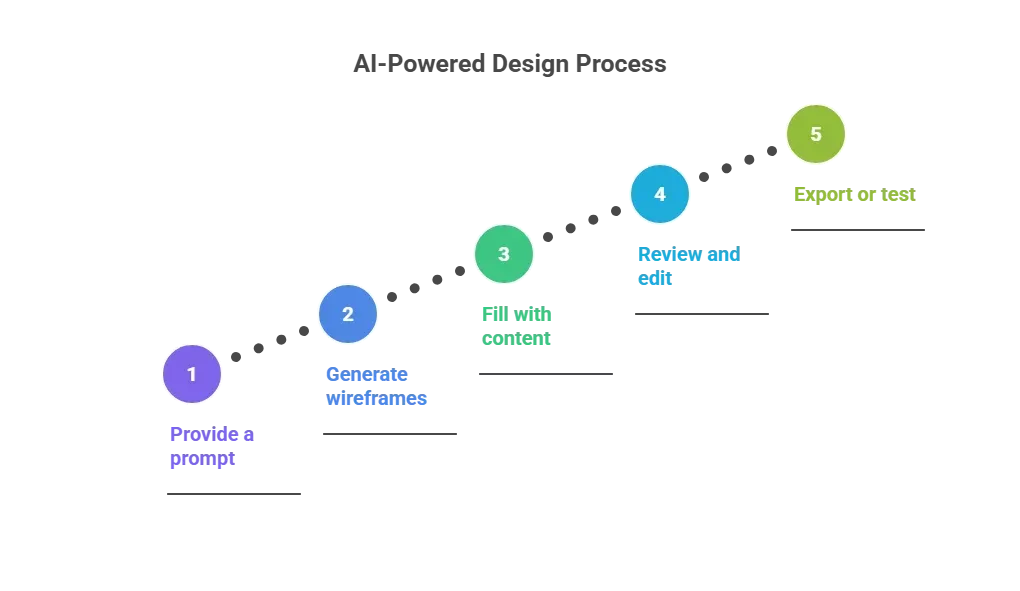
Think of AI UI generators as a designer’s reliable sidekick, quick, tireless, and always ready to turn your ideas into screens. You still steer the ship, but the AI handles the heavy lifting.
The AI Design Process
Getting from idea to prototype can feel like a jungle. But with AI tools, this design process becomes clearer, more playful, and less painful.
The steps usually flow like this:
- Brainstorm ideas: Quick prompts help the AI suggest multiple concepts. It’s like having a design buddy tossing ideas back instantly.
- Generate wireframes: AI creates basic layouts showing where text, buttons, and images go. Think of it as the skeleton of your app or site.
- Add visuals and details: The AI now fills in colors, fonts, icons, and images. Your wireframes start looking real.
- Test with real users: Show prototypes to users to see what works and what doesn’t. AI can highlight confusing spots or suggest tweaks.
- Refine and export: Tweak layouts, visuals, or content. Then export high-fidelity screens or ready-to-use prototypes.
This makes teams feel like they have a partner that actually gets what they mean when they type things like “simple mobile layout with big buttons.”
AI Tools that Shape UI Today
Here’s a quick table of popular AI UI generator options currently used across different stages of the design journey.
| Tools | Best For | Typical Output | Notes |
|---|---|---|---|
| Rocket.new | Full app builds | UI + backend + deployment | Build a whole app from a single prompt |
| Visily | Beginner-friendly UI generator | High fidelity ui screens | Great for text-to-design and drag‑and‑drop edits |
| UXPilot.ai | Figma-integrated design | Wireframes to hi-fi mockups | Helps refine layouts with UX rules |
| Prototypr.ai Studio | Generate UI & edit | High fidelity screens | Uses large language models for quick designs |
| UXMagic | Text to UI & Figma export | Wireframes to responsive screens | Upload sketches or text to generate ui quickly |
| Komposo | Code-ready UI | Clean UI + export code | Converts text or images into editable design & code |
This indicates there’s a UI generator for nearly every stage of the design journey.
Real World Opinion on AI UI Design
Here’s a real voice from LinkedIn discussing tools such as AI UI generator platforms.
“This new AI agent lets you build fully functional web and mobile apps. Using nothing but natural language prompts, you can turn ideas into working interfaces, logic, and backend.”
This shows many designers and developers are curious and ready to try ui generator platforms that go beyond quick prototypes.
What AI Brings to User Experience?
AI isn’t just about flashy prototypes. It actually makes user-friendly interfaces easier to design, test, and refine. Here’s what it adds to the mix:
1. Speed: AI turns ideas into visible designs in minutes. Instead of sketching every screen by hand, teams can quickly generate UI and move into testing faster.
2. Variety: AI can suggest multiple layout ideas at once. This helps teams explore different ways to structure a page without starting from scratch every time.
3. Consistency: Fonts, buttons, spacing, and other UI elements stay uniform across screens. This keeps your app looking polished without the painstaking tweaks.
4. Testing help: AI can highlight areas that might confuse users or suggest alternative flows. It’s like having a mini ux pilot that checks your designs before developers even touch the code.
Think of AI as a friendly co-pilot. It accelerates workflows, keeps designs clean, and gives product teams a heads-up before users spot issues. You still steer the ship, but AI makes the ride smoother and less bumpy.
Design Inspiration with AI
AI tools act like a sketch buddy that never complains. When creativity hits a wall, a UI generator can instantly give fresh ideas.
For example, a designer can type:
“Create a minimal login screen with a friendly tone.”
And just like that, multiple options appear. No more staring at a blank canvas, wondering what color the button should be.
It’s perfect for those “brain fog” moments on a Tuesday afternoon. AI helps spark design inspiration, nudging teams toward layouts, styles, and ideas they might never have tried on their own.
With AI, designers don’t just get screens; they get a playful brainstorming partner. One prompt, a few clicks, and suddenly your project is brimming with options.
High Fidelity Designs and Prototypes
After wireframes are in place, it’s time to make designs feel real. This is where high-fidelity designs and prototypes come in. AI tools make this step faster, smoother, and more accurate for product teams.
1. Generate clickable prototypes: AI can turn static screens into interactive prototypes. Buttons, links, and flows work like the real app, letting teams test and iterate before any code is written.
2. Support desktop and mobile screens: Modern tools handle multiple devices. AI ensures layouts adapt to both desktop and mobile without extra manual work. Your UI looks polished everywhere.
3. Export design specs for devs: AI can produce ready-to-use specifications: measurements, colors, fonts, and assets. Developers get everything they need to build, reducing back-and-forth with designers.
Think of AI as a backstage crew for your designs. It makes prototypes click, layouts fit all screens, and developers happy. Designers can focus on creativity while AI handles the technical details.
Rocket.new : One Prompt to Create Your App
Rocket.new is a vibe solutioning platform that uses AI to generate full apps from plain text. You don’t just get a screen or prototype. You get a complete UI, backend, database, and live deployment ready. It reads your idea, creates screens, and builds the whole workflow, no coding required.
It’s a real-world example of how AI is shaping not just UI screens but the full user experience.
Top Features
- One prompt to describe the app in one sentence.
- Design to code that turns concepts into production-ready interfaces.
- Templates to help with quick design foundation.
- Multi-platform output for web and mobile screens.
It even handles authentication, database access, and deployment, so your design actually works.
Use Cases from Rocket.new
Here are a few real ways teams use Rocket.new:
- MVP Launch: Early-stage founders can submit a single prompt about their app and receive a working prototype. Screens, UI flows, and backend are all ready.
- Portfolio Projects: Design students or freelancers can upload a screenshot or a text idea and receive a full digital product to showcase to clients.
- Internal Tools: Product teams can quickly generate dashboards or internal screens without requesting a rough version from engineers.
Challenges and What to Watch For
AI accelerates design and makes it more playful, but it’s not flawless.
Here are some things teams often notice:
- Token costs can add up quickly: Many AI tools charge per action or per screen. If you’re generating many screens or experimenting heavily, costs can climb quickly.
- Free layers may only support a few screens: Some free versions limit the number of designs you can create. You might hit a cap just when ideas are flowing.
- Generated UX sometimes needs tweaking: AI can suggest flows and layouts, but they’re not always perfect. Human designers still need to adjust for usability, clarity, and user experience.
AI is like a hyperactive intern, brilliant, fast, and sometimes messy. It’s fun to work with, but real designers are still needed to make sure the final UI actually works for users.
How AI Shifts UX for Good
AI has become a strong partner in UI design. It helps teams generate ideas, draft screens, test, and move faster than doing it all by hand. It doesn’t replace designers; it gives them more time to focus on what users feel rather than what they draw.
By combining speed, variety, and consistency, AI enables product teams to focus on user experience rather than repetitive tasks. Tools like Rocket.new show that even complex apps can start from a single prompt, making the design process smarter, smoother, and surprisingly fun.
Table of contents
- -What is UI Design AI and Why It Matters?
- -How AI UI Generators Work?
- -The AI Design Process
- -AI Tools that Shape UI Today
- -Real World Opinion on AI UI Design
- -What AI Brings to User Experience?
- -Design Inspiration with AI
- -High Fidelity Designs and Prototypes
- -Rocket.new : One Prompt to Create Your App
- -Top Features
- -Use Cases from Rocket.new
- -Challenges and What to Watch For
- -How AI Shifts UX for Good