K-12 AI Analytics Dashboard Landing Page Template
Beacon is a single-page K-12 artificial intelligence analytics dashboard landing page built on a split-screen layout. It transforms raw student data into district-wide intelligence at a glance. Designed for assistant superintendents, curriculum directors, and building principals, it combines live data visuals, AI-generated insight badges, and a sharp mission-control aesthetic to drive demo clicks.
by Rocket studio
Quick summary
Beacon is a high-impact landing page template for a K-12 AI analytics dashboard. It uses a 50/50 split-screen layout, a Data Command visual theme, and an Industry Report scroll structure. The page is built to move district leaders from recognition to action, ending in a click to an interactive demo sandbox.
Who this template is for
This template is built for teams marketing AI-powered education analytics tools to district leadership. It speaks directly to the people who carry the weight of student performance data every day.
- Assistant superintendents managing data from multiple school buildings at once
- Curriculum directors who need to prove that instructional pilots are producing measurable results
- Building principals who must walk into board meetings with a clear, single-screen story
What problem this template solves
District leaders spend too much time wrestling with disconnected spreadsheets and quarterly exports. They need a page that makes the cost of that delay feel real, then immediately shows a better path forward.
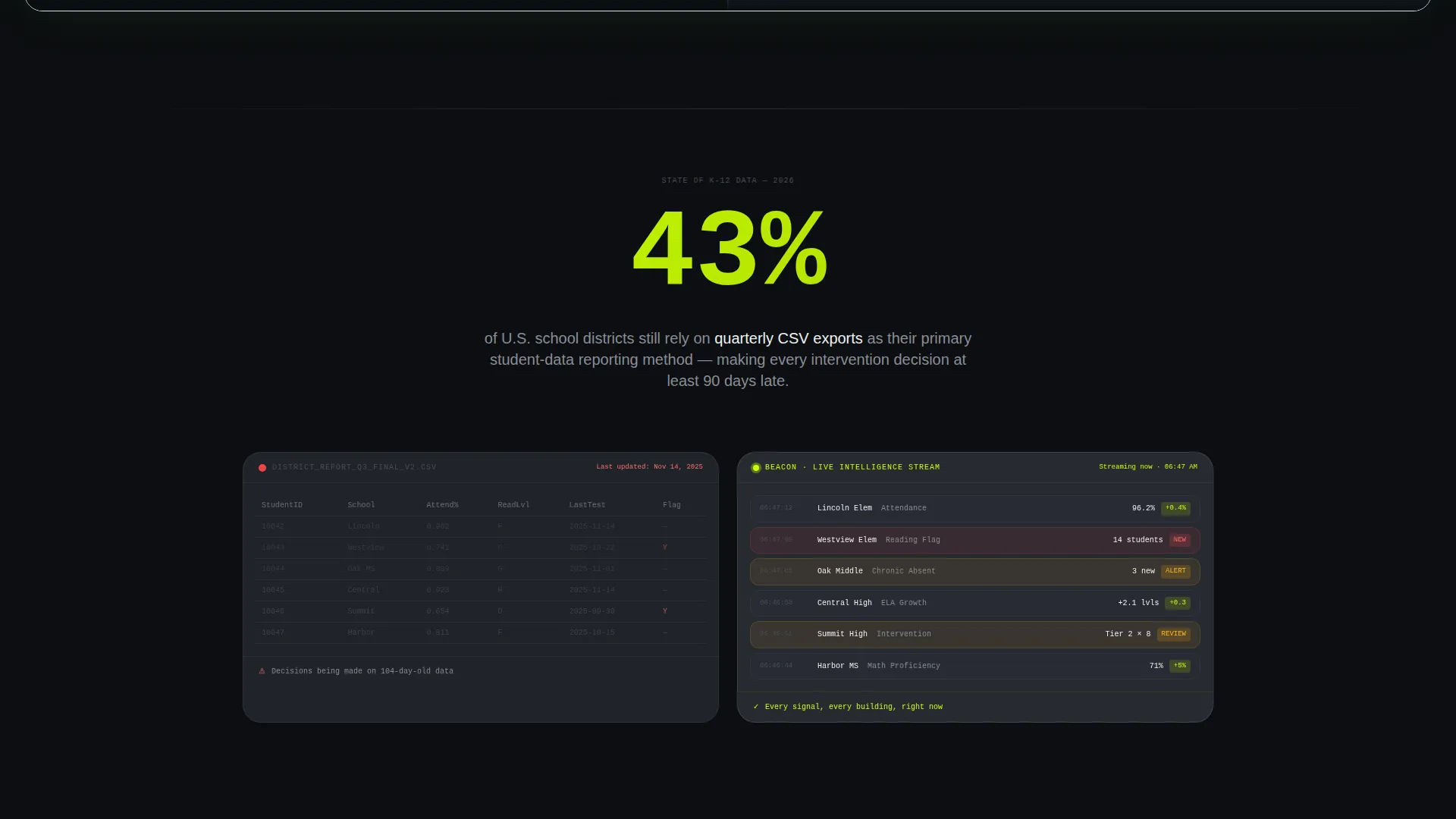
- The scroll structure opens with a sharp national statistic, then answers it with a live product screenshot
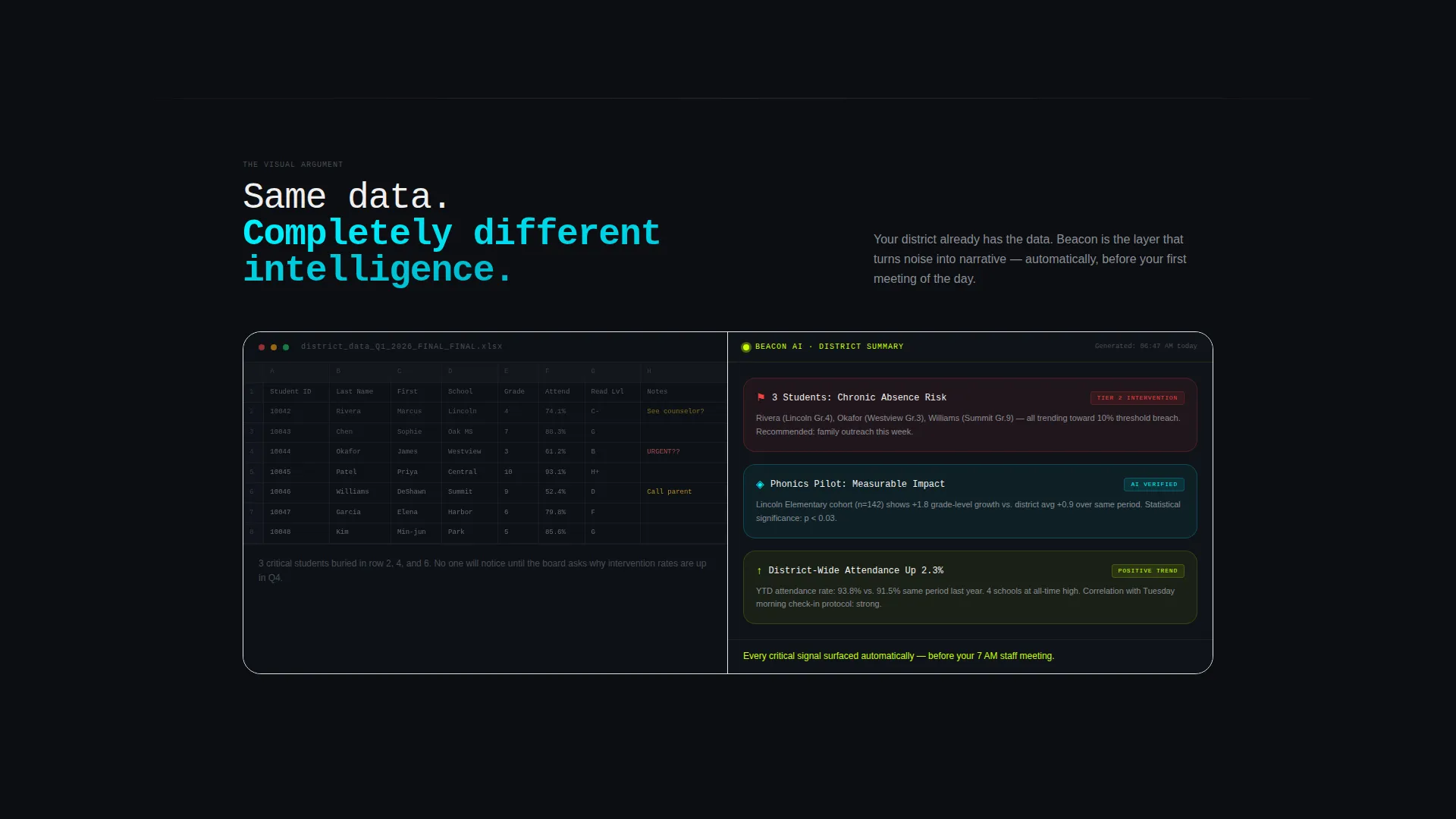
- Side-by-side comparisons contrast a traditional spreadsheet wall with an AI-summarized insight panel
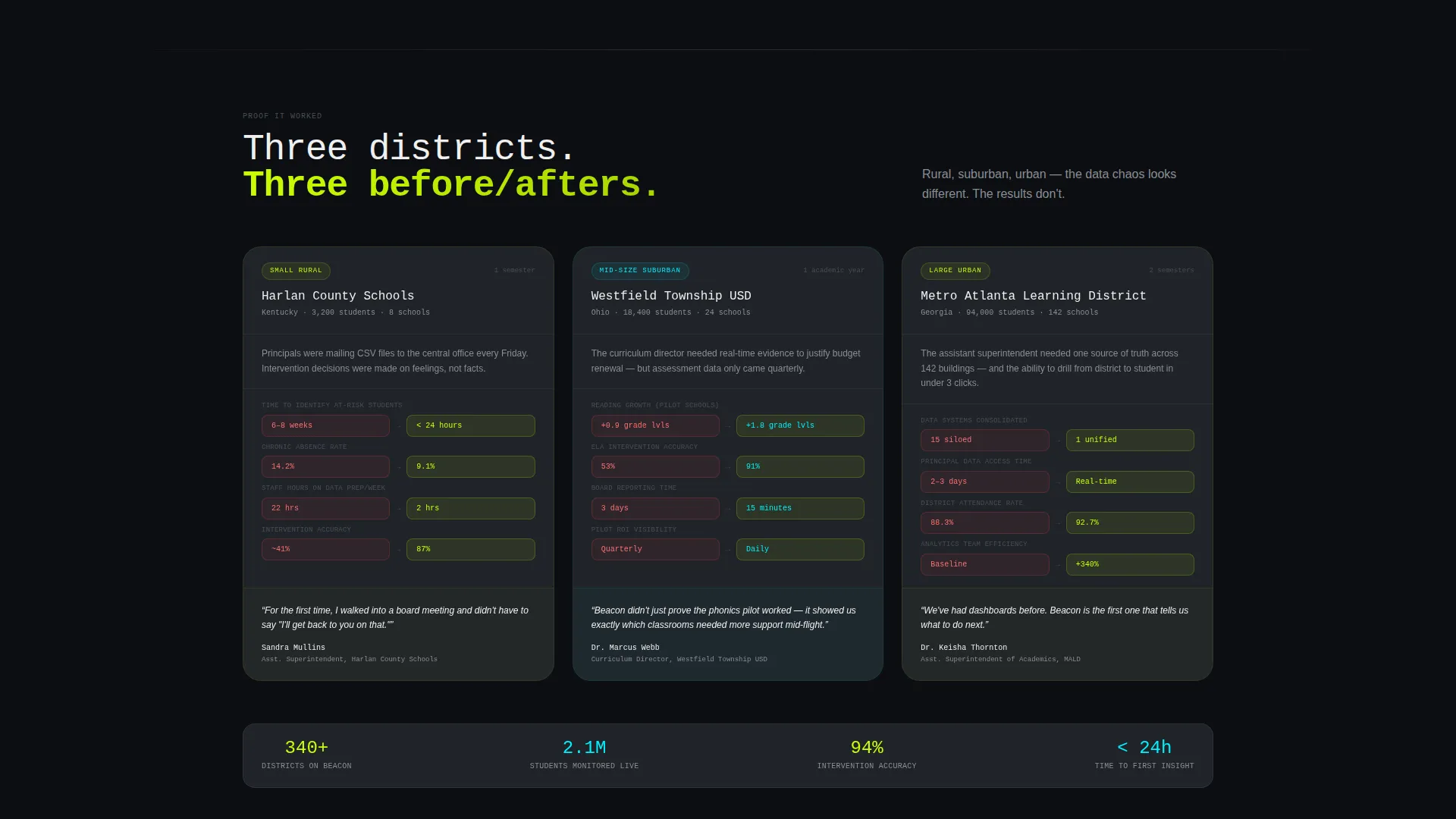
- Three district archetype case studies provide before-and-after metric strips that build trust across school sizes
What you get with this template
This template delivers a fully structured, single-page layout that guides visitors through a data-driven argument. Every section earns the next scroll with a concrete data hook.
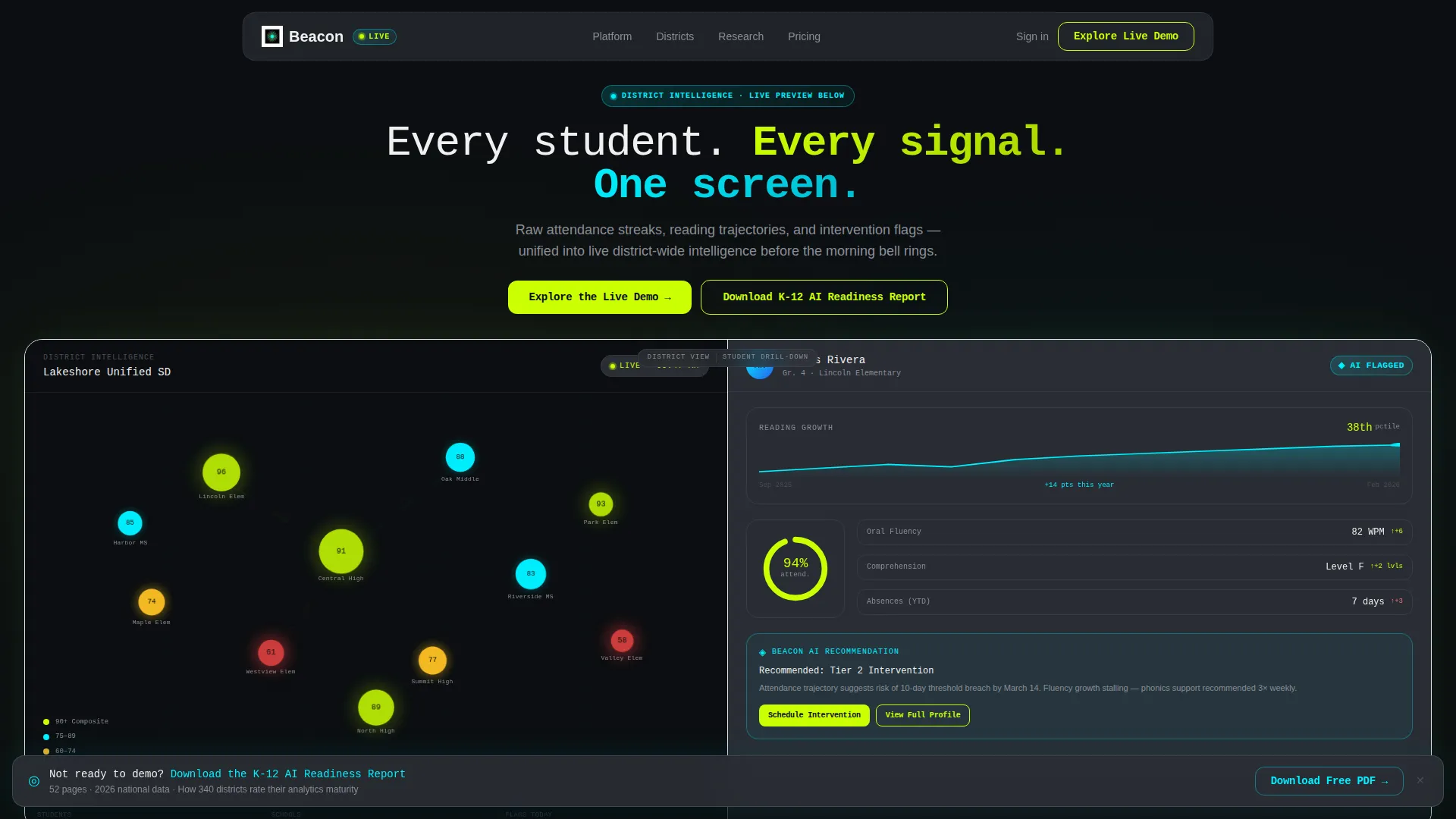
- A live Dashboard Preview header with a district heatmap, student drill-down card, and micro-animations that fire on load
- A two-stage call-to-action flow: a ghost button in the header that solidifies into a full chartreuse block after the third section
- A sticky secondary banner offering a gated K-12 AI Readiness Report PDF for visitors not yet ready to demo
Feature list
This template is built around six purpose-driven components. Each one serves a specific moment in the visitor's decision journey.
Split-Screen Dashboard Header
The header divides 50/50. The left side shows a stylized district heatmap where each school appears as a pulsing performance node. The right side displays a student-level drill-down card with a reading-growth sparkline, an attendance ring chart at 94 percent, and an AI flag reading "Recommended: Tier 2 Intervention."
Load-Triggered Micro-Animations
Numbers count up on load, the sparkline draws itself left to right, and heatmap nodes breathe with a soft glow. These animations make the dashboard feel alive without requiring any user interaction.
Industry Report Scroll Structure
The page reads like a state-of-education data briefing. A provocative national statistic opens each major section, a live product visual answers it, and a proof strip closes it. The rhythm builds urgency as the visitor scrolls.
District Archetype Case Studies
Three before-and-after metric strips cover small rural, mid-size suburban, and large urban district profiles. Each strip gives prospects a concrete performance comparison that mirrors their own context.
Progressive Call-to-Action System
The primary call to action, "Explore the Live Demo," appears first as a ghost button and then solidifies into a full chartreuse block after the third section. This timing lets the value case build before the ask lands.
Sticky Secondary Capture Banner
A floating banner offers the K-12 AI Readiness Report PDF throughout the scroll. It captures email on a separate landing page rather than interrupting the main flow, keeping the primary click path clean.
Page sections overview
| Section | Purpose |
|---|---|
| Split-Screen Header | Introduce the dashboard with live data visuals and the primary ghost-button call to action |
| National Stat Hook | Open the argument with a provocative industry statistic about quarterly CSV dependency |
| Live Screenshot Contrast | Answer the stat with a real-time streaming product screenshot |
| Spreadsheet versus. Beacon | Split-screen visual argument contrasting a spreadsheet wall with an AI insight panel |
| Case Study Strips | Three district archetype before-and-after metric strips for rural, suburban, and urban profiles |
| Solidified call to action Block | Full chartreuse "Explore the Live Demo" button after the value case is complete |
| Sticky Report Banner | Floating secondary banner offering the gated K-12 AI Readiness Report PDF |
Design & branding system
The visual identity follows a Data Command theme powered by the Acid Digital color system. Every color choice has a deliberate role, and dark surfaces do as much work as bright ones.
- Void black (#0B0E11) forms the base layer; electric chartreuse (#CAFF04) drives primary actions and live-data highlights; phosphor cyan (#00F0FF) marks trend lines and AI-generated insight badges; muted graphite (#2A2D35) separates data cards from the background
- Typography runs in tight monospace for headlines, with crisp white (#F0F0F0) body text that reads clearly against the dark palette
- The overall feel is a mission-control monitor glowing in a dark room, where every bright element is a signal and every dark surface is intentional negative space
Mobile & speed optimization
The template is designed to remain visually coherent and fast on smaller screens. The split-screen layout and animation system are structured to scale without losing the dashboard clarity that makes the page persuasive.
- The 50/50 split-screen layout stacks gracefully on mobile viewports so both halves remain readable
- Micro-animations are load-triggered rather than scroll-triggered, keeping the entry experience sharp even on slower connections
- The sticky secondary banner is positioned to remain visible without blocking primary content on any screen size
How this template helps you convert
Beacon is built around a single conversion goal: get the visitor to click "Explore the Live Demo." Every structural decision supports that click.
- The page opens with a vivid, animated dashboard preview that puts the product in front of the visitor before any copy asks for anything, making the value tangible immediately.
- The Industry Report scroll structure uses a recurring pattern of provocative stat, product answer, and proof strip to build a compounding argument that makes the visitor feel the cost of inaction before the call to action solidifies.
- The two-tier call-to-action system captures both ready buyers with the demo click and research-stage visitors with the gated PDF report, so no intent level leaves the page empty-handed.
Other information about this template
This template is designed specifically for the K-12 education technology market. It is well-suited for teams positioning AI-driven student data platforms to district administrators at any scale.
- The template style is a single-page, section-led landing page built on a 50/50 split-screen foundation
- The creative direction follows an Industry Report narrative, giving the page a credible, briefing-style authority that resonates with data-literate district leaders
- The no-form page structure keeps the primary click path frictionless; email capture happens on a secondary page after the PDF click, not on this template
- The Data Command theme and Acid Digital color system are designed to signal technological sophistication while remaining readable in both bright office and dimly lit boardroom settings
Theme
Data Command
Creative direction
Industry Report
Color system
Acid Digital
Style
Split Screen (50/50)
Direction
Click-Through
Page Sections
Split-screen Dashboard Header
Load-triggered Micro-animations
Industry Report Scroll Structure
District Archetype Case Studies
Progressive Call-to-action System
Sticky Secondary Capture Banner
Related questions
Who is this landing page template designed for?
Does this template include a lead capture form?
What animations come built into the header?
How does the two-stage call-to-action system work?
Can this template support different district sizes?



