Catalyst - Powerful DevSecOps Landing Page Template
Catalyst is a DevSecOps landing page template built for open-source security pipeline projects. It features a live-typed code snippet header, an animated terminal output block, anchor navigation across four pipeline-stage sections, and an inline terminal emulator call to action. The Dynamic Motion theme uses deep terminal black, reactive teal, and coral alert states to make every interaction feel like a real build passing.
by Rocket studio
Quick summary
Catalyst is a single-page, hub-and-spoke landing page template designed for DevSecOps open-source projects. It opens with a self-typing .catalyst.yml config block, streams animated green checkmarks through a terminal output component, and guides visitors through four anchor-nav sections. The design is built to feel like a live pipeline running clean.
Who this template is for
This template is built for technical teams and individuals who need to communicate the value of a security-focused pipeline tool without sounding like a sales brochure. It speaks the language of the people who actually run the pipelines.
- Platform engineers wiring together continuous integration and delivery pipelines who need a credible project page fast
- Application security leads who want to show developers a tool that fits into existing workflows rather than adding friction
- Startup CTOs who need to demonstrate compliance readiness on a lean budget without enterprise vendor costs
What problem this template solves
Most open-source DevSecOps projects lose potential adopters on the landing page. The tool is solid, but the page reads like documentation. Visitors leave before they understand what the project actually does.
- There is no live demonstration of the tool working, so visitors have to imagine the value instead of seeing it
- Security-focused projects often have no clear conversion path for both contributors and first-time users
- Generic templates do not reflect the terminal-native, pipeline-first culture of the target audience
What you get with this template
You get a complete, single-page hub-and-spoke layout with motion-driven sections, a working call to action flow, and a visual identity that earns trust from technical visitors in the first ten seconds.
- A self-typing YAML code snippet header with a blinking cursor and a streaming animated terminal output block showing four clean scan results
- Four anchor-nav spoke sections covering the scan, integrate, enforce, and deploy stages of a security pipeline
- An inline terminal emulator component that accepts a repository URL and simulates a real-time scan with line-by-line result output
- A persistent ghost button call to action in the anchor nav alongside two inline placements of the primary call to action
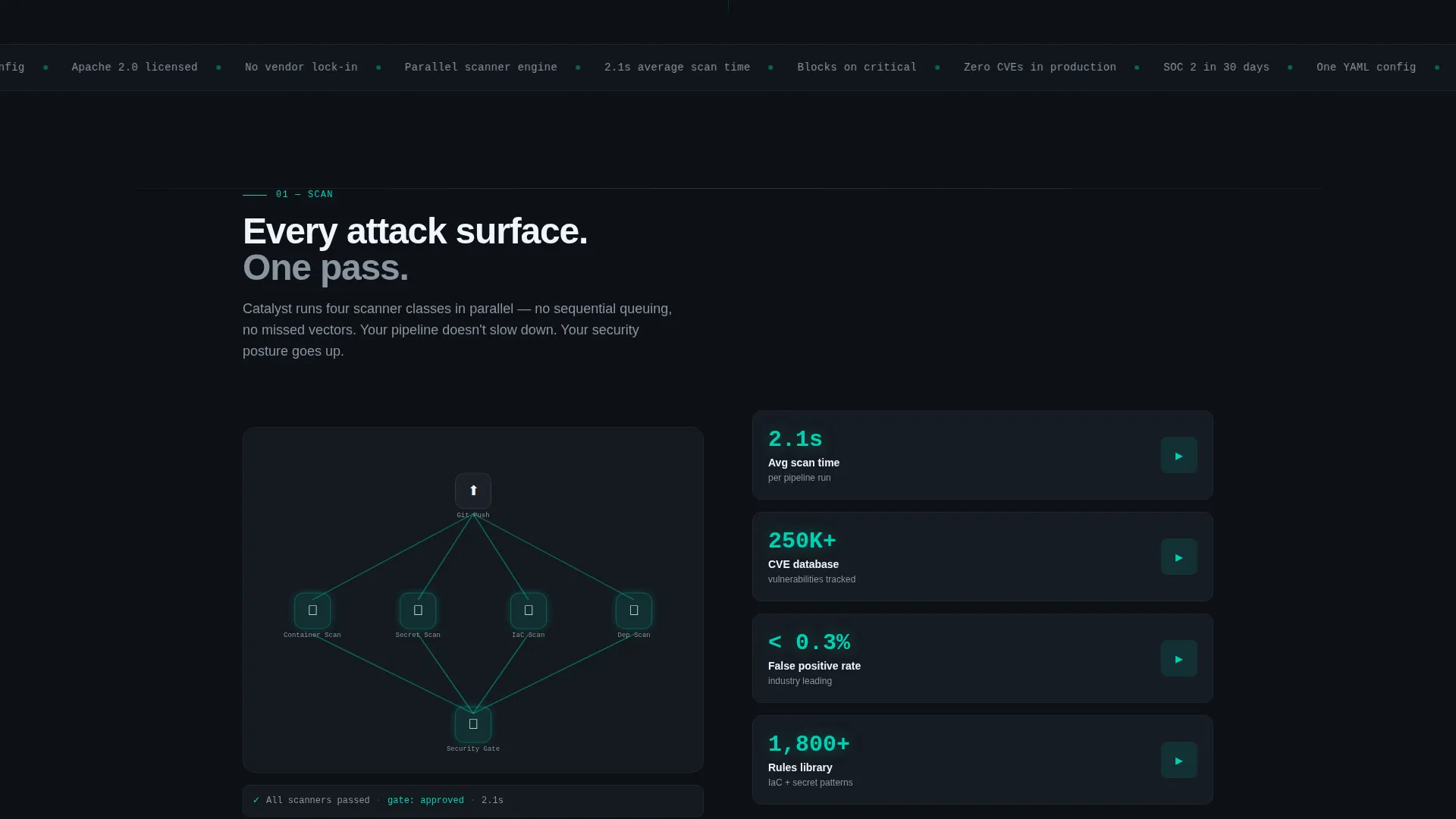
- An architecture diagram section that assembles node by node, an integration visualization panel, and a threat-detection demo highlighting a hardcoded secret before showing the corrected state
Feature list
This template packages each major interaction as a deliberate design component. Every element below comes directly from the template brief.
Self-Typing YAML Header Block
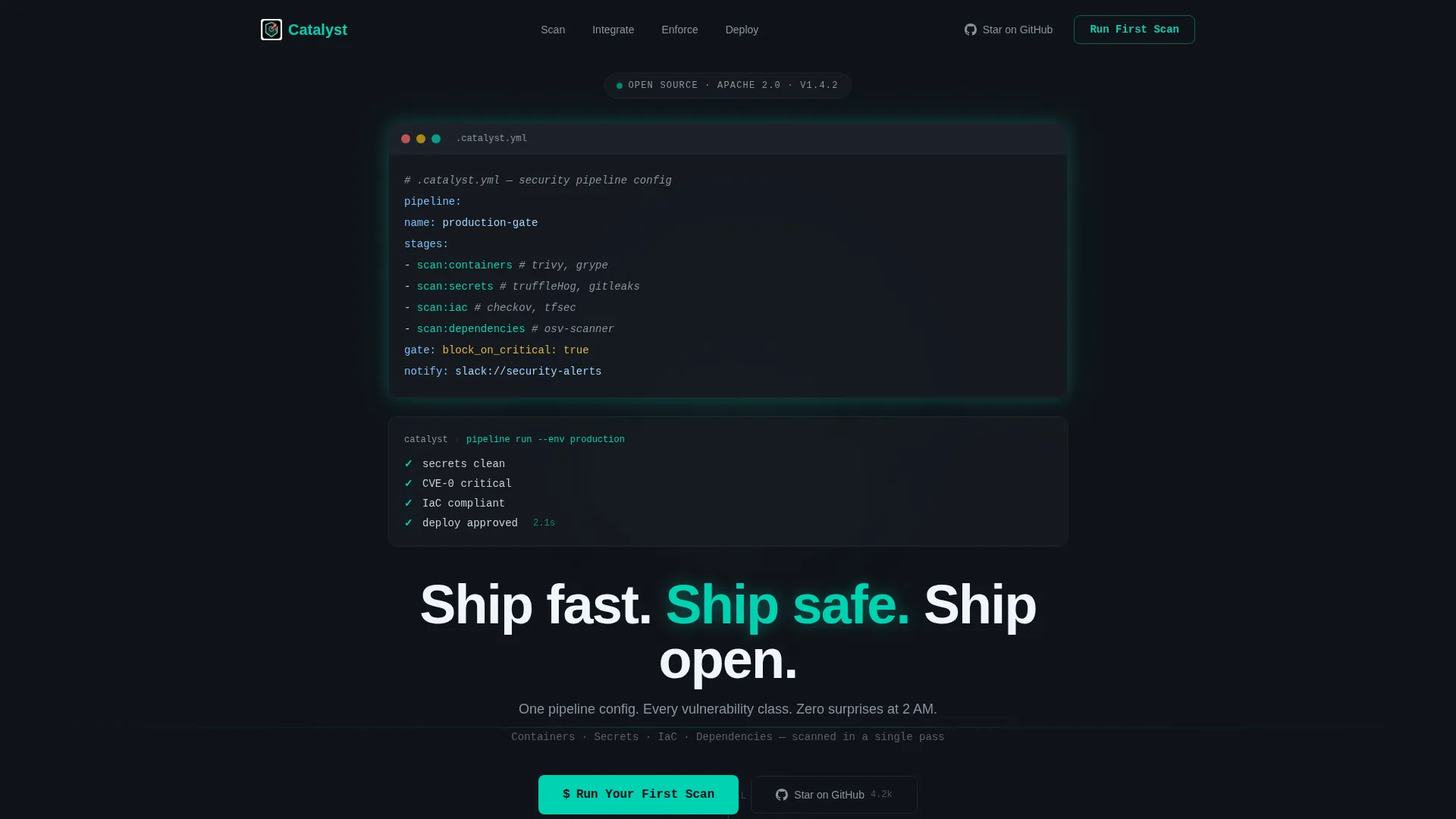
The header renders an eight-line .catalyst.yml pipeline config inside a syntax-highlighted editor block. Lines auto-type as if someone is writing the config in real time, complete with a blinking cursor. This component sets the technical tone immediately and signals competence before a single word of body copy loads.
Animated Terminal Output Stream
Below the header code block, a terminal output component streams four green checkmarks one by one: secrets clean, zero critical CVEs (Common Vulnerabilities and Exposures), infrastructure-as-code compliant, and deploy approved. The headline fades in only after the last check passes, giving visitors the emotional payoff of a passing build before they read anything.
Anchor Navigation with Persistent call to action
A sticky anchor nav pins to the top of the page with four labels: Scan, Integrate, Enforce, and Deploy. Each label links directly to its spoke section. The nav also carries a persistent ghost button labeled "Run Your First Scan," keeping the primary conversion path visible at every scroll depth.
Inline Terminal Emulator call to action
Clicking the primary call to action opens an inline terminal emulator. Visitors paste a repository URL and watch a simulated scan execute in real time, with results populating line by line. This component lets visitors experience the tool before installing anything, lowering the barrier to the first meaningful action.
Threat-Detection Demo Component
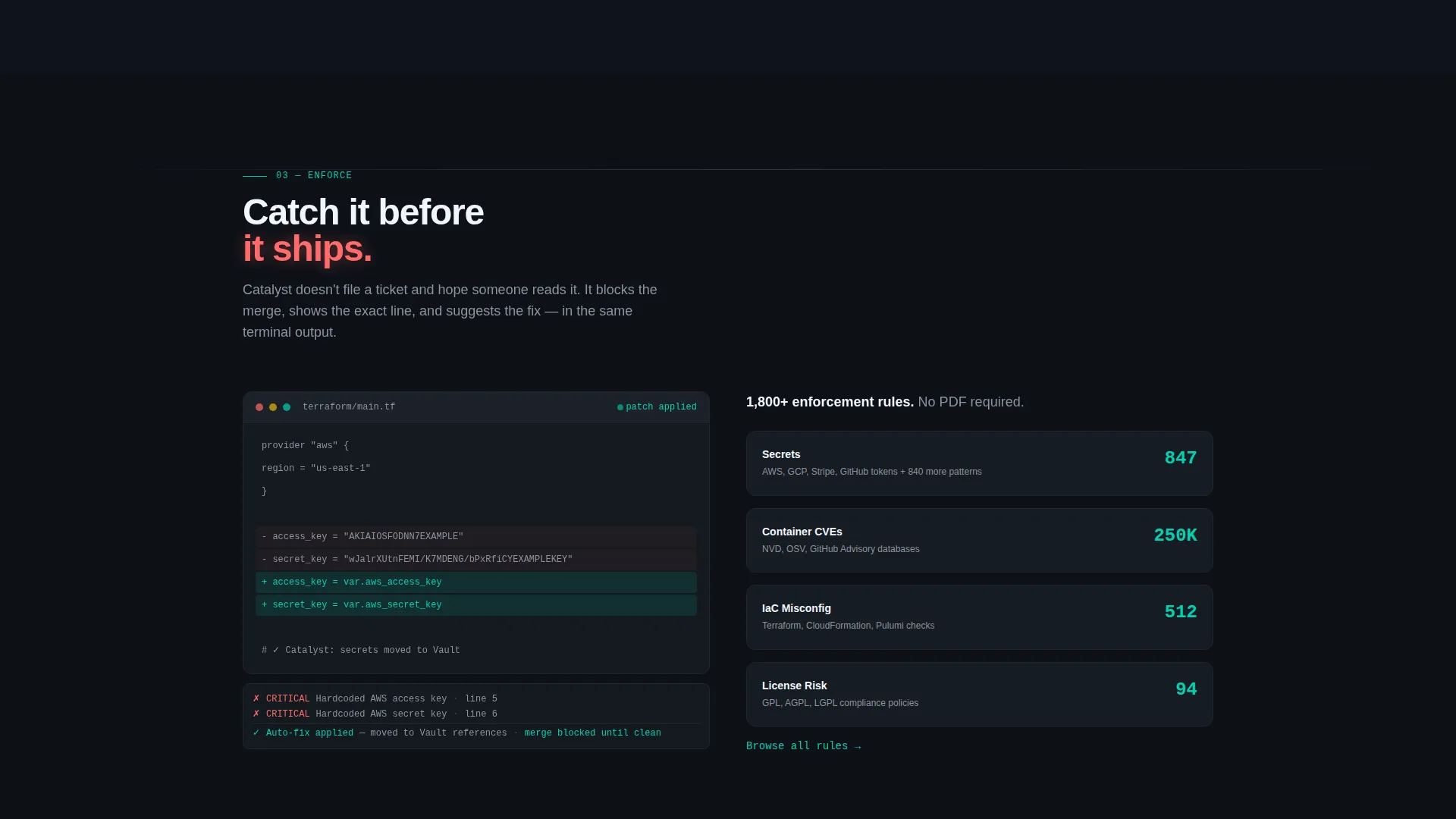
One of the spoke sections includes an interactive code diff view. A hardcoded cloud credential is highlighted in coral to signal danger, then Catalyst corrects it and the fix renders in teal. This single interaction demonstrates the core value of the tool more clearly than a paragraph of feature copy ever could.
Integration Pipeline Visualization
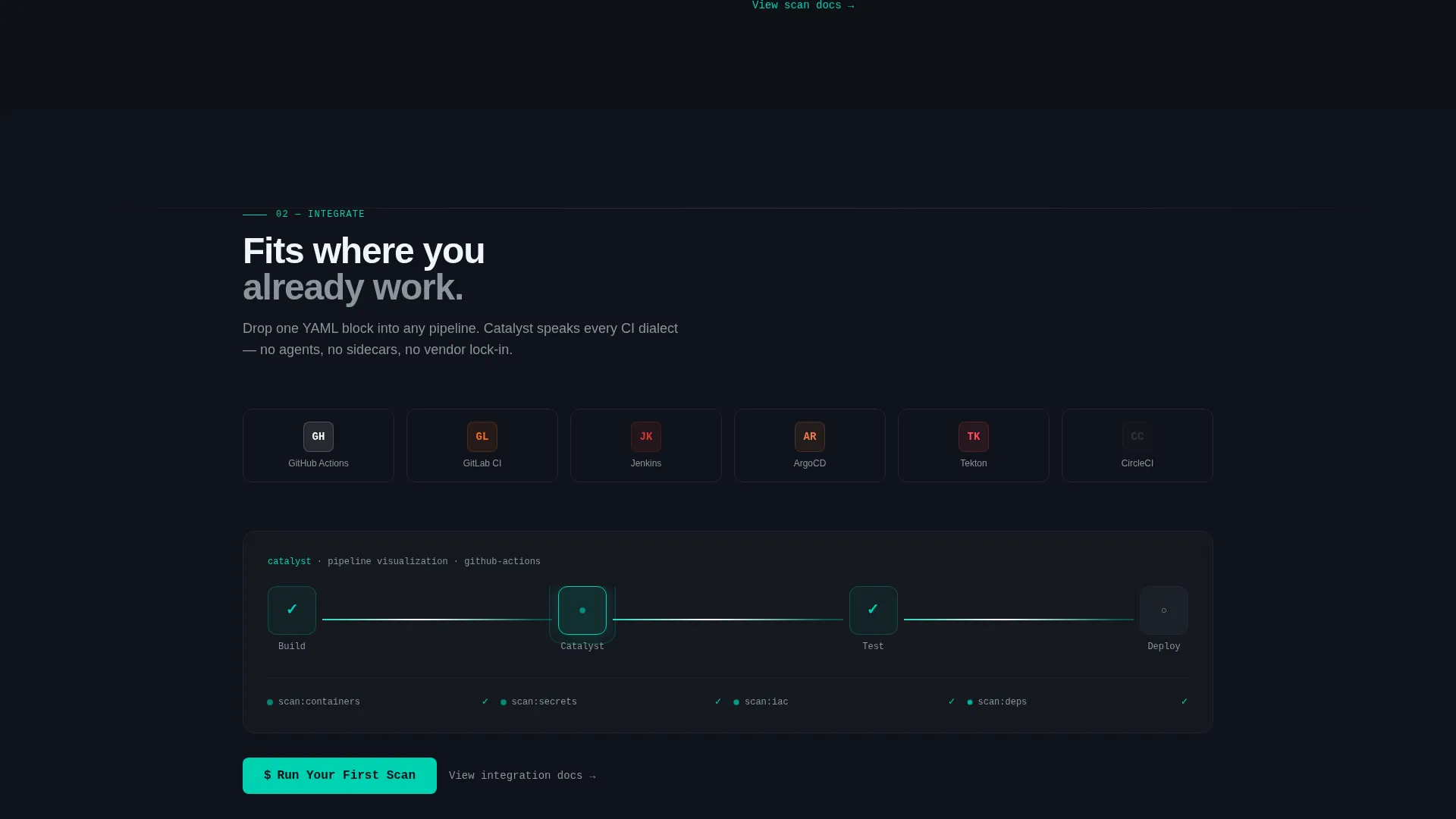
The integration spoke section displays logos for major version control and pipeline platforms that magnetically snap into a connected pipeline visualization. The motion communicates compatibility at a glance and reassures visitors that the tool fits into the workflow they already have.
Page sections overview
| Section | Purpose |
|---|---|
| Header Code Block | Opens with live-typed YAML config and streaming terminal output to demonstrate the tool immediately |
| Anchor Navigation Bar | Pins to the top with four pipeline-stage links and a persistent primary call to action ghost button |
| Scan Spoke Section | Presents the container, secret, infrastructure-as-code, and dependency scanning capabilities with assembling architecture diagram |
| Integrate Spoke Section | Shows compatible platform logos snapping into a pipeline visualization with a secondary call to action placement |
| Enforce Spoke Section | Hosts the threat-detection demo with the coral-highlighted secret and teal-corrected fix |
| Deploy Spoke Section | Closes the scroll journey with the final deployment approval state and the third primary call to action placement |
Design & branding system
The visual identity follows the Teal Catalyst color system inside a Dynamic Motion theme. Every color in the palette serves a specific functional role, not a decorative one.
- Deep terminal black (#0D1117) fills the background across all sections, keeping the interface readable for extended sessions in low-light environments
- Reactive teal (#00D1B2) drives every moving element: hover states, connection line animations between pipeline stages, and progress bars filling as they complete
- Muted slate (#8B949E) handles secondary text and dividers, reducing visual noise without losing hierarchy
- Hot coral (#FF6B6B) appears only on vulnerability alerts and critical-state indicators, never as decoration, so its presence always carries meaning
Mobile & speed optimization
The template is designed with the technical audience in mind. Platform engineers and security leads often check project pages on laptops during off-hours, but the layout adapts cleanly for smaller viewports.
- The anchor navigation collapses gracefully on smaller screens so the four pipeline-stage links and the persistent call to action remain accessible
- Motion-heavy components such as the self-typing header and the terminal emulator are structured to run without blocking the visible content of the page
- The inline terminal emulator and the integration visualization panels reflow into stacked layouts on narrow viewports without breaking the interaction logic
How this template helps you convert
The template is built around a freemium and trial conversion model. It earns the click by demonstrating the tool multiple times before asking for anything.
- The header terminal output and the threat-detection demo give visitors two direct, visual proofs of how the tool works before they reach the first call to action, reducing skepticism from a technically literate audience
- The inline terminal emulator turns the primary call to action into an experience rather than a redirect, letting visitors simulate a real scan in the browser so the first commitment feels like curiosity rather than risk
- The secondary "Star on GitHub" path captures contributors and evaluators who are not ready to install, keeping them connected to the project without losing them entirely
Other information about this template
This template is purpose-built for the DevSecOps open-source niche. A few additional details are worth noting for teams evaluating it.
- The Launch Energy creative direction means the scroll is structured like a countdown to deployment, with each section building energy toward the final deploy state rather than presenting flat feature lists
- The Hub and Spoke layout with anchor navigation is specifically suited to single-page project sites where visitors need to jump between pipeline stages without losing context
- The Dynamic Motion theme uses timed and triggered animations rather than ambient motion, so movement signals something specific in every case
- The color system is designed for dark-mode-native audiences who spend extended time in terminal and monitoring environments
Theme
Dynamic Motion
Creative direction
Launch Energy
Color system
Teal Catalyst
Style
Hub & Spoke (Anchor Nav)
Direction
Freemium/Trial
Page Sections
Self-typing YAML Header Block
Animated Terminal Output Stream
Sticky Anchor Navigation with Persistent Call to Action
Inline Terminal Emulator
Threat-detection Demo Component
Integration Pipeline Visualization
Related questions
Who is this landing page template designed for?
What sections are included in this template?
Can I use this template if my project supports different pipeline tools?
What are the two conversion paths built into this template?
Does this template include live scan logic or backend functionality?



