Powerful Education RPO | Free Website Template | Rocket
Catalyst is a comparison table landing page template built for education recruitment process outsourcing providers. It leads with animated performance counters, walks prospects through a phase-by-phase hiring comparison, and routes them to a dedicated assessment page. The design uses a structured Educational Guide style with a Teal Catalyst color system to build credibility fast.
by Rocket studio
Quick summary
Catalyst is a single-page, click-through landing page template for education recruitment process outsourcing (RPO) providers. It opens with a stats wall of animated metrics, then guides visitors through five hiring phases using side-by-side comparison tables. The goal is simple: make the case for outsourced educator recruitment so compellingly that visitors click through to request a custom model.
Who this template is for
This template is built for education-focused RPO providers who need to convert institutional decision-makers into qualified assessment-page leads. If your service fills educator roles faster than internal teams can, this page is designed to prove it.
- Talent acquisition directors managing 200 or more open faculty lines at state university systems
- Charter network chief operating officers scaling into multiple new cities with many schools opening at once
- Edtech startup hiring leads competing for instructional designers against large technology employers
What problem this template solves
Education HR teams are buried in requisition backlogs. They spend time sourcing and screening when they should be focused on retention and culture. A generic landing page cannot communicate that urgency or quantify the cost of delay. Catalyst is built to close that gap.
- Visitors leave before understanding the real time-to-fill and retention gap between internal teams and an RPO partner
- Standard templates cannot display phase-by-phase process comparisons with enough structure to feel credible to institutional buyers
- There is no frictionless click-through path that builds trust first and collects intent second
What you get with this template
You get a fully structured, desktop-first landing page with five distinct content sections. Every section has a defined role in moving a skeptical institutional buyer from curiosity to conversion without a single form on the page.
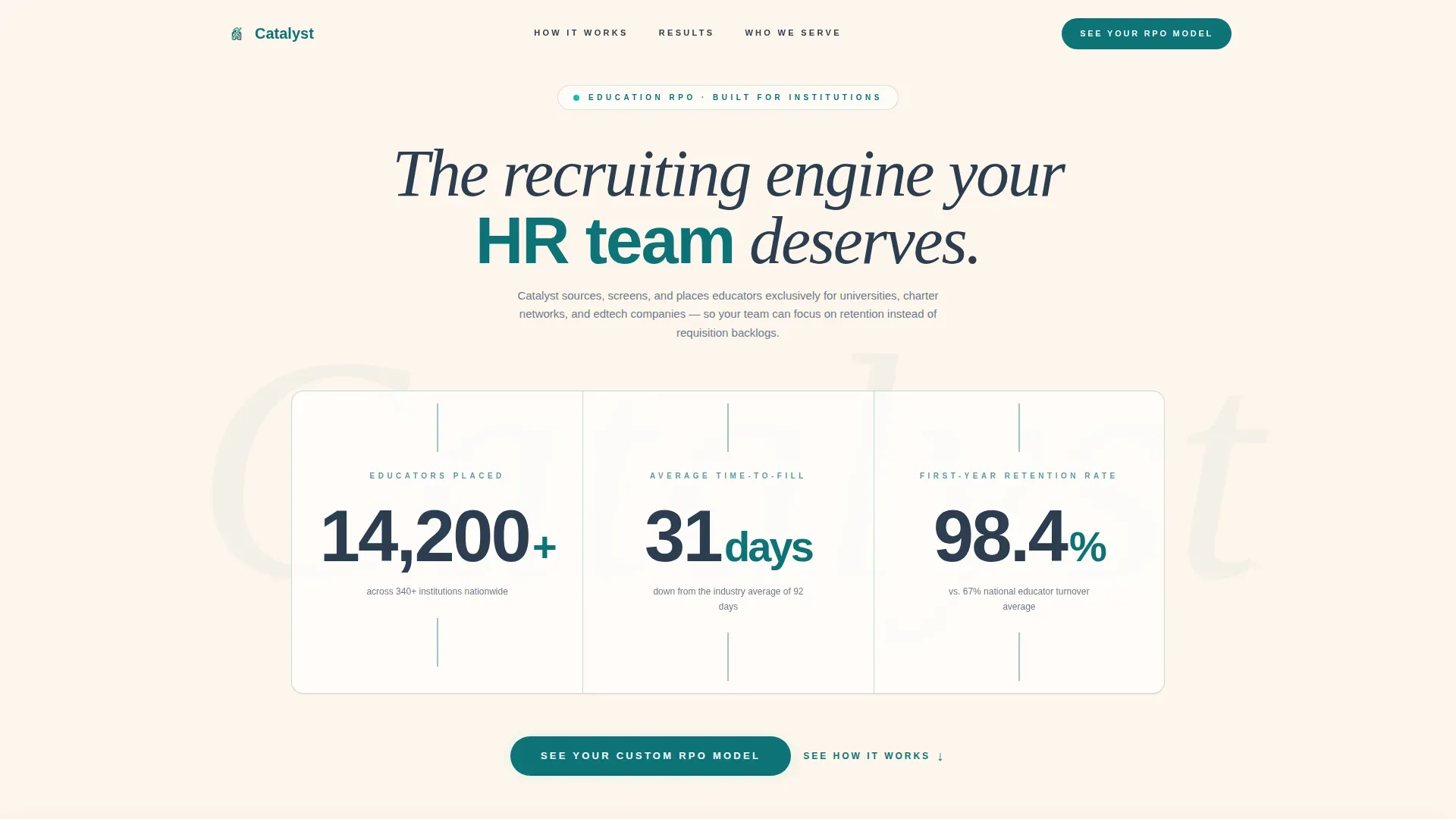
- An animated stats wall hero with three oversized metric counters that load on page entry
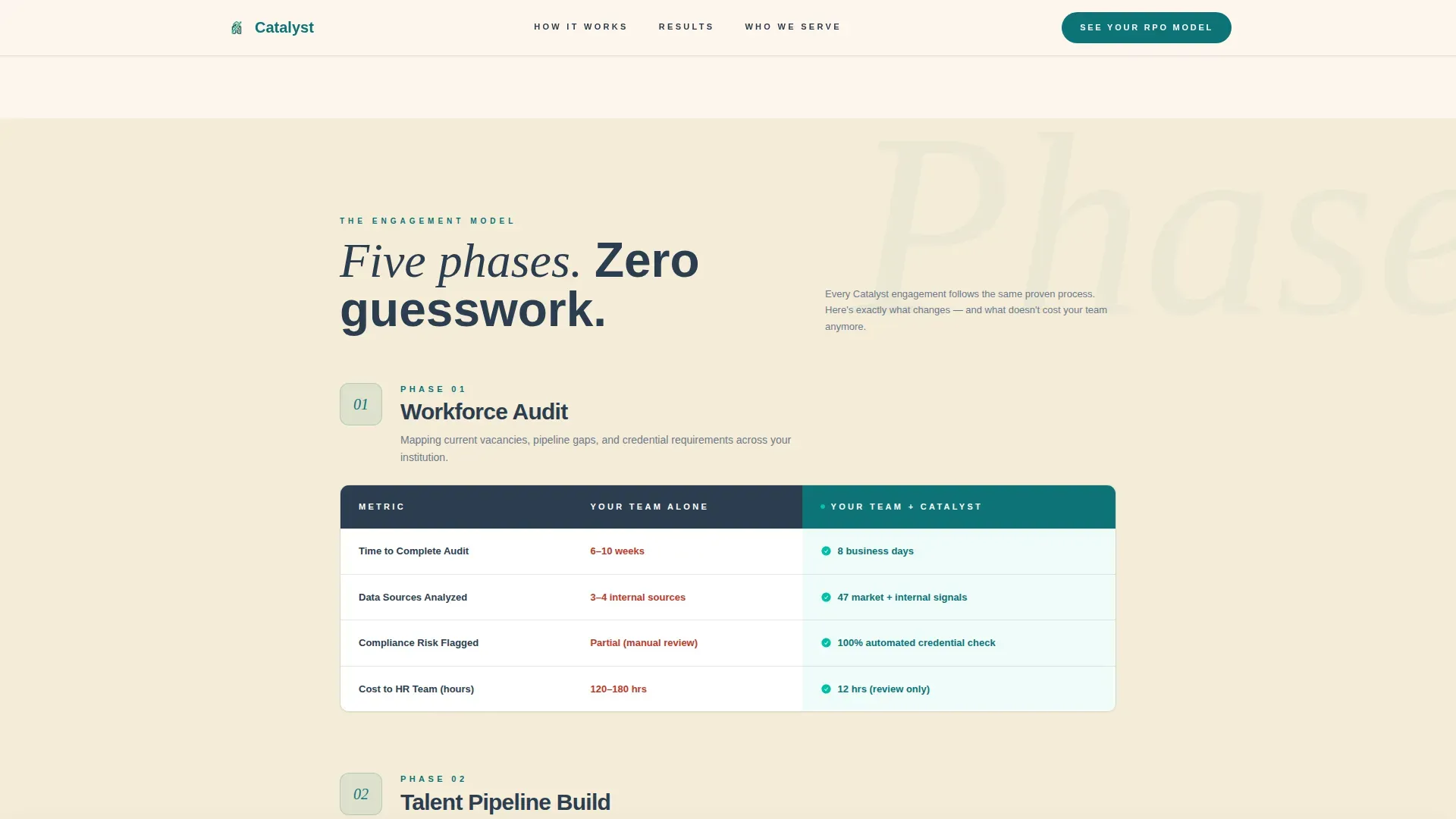
- Five phase comparison table rows contrasting internal hiring against the RPO-assisted approach across time, cost, quality, and compliance dimensions
- Institution type proof cards with named social proof quotes embedded in the comparison flow
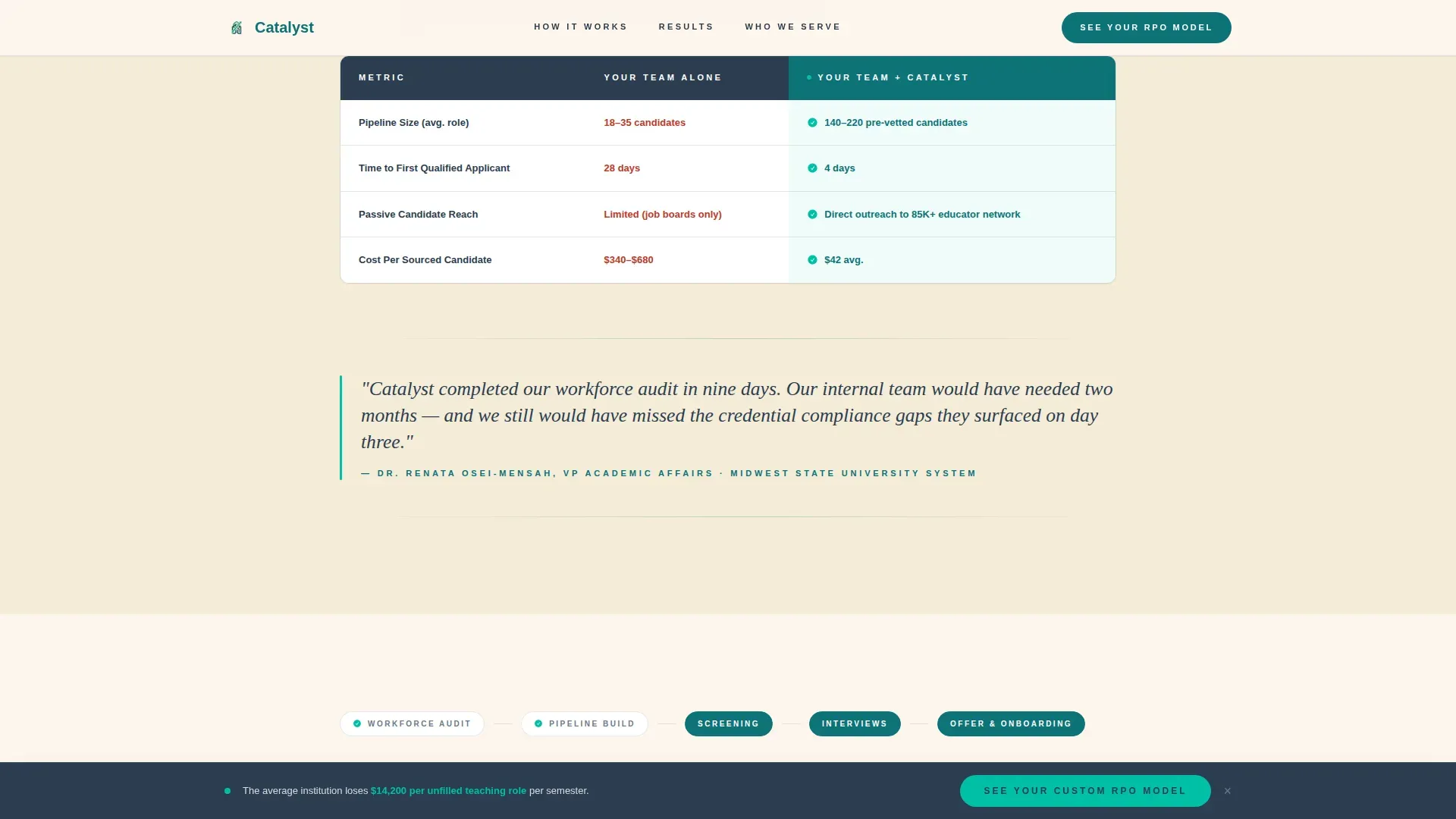
- A sticky bottom call-to-action bar that appears after the second comparison row and persists through the rest of the scroll
- A full-width conversion block at the end that routes visitors to a dedicated assessment page
Feature list
This template's functionality is drawn directly from the source brief. Each feature below corresponds to a built component or designed behavior in the template.
Animated Metrics Hero
Three large performance counters animate on page load using count-up behavior. The figures shown are 14,200 educators placed, a time-to-fill reduction from 92 days to 31 days, and a 98.4 percent first-year retention rate. No photography or illustration competes with the numbers.
Phase-by-Phase Comparison Tables
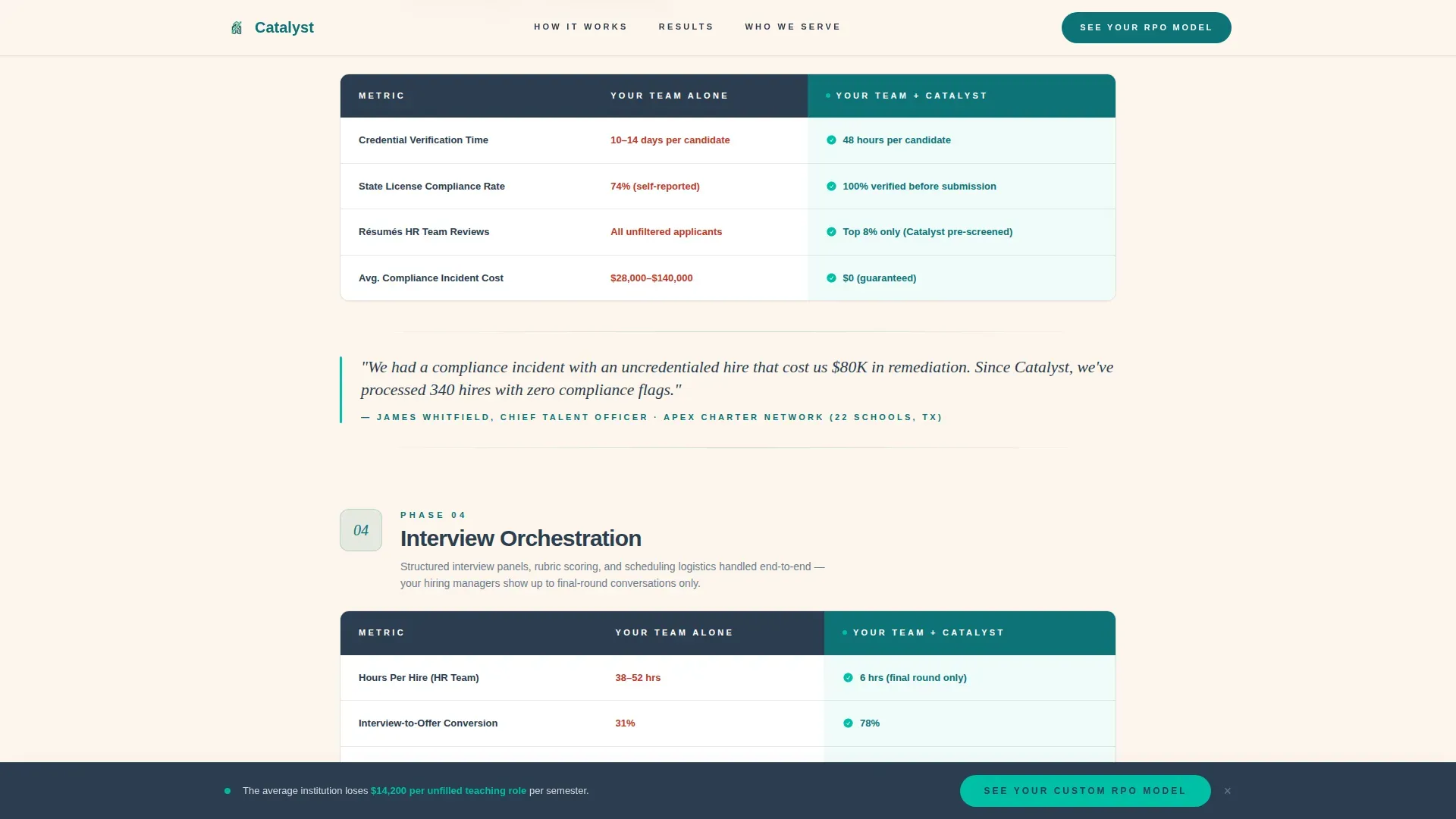
Five horizontal comparison table rows walk visitors through each RPO engagement phase: Workforce Audit, Talent Pipeline Build, Screening and Credentialing, Interview Orchestration, and Offer and Onboarding. Each row contrasts "Your Team Alone" against "Your Team + Catalyst" across time spent, cost per hire, candidate quality scores, and compliance risk.
Escalating Table Narrative
The comparison tables are sequenced to widen the performance gap with each phase. The internal-only column becomes progressively harder to justify as the visitor scrolls, creating a cumulative argument that builds toward the call to action.
Embedded Social Proof Quotes
Single-sentence client quotes from named talent directors at university, charter network, and edtech institution types appear between table sections. They are set in DM Serif Display italic to break the data rhythm and add human confirmation at each decision point.
Sticky Call-to-Action Bar
A sticky bottom bar carrying the primary call to action appears after the second comparison row and remains visible through the rest of the page. It routes visitors to a dedicated assessment page where they select institution type, number of open roles, and hiring timeline.
Institution Type Proof Cards
Three archetype cards present named social proof by institution type: university, charter network, and edtech. Each card reinforces that the RPO model works across the full range of education hiring contexts.
Page sections overview
| Section | Purpose |
|---|---|
| Stats Metrics Hero | Open with animated counters to establish credibility immediately |
| Phases 1 and 2 Tables | Compare Workforce Audit and Pipeline Build side by side |
| Phases 3 to 5 Tables | Compare Screening, Interview, and Onboarding with embedded quotes |
| Institution Type Cards | Show named proof by university, charter, and edtech archetypes |
| Full-Width call to action Block | Route visitors to the custom RPO assessment page |
| Footer Row | Provide single-row linear navigation and legal baseline |
Design & branding system
The template follows an Educational Guide visual theme. The palette is designed to feel like a well-printed institutional document: structured, trustworthy, and quietly energizing without relying on photography or decorative illustration.
- Deep lecture-hall teal (#0D7377) anchors the primary color role; chalkboard charcoal (#2C3E50) handles body text, table borders, and structural chrome
- Bright catalyst green (#00BFA6) marks active states, progress indicators, and highlight moments in the comparison tables
- Warm parchment (#FDF6EC) sets the background field, giving data the visual weight of text chiseled into institutional print
- Plus Jakarta Sans is used for all headings and body text; DM Serif Display italic handles client quotes and editorial accents
Mobile & speed optimization
The template is built desktop-first, reflecting the reality that talent acquisition directors review hiring data on workstations during active hiring crunches. A mobile-responsive fallback is included so the page remains usable on smaller screens.
- Server Components handle all static sections, keeping the base page lightweight and fast to render
- Client Components are scoped only to the animated counter hero and the sticky call-to-action bar, limiting interactive JavaScript to the elements that need it
- ScrollTrigger staggered reveals add progressive animation to comparison table rows as the visitor scrolls, without blocking the initial page render
How this template helps you convert
The page is engineered as a click-through funnel. There is no form on the landing page itself. The tables do the convincing, and the call to action collects intent only after the visitor has absorbed a cumulative, phase-by-phase case.
- The animated metrics hero establishes performance proof in the first three seconds, before the visitor has decided whether to keep reading
- The escalating comparison tables build a progressively stronger argument across five hiring phases, making the internal-only column harder to justify with every row
- The sticky call-to-action bar and the final full-width conversion block meet the visitor at the moment of impatience, routing them to a structured assessment page rather than a cold form
Other information about this template
This template is categorized under HR and Hiring, specifically within the Education HR subcategory and the Education RPO Provider niche. It is built for business-to-business service providers whose buyers are institutional, data-driven, and skeptical of generic marketing claims.
- The assessment page flow is designed around three prospect inputs: institution type, number of open roles, and hiring timeline
- The footer uses a Pattern 1 linear single-row layout, keeping the page exit clean and uncluttered
- Animation is powered by GSAP for the count-up hero and ScrollTrigger for staggered section reveals
- Localization is set to English (United States); dates follow MM/YYYY format and no currency symbols are used
- The template style is Comparison Table and the creative direction follows a Step-by-Step Guide structure, making it well-suited for service providers who need to walk institutional buyers through a multi-phase process before asking for a commitment
Theme
Educational Guide
Creative direction
Step-by-Step Guide
Color system
Teal Catalyst
Style
Comparison Table
Direction
Click-Through
Page Sections
Animated Metrics Hero Wall
Five-phase Comparison Tables
Escalating Argument Structure
Sticky Call-to-action Bar
Embedded Institutional Social Proof
Institution Type Proof Cards
Related questions
Who is this landing page template designed for?
Does the landing page include a contact form?
What sections are included in the template?
What animation is built into this template?
Can I update the comparison table content to match my own data?



