Healthcare Digital Presence Education Website Template
Certify is a healthcare course and training platform landing page built as a modular card grid. It targets nurses, paramedics, and allied-health professionals who need board-style practice, timed simulations, and continuing education credit modules. The Data Command visual theme, electric indigo palette, and comparison-versus layout make the case for switching before a visitor ever reaches the call to action.
by Rocket studio
Quick summary
Certify is a single-page healthcare training platform landing page designed around a Data Command theme. It uses a modular card grid structure, a comparison-versus layout, and a product screenshot header to communicate platform value instantly. The page speaks directly to clinical professionals who need efficient, high-stakes exam preparation and continuing education credit tracking.
Who this template is for
This template suits healthcare educators, clinical training teams, and platform founders who need a high-converting landing page for a course and certification product. It works equally well for individual learners and institutional buyers.
- Night-shift registered nurses and newly graduated physician assistants studying for specialty certifications
- Hospital learning and development directors enrolling entire departments before accreditation audits
- Healthcare training platform founders who need a launch-ready, comparison-driven page
What problem this template solves
Most healthcare training platforms look like outdated portals. They fail to communicate their advantages quickly, and they lose visitors before making the case for switching. This template is designed to remove that friction entirely.
- Passive, text-heavy pages fail to convey the urgency that clinical professionals feel around certification deadlines
- No clear side-by-side comparison means visitors cannot see the difference between modern and legacy platforms at a glance
- A buried or absent call to action means high-intent visitors leave without converting
What you get with this template
You get a fully structured, modular landing page that builds momentum from the first scroll. Every section has a defined role in moving the visitor toward a decision.
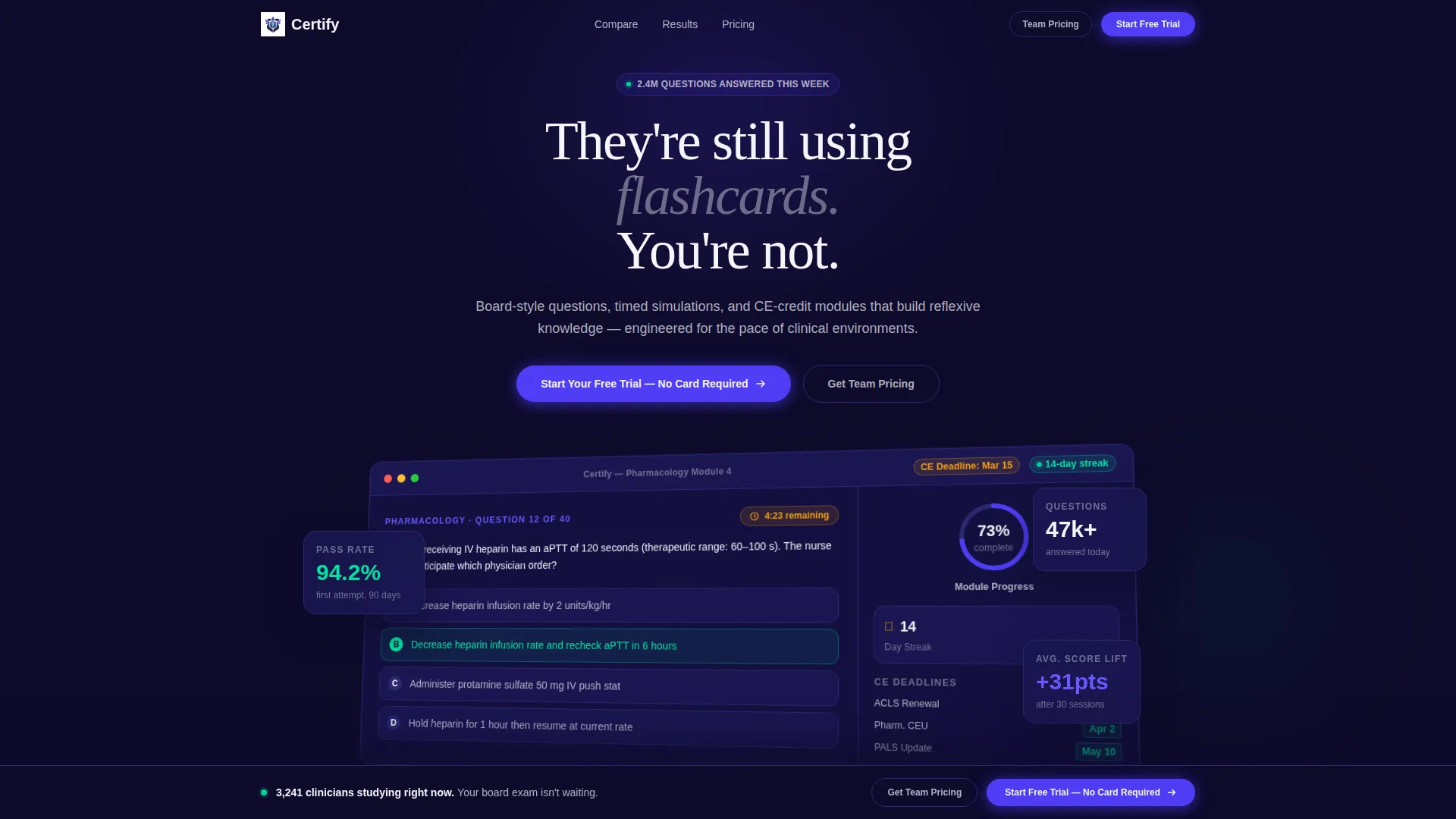
- A full-width product screenshot header with a tilt effect and indigo glow, anchoring the page with immediate visual credibility
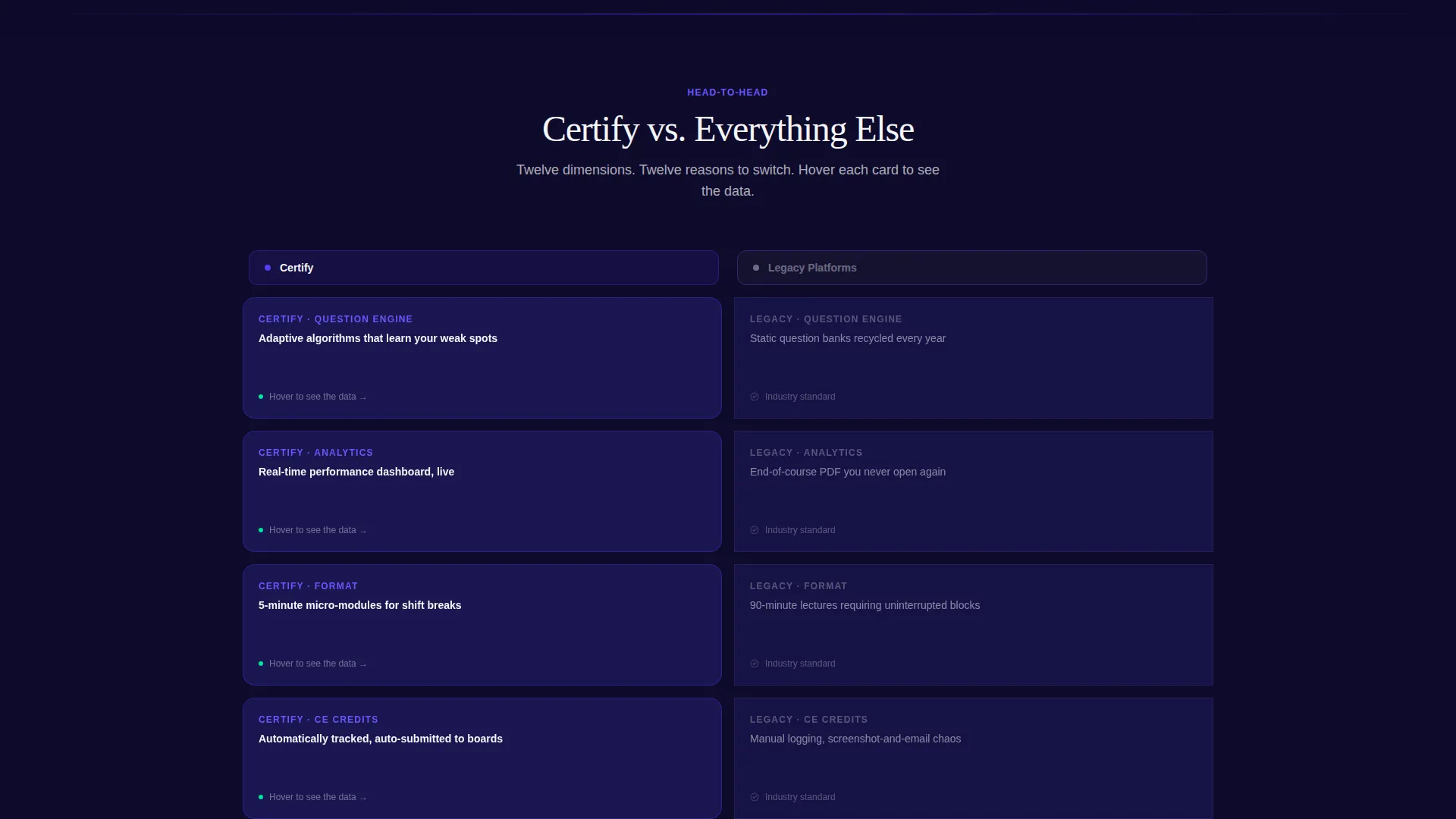
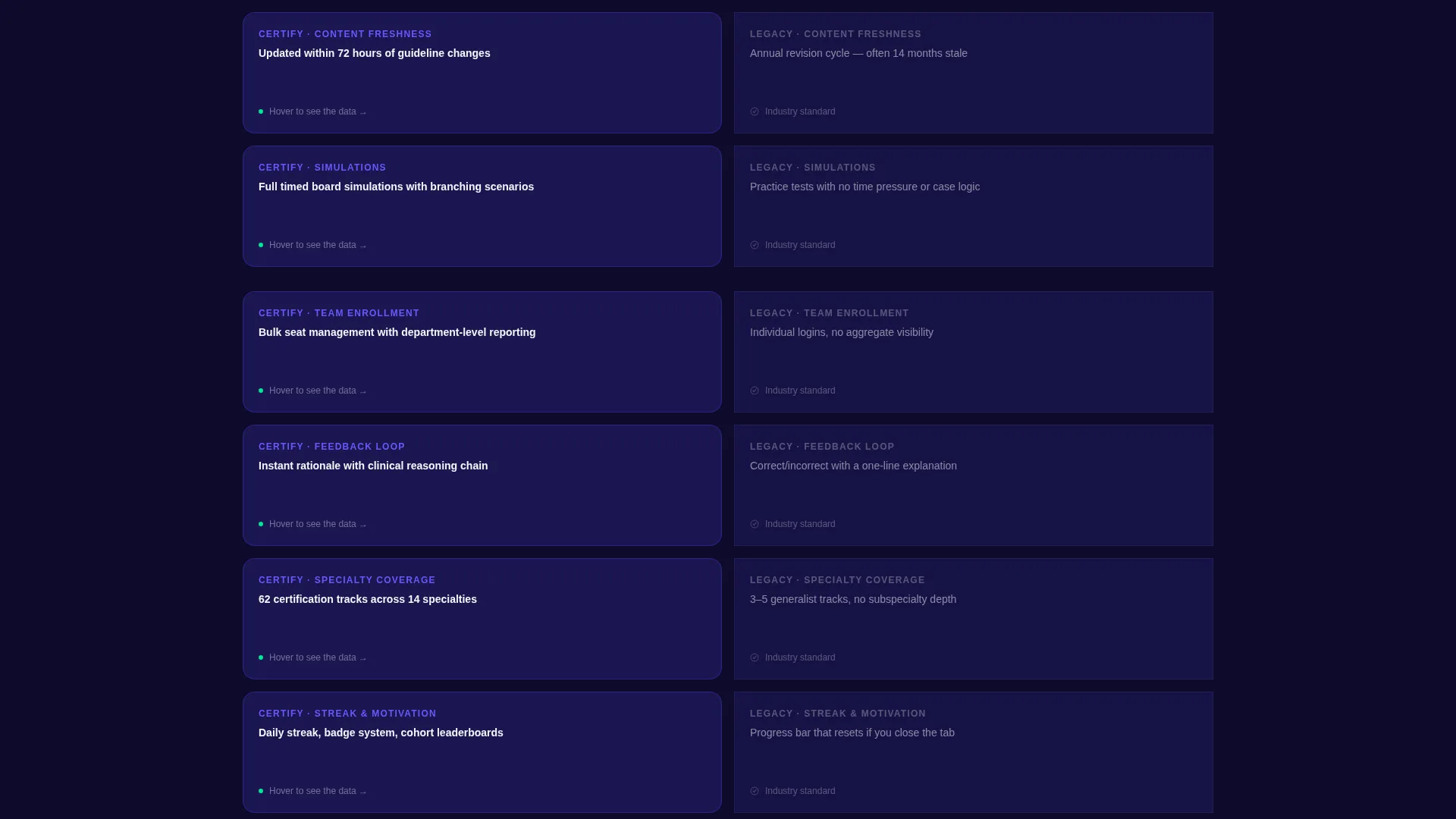
- A twelve-dimension versus grid where each card flips on hover to reveal a supporting stat or testimonial
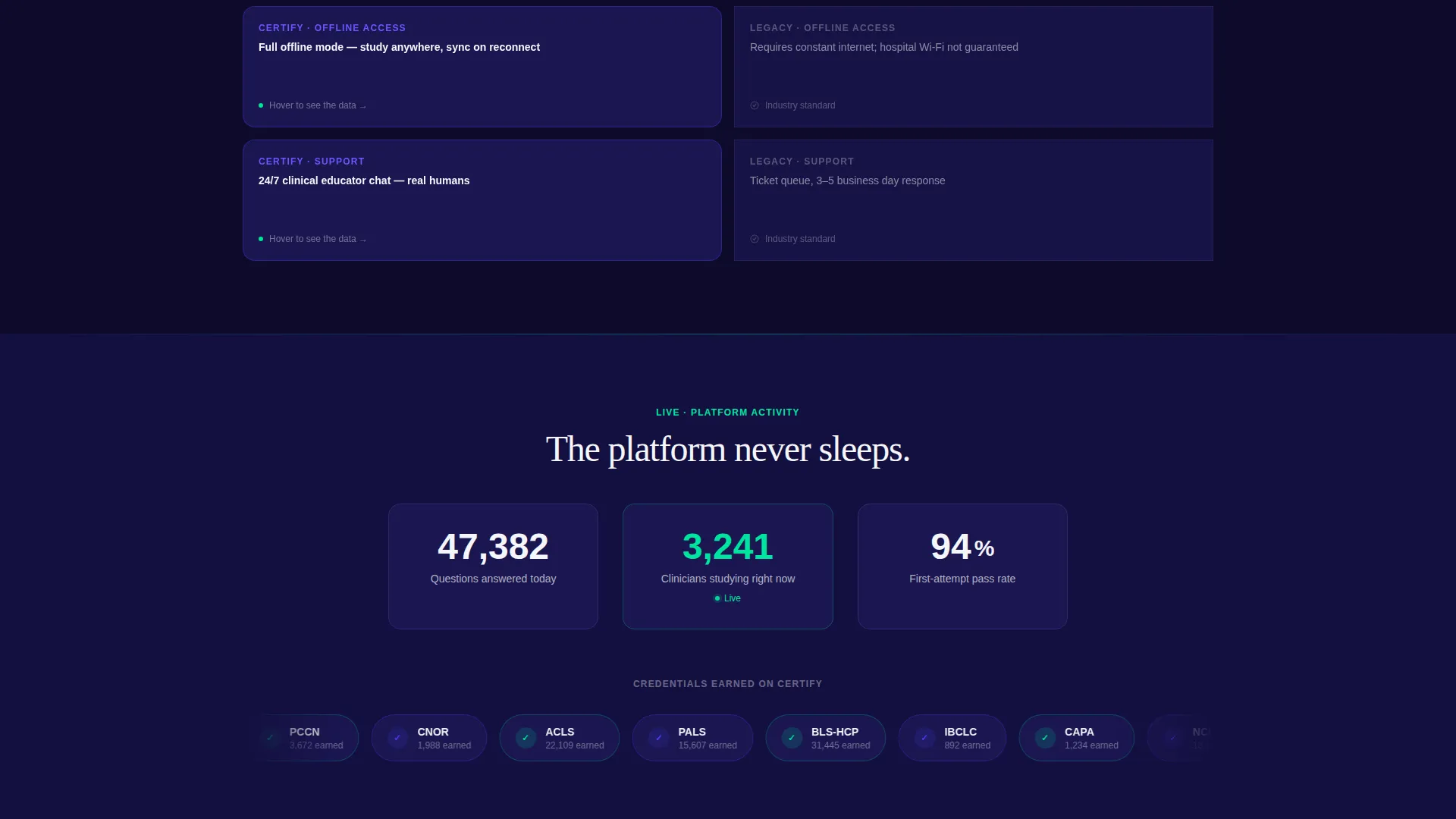
- Animated platform-wide question counters, a credential badge carousel, and three modular pricing tier cards that visually echo the course card style
Feature list
A paragraph introducing the features section: The Certify template packages several purpose-built components that work together to move a clinical professional from curiosity to commitment. Each feature below reflects a specific design or layout decision from the source brief.
Full-Width Product Screenshot Header
The header displays a pixel-accurate platform dashboard mid-session. Visible elements include a timed pharmacology question, a radial progress wheel at 73 percent, a 14-day streak counter, and a sidebar showing upcoming continuing education deadlines in amber and green. The screenshot sits on a slight three-dimensional tilt against a deep navy background with a soft indigo glow beneath it.
Twelve-Dimension Versus Grid
The comparison grid is the engine of the page. It lines up two columns, card against card, across twelve dimensions. Topics include adaptive algorithms versus static question banks, real-time analytics versus end-of-course PDFs, and micro-modules versus ninety-minute lectures. Each card flips on hover to reveal a single supporting stat or a real testimonial.
Live Animated Platform Counters
Below the versus grid, an animated counter displays the total number of questions answered across the platform today. This social-proof element builds momentum and reinforces platform scale without requiring a visitor to take anything on faith.
Credential Badge Carousel
A scrolling carousel showcases earned credential badges. It communicates that real learners are completing real certifications on the platform, which is especially persuasive for first-time visitors who are evaluating trust before committing to a trial.
Sticky Trial Call-to-Action Bar
A sticky bottom bar activates after a visitor scrolls past the third comparison row. It carries the primary call to action: "Start Your Free Trial, No Card Required." The bar stays in view without interrupting the reading flow until the visitor is already primed to act.
Inline Team Pricing Form
A secondary path targets institutional buyers. An "Get Team Pricing" link opens an inline form asking for facility name, number of seats, and primary certification track. This keeps enterprise leads on the page rather than routing them to a separate contact page.
Page sections overview
| Section | Purpose |
|---|---|
| Product Screenshot Header | Anchors the page with a live dashboard visual and a direct headline |
| Platform Headline Copy | Sets urgency and positions Certify against legacy study methods |
| Versus Comparison Grid | Compares twelve dimensions of Certify against traditional platforms |
| Hover-Flip Stat Cards | Reveals supporting stats and testimonials on each comparison card |
| Animated Question Counter | Shows real-time platform activity to build social proof |
| Badge Credential Carousel | Displays earned certifications to validate platform outcomes |
| Pricing Tier Cards | Presents three plan options as modular cards that echo the course card pattern |
| Sticky call to action Bar | Activates after scroll to keep the trial offer persistently visible |
| Team Pricing Form | Captures institutional buyer details inline without a page redirect |
Design & branding system
The visual identity follows a Data Command theme. The palette is drawn from clinical precision, resembling a hospital vitals monitor translated into a software interface. Every color has a specific role and is not used interchangeably.
- Deep mission-control navy (#0E0B2B) dominates backgrounds; charged indigo (#4F3DF5) energizes cards and hover states; clinical white (#F4F5FA) carries body text and data labels
- Pulse-green (#00E5A0) is reserved exclusively for progress indicators and success states, firing only when something is earned such as a passed module, a completed course, or a maintained streak
- The three-dimensional tilted screenshot, indigo glow shadow, and card-flip interactions give the page a sense of live signal and forward motion
Mobile & speed optimization
The modular card grid structure is designed to reflow cleanly at smaller screen sizes. The layout choices support a consistent visual hierarchy whether a visitor is on a desktop workstation or a phone between clinical rounds.
- Card grid columns adapt to single-column stacking on narrow viewports without breaking the versus comparison logic
- The sticky call-to-action bar remains functional and unobtrusive at mobile screen widths
- Lightweight animation choices, such as counter reveals and card flips, keep interactions feeling responsive on lower-bandwidth connections
How this template helps you convert
The page is structured as a progressive argument. By the time a visitor reaches the call to action, the versus grid has already answered "why switch" twelve times. The conversion path has two distinct lanes to capture both individual and institutional buyers.
- The versus grid removes objections early by naming real trade-offs and backing each one with a stat or testimonial on the flip side of every card, so the primary call to action feels like a logical next step rather than a sales push.
- The sticky trial bar activates at exactly the right scroll depth and the inline team pricing form lets hospital learning and development directors start an enterprise conversation without leaving the page.
Other information about this template
This template is categorized under Technology with a subcategory of Healthcare Digital Presence. It is built for the healthcare course and training platform niche and carries a high intersection match score of 13 across its design and niche signals.
- The template style is Card Grid (Modular), the creative direction is Launch Energy, and the landing page direction is Comparison/Versus
- The header concept is Product Screenshot, and the theme is Data Command with an Electric Indigo color system
- This layout is appropriate for platforms offering continuing education credit modules, board examination preparation, and timed clinical simulations for allied-health professionals
Theme
Data Command
Creative direction
Launch Energy
Color system
Electric Indigo
Style
Card Grid (Modular)
Direction
Comparison/Versus
Page Sections
Product Screenshot Header with 3D Tilt
Twelve-dimension Versus Comparison Grid
Animated Platform Activity Counter
Credential Badge Carousel
Scroll-triggered Sticky Call to Action Bar
Inline Team Pricing Form
Related questions
Who is this landing page template designed for?
Can I use this template to promote a platform with multiple certification tracks?
Does the versus comparison grid work for any number of dimensions?
Is the sticky call-to-action bar always visible on the page?
Can learning and development directors start a team inquiry without leaving the page?



