Claims - Powerful Education Landing Page Template
Claims is a split-screen education claims management landing page template built for school finance teams, charter network CFOs, and special education directors. It pairs a tab-switching dashboard header with a scrolling feature matrix to show how billing errors, denied reimbursements, and misclassified expenditures get caught before they drain restricted budgets. Clean, conversion-ready, and free to try on your first 50 claims.
by Rocket studio
Quick summary
Claims is a single-page, split-screen landing page template designed for education claims management platforms. It opens with a three-tab interactive dashboard, Detect, Dispute, Recover, and scrolls through a problem-to-solution feature matrix. The layout is built around a Freemium trial conversion path and targets school business officials, charter CFOs, and special education directors.
Who this template is for
This template is built for teams that sell or use education billing and reimbursement recovery tools. It speaks directly to the people who stay late reconciling fund accounts and chasing denied reimbursements.
- School business officials managing Individuals with Disabilities Education Act (IDEA) fund reconciliation
- Charter network Chief Financial Officers disputing Medicaid reimbursement denials
- Special education directors tracking uncollected E-Rate credits across a fiscal year
What problem this template solves
District finance teams lose recoverable money not because they lack effort, but because the tools they use hide the problem. Errors pile up across spreadsheets, filing windows expire, and denied claims go uncontested.
- Billing errors and modifier code mismatches go unnoticed until after appeal deadlines pass
- Misclassified expenditures quietly erode Title I and IDEA budget allocations
- No clear view of how much reimbursement recovery is realistically within reach
What you get with this template
You get a fully structured, ready-to-customize landing page that walks visitors through a three-act product tour before they scroll a single pixel. Every section earns trust before asking for a click.
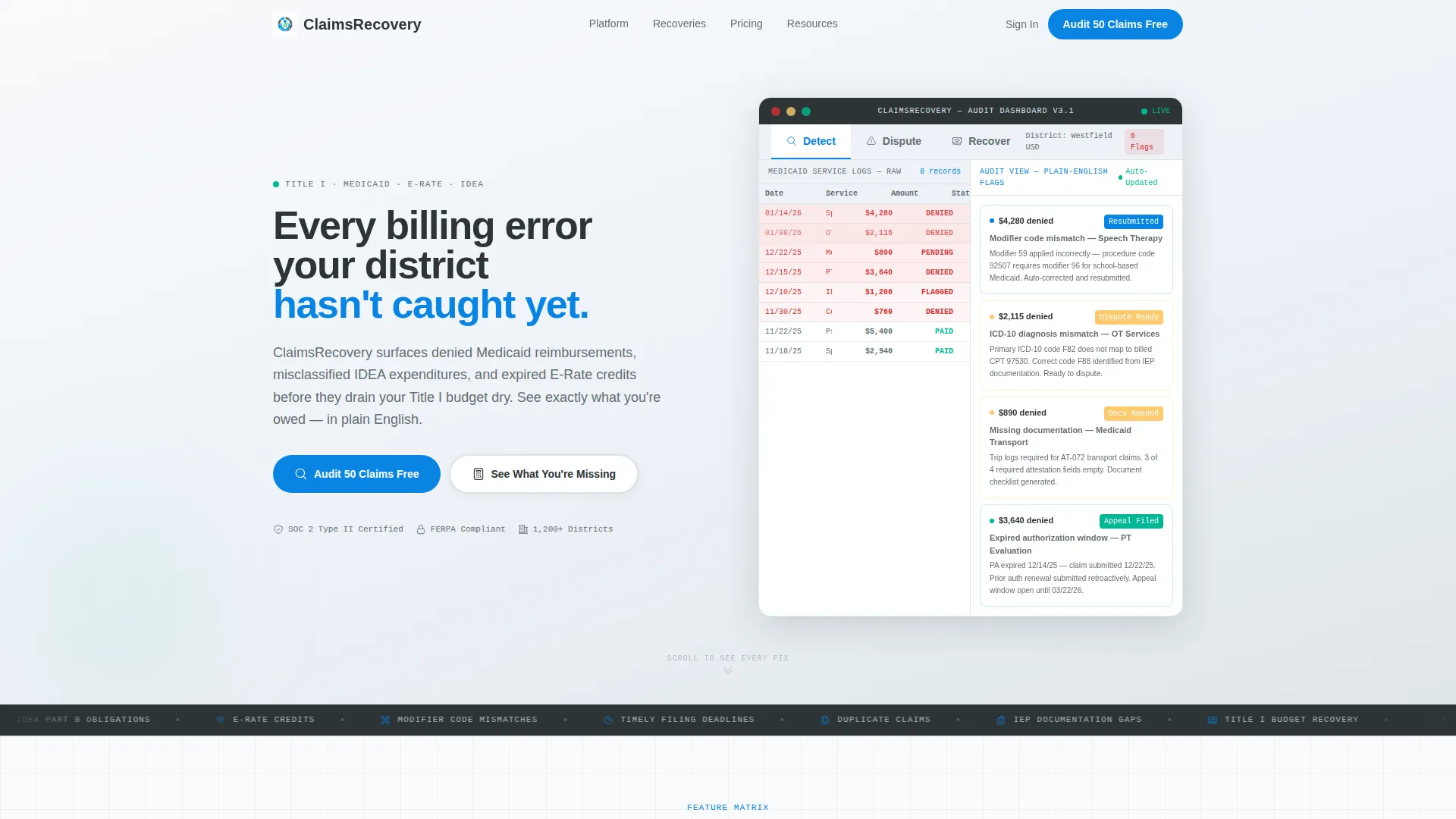
- A Feature Tab Switcher header with three live-swapping panels: Detect, Dispute, and Recover
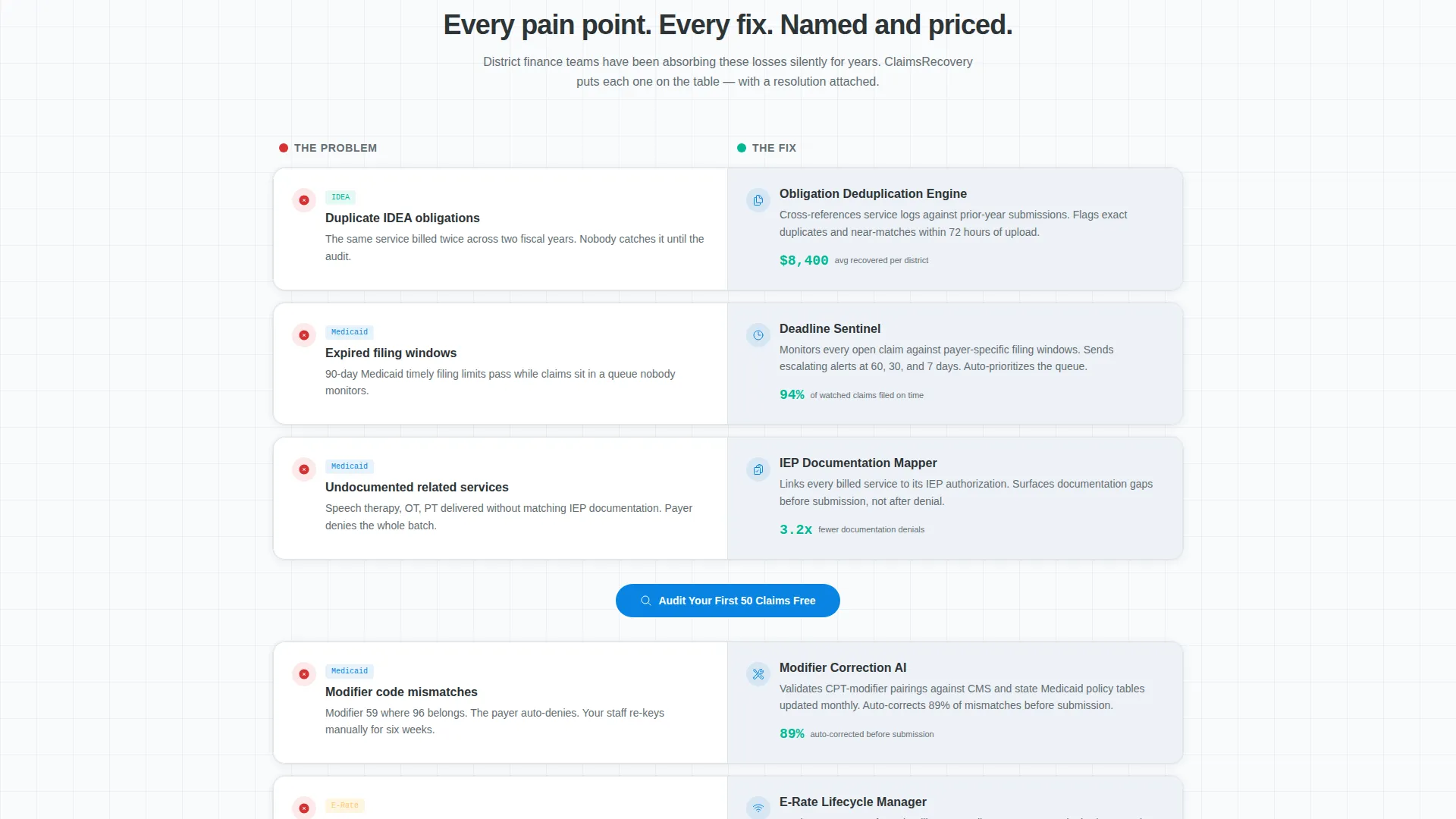
- A scrolling Feature Matrix pairing district pain points with platform fixes and micro-animations
- A Freemium conversion flow with a primary call to action (call to action), a calculator modal secondary path, and a three-field signup form
Feature list
This template includes purpose-built components drawn directly from the brief. Each one serves a specific role in the visitor journey from problem recognition to free trial signup.
Three-Tab Dashboard Header
The header opens in "Detect" mode showing a split view: a messy Medicaid service log on the left with red-flagged rows, and a clean audit panel on the right with plain-English explanations per flag. Clicking "Dispute" or "Recover" swaps the right panel instantly. Visitors complete a full product tour without scrolling.
Scrolling Feature Matrix
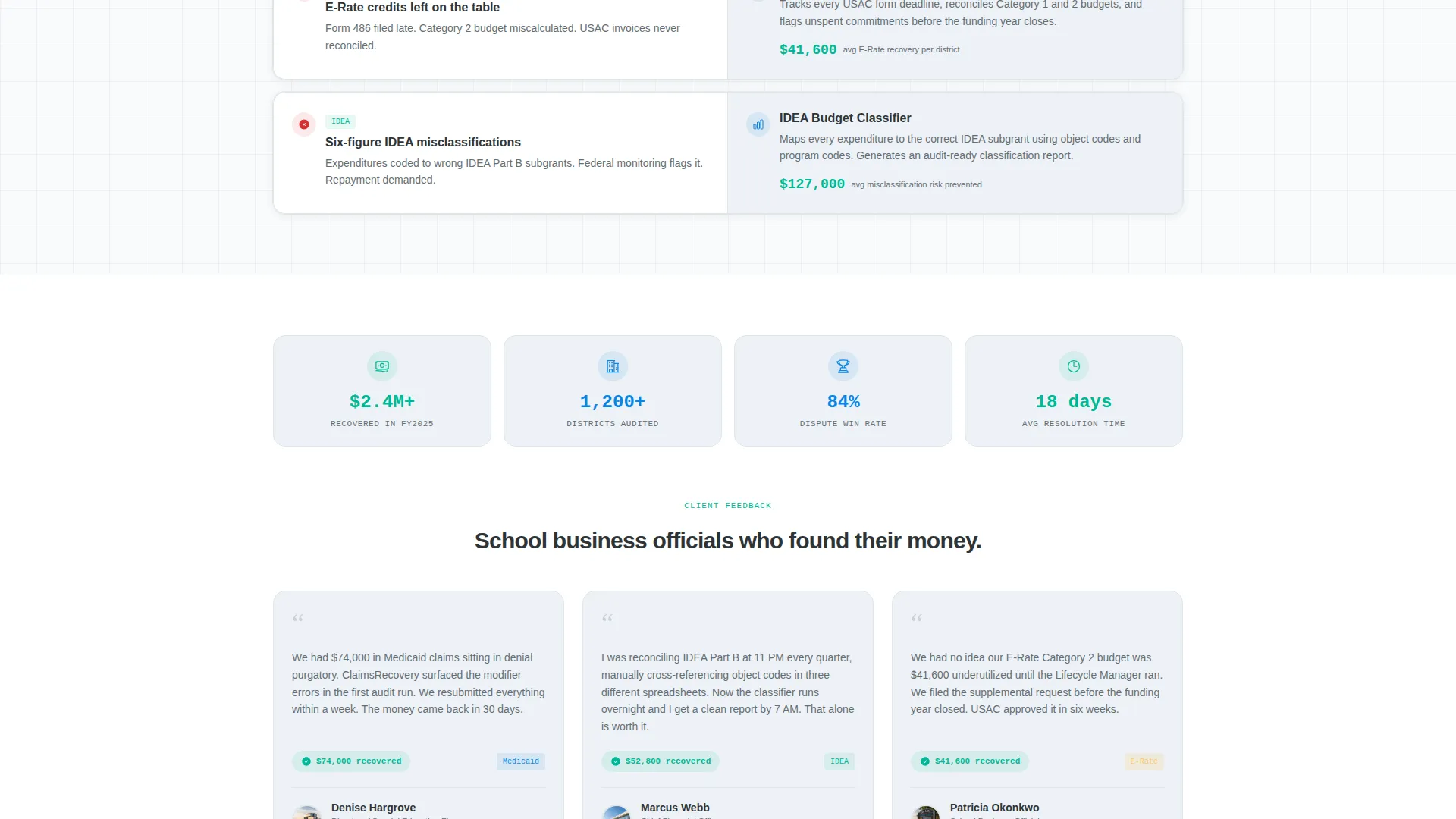
Below the header, the page splits into a two-column grid. The left column lists pain points that district finance teams recognize immediately. The right column shows the corresponding platform feature with a micro-animation of the fix. Each row is a matched problem-and-solution pair, and the grid escalates from single-claim corrections to portfolio-wide recovery dashboards.
Pinned Freemium call to action
The primary call to action, "Audit Your First 50 Claims Free," is pinned in the header and repeated after every third feature row. It keeps the conversion path visible without interrupting the reading flow.
Recovery Calculator Modal
A secondary conversion path labeled "See What You're Missing" triggers a modal calculator. Visitors enter their annual Medicaid or E-Rate claim volume and see an estimated recovery amount before creating an account. The modal converts by showing dollars already lost, not future promises.
Lightweight Signup Form
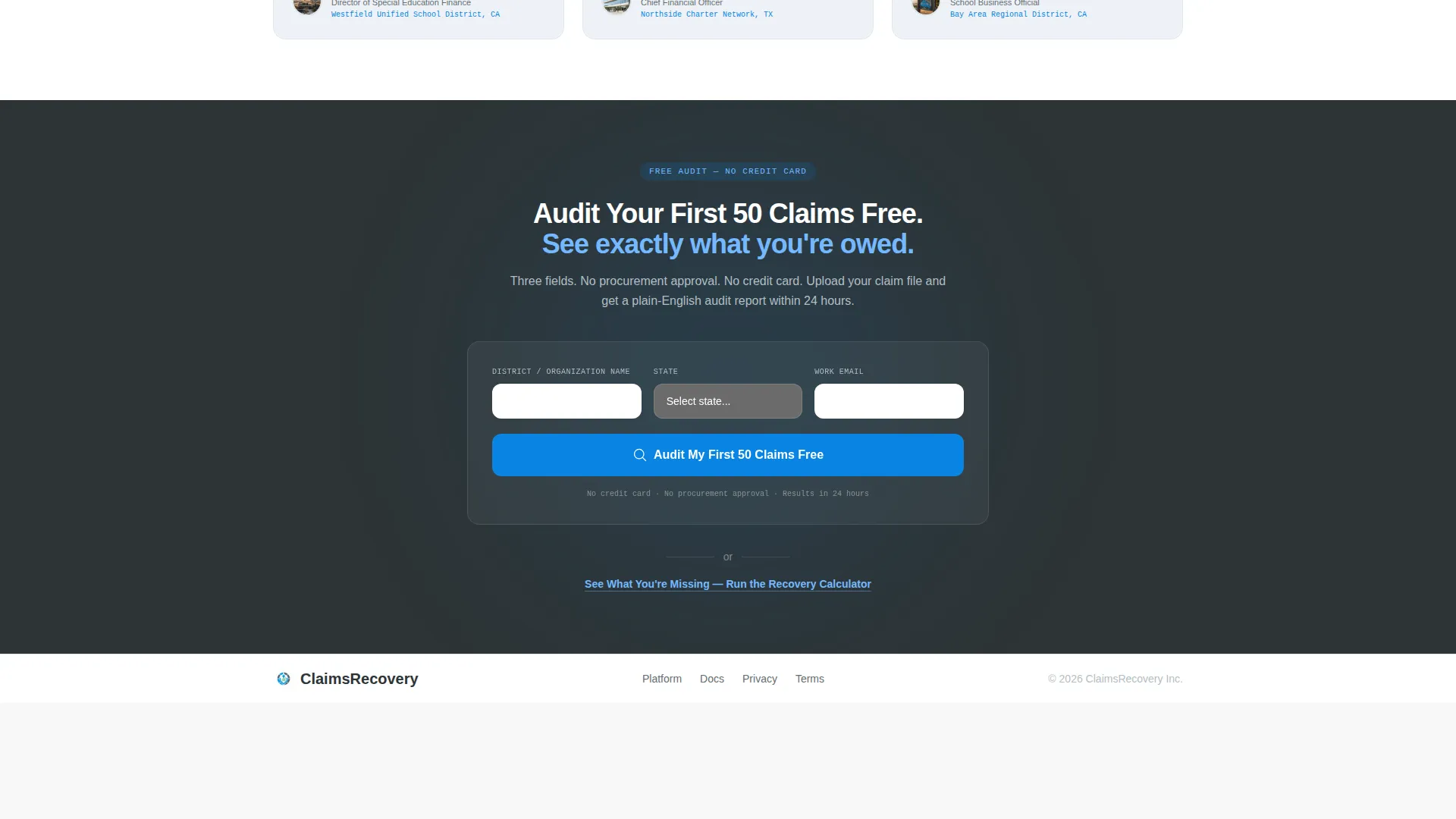
The signup form collects three fields: district name, state, and work email. No credit card is required, and no procurement approval is implied. The low-friction entry point is designed to reduce signup hesitation for public-sector buyers.
Split-Screen Layout Structure
The 50/50 split-screen template style runs throughout the page. Left and right panels carry equal visual weight, keeping data-dense audit views and clean feature explanations side by side without crowding either column.
Page sections overview
| Section | Purpose |
|---|---|
| Tab Switcher Header | Opens the product tour with Detect, Dispute, and Recover tabs |
| Split Dashboard View | Shows flagged claim logs alongside clean audit explanations |
| Pinned call to action Bar | Keeps "Audit Your First 50 Claims Free" visible at all times |
| Feature Matrix Grid | Matches district pain points to platform fixes row by row |
| call to action Repeat Rows | Reinforces the free trial offer after every third feature pair |
| Calculator Modal Trigger | Lets visitors estimate recovery before signing up |
| Three-Field Signup Form | Collects district name, state, and work email with no card required |
Design & branding system
The Slate & Sky color system was chosen to evoke the feeling of stepping out of a windowless budget meeting into a clear morning. Heavy administrative data looks organized and trustworthy rather than overwhelming.
- Deep administrative slate (#2D3436) and chalkboard charcoal (#636E72) anchor headers and data-dense panels
- Open-sky blue (#0984E3) drives calls to action, progress bars, and active tab indicators; cloud-break white (#DFE6E9) provides breathing room between dense feature columns
- Approval green (#00B894) marks resolved claims and successful recoveries, giving visitors a clear visual signal that the platform delivers results
Mobile & speed optimization
The split-screen layout and interactive tab components are designed to remain usable as viewport widths narrow. The Startup Velocity theme prioritizes a clean, fast-loading visual structure.
- The 50/50 split columns stack gracefully on smaller screens so both content panels remain readable
- The Feature Matrix rows reflow into single-column stacks on mobile without losing the problem-solution pairing
- The pinned call to action bar and modal trigger remain accessible at mobile viewport sizes to preserve the conversion path
How this template helps you convert
Every design decision in this template is oriented toward reducing hesitation and surfacing recoverable value before the visitor leaves the page.
- The tab-switching header delivers a three-act product demo in the first viewport, giving visitors a complete picture of the platform before they commit to scrolling.
- The Feature Matrix builds a cumulative, undeniable case row by row, escalating from single-claim corrections to six-figure recovery dashboards so visitors feel the scope of what they are leaving on the table.
- The calculator modal converts passive interest into personal urgency by naming estimated dollars already lost, making the free trial feel like a logical next step rather than a sales interaction.
Other information about this template
This template is part of a broader Education Software category under the Technology vertical. It is well suited for any education claims management platform, billing audit tool, or reimbursement recovery service targeting public school districts and charter networks.
- The Startup Velocity theme and Slate & Sky palette are designed for SaaS and fintech-adjacent education products that need to project credibility quickly
- The Freemium/Trial landing page direction means the page is optimized to drive low-friction signups, not demo requests or sales calls
- The three-field form structure (district name, state, work email) is intentionally minimal to reduce the procurement-approval friction common in public-sector sales cycles
- This template can support claims categories including Medicaid reimbursements, E-Rate credits, IDEA fund reconciliation, and Title I expenditure auditing based on the use cases described in the brief
Theme
Startup Velocity
Creative direction
Feature Matrix
Color system
Slate & Sky
Style
Split Screen (50/50)
Direction
Freemium/Trial
Page Sections
Three-tab Interactive Dashboard Header
Problem-to-solution Feature Matrix
Pinned Freemium Trial Call to Action
Recovery Calculator Modal
Low-friction Three-field Signup Form
50/50 Split-screen Layout
Related questions
Who is this landing page template designed for?
What conversion paths does this template include?
Can I customize the tab labels and feature matrix rows?
Does the signup form require a credit card or procurement approval?
What claim types does this template's content reference?



