Premium Government Software Privacy Policy & Terms Website Template
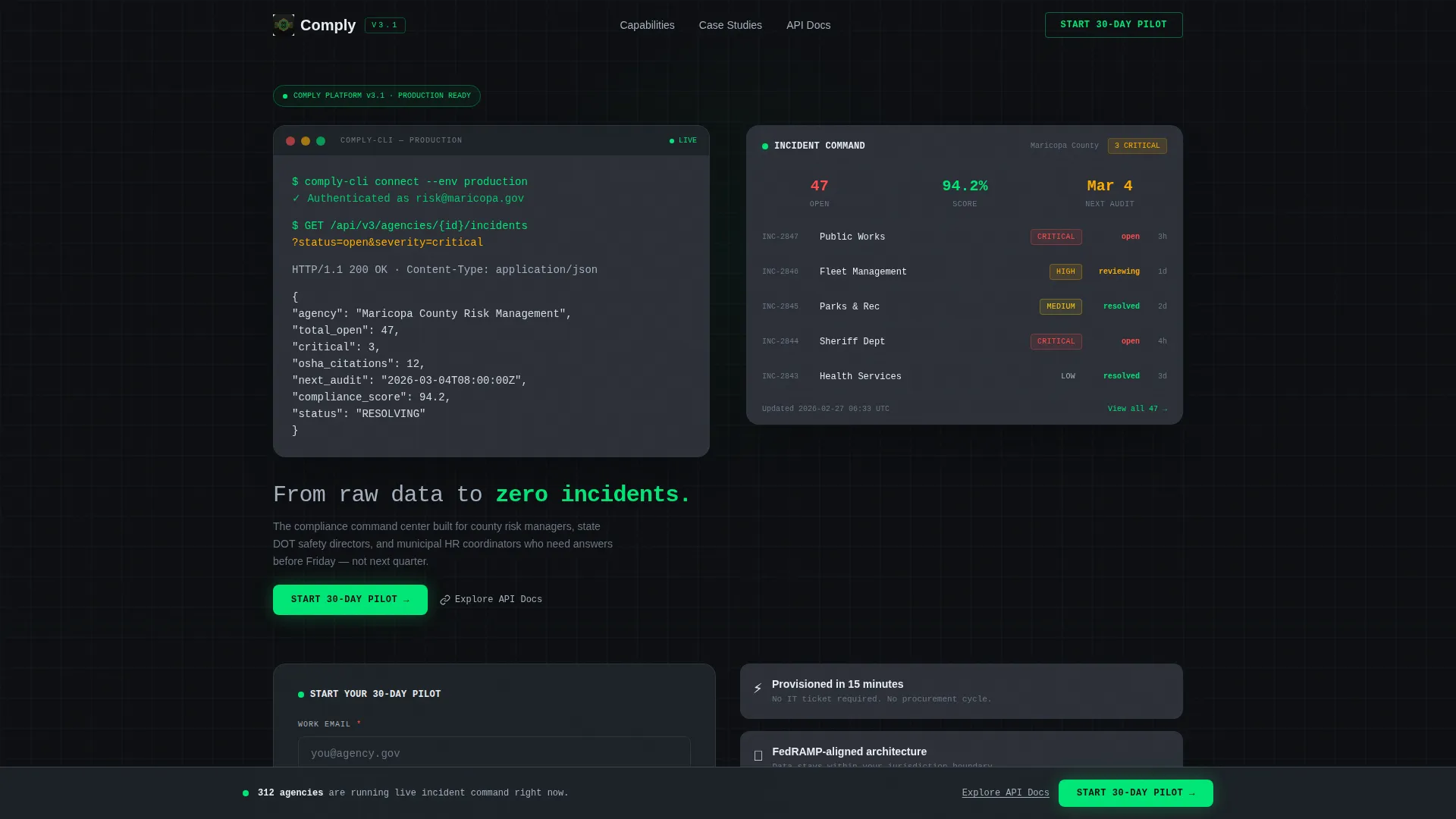
Comply is a government safety management landing page template built for compliance officers, risk managers, and safety directors. It opens with a live terminal animation that transforms raw API data into a polished dashboard, then walks visitors through each platform capability using spec-sheet scroll sections. The freemium pilot flow captures qualified government leads with minimal friction.
by Rocket studio
Quick summary
Comply is a scroll-reveal landing page template for a government safety management platform. It opens with an animated code terminal that resolves into a dashboard widget, then walks visitors through incident tracking, audit scheduling, and regulatory mapping. A sticky pilot signup bar and a secondary API docs path convert two types of government buyers at once.
Who this template is for
This template is built for teams selling or presenting government safety software to public-sector decision-makers. It speaks directly to the people who live inside compliance workflows every day.
- County risk managers handling Occupational Safety and Health Administration (OSHA) citations across multiple departments
- State department of transportation (DOT) safety directors who track fleet incidents in real time
- Municipal human resources coordinators managing workers' compensation claims and needing fast answers
What problem this template solves
Compliance officers in government agencies deal with scattered data. Safety regulations, incident logs, and audit trails live in different systems, filing cabinets, and spreadsheets. This template addresses that fragmentation directly and shows visitors a better path.
- Fragmented records make it hard to spot patterns before an incident becomes a liability
- Paper-based audit trails slow down reporting and leave risk managers exposed during inspections
- No single view of jurisdiction-wide safety status means decisions get made on incomplete information
What you get with this template
You get a fully structured, single-page scroll-reveal layout designed around a government safety command center narrative. Every section is built to earn trust before asking for a commitment.
- A four-second header animation showing a live API call resolving into a dashboard widget
- Spec-sheet scroll sections pairing plain-language feature explanations with live-styled dashboard modules
- A freemium pilot conversion flow with a government work email validator, agency name field, and department count dropdown
Feature list
This template delivers a set of purpose-built layout components. Each one is grounded in the technical and persuasive needs of a government software landing page.
Animated Terminal Header
The page opens with a monospaced code block that animates line by line. It shows a real-format API call pulling open critical incidents, then collapses into a clean dashboard widget in four seconds. The transformation happens before any marketing copy appears, establishing platform credibility immediately.
Spec Sheet Scroll Sections
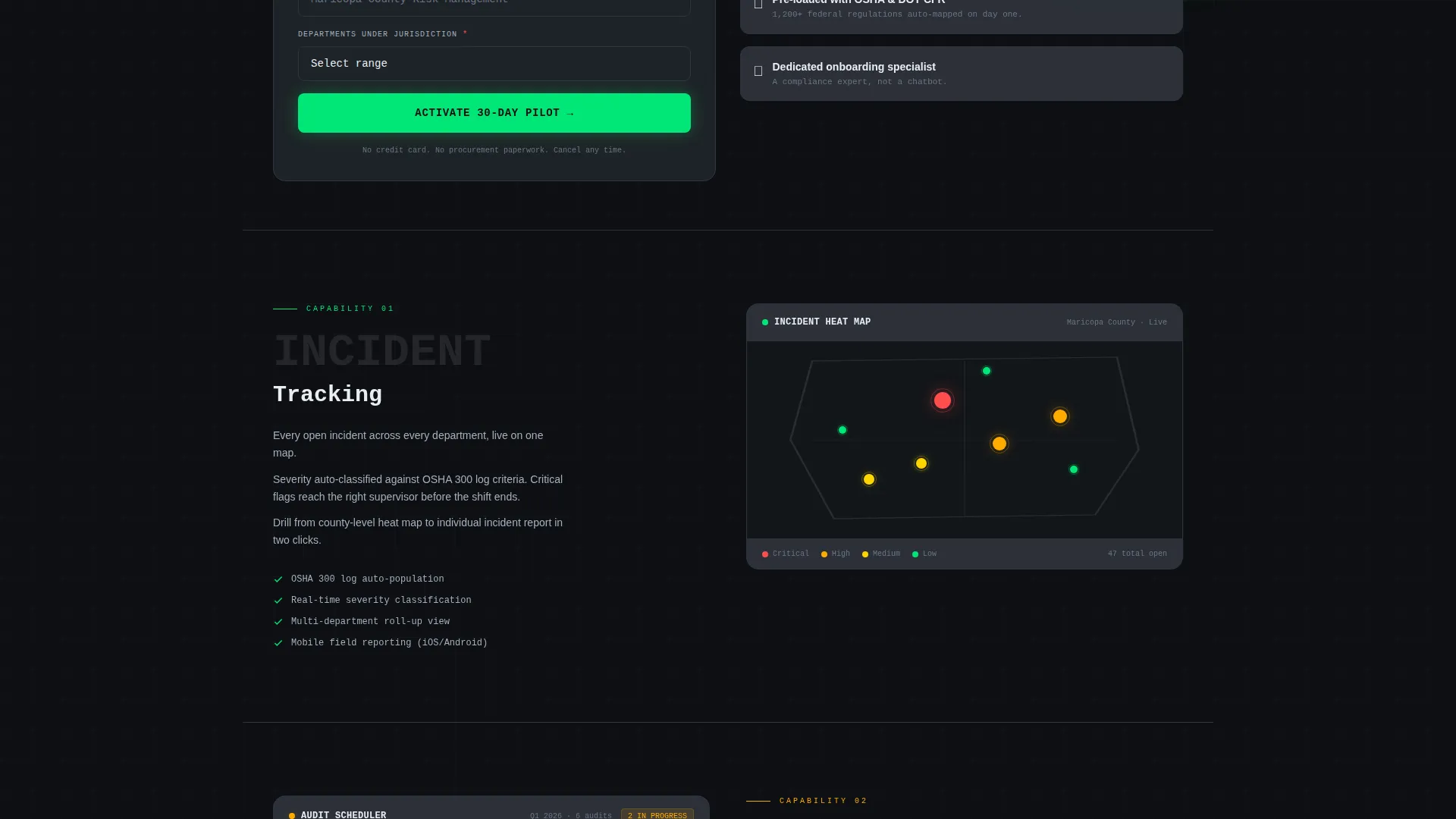
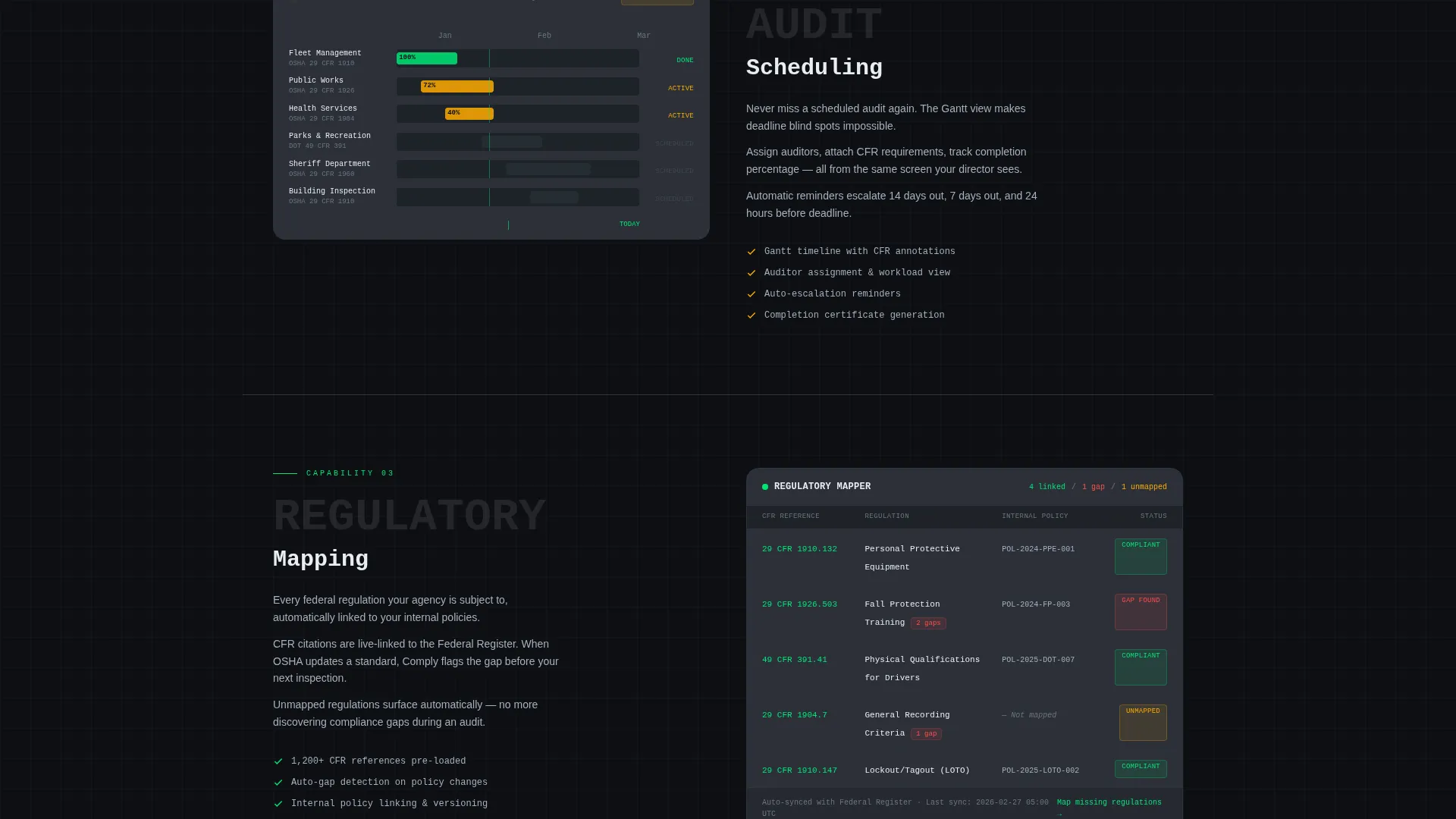
Each scroll-triggered section reveals one platform capability in technical datasheet style. The feature name appears in oversized monospace, a three-line plain-language explanation sits on the left, and a live-styled dashboard module sits on the right. Sections cover incident heat maps, Gantt-style audit timelines, and Code of Federal Regulations (CFR) regulatory mapping linked to internal policies.
Sticky Pilot Conversion Bar
After the third spec section, a sticky bar locks to the viewport and repeats the primary call to action. It keeps the "Start Your 30-Day Pilot" prompt visible without interrupting the scroll experience. This persistent nudge reduces drop-off at the point where technical readers are most engaged.
Government Email Validator
The pilot signup form includes automatic validation for work email addresses using the dot-gov domain format. A green checkmark confirms the domain in real time, reducing form friction for qualified government applicants and filtering out unqualified submissions passively.
Dual Conversion Paths
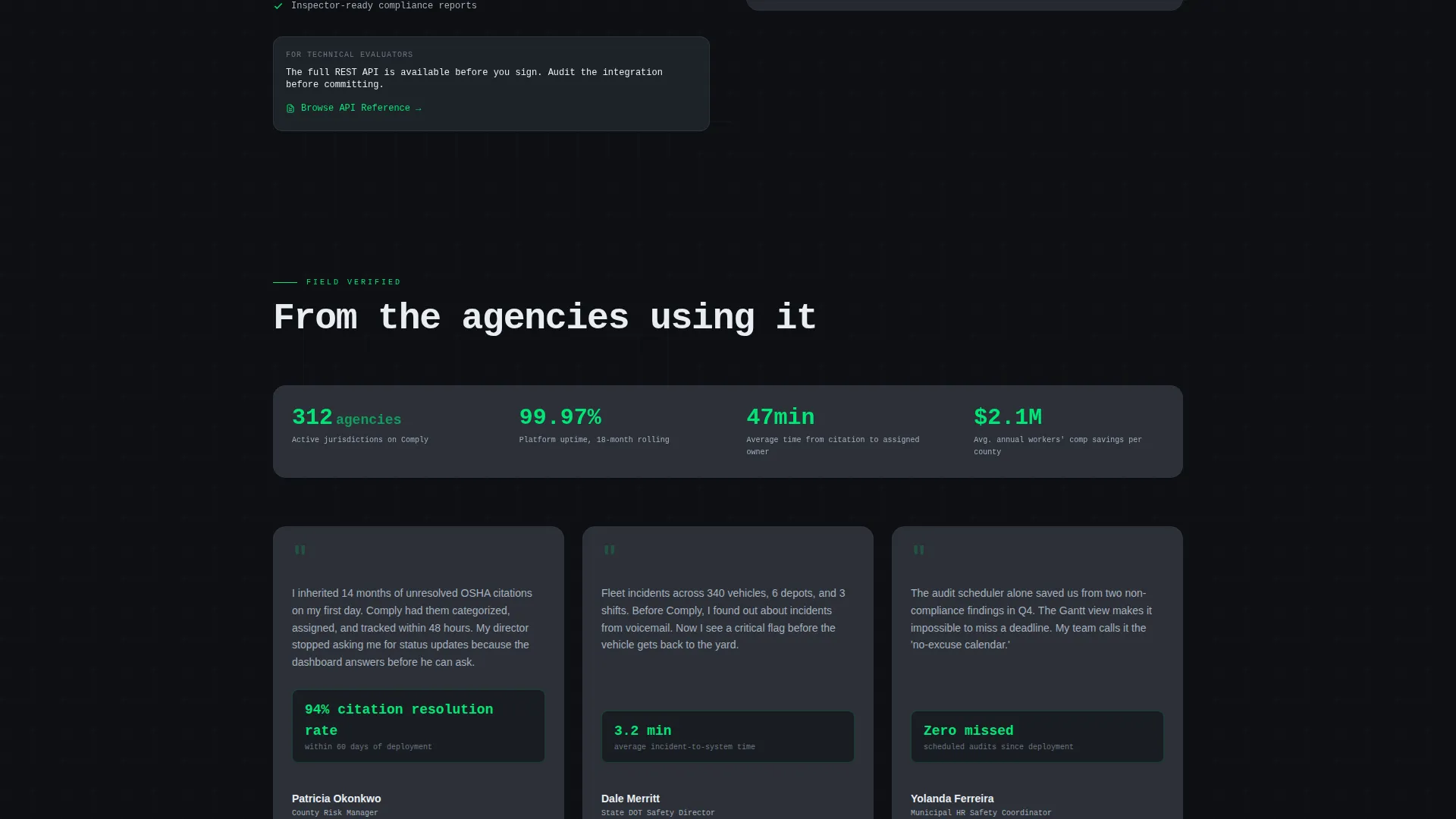
The page supports two distinct buyer journeys. Decision-makers see the primary pilot call to action. Technical evaluators see a secondary "Explore the API Docs" path that lets them vet integration depth before committing. Both paths are present from the first section so neither audience feels unaddressed.
Carbon Fiber Dashboard Theme
The visual system uses a deep cockpit black and woven graphite background palette with status-green interactive states and alert amber attention indicators. Data surfaces float on subtle card layers. The result reads like an instrument panel rather than a marketing page, which builds immediate credibility with technical government audiences.
Page sections overview
| Section | Purpose |
|---|---|
| Terminal Header Animation | Opens with live API call resolving into a dashboard widget |
| Primary Pilot call to action | Captures pilot signups directly below the header animation |
| Incident Tracking Module | Shows county-level heat map as a live dashboard spec block |
| Audit Scheduling Module | Displays Gantt-style timeline for audit planning |
| Regulatory Mapping Module | Auto-links CFR references to internal agency policies |
| Sticky Conversion Bar | Repeats pilot call to action after third spec section with persistent visibility |
| API Docs Secondary Path | Offers technical evaluators a no-commitment integration review route |
| Pilot Signup Form | Collects work email, agency name, and department count |
Design & branding system
The visual identity follows a Dashboard Pro theme using a Carbon Fiber color system. Every color choice serves a functional role, with nothing decorative added for its own sake.
- Backgrounds stay between deep cockpit black (#0D0F12) and woven graphite (#1E2328), with data card surfaces at #2C3038
- Status-green (#00E676) marks passing indicators and interactive elements, while alert amber (#FFAB00) flags attention states
- Cool titanium (#A4B0BE) handles secondary text and borders, keeping the palette readable and instrument-panel precise
Mobile & speed optimization
The scroll-reveal layout is structured for progressive loading. Each spec section loads as it enters the viewport, keeping the initial page weight low and the experience responsive across devices.
- Scroll-triggered section reveals reduce upfront rendering load and keep the page feeling fast as users navigate
- The sticky call to action bar is designed to remain functional and visible on smaller viewports without blocking content
- The terminal animation is timed at four seconds, short enough to hold attention on mobile without causing drop-off
How this template helps you convert
This template is built around a specific conversion strategy: show real system output first, then ask for commitment. That sequence removes the skepticism that typically slows down government software evaluations.
- The terminal animation demonstrates platform depth in the first four seconds, so visitors arrive at the pilot form already convinced the system is real and functional
- The spec-sheet scroll format lets technical buyers self-qualify section by section, meaning the people who reach the form are already your most engaged prospects
- The dual call to action structure (pilot signup plus API docs) captures both budget decision-makers and technical gatekeepers in the same scroll, reducing the back-and-forth that typically stalls government procurement conversations
Other information about this template
This template is designed specifically for the government software category and fits naturally within the broader government safety management niche. It is a strong starting point for any team building or marketing a compliance-focused platform to public-sector agencies.
- The template style is Scroll Reveal (Progressive), meaning sections animate into view as the visitor scrolls rather than loading all at once
- The creative direction follows a Spec Sheet format, which mirrors the technical documentation government buyers already trust
- The header concept is a Code Snippet, establishing a developer-credible tone before any prose copy appears
- The landing page direction is Freemium/Trial, optimized for a 30-day pilot offer rather than a direct purchase flow
- The theme is Dashboard Pro, which pairs well with data-heavy government software products across safety, compliance, and risk management categories
Theme
Dashboard Pro
Creative direction
Spec Sheet
Color system
Carbon Fiber
Style
Scroll Reveal (Progressive)
Direction
Freemium/Trial
Page Sections
Animated Terminal Header Block
Spec Sheet Scroll Reveal Sections
Sticky 30-day Pilot Call to Action Bar
Government Email Auto-validation
Dual Buyer Conversion Paths
Carbon Fiber Instrument Panel Theme
Related questions
Who is this landing page template designed for?
What makes the header animation different from a standard hero section?
Does the template support two different types of buyers?
Can I customize the pilot signup form fields?
Is this template suitable for a single-page layout or a multi-page site?



