Streamlined Incidentreporting | Free Website Template | Rocket
Flagged is a sidebar companion landing page template built for incident reporting platforms in the workplace safety and compliance space. It guides visitors through a five-step workflow, from first report to compliance export, using a fixed scroll-linked sidebar, an animated search demo, and interactive sandbox modals that let EHS managers feel the product before they sign up.
by Rocket studio
Quick summary
Flagged is a single-page template designed for B2B workplace safety platforms. It combines a live search demo header, a scroll-linked sidebar workflow guide, and a freemium signup flow. The result is a page that acts as a product demo and a conversion tool at the same time, calm, clinical, and built for EHS professionals under real compliance pressure.
Who this template is for
This template is built for safety-focused SaaS teams who need to convert skeptical, process-driven buyers. It speaks directly to the people who live inside incident logs, OSHA reports, and corrective-action boards every day.
- Environmental Health and Safety (EHS) managers overseeing multi-facility OSHA compliance programs
- Operations leads currently tracking incidents in email threads or on paper
- Compliance officers who need audit-ready incident records without manual assembly
What problem this template solves
Most incident reporting platforms describe their features in bullet points. That approach fails with EHS buyers, who need to trust a system before they hand it their compliance data. Flagged solves the credibility gap by making the page itself a guided product experience.
- Visitors arrive unsure whether the platform can handle their specific incident types and reporting volume
- The page removes that doubt by walking them through each stage of the workflow in real time
- The freemium call to action appears only after the visitor has already felt competent using the product
What you get with this template
You get a complete, desktop-first landing page layout structured around a five-step incident management workflow. Every section is purpose-built to reduce buyer hesitation and move EHS professionals toward a no-credit-card trial signup.
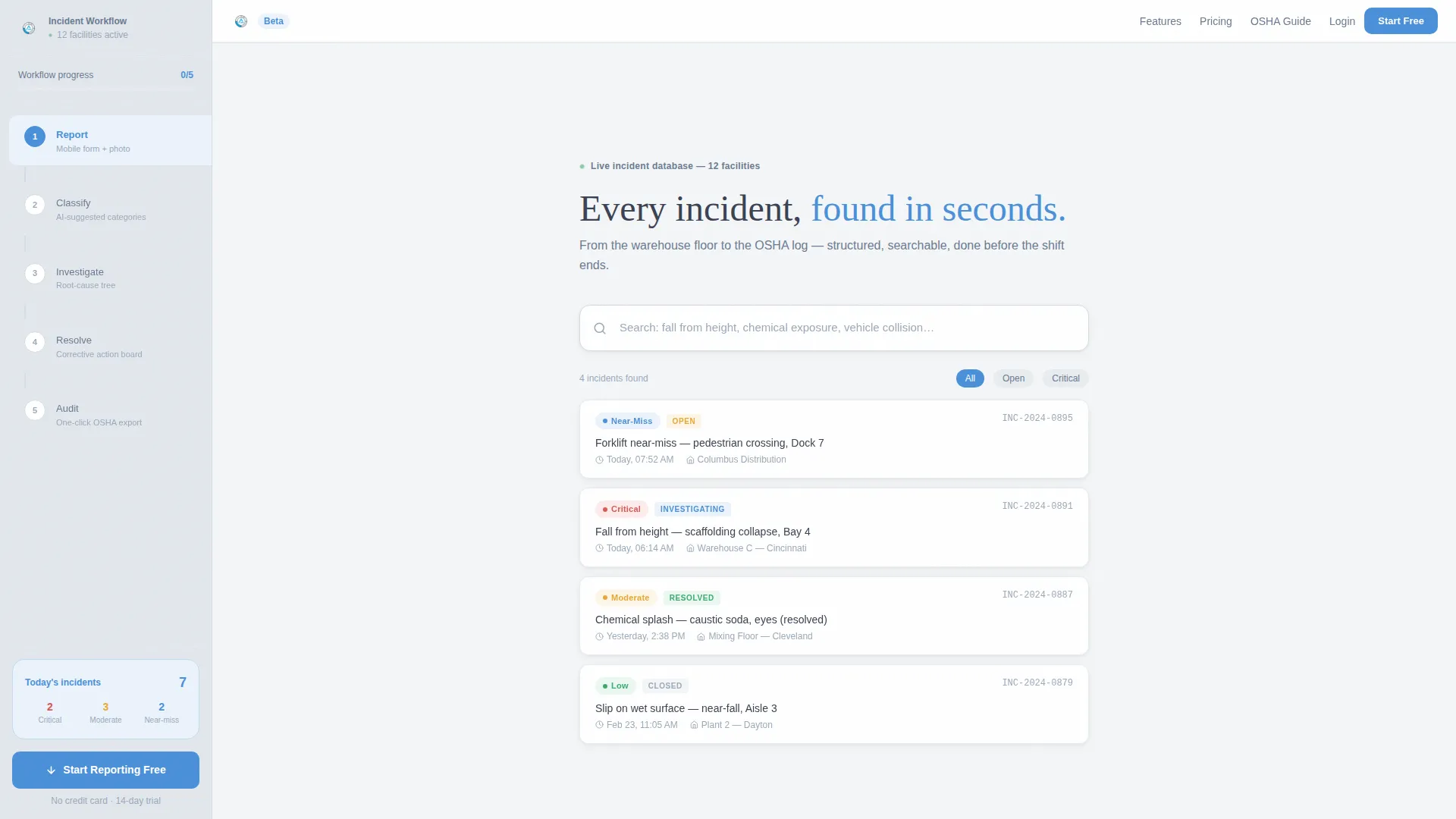
- An animated search header with autocomplete simulation and staggered live result cards showing incident type, severity tag, timestamp, and resolution status
- A fixed left sidebar that highlights each workflow step in signal-blue as the corresponding right-panel section scrolls into view
- A pinned "Start Reporting Free" call to action with a two-field signup form, plus per-step sandbox modals triggered by "Try this step live" links
Feature list
This template ships with six core interaction patterns and layout systems. Each one is grounded in the source brief and designed to serve EHS platform conversion goals.
Animated Incident Search Header
The header centers a single search input with ghost text prompting visitors with real incident category examples. As the visitor types, result cards animate in showing incident type, severity tag, timestamp, and resolution status. This makes the product feel immediately useful before a single word of copy is read.
Scroll-Linked Sidebar Navigation
A fixed left sidebar lists five workflow steps: Report, Classify, Investigate, Resolve, and Audit. Each step highlights in signal-blue as the visitor scrolls into the matching right-panel section. The sidebar always shows the visitor exactly where they are in the workflow.
Right-Panel Workflow Stages
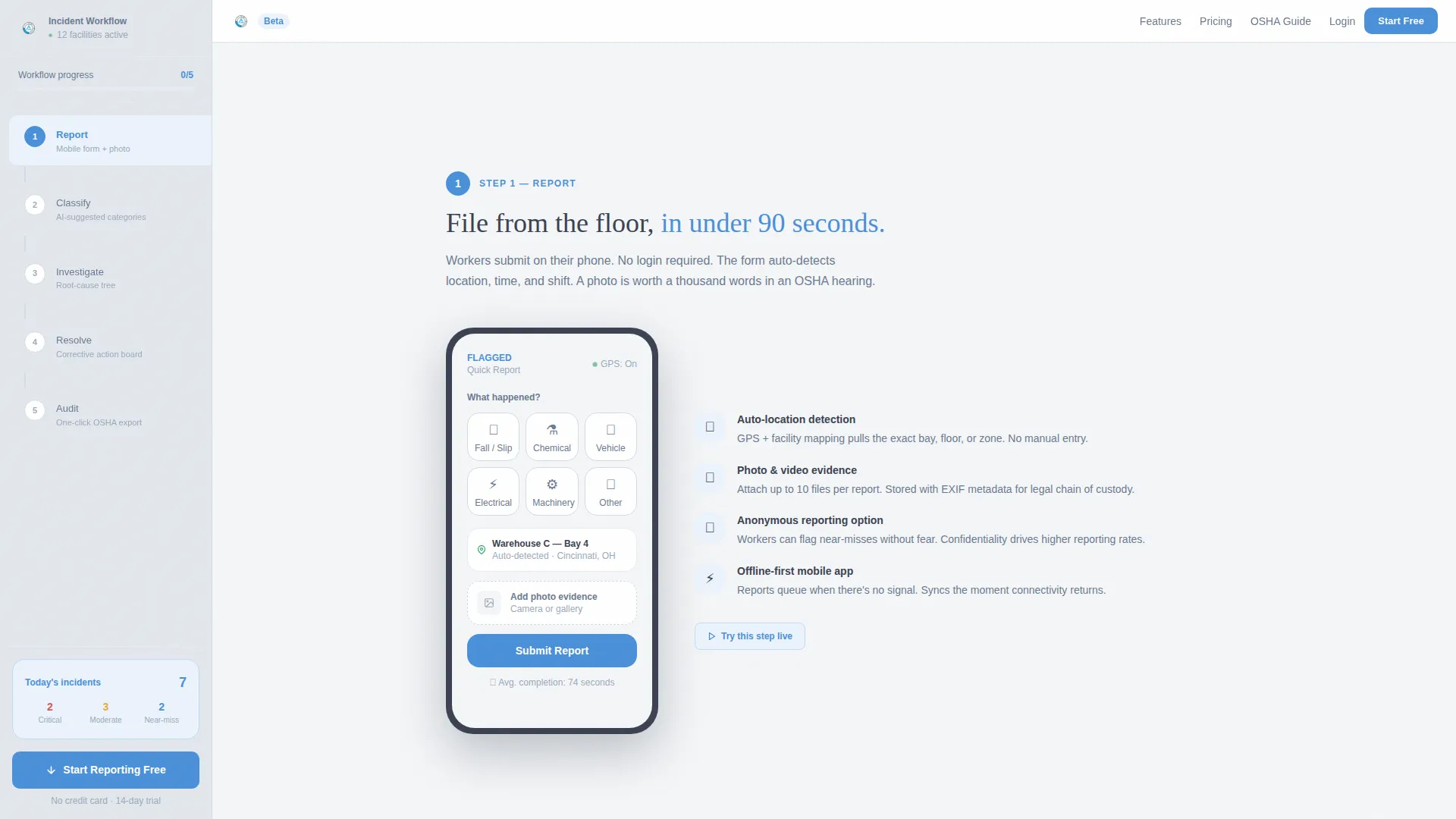
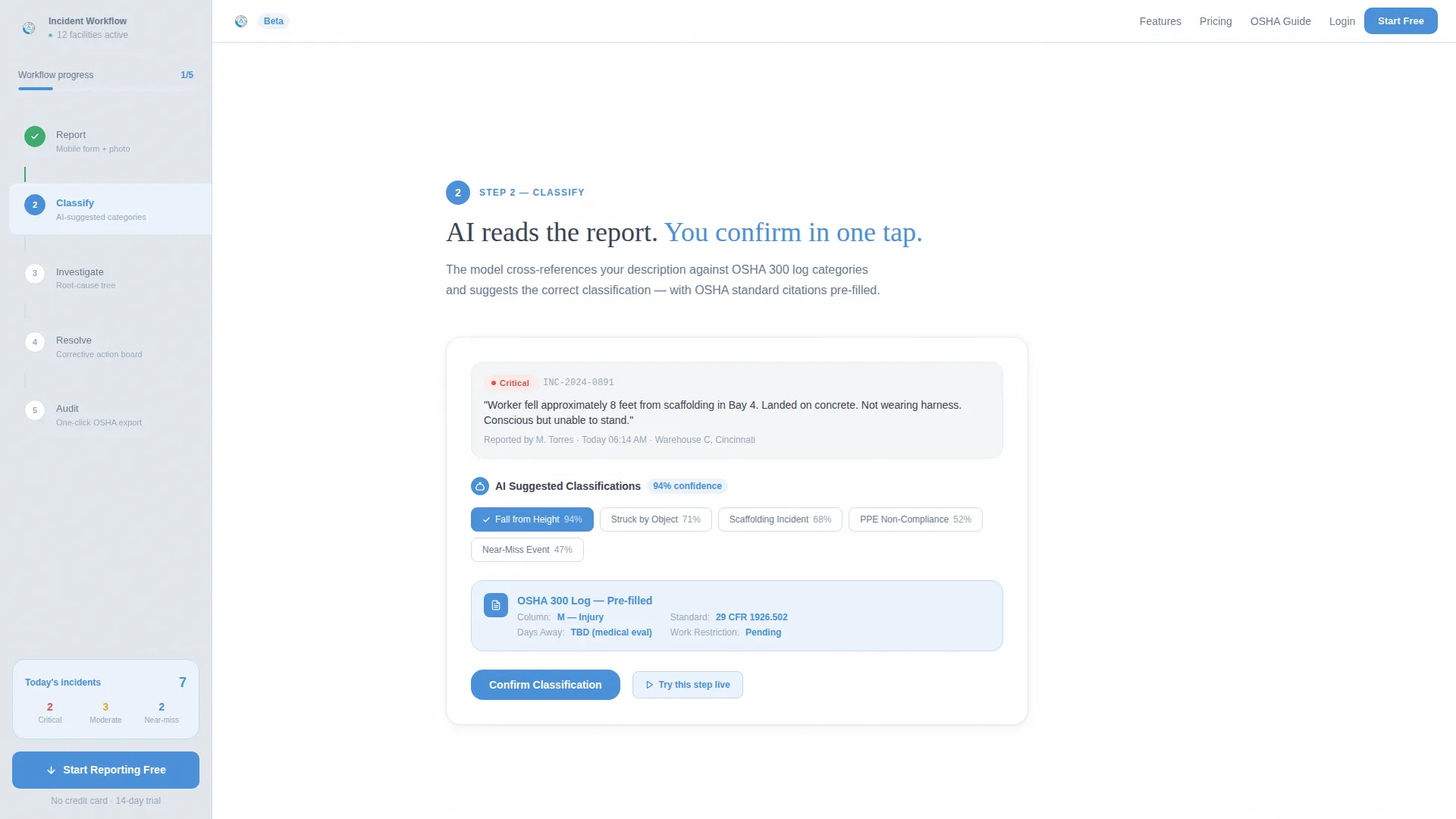
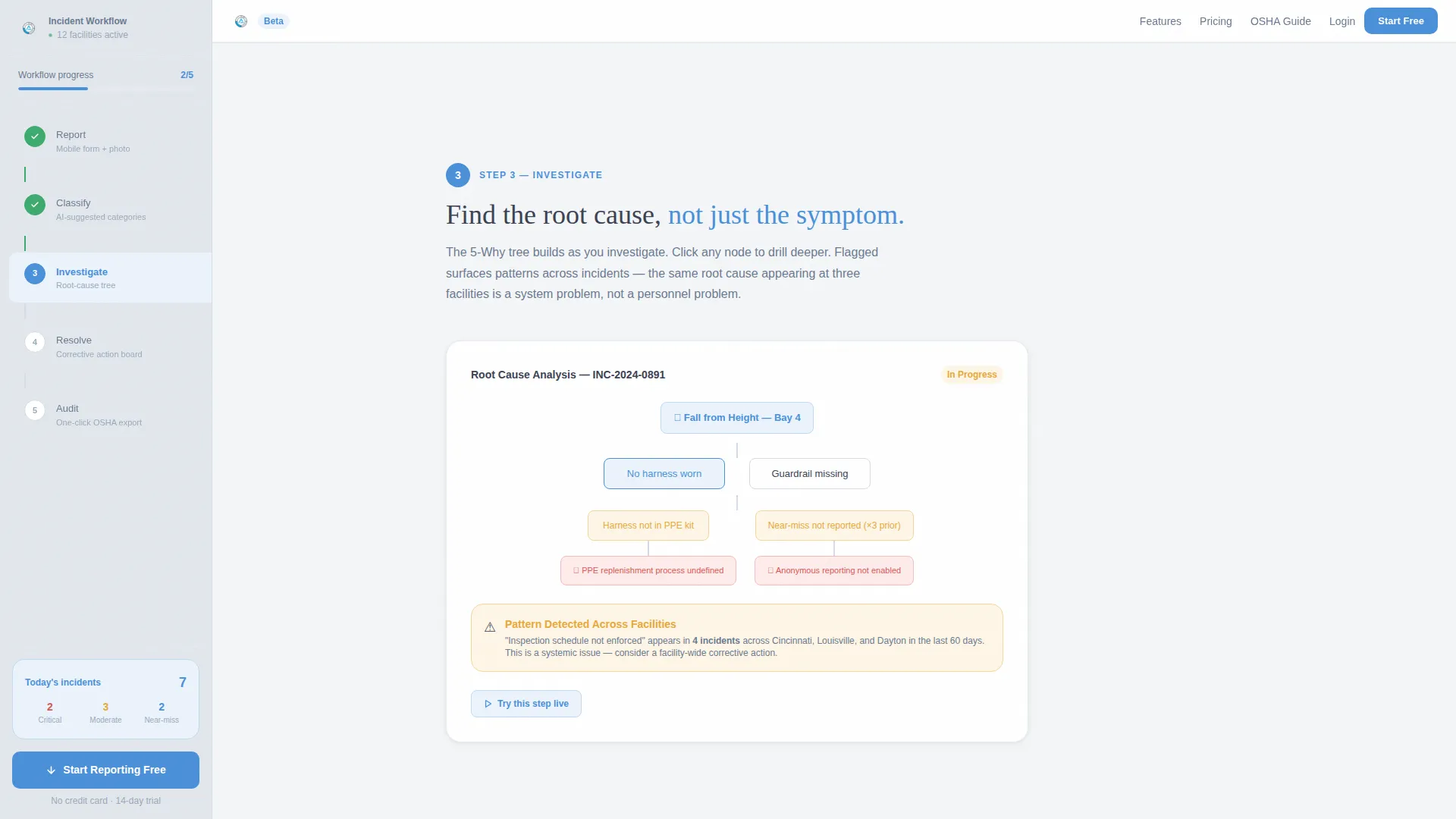
Each sidebar step corresponds to a detailed right-panel view showing the actual product interface for that stage. These panels include the mobile reporting form with photo upload, the AI-suggested classification screen, the root-cause investigation tree, the corrective-action assignment board, and the one-click compliance export view.
Per-Step Interactive Sandbox Modals
Below each workflow step, a "Try this step live" link opens an interactive sandbox of that specific feature. Visitors can engage with the reporting form, classification logic, or export screen without creating an account. This approach earns trust by giving buyers a hands-on preview.
Pinned Freemium Conversion Call to Action
The primary call to action is fixed to the bottom of the sidebar and stays visible throughout the entire scroll journey. Clicking it opens a two-field signup form requiring only a work email and facility count. There is no credit card required.
Social Proof and Metrics Bar
A trust section displays key performance metrics including incidents logged, facilities served, and average incident resolution time. Two testimonial cards from an EHS manager and an operations lead provide role-specific social proof alongside company context.
Page sections overview
| Section | Purpose |
|---|---|
| Hero Search Demo | Simulates live incident search with animated result cards |
| Sidebar Workflow Nav | Fixed five-step guide that tracks scroll position |
| Step 1: Report | Shows mobile reporting form with photo upload |
| Step 2: Classify | Displays AI-suggested incident classification screen |
| Step 3: Investigate | Presents root-cause investigation tree interface |
| Step 4: Resolve | Shows corrective-action assignment board |
| Step 5: Audit | Displays one-click compliance export view |
| Metrics Trust Bar | Highlights incidents logged, facilities, resolution time |
| Testimonials Section | Two role-specific cards from EHS and ops personas |
| Final Call to Action | "Start Reporting Free" with two-field signup form |
| Footer | Linear single-row pattern with standard footer links |
Design & branding system
The visual identity follows a Soft Mist color system inside a Startup Velocity theme. The aesthetic feels like a clean whiteboard in a well-lit operations room: nothing competes for attention, and every interactive element earns its place.
- Color palette: fog-white background (#F4F6F8), quiet graphite body text (#3B4252), muted steel sidebar (#E2E7ED), and a single signal-blue accent (#4A90D9) reserved for buttons, active states, and progress indicators
- Typography: DM Sans for body text and interface elements; Fraunces for display moments where tone and authority matter
- Animation approach: medium intensity with scroll-linked sidebar step highlighting, staggered card reveal animations, and search autocomplete simulation
Mobile & speed optimization
The template is desktop-first, reflecting the reality that EHS managers do most of their compliance work at a desk. Responsive behavior is included to support field workers accessing incident forms on mobile devices.
- The fixed sidebar collapses gracefully for smaller screen sizes so the workflow remains navigable on mobile
- Server Components handle static sections to reduce initial load overhead, while Client Components power the interactive demo and sidebar scroll tracking
- Card stagger reveals and scroll-linked animations are scoped to avoid unnecessary repaints on lower-powered devices
How this template helps you convert
The conversion strategy is baked into the page structure, not bolted on at the end. Every design and interaction decision moves the visitor one step closer to clicking "Start Reporting Free."
- The animated search header puts visitors inside the product immediately, building confidence before they read a single feature claim or testimonial
- The scroll-linked sidebar walk-through turns the page into a guided trial run, so by Step 5 the visitor has mentally filed their first incident and is primed to want the real account
- The always-visible pinned call to action with a two-field no-credit-card form removes every remaining barrier at the exact moment the visitor is most engaged
Other information about this template
This template is part of a broader Startup Velocity theme family built for B2B SaaS platforms that serve compliance-heavy industries. It is well-suited for teams building in the EHS software, workplace safety technology, and environmental compliance verticals.
- The template uses OSHA-specific terminology throughout, including references to OSHA log formats, corrective-action workflows, and audit-ready record structures
- The localization defaults are English, USD currency, and United States date format (MM/DD/YYYY), making it ready for US-market EHS platforms out of the box
- The layout scales well for platforms serving anywhere from small single-site operations to enterprise teams managing 50 or more facilities across multiple regions
- The Sidebar Companion template style is purpose-matched to step-by-step guide creative direction, making it an effective choice for any compliance workflow tool that benefits from a staged, progressive disclosure experience
Theme
Startup Velocity
Creative direction
Step-by-Step Guide
Color system
Soft Mist
Style
Sidebar Companion
Direction
Freemium/Trial
Page Sections
Animated Incident Search Header
Scroll-linked Sidebar Workflow
Right-panel Stage Previews
Per-step Interactive Sandbox Modals
Pinned Freemium Call to Action
Metrics and Testimonials Trust Block
Related questions
Who is this landing page template designed for?
Does the freemium signup form require a credit card?
How does the sidebar navigation work as visitors scroll?
Can this template be adapted for other compliance or safety workflows?
What makes this template different from a standard SaaS landing page?



