Church & Religious Org Specialist Pricing Website Template
Flock is a comparison table landing page template built for churches and religious organizations that need a clean, professional team directory online. It walks visitors through a three-step setup, surfaces a tiered pricing comparison, and drives free signups with a two-field form. The design uses a deep navy dashboard palette that feels calm, credible, and purposeful.
by Rocket studio
Quick summary
Flock is a single-page directory landing page template designed for churches, parishes, and religious organizations. It presents your full ministry team in one organized, searchable grid and uses a structured comparison table to guide visitors toward a free plan signup. The dashboard-inspired layout balances authority with approachability.
Who this template is for
This template is built for the people who keep a congregation running behind the scenes. If you spend time answering "who do I contact about..." questions, this page was made for you.
- Executive pastors managing volunteers across multiple campuses who need one central place to surface every team member's role and contact path
- Church administrators and denominational office staff who need new hires to appear on the website quickly and accurately
- Religious organizations of any size or tradition looking to replace an outdated staff directory with a living, searchable team page
What problem this template solves
Most congregations have no single, organized place where members can find the right person for the right ministry. The team directory lives on a whiteboard, inside a spreadsheet, or scattered across outdated web pages.
- Staff names, roles, and contact information are hard to find, leading to repeated "who do I talk to" calls every week
- New staff members take too long to appear on the public website, creating confusion during their first weeks on the job
- Multi-campus organizations have no unified view of their full team, making coordination harder than it needs to be
What you get with this template
Flock gives you a complete, conversion-focused landing page that doubles as a team directory showcase. Everything needed to go from blank slate to published page is already structured and ready to customize.
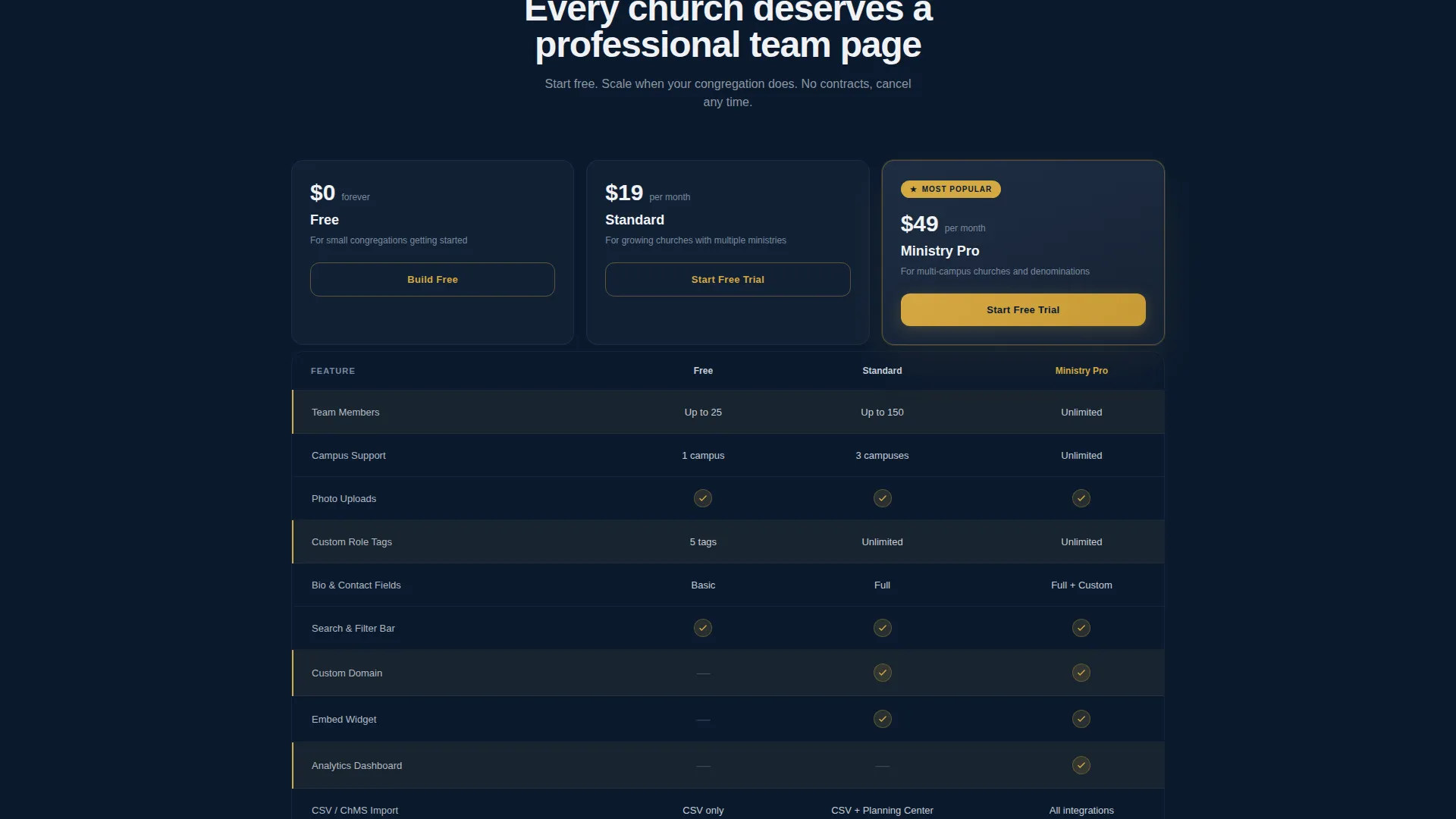
- A full comparison table section with Free, Standard, and Ministry Pro plan columns featuring row-by-row feature reveals
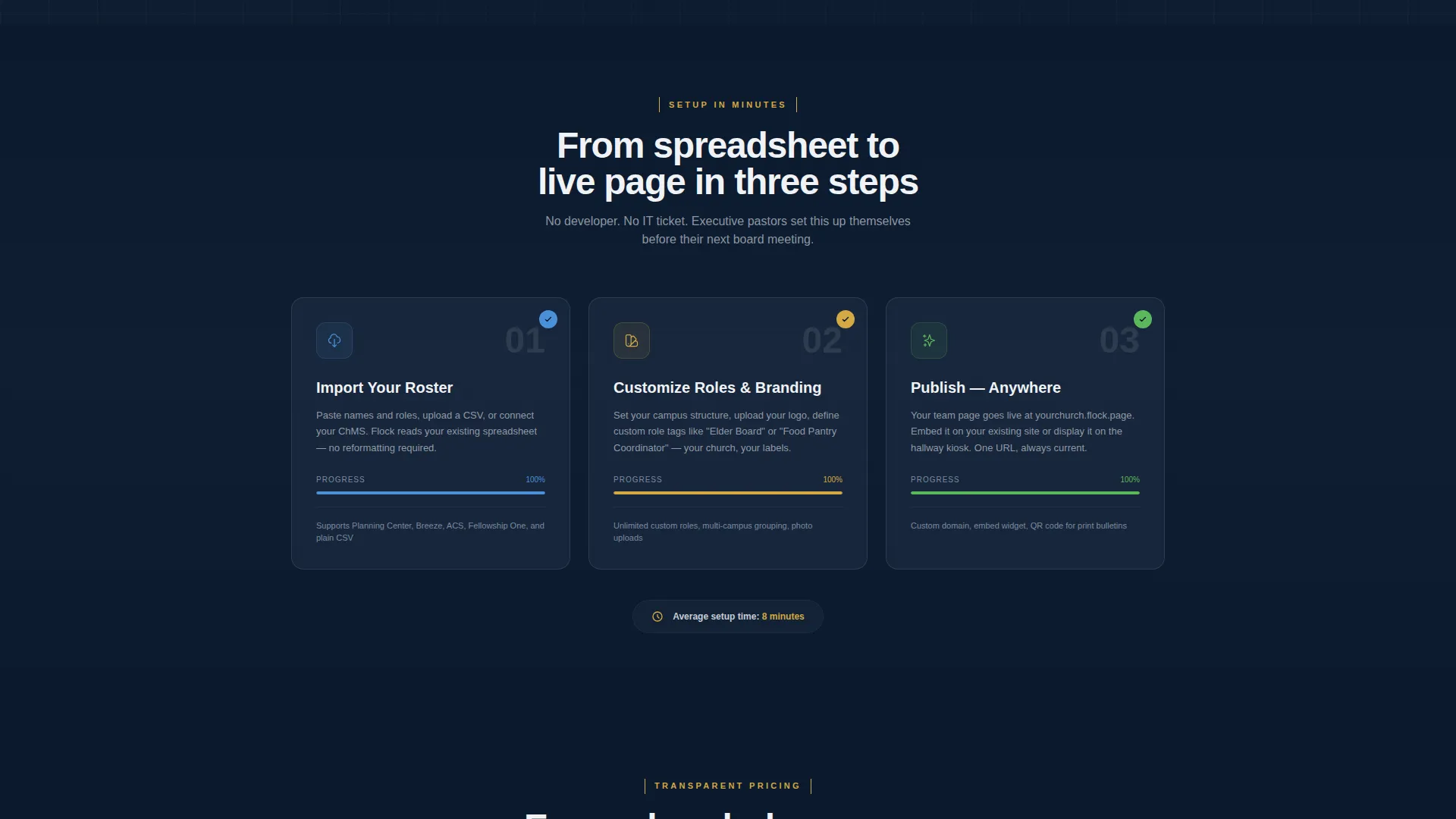
- An animated three-step setup sequence (import, customize, publish) that plays as the visitor scrolls into view
- A two-field free signup form (church name and email address) with no credit card required, plus a secondary "See It With Your Roster" CSV preview path
Feature list
This template is built around purpose-driven components that serve both the visitor experience and the church's operational clarity.
Scrolling Logo Bar Header
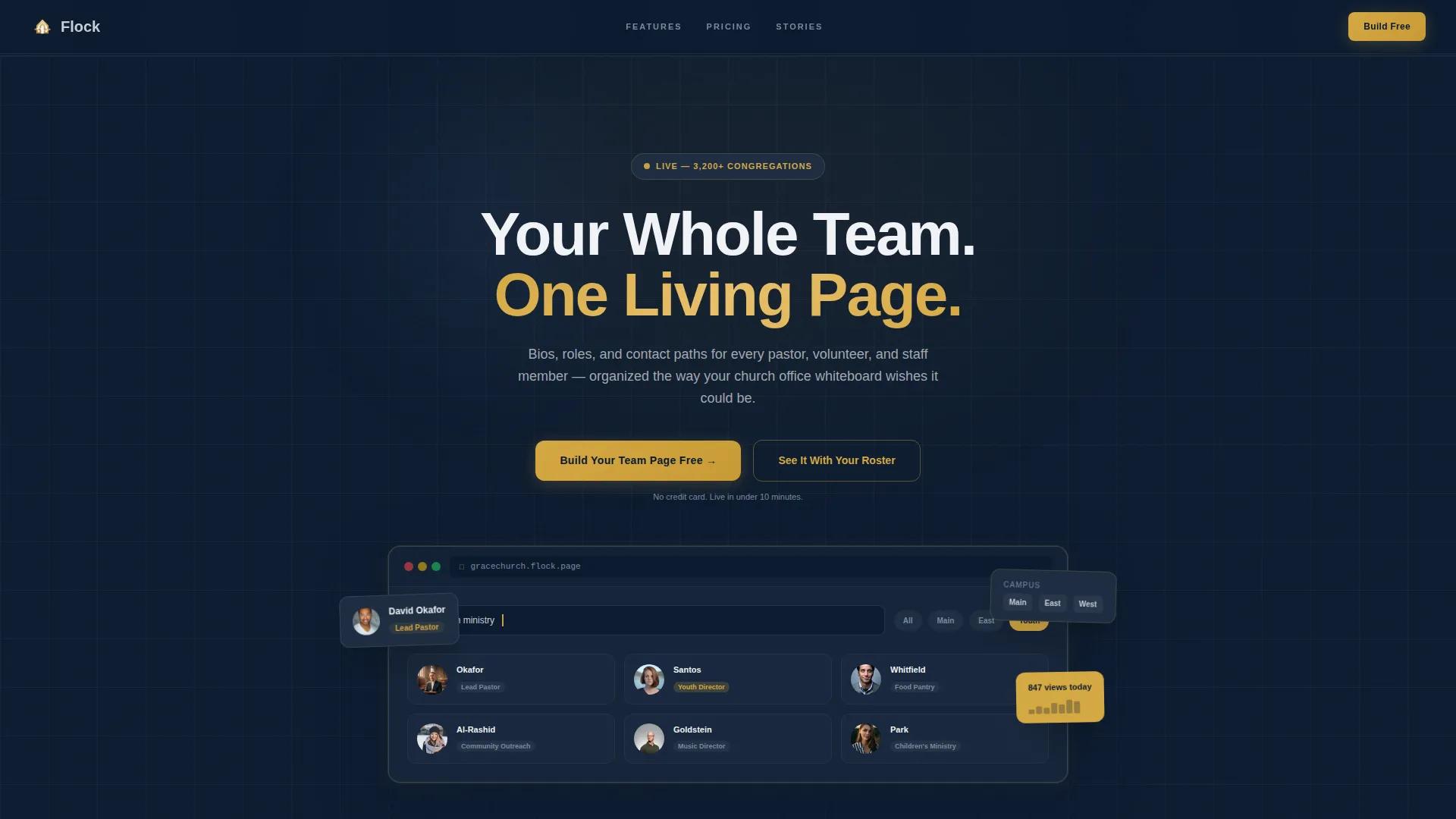
A horizontal ribbon of real church and denomination logos scrolls in a continuous loop against the deep navy background. It opens the page with immediate social proof, showing that organizations of every tradition use and trust the platform.
Animated Setup Sequence
A three-step visual sequence showing import, customize, and publish animates as the visitor scrolls into that section. Each step completes in real time on screen, making the onboarding process feel simple and achievable before a visitor even signs up.
Viewport-Triggered Comparison Table
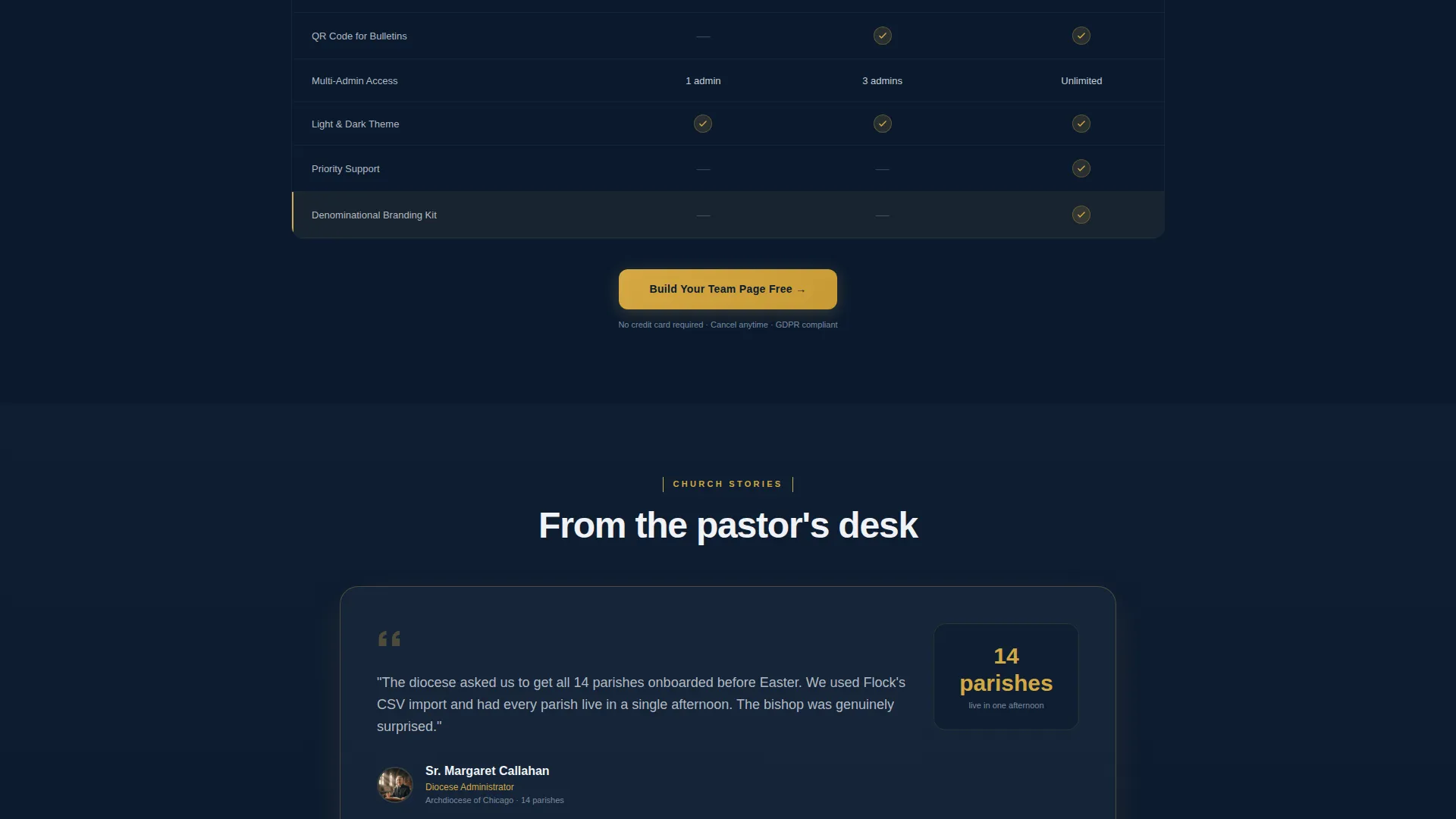
The Free, Standard, and Ministry Pro plan columns use row-by-row feature reveals. Each row highlights in steeple gold as it enters the viewport, drawing attention to key differentiators like multi-campus support, custom role tags, and analytics dashboard access.
Embedded Testimonials
Real church admin testimonials appear inside the comparison table flow, breaking up the feature rows and keeping the page voice human. This placement reinforces trust at the exact moment a visitor is weighing plan options.
Live Theme Toggle Preview
A final section lets visitors toggle between light and dark themes on a live page preview. This demonstrates how the directory looks on both a church website and a hallway kiosk screen before any commitment is made.
CSV Roster Preview Path
The secondary call to action, "See It With Your Roster," lets visitors upload or paste a CSV file of names and roles to generate an instant team page preview. This reduces the gap between first interest and real engagement to a single step.
Page sections overview
| Section | Purpose |
|---|---|
| Logo Bar Header | Opens with denomination logos and the headline "Your Whole Team. One Living Page." alongside a browser mockup showing a sample team grid |
| Three-Step Setup | Animated import, customize, and publish sequence that plays on scroll to show how fast setup can be |
| Comparison Table | Free, Standard, and Ministry Pro columns with viewport-triggered row highlights and embedded testimonial cards |
| Theme Toggle Preview | Live light and dark mode preview showing the directory on a website and a kiosk display |
| Bottom call to action Section | Final "Build Your Team Page Free" call to action with the two-field signup form |
| Pinned Top Bar | Slim sticky bar carrying the primary call to action after the first scroll, keeping the signup prompt always visible |
Design & branding system
The visual system follows a Dashboard Pro theme built around a Midnight Blue color palette. The result feels like a focused church management tool rather than a generic website template.
- Deep sanctuary navy (#0B1A2E) forms the primary background, vestment slate (#1E2D42) surfaces card rows and table backgrounds, and communion silver (#C8CDD5) handles body text and dividers
- Steeple gold (#D4A843) is reserved for calls to action, toggle states, plan highlights, and the row-reveal effect in the comparison table
- Typography uses clean, weighted sans-serif headings that feel authoritative without relying on decorative religious imagery
Mobile & speed optimization
The layout is designed to remain clear and functional across screen sizes, which matters especially for church staff who review the directory from a phone between services.
- The comparison table and team grid reflow cleanly for smaller viewports so plan details and team member cards remain readable without horizontal scrolling
- The sticky top bar and bottom call to action persist correctly on mobile, keeping the signup path accessible at every scroll position
How this template helps you convert
Flock is structured around a freemium and trial conversion model. Every design decision pushes a curious visitor toward taking one low-friction action.
- The pinned top bar carries the "Build Your Team Page Free" call to action from the first scroll onward, so the signup path is never out of reach no matter where a visitor stops reading
- The two-field signup form asks only for a church name and an email address with no credit card required, removing the most common reason visitors abandon a signup flow
- The "See It With Your Roster" CSV path lets visitors generate a real preview using their own data, turning abstract curiosity into a tangible result before any account is created
Other information about this template
Flock is part of the Church and Religious Organization Website Templates category under the broader Technology template collection. A few additional details worth knowing before you build.
- The template is designed to serve a wide range of faith traditions, including nondenominational megachurches, Catholic parishes, AME congregations, synagogues, and mosques
- The directory structure supports bios, role badges, and contact paths for every team member, from lead pastors to food pantry coordinators and youth ministry volunteers
- The comparison table rows include team member count limits, custom role tags, multi-campus support, photo uploads, and analytics dashboard access as distinguishing features across plan tiers
- The template is categorized under the Church and Religious Org Team Page niche, making it a focused solution rather than a generic organizational directory
Theme
Dashboard Pro
Creative direction
Launch Energy
Color system
Midnight Blue
Style
Comparison Table
Direction
Freemium/Trial
Page Sections
Scrolling Logo Bar Header
Animated Three-step Setup
Viewport-triggered Comparison Table
Embedded Testimonial Cards
Live Light and Dark Theme Toggle
CSV Roster Preview Path
Related questions
Can this template support a church with multiple campuses?
Does the free plan require a credit card to sign up?
What is the "See It With Your Roster" feature?
What types of team members can be listed in the directory?
Is this template suitable for non-Christian religious organizations?



