Forge - Powerful Fitnessbuilder Landing Page Template
Forge is a bold, brutalist fitness website builder landing page built for personal trainers, gym owners, and boutique studio operators. It combines a live-data metrics wall, a drag-and-drop builder demo, and a high-urgency scroll rhythm to turn visitors into signups fast. No corporate softness, no filler, just raw capability on display.
by Rocket studio
Quick summary
Forge is a single-page fitness website builder landing page that opens with a live metrics dashboard and closes with a full-width call-to-action button. It is built for fitness professionals who need a site that communicates power, speed, and results. The design is Bold Brutalist, the palette is electric, and every section earns the next click.
Who this template is for
This template is built for fitness professionals who are done with generic website tools that feel too corporate and too slow. It speaks directly to the people building real fitness businesses from the ground up.
- Solo personal trainers running transformation challenges or online coaching programs
- CrossFit box owners and boutique gym operators who need class schedules and trainer bios live
- Online fitness influencers selling programs and digital products around the clock
What problem this template solves
Most fitness professionals spend too long on website tools that were never designed for their world. The result is a site that looks like a dentist's office. Forge solves that mismatch directly.
- Generic builders offer no fitness-specific sections like WOD boards, class schedules, or pricing tables built for training packages
- Existing templates feel polished but lifeless, disconnected from the raw energy of a real gym
- The selling process is slow because visitors cannot see the builder in action before committing
What you get with this template
This template delivers a complete, high-urgency landing page that sells a fitness website builder through demonstration and credibility. Every section has a job, and every job is to move the visitor one step closer to clicking "Build Your Site Free."
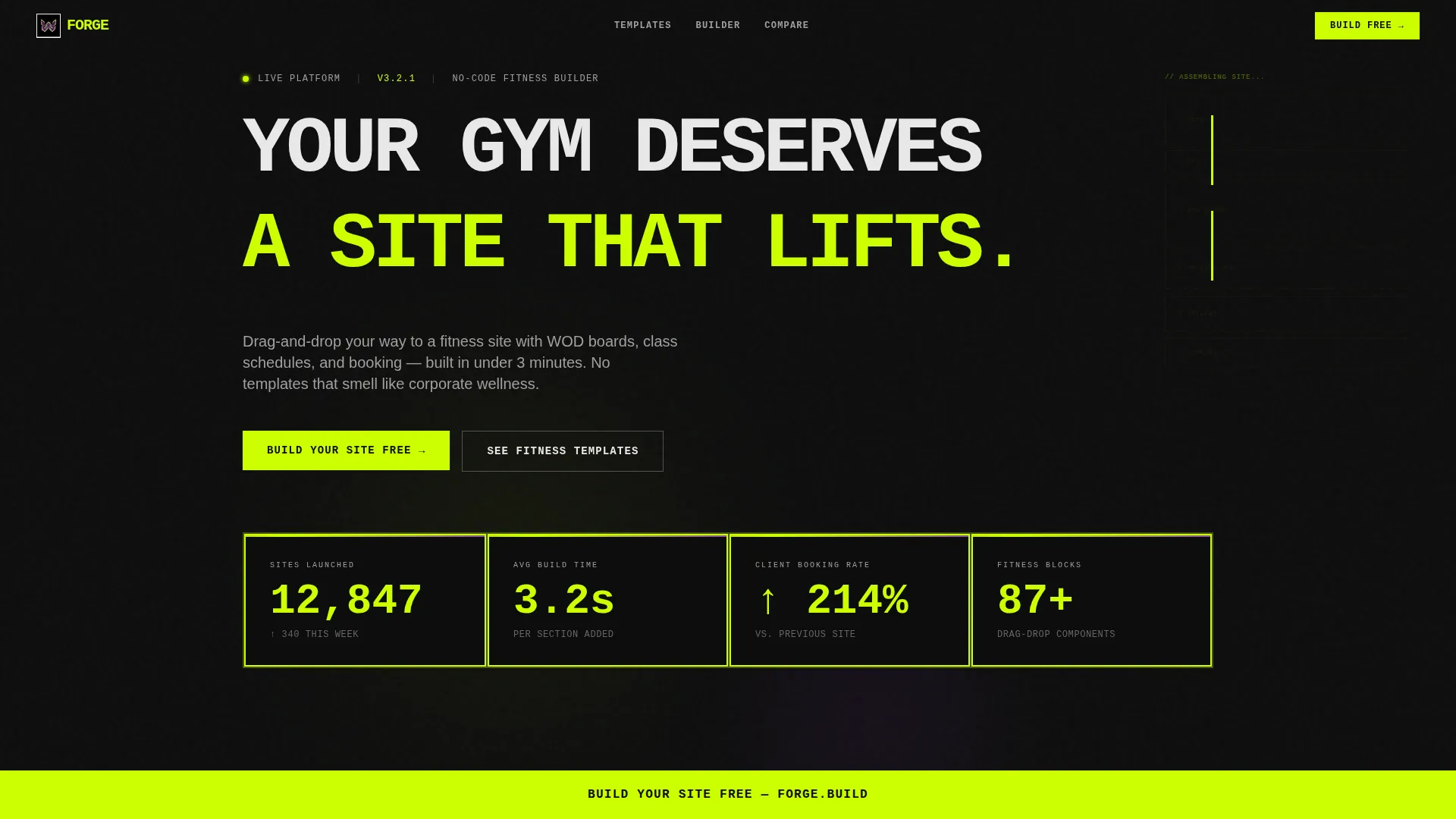
- A live-data metrics wall in the header that displays real site-launch numbers with animated counters
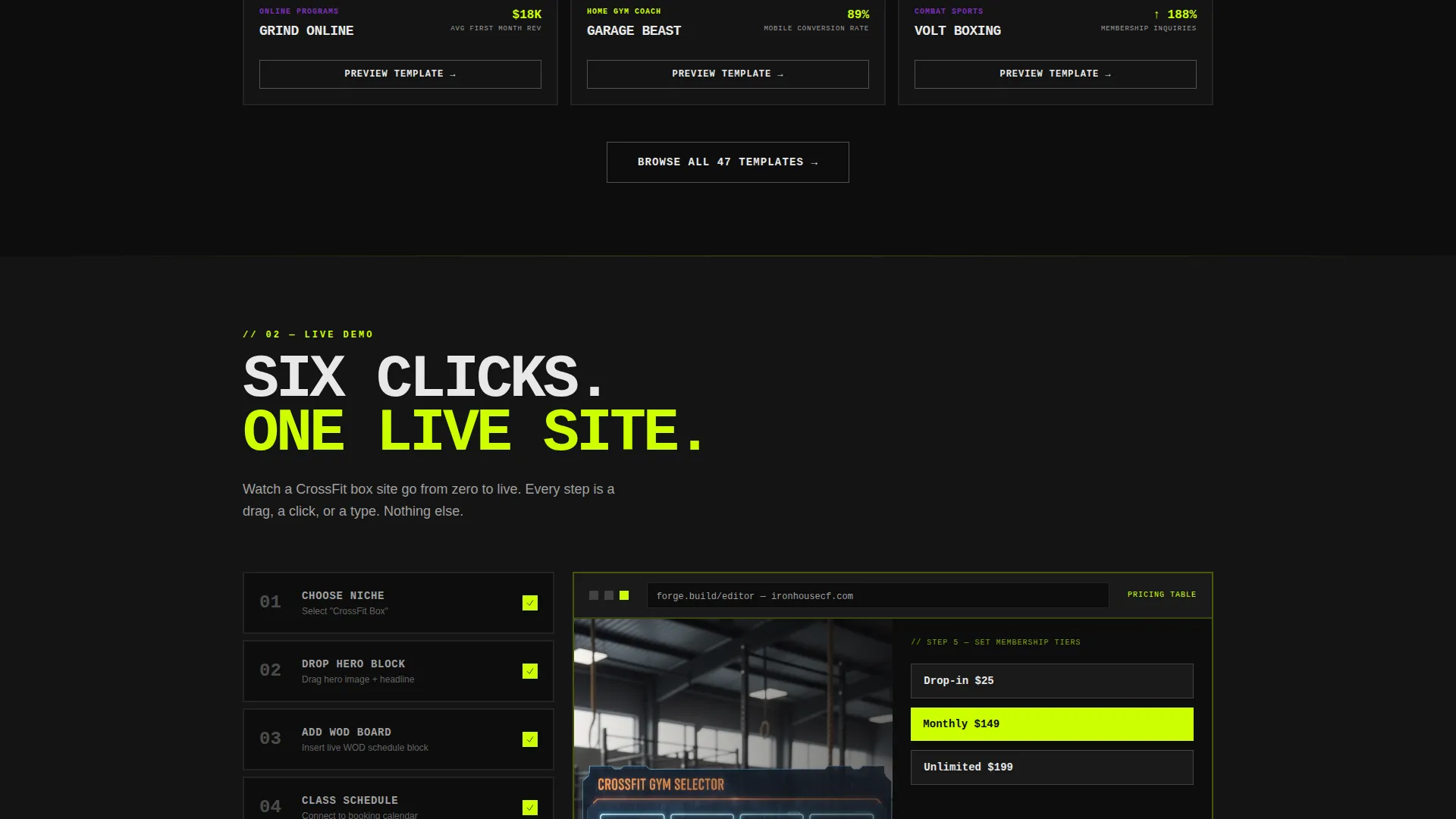
- A drag-and-drop builder demo section showing a full fitness site assembled in six visible steps
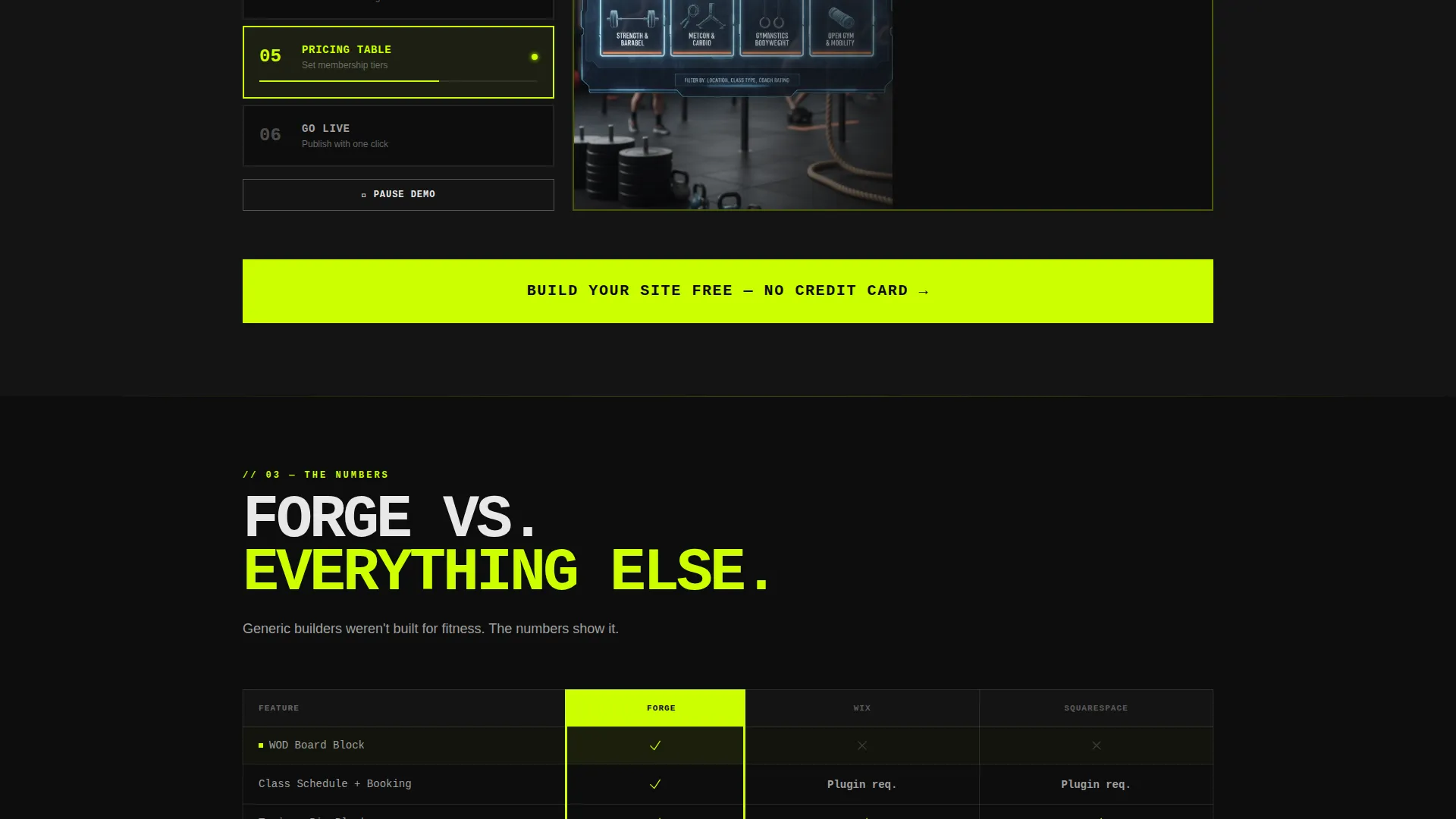
- A brutalist comparison table placing the builder side by side with generic alternatives on speed, features, and mobile conversion
Feature list
This template includes a focused set of high-impact components designed specifically for a fitness website builder landing page. Each one is grounded in the source brief and built to perform a clear role in the visitor journey.
Live Metrics Dashboard Header
The page opens with a bold stats wall displaying numbers like sites launched, average section build time, and client booking rate improvements. Each metric lives in its own brutalist card with thick acid-lime borders. Counters tick upward on page load to signal credibility before the headline even registers.
Ghosted Wireframe Builder Animation
Behind the metrics grid, a wireframe of a fitness website assembles itself in real time. Blocks snap into place, hero image, class schedule, trainer bio, pricing table, simulating the build experience visually and immediately. This animation sets the product's core promise before the visitor scrolls a single pixel.
Template Preview Grid with Hover Interaction
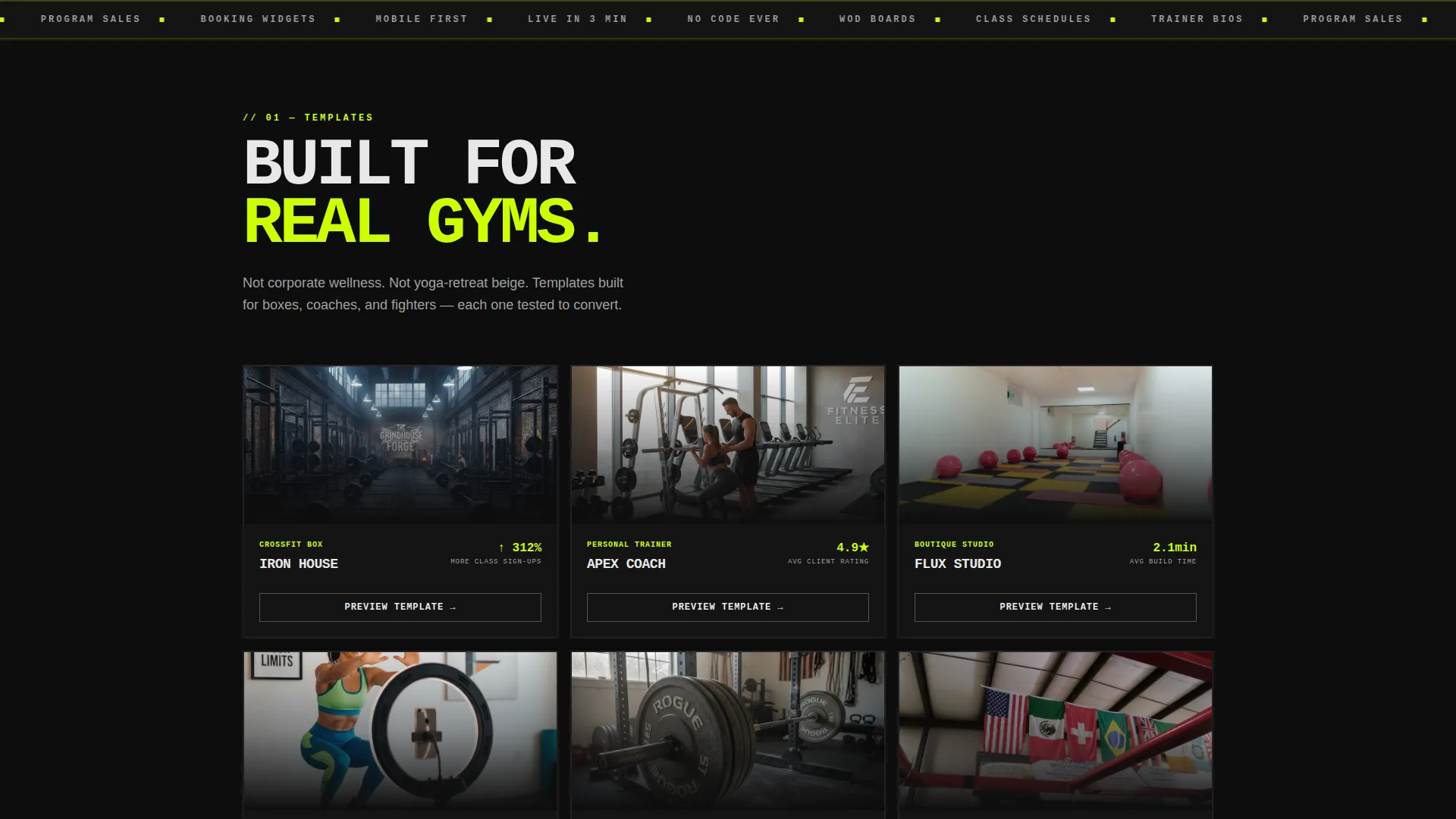
A grid of fitness template previews tilts and rotates on hover like album covers. This section lets visitors explore the visual range of the builder without leaving the page. It builds proof through variety and makes the product feel alive.
Live Six-Click Builder Demo
A dedicated section walks visitors through a fitness site being assembled in six clicks. This is the page's primary selling moment. Showing the process removes hesitation more effectively than any written claim could.
Brutalist Comparison Data Table
A no-rounded-corners comparison table pits Forge against generic website builders across speed, fitness-specific features, and mobile conversion rates. The visual style reinforces the brand's anti-corporate positioning. The data does the persuading.
Pinned Full-Width call to action Button
After the builder demo, a full-width electric lime "Build Your Site Free" button appears and then pins to the bottom of the viewport for the rest of the scroll. No form, no friction, the click routes directly to the signup interface. A secondary "See Fitness Templates" call to action appears earlier for visitors who need more proof first.
Page sections overview
| Section | Purpose |
|---|---|
| Stats Metrics Wall | Opens with live counters and brutalist data cards to establish instant credibility |
| Wireframe Build Animation | Visualizes the builder assembling a fitness site in real time behind the metrics |
| Template Preview Grid | Shows fitness template variety with tilt-and-rotate hover interactions |
| Live Builder Demo | Walks visitors through a six-click site build to demonstrate product speed |
| Comparison Data Table | Benchmarks the builder against generic tools on key fitness-relevant criteria |
| Pinned call to action Button | Locks "Build Your Site Free" to the bottom of the viewport after the demo section |
Design & branding system
The visual identity follows a Bold Brutalist theme powered by an Acid Digital color system. Every design decision is intentional and aggressive, this page is not trying to look approachable, it is trying to look capable.
- Void black (#0D0D0D) dominates the background throughout, reinforcing a warehouse-gym-at-midnight atmosphere
- Electric lime (#CCFF00) drives every call to action, data highlight, and interactive pulse, while bruise purple (#7B2FBE) handles secondary accents and hover states
- Typography is oversized, monospaced, and pushed to the edges of the layout with zero softness, no rounded corners, no gentle gradients, no corporate whitespace
Mobile & speed optimization
The layout is designed with a mobile-first mindset that does not sacrifice the brutalist visual impact on smaller screens. Fitness audiences browse heavily on phones, and this template accounts for that reality.
- The pinned call to action button remains fixed at the bottom of the viewport on all screen sizes, keeping the conversion action always reachable
- The stats dashboard, template grid, and comparison table all reflow cleanly into single-column stacks without breaking the visual hierarchy
How this template helps you convert
The page is structured as a deliberate escalation. Each section increases urgency and capability until the visitor feels the product's value before they are asked to act.
- The metrics wall in the header establishes credibility through real numbers before the visitor reads a single headline, removing the need for trust-building copy later in the page
- The live builder demo is positioned as the primary selling moment, showing the product in action converts more effectively than describing it, and the pinned call to action capitalizes on that momentum immediately after
Other information about this template
This template is part of the Fitness Software and SaaS category under the Technology umbrella. It is matched to a fitness website builder niche with a Dashboard and Data Grid template style.
- The creative direction is Launch Energy, meaning the scroll rhythm intentionally accelerates as the visitor moves down the page, sections get shorter, type gets larger, and the lime palette intensifies
- The header concept is a Stats and Metrics wall, a deliberate choice that prioritizes proof over pitch from the very first viewport
- The landing page direction is Click-Through, with no forms on the page, every call to action routes directly to the signup or builder interface to reduce drop-off at the conversion point
Theme
Bold Brutalist
Creative direction
Launch Energy
Color system
Acid Digital
Style
Dashboard/Data Grid
Direction
Click-Through
Page Sections
Live Metrics Dashboard Header
Real-time Wireframe Builder Animation
Tilt-and-rotate Template Preview Grid
Six-click Live Builder Demo
Brutalist Comparison Table
Viewport-pinned Call to Action Button
Related questions
Who is this landing page template designed for?
Does this template include a form or checkout flow?
What makes the design different from a standard SaaS landing page?
Can I update the metrics shown in the stats wall?
What is the secondary call to action and when does it appear?



