FranchiseCommand - Unified Compliance Landing Page Template
Franchisecommand is a bento grid landing page template built for franchise document management platforms. It pairs a Tech Glass visual identity with interactive scroll behavior, a dark-glass header, and a three-step lead capture form. The layout guides franchise development directors, multi-brand franchisees, and franchise attorneys from first impression to qualified demo request.
by Rocket studio
Quick summary
Franchisecommand is a single-page bento grid template designed for franchise document management platforms. It opens with an asymmetric dark-glass header, moves through interactive feature cards with hover-triggered micro-animations, and closes with a progressive three-step lead capture form. The Tech Glass aesthetic and Teal Catalyst color system make the product feel precise, serious, and alive.
Who this template is for
This template is built for software platforms that help franchise organizations manage complex document workflows. It speaks directly to buyers who operate at scale and feel the real cost of document chaos.
- Franchise development directors managing multi-unit expansions and disclosure document timelines
- Multi-brand franchisees handling renewal cycles across several different franchise concepts
- Franchise attorneys who need fast access to every Franchise Disclosure Document amendment on record
What problem this template solves
Franchise document management is genuinely complex. Disclosure documents, operations manuals, compliance calendars, signature tracking, and version histories rarely live in one place. The result is missed deadlines, audit risk, and hours lost searching for the right file version.
- Visitors arrive without a clear sense of what unified document control actually looks like in practice
- A static feature list does not prove operational capability the way a live demo interaction does
- Long scroll pages often lose qualified leads before they reach a conversion point
What you get with this template
This template delivers a complete, conversion-focused landing page structure. Every section is purpose-built to move a franchise professional from curiosity to contact.
- An asymmetric bento grid layout with six to eight dark-glass header panels showing real document artifacts
- Interactive feature cards with hover-triggered animations including a compliance timeline and a redline diff-view
- A three-step progressive lead capture form plus a secondary email-gated PDF download path
Feature list
This template includes a focused set of interactive and structural features. Each one is grounded in the source brief and designed to serve a qualified franchise software buyer.
Animated Dark Glass Header
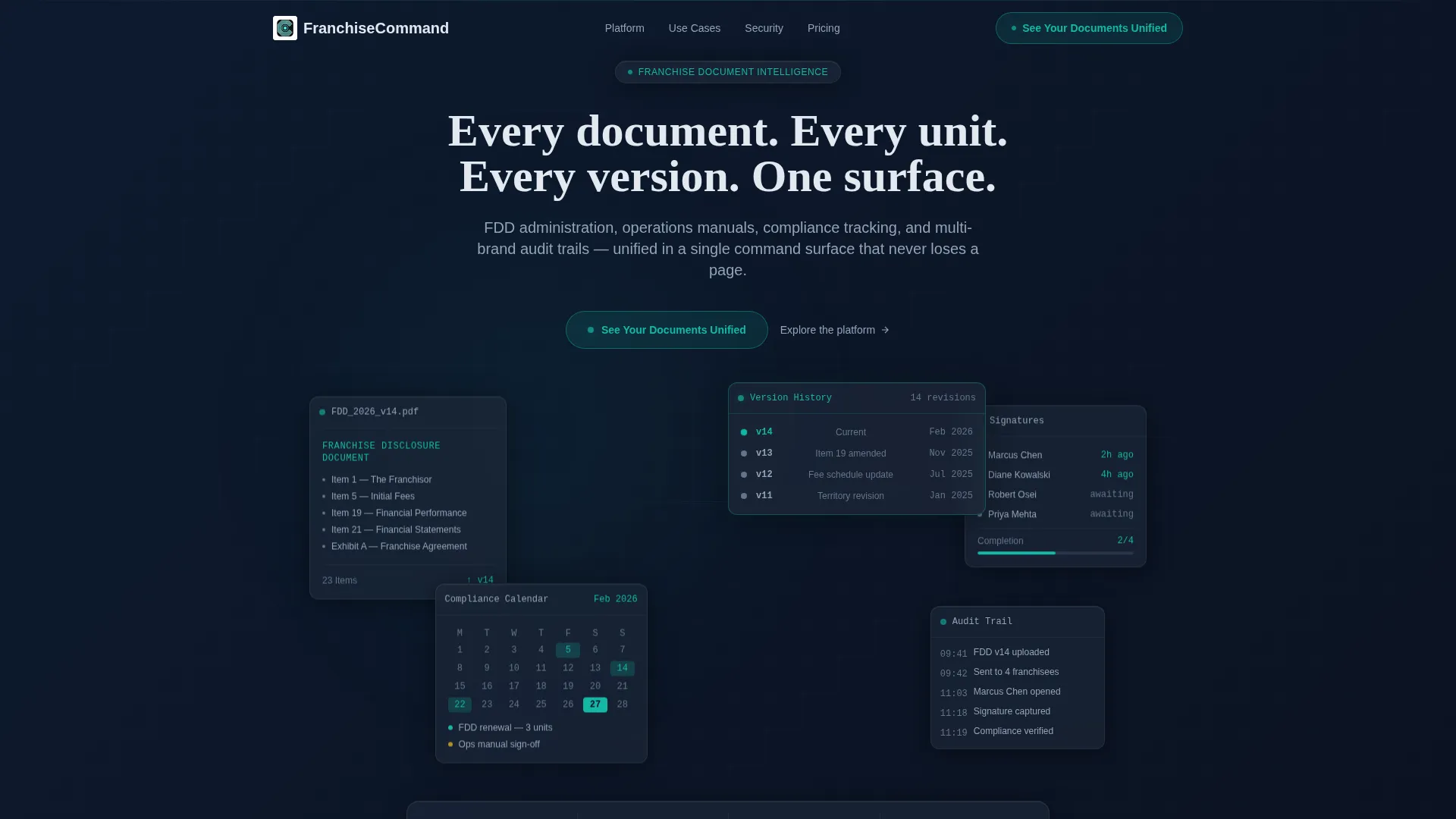
Six to eight translucent, layered panels fill the header in an asymmetric bento composition. Each panel displays a distinct document artifact: an FDD cover mid-scroll, a signed signature field, a version history timeline, and a compliance calendar. Panels sit at slightly different z-indexes with soft parallax on mouse movement and light refracting across frosted surfaces.
Interactive Bento Grid Sections
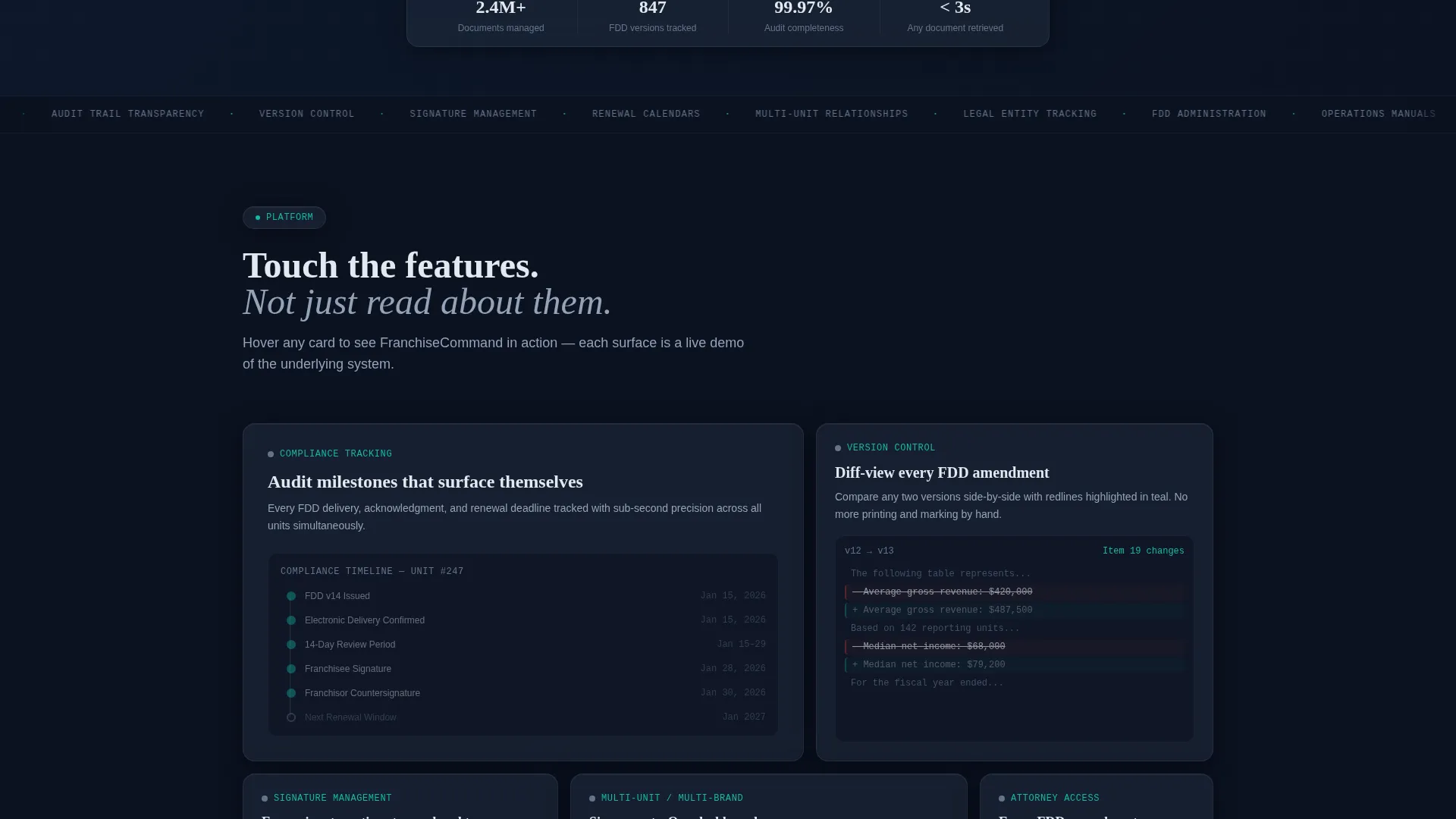
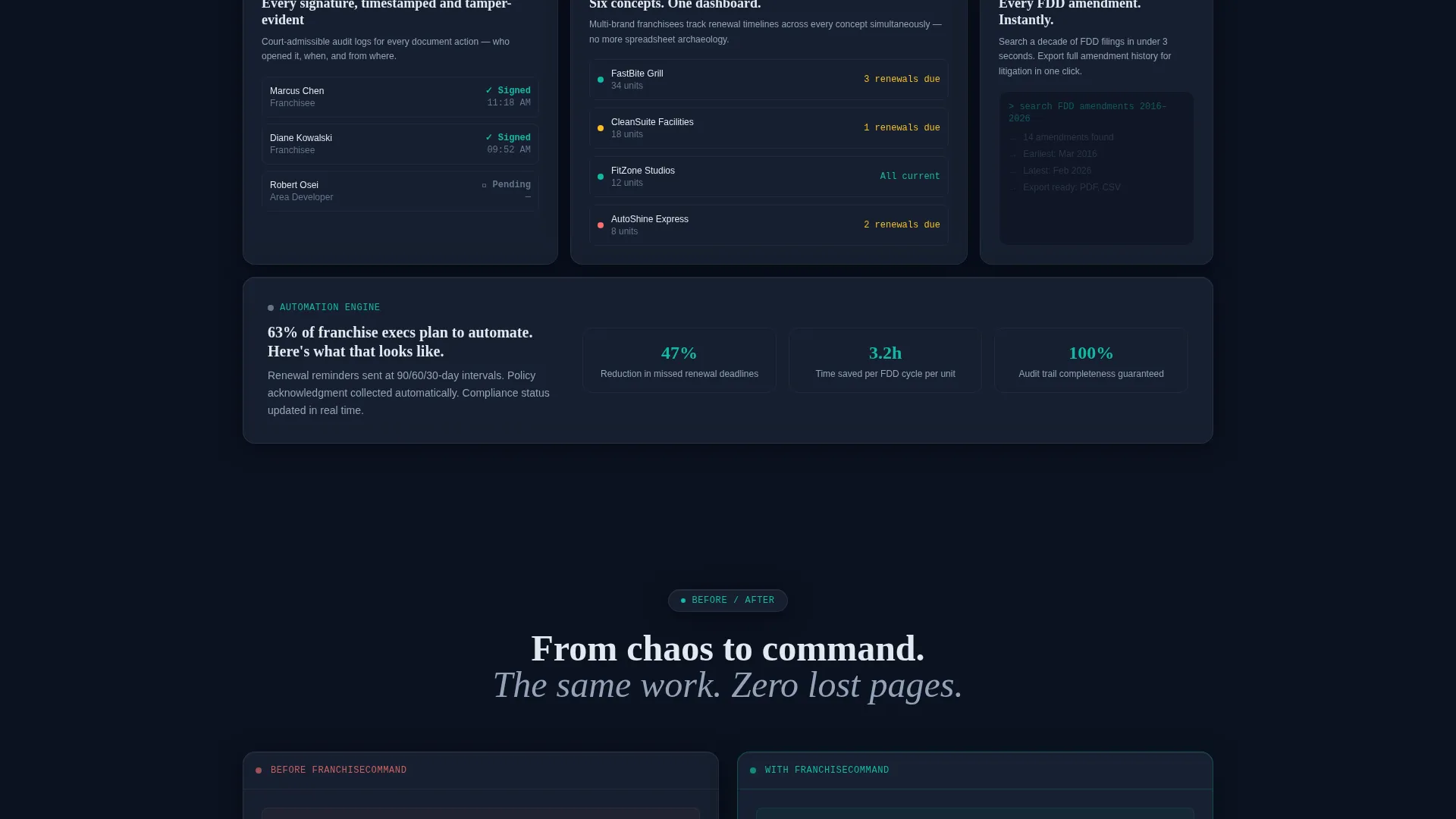
The scroll layout is not passive. Each bento card responds on hover: the Compliance Tracking card animates an audit milestone timeline, and the Version Control card slides in a diff-view comparing two FDD editions with redlines highlighted in teal. Visitors experience the product before they ever fill out a form.
Progressive Three-Step Lead Form
The primary conversion path uses a three-step progressive disclosure form. Step one captures franchise unit count via dropdown. Step two presents checkboxes for primary document pain points. Step three collects name, email, and an optional franchise brand or system name field.
Secondary PDF Download Path
A secondary conversion option offers a downloadable PDF titled "The Franchise Document Ops Checklist." It is gated behind email only. This path captures visitors who are not yet ready for a demo but have scrolled deep enough to signal strong intent.
Shifting Grid Layout Logic
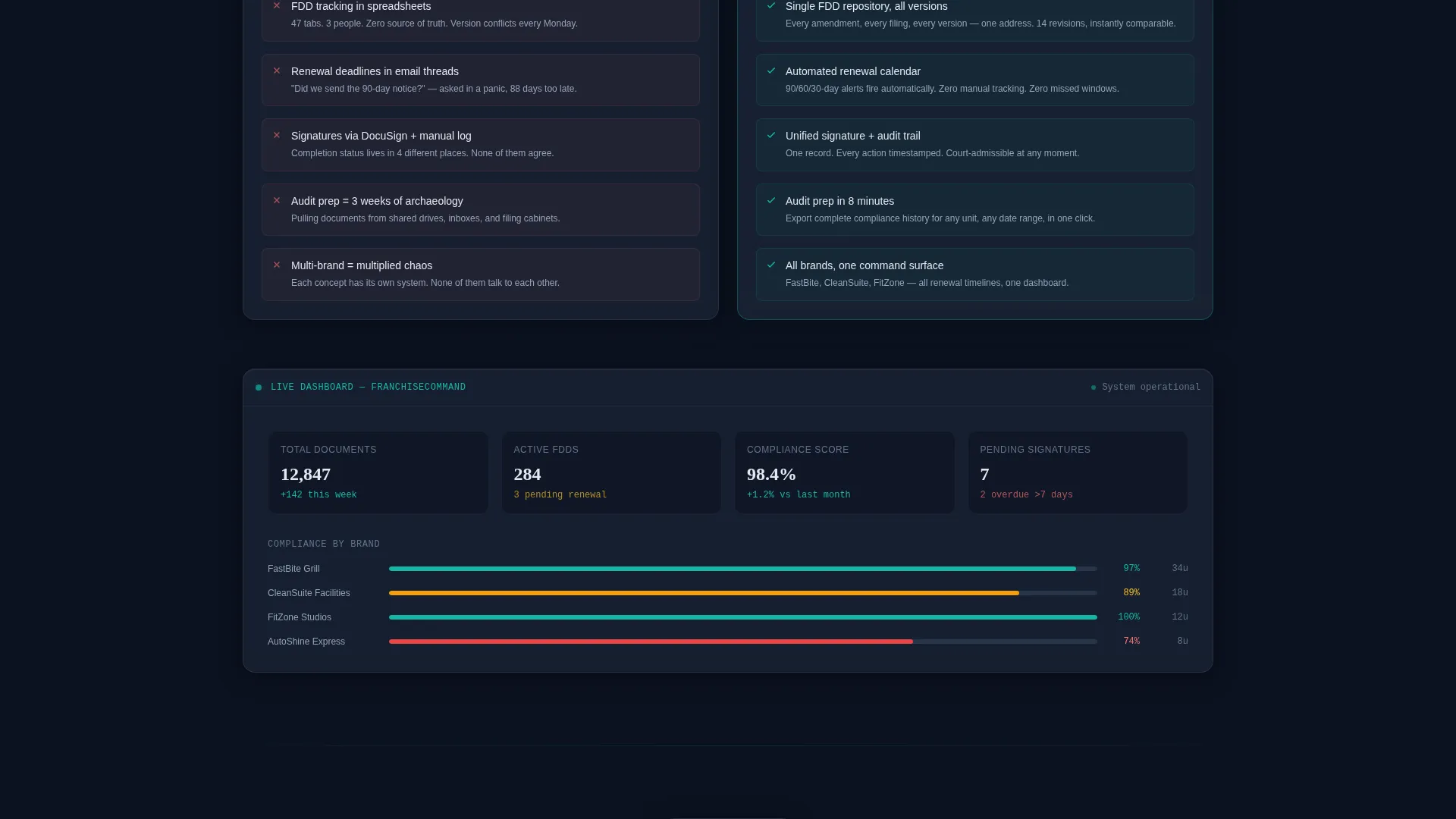
The bento grid reorganizes between page sections. It moves from a three-column document taxonomy view to a two-column before-and-after workflow comparison to a single wide panel displaying a live dashboard mockup. Each scroll depth escalates the proof narrative from organization to automation to litigation protection.
Typed Headline and Floating call to action
The headline types itself in on load: "Every document. Every unit. Every version. One surface." A floating glass pill button carrying the call to action "See Your Documents Unified" appears first in the header and repeats at the grid's midpoint after the interactive proof section.
Page sections overview
| Section | Purpose |
|---|---|
| Dark Glass Header | Establish platform authority with layered document artifact panels and typed headline |
| Floating call to action Button | Capture early high-intent clicks before scroll begins |
| Compliance Tracking Card | Animate an audit milestone timeline on hover to demonstrate live tracking |
| Version Control Card | Slide in a redline diff-view on hover to show FDD version comparison |
| Three-Column Document Taxonomy | Organize core document categories in a skimmable bento grid format |
| Before and After Workflow | Compare old document chaos with unified platform control side by side |
| Live Dashboard Panel | Show a wide single-panel dashboard mockup as the final proof of capability |
| Midpoint call to action Block | Repeat the primary call to action after interactive proof is delivered |
| Three-Step Lead Form | Qualify and convert visitors through a progressive disclosure capture flow |
| PDF Checklist Gate | Capture secondary leads via email-only gated download offer |
Design & branding system
The visual identity is built on a Tech Glass theme using the Teal Catalyst color system. Every color decision is intentional. Nothing is decorative without purpose.
- Deep obsidian (#0B1120) is the primary background; frosted panel gray (#1E293B) surfaces card interiors; crisp signal white (#E2E8F0) handles all typography and borders
- Translucent teal (#14B8A6) appears only on hover states, progress indicators, and active document badges so every flash of color signals a live interaction
- Card borders carry a 1px frosted-glass edge with subtle inner glow, making each tile appear to float above the dark background like panels in a lit aquarium
Mobile & speed optimization
The bento grid layout is structured to adapt across screen sizes without breaking the visual hierarchy. Interaction-heavy sections are designed to degrade gracefully on touch devices.
- Hover micro-animations are contained within individual bento cards so they do not affect page layout or interrupt scroll behavior
- The floating call to action pill and the three-step form are positioned to remain accessible at any scroll depth on smaller screens
- The grid column count shifts between sections by design, which naturally supports a responsive reflow from three columns down to a single-column stack
How this template helps you convert
This template is built around a dual conversion strategy. It captures both high-intent demo-ready visitors and early-stage researchers in the same scroll journey.
- The interactive bento cards let visitors touch the product before they commit to anything. A qualified franchise director who hovers over the version control card and sees a live redline comparison is already sold on the concept before the form appears.
- The three-step progressive form reduces friction by asking one type of question at a time. Unit count first, pain point second, contact details third. Each step feels small, which keeps completion rates higher than a single long form would.
- The secondary PDF download path catches visitors who are not yet ready for a demo. An email captured here is a real lead at a real stage of consideration, not a bounce.
Other information about this template
This template sits at the intersection of franchise software and document operations tooling. It is well suited for platforms serving the compliance-heavy, multi-unit franchise sector.
- The template style is Bento Grid, the theme is Tech Glass, and the creative direction is Interactive Explorer
- The header concept is Dark Glass Panels and the landing page direction is Lead Generation using the Teal Catalyst color system
- This template can support franchise document management use cases including FDD administration, operations manual versioning, multi-brand compliance consolidation, and audit trail visibility
Theme
Tech Glass
Creative direction
Interactive Explorer
Color system
Teal Catalyst
Style
Bento Grid
Direction
Lead Generation
Page Sections
Animated Dark Glass Header Panels
Hover-triggered Interactive Feature Cards
Three-step Progressive Lead Form
Email-gated PDF Checklist Download
Shifting Bento Grid Layout
Floating Glass Pill Call to Action
Related questions
Who is the primary audience for this template?
What makes the header different from a standard hero section?
What is the purpose of the secondary PDF download path?
Can the three-step form support different qualification questions?
Does this template include placeholder content for the bento panels?



