Conversion Real Estate Landing Page Template
Portal is a bento grid real estate customer portal landing page built on a Tech Glass visual theme with a Monochrome Steel palette. It opens with an interactive calculator that proves value before any copy loads, then walks visitors through a side-by-side feature matrix. The design targets property managers, landlords, and buyers who need one clean interface to replace scattered tools.
by Rocket studio
Quick summary
Portal is a single-page bento grid landing page for a real estate customer portal product. It leads with a live savings calculator, follows with a Without versus With comparison matrix, and closes with a low-friction three-field sign-up form. The Monochrome Steel color system and Tech Glass visual theme give every section a sharp, credible finish that matches the product's professional audience.
Who this template is for
This template is built for real estate software products and portal platforms that need to convince a skeptical, time-pressured audience to make a switch. It speaks directly to people who already manage properties but are doing it the hard way.
- Property managers running portfolios of dozens to hundreds of units
- Landlords who currently track rent and leases in spreadsheets or paper records
- First-time buyers overwhelmed by closing documents and payment timelines
What problem this template solves
Real estate professionals often arrive at a product page already exhausted. They need to see proof of value fast, or they leave. Generic hero images and bullet-point feature lists do not convert this audience. Portal replaces those conventions with tools and evidence.
- Visitors get a working calculator before they read a single line of marketing copy
- The feature matrix makes the cost of their current workflow visible and tangible
- The sign-up form appears only after the page has already made the argument
What you get with this template
You get a fully structured bento grid landing page layout with every section, component, and interaction pattern pre-designed and ready to customize. The template is built around three conversion moments that compound as the visitor scrolls.
- An interactive role-based calculator hero that replaces a static header image
- A scrolling Without versus With comparison matrix with escalating stakes per row
- A sticky bottom call-to-action bar and a secondary sandbox demo path
Feature list
This section describes the built-in components and layout capabilities included in the Portal template.
Role-Based Savings Calculator
The header section is a frosted-glass calculator card floating over a dark gunmetal viewport. Visitors select their role (owner, tenant, or manager) and enter their property count. The tool instantly surfaces estimated hours saved per month, documents eliminated, and payment processing fees reduced, with numbers that animate upward like a stock ticker. No hero image is needed because the tool demonstrates value directly.
Bento Grid Comparison Matrix
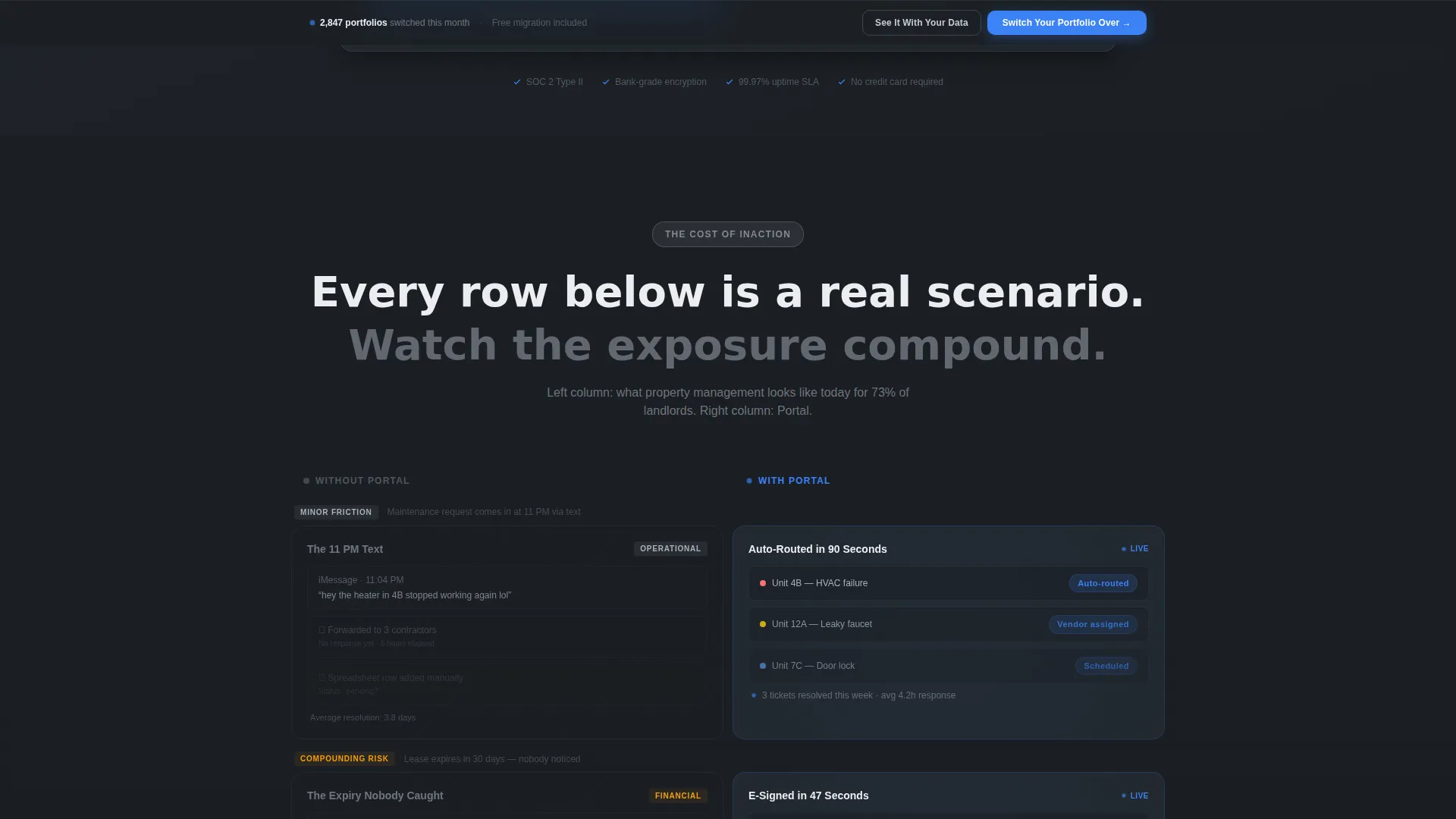
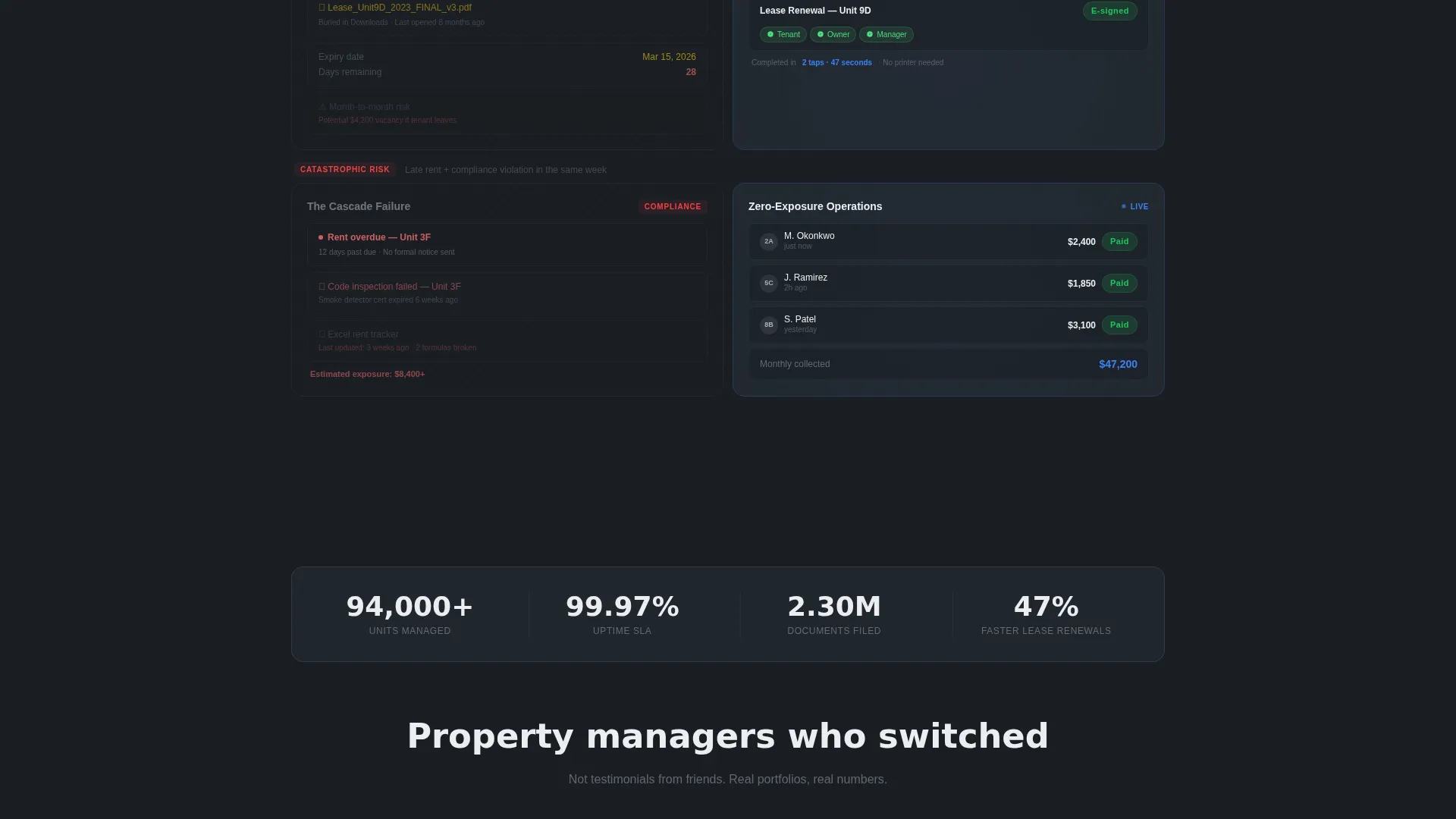
Once past the calculator, the page reveals a structured bento grid where each row presents a direct contrast. Left-column cells use muted steel styling to show the current painful reality: scattered emails, PDF attachments, and late-night spreadsheet edits. Right-column cells use lit glass-panel styling with live interface previews showing auto-routed maintenance tickets, e-signed lease renewals, and real-time rent ledgers. Each row escalates in severity, moving from minor friction to compliance-level risk.
Sticky Conversion Bar
A bottom-anchored call-to-action bar activates after the visitor passes the third bento row. The primary action reads "Switch Your Portfolio Over." The bar stays visible during continued scrolling so the decision point is never more than one tap away.
Secondary Demo Path
A second conversion option, "See It With Your Data," links to a live sandbox demo pre-loaded with sample properties. This path serves visitors who want proof of the interface before committing, without sending them off the page empty-handed.
Three-Field Sign-Up Form
The sign-up section captures only three inputs: property count, current tools used via a dropdown, and email address. The dropdown includes common options such as spreadsheets, and named property management platforms. Keeping the form to three fields reduces friction after the calculator and matrix have already made the value case.
Tech Glass Visual System
Every bento cell, card, and interactive element uses the Monochrome Steel palette: deep gunmetal (#1B1F24) for dark backgrounds, brushed aluminum (#A8B0BA) for secondary text, frosted panel white (#ECEEF1) for light-mode cells, and electric blue (#3B82F6) reserved exclusively for interactive states and live-data indicators. The blue accent appears only where the visitor can take an action.
Page sections overview
| Section | Purpose |
|---|---|
| Calculator Hero | Prove value with an interactive role-based estimator before any copy |
| Role Selector | Let visitors identify as owner, tenant, or manager to personalize output |
| Savings Output | Animate estimated hours saved, documents cut, and fees reduced |
| Comparison Matrix | Show Without Portal versus With Portal in escalating bento rows |
| Maintenance Row | Illustrate auto-routed ticket flow versus scattered email chains |
| Lease Renewal Row | Show e-sign in two taps versus attachment-heavy back-and-forth |
| Rent Ledger Row | Display real-time ledger versus spreadsheet risk of missed payment |
| Compliance Risk Row | Make the cost of inaction visible at the highest-stakes scenario |
| Sticky call to action Bar | Anchor primary conversion action after the third matrix row |
| Demo Path Link | Offer sandbox access for visitors who want to see live data first |
| Sign-Up Form | Capture property count, current tool, and email in three fields |
Design & branding system
The Tech Glass theme uses a Monochrome Steel color palette to create a product interface aesthetic that feels credible and precise. Depth is built through the contrast between gunmetal dark cells and frosted white light cells within the same bento grid.
- Gunmetal (#1B1F24) and frosted white (#ECEEF1) alternate to create visual separation between bento cells
- Brushed aluminum (#A8B0BA) carries body text on dark surfaces; gunmetal text sits on light surfaces
- Electric blue (#3B82F6) appears only on interactive states and live-data indicators, keeping the accent purposeful
Mobile & speed optimization
The bento grid layout is structured to restack cleanly on smaller viewports. The calculator and comparison matrix remain functional and readable on touch screens without horizontal scrolling.
- Bento cells collapse into a single-column vertical stack on mobile screen widths
- The sticky conversion bar remains anchored at the bottom of the screen on all device sizes
- The three-field form is thumb-friendly and requires minimal input to complete
How this template helps you convert
Portal is designed around a specific psychological sequence: prove value, reveal cost of inaction, then ask for the conversion. Every section of the page serves one of those three moments.
- The calculator hero front-loads proof before the visitor reads any marketing copy, so trust is established at the first interaction rather than the last
- The escalating comparison matrix makes the visitor's current workflow feel progressively riskier with each row they scroll past, compounding the motivation to act
- The sticky bar and low-friction three-field form remove every remaining barrier at the moment the visitor is most persuaded
Other information about this template
Portal is categorized under Technology, specifically Real Estate Software and Software as a Service (SaaS). It is designed as a single landing page, not a multi-page website, so all conversion logic lives within one scrollable experience. The template style is Bento Grid, which suits data-rich real estate portal products that need to communicate multiple value propositions without a long text-heavy layout. The header concept is a Calculator or Estimator, which is a high-intent pattern for real estate portal software because it personalizes the value proposition for each visitor role before any feature list appears.
- Suitable for real estate customer portal products targeting property managers, landlords, and buyers
- The Comparison or Versus landing page direction is well-matched to audiences currently using competing tools or manual processes
- Template is ready to customize with your own brand colors, copy, and calculator logic


Theme
Tech Glass
Creative direction
Feature Matrix
Color system
Monochrome Steel
Style
Bento Grid
Direction
Comparison/Versus
Page Sections
Role-based Savings Calculator Hero
Bento Grid Comparison Matrix
Sticky Bottom Conversion Bar
Secondary Sandbox Demo Path
Three-field Sign-up Form
Monochrome Steel Visual Theme
Related questions
Who is the target audience for this landing page template?
Can I customize the calculator inputs and output metrics?
Does the template work without a live backend for the calculator?
What makes the bento grid format a good fit for a real estate portal product?
How does the sticky conversion bar work?



