Ledger - Powerful Education Landing Page Template
Ledger is a bento grid landing page template built for education inventory management platforms. It combines a live API code snippet header, a spec-sheet-style capability grid, and a sticky comparison table to show district asset managers exactly what the platform delivers. The design uses a Slate and Sky color system for a data-driven, authoritative feel.
by Rocket studio
Quick summary
Ledger is a single-page bento grid template designed for school district asset tracking platforms. It opens with a syntax-highlighted terminal header, moves through a spec-sheet capability grid, and anchors mid-page on a twelve-item comparison table. The result is a confident, data-forward landing page that speaks directly to district operations teams.
Who this template is for
This template is built for education technology companies and SaaS platforms serving K-12 school districts. It targets buyers who need to communicate platform value to procurement-minded audiences.
- District asset managers who coordinate inventory across dozens of school buildings
- IT coordinators preparing for audits and tracking device check-outs
- Operations directors who need capital budget justification backed by real depreciation data
What problem this template solves
Managing school district assets through spreadsheets is slow, error-prone, and nearly impossible to scale across multiple buildings. This template helps platforms communicate a faster, more reliable alternative.
- Teams lose weeks preparing for audits when data lives in disconnected files
- Missing or misplaced assets like Chromebook carts and lab equipment go untracked until it is too late
- Decision-makers struggle to justify procurement budgets without clear lifecycle and depreciation data
What you get with this template
Ledger delivers a complete, conversion-focused landing page structure built around credibility and clarity. Every section is purpose-designed to move evaluators toward a clear next step.
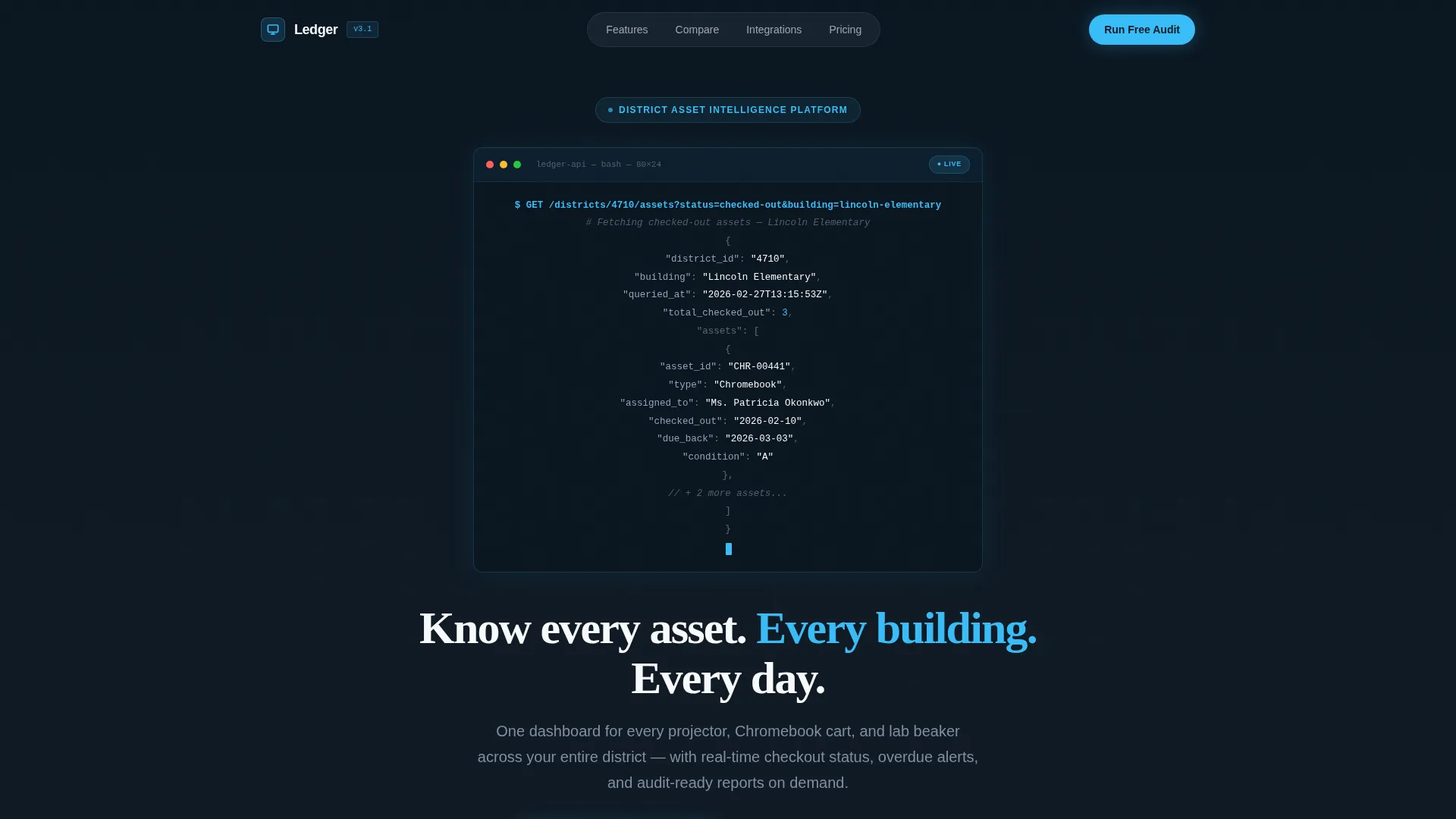
- A styled terminal code snippet header showing a live API asset query with syntax highlighting
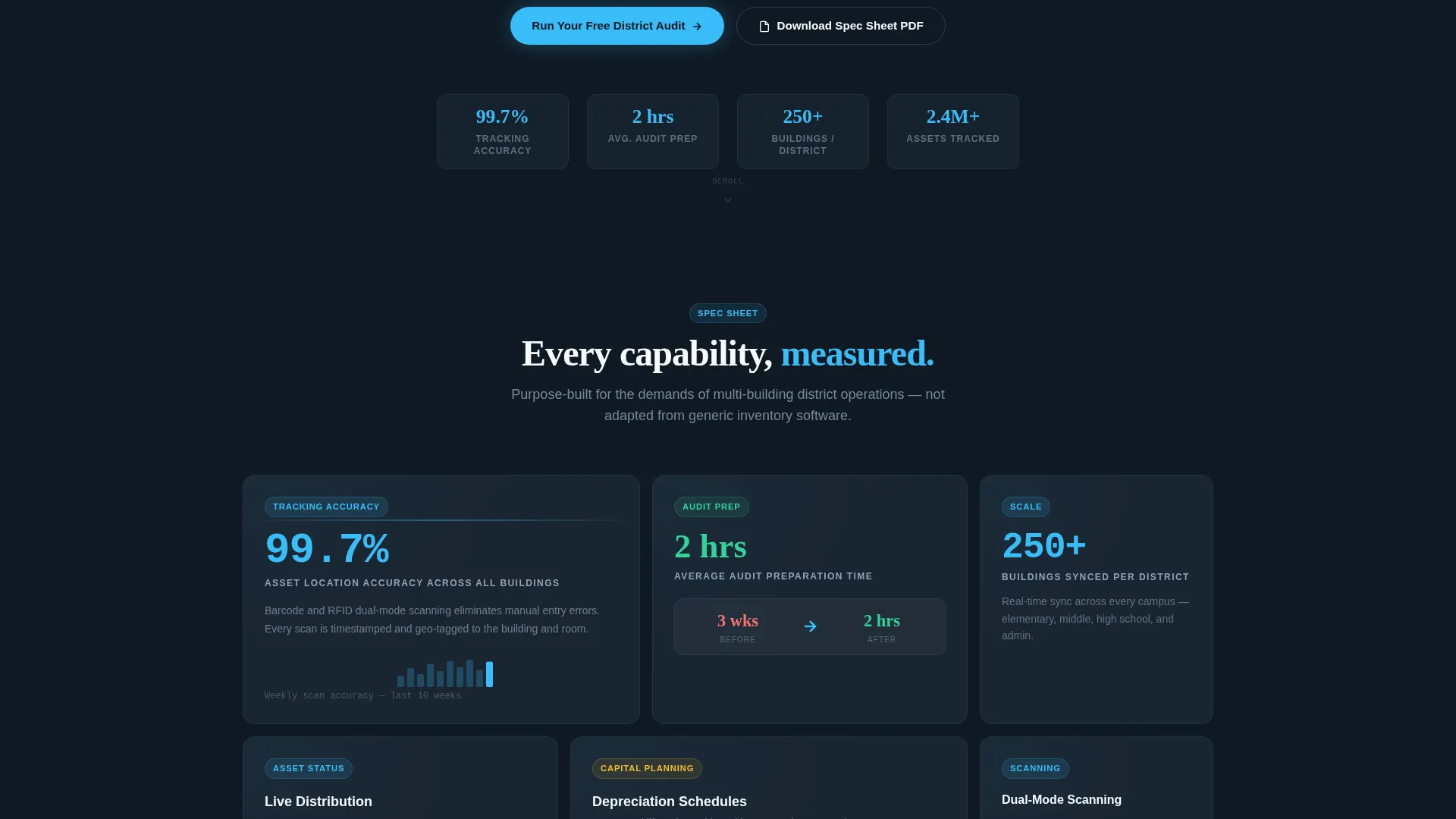
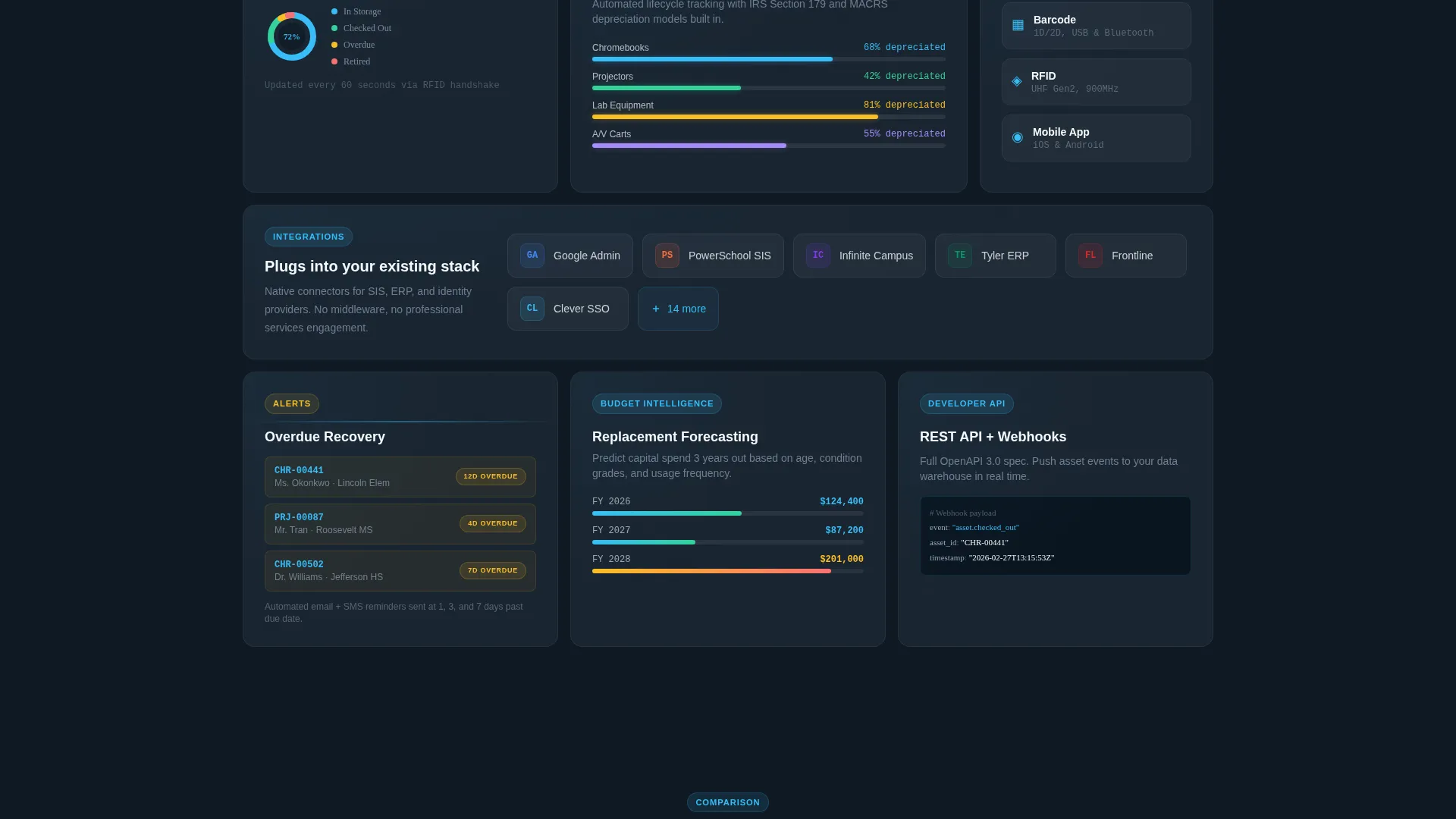
- A rhythmic bento grid of capability cards, each showing a metric, micro-illustration, and one-sentence explanation
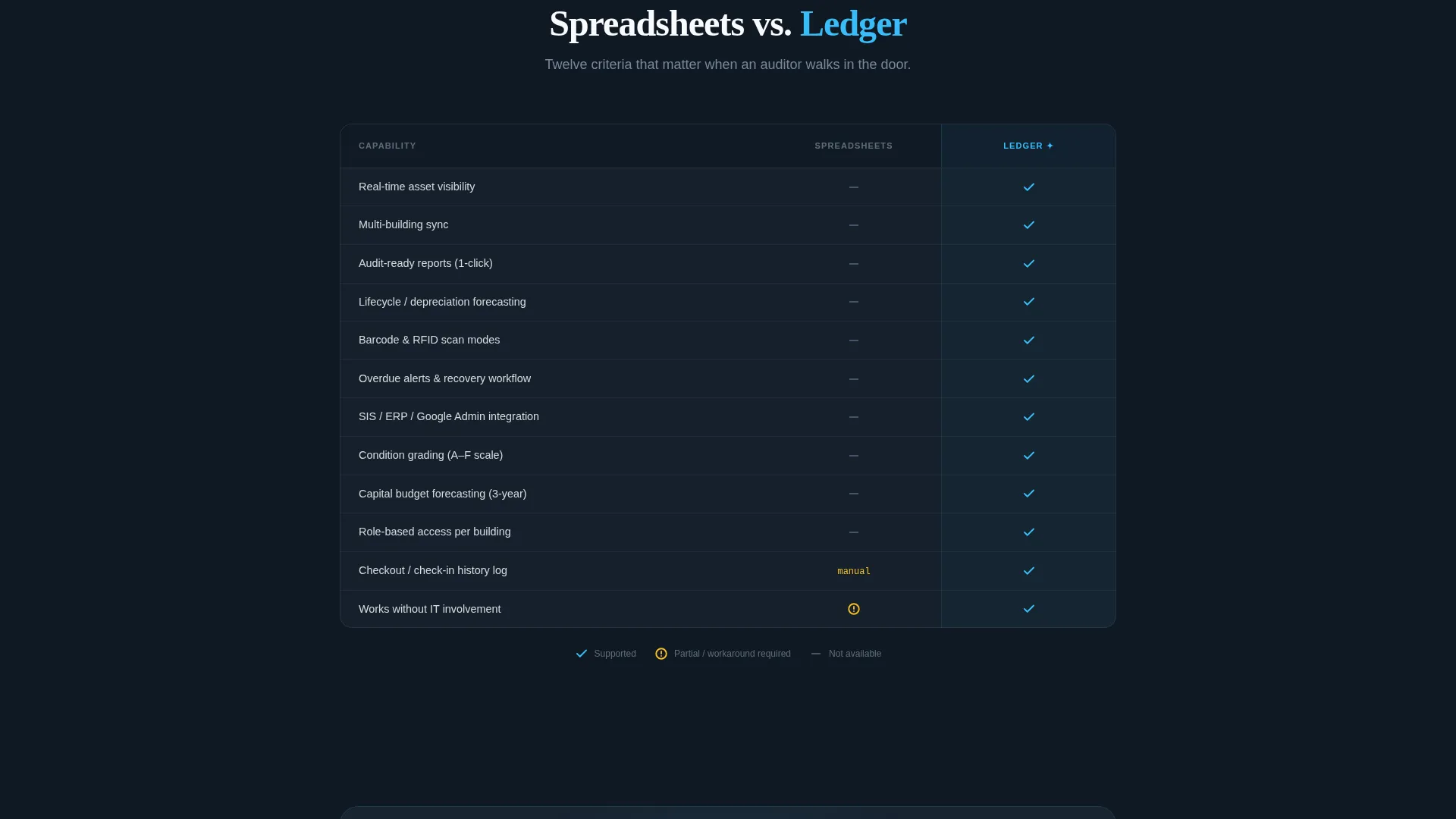
- A sticky two-column comparison table contrasting manual spreadsheet workflows against the platform across twelve line items
- A low-friction primary call-to-action form with three fields: district name, number of buildings, and work email
- A secondary conversion path offering a downloadable spec sheet PDF for procurement committee review
Feature list
This template is built around five core design and content capabilities that work together to build trust and drive sign-ups.
Live API Code Snippet Header
The header displays a styled terminal block with a real-looking API call pulling asset data for a district. The syntax is highlighted in sky blue and chalk white on graphite, with a blinking cursor that puts the visitor inside the product experience before they read a single marketing line.
Bento Grid Capability Cards
The main content area uses a rhythmic bento grid layout where wide cells hold feature comparisons and narrow cells spotlight stat callouts. Each card contains a metric, a micro-illustration, and a one-sentence explanation, keeping the page scannable without sacrificing depth.
Sticky Comparison Table
A twelve-row comparison table stays accessible mid-page as visitors scroll. It lines up spreadsheet-based workflows against the platform across criteria such as real-time visibility, multi-building sync, audit-ready reports, and lifecycle forecasting, using sky-blue checkmarks on one side and slate dashes on the other.
Dual Conversion Paths
The primary call-to-action invites visitors to run a free district audit using a three-field form. A secondary option lets evaluators download a spec sheet as a PDF, giving procurement teams the documentation they need without forcing an immediate commitment.
Data Command Visual Theme
The Slate and Sky color system uses deep graphite for grid backgrounds, brushed slate for card surfaces, open-sky blue for active elements and live data points, and chalk white for body text. The palette communicates control and precision without feeling cold or sterile.
Page sections overview
| Section | Purpose |
|---|---|
| Terminal Header Block | Anchors the page with a live-style API query and a single bold value statement |
| Bento Grid Cards | Communicates platform capabilities through metrics, illustrations, and brief copy |
| Comparison Table | Contrasts manual spreadsheet workflows against the platform across twelve criteria |
| Primary call to action Form | Collects district name, building count, and work email for a free audit sign-up |
| Secondary PDF Path | Offers a downloadable spec sheet for evaluators presenting to procurement committees |
Design & branding system
The template follows a Data Command theme expressed through the Slate and Sky color palette. Every design decision reinforces a sense of precision and operational control.
- Deep graphite (#1E2A38) dominates grid cell backgrounds, brushed slate (#475569) surfaces card containers, open-sky blue (#38BDF8) highlights buttons and live data points, and chalk white (#F8FAFC) carries all body text
- The bento grid rhythm alternates wide and narrow cells so the layout stays visually dynamic without becoming cluttered
- Syntax highlighting in the terminal header uses the same sky blue and chalk palette, making the code block feel like a native part of the interface rather than a decorative insert
Mobile & speed optimization
The bento grid layout is structured to reflow cleanly across screen sizes, keeping every capability card readable on smaller viewports. The page avoids heavy dependencies that would slow initial load.
- Grid cells stack vertically on mobile so stat callouts and feature cards remain legible without horizontal scrolling
- The sticky comparison table adapts to narrower widths, keeping the two-column structure intact for side-by-side evaluation on tablets and phones
How this template helps you convert
Ledger is built around a deliberate conversion sequence that guides evaluators from curiosity to commitment through progressive proof.
- The terminal code snippet header creates immediate credibility by showing the product in action, not just describing it, so technically literate visitors trust the platform before reading the first marketing sentence.
- The spec-sheet bento grid builds a complete picture of platform capability through concrete metrics like 99.7% asset tracking accuracy and audit prep time reduced from three weeks to two hours, giving evaluators the hard numbers they need.
- The dual call-to-action structure serves two buyer stages at once: the free audit form captures ready-to-commit leads, while the PDF download path keeps procurement-stage evaluators engaged without pressuring them into a premature decision.
Other information about this template
Ledger is a strong fit for platforms competing in the education software and SaaS market where buyers conduct thorough evaluations before committing. The template is designed to support that evaluation process at every step.
- The template references integrations with Student Information Systems (SIS), Enterprise Resource Planning (ERP) platforms, and Google Admin as example integration signals, making the platform feel enterprise-ready
- Barcode and RFID scan mode callouts in the bento grid speak directly to operations staff who manage physical asset workflows in the field
- Automated depreciation schedule cards address the capital planning concerns that operations directors bring to budget conversations
- The spec sheet PDF download is specifically designed to support multi-stakeholder procurement scenarios where a single evaluator must present findings to a committee
- This template is categorized under Technology, Education Software and SaaS, in the Education Inventory Management niche, making it well-suited for platforms targeting K-12 district operations teams
Theme
Data Command
Creative direction
Spec Sheet
Color system
Slate & Sky
Style
Bento Grid
Direction
Comparison/Versus
Page Sections
Live API Terminal Header
Spec Sheet Bento Grid
Twelve-row Comparison Table
Dual Conversion Path Design
Data Command Color System
Related questions
Who is this landing page template designed for?
Can I customize the API code snippet in the header?
Does this template include two separate calls to action?
How does the sticky comparison table work?
Is the bento grid layout flexible?



