Ledger - Streamlined Government Landing Page Template
Ledger is a scroll reveal landing page template built for government billing and invoicing platforms. It opens with a live calculator that quantifies wasted time and money for each visitor. Compliance automation, process comparisons, and case studies unfold section by section as the visitor scrolls, turning proof into momentum before a progressive lead form closes the deal.
by Rocket studio
Quick summary
Ledger is a single-page template designed for government billing and invoicing software. It leads with a working estimator tool instead of a hero image, so visitors see their own numbers before they read a single marketing claim. Scroll-triggered sections then layer in process proof, compliance context, and agency case studies, building trust before the lead form ever appears.
Who this template is for
This template is built for SaaS and software teams selling billing or invoicing solutions into the public sector. If your buyers are cautious, data-driven, and tired of vague product pitches, this page format meets them where they are.
- State agency Chief Financial Officers managing spreadsheet-heavy reconciliation workflows
- County procurement officers tracking down missing purchase order numbers at quarter-end
- Federal subcontractors whose invoices sit unpaid due to formatting errors on a single field
What problem this template solves
Government procurement cycles move slowly, and most marketing pages do nothing to change that. A generic hero section and bullet-point feature list will not convince a skeptical CFO to book a demo. Ledger solves the credibility gap by making the visitor's own inefficiency visible before asking for anything.
- Billing pain points like 90-day invoice cycles and compliance formatting errors go unquantified on most pages
- Procurement-focused buyers need process proof and regulation context, not startup-style hype
- Standard lead forms feel premature when trust has not yet been established through demonstrated value
What you get with this template
Ledger delivers a complete scroll reveal landing page structure purpose-built for government software lead generation. Every section is sequenced to build evidence and reduce friction before the call to action appears.
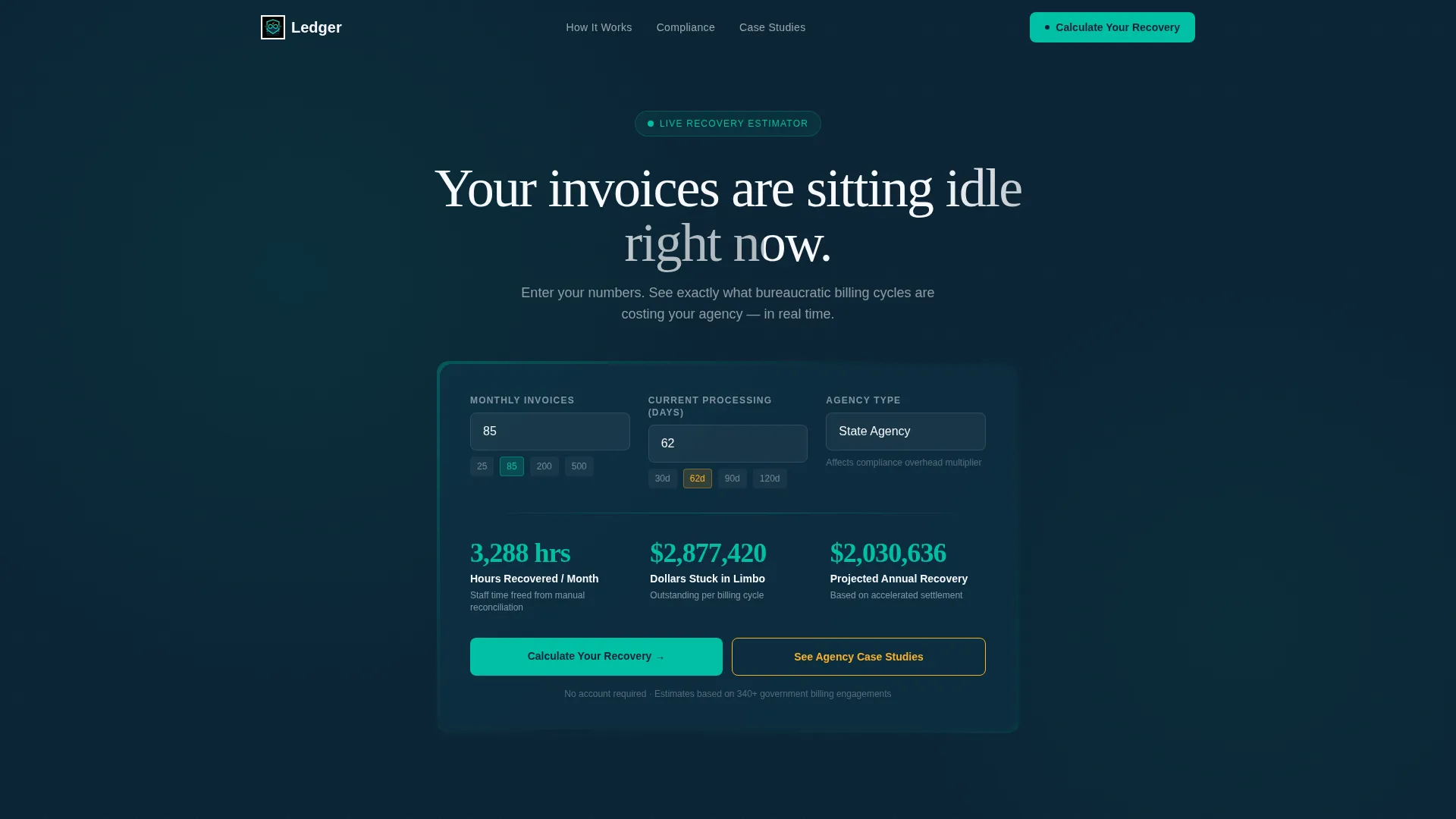
- A live estimator in the header with three input fields and real-time animated output numbers
- Scroll-triggered sections covering process comparison, compliance automation, and agency case studies
- A multi-step progressive lead form that collects information gradually rather than all at once
Feature list
This template is built around a specific conversion logic: show the visitor their problem in their own numbers, then prove your solution works for agencies like theirs. Each feature serves that sequence directly.
Live Header Calculator
The header centers a working estimator tool against a deep navy background. Visitors enter their average monthly invoice volume, current processing time in days, and agency type from a dropdown. The moment any field changes, teal-colored output numbers animate upward in real time, showing hours recovered per month, dollars stuck in unpaid limbo, and projected annual savings.
Scroll Reveal Section Flow
Each content section stays hidden until the visitor scrolls into it. Sections surface like classified files being declassified one by one, building momentum as evidence accumulates. The teal accent color intensifies progressively from section to section, giving the page a visual sense of a system powering up.
Process Comparison Section
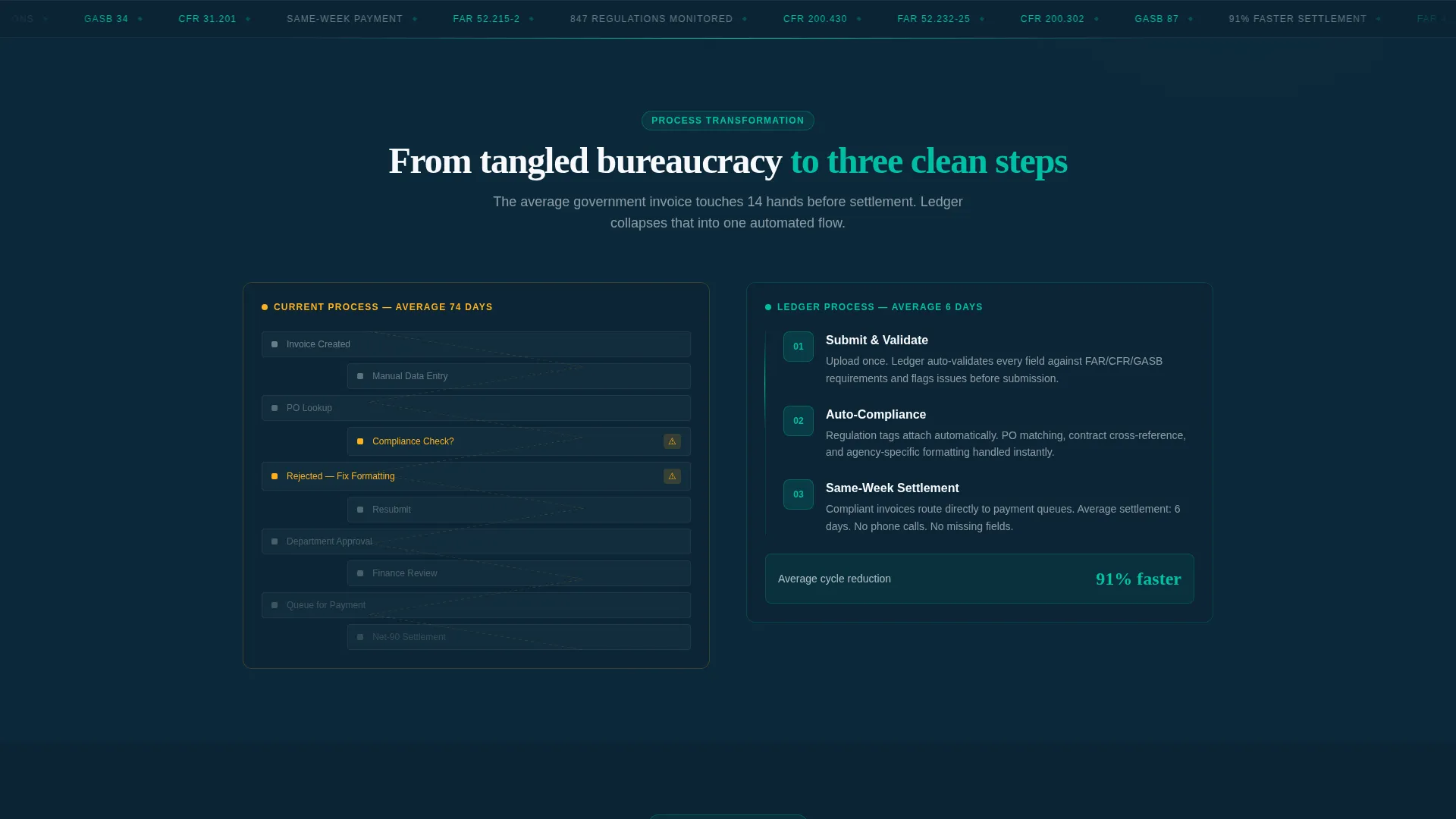
This section renders the visitor's current billing workflow as a tangled flowchart, then simplifies it into three clean steps as the scroll progresses. The contrast between the before and after states makes the platform's core value visible without requiring the visitor to read a paragraph of explanation.
Compliance Automation Tags
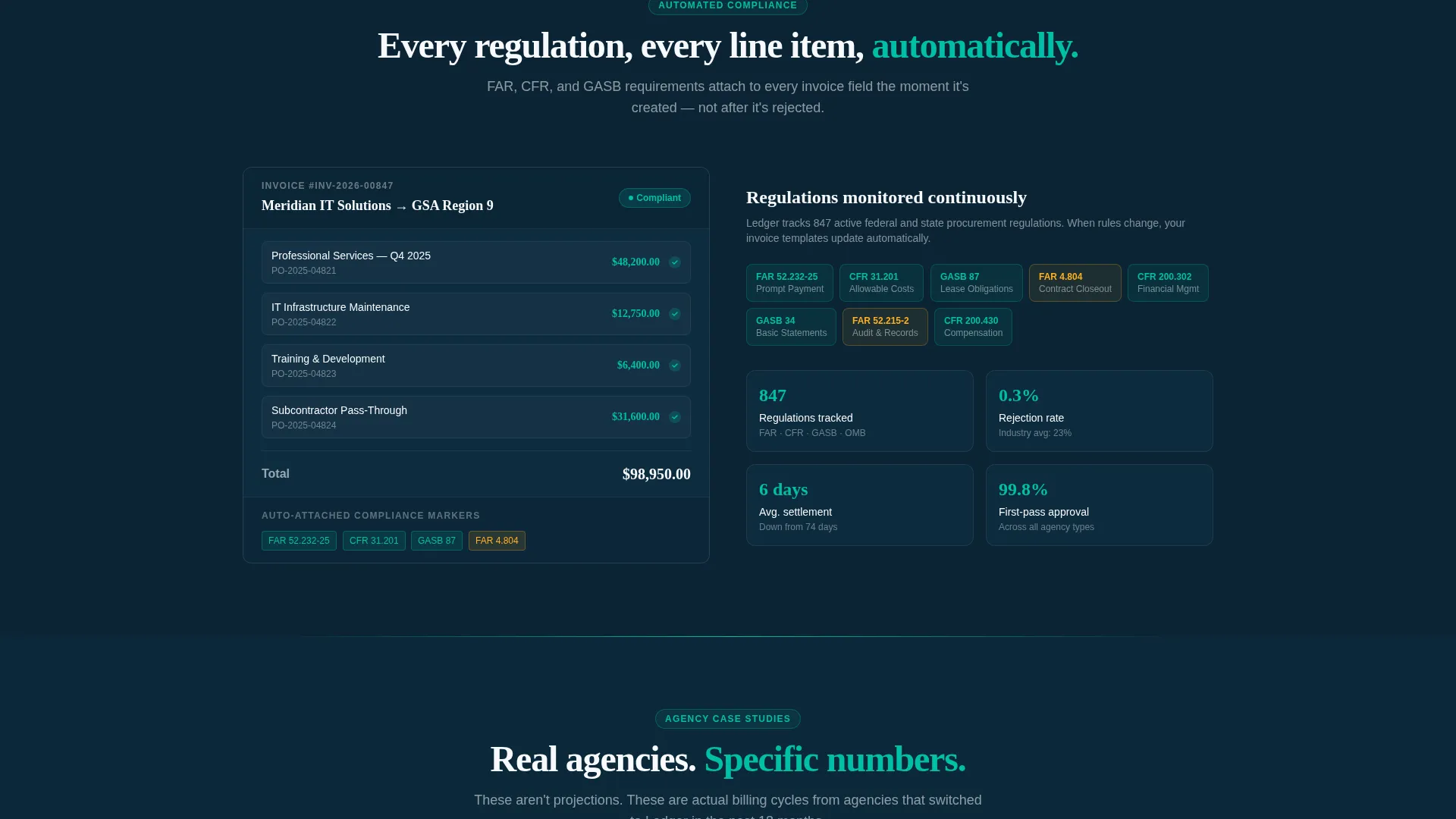
Regulation codes including the Federal Acquisition Regulation, the Code of Federal Regulations, and the Governmental Accounting Standards Board float in as visual tags that auto-attach to invoice preview elements. This section signals to procurement-savvy buyers that compliance is built in, not bolted on.
Agency Case Studies with Metrics
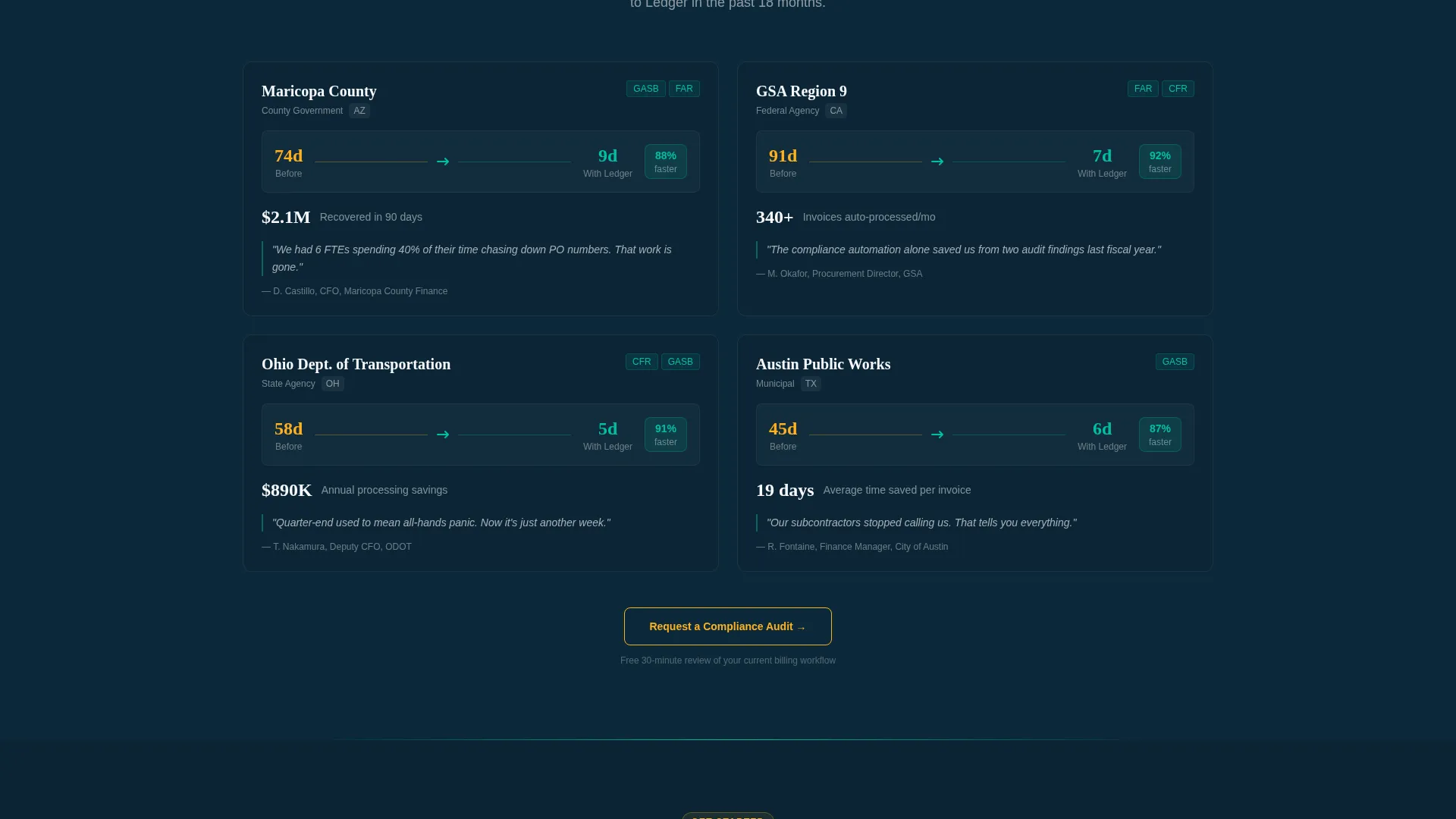
Specific agency logos and data points fade in as the visitor scrolls. An example metric shown in the brief is a county cycle reduction from 74 days down to 9. Real numbers tied to named agencies carry far more weight with government buyers than generalized percentage claims.
Progressive Lead Capture Form
The lead form discloses fields in steps rather than presenting them all at once. Step one asks only for a work email. Step two requests agency name and role title. Step three collects invoice volume range and a multiple-choice selection of the visitor's biggest billing pain point. This reduces abandonment by keeping each individual ask feel small.
Page sections overview
| Section | Purpose |
|---|---|
| Header Calculator | Quantify visitor's billing waste in real time |
| Process Comparison | Contrast current workflow with simplified three-step flow |
| Compliance Automation | Show regulation tags auto-attached to invoice previews |
| Agency Case Studies | Prove results with named agencies and specific metrics |
| Secondary call to action Block | Invite visitors to request a compliance audit |
| Progressive Lead Form | Collect contact and agency details across three steps |
Design & branding system
The color system is called Teal Catalyst and is built around four purposeful values that work together to feel like a modernized government dashboard. The palette is serious enough for a procurement review board and modern enough to signal that this is not legacy software.
- Deep federal navy (#0B2434) anchors the header and primary backgrounds with institutional credibility
- Catalyst teal (#00BFA6) drives animated output numbers, section accents, and the primary call-to-action color
- Signal amber (#FFB020) is reserved for interactive states and urgency indicators only, keeping it high-impact
- Clean document white (#F7F9FC) provides the content surface that keeps body copy and data readable
Mobile & speed optimization
The scroll reveal interactions and real-time calculator are designed to work within a single-page layout that loads progressively as the visitor moves down. The sequenced reveal structure means heavy visual sections only activate when they enter the viewport.
- Scroll-triggered animations fire only when sections enter view, keeping earlier sections lightweight while loading
- The three-step progressive form reduces the visible form footprint on smaller screens significantly
- The calculator's input fields and animated output numbers are laid out for straightforward use on touch devices
How this template helps you convert
Ledger is built around a specific conversion philosophy: the calculator does the selling, and the form feels like a formality by the time it appears. Each structural decision on the page serves that goal.
- The header estimator turns the visitor's own data into the first headline they see, creating immediate personal relevance before any product claim is made.
- Scroll-triggered proof sections build a layered evidence stack, so each new section adds credibility rather than repeating the same message in a different format.
- The progressive lead form breaks a high-commitment ask into three low-friction steps, reducing the perceived cost of engaging at the moment the visitor is most convinced.
Other information about this template
Ledger is categorized under Technology, specifically within the Government Software and Software as a Service subcategory, with a niche focus on government billing and invoicing. The template theme is Startup Velocity, which pairs the credibility of institutional design with the forward energy of a modern product company.
- The creative direction is Calculator and Tool First, meaning the interactive estimator is the primary engagement mechanism from the first second on page
- The header concept is a Calculator and Estimator, not a static hero, making this template distinct from most government software pages
- The template style is Scroll Reveal, also described as Progressive, which means section visibility is earned through scrolling rather than presented all at once
- The landing page direction is Lead Generation, with two named calls to action: "Calculate Your Recovery" anchored to the header tool, and "Request a Compliance Audit" placed after the case studies
- The intersection match score for this template against its niche and subcategory is 13, indicating a strong alignment between the design system and the target audience's expectations
- This template is suitable for teams building or launching government billing software, invoice automation tools, or public sector financial workflow platforms
Theme
Startup Velocity
Creative direction
Calculator/Tool First
Color system
Teal Catalyst
Style
Scroll Reveal (Progressive)
Direction
Lead Generation
Page Sections
Live Real-time Header Calculator
Scroll Reveal Progressive Sections
Before-and-after Process Comparison
Compliance Automation Tag Display
Agency Case Studies with Named Metrics
Three-step Progressive Lead Form
Related questions
Who is the primary audience for this landing page template?
Does the calculator in the header actually perform live calculations?
What is the purpose of the progressive lead form?
Can this template be used for products outside government billing?
What makes this template different from a standard SaaS landing page?



