DevSecOps Tool Comparison Landing Page Template
Lockdown is a DevSecOps tool comparison landing page built for engineering leads who need clarity fast. It maps Static Application Security Testing (SAST), Dynamic Application Security Testing (DAST), Software Composition Analysis (SCA), Cloud Security Posture Management (CSPM), and Infrastructure-as-Code scanning tools into a single filterable matrix, so teams can compare capabilities side by side before making a costly decision.
by Rocket studio
Quick summary
Lockdown is a single-page DevSecOps directory and comparison tool built around a filterable capability matrix. It indexes over 247 tools across 14 categories, surfaces 38 integration overlaps, and gates the full downloadable comparison behind a lightweight lead capture form. The design feels like a clean terminal at midnight: dark, precise, and built entirely around the data.
Who this template is for
This template is designed for teams and professionals who live inside the DevSecOps tooling decision cycle. If your work involves evaluating security platforms, building compliance cases, or translating vendor claims into engineering decisions, this is built for you.
- Platform engineers overwhelmed by vendor documentation and overlapping tool categories
- Chief Information Security Officers (CISOs) building board-level compliance cases
- DevOps leads handed a "shift left" mandate with no clear budget or tool roadmap
What problem this template solves
Choosing the wrong DevSecOps stack is expensive. Most teams spend weeks tabbing between vendor PDFs, slide decks, and scattered comparison blogs before arriving at a decision that still feels uncertain. The real problem is not a shortage of information. It is the absence of a structured, comparable format that lets you see everything at once.
- No single place exists to compare SAST, DAST, SCA, CSPM, and Infrastructure-as-Code (IaC) scanners side by side
- Compliance requirements and integration conflicts are buried across dozens of separate vendor sources
- Budget conversations stall because capability data is not organized for decision-makers to act on
What you get with this template
Lockdown delivers a complete, ready-to-use landing page structure centered on a live-style comparison matrix. Every section is built to earn the next scroll, moving visitors from high-level stats to granular, gated data.
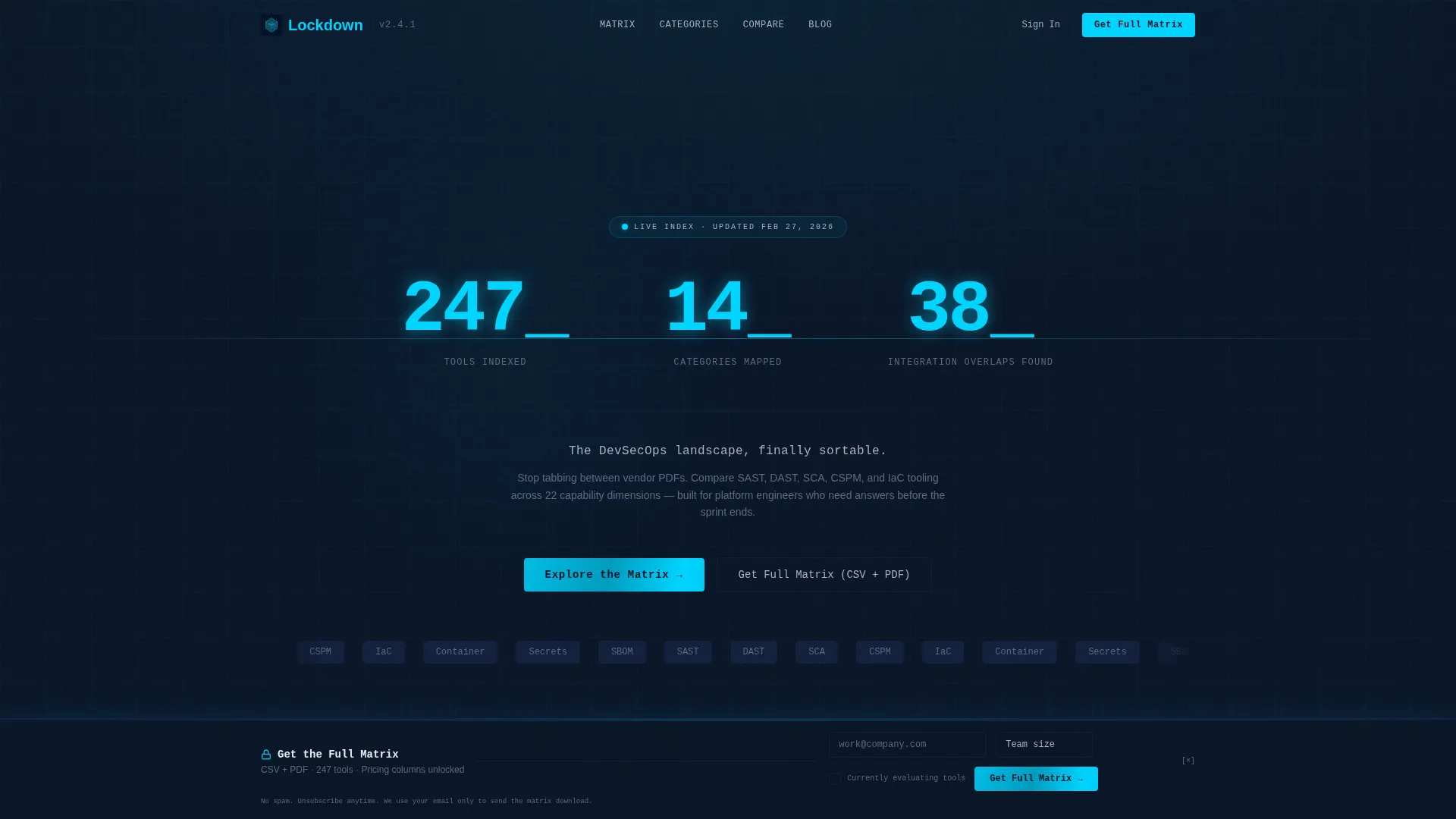
- A monospaced typographic stats header with animated counters for tools indexed, categories mapped, and integration overlaps found
- A multi-layer filterable comparison table covering tool capabilities, pricing tiers, latency benchmarks, and compatibility data
- A lead generation gate with a persistent bottom bar, a three-field capture form, and a secondary bookmark-by-email conversion path
Feature list
This template includes a focused set of built-in components designed around data clarity and lead conversion.
Animated Stats Header
Three large typographic counters tick upward against the deep navy background before locking into place. The numbers display "247 Tools Indexed," "14 Categories Mapped," and "38 Integration Overlaps Found" in a monospaced typeface. A single silver subline reads: "The DevSecOps landscape, finally sortable."
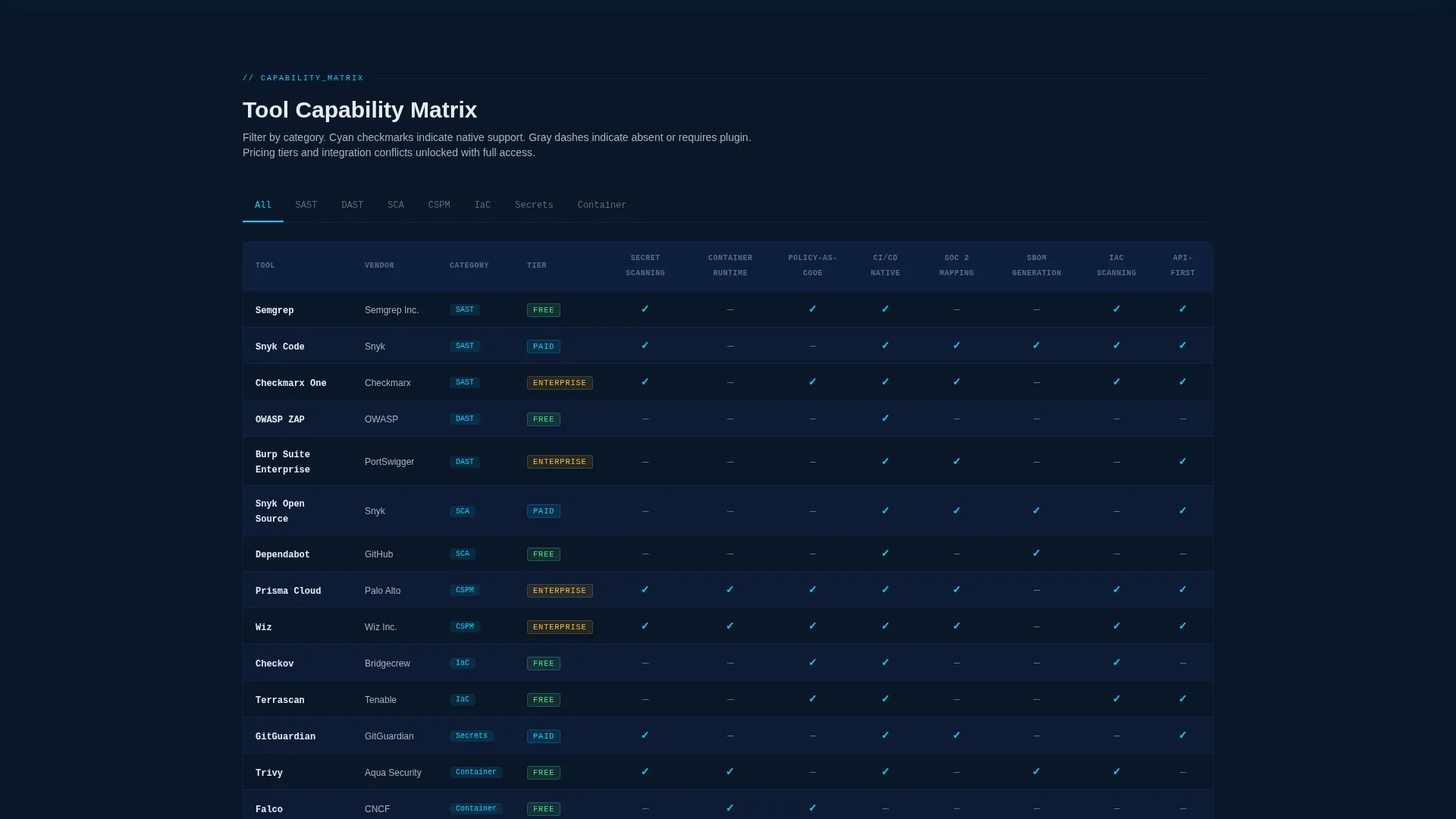
Filterable Capability Matrix
The core comparison table lets visitors filter by tool name or capability row. Columns cover capabilities including secret scanning, container runtime, policy-as-code, CI/CD native integration, and SOC 2 mapping. Cyan checkmarks and gray dashes create an instant scannable pattern across the full table.
Progressive Data Reveal
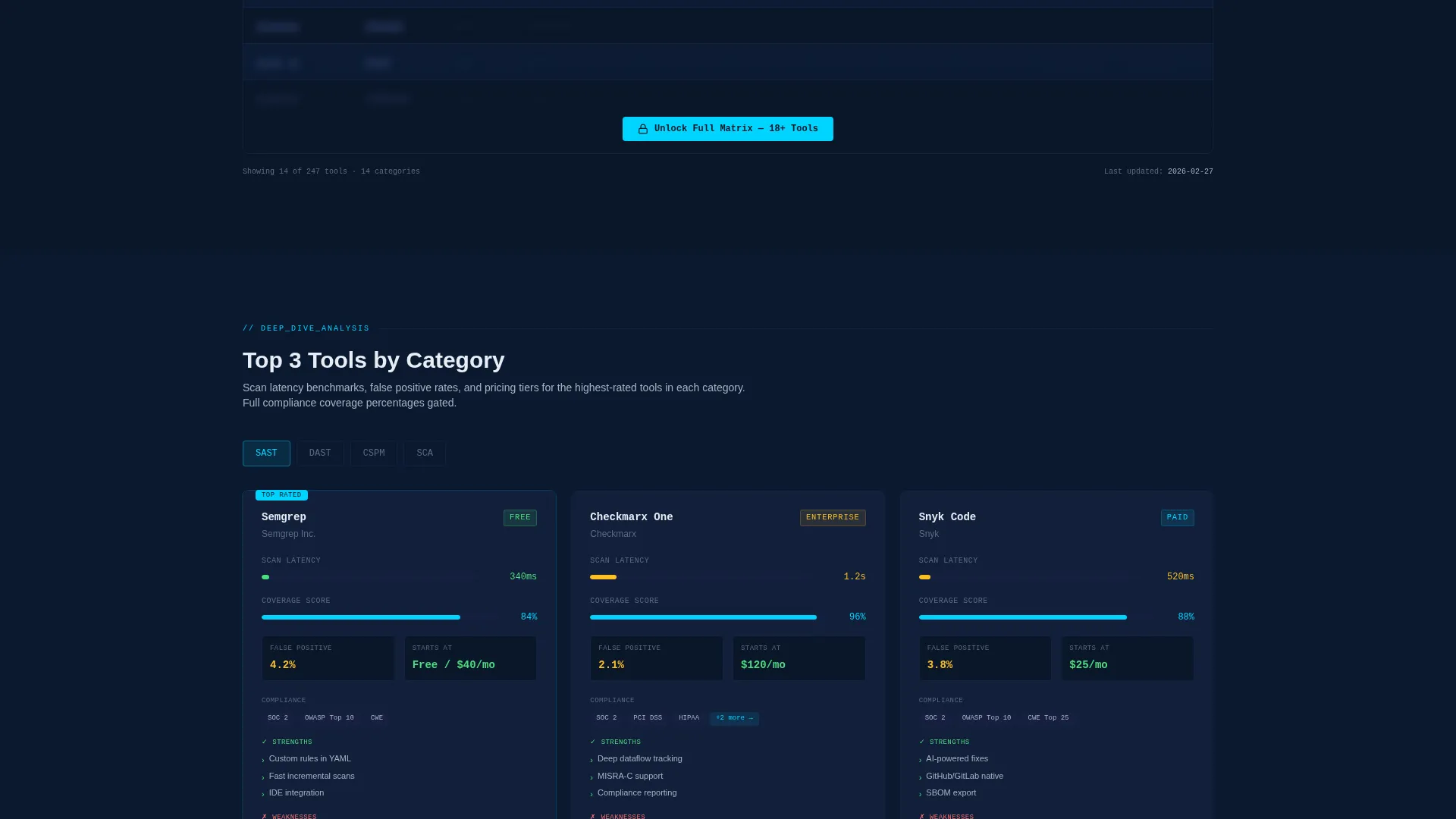
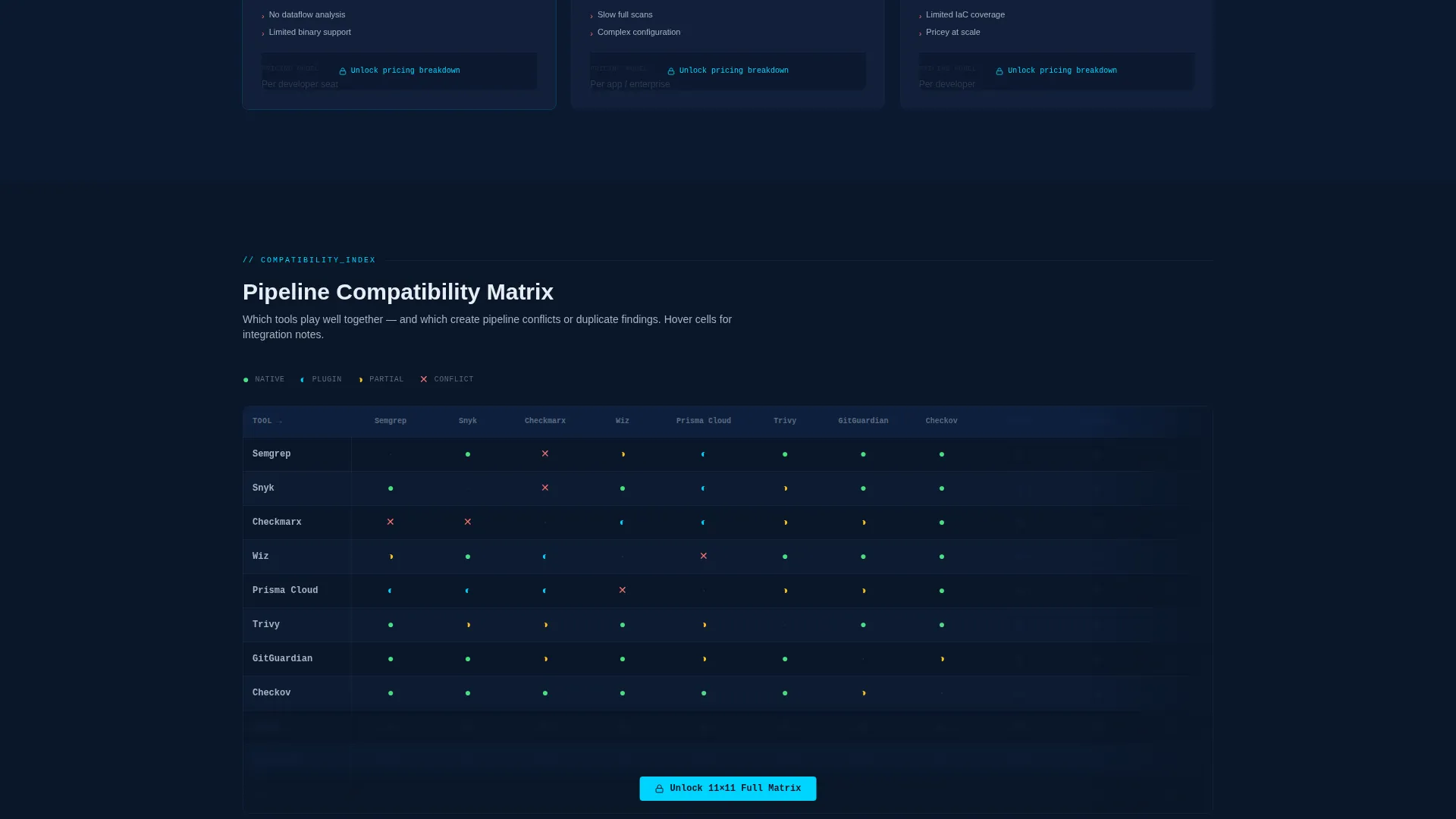
The page escalates in specificity with each scroll section. The first layer shows a broad category view. The second layer delivers a deep-dive comparison of the top three tools in a selected category, including latency benchmarks and pricing tiers. The third layer shows a compatibility matrix flagging pipeline conflicts.
Persistent Lead Capture Bar
After two scroll depths, a bottom bar appears with a "Get the Full Matrix" call to action. The form captures work email, team size (via a dropdown with four ranges), and a single checkbox for visitors currently evaluating tools. Granular data columns stay blurred behind the gate to earn the click.
Bookmark-by-Email Path
A secondary conversion path lets visitors save individual tool comparisons to their inbox. This lighter commitment option captures the same lead data without requiring the full form interaction, giving hesitant visitors a lower-friction entry point.
Gated Downloadable Output
The complete matrix is available as both a CSV file and a PDF download. This dual-format delivery makes the data usable inside spreadsheet workflows and shareable in board or leadership presentations without any extra reformatting.
Page sections overview
| Section | Purpose |
|---|---|
| Stats Metrics Header | Opens with three animated counters to establish scale and credibility instantly |
| Broad Category Matrix | Gives visitors a filterable overview of all 14 DevSecOps tool categories |
| Top Three Deep Dive | Compares the leading tools per category with pricing and latency data |
| Compatibility Conflict Map | Shows which tools integrate well and which create pipeline conflicts |
| Gated Download Bar | Persistent bottom bar that gates the full CSV and PDF matrix behind a form |
| Bookmark Email call to action | Secondary capture path for visitors saving individual tool comparisons |
Design & branding system
The visual identity follows a Directory and Discovery theme built around a Midnight Blue color system. Every design choice prioritizes data legibility over decoration. The palette feels like a live security operations center dashboard at night.
- Deep terminal navy (#0A1628) as the primary background, desaturated slate (#1B2A4A) for card surfaces and table rows, and cool silver (#A8B2C1) for body text and secondary labels
- Electric cyan (#00D4FF) reserved exclusively for interactive elements, hover states, and data highlights, with near-invisible table borders (#162040) and single-shade alternating row bands to guide horizontal eye tracking
- Typography uses a monospaced typeface for all numerical and data-forward elements, reinforcing the terminal aesthetic throughout the page
Mobile & speed optimization
The layout is structured to remain navigable and readable across screen sizes. The comparison table and stat header adapt to narrower viewports without losing the core data hierarchy.
- The persistent bottom bar and lead capture form remain accessible at all scroll depths on mobile
- Table columns and filter controls are designed to reflow for smaller screens without hiding critical capability data
- The dark color system reduces visual noise on high-contrast mobile displays, keeping the data-forward aesthetic intact
How this template helps you convert
Lockdown uses a layered reveal strategy to build trust before asking for contact details. Visitors see enough of the matrix to believe in its depth, which makes the gate feel worth crossing.
- The animated stats header establishes immediate credibility by showing the scale of the index before any scrolling occurs, earning attention from the first second.
- The progressive data reveal rewards each scroll with more specific and harder-to-find information, so visitors feel invested in the content before they reach the gate.
- The dual conversion path (full form plus bookmark-by-email) captures leads at two commitment levels, reducing drop-off from visitors who are not yet ready for the full download.
Other information about this template
Lockdown is designed to serve the DevSecOps tool and framework niche with a format that mirrors how security professionals actually think: structured, filterable, and skeptical of noise. A few additional details worth noting about this template:
- The template style is a Comparison Table layout, suited to directory and discovery use cases where side-by-side evaluation drives the decision
- The header concept is Stats and Metrics, using data volume as the visual hook rather than illustration or hero imagery
- The lead generation direction gates the highest-value content (pricing columns, integration conflict flags, compliance coverage percentages) while keeping enough of the matrix visible to prove its depth
- The template fits naturally within DevSecOps technology category pages, security tool directories, and platform engineering resource hubs
- The color system and terminal aesthetic make it credible to a technical audience that distrusts overly polished marketing pages
Theme
Directory & Discovery
Creative direction
Feature Matrix
Color system
Midnight Blue
Style
Comparison Table
Direction
Lead Generation
Page Sections
Animated Typographic Stats Header
Filterable Capability Comparison Table
Progressive Three-layer Data Reveal
Persistent Gated Download Bar
Bookmark-by-email Conversion Path
Related questions
Who is this landing page template designed for?
What types of tools does the comparison matrix cover?
How does the lead capture gate work?
Can visitors see the matrix without submitting the form?
What file formats does the gated download include?



