Payroll Provider | Free Website Template | Rocket
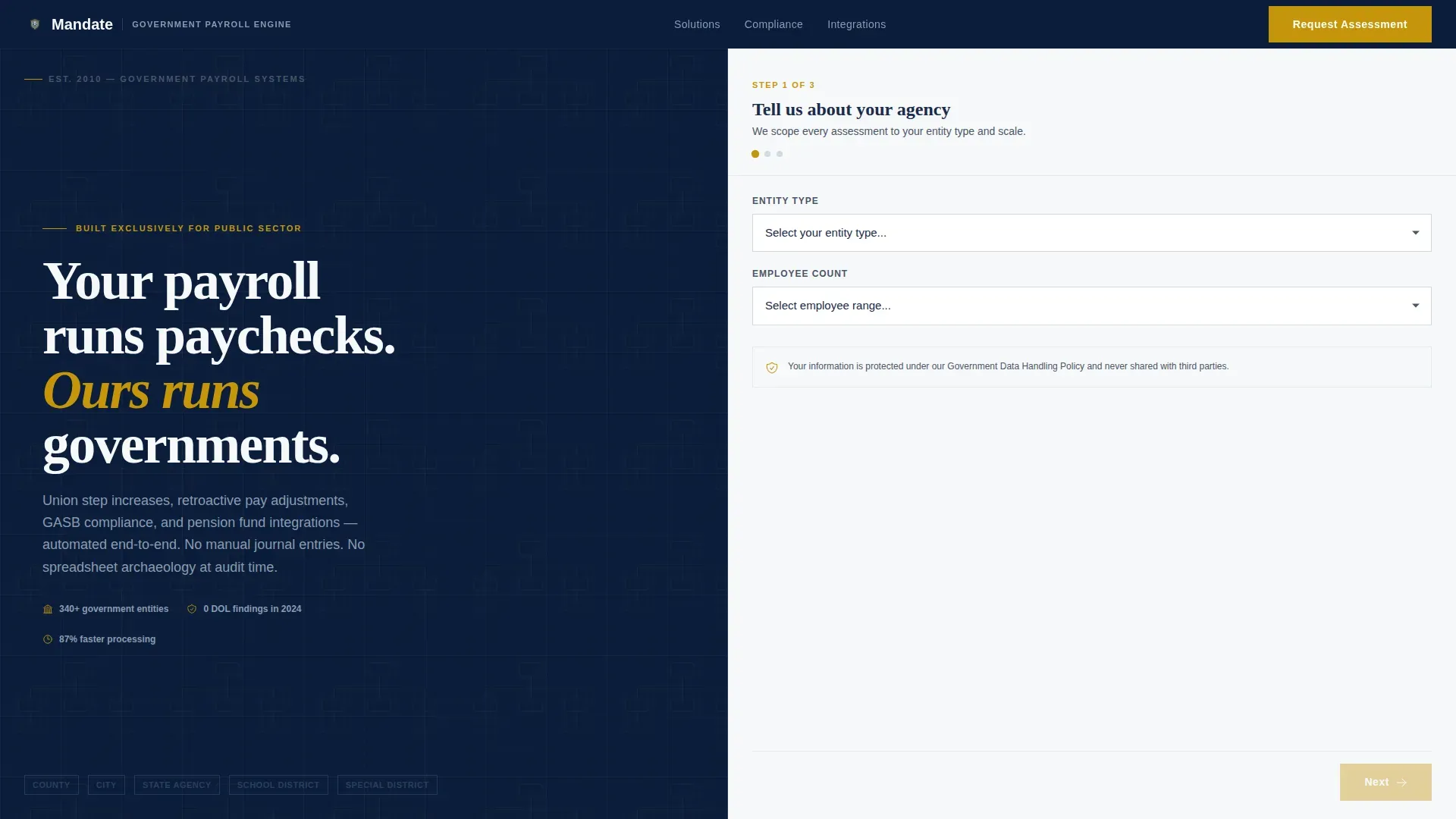
Mandate is a split-screen landing page built for government and public sector payroll providers. It combines a multi-step lead capture form with a case study narrative scroll, guiding county HR directors, city finance officers, and state agency administrators from problem recognition to a scheduled payroll assessment. The Corporate Precision design system signals institutional credibility from the first scroll.
by Rocket studio
Quick summary
Mandate is a 50/50 split-screen landing page designed for government payroll providers. It opens with a multi-step form that qualifies leads by entity type and size, then scrolls through case study panels that build a documented case against outdated systems. The Navy Authority color palette and Corporate Precision theme reinforce institutional trust at every section.
Who this template is for
This template is built for payroll providers who sell directly to public sector buyers. The design language, form structure, and case study narrative all speak to the specific concerns of government procurement decision-makers.
- County HR directors managing large, multi-unit workforces across multiple bargaining agreements
- City finance officers preparing for audit season with fragile, spreadsheet-based payroll processes
- State agency administrators responsible for replacing legacy systems that predate modern software
What problem this template solves
Most payroll landing pages are built for small businesses. Government buyers face a completely different set of requirements, and generic pages fail to address them. Mandate closes that gap with structured, evidence-led content that mirrors how public sector buyers already think.
- Visitor trust is lost when a page cannot demonstrate familiarity with union step increases, retroactive pay, or pension fund integrations
- Generic lead forms waste qualified prospects by asking the wrong questions in the wrong order
- Without case study proof, government buyers have no basis to move past the research stage
What you get with this template
You get a complete, single-page layout ready to present a government payroll solution with the authority and specificity public sector buyers expect. Every section is purposeful and content-ready.
- A split-screen header with a three-step lead qualification form built around entity type, employee count, and current pain points
- A scrollable case study narrative section featuring before-and-after split panels for county, city, and school district scenarios
- A secondary conversion path offering a downloadable Government Payroll Compliance Checklist gated behind email capture
Feature list
This landing page includes a focused set of components designed to qualify, persuade, and convert government payroll buyers.
Three-Step Progressive Lead Form
The header form captures lead data across three focused steps. Step 1 collects entity type and employee count range. Step 2 asks about the current payroll system and primary pain point. Step 3 requests name, title, email, and preferred contact window. Each step keeps the form feeling structured and official, not promotional.
Case Study Narrative Scroll
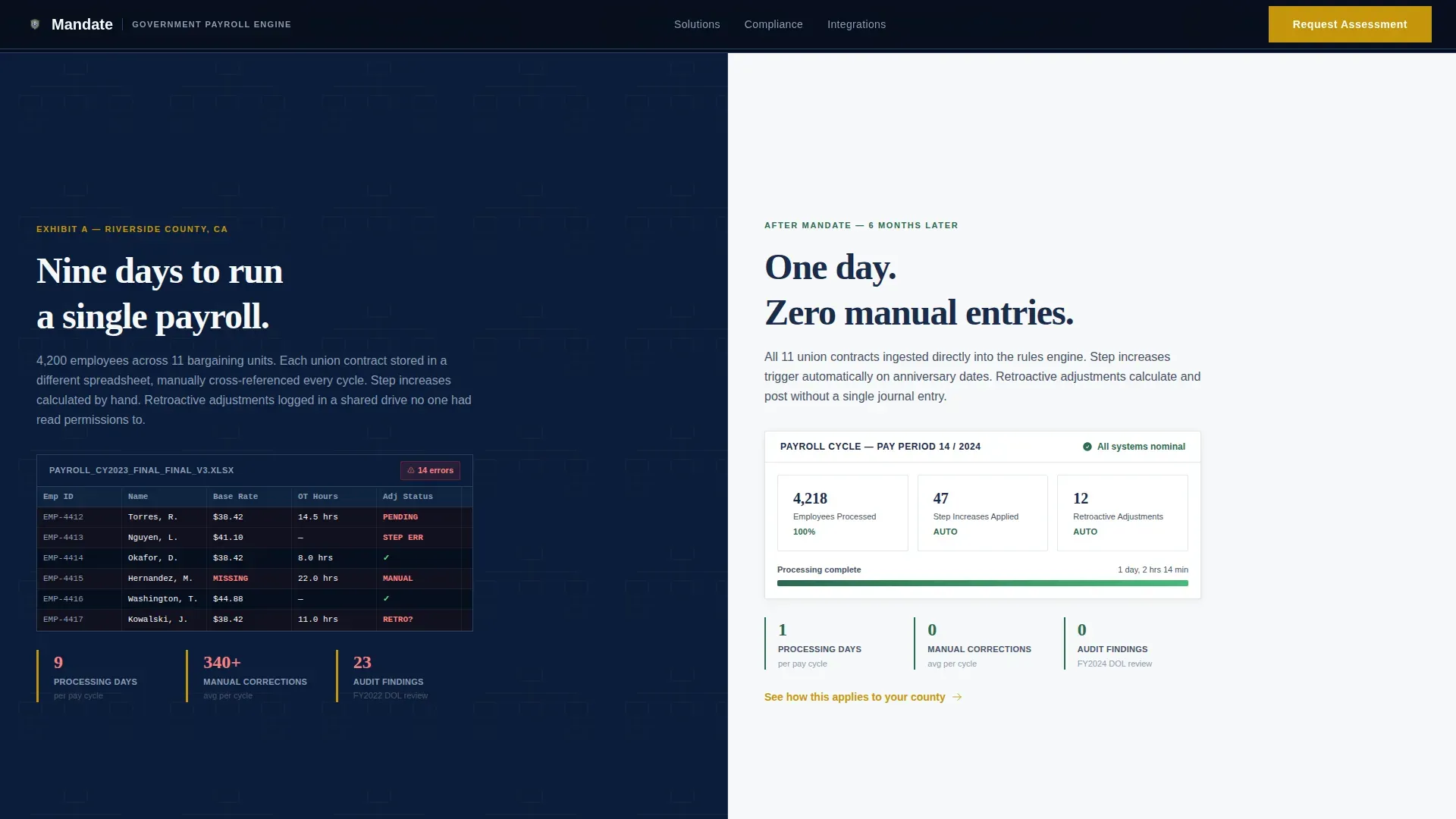
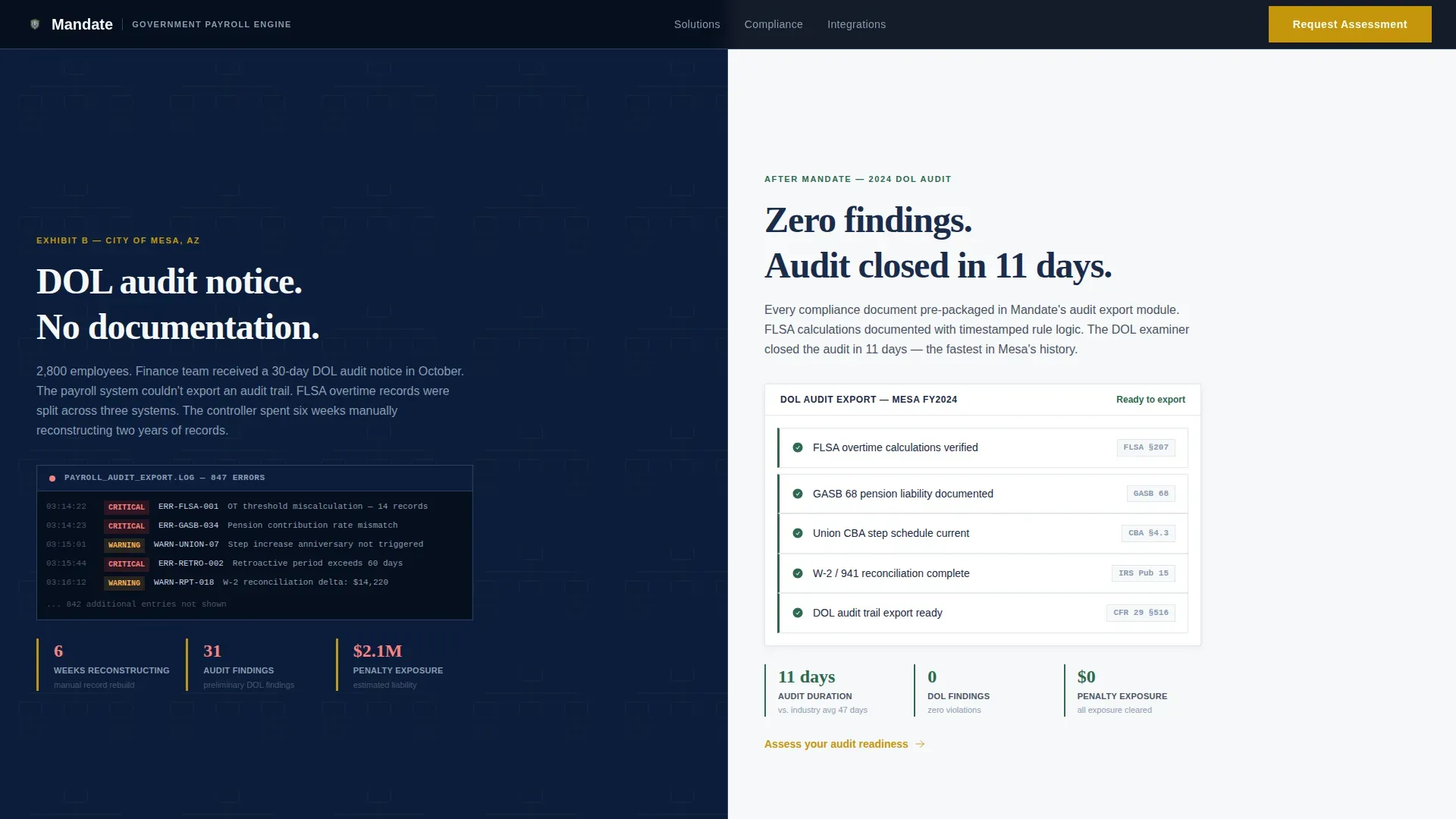
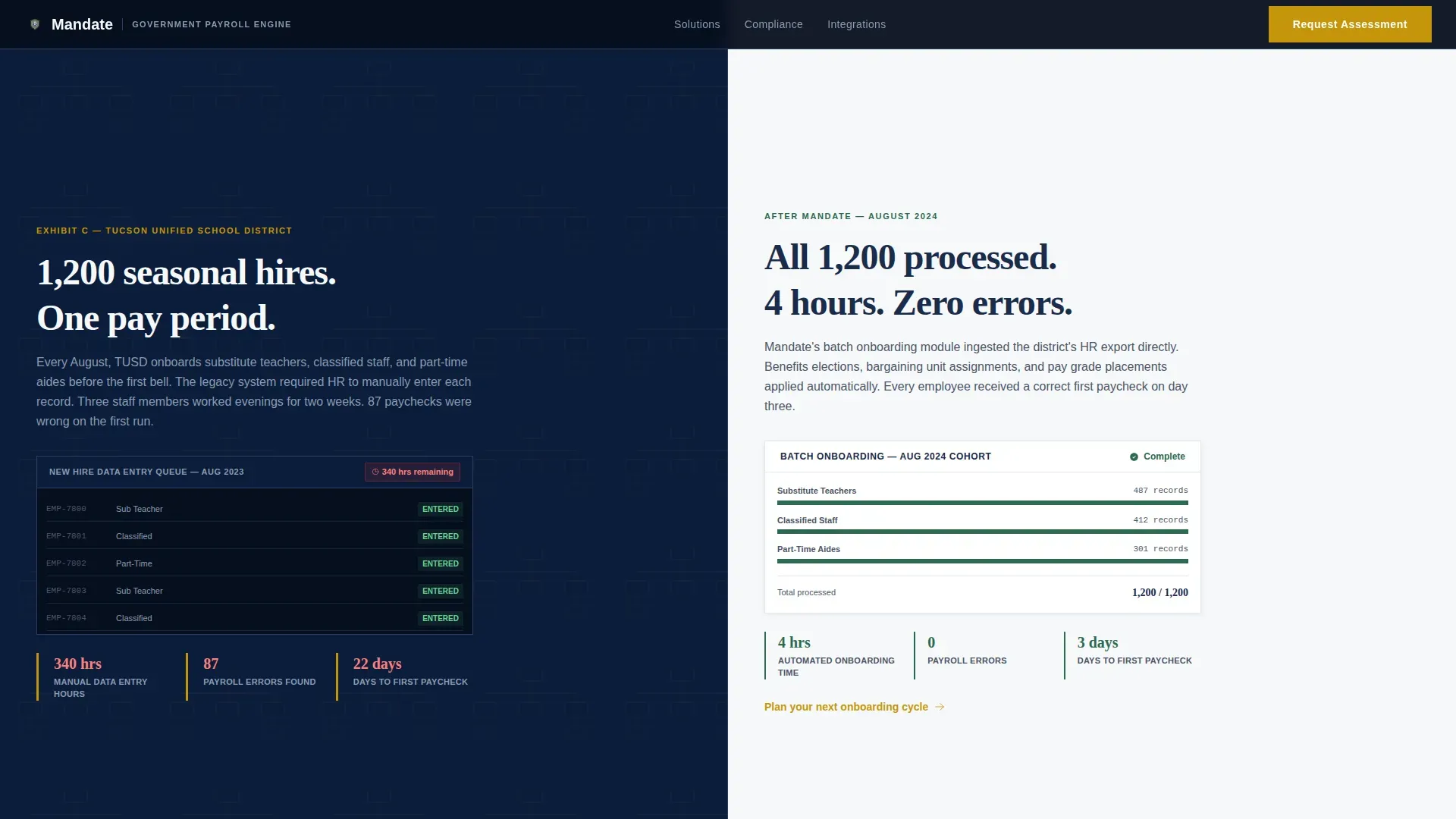
Each case study occupies a full split-screen panel. The left side presents the before state using redacted screenshots, error logs, and data visualizations of overtime miscalculations. The right side shows clean dashboards, compliance checkmarks, and documented savings. Three scenarios are included: a county, a city, and a school district.
Before-and-After Data Visualizations
The before panels use rendered data visuals, including messy spreadsheet representations and error logs, to make the cost of inaction tangible. The after panels pair those visuals with dollar amounts saved and compliance outcomes. This exhibit-by-exhibit structure builds a persuasive, documented argument.
Dual Conversion Path Design
The primary call to action invites visitors to request a payroll assessment. A secondary path below the case studies offers the downloadable compliance checklist for visitors still in research mode. Both paths operate within the same page, capturing leads at different readiness levels.
Navy Authority Color System
The layout uses deep federal navy as the dominant background on left panels, clean bond-paper white on right content panels, and certification-seal gold reserved for calls to action and key data points. The palette communicates institutional authority without relying on decoration.
Muted Security-Paper Background Pattern
The header left panel uses a faintly visible background pattern of org-chart lines and pay-grade grids. This detail reinforces the government context visually while keeping the headline and form elements clearly legible.
Page sections overview
| Section | Purpose |
|---|---|
| Split-Screen Header | Presents headline and opens three-step lead qualification form |
| Entity Type Selector | Lets visitors self-identify as county, city, state agency, school district, or special district |
| Pain Point Dropdown | Captures compliance gaps, manual processes, pension integration, or reporting delays |
| Contact Capture Step | Collects name, title, email, and preferred contact window in Step 3 |
| County Case Study | Documents payroll processing time cut from nine days to one |
| City Case Study | Showcases a Department of Labor audit passed with zero findings |
| School District Case Study | Shows 1,200 seasonal employees onboarded in a single pay period |
| Before-State Panels | Visualizes spreadsheet errors, overtime miscalculations, and compliance risk |
| After-State Panels | Displays clean dashboards, savings figures, and compliance checkmarks |
| Compliance Checklist Gate | Offers downloadable checklist gated behind email-only capture |
| Primary call to action Block | Drives visitors to request a formal payroll assessment |
Design & branding system
The Corporate Precision theme translates directly into a visual identity that reads as authoritative without feeling cold. Every color decision serves a structural purpose, and no decorative element exists without a reason.
- Deep federal navy (#0B1D3A) dominates left panels; bond-paper white (#F7F8FA) anchors right content panels; pressed-uniform gray (#4A5568) handles secondary text and dividers
- Certification-seal gold (#C5960C) appears only on calls to action and key data points, keeping its visual weight reserved for moments that require attention
- The header background pattern of faint org-chart lines and pay-grade grids references security-paper aesthetics, reinforcing the government payroll context without explicit decoration
Mobile & speed optimization
The split-screen layout is structured to restack cleanly on smaller viewports, keeping the multi-step form accessible without horizontal scrolling.
- Left and right panels are designed to stack vertically on mobile, preserving form usability and case study readability
- The three-step form structure limits how much content appears on screen at once, reducing cognitive load on any device size
How this template helps you convert
Every design and content decision on this page is oriented toward capturing qualified leads from public sector buyers who are already mid-evaluation.
- The multi-step form uses progressive disclosure to reduce friction. Each step asks only what is needed at that moment, making the form feel methodical rather than intrusive, which matches how government buyers prefer to share information.
- The case study narrative builds a documented, evidence-led argument across three distinct public sector scenarios. By the time a visitor reaches the primary call to action, they have already seen proof specific to their entity type.
- The dual conversion path catches visitors at two different stages of readiness. The compliance checklist captures early-stage researchers; the payroll assessment request captures buyers who are closer to a vendor decision.
Other information about this template
This template was designed specifically for the government and public sector payroll provider niche, where trust signals and specificity matter more than visual flair. The structured form language, case study format, and compliance-focused secondary offer all reflect how procurement decisions actually move in this space.
- The template style is a 50/50 split screen, making it well suited to presenting contrast, such as before versus after, or problem versus solution, in a single viewport
- The primary call to action language ("Request Your Payroll Assessment") is built into the template and frames the engagement as diagnostic rather than sales-driven
- The compliance checklist secondary offer is designed as an email-only gate, reducing commitment friction for visitors who are not yet ready to schedule a conversation
- This template sits within the HR and Hiring category, specifically addressing the Government and Public Sector HR subcategory
Theme
Corporate Precision
Creative direction
Case Study Narrative
Color system
Navy Authority
Style
Split Screen (50/50)
Direction
Lead Generation
Page Sections
Three-step Progressive Lead Form
Case Study Narrative Scroll
Before-and-after Data Visualizations
Dual Conversion Path Design
Navy Authority Color System
Security-paper Header Background
Related questions
Who is the primary audience for this landing page template?
What does the three-step form capture?
What are the two conversion paths included on this page?
What case study scenarios are built into the template?
Can this template be adapted for a non-government payroll provider?



