AI for Home Pricing Website Template
Optimize is a single-page landing page template built for AI-powered home services pricing platforms. It combines an interactive pricing simulator, a three-column comparison table, animated margin-lift statistics, contractor testimonials, and a frictionless click-through flow, all wrapped in a mission-control dark theme designed to show owner-operators exactly what they are leaving on the table.
by Rocket studio
Quick summary
Optimize is a high-motion, data-dense landing page template for B2B software-as-a-service platforms in the home services AI pricing space. It opens with a live pricing simulator, builds credibility through a sequential comparison table, and drives visitors toward a single frictionless action. The entire page is designed to make the revenue opportunity feel tangible and immediate.
Who this template is for
This template is built for software-as-a-service founders and product marketers who need to sell an AI pricing intelligence tool to skeptical, busy tradespeople. It speaks directly to the operators who have tried spreadsheets and gut feel and are ready for something smarter.
- Owner-operators running small fleets of service trucks who want to stop leaving margin on every invoice
- Regional home service companies scaling past early-stage revenue who know their pricing process is no longer keeping up
- Franchise managers who need to standardize rates consistently across multiple territories
What problem this template solves
Most landing pages for pricing software lead with feature lists and ask too much, too soon. A contractor visiting a page at the end of a long shift does not want to read a brochure. They want to feel the problem and see the solution in the same scroll.
- No clear visual proof of the pricing gap between current habits and AI-optimized rates
- Too many form fields and friction points before visitors understand the value
- No fast, scannable comparison that separates the product from manual methods and basic rule-based tools
What you get with this template
This template gives you a complete, production-ready landing page layout with every major section pre-built and wired for high-motion interactivity. It is structured to guide a skeptical contractor from curiosity to click in a single focused scroll.
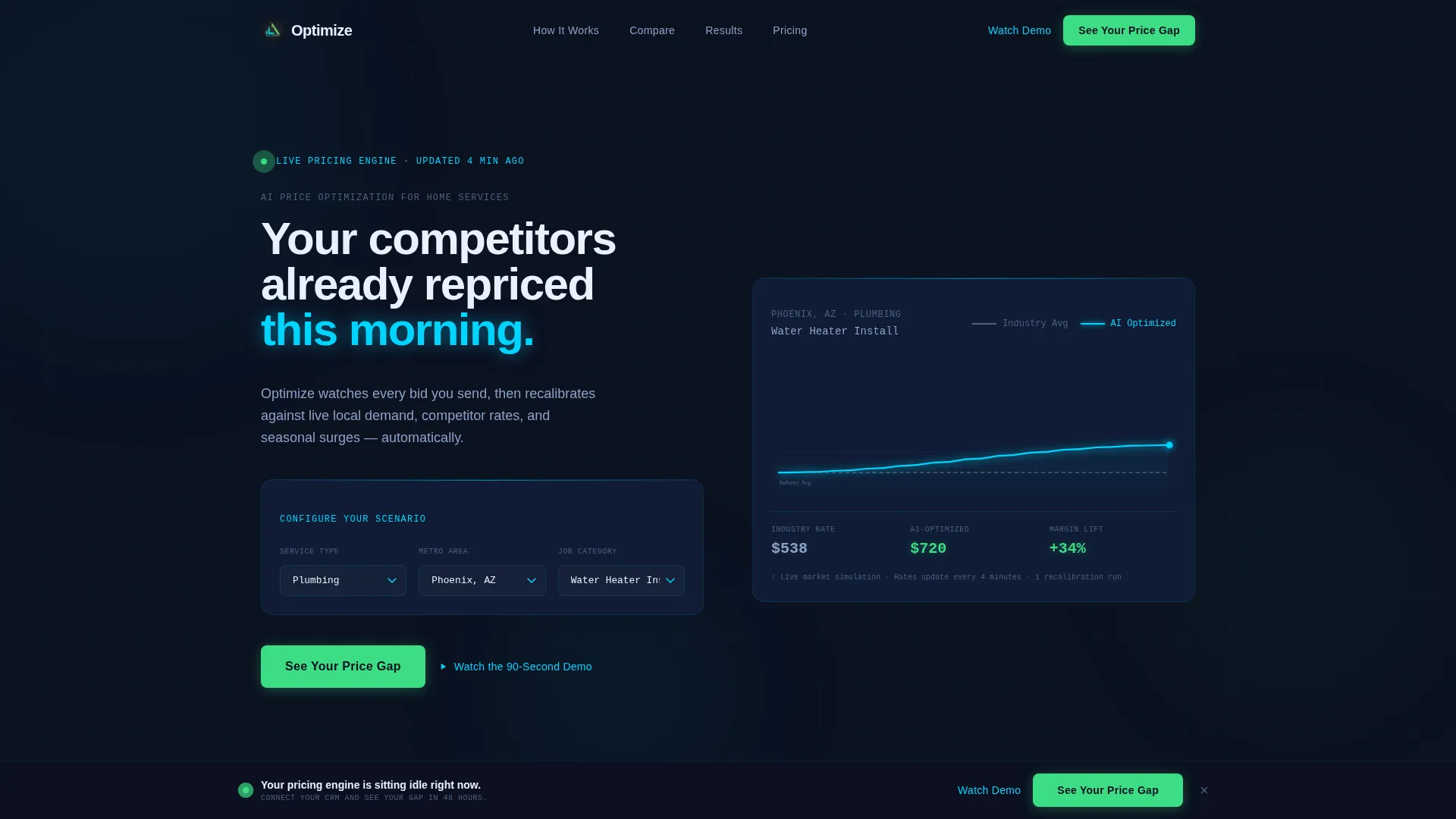
- An interactive header simulator with service-type dropdowns, a metro area selector, and an animated price curve showing industry average versus AI-optimized rates
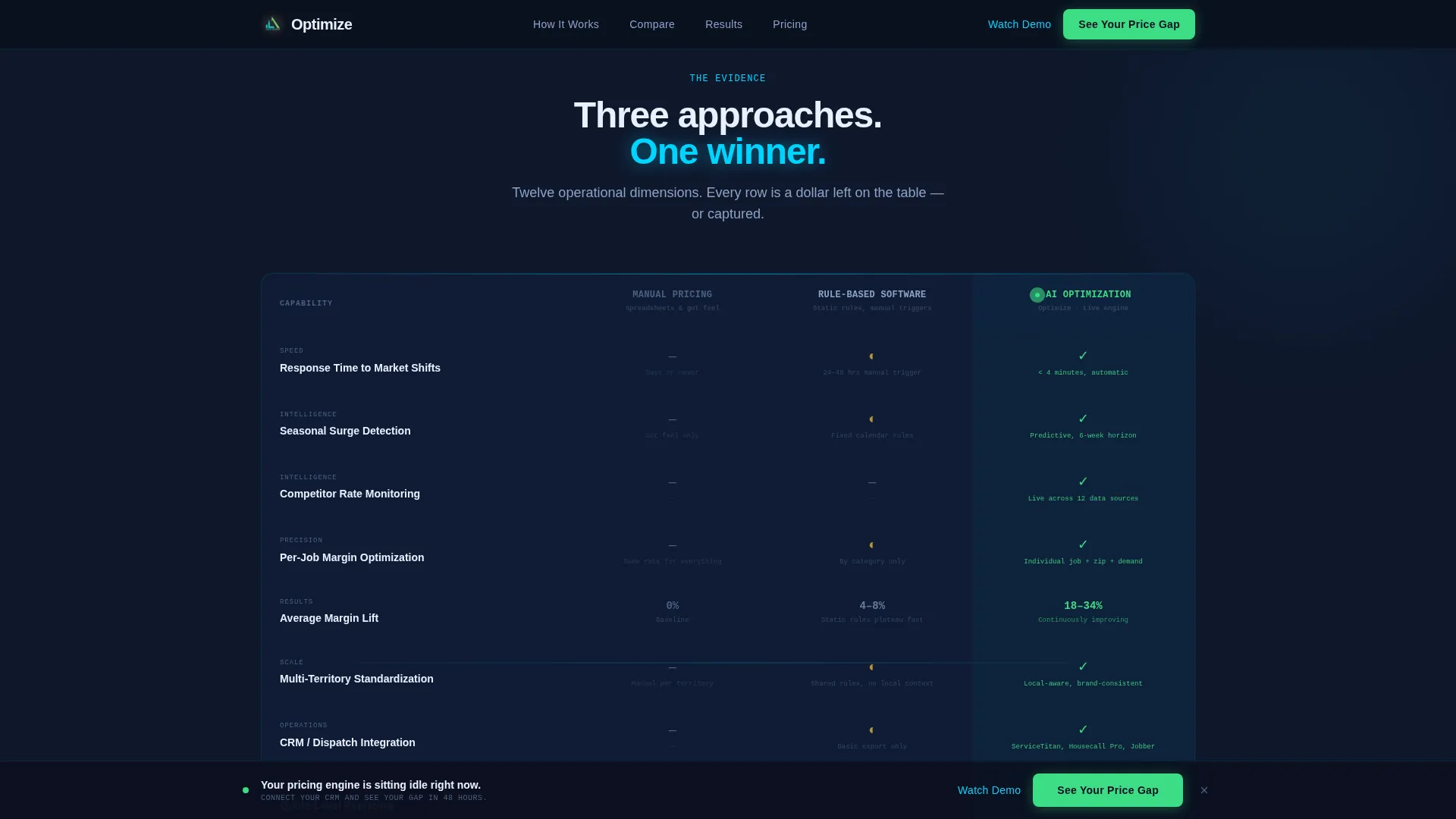
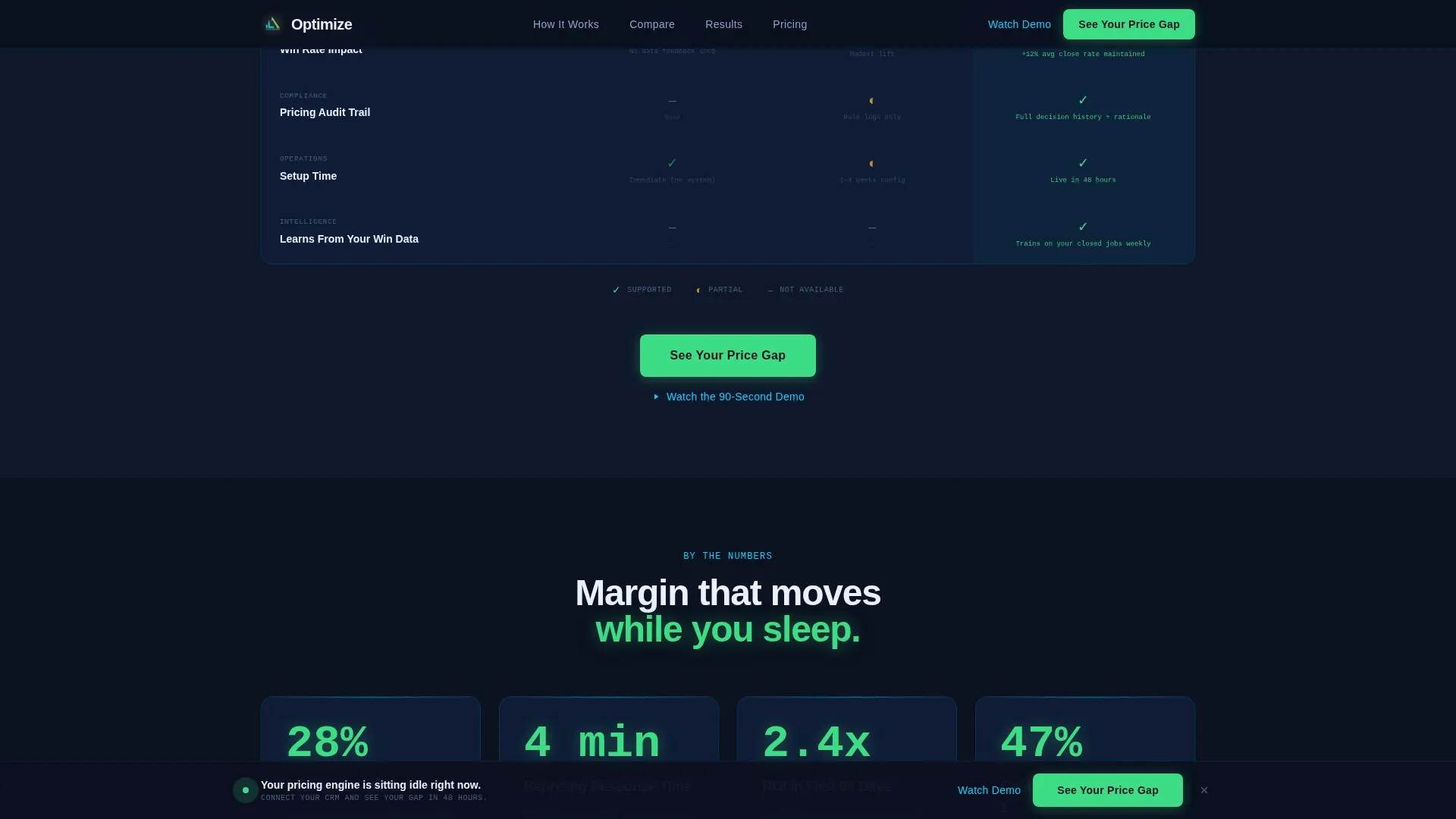
- A three-column comparison table covering twelve operational rows, with profit-green checkmarks animating in sequentially as the visitor scrolls
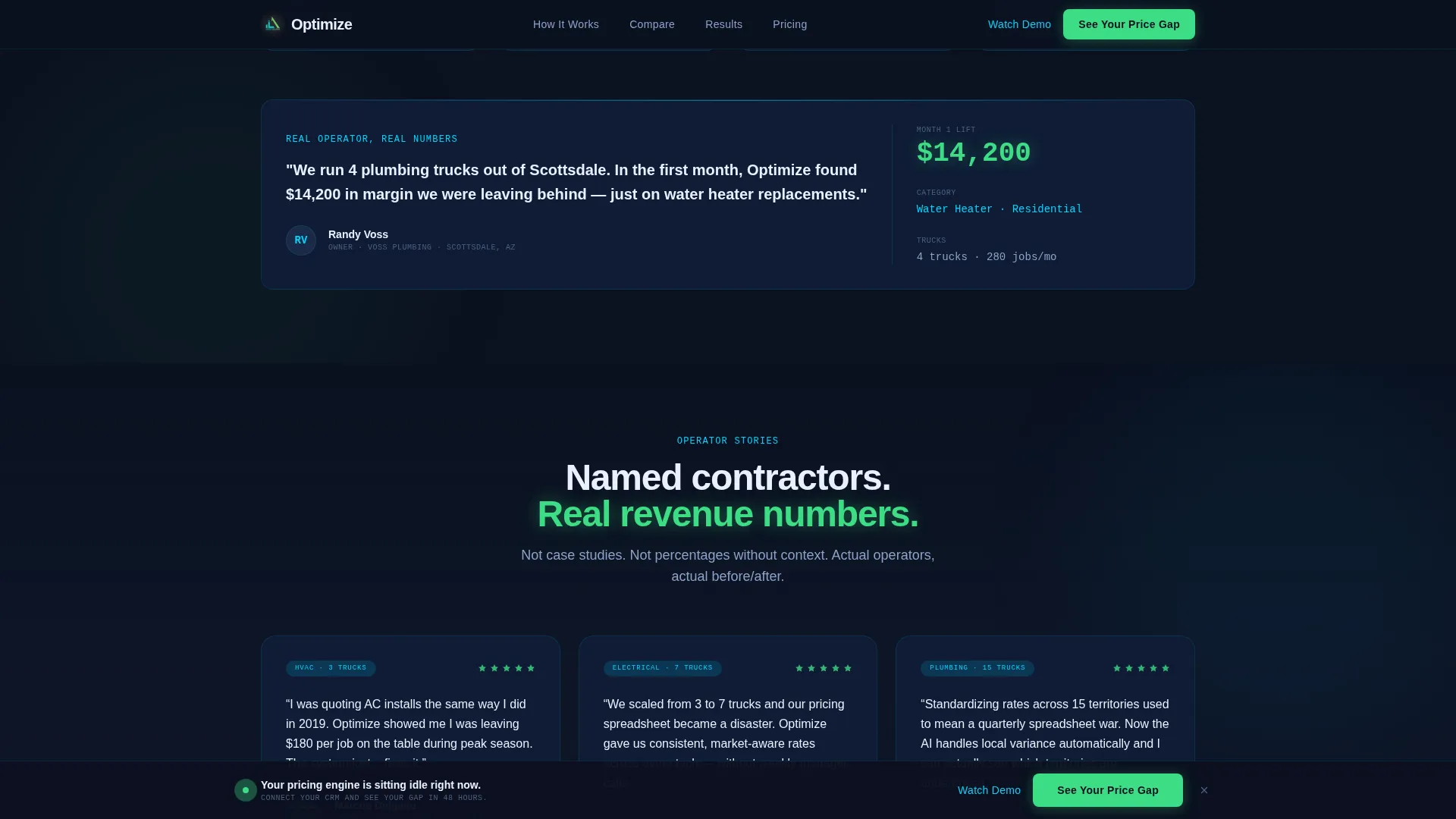
- Animated margin-lift statistics, named contractor testimonial cards with before-and-after revenue figures, a quote repricing motion graphic, and a sticky profit-green call-to-action bar
Feature list
This template includes six core built-in components, each designed to carry a specific part of the conversion argument.
Interactive Pricing Simulator
The above-the-fold header embeds a functional pricing simulator. Visitors choose a service type, a metro area, and a job category. An animated price curve then draws in real time, showing a flat industry-average line against a rising AI-optimized rate traced in live-signal cyan. Numbers tick like a stock feed, and the headline fades in after the first animation cycle.
Sequential Comparison Table
A three-column table contrasts Manual Pricing, Rule-Based Software, and AI Optimization across twelve operational rows including response time, margin lift, seasonal adjustment, and competitor monitoring. Each row animates in one by one as the visitor scrolls, building the case like evidence stacking. Profit-green checkmarks mark AI advantages while gaps appear in muted gray.
Viewport-Triggered Margin Stats
Real margin-lift percentages sit below the comparison table and count up from zero the moment they enter the viewport. The count-up effect uses an IntersectionObserver scroll trigger so the numbers only animate when the visitor actually sees them, making the impact feel live and earned.
Contractor Testimonial Cards
Named contractor cards slide in with before-and-after revenue figures attached to real company names and truck counts. The social proof is localized to American markets with city references such as Phoenix, Atlanta, and Denver, giving regional operators a recognizable frame of reference.
Quote Repricing Motion Graphic
A dedicated section shows a single job quote flowing through the AI engine and repricing three times before it reaches the customer. The motion graphic makes the abstract concept of real-time repricing concrete and watchable, reinforcing the core value proposition in a way that text alone cannot.
Sticky Click-Through Call-to-Action Bar
The primary call to action, labeled "See Your Price Gap," appears anchored below the simulator, again after the comparison table, and finally as a full-width sticky bar after the testimonials. A secondary "Watch the 90-Second Demo" link in cyan sits beneath each primary button for visitors who prefer motion before committing to a click.
Page sections overview
| Section | Purpose |
|---|---|
| Hero Simulator Header | Lets visitors interact with live pricing animation before reading a single word of copy |
| Comparison Table | Stacks Manual, Rule-Based, and AI Optimization side by side across twelve rows |
| Margin Lift Stats | Animates real percentage gains from zero as each stat enters the viewport |
| Testimonial Cards | Slides in named contractor proof with before-and-after revenue figures |
| Quote Repricing Flow | Shows a single quote repricing three times through the AI engine |
| Sticky call to action Bar | Keeps the primary call to action visible after the testimonials section |
| Footer | Delivers a clean linear single-row close with secondary navigation |
Design & branding system
The visual identity follows a Dynamic Motion theme rooted in a Midnight Blue color system. The palette is designed to feel like a mission control room running overnight, dark surfaces, glowing data streams, and the constant suggestion of a system working on your behalf.
- Deep terminal navy (#0B1120) dominates full-bleed section backgrounds, with satellite-map blue (#1B2A4A) used for card and surface layers
- Live-signal cyan (#00D4FF) traces animated chart paths, data pulses, and interactive highlights throughout the page
- Profit green (#3DDC84) appears exclusively on upward-trending numbers and call-to-action buttons, training the visitor's eye to associate that color with revenue
Mobile & speed optimization
The template is built desktop-first to match the dashboard-heavy nature of the user interface, with full responsiveness for tablet and mobile viewports. Animation performance is handled thoughtfully so the page stays fluid even on lower-powered devices.
- IntersectionObserver powers all scroll-linked animations including the count-up stats, sequential table row reveals, and testimonial card slides
- CSS custom properties handle theming throughout, making color and spacing adjustments straightforward without touching multiple files
How this template helps you convert
The page is structured as a Click-Through landing page. Every design decision reduces friction and accelerates the visitor toward a single action: clicking through to connect their data and see their actual price gap.
- The simulator delivers a personalized taste of the product before any copy asks for commitment, so visitors arrive at the comparison table already engaged
- The sequential comparison table builds a logical case row by row, and the animated margin stats immediately below it translate that logic into dollar-denominated proof
- The sticky call-to-action bar ensures the primary action is always visible without a form on the page, removing the biggest source of drop-off in B2B landing pages
Other information about this template
This template is built around a specific conversion architecture designed for AI pricing intelligence tools in the home services vertical. A few additional details are worth noting for teams evaluating it.
- Typography uses DM Sans for headings and JetBrains Mono for data displays, ticker numbers, and any monospaced data-feed elements
- The footer follows a linear single-row pattern, keeping the page close clean and lightweight after the sticky bar handles the final call to action
- The template is localized for United States markets, with USD formatting, American contractor names, and city references baked into the social proof layout
- Animation intensity is high by design; the template assumes a visitor who responds to data-dense, cinematic interfaces rather than minimal editorial layouts
- The page routes all primary clicks to a dedicated analysis page where visitors connect a CRM or upload a rate sheet, keeping this landing page entirely form-free
Theme
Dynamic Motion
Creative direction
Launch Energy
Color system
Midnight Blue
Style
Comparison Table
Direction
Click-Through
Page Sections
Interactive Above-the-fold Pricing Simulator
Sequential Three-column Comparison Table
Viewport-triggered Count-up Statistics
Named Contractor Testimonial Cards
Quote Repricing Motion Graphic
Persistent Profit-green Call-to-action System
Related questions
Does this template include a form or lead capture field?
Can I change the service categories in the pricing simulator?
Is this template suitable if my platform covers only one trade?
How does the sequential comparison table animation work?
What happens when a visitor clicks the primary call-to-action button?



