Optimize — Powerful Insurance Administration Landing Page Template
Underwrite is a dark-themed, Dashboard Pro insurance document management landing page template built for agencies and risk managers. It combines an interactive policy dashboard preview, a granular feature comparison table, and a download-focused conversion flow to show visitors exactly why scattered spreadsheets and carrier portals are costing them time and creating real exposure risk.
by Rocket studio
Quick summary
Underwrite is a single-page template designed to showcase an insurance document management platform. It opens with a live-fidelity dashboard preview, moves through a systematic feature comparison table, and closes with a clear app download call to action. Every section is built to replace doubt with evidence before the visitor ever taps the button.
Who this template is for
This template speaks directly to the people who feel the daily weight of unmanaged policy documents. It is built for professionals who know what it costs when something slips through.
- Agency principals and commercial lines customer service representatives juggling renewal spreadsheets and multiple carrier portals every day
- Risk managers at mid-market firms inheriting years of unfiled, unaudited legacy policies with no reliable system in place
- Insurance software teams that need a polished, credible landing page to earn the trust of cautious professional buyers before asking for a download
What problem this template solves
Most insurance professionals do not have a document management problem in the abstract. They have a very specific, daily problem: finding the right endorsement before a client calls back, tracking which certificates expire this week, and proving audit readiness without a two-day fire drill. This template makes that problem visible and then resolves it visually.
- Scattered policies across filing cabinets, email threads, and multiple carrier portals create real errors and omissions exposure that generic cloud storage does not solve
- Manual renewal tracking in spreadsheets leads to missed expirations that no one notices until a client or auditor asks
- The absence of full-text search across an entire book of business turns routine CSR tasks into time-consuming manual hunts
What you get with this template
This template delivers a fully structured, conversion-ready landing page with every section pre-built and logically sequenced. The visual system, the interaction patterns, and the content hierarchy all come ready to adapt.
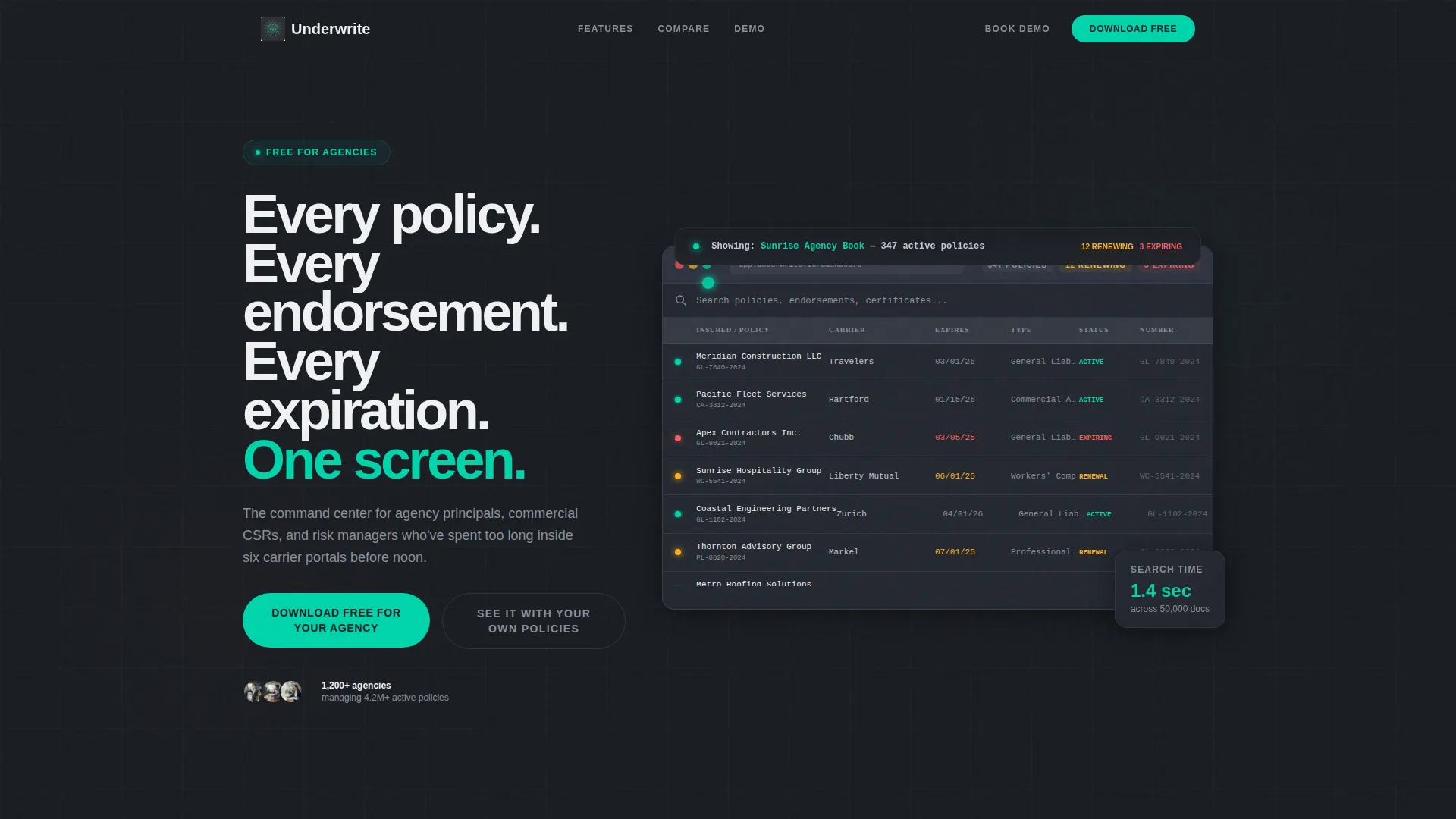
- An animated interactive dashboard header showing a live sample book of business with 347 policies, status pips, and an autonomous search demonstration filtering results in real time
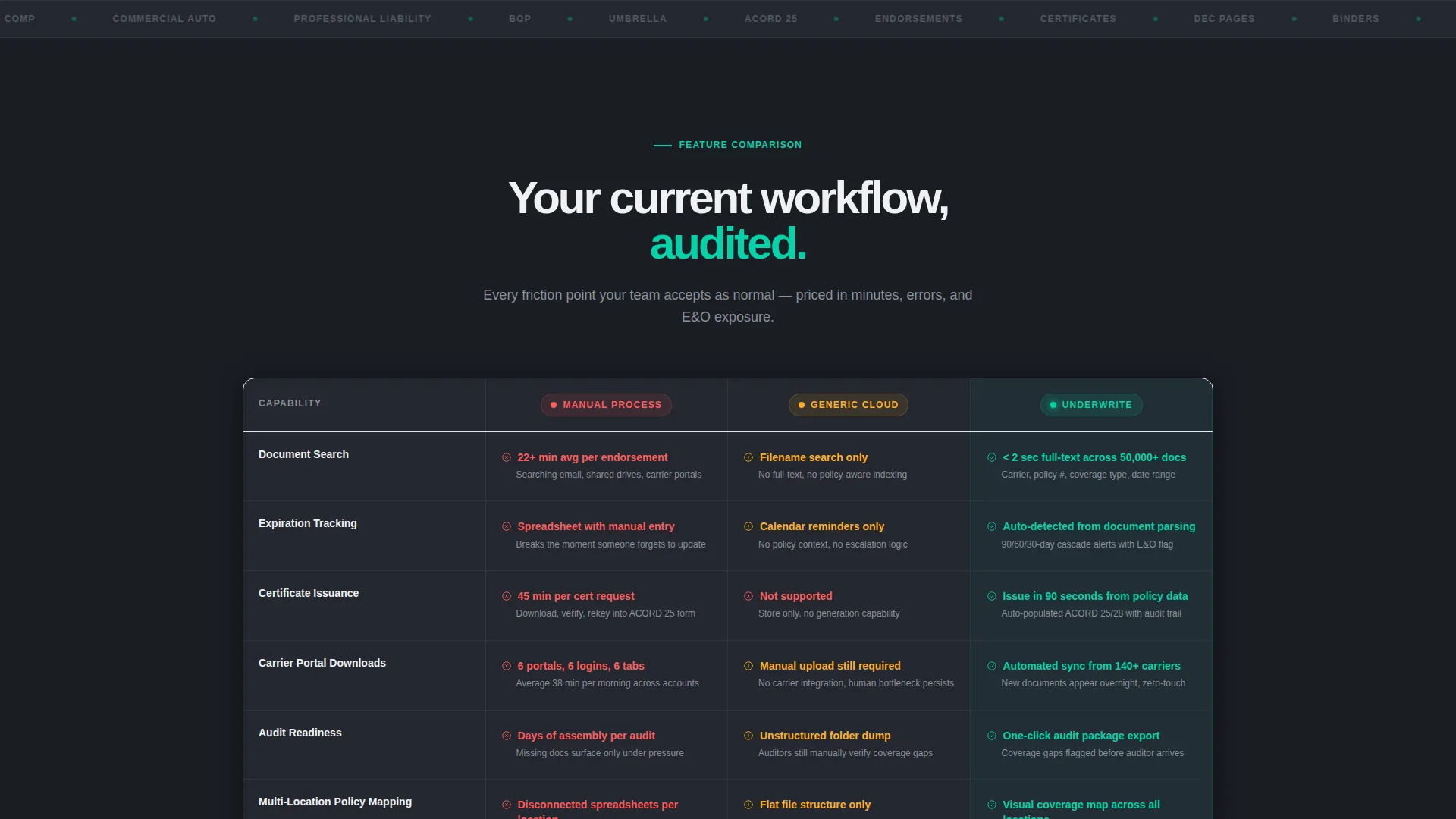
- A feature comparison table measuring document search, expiration tracking, certificate issuance, carrier portal downloads, audit readiness, and multi-location policy mapping against manual processes and generic storage
- A modal-based app download flow with platform selection buttons, an email field for mobile users, and a secondary demo booking path collecting agency name, management system, and policy count
Feature list
This template is built around a specific set of functional components that work together to convert a skeptical professional buyer.
Animated Interactive Dashboard Header
The header renders a full-fidelity sample dashboard showing 347 active policies, 12 flagged for renewal, and 3 expiring certificates. An autonomous cursor animates a search for "General Liability," filters the table to 41 results, and opens a policy detail view with dec page, endorsement stack, and claims history tabs. The headline then appears over a frosted overlay.
Feature Comparison Table
Six workflow rows compare manual processes, generic cloud storage, and the platform side by side. Each platform cell carries a specific capability or metric, while the competing columns display clearly marked friction points using the template's amber and red status indicators. The table is the page's primary evidence engine.
Pain-to-Resolution Feature Sections
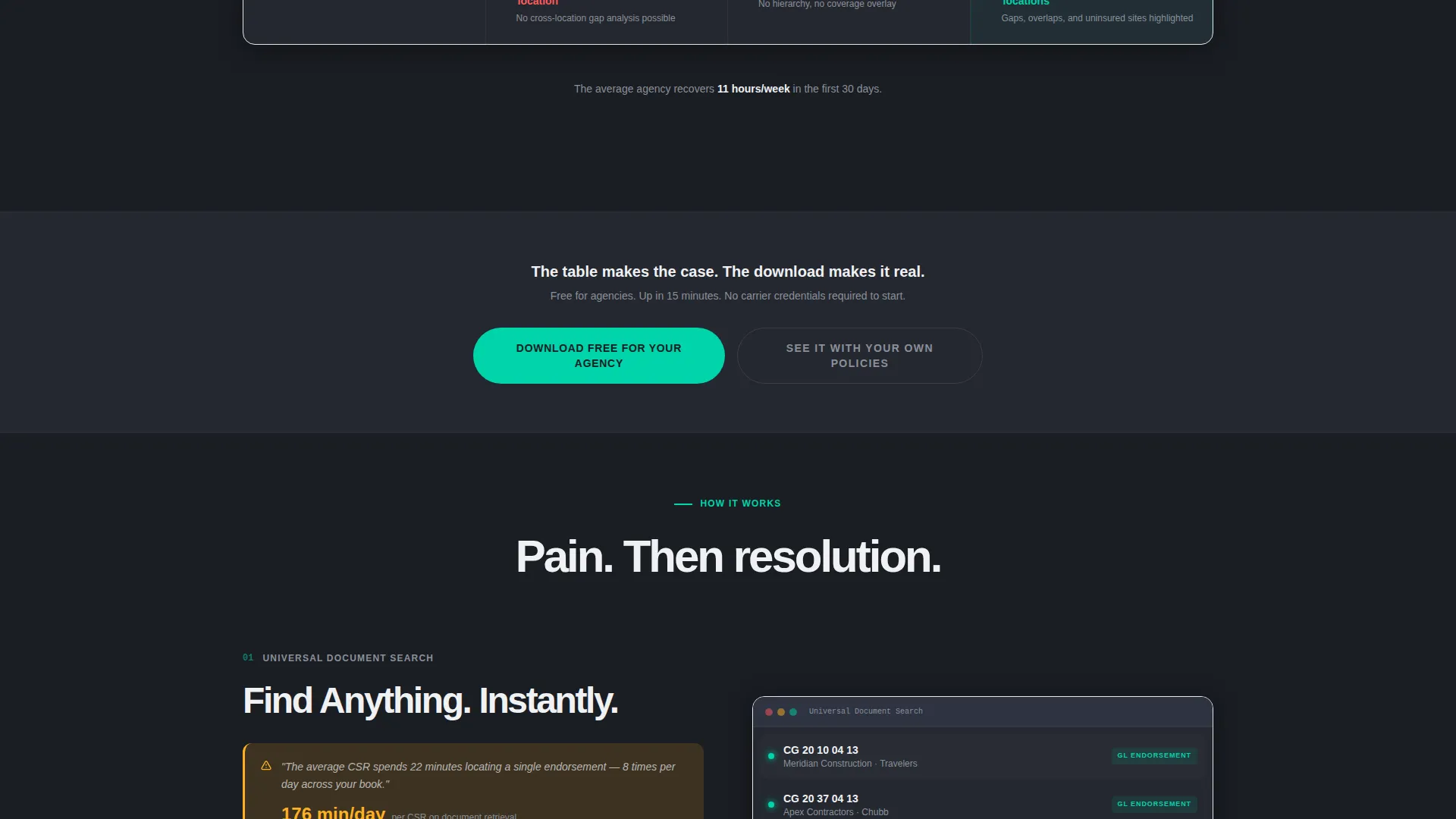
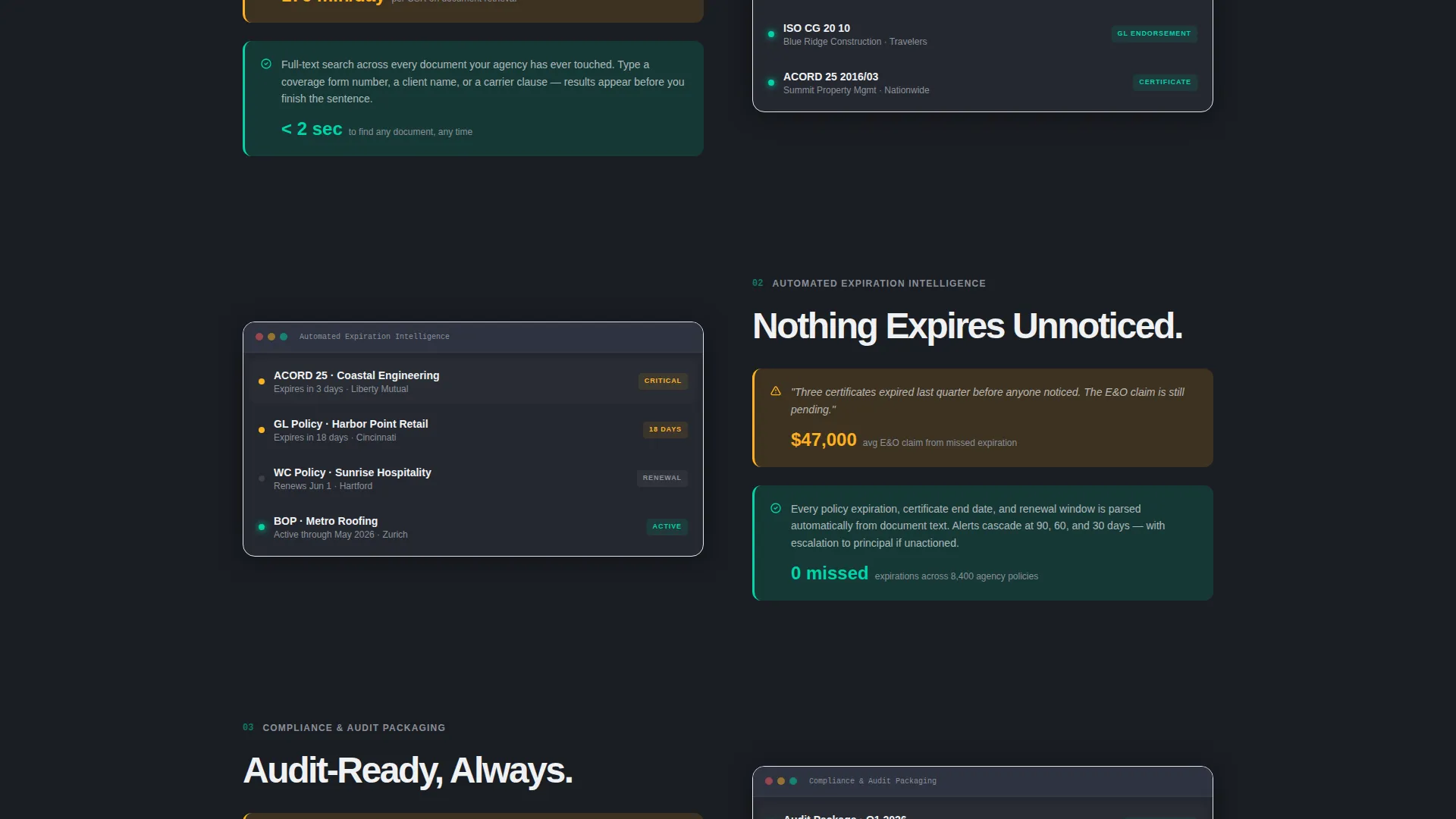
Each feature section below the comparison table opens with a quantified user pain point and closes with a dashboard screenshot illustrating the resolution. Stakes escalate deliberately from daily annoyance to errors and omissions exposure to audit failure, making inaction feel increasingly costly.
Pinned Mobile Download call to action
The primary call to action reads "Download Free for Your Agency" and pins to the bottom of the viewport on mobile. On desktop, it sits statically in the header navigation and repeats after the comparison table and after the final feature section.
Download Modal with Dual Platform Flow
Clicking the primary call to action opens a modal containing large Apple and Windows download buttons. An email field labeled "Or send the download link to your desk" gives mobile users a path to act later. The modal is designed to capture intent regardless of the device or situation.
Demo Booking Secondary Path
A secondary conversion option labeled "See It With Your Own Policies" links to a guided demo booking form. The form collects agency name, management system selection from a predefined dropdown, and approximate policy count to qualify the lead before the demo.
Page sections overview
| Section | Purpose |
|---|---|
| Animated Header Preview | Demonstrates the dashboard live with autonomous cursor interaction and filtered search results |
| Headline Overlay | Delivers the core value statement over the frosted dashboard preview |
| Feature Comparison Table | Systematically contrasts manual, generic storage, and platform workflows row by row |
| Pain-Resolution Feature Blocks | Escalates stakes from daily friction to audit and liability exposure with screenshot evidence |
| Primary Download call to action | Repeats the app download offer at key scroll milestones and pins on mobile |
| Download Modal | Captures platform preference, email address, and deferred download intent |
| Demo Booking Form | Collects agency context to qualify visitors choosing the guided demo path |
Design & branding system
The visual system follows a Dashboard Pro theme using a Carbon Fiber color palette. Every color carries a defined function, nothing is decorative, and the overall feel mirrors a precision instrument panel rather than a marketing page.
- Deep graphite (#1A1D23) and matte charcoal (#242830) form the base surfaces, with titanium mid-tone (#3A3F47) handling borders and secondary user interface elements, and crisp white (#F0F1F3) keeping typography readable against the dark background
- Status-light teal (#00D4AA) marks active states and confirmations throughout the dashboard preview, while alert amber (#FFB020) flags expirations and action-required rows so the color itself communicates urgency without extra copy
- Typography is set in clean, high-contrast white on dark surfaces to ensure that every data point in the interactive preview and comparison table reads clearly at a glance
Mobile & speed optimization
The layout is structured to work as effectively on a phone during a carrier meeting as it does on a desktop workstation. The conversion architecture adapts to context rather than requiring a specific environment.
- The primary download call to action pins to the bottom of the mobile viewport so it is always reachable without scrolling back to the top
- The email field inside the download modal gives mobile visitors a practical way to send the download link to a desktop device for later action
- The demo booking form is concise by design, asking only for agency name, management system, and policy count to minimize friction on smaller screens
How this template helps you convert
Every structural decision in this template is made to reduce doubt and increase the visitor's confidence before they reach the download button.
- The interactive dashboard header puts a working preview in front of the visitor immediately, so the product feels real and tangible before a single feature claim is read.
- The comparison table uses specific metrics and named friction points to make the cost of the current workflow concrete and personal rather than abstract.
- The escalating pain-to-resolution feature sections, combined with a pinned mobile call to action and a dual-path modal, ensure that a visitor who is convinced has no obstacle between that conviction and completing the download or booking the demo.
Other information about this template
This template is built specifically for the insurance software category, targeting professionals in agency operations and commercial lines management. It is designed to support a direct app download offer as the primary conversion goal, with a guided demo as a secondary path.
- The template style is a comparison table landing page, making it well suited for platforms that need to dismantle a visitor's existing workflow before presenting an alternative
- The Dashboard Pro theme and Carbon Fiber color system are available as a matched visual identity for other templates in the same product family
- The interactive header concept and feature matrix creative direction are particularly effective for insurance document management tools, where showing beats telling and specificity earns trust faster than broad claims
Theme
Dashboard Pro
Creative direction
Feature Matrix
Color system
Carbon Fiber
Style
Comparison Table
Direction
App Download
Page Sections
Interactive Policy Dashboard Header
Six-row Feature Comparison Table
Escalating Pain-to-resolution Sections
Pinned Mobile Download Call to Action
Dual-platform Download Modal
Guided Demo Booking Form
Related questions
Who is this landing page template built for?
Can I adapt the comparison table rows for a different set of features?
What conversion paths does this template include?
Does the interactive dashboard header require real policy data?
Is this a single-page template or a multi-page website?



