Surgical Excellence Surgeon Directory Landing Page Template
Scaffold is a bento grid landing page template built for platform engineering managed services. It opens with a live-feel dashboard preview, walks visitors through a Problem-to-Solution arc, and closes with a CLI install call to action. The dark, iridescent design system feels at home on an engineering team's screen at any hour.
by Rocket studio
Quick summary
Scaffold is a single-page bento grid template designed for platform engineering managed services. It opens on a dashboard preview that immediately proves the product works, then scrolls through a Problem-to-Solution arc before landing on a CLI install call to action. The void-black and iridescent color system keeps every metric readable and every interaction purposeful.
Who this template is for
This template is built for technical founders and engineering leaders who need to communicate a complex managed service quickly and credibly. If your audience opens landing pages in a terminal-dark browser at 2 a.m., this is the template for that audience.
- VP Engineering leads at Series B-to-D startups managing Kubernetes clusters, CI/CD pipelines, and internal developer platforms
- Site Reliability Engineers (SREs) who need to show stakeholders why automation matters before the next incident
- CTOs pitching a managed platform service to a board or evaluating one for their own team
What problem this template solves
Platform engineering services are hard to explain on a page. Visitors arrive skeptical, busy, and already burned by overpromised tooling. A generic SaaS template does not carry the weight of cluster health grids and mean-time-to-recovery gauges. Scaffold solves the credibility gap by leading with visible proof before making any ask.
- Engineers and decision-makers need to see working data before they trust a product, not marketing copy
- The Problem-to-Solution arc mirrors the emotional journey buyers are already on, from noise and burnout to clarity
- Standard landing page templates lack the dark, data-dense visual language that resonates in DevOps and platform engineering contexts
What you get with this template
You get a fully structured bento grid landing page that guides technical visitors from pain recognition to confident action. Every section is purpose-built for a platform engineering audience, and the visual system is ready to use out of the box.
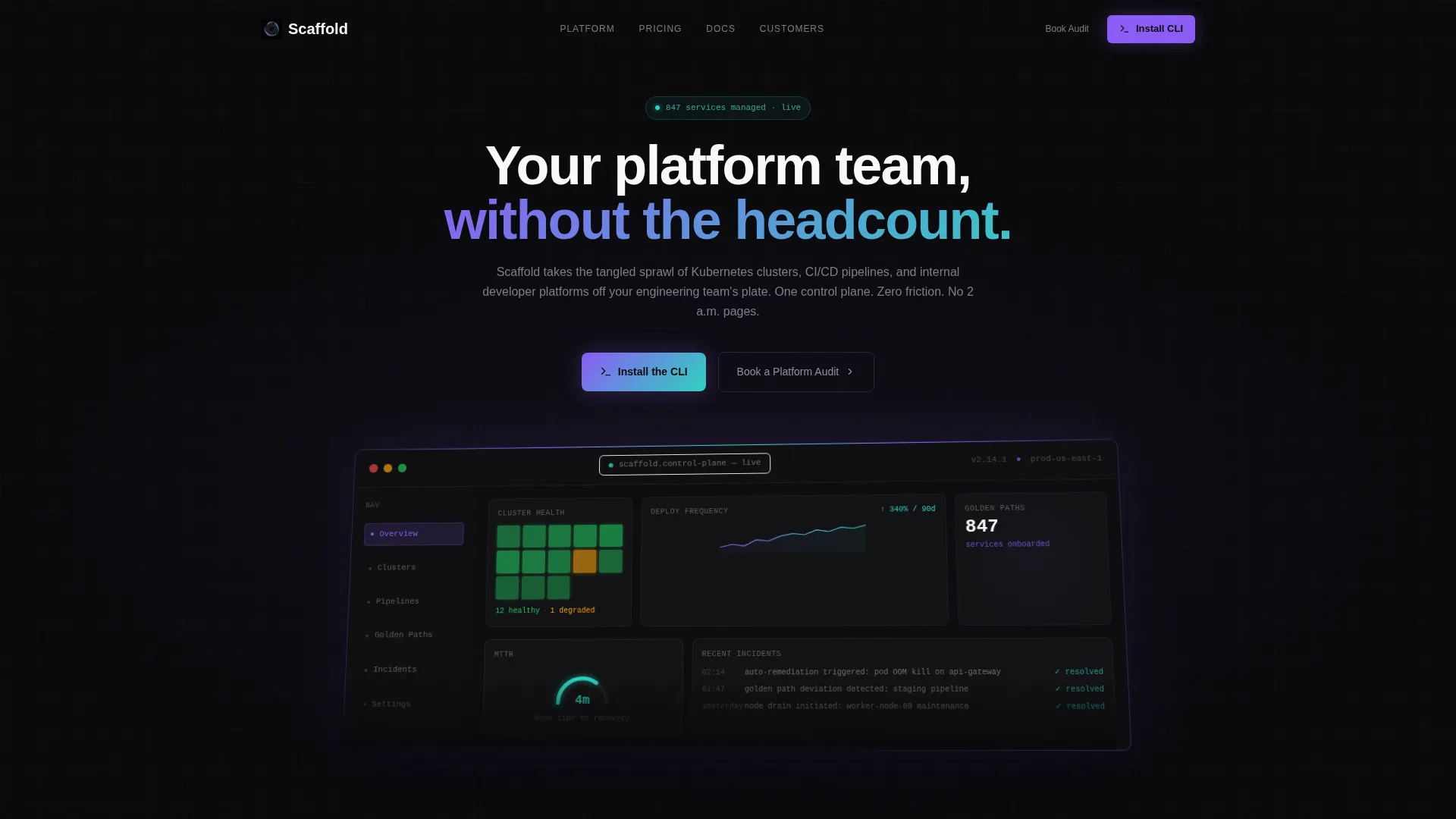
- A dashboard preview header section showing a control plane render with cluster health, deployment frequency, a golden-path service count, and a mean-time-to-recovery gauge
- A Problem-to-Solution bento arc with three paired card sets, a full-width pivot divider, pricing tier cards, customer deployment metrics, and a rotating testimonial grid
- A dual-path call to action with a CLI install block (including a one-click copy curl command and toggles for macOS, Linux, and Docker) plus a secondary "Book a Platform Audit" option, positioned both mid-page and in a sticky bottom bar
Feature list
This section describes the core built-in capabilities of the Scaffold template.
Dashboard Preview Header
The header fills 70 percent of the viewport with a pixel-perfect control plane render. It shows twelve green nodes and one amber in a cluster health grid, a 90-day deployment frequency sparkline trending upward, a golden-path scaffold count reading 847 services onboarded, and a mean-time-to-recovery gauge at 4 minutes. The render sits on a subtle 3D axis to give depth. Void black bleeds to the browser edge.
Problem-to-Solution Bento Arc
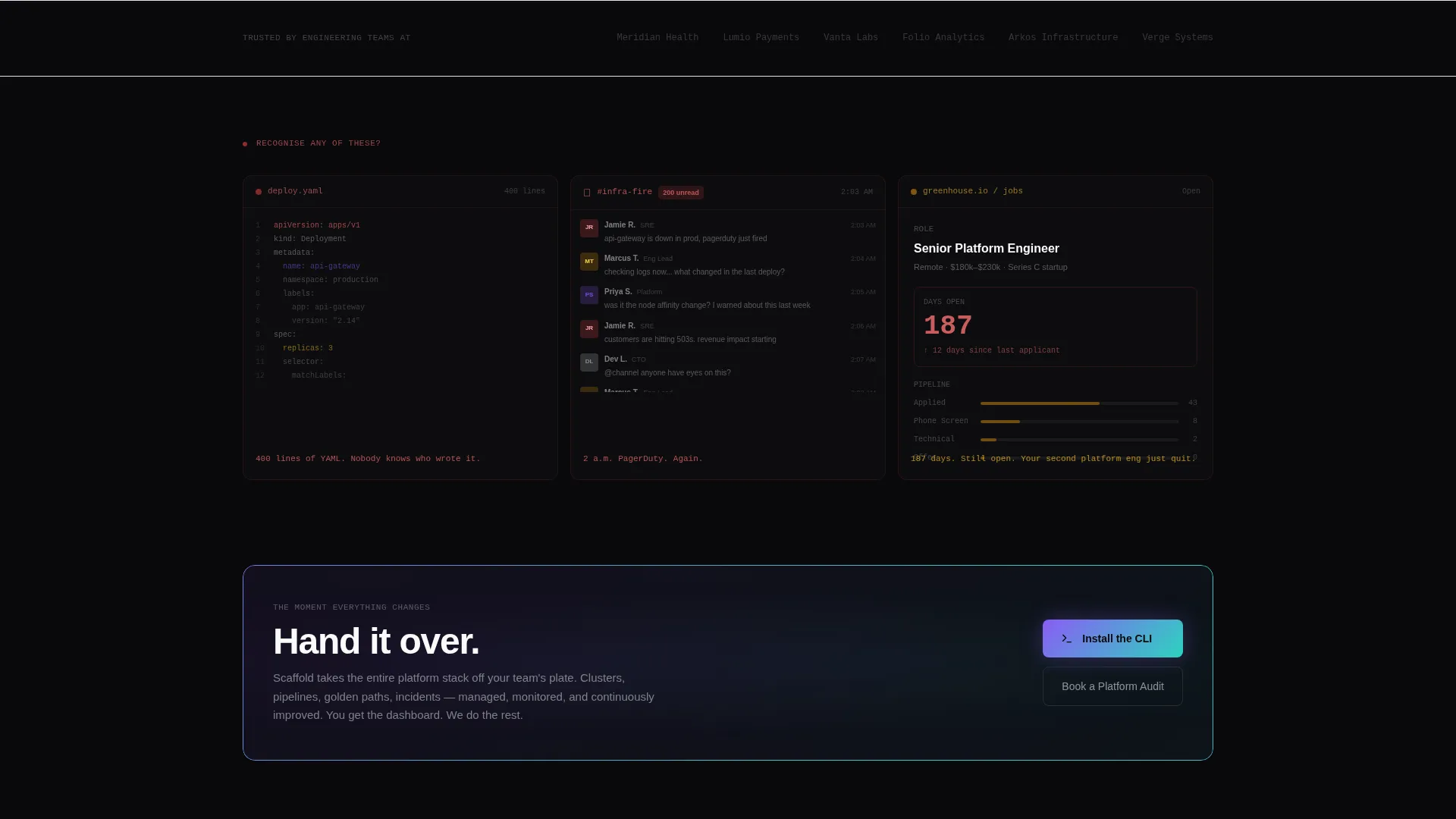
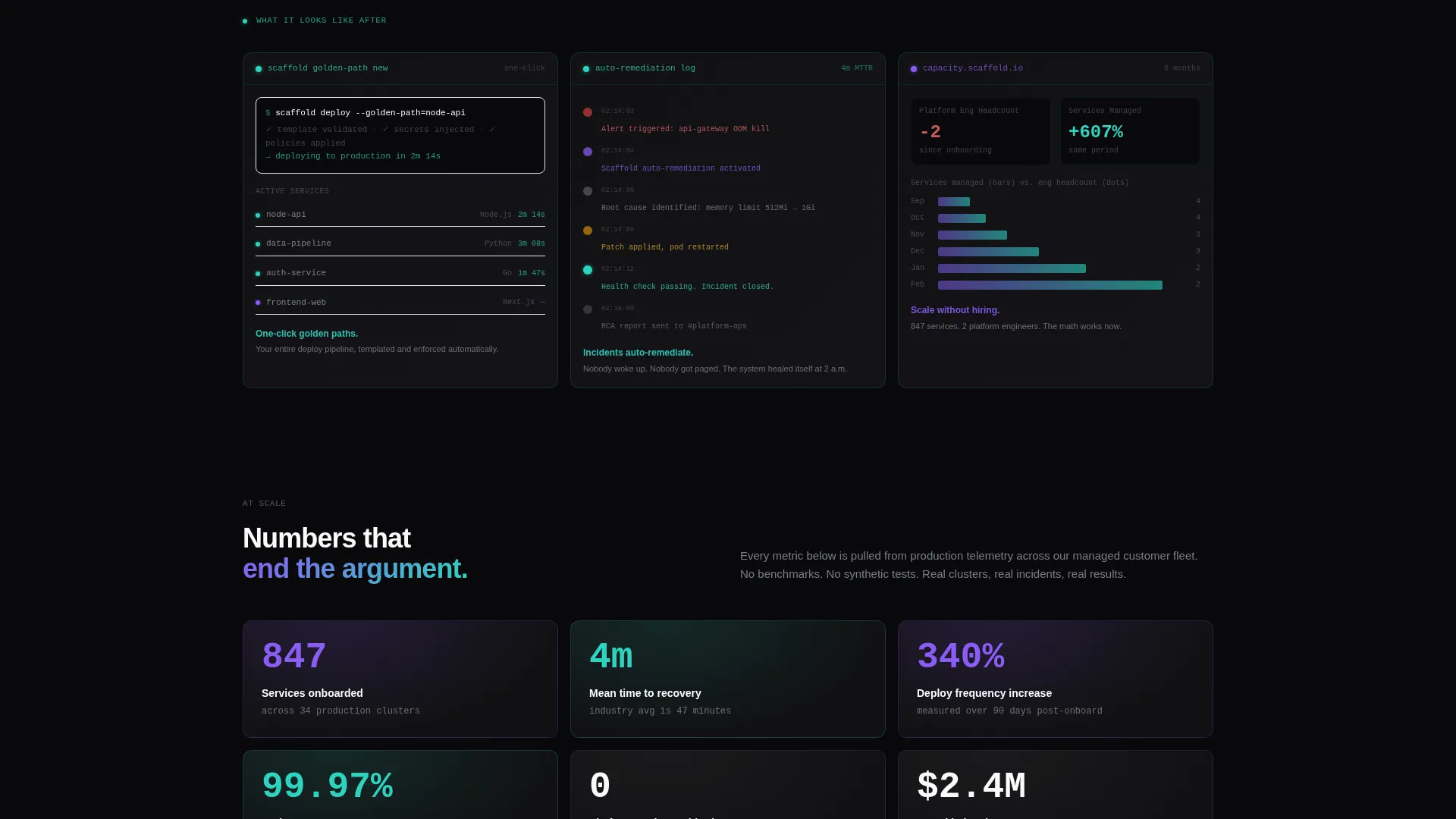
The scroll opens in deliberate discomfort. Three dark, dense cards show a 400-line deploy pipeline YAML file, a Slack thread labeled with 200 unread messages, and a hiring dashboard with a platform engineer role open for 187 days. A full-width iridescent divider card reads "Hand it over." Below it, three mirrored cards show the managed service response: a one-click golden path, an incident auto-remediation timeline, and a capacity chart.
CLI Install Call to Action
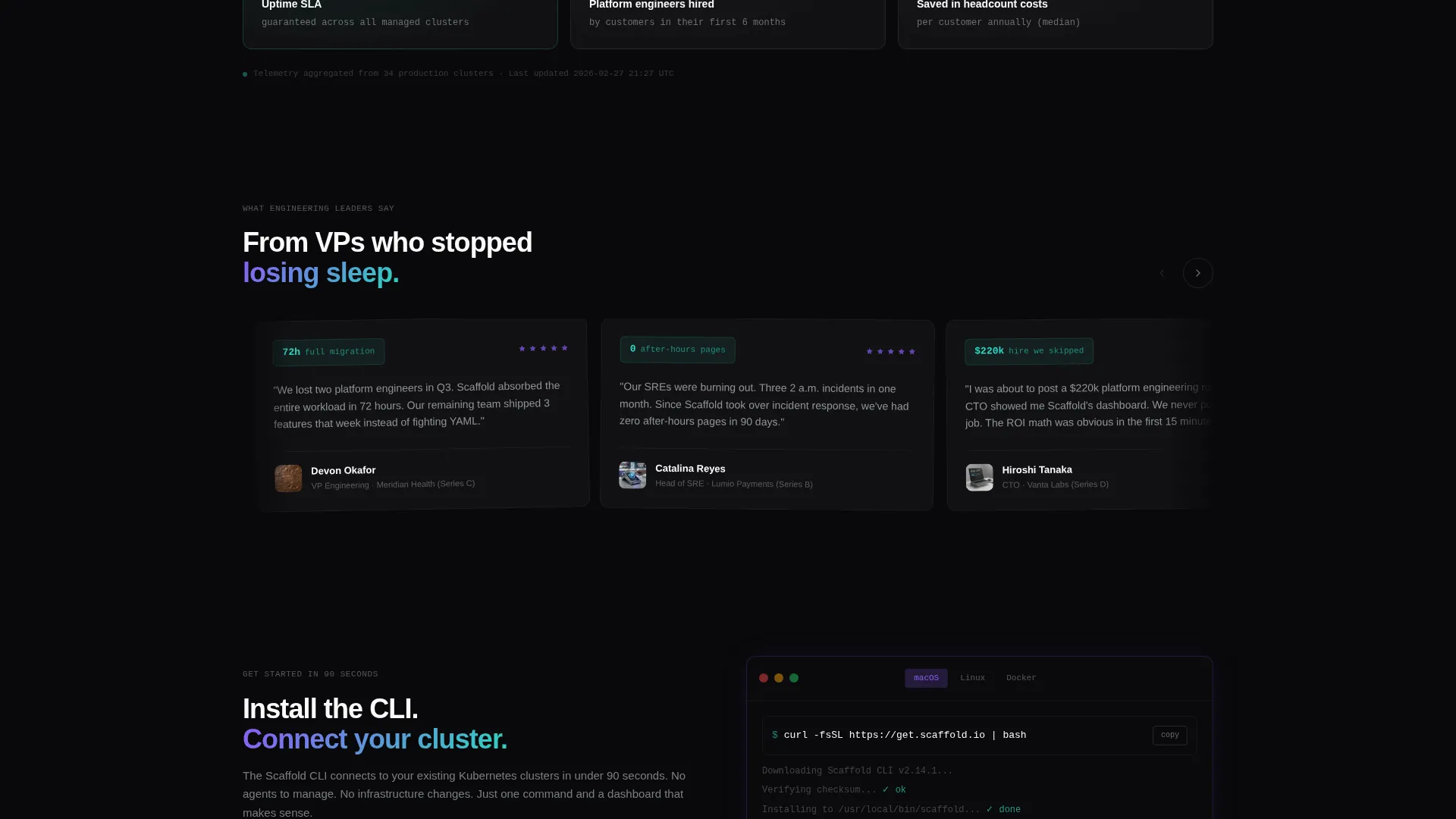
The primary action is a CLI install block with a one-click copy-to-clipboard curl command. Platform toggles let visitors switch between macOS, Linux, and Docker without leaving the page. This block appears twice: once floating after the problem-to-solution pivot, and once anchored in a sticky bottom bar that appears after 40 percent scroll depth.
Sticky Bottom Bar
A persistent bottom bar activates after the visitor scrolls past 40 percent of the page. It holds the CLI install call to action so the conversion path is always in view without interrupting reading flow. This ensures the primary action stays accessible through the pricing, metrics, and testimonial sections.
Rotating Testimonial Grid
The lower section of the page includes a rotating testimonial grid built for engineering leaders. Each card grows slightly larger and more luminous as the arc escalates, pulling the visitor visually toward resolution and reinforcing trust at the moment closest to conversion.
Secondary Audit Path
Not every visitor is ready to run a curl command. A "Book a Platform Audit" secondary call to action runs alongside the CLI install for teams that need a human touchpoint first. Both paths are present on the same page so no visitor reaches a dead end.
Page sections overview
| Section | Purpose |
|---|---|
| Dashboard Preview Header | Opens with a live-feel control plane render to prove the product exists and works at scale |
| Problem Cards Row | Shows three real failure modes in dark, dense bento cards to surface buyer pain immediately |
| Pivot Divider Card | Full-width iridescent card with "Hand it over" copy marks the emotional turning point of the page |
| Solution Cards Row | Mirrors the three problem cards with managed service responses: golden path, auto-remediation, capacity chart |
| CLI Install Block | One-click curl install with platform toggles, positioned mid-page after the solution pivot |
| Pricing Tier Cards | Lays out service tiers to help buyers self-select and move toward sign-up |
| Customer Metrics Section | Deployment data and platform scale numbers reinforce credibility before the final ask |
| Testimonial Grid | Rotating quotes from engineering leaders build trust and escalate visual energy toward conversion |
| Sticky Bottom Bar | Persistent CLI install and audit call to action visible after 40 percent scroll depth |
Design & branding system
The visual identity follows a Data Command theme with an AI Iridescent color system. The palette is built to read clearly on dark screens while making every metric feel alive and meaningful. Iridescence appears only on edges, hover states, and data highlights, never as background noise.
- Void black (#09090B) as the primary background, holographic violet (#8B5CF6) for primary actions and data highlights, spectral teal (#2DD4BF) for success states and metric callouts, and liquid silver (#C4C7CE) for body text
- An iridescent gradient shifting between violet and teal appears on hover states, card borders, and the full-width pivot divider card
- The 3D-axis dashboard header, dark problem card density, and escalating luminosity across the testimonial grid all reinforce the Problem-to-Solution arc visually
Mobile & speed optimization
The bento grid layout is structured to reflow cleanly from wide desktop viewports down to mobile screens. The dashboard header and sticky bottom bar are designed with viewport-relative sizing so key elements stay proportional across device sizes.
- Bento grid cards reflow into single-column stacks on smaller screens without breaking the Problem-to-Solution reading order
- The sticky bottom bar remains accessible on mobile so the CLI install path is never buried below the fold
- Platform toggles in the CLI block are touch-friendly so mobile visitors can switch between macOS, Linux, and Docker without precision tapping
How this template helps you convert
The conversion strategy is earned, not assumed. The page proves the product before asking for anything, then offers two paths forward so no visitor is left without a next step.
- The dashboard preview header shows real cluster data and metrics in the first viewport, building immediate credibility before any marketing copy appears.
- The Problem-to-Solution arc mirrors the exact emotional journey of the target buyer, moving them from recognized pain to visible relief before presenting the CLI install.
- The dual-path call to action (CLI install for self-serve visitors and "Book a Platform Audit" for teams that need a conversation) ensures both ready and evaluating buyers have a clear, frictionless next step.
Other information about this template
Scaffold is built specifically for the platform engineering managed service category, where buyer trust is hard to earn and technical audiences need to see proof before they act. The template is designed to work as a complete, self-contained landing page without requiring additional pages or navigation.
- The template style is a bento grid, which suits data-dense content and allows visual hierarchy to carry the narrative without long prose sections
- The creative direction is a Problem-to-Solution Arc, making it well suited to any service that solves a known, painful operational problem
- The App Download landing page direction means the primary conversion metric is a CLI install, not a form fill, making it unusual and memorable compared with standard SaaS templates
- The header concept is a Dashboard Preview, which can be adapted to show any platform's real metrics, cluster data, or deployment statistics
Theme
Data Command
Creative direction
Problem→Solution Arc
Color system
AI Iridescent
Style
Bento Grid
Direction
App Download
Page Sections
Dashboard Preview Header
Problem-to-solution Bento Arc
CLI Install Block with Platform Toggles
Sticky Bottom Conversion Bar
Rotating Testimonial Grid
Secondary Platform Audit Path
Related questions
Who is the Scaffold template designed for?
Can I replace the dashboard header with my own product metrics?
What is the primary call to action on this landing page?
Does the template include both the problem cards and the solution cards?
When does the sticky bottom bar appear?



