Education Survey & Feedback Landing Page Template
Pulse is a hub-and-spoke landing page template built for education survey and feedback platforms. It features an animated dashboard header, five anchor-navigated feature matrix sections, and a click-through conversion flow that sends visitors directly into a free interactive demo. The design runs on a dynamic motion theme with an AI iridescent color palette across a dark graphite canvas.
by Rocket studio
Quick summary
Pulse is a single-page, anchor-navigated template designed for education survey and feedback platforms. It opens with a living dashboard preview, guides visitors through five animated feature matrix sections, and converts them by launching a sandbox demo rather than a form. The visual language is kinetic, iridescent, and built to communicate real-time intelligence.
Who this template is for
This template is built for teams selling or showcasing adaptive survey technology inside the education sector. It speaks directly to the people who make decisions about classroom data tools.
- District assessment coordinators managing compliance timelines and reporting demands
- Department heads and principals who need honest, fast feedback before high-stakes meetings
- Education software founders and product teams positioning a modern alternative to static survey tools
What problem this template solves
Traditional survey platforms look and feel static. Their marketing pages match: long feature lists, dense pricing tables, and a form gate before anyone sees the product. That approach fails buyers who are already skeptical.
- Visitors cannot feel the difference between a dynamic, adaptive platform and a spreadsheet with a submit button
- Decision-makers under deadline pressure do not trust promised value they cannot immediately verify
- No clear conversion path means high bounce rates even when the product is genuinely strong
What you get with this template
You get a fully structured, single-page layout that performs the product story rather than just describing it. Every section is built around motion, clarity, and a direct path to conversion.
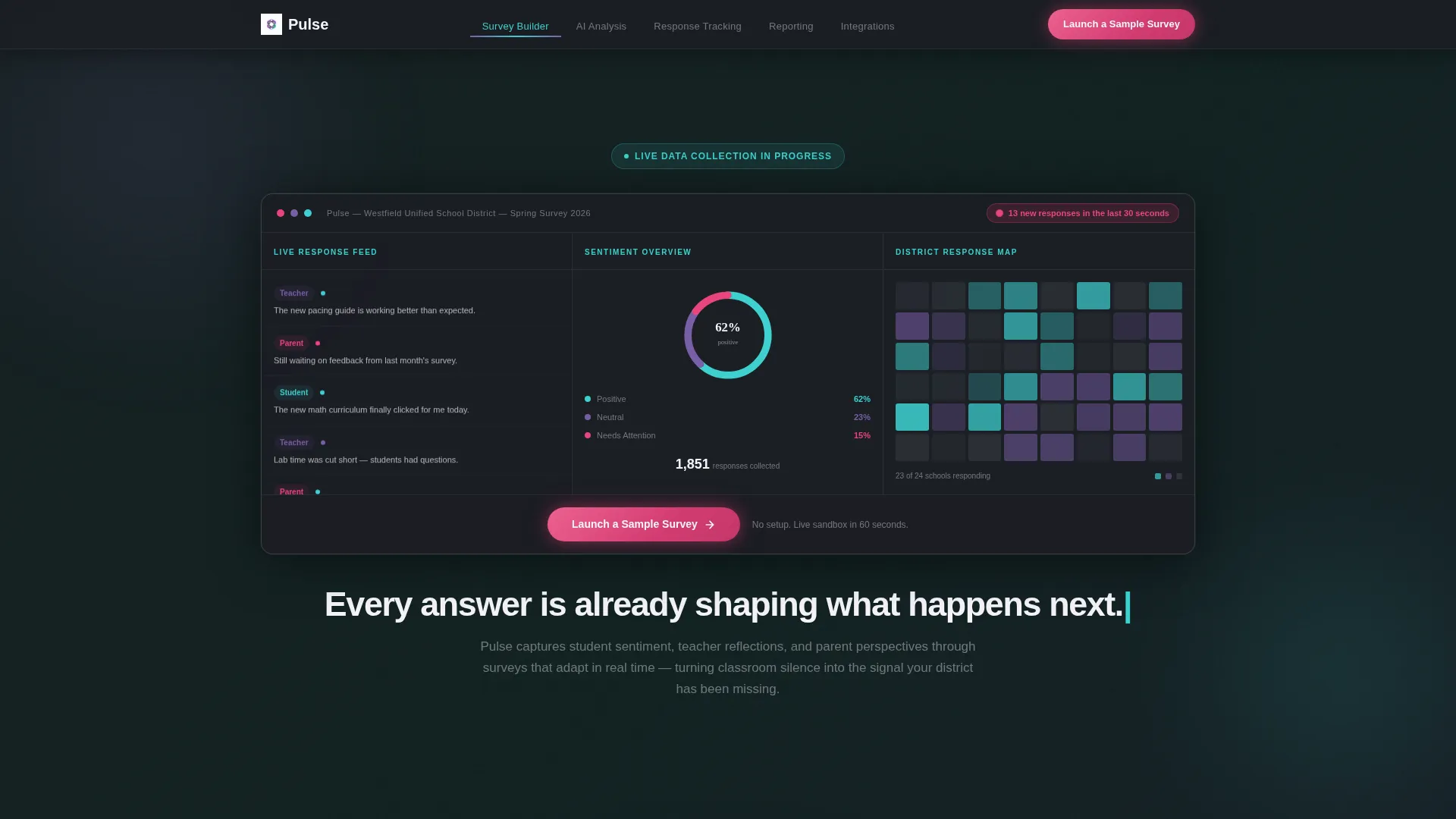
- An animated header dashboard with a live response feed, a rotating sentiment chart, and a pulsing district heatmap
- Five anchor-navigated spoke sections, each ending with a repeated primary call to action
- A click-through conversion model that bypasses form fields and routes visitors straight into a pre-loaded sandbox demo
Feature list
This section covers the core capabilities built into the Pulse template, as defined by the source brief.
Animated Dashboard Header
The header presents a living mock-up of the platform in action. A real-time survey response feed flows in from the left, a sentiment donut chart rotates as segments grow, and a district heatmap pulses with iridescent color as responses land. A notification badge blinks with a live response count, and the headline types itself letter by letter beneath the display.
Hub and Spoke Anchor Navigation
A fixed navigation bar sits at the top of the page with five labeled spokes: Survey Builder, AI Analysis, Response Tracking, Reporting, and Integrations. Each label scrolls directly to its dedicated feature matrix section, letting visitors jump to the capability they care about most without losing their place.
Scroll-Activated Feature Matrices
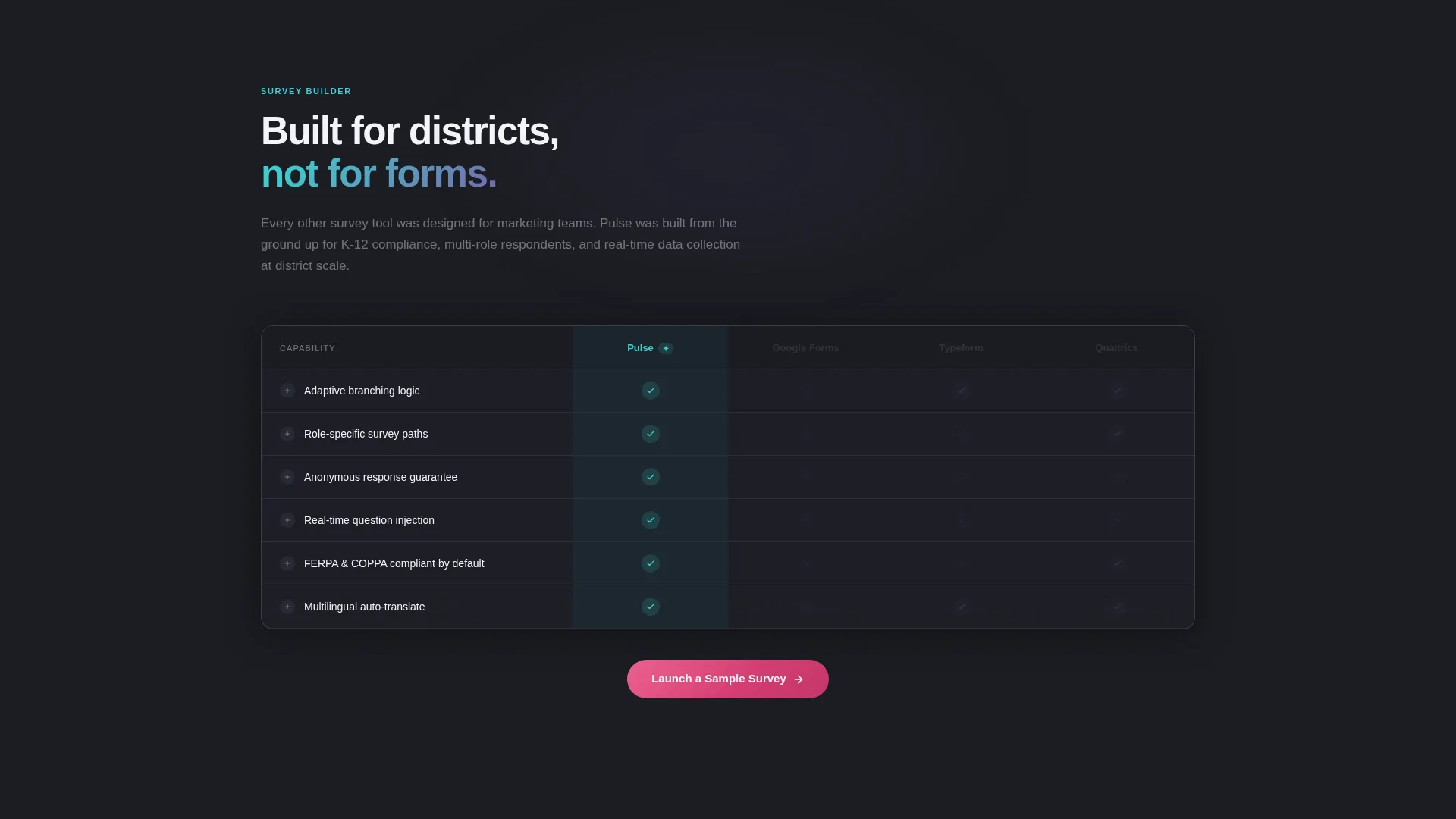
Each spoke section uses an animated comparison table format. Checkmarks animate in on scroll, capability rows expand to reveal micro-demos, and competitor columns gray out as the product column illuminates. The scroll experience is intentionally kinetic, building momentum and competitive contrast with every section.
Click-Through Conversion Flow
There are no form fields on the landing page. The primary call to action, "Launch a Sample Survey," appears first inside the header dashboard as a glowing button and repeats at the close of every spoke section. Each click passes the visitor into a pre-loaded sandbox where they build a three-question survey in under sixty seconds.
AI Iridescent Visual System
The color palette uses deep graphite as the primary background, with shifting gradient accents moving between holographic violet and electric teal. Chalk-white handles text and card surfaces. Signal-pink is reserved exclusively for live data indicators and call-to-action states. The result is a dark, intelligent visual environment that still feels warm and grounded.
Dynamic Motion Theme
Every interaction in the template is motion-led. Scroll triggers animate content into view, tables perform competitive comparisons in real time, and the header dashboard is in a permanent state of mid-collection. The motion system communicates platform intelligence without a single word of explanation.
Page sections overview
| Section | Purpose |
|---|---|
| Header Dashboard | Showcases animated live survey feed, sentiment chart, and district heatmap with a primary call to action |
| Anchor Navigation Bar | Fixed hub with five spoke labels for instant section access throughout the page |
| Survey Builder Matrix | Animated feature comparison focused on adaptive survey construction capabilities |
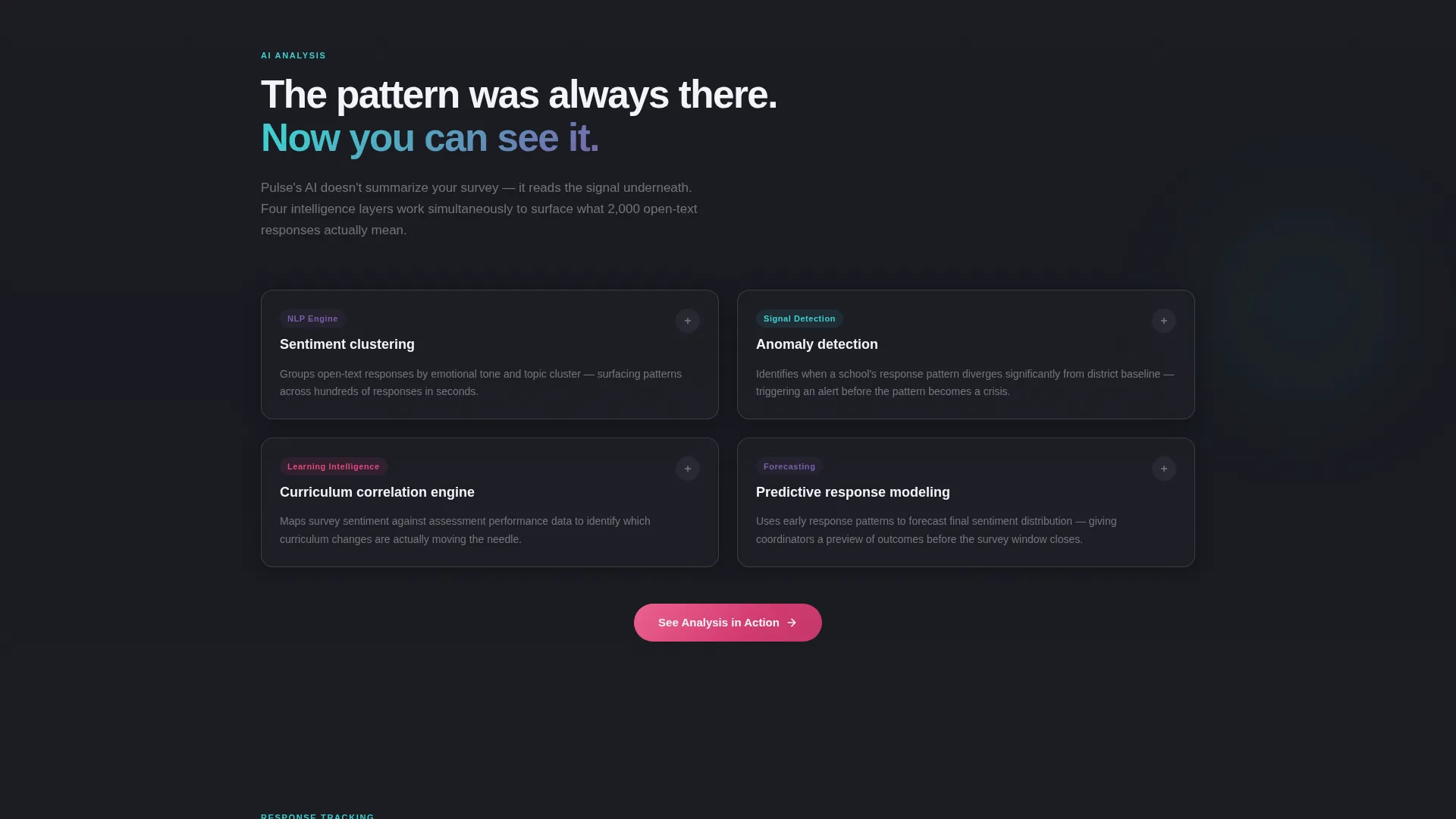
| AI Analysis Matrix | Scroll-activated rows highlighting real-time sentiment and pattern recognition features |
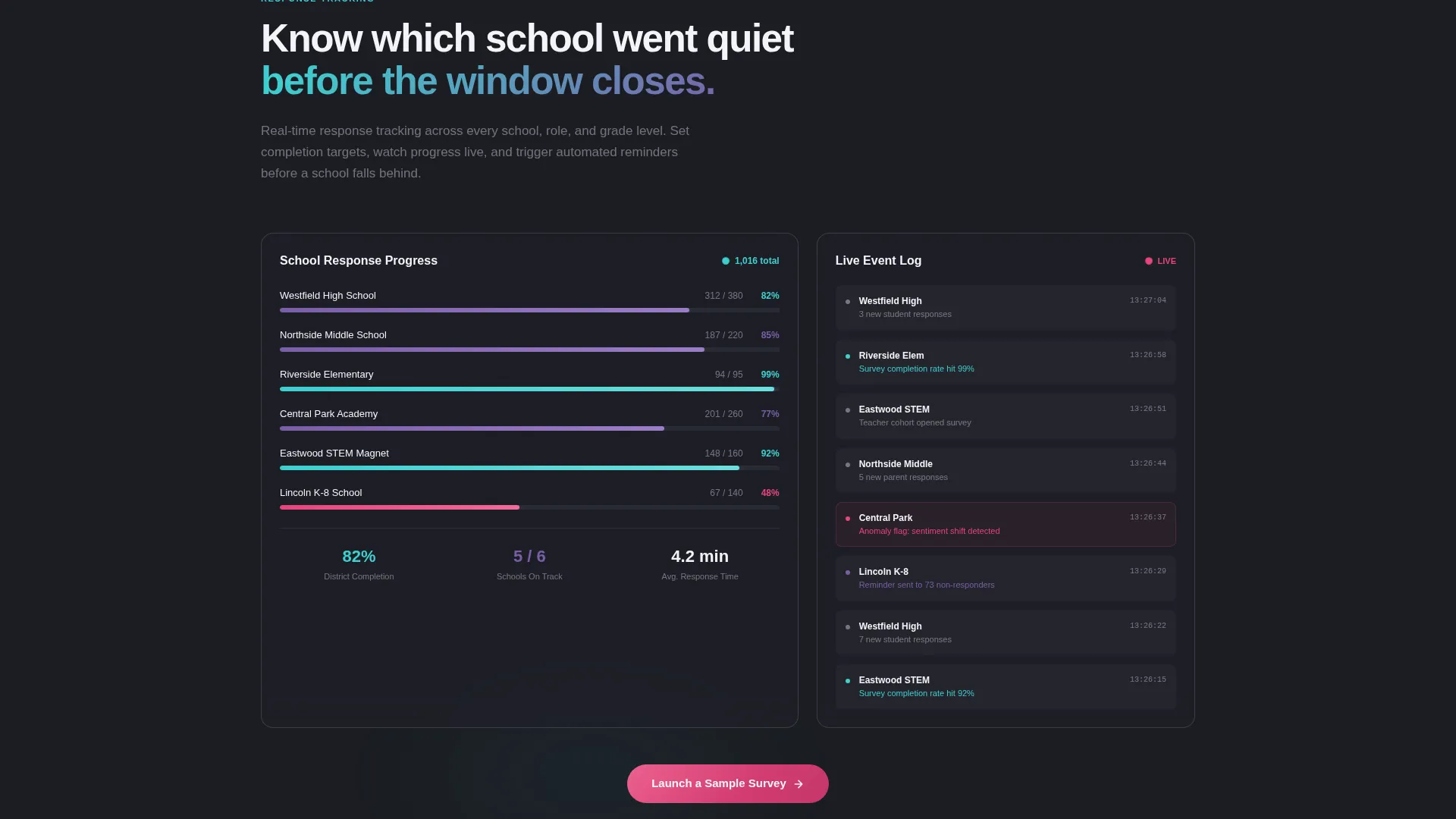
| Response Tracking Matrix | Kinetic table showing live tracking capabilities with micro-demo expansions |
| Reporting Matrix | Competitive comparison covering report generation and data presentation features |
| Integrations Matrix | Final spoke section covering platform connections, closing with a repeated call to action |
Design & branding system
The visual identity is built around a dark auditorium aesthetic where prismatic light moves across every surface. The palette is precise and purposeful, with each color assigned a specific role.
- Deep graphite (#1B1D23) as the primary background, holographic violet (#7B5EA7) and electric teal (#3ECFCF) as shifting gradient accents, chalk-white (#F4F4F8) for text and card surfaces, and signal-pink (#E8457C) reserved for live data pings and call-to-action states
- The Dynamic Motion theme governs all interactions: scroll-triggered animations, self-typing headlines, rotating charts, and pulsing map elements keep the page alive at every viewport depth
- The AI Iridescent color system creates a futuristic but grounded atmosphere, intelligent and slightly cinematic while still feeling relevant to an education context
Mobile & speed optimization
The template is structured to maintain its kinetic identity across screen sizes. Motion-led design can be heavy if left unchecked, so the layout accounts for this.
- Animated components are built into a single-page scroll structure, reducing layout complexity and keeping the viewport focused
- The click-through conversion model removes form-rendering overhead from the landing page entirely, keeping the interaction path lean
- Each feature matrix section is designed as a self-contained scroll unit, making it straightforward to adapt for narrower viewports without breaking the hub-and-spoke flow
How this template helps you convert
The Pulse template earns conversion through immediate product experience rather than delayed promises. Every design and structural decision points toward a single outcome: getting the visitor into the sandbox.
- The animated dashboard header puts the product in motion before the visitor reads a single word, establishing credibility through demonstration rather than description
- Five dedicated feature matrix sections give different buyer types, from assessment coordinators to principals, a reason to stay and scroll through the sections most relevant to their role
- The "Launch a Sample Survey" call to action appears at every logical exit point on the page, and it routes directly to a pre-loaded demo environment where the visitor builds a real survey in under sixty seconds, earning trust through competence
Other information about this template
Pulse is categorized under Technology and Education Software, and it sits at the intersection of the education survey and feedback niche. It is a Hub and Spoke template style with a Click-Through landing page direction, meaning conversion happens off-page inside a demo environment rather than through an on-page form.
- The template is matched to a Feature Matrix creative direction, meaning its spoke sections are built around comparison and capability demonstration rather than narrative storytelling
- The header concept is classified as Dashboard Preview, a specific layout pattern where an animated product interface serves as the visual hero rather than a static illustration or photography
- The intersection match score for this template is 13, indicating a strong alignment between the template style, theme, creative direction, and niche requirements
Theme
Dynamic Motion
Creative direction
Feature Matrix
Color system
AI Iridescent
Style
Hub & Spoke (Anchor Nav)
Direction
Click-Through
Page Sections
Animated Dashboard Header
Hub and Spoke Anchor Navigation
Scroll-activated Feature Matrices
Click-through Conversion Flow
AI Iridescent Color System
Dynamic Motion Theme
Related questions
Who is the Pulse template designed for?
Does the landing page include any form fields?
How many sections does the Pulse template include?
Can the color palette be customized to match a different brand?
What makes the feature matrix sections different from a standard comparison table?



