Toy Manufacturing Booking System Landing Page Template
Queue is a single-page comparison table landing page built for toy manufacturing booking systems. It combines a live-metrics header, an industry-report scroll flow, and a side-by-side capability comparison to help production managers, procurement leads, and operations directors understand exactly why manual scheduling fails and what a purpose-built booking engine delivers instead.
by Rocket studio
Quick summary
Queue is a dark-themed, data-forward landing page template designed for a toy manufacturing booking and production-scheduling system. It opens with a real-time KPI wall, moves through an industry-report narrative, anchors trust with a detailed comparison table, and closes with a factory case study and two conversion-focused calls to action.
Who this template is for
This template is built for software teams and marketers selling vertical scheduling tools to mid-size toy factories. It speaks directly to the people who live inside production chaos every day.
- Production managers coordinating injection molding, paint stations, and packaging bays across tight holiday timelines
- Procurement leads allocating resin and ABS plastic (Acrylonitrile Butadiene Styrene) across multiple stock-keeping units
- Operations directors at mid-size manufacturers who still run tooling changeovers through spreadsheets
What problem this template solves
Toy manufacturers face a brutal seasonal squeeze. Q4 demand spikes collide with limited tooling windows, and the result is missed deadlines, conflicting line allocations, and costly changeover delays. A generic template cannot frame this problem with credibility.
- No standard landing page template presents the production-scheduling problem with data visualizations, collision maps, or benchmark statistics
- Generic layouts lack the comparison depth needed to show capability differences between manual scheduling, ERP modules, and a dedicated booking engine
- Most templates do not carry the visual authority of a factory control room, which is the emotional register this audience trusts
What you get with this template
You get a fully structured single-page layout that builds a persuasive, evidence-led case from first scroll to final call to action. Every section is purpose-designed around the toy manufacturing context.
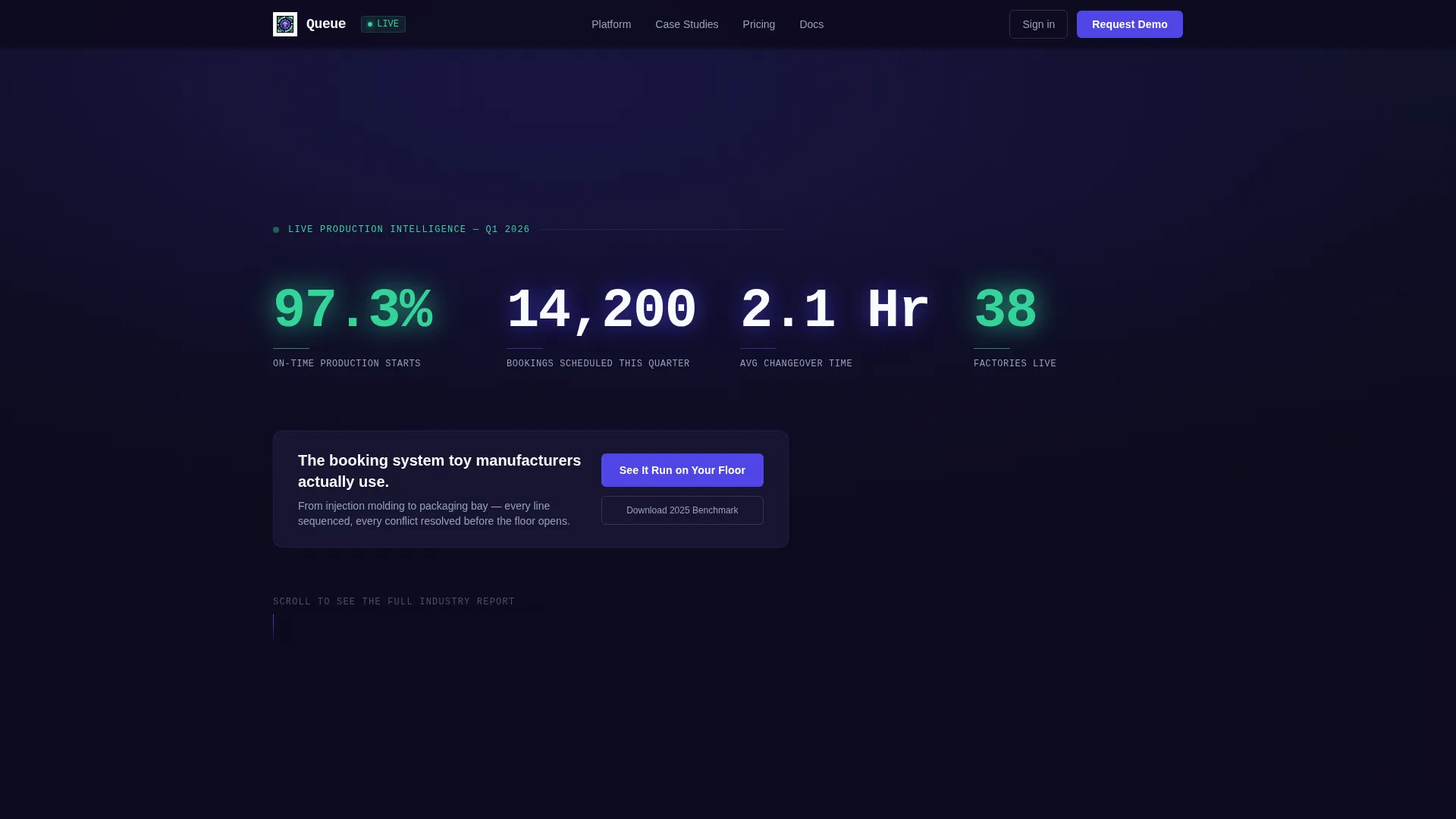
- A full-width KPI header panel with four oversized live-metric displays and a bold positioning statement
- A three-section industry-report body covering seasonal collision data, a granular comparison table, and a before-and-after factory case study
- Two conversion touchpoints: a primary demo call to action beneath the comparison table and a sticky secondary call to action after the case study
Feature list
This template includes purpose-built sections and components that reflect the specific demands of a production-scheduling sales page.
Live Metrics Header Wall
The header opens with four billboard-scale KPIs: 97.3% on-time production starts, 14,200 bookings scheduled this quarter, 2.1-hour average changeover time, and 38 factories live. Each number is set in tabular monospace type against console black, with a faint indigo glow suggesting a live data feed. A single positioning line sits below the metrics to anchor the value proposition immediately.
Seasonal Collision Data Visualization
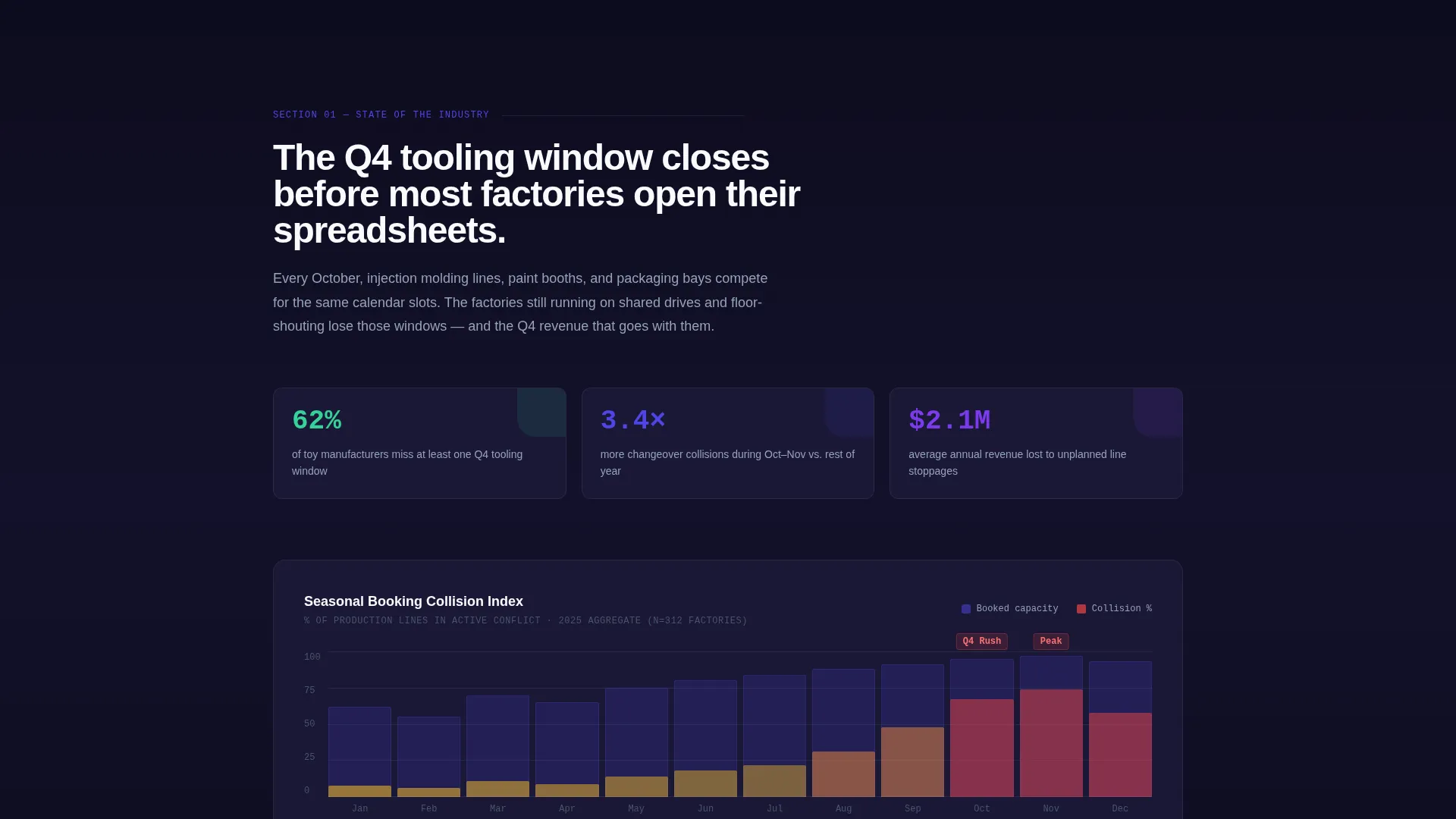
Section one of the body presents a data visualization of seasonal booking collisions. It communicates that 62% of toy manufacturers miss Q4 tooling windows, framing the product as the documented solution to a measurable industry problem rather than a general efficiency claim.
Granular Comparison Table
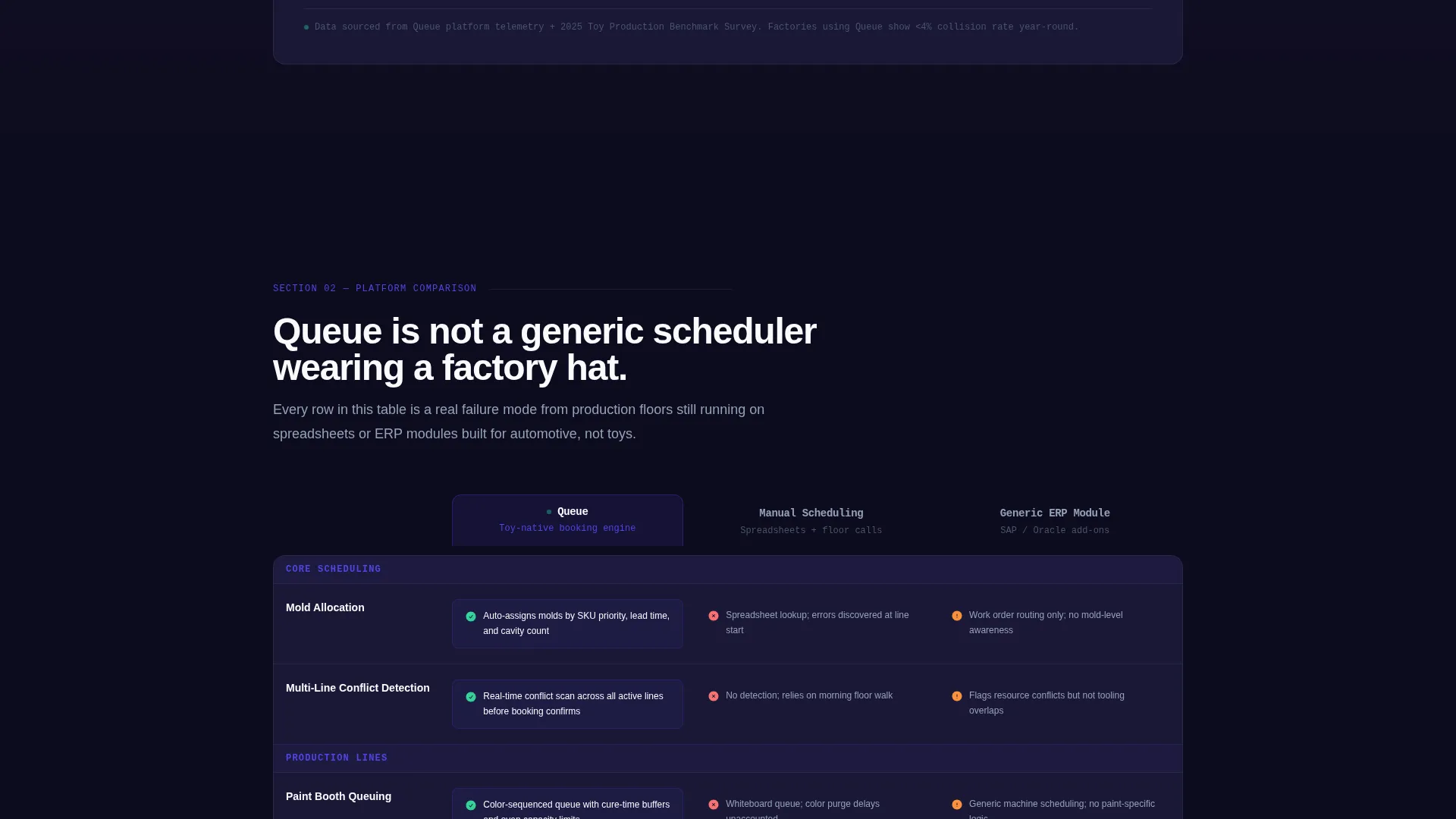
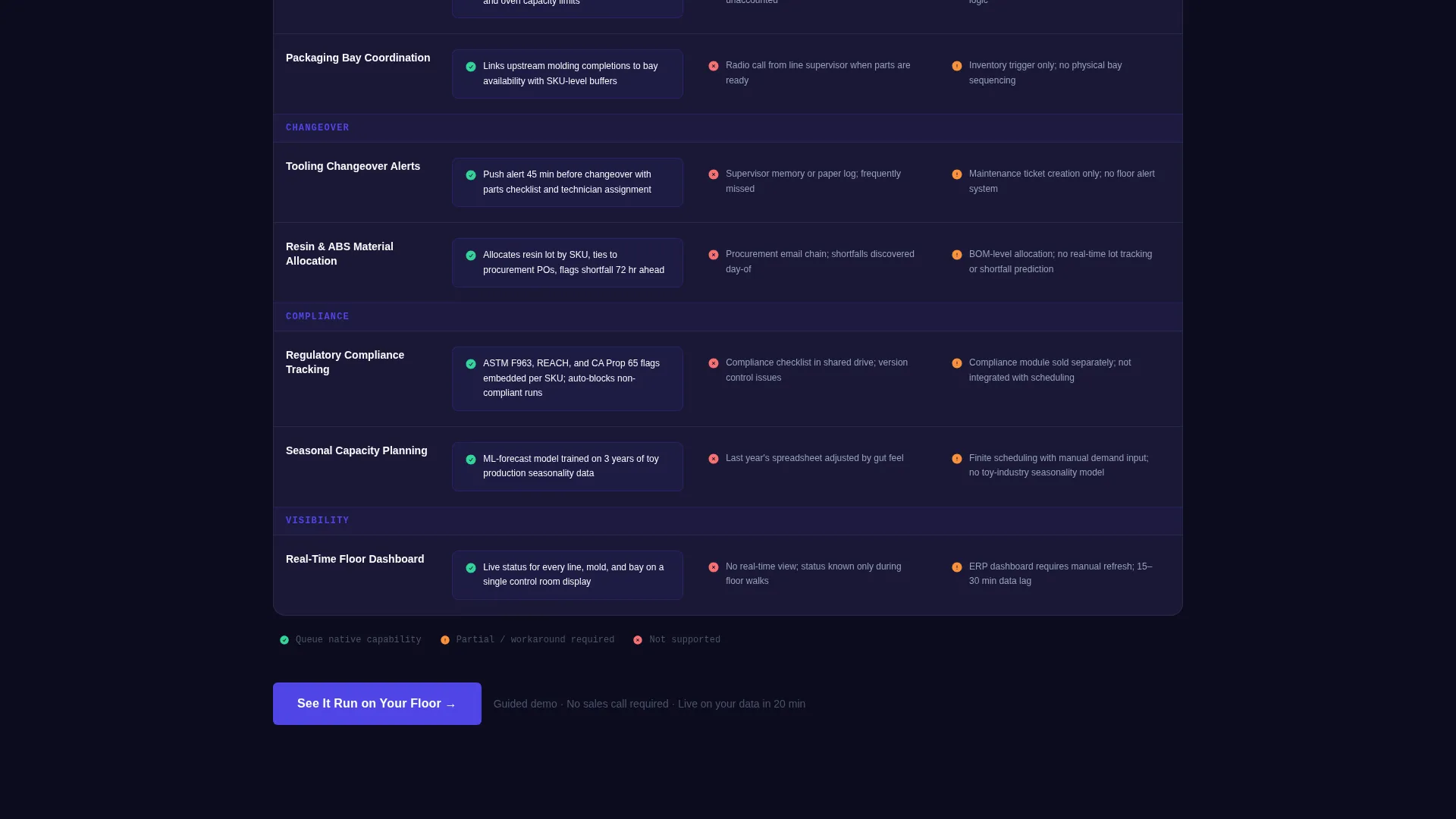
The template's centerpiece is a three-column comparison table: the product versus manual scheduling versus generic ERP (Enterprise Resource Planning) modules. Rows cover mold allocation, multi-line conflict detection, paint booth queuing, compliance tracking, and real-time changeover alerts. Each cell contains specific capability descriptions, not simple tick marks.
Factory Case Study Block
A dedicated case study section presents before-and-after throughput charts from a real factory scenario. This grounds the product claims in operational evidence and gives skeptical buyers the proof layer they need before committing to a demo.
Dual Call-to-Action System
The primary call to action, "See It Run on Your Floor," links to a guided product demo and appears first beneath the comparison table. A sticky secondary call to action, "Download the 2025 Toy Production Benchmark," captures email leads from visitors not yet ready to demo. Both placements are intentional and sequenced for conversion.
Industry-Report Scroll Flow
The entire page is structured as a progressive evidence narrative. Each section is more specific than the last, moving the visitor from awareness of the problem to confidence in the solution. The scroll earns trust the way a well-researched whitepaper does.
Page sections overview
| Section | Purpose |
|---|---|
| KPI Metrics Header | Opens with four live-scale production statistics and a bold positioning statement |
| Seasonal Collision Visualization | Shows documented evidence that 62% of manufacturers miss Q4 tooling windows |
| Comparison Table | Compares the booking engine against manual scheduling and ERP modules row by row |
| Factory Case Study | Delivers before-and-after throughput data to validate product claims |
| Primary call to action Block | Drives demo signups with the "See It Run on Your Floor" button |
| Sticky Secondary call to action | Captures email leads with the 2025 Toy Production Benchmark download offer |
Design & branding system
The visual identity follows a Data Command theme built on an Electric Indigo color system. The palette feels like a factory dashboard viewed on a high-contrast display: dark enough that every data point glows, precise enough that the eye never hunts for meaning.
- Deep console black (#0D0B1E) as the base, primary indigo (#4F46E5) for active elements, secondary violet (#7C3AED) for hover states and data highlights, cool slate (#94A3B8) for secondary text and table borders, and sharp mint (#34D399) reserved exclusively for positive metrics and confirmation states
- Tabular monospace typography at billboard scale for KPI figures, giving numerical data the visual weight it deserves
- A control-room aesthetic throughout: every panel, every row, and every metric is designed to feel alive and authoritative rather than decorative
Mobile & speed optimization
The template is structured with a lean, section-based layout that translates clearly to smaller screens. The control-room aesthetic scales without losing legibility or visual hierarchy.
- Oversized KPI figures and tabular type remain readable at mobile scale, preserving the header's immediate impact
- The comparison table is structured for horizontal scroll on narrow viewports, keeping all capability data accessible without collapsing content
- The sticky secondary call-to-action bar remains anchored and visible as the visitor scrolls through the case study section on any screen size
How this template helps you convert
This template is engineered around a single goal: moving the right visitor from recognition to action. It does this by stacking evidence in a deliberate sequence.
- The KPI header establishes instant credibility with real production statistics, so visitors know within seconds that this product operates at factory scale.
- The comparison table removes evaluation friction by presenting granular capability differences in one scannable view, making it easy to see exactly where manual scheduling and generic ERP modules fall short.
- The dual call-to-action system serves two buyer stages at once: the demo-ready visitor gets a direct path to "See It Run on Your Floor," while the research-stage visitor is captured through the benchmark report download before they leave.
Other information about this template
Queue is a template built specifically for the toy manufacturing vertical software-as-a-service (SaaS) market. It is suited for teams positioning a booking engine against legacy workflows at mid-size factories.
- The template style is a Comparison Table landing page, making it ideal for competitive displacement campaigns where the buyer is actively evaluating options
- The creative direction follows an Industry Report format, which gives the page authority that a feature-list or benefit-statement layout cannot match in a technical buying context
- The header concept draws on a Stats and Metrics pattern, which is a proven entry point for data-literate buyers such as operations directors and procurement leads
- The click-through landing page direction means every design and copy decision is oriented toward a single measurable action, with the secondary email capture acting as a supporting conversion rather than a competing one
- This template sits within the Technology category and the Toy Manufacturing Vertical SaaS subcategory, making it a focused tool rather than a general-purpose marketing layout
Theme
Data Command
Creative direction
Industry Report
Color system
Electric Indigo
Style
Comparison Table
Direction
Click-Through
Page Sections
Live KPI Metrics Header Panel
Seasonal Collision Data Visualization
Granular Three-column Comparison Table
Before-and-after Factory Case Study
Dual Conversion Call-to-action System
Related questions
Who is the primary audience for this landing page template?
Can I adapt the comparison table rows for my specific product features?
Does the template include the actual KPI data shown in the preview?
Is this template suitable for industries beyond toy manufacturing?
What makes this template different from a generic SaaS landing page?



