SaaS Software & SaaS Professional Website Template
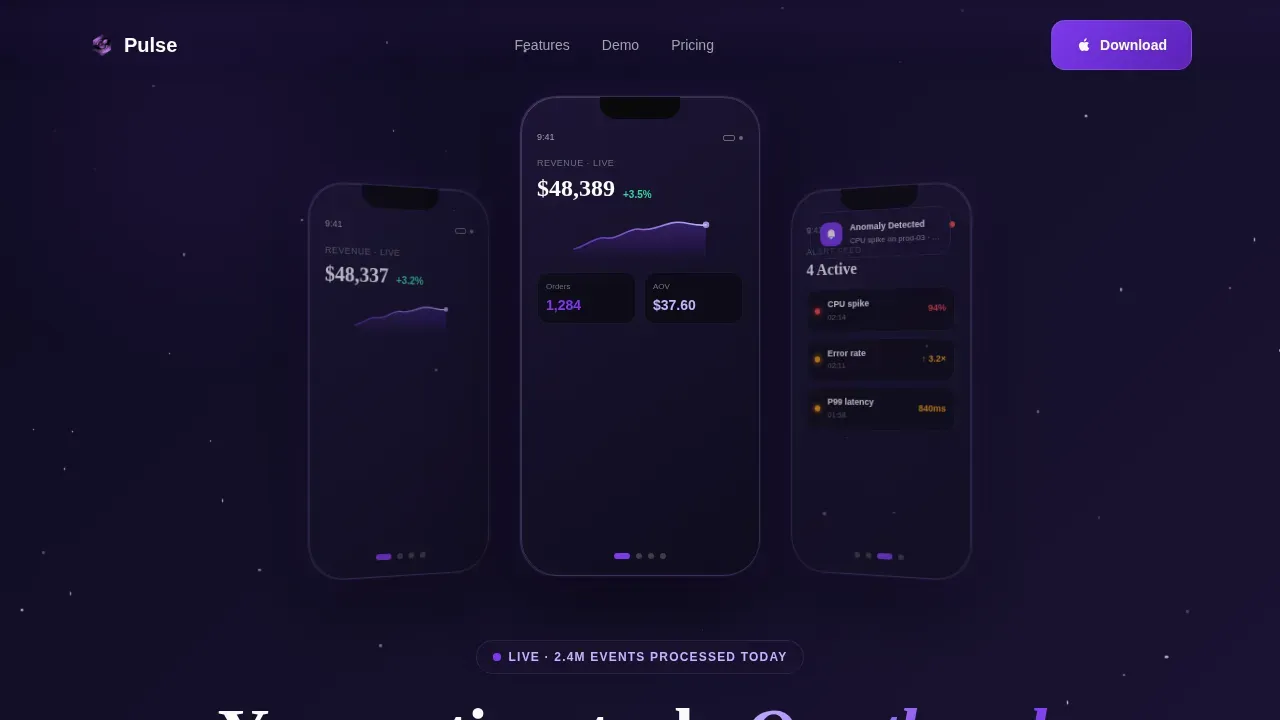
Pulse is a scroll-reveal landing page template built for mobile analytics SaaS products. It opens with three frosted-glass phone mockups floating in a void-black space, collapses them into a single animated device as visitors scroll, and closes with a full dashboard panorama. Every section activates the product story, earning the app download before the visitor reaches the final call to action.
by Rocket studio
Quick summary
Pulse is a single-page, scroll-activated landing page template designed for mobile analytics and operations dashboard apps. It uses a dark glassmorphism visual identity, high-motion scroll animations, and a dual call-to-action strategy to drive iOS and Android app downloads. The template gives visitors a hands-on sense of the product before they ever tap "install."
Who this template is for
This template is built for SaaS teams shipping mobile-first analytics products to business users. It works equally well for solo founders, small product teams, and larger organizations presenting a polished mobile command center to prospects.
- Ops managers and operations teams who need to show how the app surfaces production metrics on the factory floor
- Growth leads and marketing team members who track campaign spend, lead volume, and sales trends in real time
- Chief technology officers and data analyst roles who need to communicate incident response capabilities to stakeholders
What problem this template solves
Most analytics app landing pages show static screenshots and bullet points. They describe features but never create the feeling of using the product. Potential customers leave without understanding why the mobile experience matters, and the download rate stays low.
Pulse solves that gap by making the page itself behave like the app. Visitors experience scroll-activated demos, animated metrics, and real time alerts before they commit to installing anything.
- Teams struggle to communicate the speed and responsiveness of a mobile dashboard through static visuals alone
- Visitors who are not ready to install need a path to experience the product, so a "Try the Live Demo" option is critical
- Without outcome-based messaging, prospects focus on raw numbers instead of the smarter decisions those numbers enable
What you get with this template
Pulse delivers a complete, production-ready landing page structure for a mobile analytics app. Every section is pre-built and purposeful, from the parallax hero to the final dashboard panorama.
- A five-section page flow: hero, features showcase, live metrics demo, social proof, and dashboard panorama, plus a Vercel-style horizontal footer
- Scroll-activated phone mockup animations powered by GSAP ScrollTrigger, including swipe-to-filter, pinch-to-zoom, and push notification demos
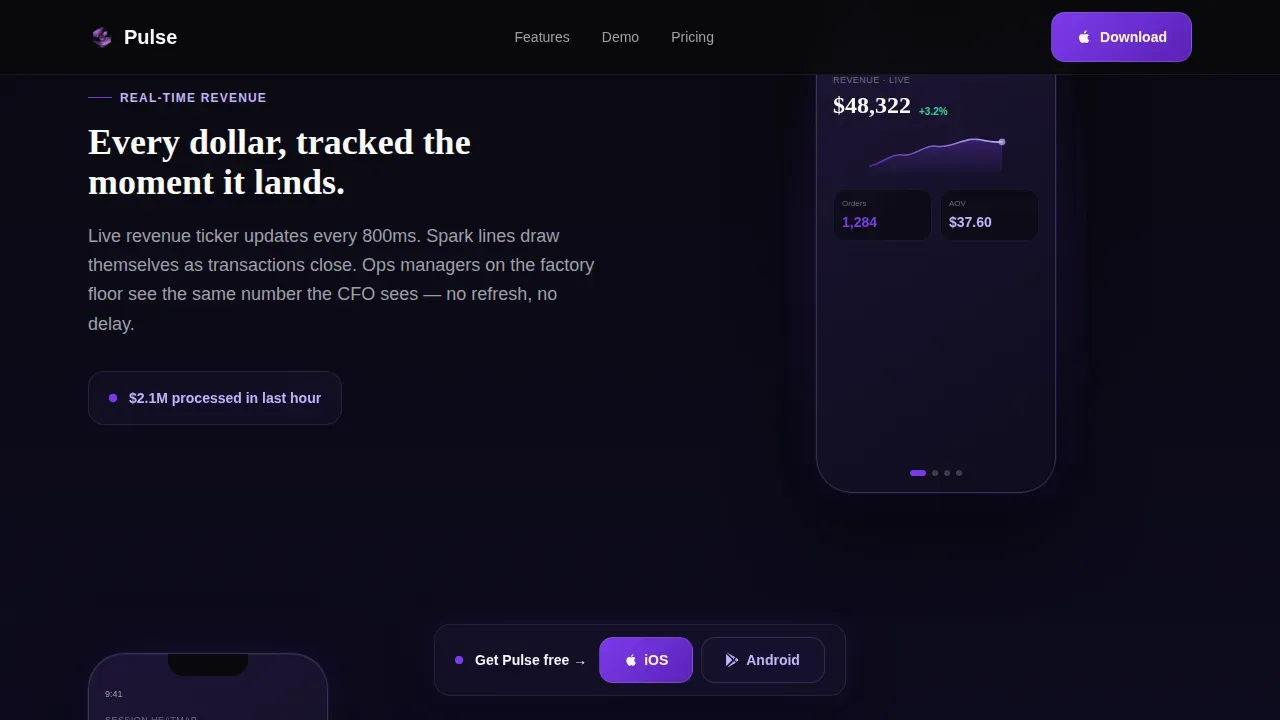
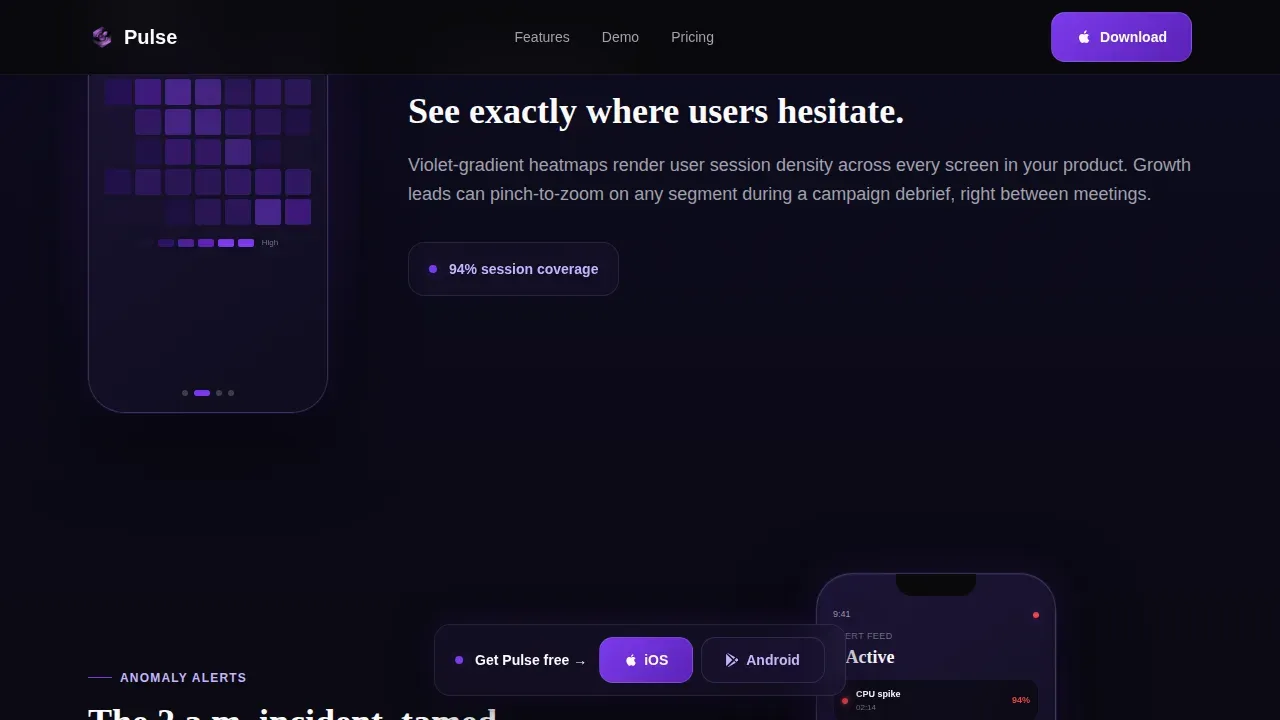
- A floating call-to-action bar that pins after the second scroll section, keeping "Download for iOS" and "Get It on Android" always within reach
Feature list
This section details the built-in capabilities included in the Pulse template. Each feature is grounded in the source brief and reflects what the template actually delivers.
Parallax Hero with Glass Phone Mockups
The hero opens with three translucent, frosted-glass phone mockups floating against a void-black background. Each panel shows a different live screen: a real time revenue ticker with a green spark line, a heatmap of user sessions glowing in violet gradients, and an alert feed with timestamped anomaly flags. Subtle cursor-driven parallax shifts the panels as the visitor moves their mouse, with light refracting along beveled edges. A headline fades up between the devices, immediately communicating the core value of the mobile dashboard.
Scroll-Activated Phone Demo Sequence
As the visitor scrolls past the hero, the three panels collapse into a single phone that docks at the center of the screen. Each subsequent section is a feature deep-dive where the phone's screen animates in sync with the content: a swipe-to-filter demo, a pinch-to-zoom interaction on a line chart, and a push notification sliding down from the status bar. Visitors feel like they are actually using the app, which builds confidence and accelerates the decision to download.
Live Metrics Demo Section
The third section presents count-up data points, self-drawing chart lines, and toggle micro-interactions that activate on scroll. Key metrics animate from zero to their displayed values, creating a sense of density and momentum. This section lets visitors track performance figures like active users, recent conversions, and engagement metrics in a format that mirrors the real product experience. The effect rewards every scroll increment and escalates the sense of control.
Dual Download Call to Action with Floating Bar
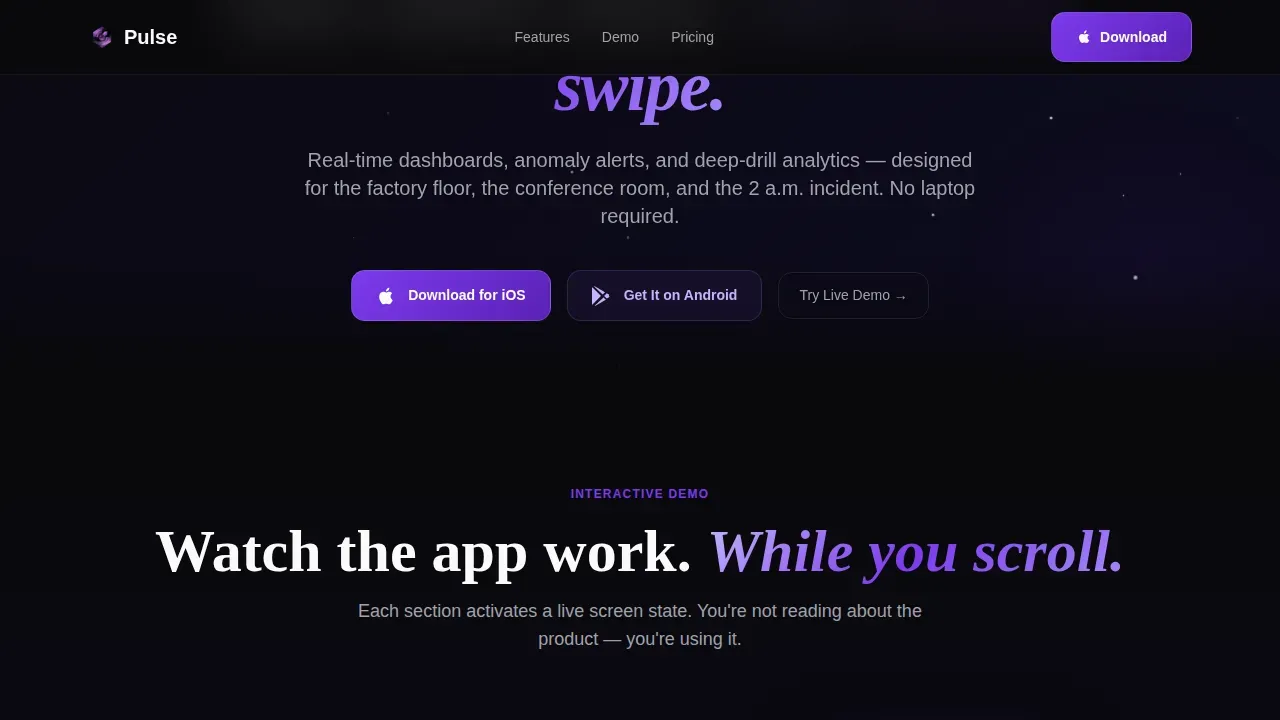
Two primary call-to-action buttons appear beneath the hero: "Download for iOS" and "Get It on Android," each with platform-native icons. After the second scroll section, these buttons reappear as a slim floating bar that stays pinned to the screen. A tertiary option reading "Try the Live Demo" gives visitors a lower-commitment path. This three-path structure ensures every visitor type has a relevant next step.
Social Proof Section
A dedicated testimonials section presents role-specific feedback from ops managers, growth leads, and chief technology officers. Each testimonial includes a specific outcome and company context, giving potential customers concrete evidence of the app's value. Social proof at this stage of the page reinforces the trust built through the animated demo sequence.
Full Dashboard Panorama Finale
The final content section reveals a full dashboard panorama stitched together from every feature demonstrated above. It functions as a visual summary of the entire product and delivers a closing moment of impact before the final download call to action. This section makes the install feel like a natural continuation of what the visitor has already experienced.
Page sections overview
| Section | Purpose |
|---|---|
| Hero: Glass Mockups | Opens with three parallax phone panels, a fade-up headline, and dual download buttons |
| Features Showcase | Docks a single phone center-screen and animates feature demos on scroll |
| Live Metrics Demo | Activates count-up metrics, self-drawing chart lines, and toggle interactions |
| Social Proof | Displays role-specific testimonials with concrete outcome data |
| Dashboard Panorama | Stitches all features into a full dashboard view with a final download call to action |
| Footer: Horizontal Flow | Delivers navigation and brand links in a Vercel-style horizontal layout |
Design & branding system
Pulse follows a Data Command visual theme built on a Void and Violet color system. The palette is designed to feel like a spacecraft cockpit at cruising altitude: dark enough that every lit element commands attention, with violet pulses confirming activity and life.
- Colors: absolute void black (#09090B) and deep space indigo (#1A1333) for backgrounds; electric violet (#7C3AED) for buttons, chart accents, and notification pings; phosphor lilac (#C4B5FD) for data highlights and interactive states; cool gray (#A1A1AA) for body text; and pure white (#FAFAFA) for headlines
- Typography: Plus Jakarta Sans handles body copy and interface labels for a clean, user friendly reading experience; Fraunces is used for display headlines, adding editorial weight to the hero and section titles
- Visual style: glassmorphism panels, frosted translucency, beveled edges, and GPU-accelerated transforms create the sense of depth and precision that makes the design feel like a living command center
Mobile & speed optimization
Pulse is built with a mobile-first design philosophy. Since the product being sold is itself a mobile app, the template ensures the landing page experience mirrors the quality and responsiveness of the product.
- The template uses GPU-accelerated transforms and separates server-rendered static components from client-side animation components, keeping heavy GSAP animations from blocking initial page rendering
- Call-to-action buttons are sized for easy thumb tapping, following touch-target best practices so visitors on phones can act without frustration
- The floating call-to-action bar is designed to remain unobtrusive on small screens while keeping the download path visible throughout the scroll journey
How this template helps you convert
Pulse earns the download before asking for it. Rather than presenting features as a list and hoping visitors connect the dots, the template builds a progressive case through interaction and demonstration.
- The animated hero immediately communicates the product's visual quality and speed, giving visitors an instant sense of what they are getting before they read a single word of body copy
- The scroll-activated phone demo sequence lets visitors experience swipe-to-filter, pinch-to-zoom, and push notification interactions, creating a hands-on familiarity with the mobile dashboard that no static screenshot can replicate
- The floating call-to-action bar and the "Try the Live Demo" tertiary path ensure that whether a visitor is ready to install immediately or wants more context first, there is always a relevant and low-friction next step available
Other information about this template
Pulse is designed to operate as a single source of truth for the product's value proposition. Every animation, every data point, and every section reinforces the same core message before asking for the download.
- The template's approach to key metrics visualization reflects how modern dashboard tools present data: not as raw numbers in a table, but as animated insights that make trends immediately readable. A line chart that draws itself on scroll communicates movement and direction far more effectively than a static image.
- Teams who work with tools like tableau pulse for digest-style metric delivery will recognize the pattern: insight streams that flag trends proactively, like a downward trend in customer satisfaction, rather than waiting for a data analyst to build a report. Pulse the template demonstrates this concept visually across every demo section.
- The template is relevant for teams comparing it against tableau cloud or adobe analytics landing page patterns. While tableau cloud and adobe analytics are full business intelligence platforms, Pulse as a template is purpose-built for mobile-first SaaS products that need to show, not tell.
- Teams who rely on slack digests or email digest workflows for metric delivery will find the push notification demo in the Features Showcase section directly mirrors that experience. The animated alert feed shows how the app can surface critical data without requiring the user to open a separate dashboard.
- The social proof section can accommodate testimonials from a regional manager tracking inventory levels, a growth lead monitoring net sales and total sales trends, or a chief technology officer reviewing cost metrics and engagement metrics after an incident.
- Teams can customize the dashboard panels to reflect their own specific metrics: website traffic, lead volume, new users, or any other key performance indicators relevant to their business channel and audience.
- The template supports a natural language approach to outcome messaging, meaning copy slots are structured around what users gain, such as instant insights and smarter decisions, rather than raw technical specifications.
- Teams building with no-code platforms will find this template easy to adapt. It is designed so that product managers and small businesses can follow metrics, navigate the layout, and customize section content without deep engineering knowledge. No-code solutions reduce the time needed to launch, and Pulse is structured to support that workflow.
- The template includes a contact form section placeholder as part of the footer structure, giving teams a place to route follow up questions from visitors who want more detail before downloading.
- Buyers comparing older versions of similar dark-theme analytics templates will notice that Pulse prioritizes interaction depth over decoration. Every animation serves a conversion purpose, not just an aesthetic one.
- The template's bi tools context is relevant for teams selling to users who already work with business intelligence platforms and need to extend those insights to mobile. Pulse positions the mobile app as the natural companion to desktop data infrastructure, not a replacement.
- Data sources powering the animated mockups are represented visually as a single consolidated view, reflecting the product promise of combining data from multiple platforms into one Pulse report.
- The ability to follow metrics across multiple channels, track strategic decisions in real time, and monitor performance from any location is woven into the page's section structure and copy slots. Teams can adapt these to match their specific metrics and their customers' workflows.
- Microsoft teams and other collaboration channel integrations can be referenced in the social proof or features sections using the available copy slots, reinforcing the message that insights reach users wherever they already work.
Theme
Data Command
Creative direction
Interactive Explorer
Color system
Void & Violet
Style
Scroll Reveal (Progressive)
Direction
App Download
Page Sections
Parallax Hero with Glass Phone Mockups
Scroll-activated Phone Demo Sequence
Live Metrics Demo with Micro-interactions
Dual Download Call to Action with Persistent Floating Bar
Role-specific Social Proof Section
Full Dashboard Panorama Finale
Related questions
What page sections are included in the Pulse template?
Can I customize the metrics and dashboard visuals shown in the mockups?
Is this template suitable for promoting both iOS and Android apps?
Does the template include a path for visitors who are not ready to install?
What animation library powers the scroll interactions in Pulse?



