Dynamic Retail Membership Landing Page Template
Roster is a split-screen landing page template built for retail membership management platforms. It combines a live interactive directory preview with a dark Carbon Fiber visual system to instantly show visitors what the product does. Designed for trade associations, franchise networks, and chambers of commerce, it drives free trial sign-ups through a frictionless one-step form and a real-time CSV import modal.
by Rocket studio
Quick summary
Roster is a high-impact, single-page landing page template for retail membership management platforms. It pairs a functioning interactive directory preview with a dark, instrument-panel aesthetic to communicate platform value in seconds. The design guides trade association coordinators, franchise teams, and chamber directors from first scroll to free trial with minimal friction.
Who this template is for
This template is built for teams that manage large retailer networks and need to communicate platform value fast. If your audience juggles renewal cycles, member status tracking, or scattered contact data, Roster speaks directly to them.
- Trade association coordinators managing hundreds of member shops across multiple regions
- Franchise headquarters teams needing real-time visibility into active and lapsing members
- Chamber of commerce directors replacing manual renewal notices with a self-service system
What problem this template solves
Member directories often live in spreadsheets that nobody trusts and renewal dates that everyone misses. There is no clear way to show prospects the difference between that chaos and a living, searchable platform, until they can actually see it working.
- Visitors cannot visualize the product value from static screenshots alone
- Coordinators struggle to explain the platform to stakeholders without a working demo
- High imagination gaps between curiosity and sign-up kill freemium conversion rates
What you get with this template
The template delivers a complete, single-page conversion experience built around an interactive product preview. Every section is designed to reduce doubt and accelerate the decision to start a free trial.
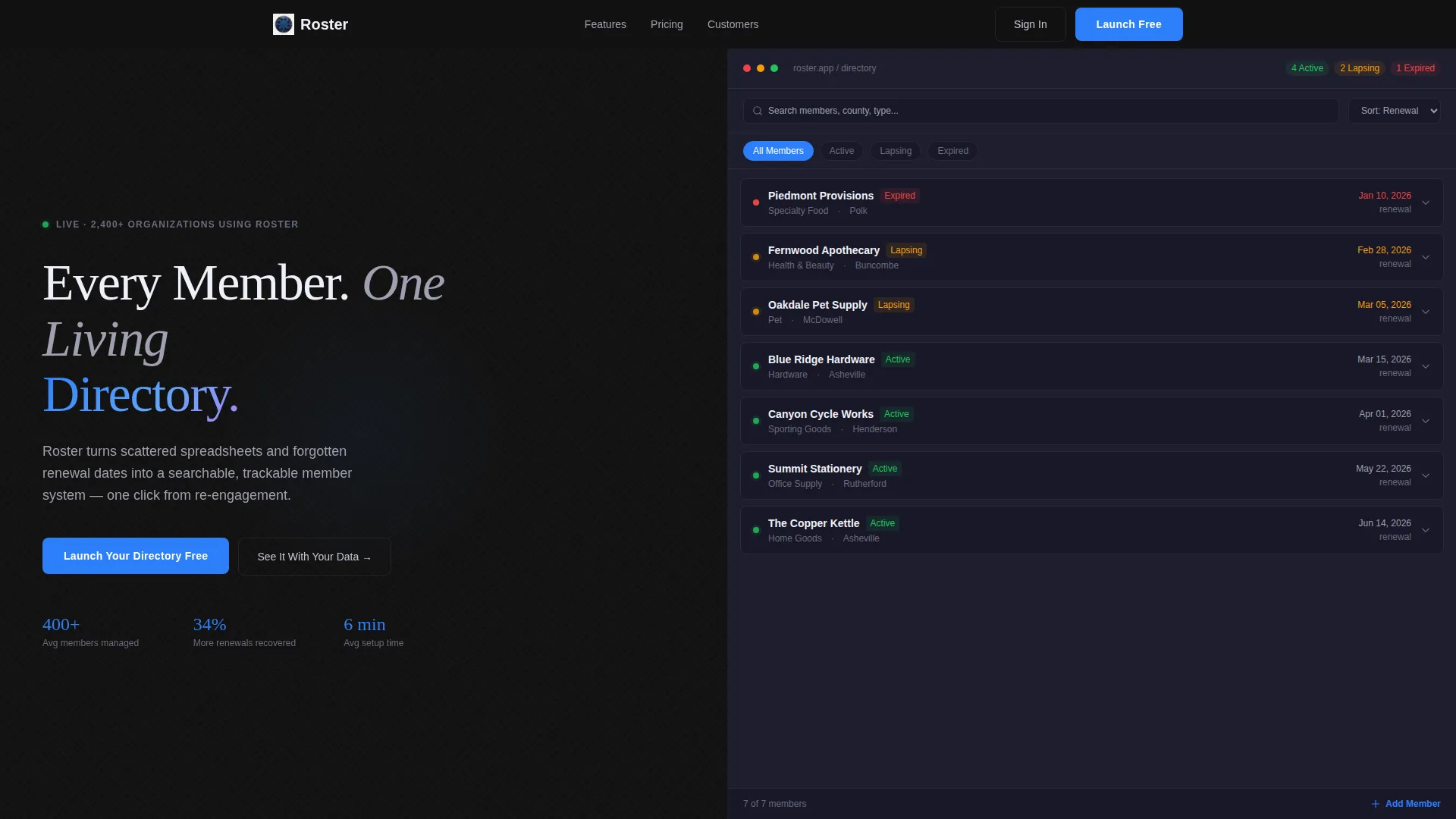
- A 50/50 split-screen header with a bold headline on the left and a live, filterable member directory on the right
- A sticky bottom bar with the primary call-to-action pinned after the first scroll
- A guided CSV import modal that transforms pasted data into live directory cards in real time
Feature list
This template includes purpose-built interactive and visual components that work together to drive freemium sign-ups and demonstrate platform capability without a separate demo environment.
Live Interactive Directory Preview
The right half of the header runs a fully functional mini-app. Visitors can filter sample retailer cards by status, active, lapsing, or expired, sort by renewal date, and click to expand individual cards. Status dots pulse green and amber, making the platform feel alive before anyone signs up.
Sequential Feature Module Animation
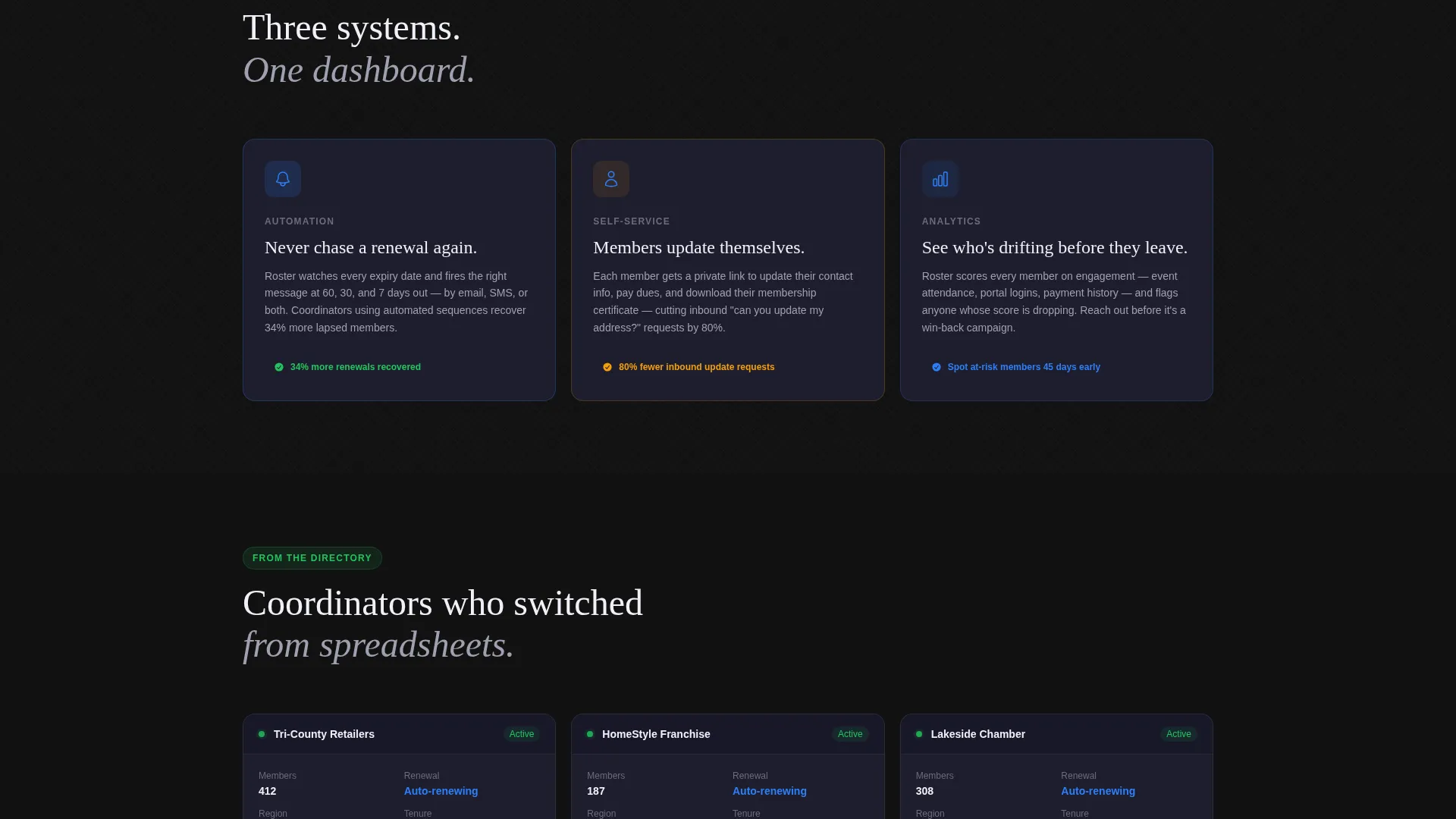
Three feature modules animate in one after another as the visitor scrolls: automated renewal reminders, member self-service portals, and engagement analytics. Each module arrives with a subtle upward burst, mimicking the feel of a dashboard populating in real time.
Problem Visualization Split
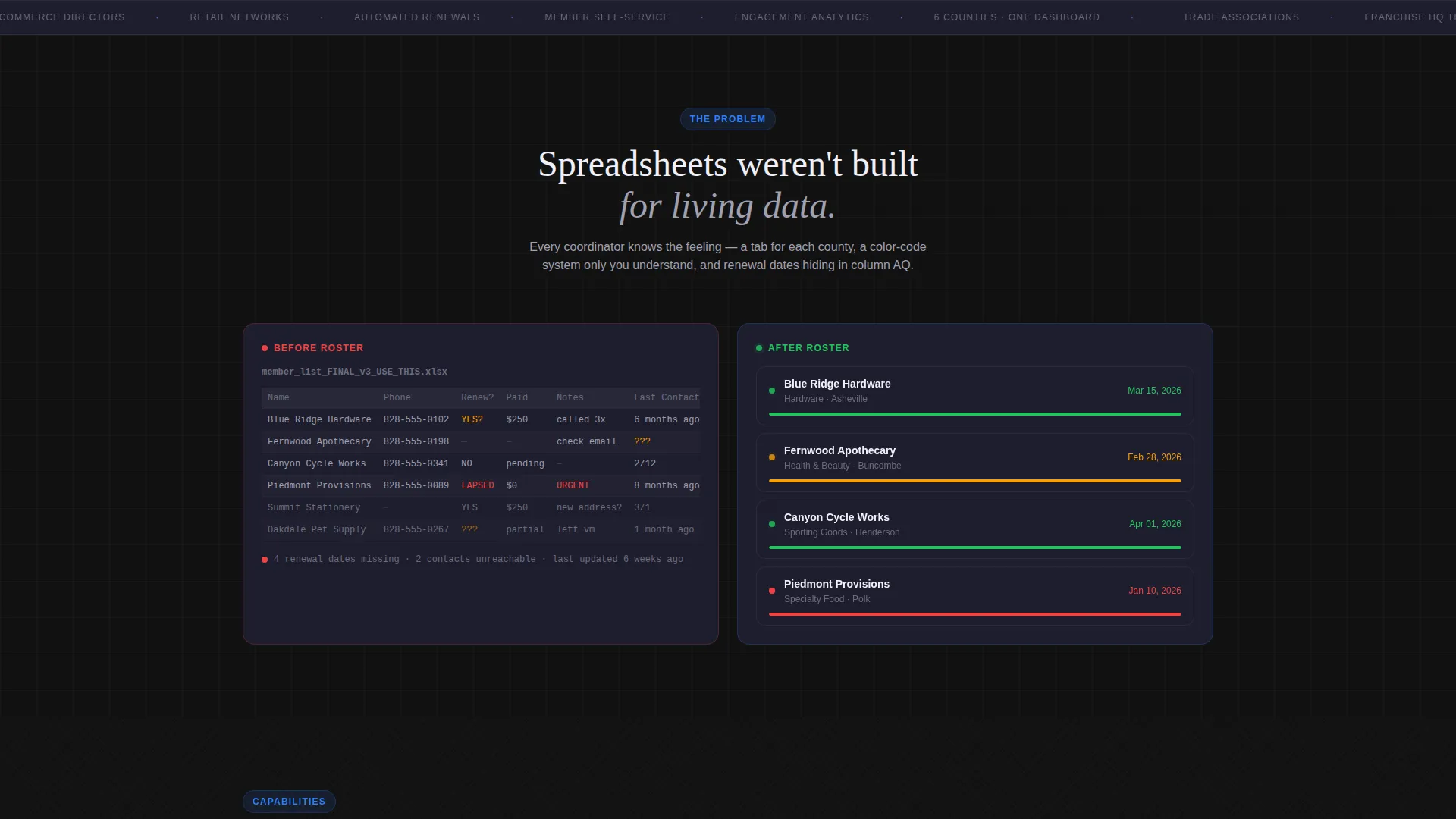
A dedicated section shows a chaotic spreadsheet on the left morphing into a clean member directory on the right. This visual contrast communicates the core value proposition without a single word of explanation.
Testimonial Cards in Product user interface
Testimonials appear as member-card interface elements rather than standard quote blocks. This reinforces the platform's own visual language and keeps the design system consistent throughout the page.
Sticky Conversion Bar
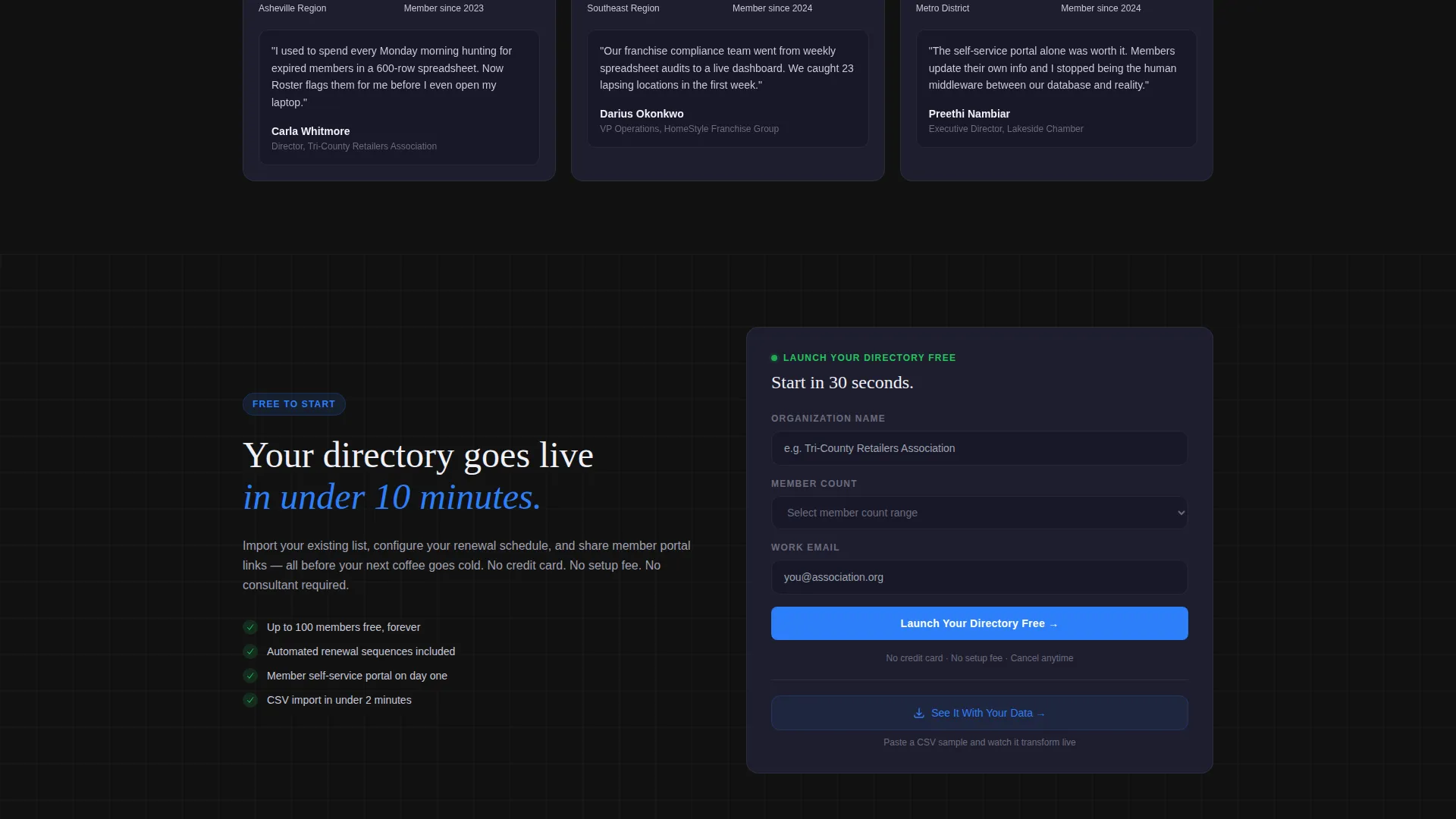
After the first scroll, a bottom bar locks into place carrying the primary call-to-action button in electric blue. The sign-up form is a single step: organization name, member count range, and work email, with no credit card required.
CSV Import Wizard Modal
A secondary conversion path labeled "See It With Your Data" opens a guided modal. Visitors paste a CSV sample and watch it transform into directory cards live. This collapses the gap between curiosity and commitment more effectively than any static feature list.
Page sections overview
| Section | Purpose |
|---|---|
| Split-Screen Header | Pairs bold headline with live filterable directory preview |
| Problem Contrast Section | Morphs chaotic spreadsheet visual into clean directory |
| Feature Modules Row | Animates three key capabilities in sequential scroll order |
| Testimonials Block | Displays social proof as member-card interface elements |
| Sticky call to action Bar | Pins primary sign-up action after first scroll |
| CSV Import Modal | Lets visitors preview their own data as live directory cards |
Design & branding system
The visual identity follows a Directory and Discovery theme built on the Carbon Fiber color system. Every surface is dark and light-absorbing, so each illuminated element commands immediate attention.
- Core palette: cockpit black (#121212), woven graphite (#1E1E2E), titanium mid-tone (#A0A0B0), and electric launch blue (#2D7FF9) for buttons, toggles, and progress indicators
- Texture detail: a subtle carbon-weave pattern on the headline section gives depth without visual noise
- Interactive states: pulsing green and amber status dots on member cards reinforce real-time platform behavior throughout the design
Mobile & speed optimization
The template is structured for fast loading and clean rendering across device sizes. The split-screen layout and interactive components are designed to remain functional and readable on smaller screens.
- The sticky conversion bar and single-step sign-up form are touch-friendly and stay accessible on mobile viewports
- Sequential animations are lightweight and triggered by scroll position, avoiding heavy asset loads on entry
- The CSV import modal is designed as a focused overlay, keeping the experience contained and performant on any screen size
How this template helps you convert
Every design and layout decision in Roster points toward one outcome: turning a curious visitor into a free trial user with as little resistance as possible.
- The live interactive directory in the header acts as an instant product demo, showing platform behavior before the visitor reads a single feature bullet
- The sticky call to action bar keeps the sign-up action visible at all times without interrupting the scroll experience
- The CSV import modal removes the biggest conversion barrier, the gap between "this looks interesting" and "I can see how this works for me"
Other information about this template
Roster is part of the retail software category within the broader technology template collection. It is purpose-matched for the retail membership management niche and scored a strong intersection match, meaning the template style, theme, and conversion direction are tightly aligned with what buyers in this niche expect to see.
- Template style: Split Screen (50/50), well suited for platforms that benefit from side-by-side comparison storytelling
- Landing page direction: Freemium and Trial conversion, optimized for low-friction sign-up flows with no payment required at entry
- The Launch Energy creative direction drives the scroll pacing, making each section feel like a system booting up rather than a static page loading
- The Interactive Preview header concept is a recognized high-performance pattern for software landing pages where product behavior is the strongest selling point
Theme
Directory & Discovery
Creative direction
Launch Energy
Color system
Carbon Fiber
Style
Split Screen (50/50)
Direction
Freemium/Trial
Page Sections
Live Filterable Directory Preview
Sequential Feature Module Animation
Problem-to-solution Visual Contrast
Sticky Freemium Conversion Bar
CSV Import Wizard Modal
Testimonials as Product User Interface Cards
Related questions
Can I customize the member card layout and color palette?
Does the interactive directory preview require a live database to work?
What does the single-step sign-up form collect?
Who is this landing page template built for?
Can I remove the CSV import modal without breaking the page?



