Conflictfree Education Landing Page Template
This bento grid landing page template is built for K-12 AI scheduling assistants. It opens with a live dashboard animation showing a master schedule solving in real time, rolls through animated stat cards proving scale, and closes with a freemium call to action. The Carbon Fiber color system and Dynamic Motion theme make every section feel purposeful and immediate.
by Rocket studio
Quick summary
A single-page bento grid template designed for K-12 AI scheduling tools. It leads with a live dashboard preview, hits visitors with hard performance numbers before any explanation, and guides them toward a no-credit-card trial. The Carbon Fiber palette and Dynamic Motion theme communicate speed, precision, and control from the first scroll.
Who this template is for
This template is built for teams marketing AI-powered master schedule tools to school and district administrators. It speaks directly to the people who feel the pressure of summer scheduling most acutely.
- Assistant principals who spend late nights rebuilding schedules in spreadsheets every July
- District operations directors managing calendars across multiple school buildings
- Guidance counselors trying to fulfill every student course request without creating impossible section conflicts
What problem this template solves
Summer scheduling is one of the most time-intensive tasks in K-12 administration. Thousands of constraints collide at once, and most teams are still solving them by hand. This template helps you show decision-makers exactly what AI-powered scheduling relief looks like.
- Administrators struggle to communicate the complexity of constraints like teacher certifications, room capacities, and IEP (Individualized Education Program) mandates in a way that earns trust quickly
- Static product pages fail to convey the speed and intelligence of an AI solve in progress
- Freemium tools need a low-friction entry point that reduces sign-up anxiety without underselling the product
What you get with this template
You get a fully designed, animation-ready bento grid landing page that walks visitors through a live scheduling solve, proves capability with real numbers, and converts with a three-field sign-up modal. Every section is built to carry weight.
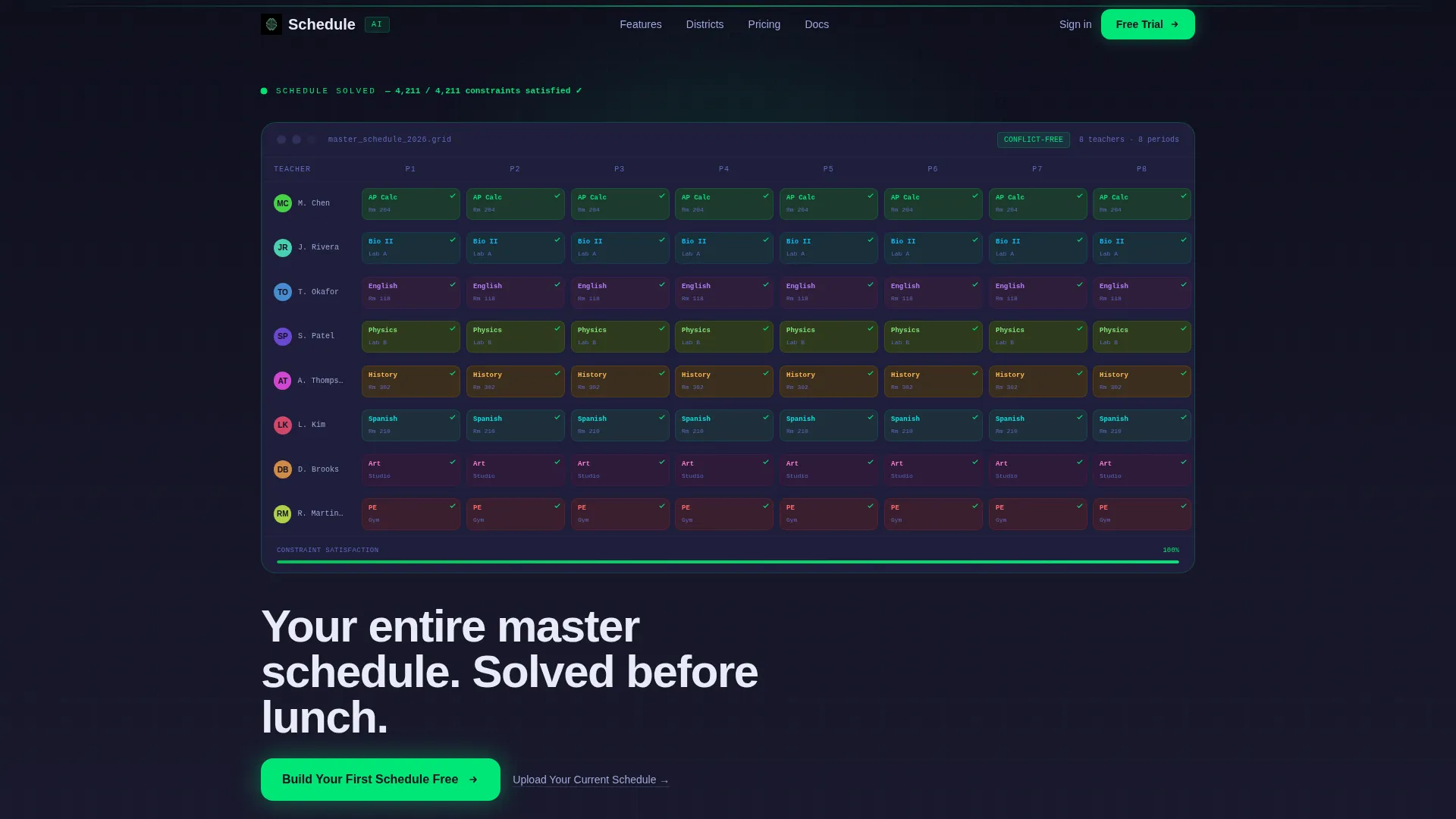
- A full-width animated header card showing a master schedule populating in real time with a live constraint counter
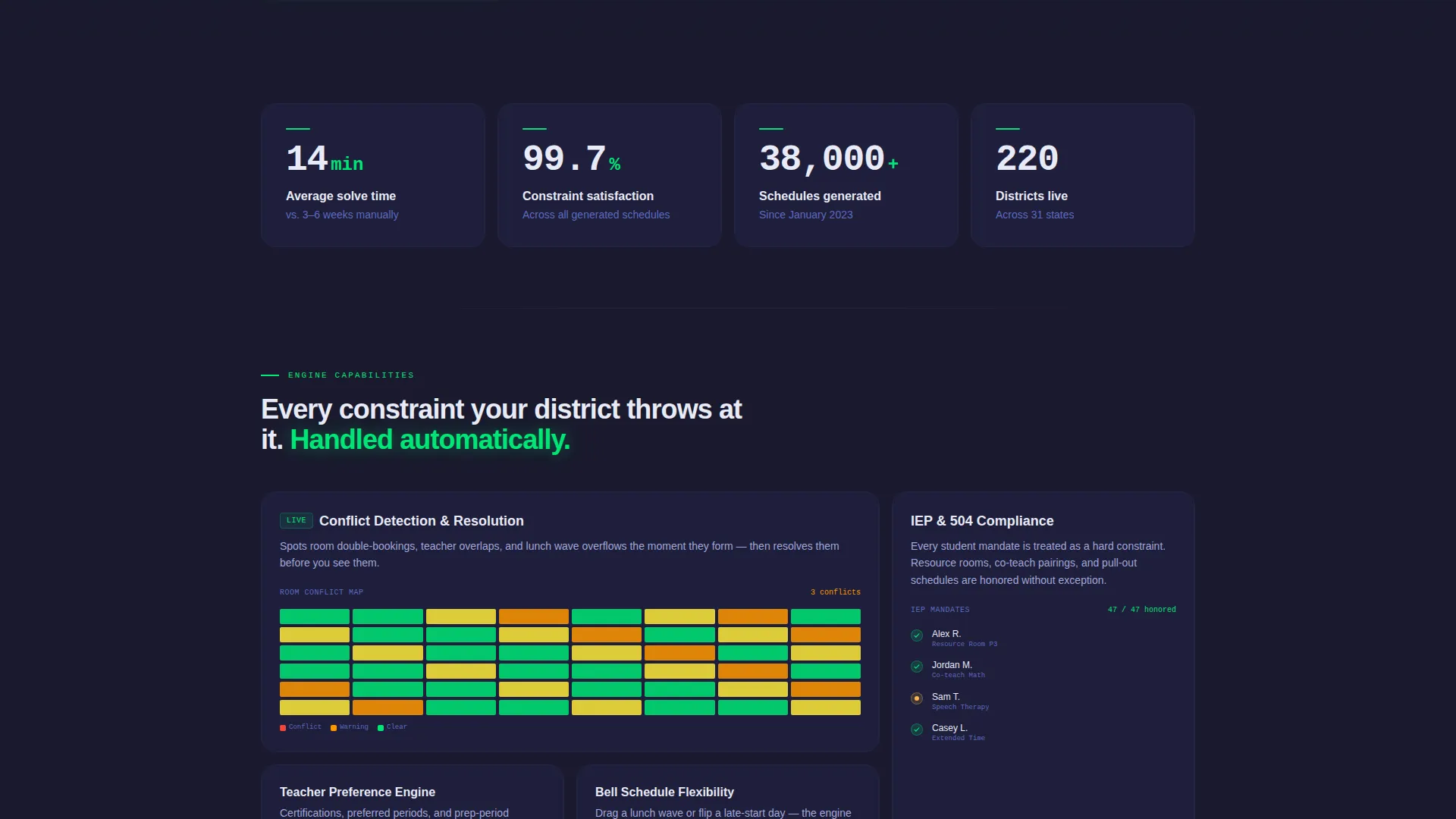
- Four oversized stat cards with counting ticker animations displaying solve time, constraint satisfaction rate, schedules generated, and active districts
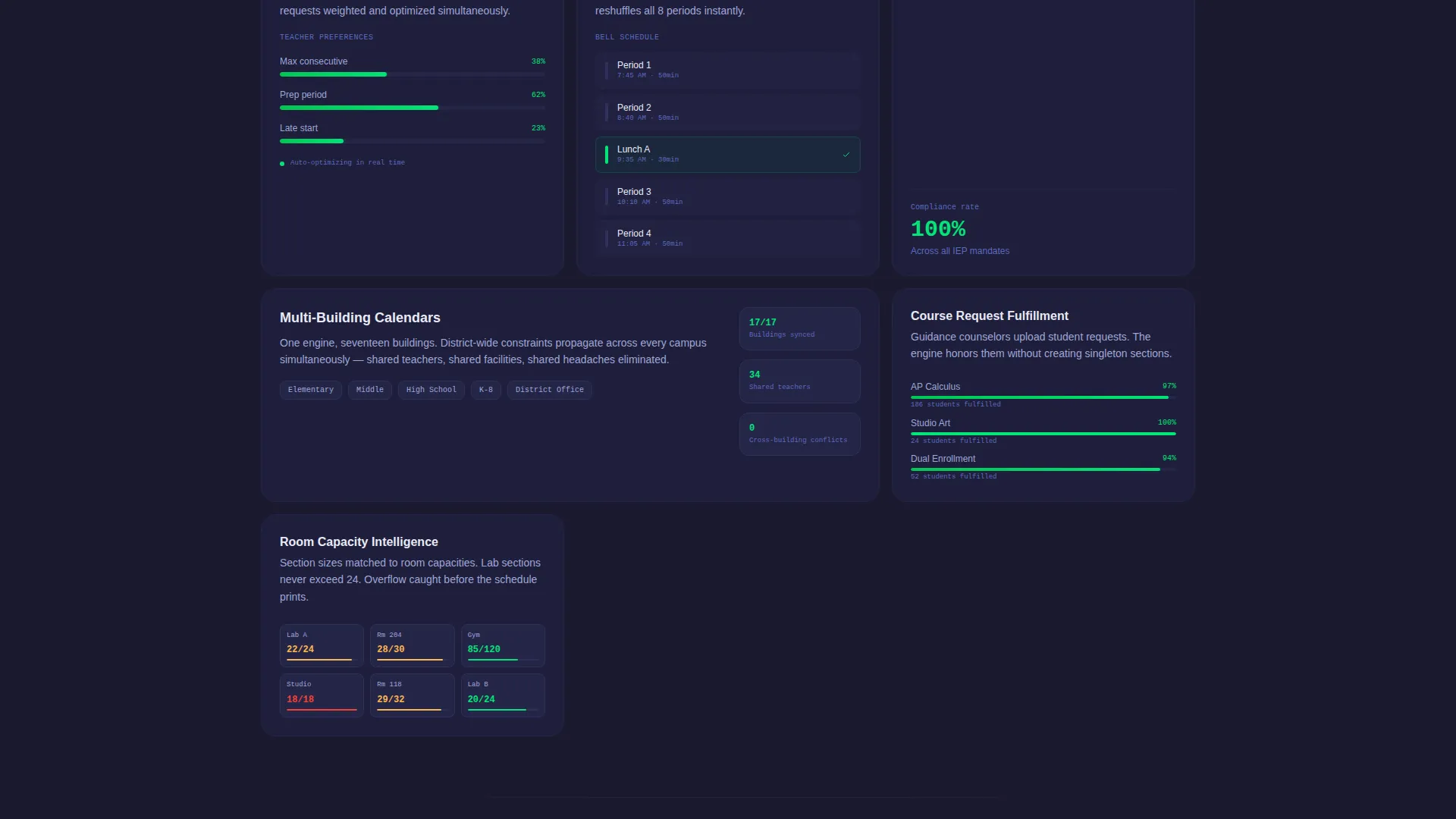
- Asymmetric bento tiles featuring embedded micro-animations including a room-conflict heatmap, a teacher preference slider, and a drag-and-drop bell schedule reshuffler
- A freemium call to action (call to action) modal with three fields: district name, number of buildings, and work email, with no credit card required
- A secondary upload path for administrators who want the AI to audit an existing schedule
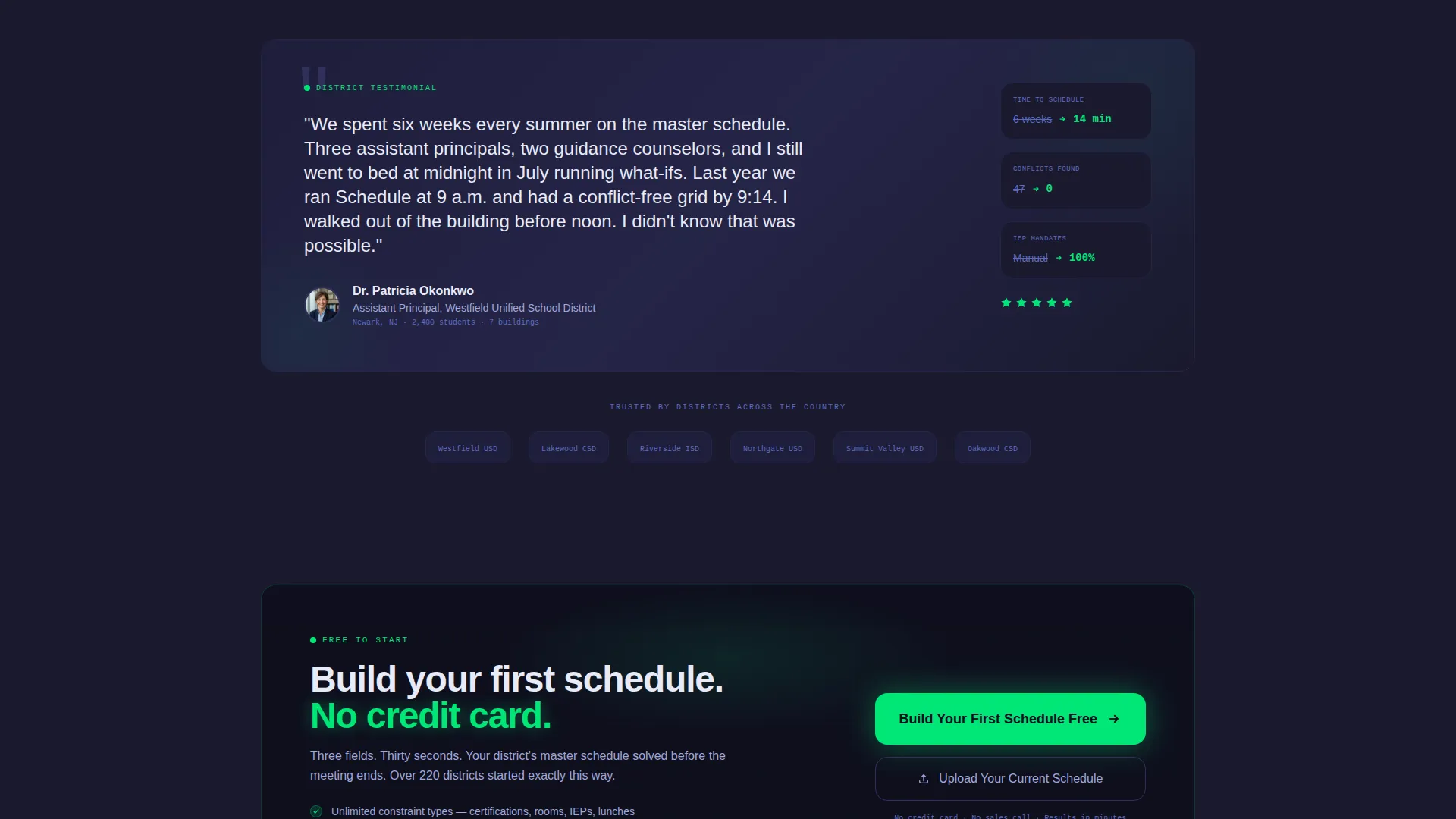
- A closing testimonial card attributed to a real assistant principal with their district named
Feature list
This template ships with six purpose-built components. Each one serves a specific moment in the visitor's decision journey.
Live Dashboard Header Card
A full-width bento card animates a master schedule mid-solve. Periods populate left to right, teacher names slide into slots, and green checkmarks appear beside each resolved constraint. A counter ticks upward to 4,211 constraints satisfied while the grid completes. The headline types itself below the animation.
Animated Stats Row
Four wide stat cards animate on scroll entry. Each card displays one core metric: 14-minute average solve time, 99.7% constraint satisfaction, 38,000 or more schedules generated, and 220 districts currently active. Counting ticker animations run on entry so every number feels earned, not stated.
Asymmetric Bento Feature Tiles
The feature section uses irregular tile sizing to create visual rhythm and forward motion. Short feature descriptions alternate with embedded micro-animations. Tiles shrink as features multiply, giving the grid a sense of acceleration before it resolves.
Embedded Micro-Animations
Three distinct micro-animations live inside the feature tiles. A room-conflict heatmap shifts from red to green as conflicts clear. A teacher preference slider adjusts in real time. A bell schedule reshuffles after a single drag interaction. Nothing in this section is static.
Freemium Sign-Up Modal
The primary call to action button appears twice: once floating inside the header dashboard and once anchoring the final bento row. Clicking opens a lightweight modal with exactly three fields. There is no credit card prompt, keeping the barrier to entry as low as possible.
Closing Testimonial Card
A single wide card ends the bento grid with a testimonial from an assistant principal, including their district name. The card grounds the product's claims in a real human voice at the moment of highest conversion intent.
Page sections overview
| Section | Purpose |
|---|---|
| Animated Header Dashboard | Show the AI solving a master schedule live |
| Stat Cards Row | Prove scale with hard numbers before copy |
| Feature Bento Tiles | Demonstrate capabilities through micro-animations |
| Heatmap Conflict Tile | Visualize room conflict resolution in motion |
| Preference Slider Tile | Show teacher preference handling in real time |
| Bell Schedule Tile | Illustrate drag-and-drop rescheduling live |
| Testimonial Card | Close with a named, real-world voice |
| Primary call to action Row | Convert with a three-field freemium modal |
Design & branding system
The Carbon Fiber color system creates a cockpit-style interface that feels dense with information but never cluttered. Every color choice has a clear function in the visual hierarchy.
- Deep carbon black (#1A1A2E) dominates all backgrounds, giving the page a dark, high-focus surface
- Machined graphite (#30305A) defines card edges, bento grid dividers, and tile borders throughout the layout
- High-vis indicator green (#00E676) marks every resolved constraint, active state, and confirmation moment across animations
- Cool-white data text (#E8EAF6) carries all typography so it appears to float above the dark surface like projected data on a screen
Mobile & speed optimization
The bento grid layout and Dynamic Motion theme are designed to translate cleanly across screen sizes. Animation-heavy sections are structured to remain meaningful even at smaller viewports.
- Bento grid tiles reflow responsively so asymmetric desktop layouts collapse into readable stacked columns on mobile
- Micro-animations are contained within individual tiles, keeping motion localized and preventing layout disruption on narrow screens
- The lightweight three-field onboarding modal is thumb-friendly by design, reducing friction for mobile visitors who are ready to sign up
How this template helps you convert
The page is structured to earn trust through demonstrated competence before it ever asks for anything. By the time a visitor sees the call to action, the product has already shown them what it can do.
- The animated header dashboard proves intelligence immediately. Visitors watch a real schedule solve before reading a single word of copy, replacing skepticism with curiosity.
- The stats row delivers hard numbers on the second scroll. Specific metrics like solve time and constraint satisfaction rate build credibility that generic benefit claims cannot match.
- The freemium modal removes the biggest barrier to commitment. No credit card, no lengthy form, and a secondary upload path for visitors who are not ready to start from scratch.
Other information about this template
This template is built for the K-12 education technology market and fits naturally into a product-led growth strategy where the tool proves its value before asking for payment. The design language and motion style are intentionally different from typical education software pages, which tend to be bright and illustrative rather than data-forward and kinetic.
- The template style is Bento Grid, which organizes content into modular, asymmetric card layouts rather than traditional stacked rows
- The Dynamic Motion theme means animation is a core feature of the design, not a cosmetic addition
- The Stats-First Impact creative direction prioritizes hard numbers over narrative, which aligns with the decision-making style of operations-focused administrators
- The Dashboard Preview header concept is the most technically demanding section and sets the tone for every scroll interaction that follows
- The Freemium/Trial landing-page direction means the page is optimized for low-friction sign-up rather than a sales-call booking flow
- This template is well-suited for product teams building in the AI for Education K-12 subcategory who need to communicate complex scheduling logic to non-technical buyers
Theme
Dynamic Motion
Creative direction
Stats-First Impact
Color system
Carbon Fiber
Style
Bento Grid
Direction
Freemium/Trial
Page Sections
Live Constraint-solving Header Animation
Counting Stats Cards on Scroll
Micro-animation Feature Tiles
Freemium Sign-up Modal
Schedule Upload Conversion Path
Named Testimonial Close Card
Related questions
Who is this landing page template designed for?
Does the trial flow in this template require a credit card?
Can an administrator upload an existing schedule instead of starting from scratch?
What makes bento grid layout a strong choice for this type of product?
Are the animations in this template functional or purely decorative?



