Email Security Landing Page Template | Data Command
Shield is a hub-and-spoke landing page template built for email security platforms. It combines a live-style threat dashboard header, an interactive comparison explorer, and a progressive three-step conversion form. Designed in a Data Command visual theme with a deep Slate and Sky color system, it gives IT-focused buyers a confident, evidence-first experience from the first scroll.
by Rocket studio
Quick summary
Shield is a single-page, anchor-navigated landing page template for email security platforms. It opens with a pixel-rendered threat console dashboard, walks visitors through five interactive comparison spokes, and closes with a progressive disclosure conversion form. The design feels cold, vigilant, and technically credible, built for buyers who need evidence before they commit.
Who this template is for
This template is built for teams selling email security to technically sophisticated buyers. It works best when the sales conversation is competitive and proof-driven.
- IT directors at mid-market companies evaluating platforms after a breach
- Compliance officers managing Domain-based Message Authentication, Reporting, and Conformance (DMARC) reporting across financial accounts
- Managed Service Provider (MSP) owners overseeing email hygiene across multiple client tenants simultaneously
What problem this template solves
Most email security landing pages bury their proof points in paragraphs. Buyers with real threat experience stop reading. They want data, not descriptions.
- Visitors cannot compare your platform against competitors without leaving the page
- Generic layouts fail to signal technical credibility to IT and compliance buyers
- Standard lead forms feel out of place when the product is a security tool
What you get with this template
You get a fully structured, single-page layout that frames your platform as the standard other tools are measured against. Every section is built to move a skeptical buyer closer to a scan request.
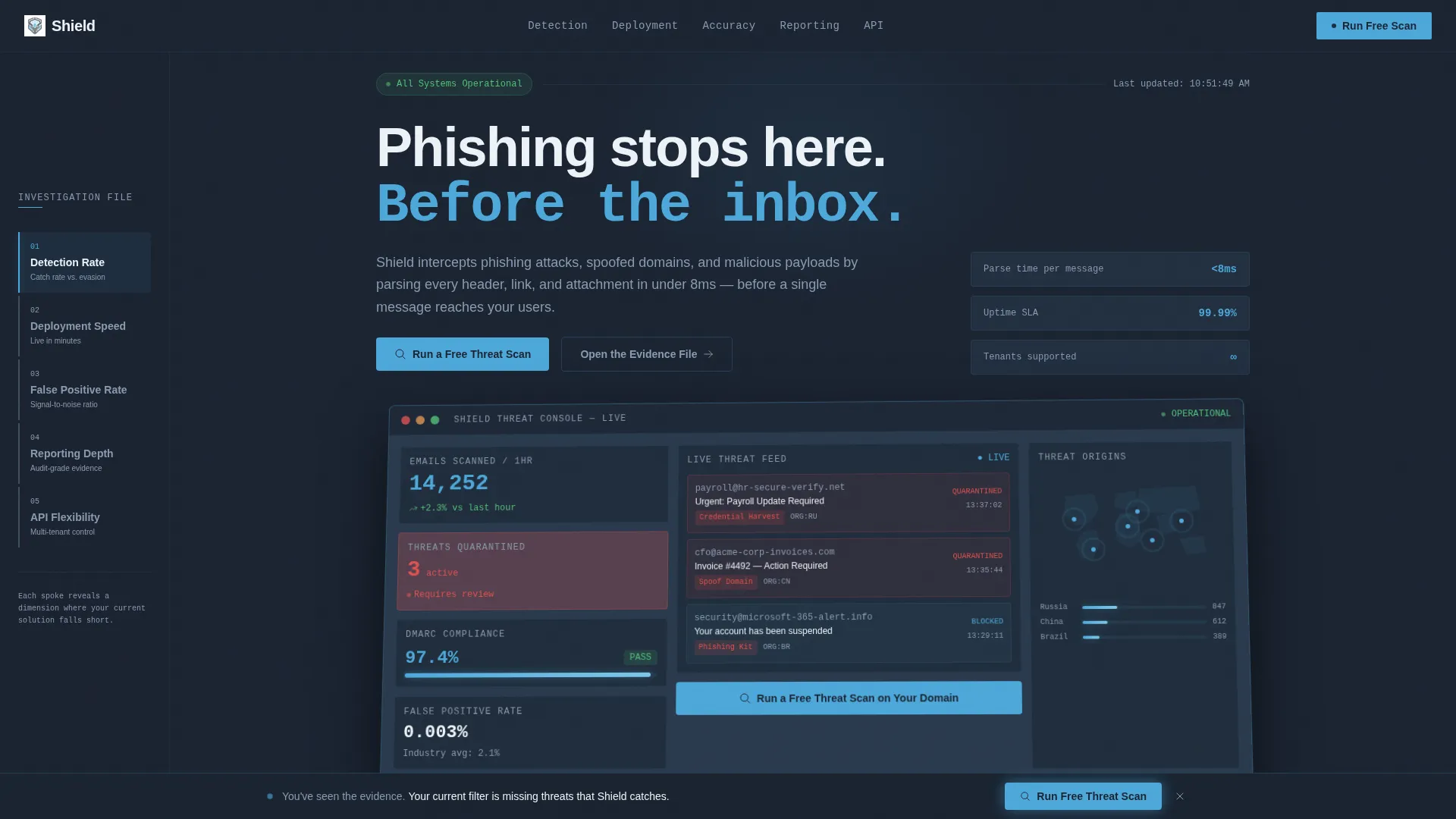
- A live-style threat dashboard header with real metric callouts and a perspective-tilted console render
- Five anchor-navigated comparison spokes that animate new data panels like pulling up case files
- A three-step progressive disclosure form and a secondary gated PDF conversion path
Feature list
This template includes six purpose-built components. Each one is designed to carry its weight in a competitive, high-trust buying context.
Live Threat Console Header
The header renders a pixel-accurate dashboard preview showing 14,237 emails scanned in the last hour, three quarantined phishing attempts flagged in pulsing sky-blue, a DMARC compliance score of 97.4%, and a world map with radar-style origin points for blocked threats. The console sits at a 3-degree perspective tilt. No stock photography is used, the product interface is the visual hero.
Hub and Spoke Anchor Navigation
A persistent left-rail navigation links five labeled spokes: Detection Rate, Deployment Speed, False Positive Rate, Reporting Depth, and API Flexibility. Clicking any spoke animates a fresh data panel into the central hub area. The interaction feels like drilling into an investigation rather than scrolling a brochure.
Interactive Comparison Data Panels
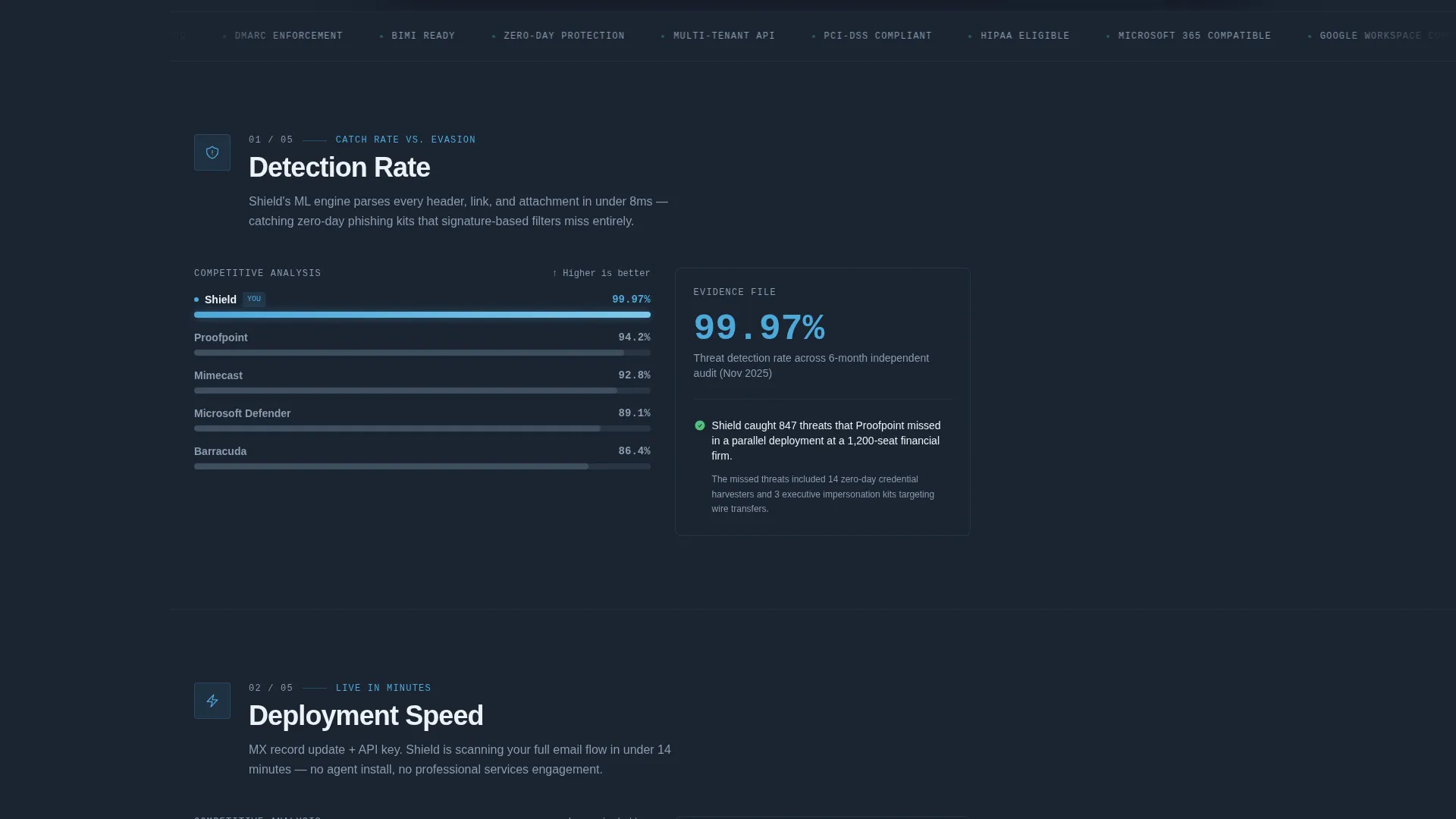
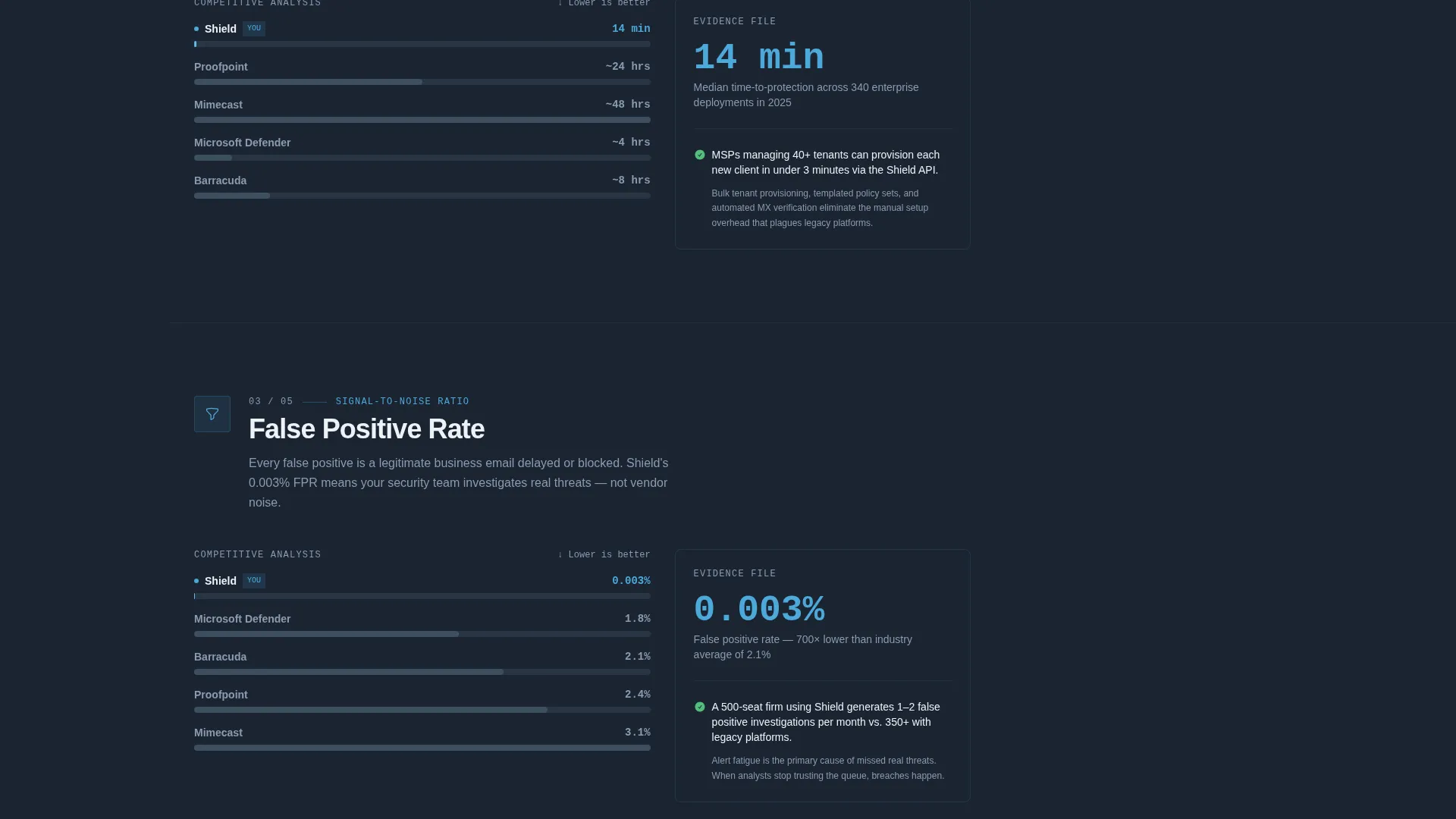
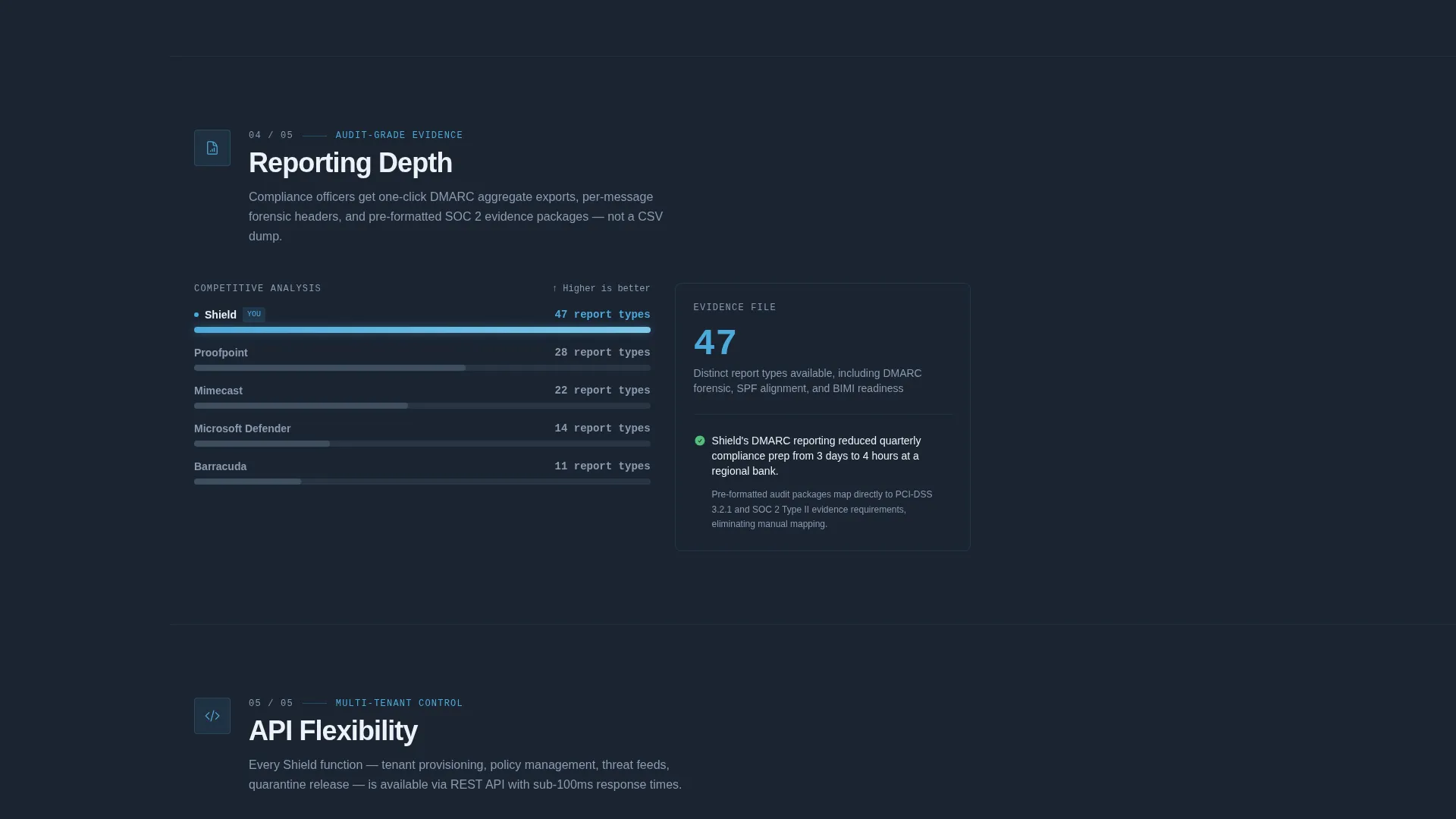
Each spoke section displays a side-by-side comparison table. Your platform's metrics appear as live sky-blue data bars. Competitor metrics render in static mid-gray. The contrast is immediate, intentional, and grounded in measurable categories rather than marketing copy.
Progressive Three-Step Conversion Form
The primary call to action, "Run a Free Threat Scan," uses progressive disclosure across three micro-steps. Step one asks for the business email domain with instant field validation. Step two collects company size range. Step three captures the current email provider. Each click feels like configuring a scan rather than submitting a form.
Sticky Conversion Bar
After a visitor passes the second spoke section, a sticky bar activates at the bottom of the viewport. It reinforces the primary call to action without interrupting the investigation flow. It appears only after the visitor has already seen comparison evidence from two data panels.
Gated PDF Secondary Conversion
A secondary conversion path offers a downloadable comparison report for visitors still in the benchmarking stage. The gate asks only for an email address and job title. This path captures buyers who are not ready to scan but are actively evaluating options.
Page sections overview
| Section | Purpose |
|---|---|
| Dashboard Console Header | Opens with live threat metrics and a perspective-tilted product render |
| Anchor Nav Rail | Lets visitors jump between five comparison spokes instantly |
| Detection Rate Spoke | Compares email threat detection accuracy with live data bars |
| Deployment Speed Spoke | Shows setup time advantage against mid-gray competitor benchmarks |
| False Positive Rate Spoke | Demonstrates filtering precision across real-volume scenarios |
| Reporting Depth Spoke | Illustrates DMARC and forensic reporting detail versus alternatives |
| API Flexibility Spoke | Presents integration breadth for MSP and enterprise configurations |
| Sticky call to action Bar | Activates after second spoke to keep scan offer visible |
| Primary Scan Form | Three-step progressive form gated on domain, size, and provider |
| Gated Report Download | Secondary capture for benchmarking visitors via email and job title |
Design & branding system
The visual identity follows a Data Command theme built around a Slate and Sky color system. It reads as predawn calm over a server farm, cold authority punctuated by precise, electric highlights.
- Deep gunmetal slate (#1B2432) fills the primary background; tactical mid-gray (#3D4F5F) surfaces cards and secondary panels
- Ice-blue sky (#4DA8DA) activates only where attention is required: threat counters, active nav indicators, toggle states, and live data bars
- Alert white (#EDF2F7) handles all body typography and whitespace, keeping text legible against the dark palette
Mobile & speed optimization
The layout is structured so the anchor navigation and comparison panels translate cleanly to narrower viewports. The data-dense header remains the focal entry point without requiring horizontal scroll.
- The persistent left-rail nav collapses gracefully for mobile-width displays while keeping spoke access intact
- Progressive disclosure form steps are thumb-friendly and designed for sequential single-field input
- Sky-blue pulse accents and data bar animations are scoped to interaction states so they do not compete with content on small screens
How this template helps you convert
The template is built around a Comparison and Versus conversion strategy. Every design and layout decision pushes a hesitant buyer toward a committed action.
- The dashboard header delivers real detection metrics before the visitor reads a single line of sales copy, establishing immediate credibility with data-literate buyers.
- The five comparison spokes build an evidence file progressively, by the time a visitor reaches the sticky conversion bar, they have already seen measurable gaps between your platform and the competition.
- The dual conversion paths capture buyers at two different readiness levels: a domain scan for those ready to act, and a gated report for those still benchmarking.
Other information about this template
Shield is designed to serve cybersecurity marketing teams who operate in a competitive evaluation landscape. The template structure supports scenarios where the buyer is comparing multiple email security vendors side by side.
- The template style is Hub and Spoke with anchor navigation, making it straightforward to repurpose the comparison spokes for different competitive angles or product tiers
- The Data Command theme and Slate and Sky palette are designed to feel consistent with enterprise security brand standards without requiring custom design work
- The interactive explorer creative direction suits email security platforms that differentiate on measurable metrics rather than feature lists
- This template is well suited for campaigns targeting email security buyers who regularly review tools like Proofpoint, Mimecast, or similar enterprise filtering platforms
Theme
Data Command
Creative direction
Interactive Explorer
Color system
Slate & Sky
Style
Hub & Spoke (Anchor Nav)
Direction
Comparison/Versus
Page Sections
Live Threat Console Dashboard Header
Five-spoke Anchor Navigation
Interactive Side-by-side Comparison Panels
Progressive Three-step Scan Form
Post-scroll Sticky Conversion Bar
Gated Comparison Report Download
Related questions
Can I update the live dashboard metrics in the header?
How does the hub and spoke navigation work?
Is this template a good fit for MSP-focused email security sales?
What information does the secondary conversion form collect?
Can the comparison spoke categories be changed to match my platform's strengths?



