Nonprofit Consulting | Free Website Template | Rocket
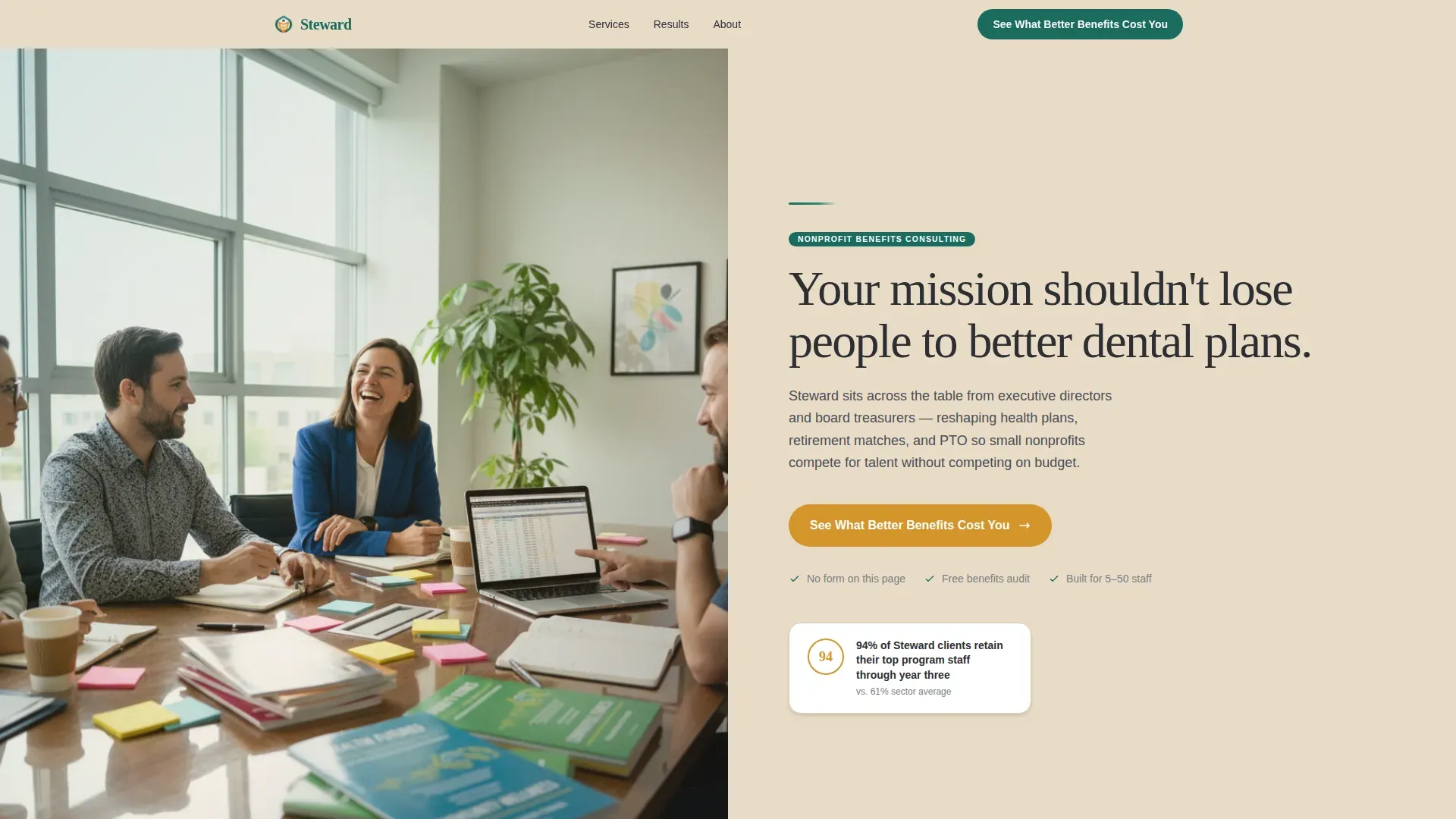
Steward is a split-screen landing page template built for nonprofit benefits consultants. It pairs a candid team photo with a warm, persuasive headline and guides visitors through a testimonial mosaic that layers real nonprofit leader quotes with concrete proof points. The design uses a Community Hearth color system to feel personal and trustworthy, not corporate.
by Rocket studio
Quick summary
Steward is a click-through landing page template for nonprofit benefits consultants. It uses a 50/50 split-screen layout, a testimonial mosaic scroll structure, and a Community Hearth visual system to move executive directors and board treasurers toward a benefits audit calculator. Every section is built around social proof and a single, repeated call to action.
Who this template is for
This template is designed for small-to-midsize nonprofit HR consultants who help organizations compete for talent. It works especially well when your audience is a time-pressed executive director or a board treasurer who does not yet trust that better benefits are within budget.
- Benefits consultants serving nonprofits with 5 to 50 staff members
- HR generalists and operations leads at community foundations, land trusts, and arts councils
- Consultancies positioning against larger employers like county government or regional corporations
What problem this template solves
Small nonprofits lose good people to larger organizations that offer better dental, stronger retirement matches, and more generous paid time off. The consultant knows how to close that gap, but needs a page that earns trust before asking for a meeting. Generic consultant templates feel corporate and cold, which is the opposite of what this audience needs to feel.
- Nonprofit leaders distrust polished sales pages and respond better to peer voices and real comparisons
- A plain services page does not communicate the depth of proof needed to justify a consultation
- Visitors need a clear, low-friction next step that does not require filling out a form on the first visit
What you get with this template
You get a fully structured click-through landing page with six distinct content zones, each serving a specific role in the conversion journey. The layout is desktop-first with a mobile-responsive fallback, and every section is designed to layer evidence as the visitor scrolls.
- A hero split section with a candid team photo panel and a headline-plus-call-to-action panel
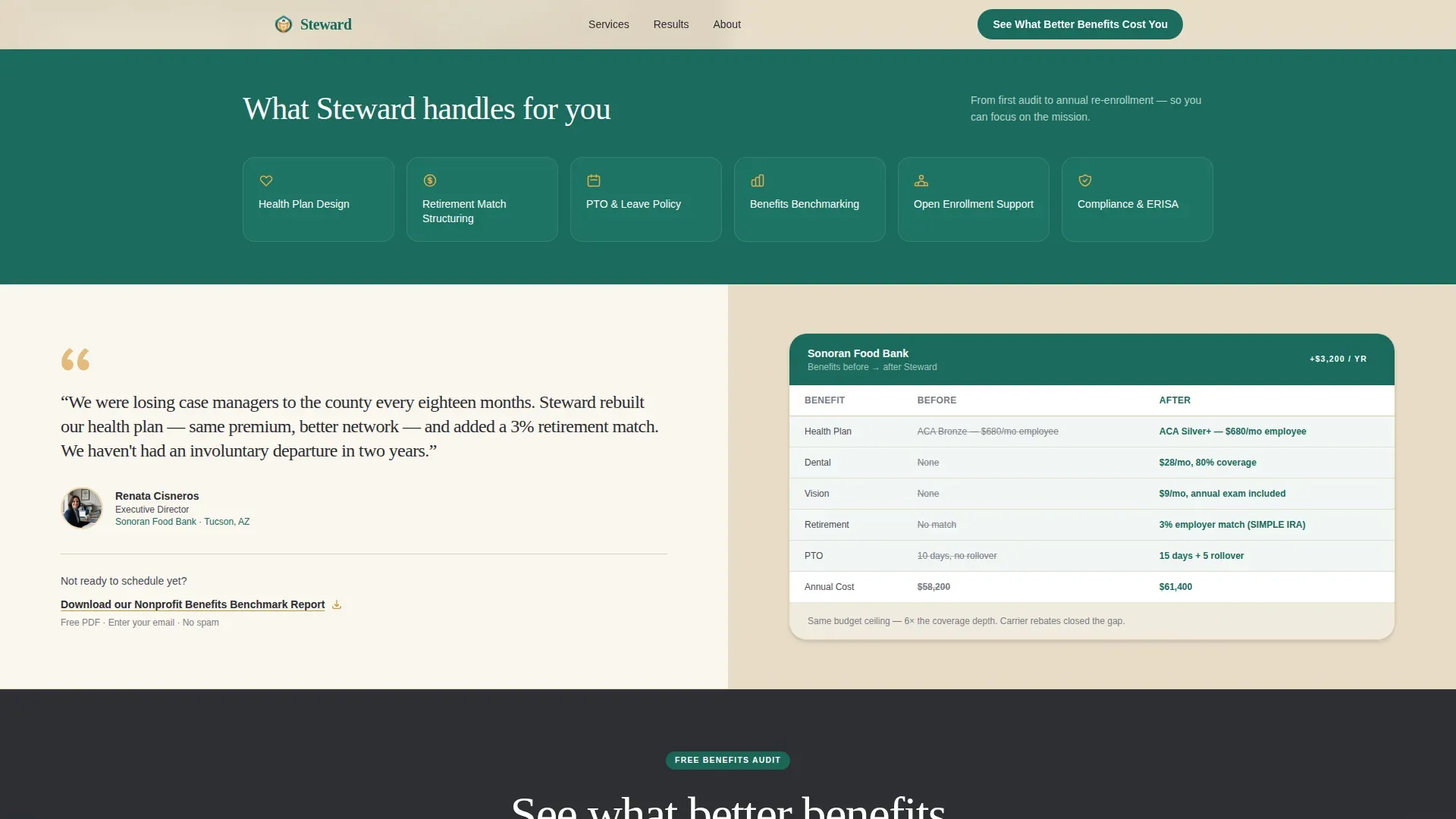
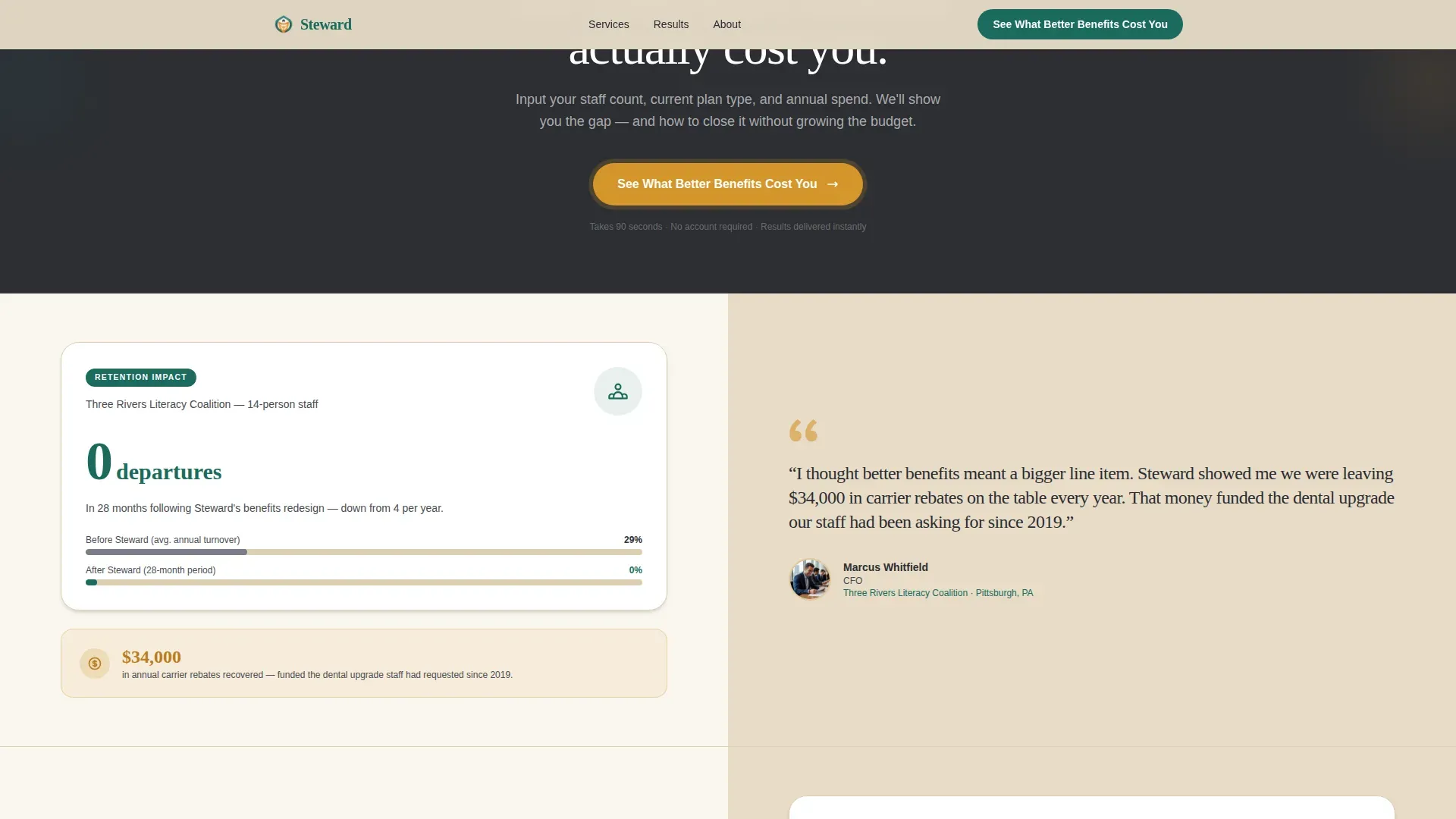
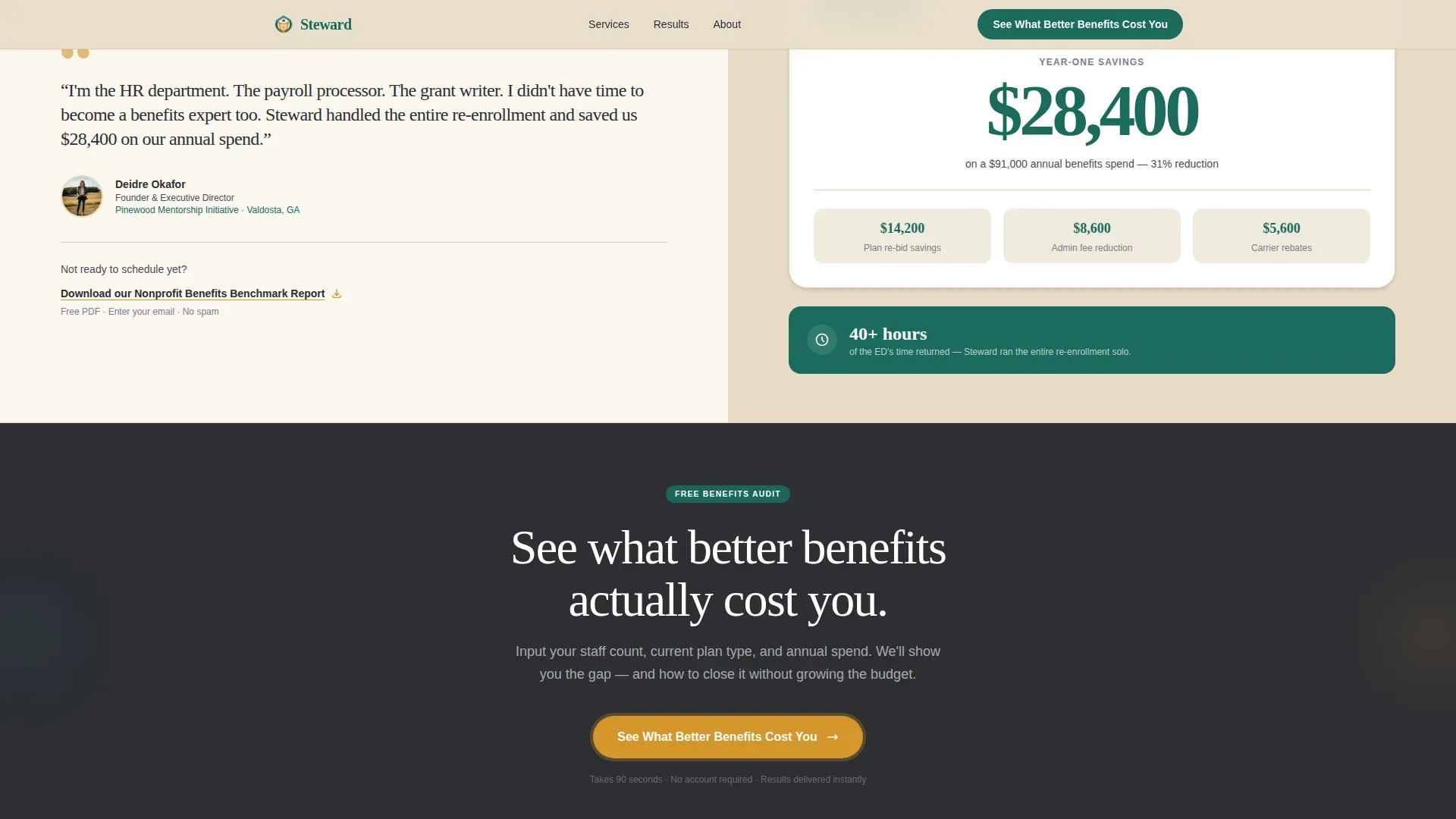
- Three testimonial mosaic rows, each pairing a nonprofit leader quote with a concrete outcome such as a before-and-after table, a retention stat, or a dollar savings figure
- A repeating primary call-to-action interstitial and a secondary download link for visitors not yet ready to click through
Feature list
This template includes purpose-built features drawn directly from the project brief. Each one supports the goal of converting skeptical nonprofit leaders into booked consultations.
50/50 Split-Screen Hero
The hero section divides the viewport equally. The left panel holds a candid team photo showing consultants mid-conversation around a conference table. The right panel carries the headline, a short supporting line, and the primary amber call-to-action button with a gentle pulse animation.
Testimonial Mosaic Scroll Structure
Three split-screen testimonial rows build social proof as the visitor scrolls. Each row pairs a named nonprofit leader portrait and quote on one side with a concrete outcome on the other. Scroll-reveal animation brings each tile into view progressively, creating a layered, cumulative sense of peer endorsement.
Repeating Call-to-Action Interstitial
The primary call to action, "See What Better Benefits Cost You," appears after the hero and repeats after every third testimonial tile. This placement ensures the conversion prompt stays visible without interrupting the proof narrative.
Before-and-After Benefits Comparison Table
One testimonial row includes a structured before-and-after comparison table embedded directly in the outcome panel. It shows plan types and cost side by side, giving treasury-minded readers a concrete visual anchor for the value being discussed.
Secondary Download Link
A text link, "Download our Nonprofit Benefits Benchmark Report," sits beneath select testimonials. It gives cautious visitors a warm off-ramp that captures an email in exchange for a PDF, keeping the relationship active without requiring an immediate commitment.
Amber Pulse and Hover Interactions
Call-to-action buttons carry a soft amber pulse animation. Testimonial cards respond to hover states. Subtle parallax applies to photo panels during scroll. These interactions are medium-weight and rely on minimal JavaScript to keep the page light.
Page sections overview
| Section | Purpose |
|---|---|
| Hero Split | Introduce team and primary call to action |
| Testimonial Row 1 | Food bank director quote plus before-and-after benefits table |
| Call-to-Action Interstitial | Repeat primary conversion prompt mid-page |
| Testimonial Row 2 | Literacy nonprofit CFO quote plus retention stat card |
| Testimonial Row 3 | Youth mentorship founder quote plus dollar savings figure |
| Final Call to Action | Close with primary button and secondary download link |
| Footer | Linear single-row pattern with supporting links |
Design & branding system
The Community Hearth theme uses the Teal Catalyst color system to feel like a well-loved community space after hours, warm and personal rather than polished and distant. Typography pairs Fraunces serif headlines with DM Sans body text for a grounded, editorial feel.
- Deep mission teal (#1A6B5C) anchors headers and section dividers; warm hearthstone (#E8DCC8) washes across backgrounds; candlelight amber (#D4952A) activates buttons, hover states, and pull-quote accents; charcoal slate (#2C2E33) keeps body text readable
- Fraunces handles all display headlines to signal warmth and authority; DM Sans handles all interface and body copy for clarity and scan speed
- Visual photography direction calls for candid, unposed imagery with natural window light, no stock polish, to match the kitchen-table intimacy of the brand voice
Mobile & speed optimization
The template is built desktop-first to match the browsing habits of executive directors and board treasurers, who typically review vendor pages during work hours on a laptop or desktop monitor. A mobile-responsive fallback ensures the layout adapts cleanly for smaller screens.
- Split-screen panels stack vertically on mobile so photo and text panels read in a logical top-to-bottom order
- Server Components handle all static sections to reduce JavaScript weight; interactive elements like the amber pulse and scroll-reveal use minimal client-side code
- Parallax effects on photo panels are scoped to desktop viewports to avoid performance drag on mobile devices
How this template helps you convert
The page is structured as a click-through path, not a form-capture page. Every design decision pushes visitors toward a single destination: the benefits audit calculator where they input staff count, current plan type, and annual benefits spend.
- The hero call-to-action button appears immediately above the fold on the right panel, so the conversion path is visible before the visitor reads a single testimonial.
- The mosaic scroll builds cumulative trust through named peer voices and verifiable outcome data, making the call to action feel earned rather than pushed by the time it repeats.
- The secondary download link beneath select testimonials captures cautious visitors with a low-commitment offer, warming them for a future conversion without sending them off the page entirely.
Other information about this template
This template is a strong match for nonprofit HR consultancies that rely on peer credibility and outcome-based selling rather than feature lists and pricing tables. It is particularly well suited to B2B professional services in the nonprofit sector where the buyer is a generalist leader, not a procurement team.
- The footer follows a linear single-row pattern, keeping the bottom of the page clean and uncluttered
- Social proof elements are designed to accept real named leaders with titles, organizations, and cities for maximum credibility
- The page supports USD localization, United States English copy conventions, and MM/DD/YYYY date formatting
- No contact form appears on this page by design; the conversion flow routes entirely through the external benefits audit calculator link
Theme
Community Hearth
Creative direction
Testimonial Mosaic
Color system
Teal Catalyst
Style
Split Screen (50/50)
Direction
Click-Through
Page Sections
50/50 Split-screen Hero Layout
Testimonial Mosaic Scroll Structure
Repeating Primary Call to Action
Before-and-after Comparison Table
Secondary Benchmark Report Download
Amber Pulse and Hover Interactions
Related questions
Who is this landing page template designed for?
Does this template include a contact form?
Can I add my own client testimonials and outcome data?
What fonts and colors does this template use?
What animations are built into this template?



