Bento Grid Roofing Landing Page Template
Stormguard is a bento grid roofing landing page template built for roofing companies that handle residential and commercial work. It leads with a live cost estimator, guides visitors through a problem-to-solution scroll flow, and drives clicks toward a quote-scheduling page. The dark Void and Violet visual identity makes every section feel urgent, credible, and impossible to scroll past.
by Rocket studio
Quick summary
Stormguard is a single-page bento grid template designed for roofing contractors. It opens with an interactive cost estimator, walks visitors through common roof damage scenarios, and closes with a clear path to booking a quote. The layout is built around a dark, high-contrast color palette that communicates urgency and professionalism from the first scroll.
Who this template is for
This template is built for roofing professionals who handle both residential repairs and commercial roofing work. It speaks directly to the range of clients these businesses serve every day.
- Roofing contractors offering asphalt shingle, metal, and flat or TPO roofing services
- Companies targeting homeowners with hail or storm damage, property managers with aging roofs, and realtors needing pre-closing inspections
- Roofing businesses that want a polished digital presence without building a site from scratch
What problem this template solves
Most roofing websites lose visitors before they ever reach a phone number. Prospects arrive with a specific problem and leave when they cannot find a fast, trustworthy answer. Stormguard solves this by putting the most persuasive element first: a cost estimate the visitor builds themselves.
- Visitors with storm damage or leak concerns get an instant price range before they have to call
- Property managers and realtors can self-qualify the service scope without reading through long paragraphs
- The page removes hesitation by addressing each worry visually before moving to the next section
What you get with this template
This template includes a fully structured single-page layout with every section pre-built and ready to customize. The visual system, copy structure, and interactive components are all defined inside the design file.
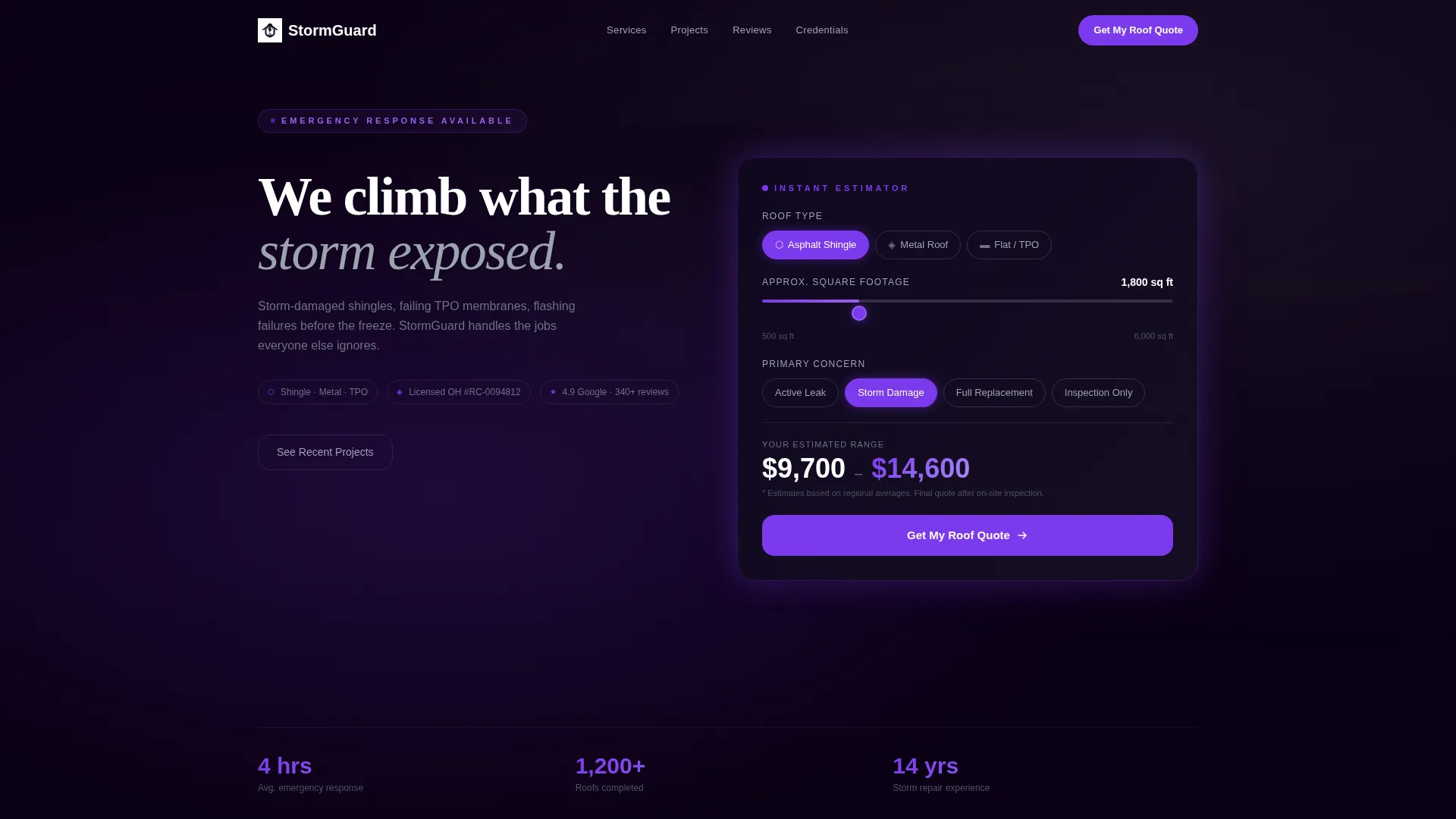
- A live calculator bento card at the top with roof-type selector, square footage slider, and concern picker
- A problem-to-solution scroll arc with damage-type cards, process steps, a before/after image slider, testimonial cards, and a credentials row
- A primary call-to-action that links to a scheduling page with a date picker and photo upload field, plus a secondary gallery path for browsing visitors
Feature list
This template includes a focused set of built-in components that work together to move a roofing prospect from curiosity to confirmed quote.
Live Roof Cost Estimator
The header bento card lets visitors select roof type, enter square footage using a slider, and choose their concern. As inputs change, an animated violet-highlighted number displays a real-time estimated cost range. By the time visitors see their number, the decision to click feels like a confirmation.
Damage-Type Problem Cards
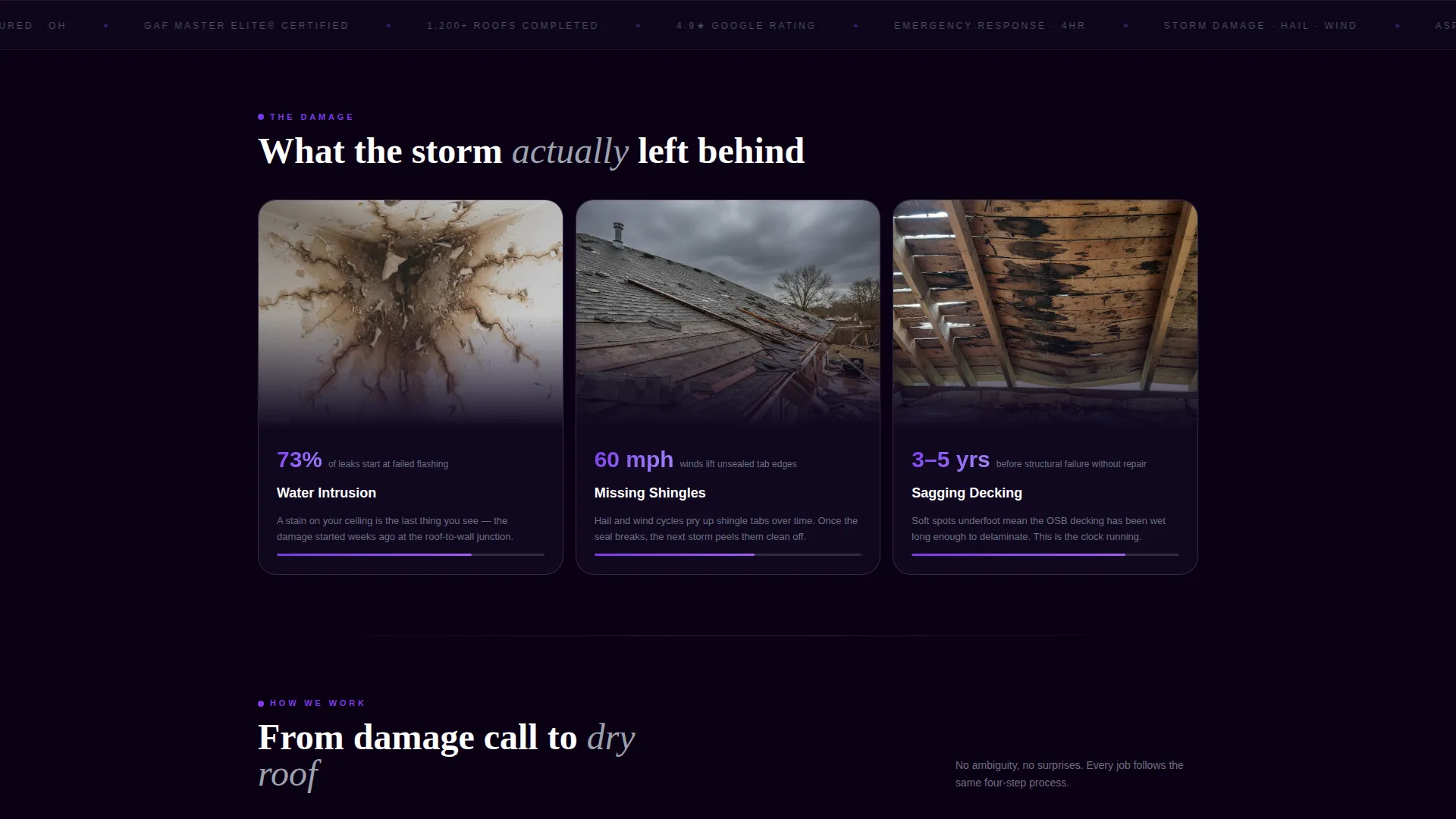
Three bento cards directly below the estimator each feature a close-up damage photo and a single supporting statistic. Examples like "73% of leaks start at failed flashing" anchor the emotional hook to credible detail. Each card represents a distinct roof failure type: water intrusion, missing shingles, and sagging decking.
Animated Process Steps
A row of process cards covers the four-stage workflow: inspection, written scope, installation, and final walkthrough. Each card animates into view as the visitor scrolls, keeping the narrative pacing deliberate and engaging. This section turns the contractor's process into a trust signal.
Before and After Roof Slider
A wide bento cell holds an interactive before/after image slider. The left side shows a moss-eaten three-tab roof; the right reveals a finished architectural dimensional shingle job. The contrast communicates quality without any supporting copy.
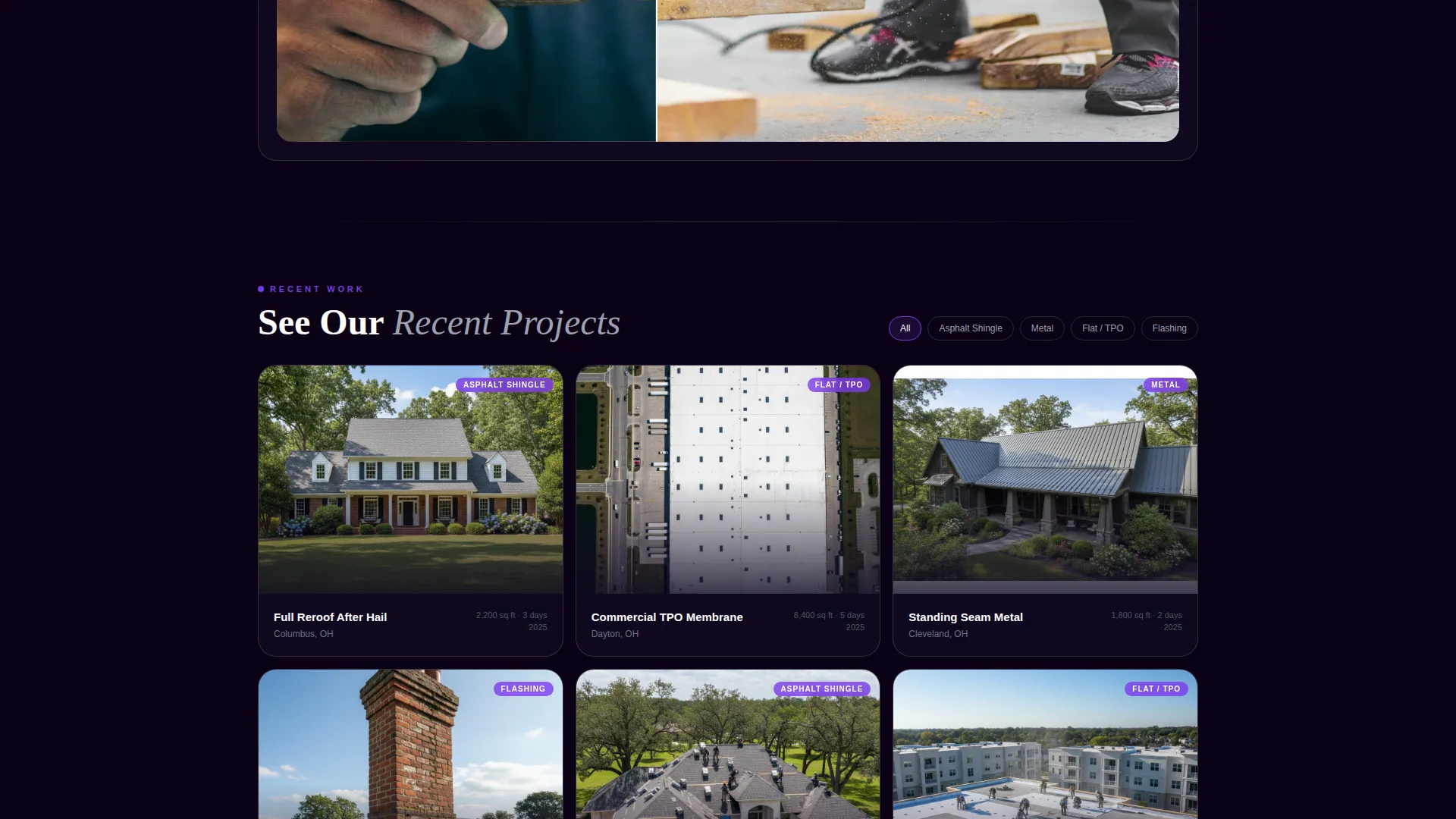
Filterable Project Gallery
A mid-page gallery grid lets browsing visitors filter completed jobs by roof type and city. This secondary path is designed for prospects who are not yet ready to request a quote but want to see proof of work first.
Credentials and Licensing Row
A dedicated row of silver-bordered bento cells displays licensing and insurance badge icons. This section addresses the trust concerns of property managers and realtors who need to verify contractor credentials before making contact.
Page sections overview
| Section | Purpose |
|---|---|
| Cost Estimator Header | Lets visitors build their own price range before scrolling further |
| Damage Type Cards | Connects common roof problems to recognizable visual evidence |
| Solution Process Steps | Shows the four-stage contractor workflow in scroll-triggered sequence |
| Before and After Slider | Demonstrates finished work quality through direct visual comparison |
| Testimonial Cards | Pairs star ratings with city names to build local social proof |
| Credentials Badge Row | Displays licensing and insurance icons to verify contractor legitimacy |
| Project Gallery Grid | Lets browsing visitors filter past jobs by roof type and city |
| Primary call to action Section | Drives quote requests through to a scheduling page with photo upload |
Design & branding system
The visual identity uses a Void and Violet color system that evokes a bruised evening sky just before a hailstorm. The palette is dark, charged, and built for high contrast on any screen.
- Deep void black (#0B0014) fills card backgrounds and section areas; electric violet (#7C3AED) powers all calls-to-action, progress indicators, and hover states; muted storm gray (#3A3545) holds body text and secondary labels
- Exposed-flashing silver (#D1D5DB) outlines every bento cell like sheet metal seams on a standing-seam roof, giving the grid structure a tactile, material quality
- A looping low-opacity drone video behind the estimator card shows a freshly finished charcoal roof against a violet-gray dusk sky, reinforcing the premium craft signal without distracting from the inputs
Mobile & speed optimization
The fixed violet call-to-action button on mobile scroll ensures the primary conversion path stays reachable no matter how far down the page a visitor has gone. The bento grid layout adapts naturally to smaller screen widths while keeping the estimator card prominent.
- The "Get My Roof Quote" button is pinned to mobile scroll so visitors never have to scroll back up to convert
- The estimator slider and roof-type selector are designed for touch input, keeping the interactive header functional on phones and tablets
- Section pacing is intentionally tight: each problem raised in the scroll flow is resolved within one screen length, reducing drop-off at anxiety points
How this template helps you convert
The page is structured so that every section earns the next click rather than just filling space. Conversion is built into the scroll sequence itself.
- The live estimator produces a personalized price range that makes the primary call-to-action feel like confirming a decision already made, rather than taking a risk on an unknown contractor
- The problem-to-solution arc raises a specific fear, such as a ceiling stain or a failed membrane, and resolves it within the same scroll length, so visitors stay engaged rather than bouncing
- The secondary gallery path captures browsing visitors who are not yet ready to request a quote, giving them a reason to stay on the page and build familiarity with the contractor's completed work
Other information about this template
Stormguard is built on a Directory and Discovery theme, which means the layout is organized to help visitors find the information most relevant to their situation quickly. The bento grid format is well-suited to roofing businesses that serve multiple client types from a single page.
- The template style is Bento Grid, making it straightforward to rearrange or resize cells during customization to fit a specific brand or service focus
- The template is categorized under Roofing Digital Presence, reflecting its focus on establishing a credible and conversion-ready online presence for roofing contractors
- The scheduling page linked from the primary call-to-action includes a date picker and a photo upload field, giving new leads an immediate, low-friction way to document roof damage before the first site visit

Theme
Directory & Discovery
Creative direction
Problem→Solution Arc
Color system
Void & Violet
Style
Bento Grid
Direction
Click-Through
Page Sections
Live Roof Cost Estimator
Damage-type Problem Cards
Scroll-triggered Process Steps
Before and After Image Slider
Filterable Project Gallery
Credentials and Licensing Badges
Related questions
What types of roofing services does this template cover?
Can this template serve both residential and commercial roofing clients?
How does the live cost estimator work?
What happens when a visitor clicks the primary call-to-action?
Is the template suitable for a roofing company that wants to showcase past projects?



