Digital Government Specialist Professional Website Template
Civicpay is a sidebar companion landing page template built for government bill payment portals. It guides residents through a clear three-step process, find, verify, and pay, using a sticky progress sidebar, structured step sections, and civic-authority design. Citizens can see exactly how online payments work before they click, making it easier for local governments to build trust and reduce drop-off.
by Rocket studio
Quick summary
Civicpay is a single-page template designed for digital government services. It uses a sidebar companion layout to walk residents through a three-step payment process. The design is clean and authoritative, built to help citizens pay property taxes, utilities, court fees, and permits online without confusion or hesitation.
Who this template is for
This template is built for government agencies, municipalities, and public organizations that need a focused, professional landing page to route residents into a live bill payment system. It is especially useful for teams replacing paper-based or phone-dependent workflows.
- Local governments launching or promoting a resident portal for online payments
- Public agency teams that need a clear, structured payment page without decoration
- Municipal organizations serving homeowners, small business owners, and elderly community members who pay bills online
What problem this template solves
Many special districts still rely heavily on in-person payments, paper checks, and phone calls. Manual processes in payment systems create overwhelming workloads and expensive errors. Outdated systems frustrate residents and make future digital adoption harder. This template removes that friction by showing the full payments process upfront, so citizens arrive informed and ready to pay.
- Residents face common friction points when essential information about payment options is buried or unclear
- A poor payment experience reduces on-time completion rates and lowers community engagement with digital services
- Staff spend so much time answering repetitive phone calls that could be eliminated with a clear, self-service payment page
What you get with this template
You get a fully structured landing page that walks visitors through three clearly defined steps before they ever click a button. The layout uses a sticky sidebar to keep residents on the same page and oriented throughout the scroll. Every section is designed to reduce hesitation and deliver transparent, professional service.
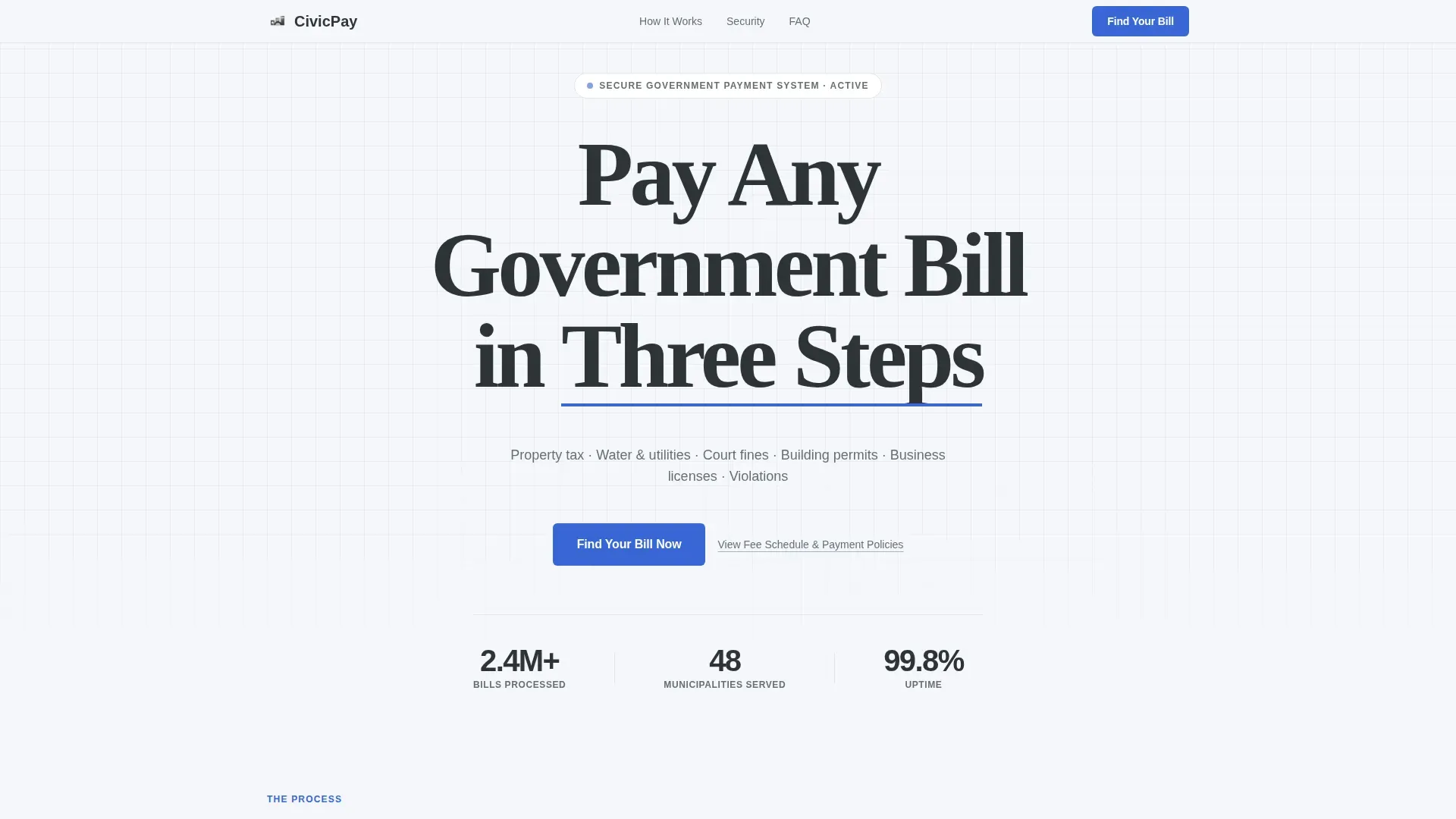
- A giant centered hero headline with a civic blue underline, bill types subhead, and a primary "Find Your Bill Now" call-to-action button
- A vertical step guide with three expanding sections covering account search, invoice verification, and payment method selection
- A security and trust section, a social proof section with usage statistics and testimonials, and an accordion FAQ section
Feature list
This template includes purpose-built components that reflect how residents actually think during the payments process.
Sticky Sidebar Progress Tracker
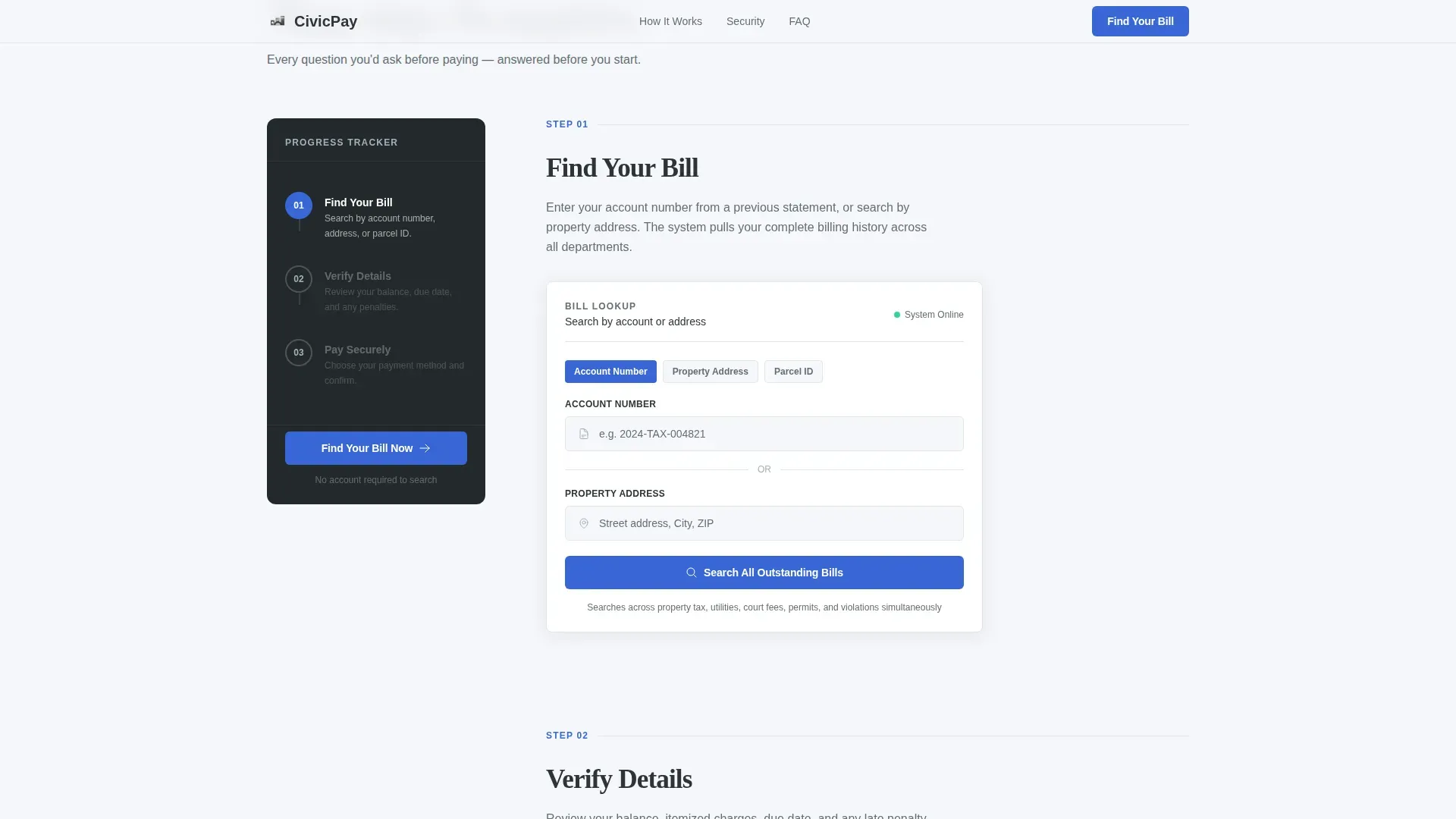
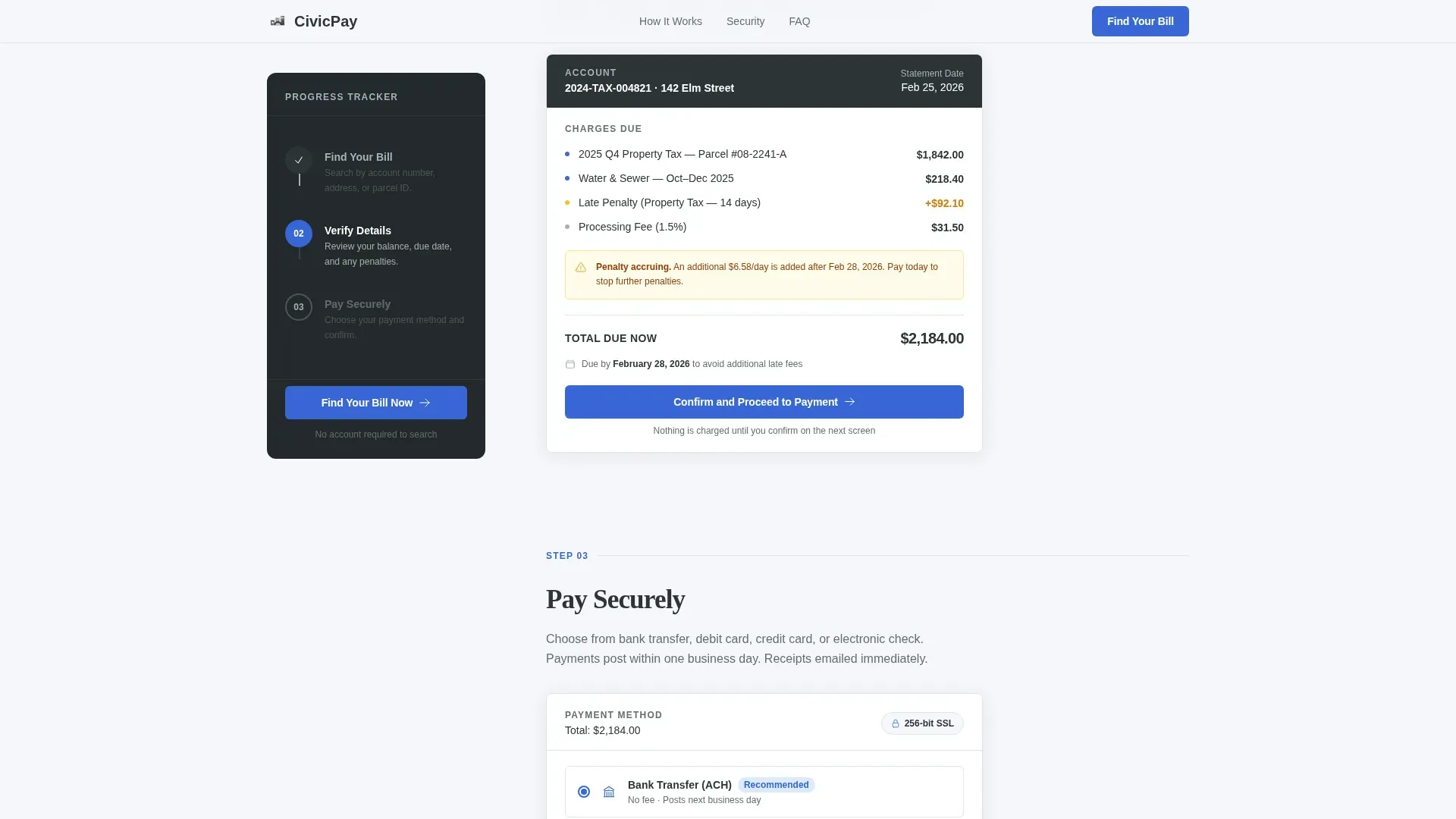
A fixed sidebar stays visible as visitors scroll through the three-step guide. Each step, Find Your Bill, Verify Details, Pay Securely, is numbered and labeled. The active step highlights in civic blue; completed steps show a charcoal checkmark. This keeps citizens oriented and reduces the cognitive load of a multi-step process.
Three-Step Expandable Guide
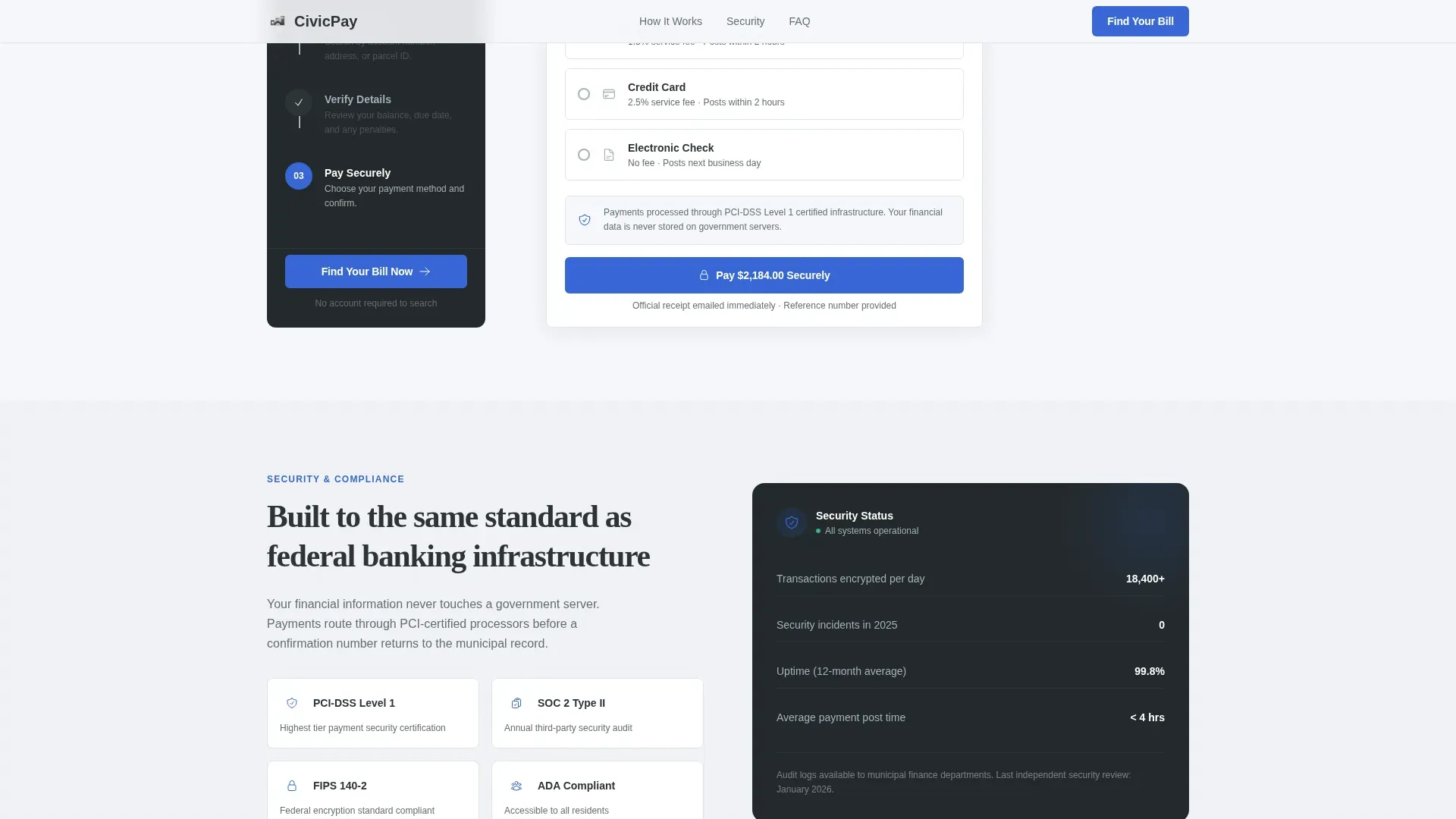
The main content area unfolds vertically through three sections. Step one shows an account number and address lookup mock-up. Step two displays a sample invoice summary with line items, due dates, and penalty notifications. Step three presents accepted payment options with a security badge and processing time. The scroll feels like a guided walkthrough, not a form.
Dual Call-to-Action System
The primary call-to-action, "Find Your Bill Now," appears in the hero and again locked to the sidebar bottom. It is always one glance away. A secondary text link, "View Fee Schedule and Payment Policies," catches cautious residents who need to review important information before committing. Both elements stay accessible without cluttering the page.
Security and Trust Section
This section displays security badges and communicates accepted payment methods clearly. Residents can see that credit and debit card options, as well as bank transfer methods, are supported. The section reinforces compliance with payment security standards so citizens feel confident before they pay online.
Social Proof Block
A dedicated section presents usage statistics, residents served and bills processed, alongside brief resident testimonials. This data-driven block helps government organizations build trust with new users who are less familiar with digital services.
Accordion FAQ Section
A collapsible FAQ section handles the questions residents most commonly ask before paying. It keeps the page clean while ensuring essential information about fees, records, and the payment process is easy to access.
Page sections overview
| Section | Purpose |
|---|---|
| Hero Headline | Introduce the service and present the primary call to action |
| Sticky Sidebar | Track scroll progress across the three payment steps |
| Step One: Find | Show the account number and address lookup interface |
| Step Two: Verify | Display a sample invoice with line items and due dates |
| Step Three: Pay | Present payment options, security badge, and processing time |
| Security and Trust | Reinforce compliance and accepted payment methods |
| Social Proof | Share usage statistics and resident testimonials |
| FAQ Accordion | Answer common payment questions in a collapsible format |
| Page Footer | Provide a single-row footer with links and policy references |
Design & branding system
The visual identity follows a Civic Service theme built on a Monochrome Steel color palette. The design communicates quiet authority, not marketing warmth. Every color choice is functional. The goal is to feel like a well-run municipal office, not a commercial website.
- Structural charcoal (#2D3436) for all body text and headings; document white (#F5F6FA) and a faint aluminum wash (#A4B0BD) for alternating backgrounds
- Civic blue (#3867D6) reserved strictly for actionable elements, buttons, active step indicators, and the hero headline underline
- Fraunces serif typeface for the giant hero headline; DM Sans for all body copy, labels, and user interface text
Mobile & speed optimization
The template is built desktop-first because the sticky sidebar layout requires a wider viewport to function as designed. A responsive mobile fallback is included so residents on any device can still access the payment steps and call-to-action without layout breakage.
- The sidebar collapses gracefully on smaller screens, keeping the step guide readable and the primary call-to-action button accessible
- Scroll-linked animations use Intersection Observer for staggered step reveals, keeping the experience smooth across modern browsers and device sizes
How this template helps you convert
The page earns the click by showing the entire process before asking anyone to start it. Transparency is the conversion mechanism, because trust is the only currency a government portal trades in. Residents who understand the full payments process before clicking are far less likely to abandon the flow.
- The sticky sidebar and sequential step layout communicate that the payment process is simple, secure, and guided, removing the hesitation that causes residents to delay payment or call your office instead
- The dual call-to-action placement ensures the "Find Your Bill Now" button is always visible, so residents who are ready to pay online can act immediately without scrolling back to the top
- The social proof section and security badges deliver the credibility signals that residents and community members rely on before submitting financial data to a government site
Other information about this template
This template is part of a broader set of solutions for digital government services. It is designed to support the civicpay trusted government bill payment portal landing page template use case specifically, meaning it is scoped for a single-page, click-through flow rather than a multi-page website. Organizations looking to modernize existing systems will find it a practical starting point.
- Administrators benefit from a layout that can communicate monthly revenue breakdowns and outstanding invoice data when connected to a live portal, the template provides the front-end structure for that context
- Local governments that prioritize streamlined processes and reduced costs will benefit from the template's self-service design, which can lower the volume of inbound phone calls and manual processing work
- The template supports civic engagement goals by making it easier for citizens to interact with public services online, which research shows increases trust: residents who visit their municipality's website regularly are almost five times more likely to fully trust their local government
- Integrated systems and automated systems that handle payment routing, reporting, and records are not part of this template's scope, it provides the front-end landing page only, and your team connects it to the appropriate back-end payment infrastructure
- 93% of United States adults believe all government entities should offer online payment options; 75% say they would pay their bills more promptly if digital options were available, this template gives your agency a professional, structured page to meet that expectation
Theme
Civic Service
Creative direction
Step-by-Step Guide
Color system
Monochrome Steel
Style
Sidebar Companion
Direction
Click-Through
Page Sections
Sticky Sidebar Progress Tracker
Three-step Expandable Guide
Dual Call-to-action Placement
Security and Trust Section
Social Proof Block
Accordion FAQ Section
Related questions
What bill types does this landing page template cover?
Does this template include a payment form or live payment processing?
Can residents pay without creating an account?
Is this template suitable for elderly or less tech-confident residents?
What payment options does the template reference in the payment step?